bulb Acura RDX 2015 Owner's Manual
[x] Cancel search | Manufacturer: ACURA, Model Year: 2015, Model line: RDX, Model: Acura RDX 2015Pages: 365, PDF Size: 12.56 MB
Page 4 of 365
Contents
Child Safety P. 52Exhaust Gas Hazard P. 64Safety Labels P. 65
Opening and Closing the Tailgate P. 107 Security System P. 113 Opening and Closing the Windows P. 115
Operating the Switches Around the Steering Wheel P. 119 Adjusting the Mirrors P. 133
Interior Lights/Interior Convenience Items P. 143 Climate Control System P. 152
Audio Error Messages P. 187General Information on the Audio System P. 190
Bluetooth ® HandsFreeLink ® P. 196 Compass* P. 225
Off-Highway Driving Guidelines P. 238 When Driving P. 240 Braking P. 257
Refueling P. 263 Fuel Economy P. 265Accessories and Modifications P. 266
Maintenance Under the Hood P. 275 Replacing Light Bulbs P. 287
Checking and Maintaining Tires P. 301 Battery P. 310 Remote Transmitter Care P. 311
Engine Does Not Start P. 327 Jump Starting P. 330 Shift Lever Does Not Move P. 332
Fuses P. 339 Emergency Towing P. 342When You Cannot Open the Tailgate P. 343
Devices that Emit Radio Waves P. 349 Reporting Safety Defects P. 350
Authorized Manuals P. 355 Client Service Information P. 356
Quick Reference GuideP. 4
Safe DrivingP. 23
Instrument PanelP. 67
ControlsP. 95
FeaturesP. 157
DrivingP. 227
MaintenanceP. 267
Handling the UnexpectedP. 319
InformationP. 345
IndexP. 357
Page 75 of 365
74
uuIndicators u
Instrument Panel
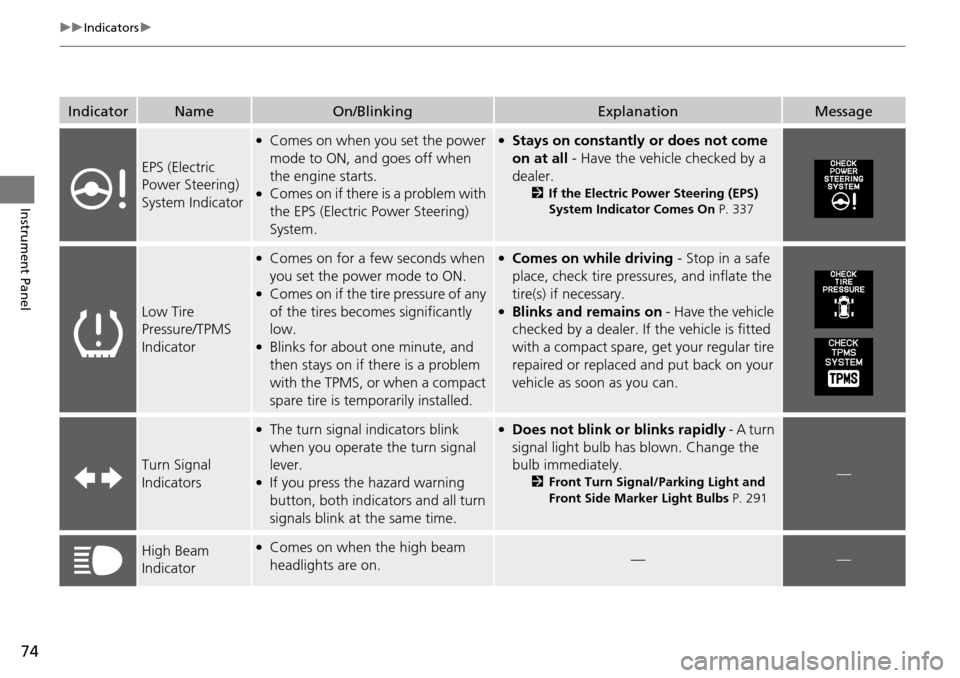
IndicatorNameOn/BlinkingExplanationMessage
EPS (Electric
Power Steering)
System Indicator
●Comes on when you set the power
mode to ON, and goes off when
the engine starts.
●Comes on if there is a problem with
the EPS (Electric Power Steering)
System.
●Stays on constantly or does not come
on at all - Have the vehicle checked by a
dealer.
2 If the Electric Power Steering (EPS)
System Indicator Comes On P. 337
Low Tire
Pressure/TPMS
Indicator
●Comes on for a few seconds when
you set the power mode to ON.
●Comes on if the tire pressure of any
of the tires becomes significantly
low.
●Blinks for about one minute, and
then stays on if there is a problem
with the TPMS, or when a compact
spare tire is temporarily installed.
●Comes on while driving - Stop in a safe
place, check tire pressures, and inflate the
tire(s) if necessary.
●Blinks and remains on - Have the vehicle
checked by a dealer. If the vehicle is fitted
with a compact spare, get your regular tire
repaired or replaced and put back on your
vehicle as soon as you can.
Turn Signal
Indicators
●The turn signal indicators blink
when you operate the turn signal
lever.
●If you press the hazard warning
button, both indica tors and all turn
signals blink at the same time.
●Does not blink or blinks rapidly - A turn
signal light bulb has blown. Change the
bulb immediately.
2 Front Turn Signal/Parking Light and
Front Side Marker Light Bulbs P. 291—
High Beam
Indicator●Comes on when the high beam
headlights are on.——
Page 123 of 365
122
uuOperating the Switches Around the Steering Wheel uTurn Signals
Controls
Turn Signals
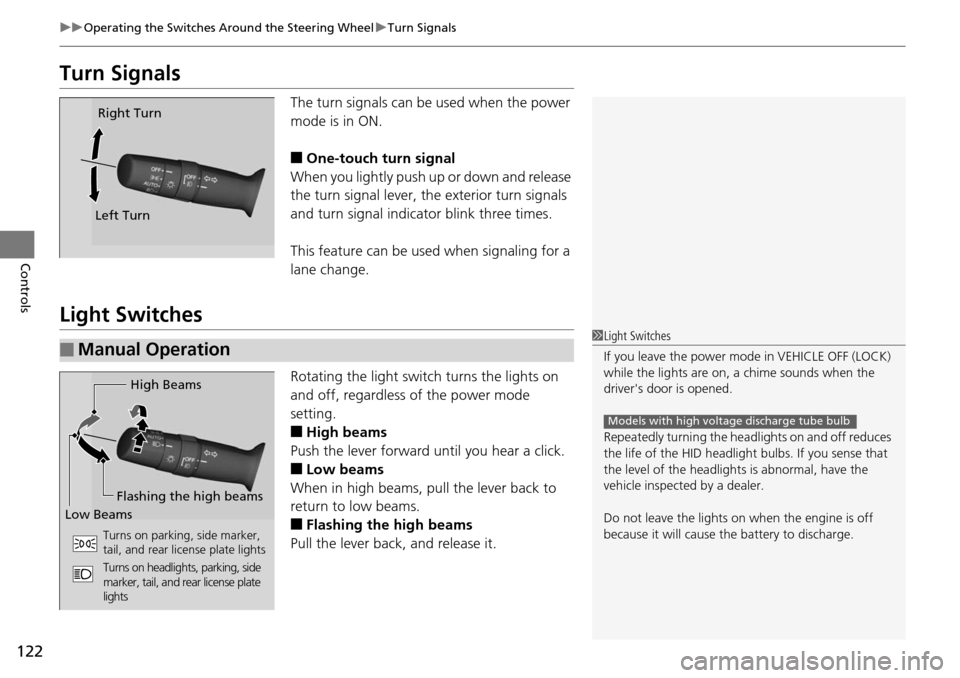
The turn signals can be used when the power
mode is in ON.
■One-touch turn signal
When you lightly push up or down and release
the turn signal lever, th e exterior turn signals
and turn signal indicator blink three times.
This feature can be used when signaling for a
lane change.
Light Switches
Rotating the light switch turns the lights on
and off, regardless of the power mode
setting.
■High beams
Push the lever forward until you hear a click.
■Low beams
When in high beams, pull the lever back to
return to low beams.
■Flashing the high beams
Pull the lever back, and release it.
Right Turn
Left Turn
■Manual Operation1 Light Switches
If you leave the power mode in VEHICLE OFF (LOCK)
while the lights are on, a chime sounds when the
driver's door is opened.
Repeatedly turning the he adlights on and off reduces
the life of the HID headlight bulbs. If you sense that
the level of the headlight s is abnormal, have the
vehicle inspected by a dealer.
Do not leave the lights on when the engine is off
because it will cause the battery to discharge.
Models with high voltage discharge tube bulb
High Beams
Flashing the high beams
Low Beams
Turns on parking, side marker,
tail, and rear license plate lights
Turns on headlights, parking, side
marker, tail, and rear license plate
lights
Page 268 of 365
267
Maintenance
This chapter discusses basic maintenance.
Before Performing MaintenanceInspection and Maintenance ............ 268
Safety When Performing Maintenance..... 269Parts and Fluids Used in Maintenance Service ........................................... 270
Maintenance Minder
TM..................... 271
Maintenance Under the Hood
Maintenance Items Under the Hood ..... 275Opening the Hood ........................... 276
Recommended Engine Oil ................ 277
Oil Check ......................................... 278
Adding Engine Oil ............................ 279
Changing the Engine Oil and Oil Filter ..... 280
Engine Coolant ................................ 282
Transmission Fluid ............................ 284
Brake Fluid ....................................... 285
Refilling Window Wa sher Fluid......... 286
Replacing Light Bulbs ....................... 287
Checking and Maintaining Wiper Blades.... 297Checking and Maintaining Tires
Checking Tires ................................. 301
Tire and Loading Information Label ...... 302Tire Labeling .................................... 302DOT Tire Quality Grading (U.S. Vehicles)....... 304Wear Indicators................................ 306
Tire Service Life ................................ 306 Tire and Wheel Replacement ........... 307
Tire Rotation .................................... 308
Winter Tires ..................................... 309
Battery ............................................... 310
Remote Transmitter Care Replacing the Button Battery ........... 311
Climate Control System Maintenance..... 312Cleaning
Interior Care .................................... 313
Exterior Care.................................... 315
Page 269 of 365
268
Maintenance
Before Performing Maintenance
Inspection and Maintenance
For your safety, perform all listed inspections and maintenance to keep your vehicle
in good condition. If you become aware of any abnormality (noise, smell, insufficient
brake fluid, oil residue on the ground, etc.), have your vehicle inspected by a dealer.
(Note, however, that service at a dealer is not mandatory to keep your warranties in
effect.) Refer to the separate maintena nce booklet for detailed maintenance and
inspection information.
■Daily inspections
Perform inspections before long distance tri ps, when washing the vehicle, or when
refueling.
■Periodic inspections
• Check the automatic transmi ssion fluid level monthly.
2Automatic Transmission Fluid P. 284
•Check the brake fluid level monthly.
2 Checking the Brake Fluid P. 285
•Check the tire pressure monthly. Examin e the tread for wear and foreign objects.
2Checking and Maintaining Tires P. 301
•Check the operation of the exterior lights monthly.
2 Replacing Light Bulbs P. 287
•Check the condition of the wiper bl ades at least every six months.
2Checking and Maintaining Wiper Blades P. 297
■Types of Inspection and Maintenance
1Inspection and Maintenance
Maintenance, replacement, or repair of
emissions control devices and systems may be
done by any automotive repair establishment or
individuals using parts that are “certified” to
EPA standards.
According to state and fede ral regulations, failure to
perform maintenance on the maintenance main
items marked with # will not void your emissions
warranties. However, all ma intenance services should
be performed in accordan ce with the intervals
indicated by the mult i-information display.
2 Maintenance Service Items P. 273
If you want to perform complex maintenance tasks
that require more skills a nd tools, you can purchase a
subscription to the Service Express website at
www.techinfo.honda.com .
2 Authorized Manuals P. 355
If you want to perform ma intenance yourself, make
sure that you have the necessary tools and skills first.
After performing ma intenance, update the records in
the separate maintenance booklet.
U.S. models
Page 288 of 365
287Continued
Maintenance
Replacing Light Bulbs
Headlight Bulbs
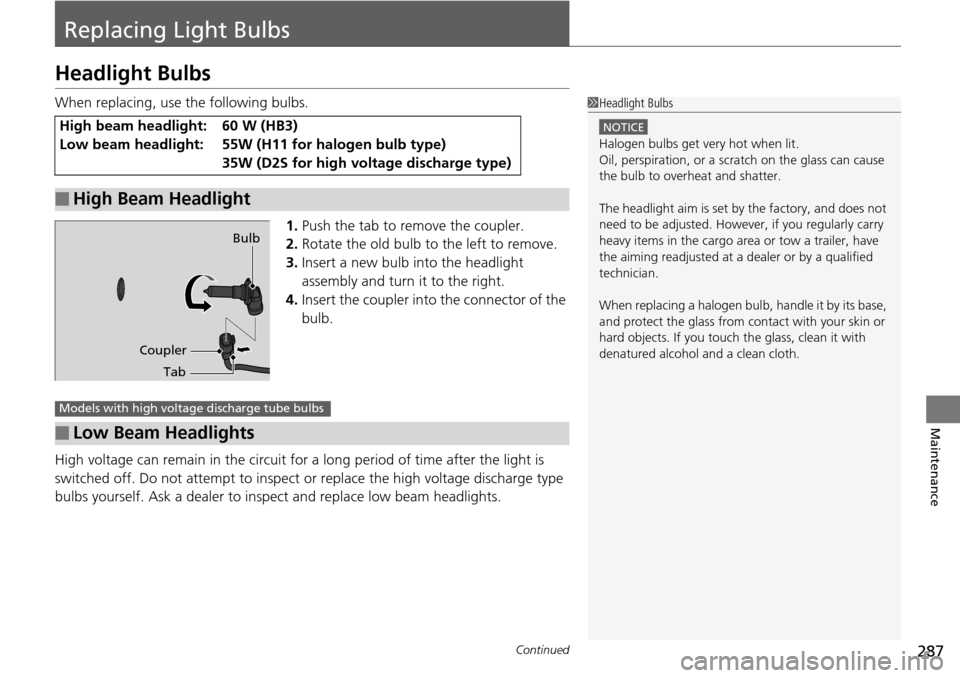
When replacing, use the following bulbs.1.Push the tab to remove the coupler.
2. Rotate the old bulb to the left to remove.
3. Insert a new bulb into the headlight
assembly and turn it to the right.
4. Insert the coupler into the connector of the
bulb.
High voltage can remain in the circuit for a long period of time after the light is
switched off. Do not attempt to inspect or replace the high vo ltage discharge type
bulbs yourself. Ask a dealer to insp ect and replace low beam headlights.
High beam headlight:
Low beam headlight:60 W (HB3)
55W (H11 for halogen bulb type)
35W (D2S for high voltage discharge type)
■High Beam Headlight
1Headlight Bulbs
NOTICE
Halogen bulbs get very hot when lit.
Oil, perspiration, or a scratch on the glass can cause
the bulb to overhe at and shatter.
The headlight aim is set by the factory, and does not
need to be adjusted. Howeve r, if you regularly carry
heavy items in the cargo area or tow a trailer, have
the aiming readjusted at a dealer or by a qualified
technician.
When replacing a halogen bu lb, handle it by its base,
and protect the glass from c ontact with your skin or
hard objects. If you touch the glass, clean it with
denatured alcohol and a clean cloth.
Coupler Bulb
Tab
■Low Beam Headlights
Models with high voltage discharge tube bulbs
Page 289 of 365
288
uuReplacing Light Bulbs uHeadlight Bulbs
Maintenance
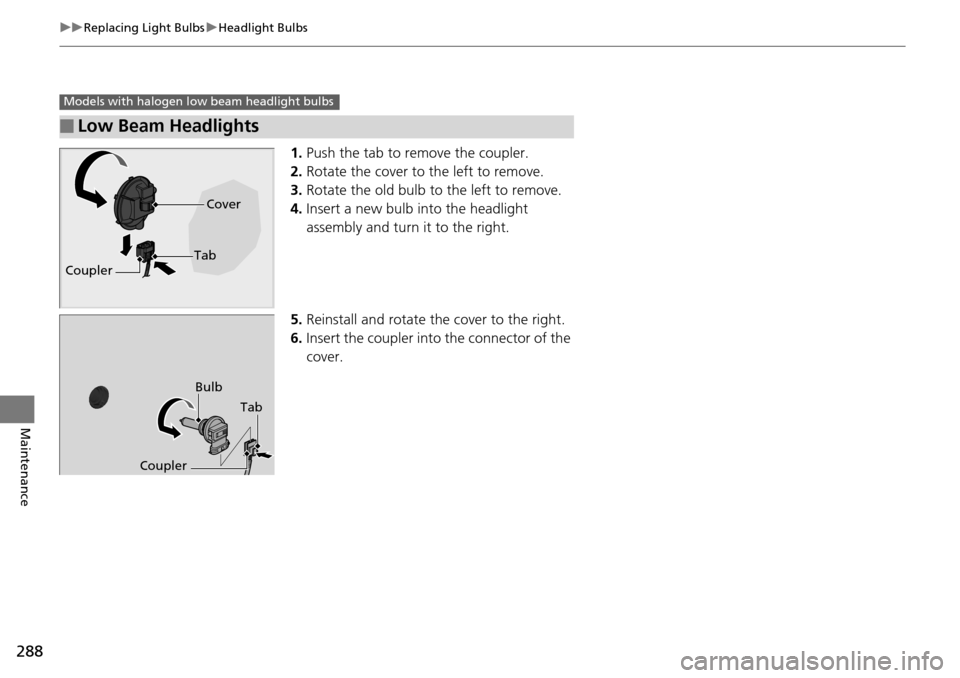
1. Push the tab to remove the coupler.
2. Rotate the cover to the left to remove.
3. Rotate the old bulb to the left to remove.
4. Insert a new bulb into the headlight
assembly and turn it to the right.
5. Reinstall and rotate th e cover to the right.
6. Insert the coupler into the connector of the
cover.
■Low Beam Headlights
Models with halogen low beam headlight bulbs
Coupler Cover
Tab
Bulb
Coupler Tab
Page 290 of 365
289
uuReplacing Light Bulbs uFog Light Bulbs*
Continued
Maintenance
Fog Light Bulbs*
When replacing, use the following bulbs.
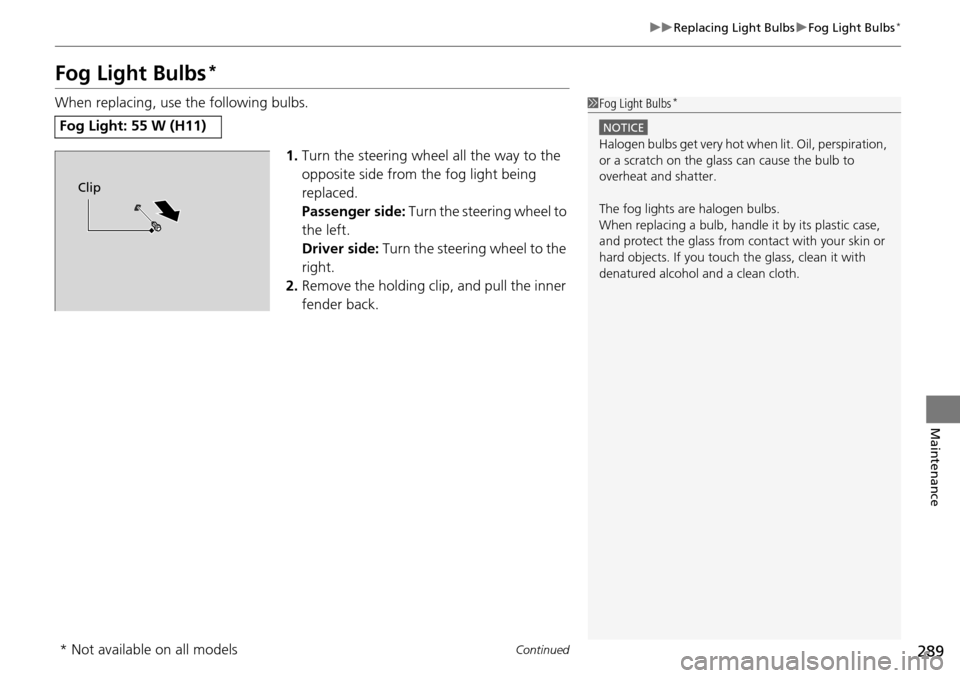
1.Turn the steering wheel all the way to the
opposite side from the fog light being
replaced.
Passenger side: Turn the steering wheel to
the left.
Driver side: Turn the steering wheel to the
right.
2. Remove the holding clip, and pull the inner
fender back.
Fog Light: 55 W (H11)
1Fog Light Bulbs*
NOTICE
Halogen bulbs get very hot wh en lit. Oil, perspiration,
or a scratch on the glass can cause the bulb to
overheat and shatter.
The fog lights ar e halogen bulbs.
When replacing a bulb, handl e it by its plastic case,
and protect the glass from c ontact with your skin or
hard objects. If you touch the glass, clean it with
denatured alcohol and a clean cloth.
Clip
* Not available on all models
Page 291 of 365
uuReplacing Light Bulbs uSide Turn Signal/Emergency Indicator Light Bulbs
290
Maintenance
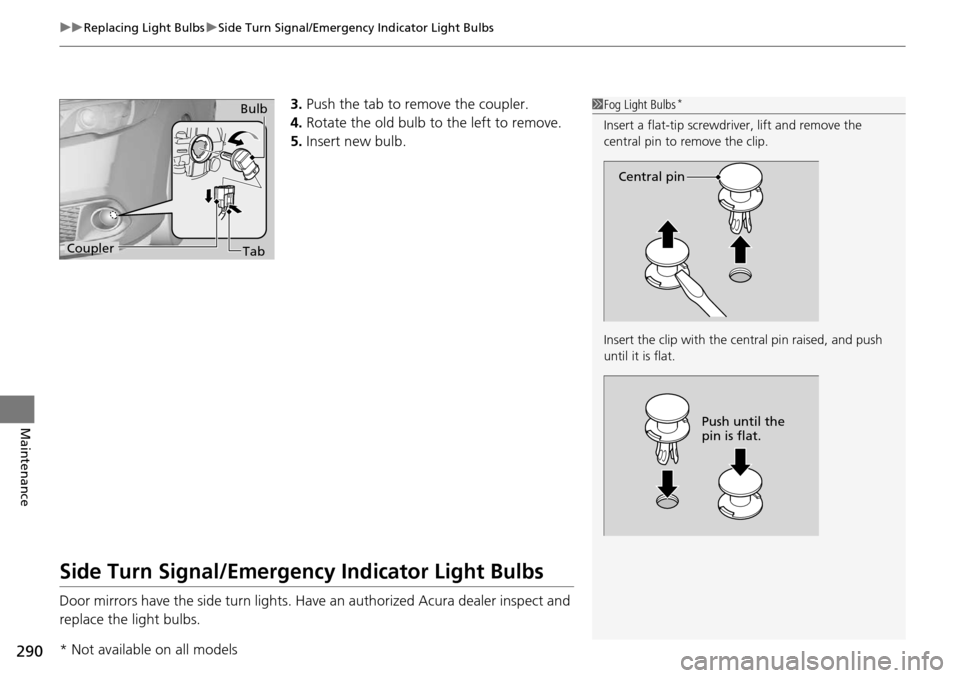
3. Push the tab to remove the coupler.
4. Rotate the old bulb to the left to remove.
5. Insert new bulb.
Side Turn Signal/Emergency Indicator Light Bulbs
Door mirrors have the side turn lights. Ha ve an authorized Acura dealer inspect and
replace the light bulbs.
1 Fog Light Bulbs*
Insert a flat-tip screwdriver, lift and remove the
central pin to remove the clip.
Insert the clip with the central pin raised, and push
until it is flat.
Central pin
Push until the
pin is flat.
Bulb
Coupler Tab
* Not available on all models
Page 292 of 365
291
uuReplacing Light Bulbs uFront Turn Signal/Parking Light and Front Side Marker Light Bulbs
Maintenance
Front Turn Signal/Parking Light and Front Side
Marker Light Bulbs
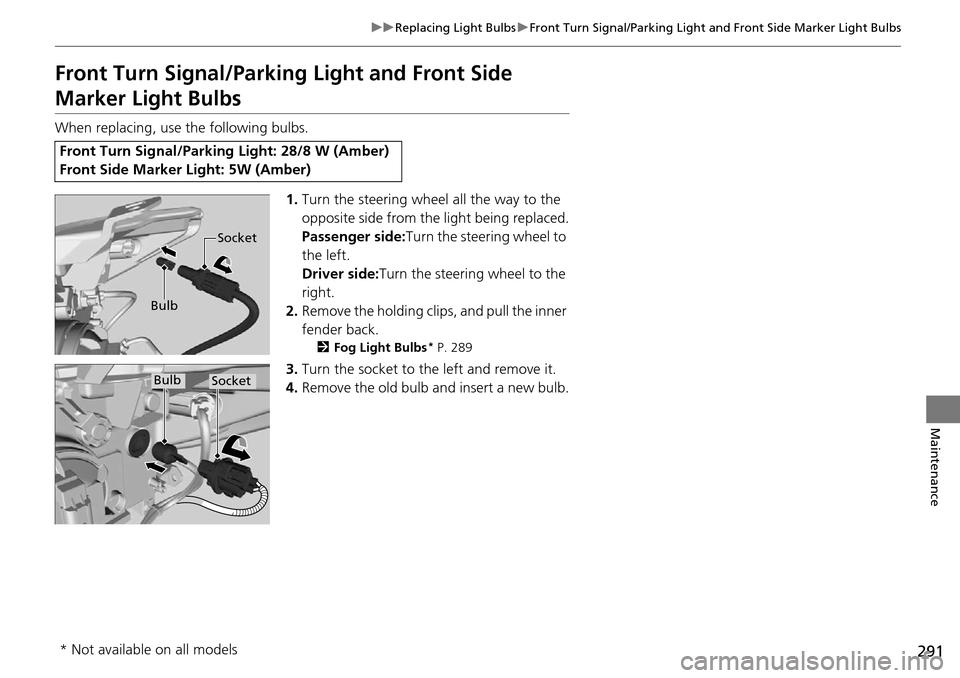
When replacing, use the following bulbs.
1.Turn the steering wheel all the way to the
opposite side from the light being replaced.
Passenger side: Turn the steering wheel to
the left.
Driver side:Turn the steering wheel to the
right.
2. Remove the holding clips, and pull the inner
fender back.
2 Fog Light Bulbs* P. 289
3.Turn the socket to the left and remove it.
4. Remove the old bulb and insert a new bulb.
Front Turn Signal/Parking Light: 28/8 W (Amber)
Front Side Marker Light: 5W (Amber)
Bulb Socket
BulbSocket
* Not available on all models