reset Acura RDX 2015 Owner's Manual
[x] Cancel search | Manufacturer: ACURA, Model Year: 2015, Model line: RDX, Model: Acura RDX 2015Pages: 365, PDF Size: 12.56 MB
Page 6 of 365
5
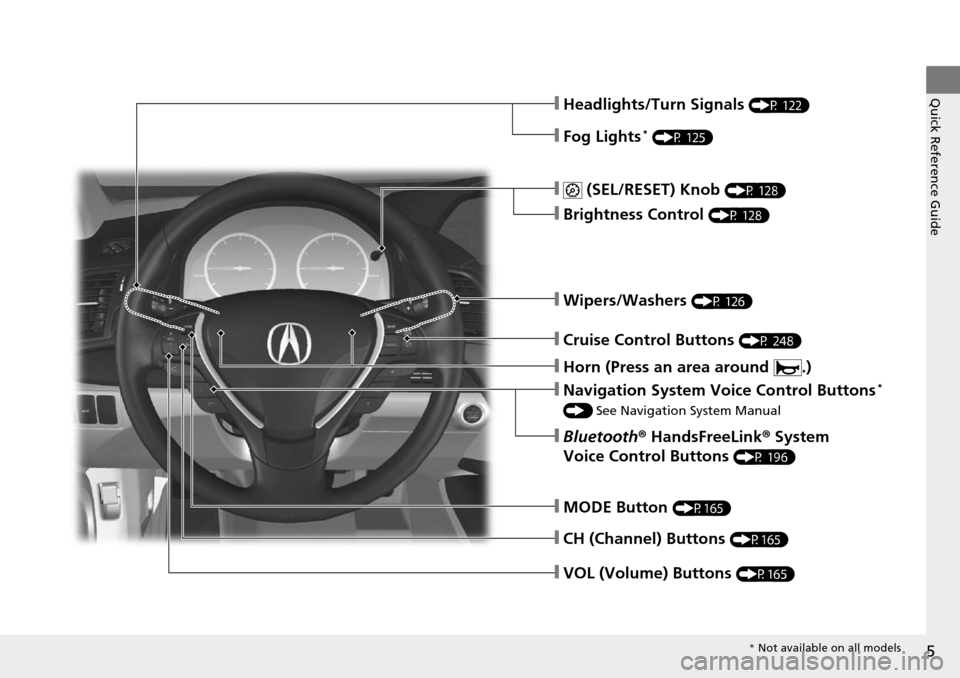
Quick Reference Guide❙Headlights/Turn Signals (P 122)
❙Fog Lights* (P 125)
❙ (SEL/RESET) Knob (P 128)
❙Brightness Control (P 128)
❙Wipers/Washers (P 126)
❙Cruise Control Buttons (P 248)
❙Navigation System Voice Control Buttons*
() See Navigation System Manual
❙Bluetooth ® HandsFreeLink ® System
Voice Control Buttons
(P 196)
❙MODE Button (P165)
❙CH (Channel) Buttons (P165)
❙VOL (Volume) Buttons (P165)
❙Horn (Press an area around .)
* Not available on all models
Page 12 of 365
11
Quick Reference Guide
Controls (P 95)
Clock (P 96)
aPress and hold the CLOCK (AUX)
button until Adjust Clock appears.
bPress Preset (4 (Hour) or (5 (Minute)
to set the time.
cPress the CLOCK button again to set
the time.
To set the time to the nearest hour: Press
and hold the CLOCK button until Adjust
Clock appears, then press the
(6 (Reset)
button.
Depending on the displayed time, the clock
sets forward or backward.
Example:
1:06 will reset to 1:00
1:53 will reset to 2:00
The navigation system receives signals from
GPS satellites, updating the clock
automatically.
Models without navigation system
Models with navigation system
ENGINE START/STOP
Button
(P 119)
Press the button to ch anges the vehicle's
power mode.
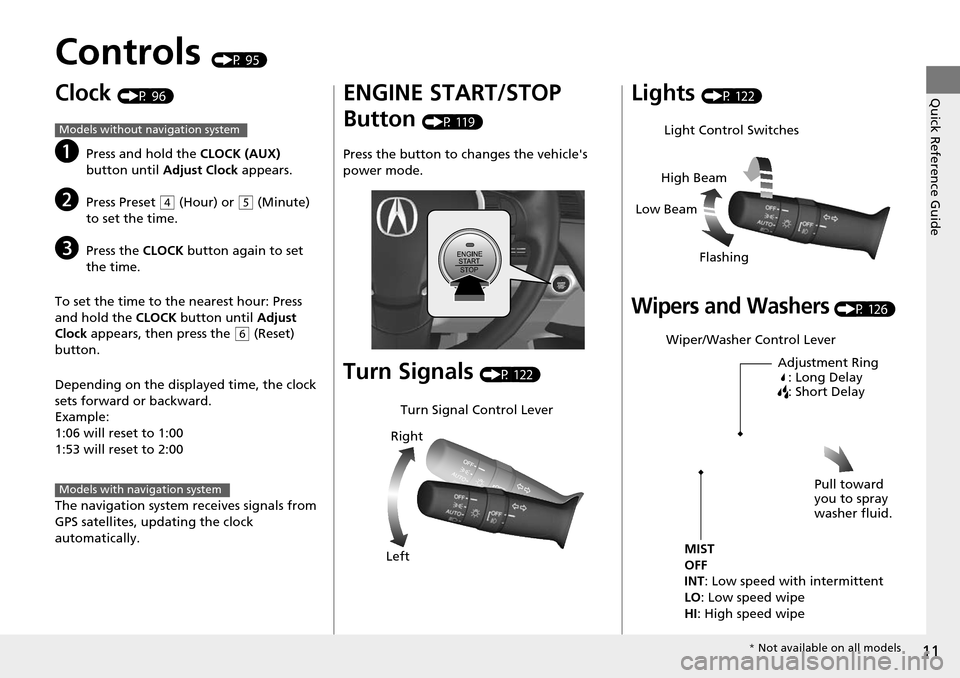
Turn Signals (P 122)
Turn Signal Control Lever
Right
Left
Lights (P 122)
Wipers and Washers (P 126)
Light Control Switches
Low Beam High Beam
Flashing
Wiper/Washer Control Lever Adjustment Ring: Long Delay
: Short Delay
MIST
OFF
INT: Low speed with intermittent
LO : Low speed wipe
HI: High speed wipe Pull toward
you to spray
washer fluid.
*
Not available on all models
Page 16 of 365
15
Quick Reference Guide
Features (P 157)
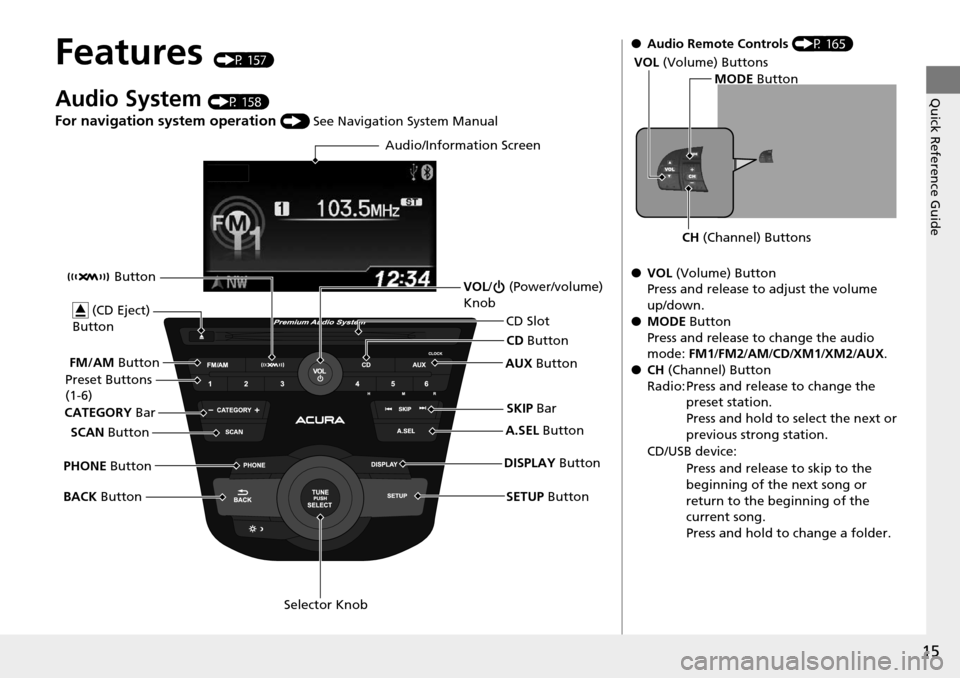
Audio System (P 158)
For navigation system operation () See Navigation System Manual
Audio/Information Screen
SCAN Button
CATEGORY
Bar
Selector Knob
BACK
Button VOL
/ (Power/volume)
Knob
CD Button
AUX Button
CD Slot
(CD Eject)
Button
Preset Buttons
(1-6)
SETUP Button
SKIP
Bar
PHONE Button Button
FM/AM
Button
A.SEL Button
DISPLAY Button
●Audio Remote Controls (P 165)
● VOL (Volume) Button
Press and release to adjust the volume
up/down.
● MODE Button
Press and release to change the audio
mode: FM1/FM2 /AM/CD/XM1 /XM2/AUX.
● CH (Channel) Button
Radio: Press and release to change the preset station.
Press and hold to select the next or
previous strong station.
CD/USB device: Press and release to skip to the
beginning of the next song or
return to the beginning of the
current song.
Press and hold to change a folder.
MODE Button
CH (Channel) Buttons
VOL
(Volume) Buttons
Page 84 of 365
83
uuGauges and Multi-Information Display uMulti-Information Display
Continued
Instrument Panel
Multi-Information Display
The multi-information display shows the odometer, trip meter, outside temperature
indicator, and other gauges. It also displa ys important messages such as warnings
and other helpful information.
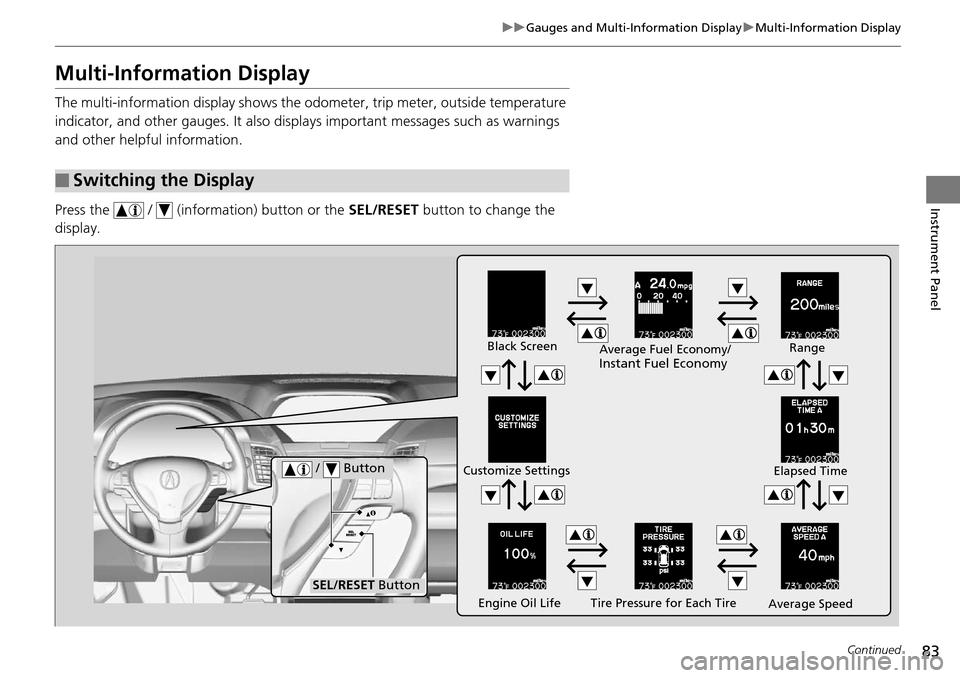
Press the / (information) button or the SEL/RESET button to change the
display.
■Switching the Display
Tire Pressure for Each Tire
Black Screen
Engine Oil Life
Customize Settings
Average SpeedRange
Elapsed Time
Average Fuel Economy/
Instant Fuel Economy
/ Button
SEL/RESET Button
Page 85 of 365

84
uuGauges and Multi-Information Display uMulti-Information Display
Instrument Panel
Shows the total number of miles (U.S.) or ki lometers (Canada) that your vehicle has
accumulated.
■Odometer
SEL/RESET Button
Outside TemperatureTrip A
Trip B
Odometer
Page 86 of 365

Continued85
uuGauges and Multi-Information Display uMulti-Information Display
Instrument Panel
Shows the total number of miles (U.S.) or k ilometers (Canada) driven since the last
reset. Meters A and B can be used to measure two separate trips.
■Resetting a trip meter
To reset a trip meter, display it, then press and hold the SEL/RESET button. The trip
meter is reset to 0.0.
Shows the outside temperature in Fahr enheit (U.S.) or Celsius (Canada).
■Adjusting the outside temperature display
Adjust the temperature reading up to ±5°F or ±3°C if the temperature reading
seems incorrect.
Shows the estimated average fuel econom y of each trip meter in mpg (U.S.) or
l/100 km (Canada). The display is updated at set intervals. When a trip meter is reset,
the average fuel economy is also reset.
Shows the instant fuel economy as a bar gr aph in mpg (U.S.) or l/100 km (Canada).
■Trip Meter
■Outside Temperature
■Average Fuel Economy
■Instant Fuel Economy
1Trip Meter
Switch between trip meter A and trip meter B by
pressing the SEL/RESET button.
1Outside Temperature
The temperature sensor is in the front bumper.
Road heat and exhaust from another vehicle can
affect the temperature reading when your vehicle
speed is less than 19 mph (30 km/h).
It may take several minutes for the display to be
updated after the temperature reading has stabilized.
Use the multi-information display’s customized
features to correct the temperature.
2 Customized Features P. 87
1Average Fuel Economy
You can change when to reset the average fuel
economy.
2 Customized Features P. 87
Page 87 of 365
uuGauges and Multi-Information Display uMulti-Information Display
86
Instrument Panel
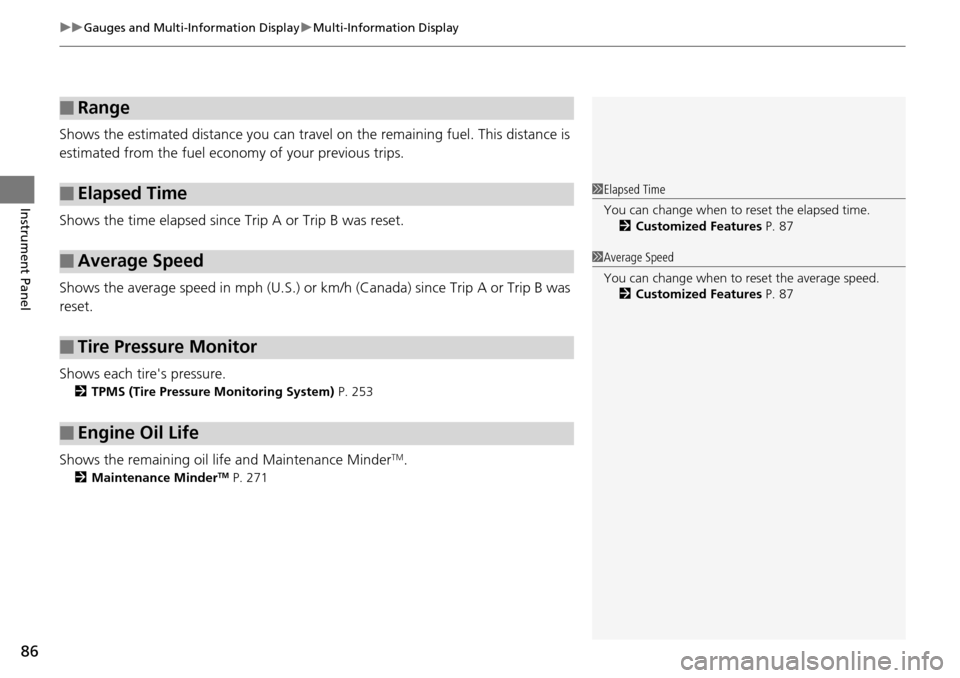
Shows the estimated distance you can travel on the remaining fuel. This distance is
estimated from the fuel economy of your previous trips.
Shows the time elapsed since Trip A or Trip B was reset.
Shows the average speed in m ph (U.S.) or km/h (Canada) since Trip A or Trip B was
reset.
Shows each tire's pressure.
2 TPMS (Tire Pressure Monitoring System) P. 253
Shows the remaining oil life and Maintenance MinderTM.
2Maintenance MinderTM P. 271
■Range
■Elapsed Time
■Average Speed
■Tire Pressure Monitor
■Engine Oil Life
1Elapsed Time
You can change when to reset the elapsed time.
2 Customized Features P. 87
1Average Speed
You can change when to reset the average speed.
2 Customized Features P. 87
Page 88 of 365
Continued87
uuGauges and Multi-Information Display uMulti-Information Display
Instrument Panel
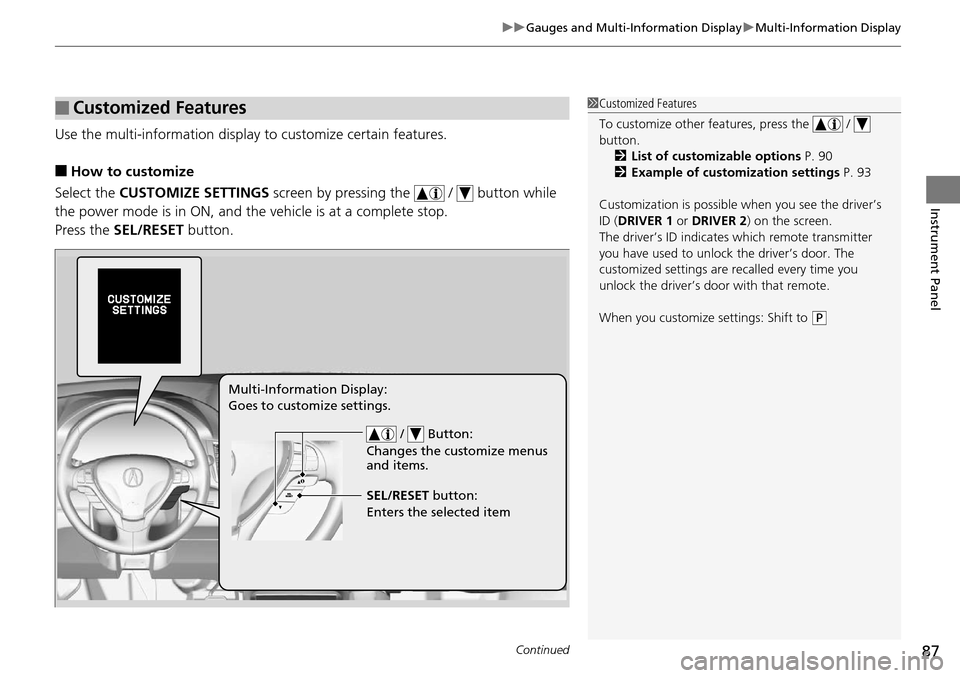
Use the multi-information display to customize certain features.
■How to customize
Select the CUSTOMIZE SETTINGS screen by pressing the / button while
the power mode is in ON, and the vehicle is at a complete stop.
Press the SEL/RESET button.
■Customized Features1Customized Features
To customize other features, press the /
button.
2 List of customizable options P. 90
2 Example of customization settings P. 93
Customization is possible when you see the driver’s
ID ( DRIVER 1 or DRIVER 2) on the screen.
The driver’s ID indicates which remote transmitter
you have used to unlock the driver’s door. The
customized settings are recalled every time you
unlock the driver’s door with that remote.
When you customize settings: Shift to
( P
/ Button:
Changes the customize menus
and items.
Multi-Information Display:
Goes to customize settings.
SEL/RESET button:
Enters the selected item
Page 89 of 365
88
uuGauges and Multi-Information Display uMulti-Information Display
Instrument Panel
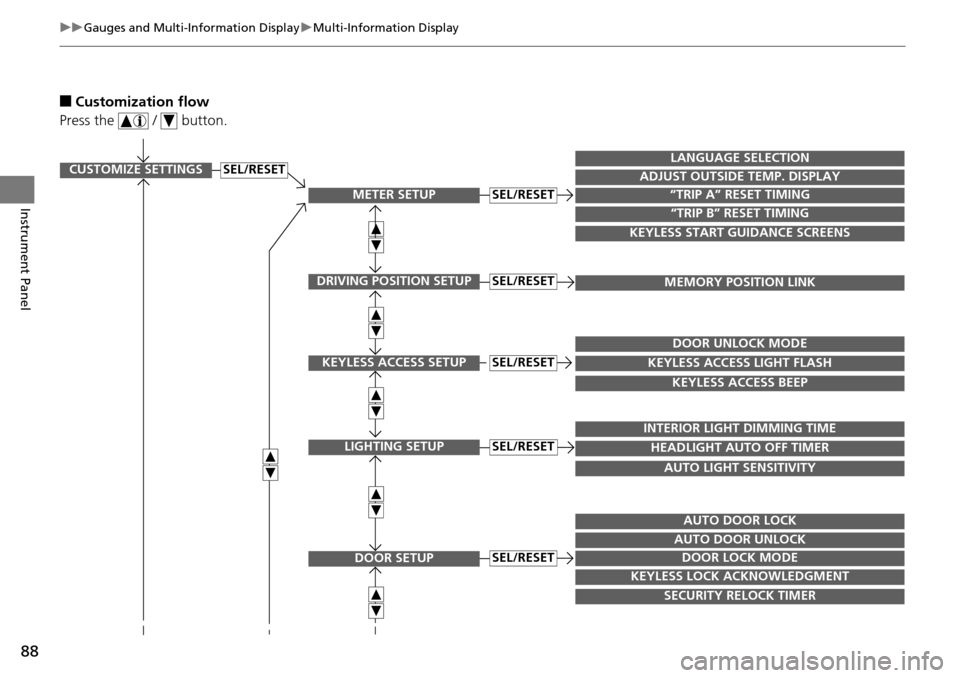
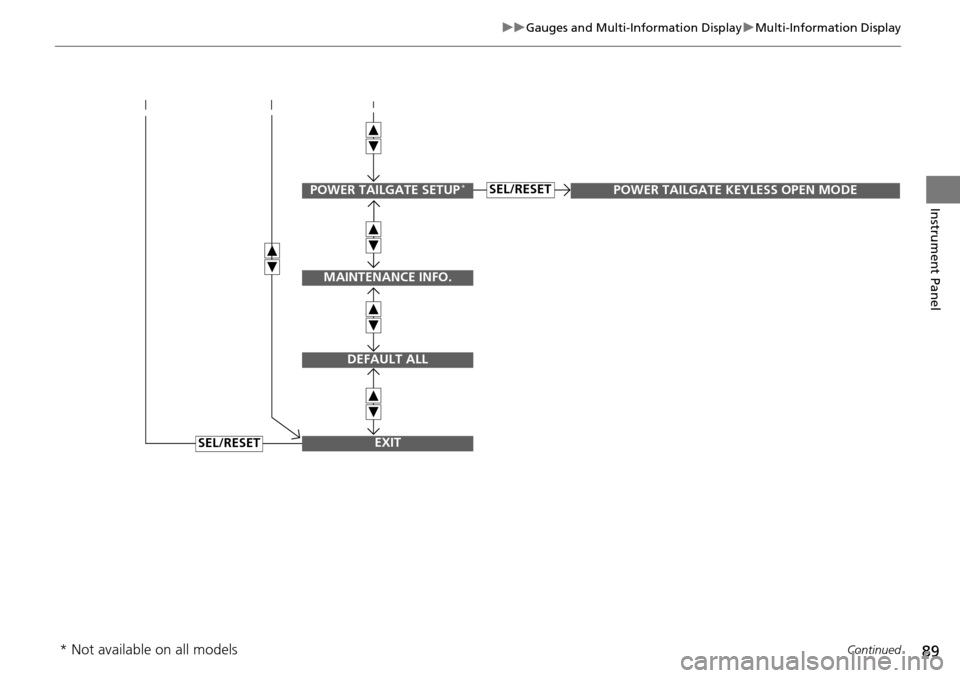
■Customization flow
Press the / button.
CUSTOMIZE SETTINGS
METER SETUP
DRIVING POSITION SETUP
KEYLESS ACCESS SETUP
LIGHTING SETUP
DOOR SETUP
“TRIP A” RESET TIMING
ADJUST OUTSIDE TEMP. DISPLAY
LANGUAGE SELECTION
“TRIP B” RESET TIMING
KEYLESS START GUIDANCE SCREENS
MEMORY POSITION LINK
KEYLESS ACCESS LIGHT FLASH
DOOR UNLOCK MODE
KEYLESS ACCESS BEEP
HEADLIGHT AUTO OFF TIMER
INTERIOR LIGHT DIMMING TIME
AUTO LIGHT SENSITIVITY
DOOR LOCK MODE
AUTO DOOR UNLOCK
AUTO DOOR LOCK
KEYLESS LOCK ACKNOWLEDGMENT
SECURITY RELOCK TIMER
SEL/RESET
SEL/RESET
SEL/RESET
SEL/RESET
SEL/RESET
SEL/RESET
Page 90 of 365
89
uuGauges and Multi-Information Display uMulti-Information Display
Continued
Instrument Panel
SEL/RESET
SEL/RESETPOWER TAILGATE SETUP*
MAINTENANCE INFO.
DEFAULT ALL
EXIT
POWER TAILGATE KEYLESS OPEN MODE
* Not available on all models