airbag Acura RDX 2016 User Guide
[x] Cancel search | Manufacturer: ACURA, Model Year: 2016, Model line: RDX, Model: Acura RDX 2016Pages: 81, PDF Size: 17.94 MB
Page 16 of 81
24 || 25
INSTRUMENT P
ANEL
INSTRUMENT P ANEL
TABLE OF
CONTENTS
INDEX
VISUAL INDEX
VOICE COMMAND INDEX
SAFETY
INFORMATION
CLIENT
INFORMATION
INSTRUMENT PANEL
SPECIFICATIONS
VEHICLE
CONTROLS
MAINTENANCE
AUDIO AND
CONNECTIVITY
HANDLING THE UNEXPECTED
BLUETOOTH®
HANDSFREELINK®
DRIVING
ACURALINK®
NAVIGATION
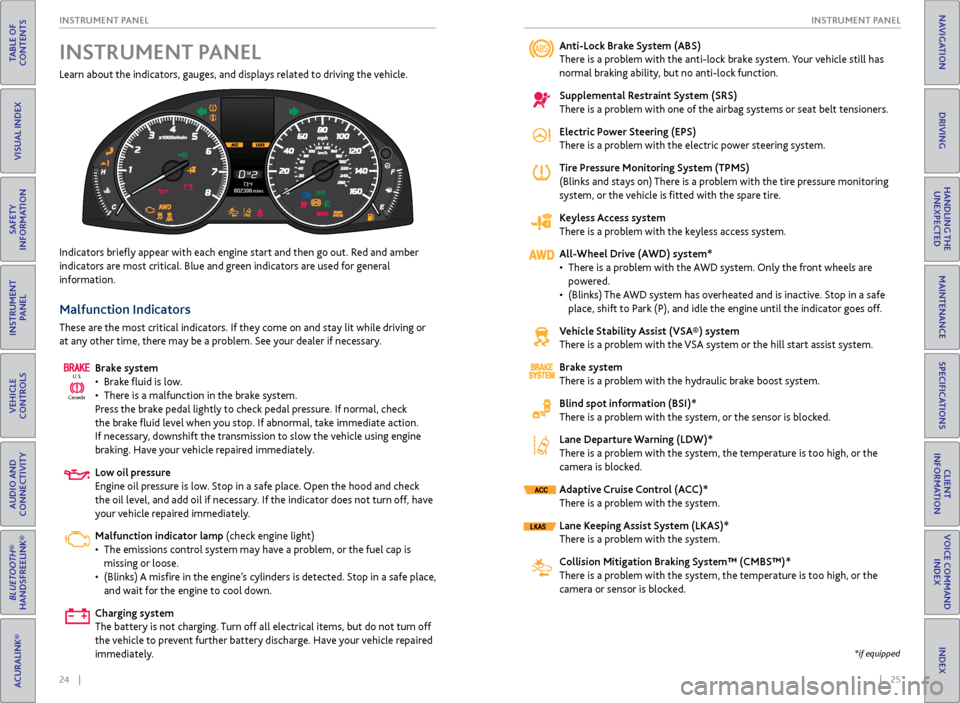
Learn about the indicators, gauges, and displays related to driving the vehicle.
Indicators briefly appear with each engine start and then go out. Red and amber
indicators are most critical. Blue and green indicators are used for general
information.
Malfunction Indicators
These are the most critical indicators. If they come on and stay lit while driving or
at any other time, there may be a problem. See your dealer if necessary.
Brake system
• Brake fluid is low.
• There is a malfunction in the brake system.
Press the brake pedal lightly to check pedal pressure. If normal, check
the brake fluid level when you stop. If abnormal, take immediate action.
If necessary, downshift the transmission to slow the vehicle using engine
braking. Have your vehicle repaired immediately.
Low oil pressure
Engine oil pressure is low. Stop in a safe place. Open the hood and check
the oil level, and add oil if necessary. If the indicator does not turn off, have
your vehicle repaired immediately.
Malfunction indicator lamp (check engine light)
• The emissions control system may have a problem, or the fuel cap is
missing or loose.
• (Blinks) A misfire in the engine’s cylinders is detected. Stop in a safe place,
and wait for the engine to cool down.
Charging system
The battery is not charging. Turn off all electrical items, but do not turn off
the vehicle to prevent further battery discharge. Have your vehicle repaired
immediately.
Canada U.S.
INSTRUMENT P
ANELAnti-Lock Brake System (ABS)
There is a problem with the anti-lock brake system. Your vehicle still has
normal braking ability, but no anti-lock function.
Supplemental Restraint System (SRS)
There is a problem with one of the airbag systems or seat belt tensioners.
Electric Power Steering (EPS)
There is a problem with the electric power steering system.
Tire Pressure Monitoring System (TPMS)
(Blinks and stays on) There is a problem with the tire pressure monitoring
system, or the vehicle is fitted with the spare tire.
Keyless Access system
There is a problem with the keyless access system.
All-Wheel Drive (AWD) system*
• There is a problem with the AWD system. Only the front wheels are
powered.
• (Blinks) The AWD system has overheated and is inactive. Stop in a safe
place, shift to Park (P), and idle the engine until the indicator goes off.
Vehicle Stability Assist (VSA®) system
There is a problem with the VSA system or the hill start assist system.
Brake system
There is a problem with the hydraulic brake boost system.
Blind spot information (BSI)*
There is a problem with the system, or the sensor is blocked.
Lane Departure Warning (LDW)*
There is a problem with the system, the temperature is too high, or the
camera is blocked.
Adaptive Cruise Control (ACC)*
There is a problem with the system.
Lane Keeping Assist System (LKAS)*
There is a problem with the system.
Collision Mitigation Braking System™ (CMBS™)*
There is a problem with the system, the temperature is too high, or the
camera or sensor is blocked.
*if equipped
Page 24 of 81
40 || 41
VEHICLE CONTROLS
VEHICLE CONTROLS
TABLE OF
CONTENTS
INDEX
VISUAL INDEX
VOICE COMMAND INDEX
SAFETY
INFORMATION
CLIENT
INFORMATION
INSTRUMENT PANEL
SPECIFICATIONS
VEHICLE
CONTROLS
MAINTENANCE
AUDIO AND
CONNECTIVITY
HANDLING THE UNEXPECTED
BLUETOOTH®
HANDSFREELINK®
DRIVING
ACURALINK®
NAVIGATION
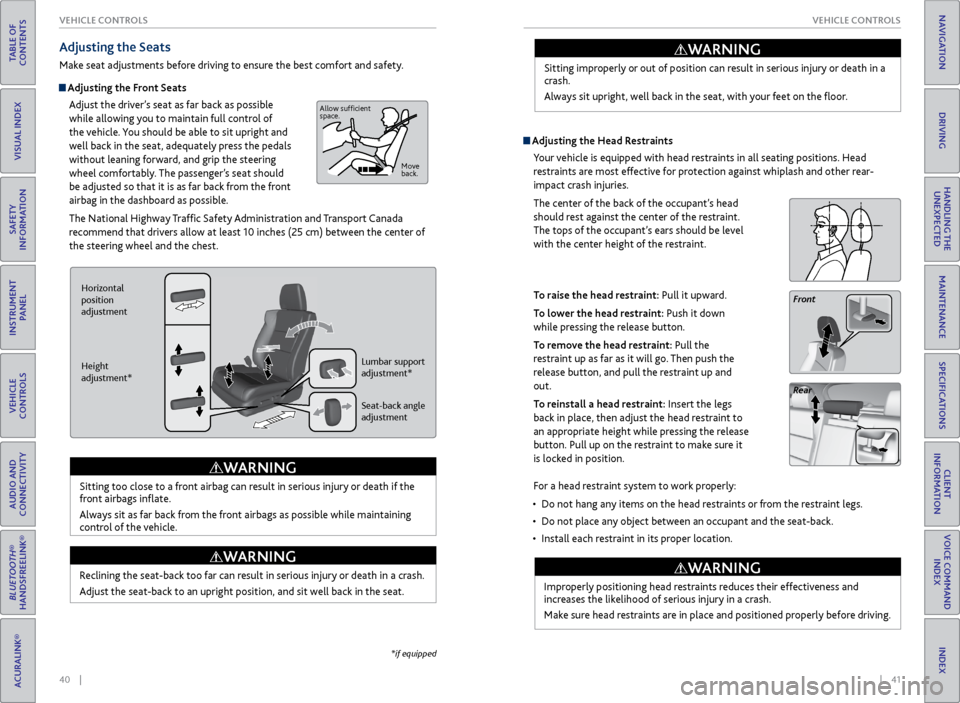
Adjusting the Seats
Make seat adjustments before driving to ensure the best comfort and safety.
Adjusting the Front Seats
Adjust the driver’s seat as far back as possible
while allowing you to maintain full control of
the vehicle. You should be able to sit upright and
well back in the seat, adequately press the pedals
without leaning forward, and grip the steering
wheel comfortably. The passenger’s seat should
be adjusted so that it is as far back from the front
airbag in the dashboard as possible.
The National Highway Traffic Safety Administration and Transport Canada
recommend that drivers allow at least 10 inches (25 cm) between the center of
the steering wheel and the chest.
Sitting too close to a front airbag can result in serious injury or death if the
front airbags inflate.
Always sit as far back from the front airbags as possible while maintaining
control of the vehicle.
WARNING
Horizontal
position
adjustment
Height
adjustment* Seat-back angle
adjustment Lumbar support
adjustment*
Reclining the seat-back too far can result in serious injury or death in a crash.
Adjust the seat-back to an upright position, and sit well back in the seat.
WARNING
Allow sufficient
space.
Move
back.
Sitting improperly or out of position can result in serious injury or death in a
crash.
Always sit upright, well back in the seat, with your feet on the floor.
WARNING
Adjusting the Head Restraints
Your vehicle is equipped with head restraints in all seating positions. Head
restraints are most effective for protection against whiplash and other rear-
impact crash injuries.
The center of the back of the occupant’s head
should rest against the center of the restraint.
The tops of the occupant’s ears should be level
with the center height of the restraint.
To raise the head restraint: Pull it upward.
To lower the head restraint: Push it down
while pressing the release button.
To remove the head restraint: Pull the
restraint up as far as it will go. Then push the
release button, and pull the restraint up and
out.
To reinstall a head restraint: Insert the legs
back in place, then adjust the head restraint to
an appropriate height while pressing the release
button. Pull up on the restraint to make sure it
is locked in position.
Front
Rear
For a head restraint system to work properly:
• Do not hang any items on the head restraints or from the restraint legs.
• Do not place any object between an occupant and the seat-back.
• Install each restraint in its proper location.
Improperly positioning head restraints reduces their effectiveness and
increases the likelihood of serious injury in a crash.
Make sure head restraints are in place and positioned properly before driving.
WARNING
*if equipped
Page 45 of 81
| 83
NAVIGATION
INDEX
VOICE COMMAND
INDEX
CLIENT
INFORMATION
SPECIFICATIONS
MAINTENANCE
HANDLING THE UNEXPECTED
DRIVING
NAVIGATION
82 |
TABLE OF
CONTENTS
VISUAL INDEX
SAFETY
INFORMATION
INSTRUMENT PANEL
VEHICLE
CONTROLS
AUDIO AND
CONNECTIVITY
BLUETOOTH®
HANDSFREELINK®
ACURALINK®
Learn how to enter a destination and operate the navigation system.
Basic Navigation Operation
A real-time navigation system uses GPS and a map database to show your current
location and help guide you to a desired destination. You can operate the system
using voice commands or the system controls.
To reduce the potential for driver distraction, certain manual functions may
be inoperable or grayed out while the vehicle is moving. Voice commands are
always available.
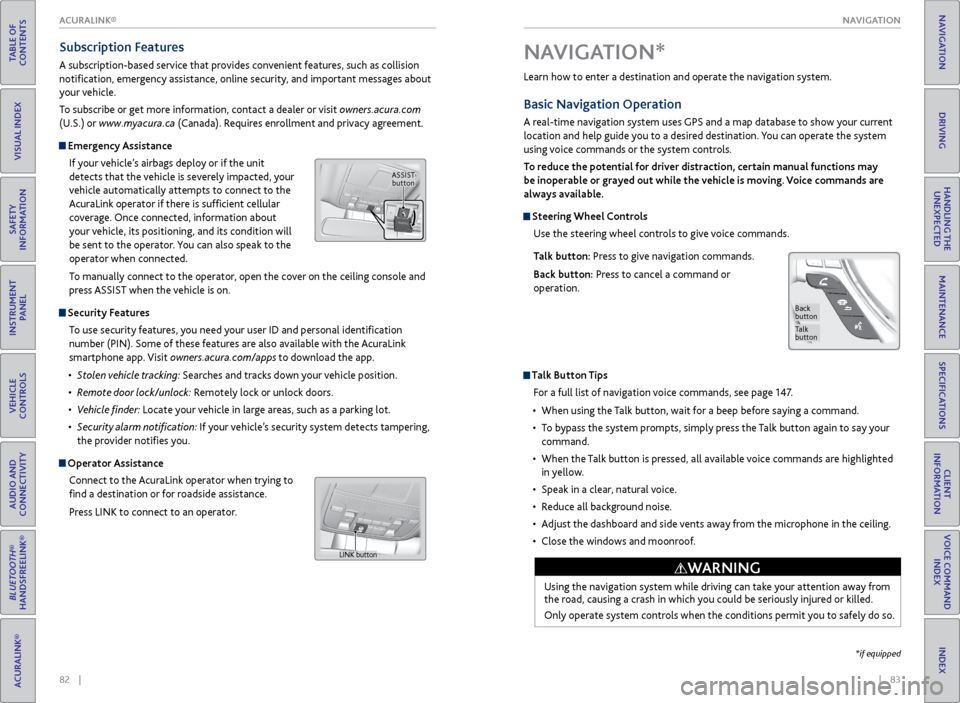
Steering Wheel Controls
Use the steering wheel controls to give voice commands.
Talk button: Press to give navigation commands.
Back button: Press to cancel a command or
operation.
Talk Button Tips
For a full list of navigation voice commands, see page 147.
• When using the Talk button, wait for a beep before saying a command.
• To bypass the system prompts, simply press the Talk button again to say your
command.
• When the Talk button is pressed, all available voice commands are highlighted
in yellow.
• Speak in a clear, natural voice.
• Reduce all background noise.
• Adjust the dashboard and side vents away from the microphone in the ceiling.
• Close the windows and moonroof.
Using the navigation system while driving can take your attention away from
the road, causing a crash in which you could be seriously injured or killed.
Only operate system controls when the conditions permit you to safely do so.
WARNING
NAVIGATION*
Talk
button
Back
button
*if equipped
Subscription Features
A subscription-based service that provides convenient features, such as collision
notification, emergency assistance, online security, and important messages about
your vehicle.
To subscribe or get more information, contact a dealer or visit owners.acura.com
(U.S.) or www.myacura.ca (Canada). Requires enrollment and privacy agreement.
Emergency Assistance
If your vehicle’s airbags deploy or if the unit
detects that the vehicle is severely impacted, your
vehicle automatically attempts to connect to the
AcuraLink operator if there is sufficient cellular
coverage. Once connected, information about
your vehicle, its positioning, and its condition will
be sent to the operator. You can also speak to the
operator when connected.
To manually connect to the operator, open the cover on the ceiling console and
press ASSIST when the vehicle is on.
Security Features
To use security features, you need your user ID and personal identification
number (PIN). Some of these features are also available with the AcuraLink
smartphone app. Visit owners.acura.com/apps to download the app.
• Stolen vehicle tracking: Searches and tracks down your vehicle position.
• Remote door lock/unlock: Remotely lock or unlock doors.
• Vehicle finder: Locate your vehicle in large areas, such as a parking lot.
• Security alarm notification: If your vehicle’s security system detects tampering,
the provider notifies you.
Operator Assistance
Connect to the AcuraLink operator when trying to
find a destination or for roadside assistance.
Press LINK to connect to an operator.
ASSIST button
LINK button
ACURALINK®
Page 80 of 81
152 || 153
INDEX
VOICE COMMAND INDEX
TABLE OF
CONTENTS
INDEX
VISUAL INDEX
VOICE COMMAND INDEX
SAFETY
INFORMATION
CLIENT
INFORMATION
INSTRUMENT PANEL
SPECIFICATIONS
VEHICLE
CONTROLS
MAINTENANCE
AUDIO AND
CONNECTIVITY
HANDLING THE UNEXPECTED
BLUETOOTH®
HANDSFREELINK®
DRIVING
ACURALINK®
NAVIGATION
Phone Commands
The system accepts these commands on most screens.
• Call by number
• Call by name
• Call (phone number)
• Call (contact name)
On-screen Commands
The system accepts these commands on any screen where applicable. All
available on-screen voice commands are highlighted in yellow when you press
the Talk button.
• Next (or Down)
• Previous (or Up)
• Return
• OK (excluding Startup Confirmation screen)
• Delete
INDEX
ABS ................................................... 25, 100
ACC ............................................. 25, 27, 102
Accessory Power Socket ............................... 50
AcuraLink® ....................................................... 81
AcuraLink featuring Aha™ ........................... 68
AcuraLink Real-Time Traffic™ ...................... 89
Adaptive Cruise Control (ACC) ..... 25, 27, 102
Aha™ ........................................................... 68
Airbags .............................................................. 9
Advanced Airbags ......................................... 9
Airbag Care ................................................... 14
Airbag System Components ..................... 13
Airbag System Indicators ........................... 11
Front Airbags (SRS) ....................................... 9
Passenger Airbag Off Indicator ................ 12
Side Airbags .................................................. 10
Side Curtain Airbags ................................... 10
All-Wheel Drive (AWD) .......................... 25, 91
Anti-Lock Brake System (ABS) ............ 25, 100
ASSIST button ................................................ 82
Audio Operation ............................................ 50
Accessory Power Socket ........................... 50
Aha™ ........................................................... 68
Audio Commands ..................................... 150
Auxiliary Input Jack .................................... 50
Bluetooth® Audio ................................. 58, 66
Color Information Display ........................ 52
Compact Disc (CD) .............................. 55, 63
FM/AM Radio ........................................ 53, 61
Hard Disc Drive (HDD) Audio .................. 64
iPod® ..................................................... 56, 65
On-Demand Multi-Use Display™ (ODMD™) ....................................... 60
Pandora® ............................................... 59, 67
SiriusXM® Radio................................... 54, 62
Sound ............................................................ 51
Steering Wheel Controls ........................... 51
USB Flash Drive .................................... 57, 63
USB Port ...................................................... 50
Automatic Dimming Rearview Mirror ........44
Automatic rain-sensing wipers ................... 39
Auxiliary Input Jack ........................................ 50
AWD ..................................................... 25, 91
Battery .......................................................... 133
Blind spot information (BSI) ................ 25, 106
Bluetooth® Audio .................................... 58, 66
Bluetooth® HandsFreeLink® ........................ 69
Dialing a Number .................................. 71, 76
E-Mail ............................................................ 79
Making a Call ......................................... 71, 76
Pairing a Phone ..................................... 70, 75
Phonebook ............................................. 71, 77Siri™ Eyes Free ...........................................
80
SMS Text Messaging ............................ 72, 79
Speed Dial ................................. 71, 72, 77, 78
Talk Button Tips ........................................... 74
Brake Assist System ..................................... 100
Brake Fluid ...................................................... 133
Brake system ............................................ 24, 25
Braking ......................................................... 100
Brightness Control ......................................... 36
Carbon Monoxide Gas ..................................... 4
Cargo Lights ..................................................... 37
Change a Setting ............................................ 48
Changing a Flat Tire ...................................... 120
Changing Fuses ............................................. 125
Changing Wiper Blades ............................... 134
Charging system ............................................. 24
Checking the Battery ................................... 133
Childproof Door Locks .................................. 33
Child Safety ..................................................... 15
Child Seat ......................................................... 17
Adding Security with a Tether ................. 20
Installing a Child Seat with a Lap/Shoulder Seat Belt ........................................... 19
Installing a LATCH-Compatible Child Seat .................................................... 18
Selecting a Child Seat ................................ 17
Client Information ....................................... 144
Climate Control ............................................. 46
Climate Control Commands ...................... 149
Clock ........................................................... 49
Collision Mitigation Braking System™ (CMBS™) ........................... 25, 27, 107
Color Information Display ............................ 52
Compact Disc (CD) .................................. 55, 63
Condition Indicators ....................................... 26
Contact Us ..................................................... 145
Cross Traffic Monitor ..................................... 111
Cruise Control ......................................... 27, 101
Customized Settings ..................................... 48
Dashboard and Ceiling Controls .................... 2
Destination ..................................................... 86
Detour ........................................................... 89
Dialing a Number ...................................... 71, 76
Door Mirrors ................................................... 44
Door Operation ........................................ 31, 33
DOT Tire Quality Grading .......................... 140
Driving ........................................................... 90
Adaptive Cruise Control (ACC) .............. 102
Blind spot information (BSI) .................. 106
Braking ....................................................... 100
Collision Mitigation Braking System™ (CMBS™) ........................................ 107
Page 81 of 81
154 || 155
INDEX
INDEX
TABLE OF
CONTENTS
INDEX
VISUAL INDEX
VOICE COMMAND INDEX
SAFETY
INFORMATION
CLIENT
INFORMATION
INSTRUMENT PANEL
SPECIFICATIONS
VEHICLE
CONTROLS
MAINTENANCE
AUDIO AND
CONNECTIVITY
HANDLING THE UNEXPECTED
BLUETOOTH®
HANDSFREELINK®
DRIVING
ACURALINK®
NAVIGATION
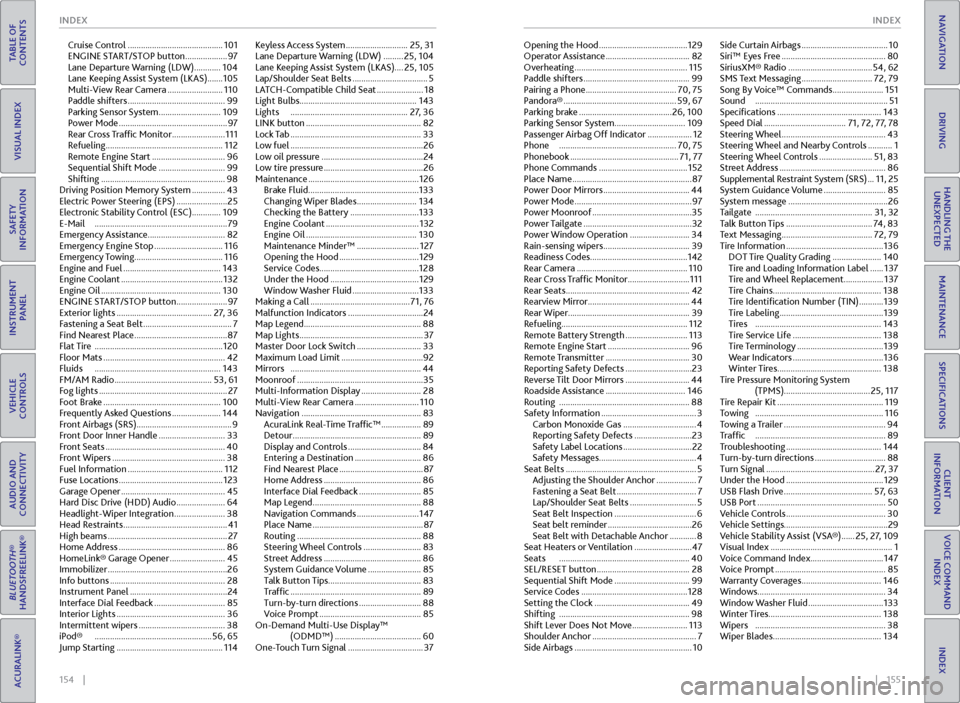
Cruise Control ........................................... 101
ENGINE START/STOP button ................... 97
Lane Departure Warning (LDW) ............ 104
Lane Keeping Assist System (LKAS) ....... 105
Multi-View Rear Camera ......................... 110
Paddle shifters ............................................ 99
Parking Sensor System ............................ 109
Power Mode ................................................. 97
Rear Cross Traffic Monitor ........................ 111
Refueling ..................................................... 112
Remote Engine Start ................................. 96
Sequential Shift Mode .............................. 99
Shifting ........................................................ 98
Driving Position Memory System ............... 43
Electric Power Steering (EPS) ....................... 25
Electronic Stability Control (ESC)............. 109
E-Mail ............................................................ 79
Emergency Assistance ...................................82
Emergency Engine Stop ............................... 116
Emergency Towing ........................................ 116
Engine and Fuel ............................................ 143
Engine Coolant .............................................. 132
Engine Oil ...................................................... 130
ENGINE START/STOP button ....................... 97
Exterior lights ........................................... 27, 36
Fastening a Seat Belt ........................................ 7
Find Nearest Place .......................................... 87
Flat Tire .......................................................... 120
Floor Mats ....................................................... 42
Fluids ......................................................... 143
FM/AM Radio ............................................ 53, 61
Fog lights .......................................................... 27
Foot Brake ..................................................... 100
Frequently Asked Questions ...................... 144
Front Airbags (SRS) ........................................... 9
Front Door Inner Handle .............................. 33
Front Seats ...................................................... 40
Front Wipers ................................................... 38
Fuel Information ........................................... 112
Fuse Locations ............................................... 123
Garage Opener ............................................... 45
Hard Disc Drive (HDD) Audio ...................... 64
Headlight-Wiper Integration ....................... 38
Head Restraints ............................................... 41
High beams ...................................................... 27
Home Address ................................................ 86
HomeLink® Garage Opener ......................... 45
Immobilizer ...................................................... 26
Info buttons .................................................... 28
Instrument Panel ............................................ 24
Interface Dial Feedback ................................ 85
Interior Lights ................................................. 36
Intermittent wipers ....................................... 38
iPod® ..................................................... 56, 65
Jump Starting ................................................ 114Keyless Access System ............................
25, 31
Lane Departure Warning (LDW) ......... 25, 104
Lane Keeping Assist System (LKAS) ....25, 105
Lap/Shoulder Seat Belts .................................. 5
LATCH-Compatible Child Seat ..................... 18
Light Bulbs ..................................................... 143
Lights ..................................................... 27, 36
LINK button .................................................... 82
Lock Tab ........................................................... 33
Low fuel ............................................................ 26
Low oil pressure .............................................. 24
Low tire pressure ............................................. 26
Maintenance .................................................. 126
Brake Fluid .................................................. 133
Changing Wiper Blades ........................... 134
Checking the Battery ............................... 133
Engine Coolant .......................................... 132
Engine Oil .................................................. 130
Maintenance Minder™ ............................ 127
Opening the Hood .................................... 129
Service Codes ............................................. 128
Under the Hood ........................................ 129
Window Washer Fluid .............................. 133
Making a Call ............................................. 71, 76
Malfunction Indicators .................................. 24
Map Legend ..................................................... 88
Map Lights ........................................................ 37
Master Door Lock Switch ............................. 33
Maximum Load Limit ..................................... 92
Mirrors ........................................................... 44
Moonroof ......................................................... 35
Multi-Information Display ........................... 28
Multi-View Rear Camera ............................. 110
Navigation ...................................................... 83
AcuraLink Real-Time Traffic™ .................. 89
Detour .......................................................... 89
Display and Controls ................................. 84
Entering a Destination .............................. 86
Find Nearest Place ...................................... 87
Home Address ............................................ 86
Interface Dial Feedback ............................ 85
Map Legend ................................................. 88
Navigation Commands ............................ 147
Place Name .................................................. 87
Routing ........................................................ 88
Steering Wheel Controls .......................... 83
Street Address ............................................ 86
System Guidance Volume ........................ 85
Talk Button Tips .......................................... 83
Traffic ........................................................... 89
Turn-by-turn directions ............................ 88
Voice Prompt .............................................. 85
On-Demand Multi-Use Display™ (ODMD™) ....................................... 60
One-Touch Turn Signal .................................. 37Opening the Hood ........................................
129
Operator Assistance ...................................... 82
Overheating ................................................... 115
Paddle shifters ................................................ 99
Pairing a Phone ......................................... 70, 75
Pandora® ................................................... 59, 67
Parking brake .......................................... 26, 100
Parking Sensor System ................................ 109
Passenger Airbag Off Indicator .................... 12
Phone ..................................................... 70, 75
Phonebook ................................................. 71, 77
Phone Commands ........................................ 152
Place Name ...................................................... 87
Power Door Mirrors ....................................... 44
Power Mode ..................................................... 97
Power Moonroof ............................................. 35
Power Tailgate ................................................. 32
Power Window Operation ........................... 34
Rain-sensing wipers ....................................... 39
Readiness Codes ............................................ 142
Rear Camera .................................................. 110
Rear Cross Traffic Monitor ............................ 111
Rear Seats ........................................................ 42
Rearview Mirror ..............................................
44
Rear Wiper ....................................................... 39
Refueling ......................................................... 112
Remote Battery Strength ............................ 113
Remote Engine Start ..................................... 96
Remote Transmitter ...................................... 30
Reporting Safety Defects .............................. 23
Reverse Tilt Door Mirrors ............................. 44
Roadside Assistance .................................... 146
Routing ........................................................... 88
Safety Information ........................................... 3
Carbon Monoxide Gas ................................. 4
Reporting Safety Defects .......................... 23
Safety Label Locations ............................... 22
Safety Messages ............................................ 4
Seat Belts ........................................................... 5
Adjusting the Shoulder Anchor .................. 7
Fastening a Seat Belt .................................... 7
Lap/Shoulder Seat Belts .............................. 5
Seat Belt Inspection ..................................... 6
Seat belt reminder ...................................... 26
Seat Belt with Detachable Anchor ............ 8
Seat Heaters or Ventilation .......................... 47
Seats ........................................................... 40
SEL/RESET button .......................................... 28
Sequential Shift Mode .................................. 99
Service Codes ................................................ 128
Setting the Clock ........................................... 49
Shifting ........................................................... 98
Shift Lever Does Not Move ......................... 113
Shoulder Anchor ............................................... 7
Side Airbags ..................................................... 10Side Curtain Airbags .......................................
10
Siri™ Eyes Free ............................................... 80
SiriusXM® Radio ...................................... 54, 62
SMS Text Messaging ................................ 72, 79
Song By Voice™ Commands ....................... 151
Sound ............................................................ 51
Specifications ............................................... 143
Speed Dial ..................................... 71, 72, 77, 78
Steering Wheel ............................................... 43
Steering Wheel and Nearby Controls ........... 1
Steering Wheel Controls ........................ 51, 83
Street Address ................................................ 86
Supplemental Restraint System (SRS) ... 11, 25
System Guidance Volume ............................ 85
System message ............................................. 26
Tailgate ..................................................... 31, 32
Talk Button Tips ....................................... 74, 83
Text Messaging ......................................... 72, 79
Tire Information ............................................ 136
DOT Tire Quality Grading ...................... 140
Tire and Loading Information Label ...... 137
Tire and Wheel Replacement.................. 137
Tire Chains ................................................. 138
Tire Identification Number (TIN) ........... 139
Tire Labeling ............................................... 139
Tires ......................................................... 143
Tire Service Life ........................................ 138
Tire Terminology ....................................... 139
Wear Indicators ......................................... 136
Winter Tires ............................................... 138
Tire Pressure Monitoring System (TPMS)....................................... 25, 117
Tire Repair Kit ................................................ 119
Towing .......................................................... 116
Towing a Trailer .............................................. 94
Traffic ........................................................... 89
Troubleshooting ........................................... 144
Turn-by-turn directions ................................ 88
Turn Signal ................................................. 27, 37
Under the Hood ............................................ 129
USB Flash Drive ........................................ 57, 63
USB Port .......................................................... 50
Vehicle Controls ............................................. 30
Vehicle Settings ............................................... 29
Vehicle Stability Assist (VSA®) ...... 25, 27, 109
Visual Index ....................................................... 1
Voice Command Index ................................. 147
Voice Prompt .................................................. 85
Warranty Coverages .................................... 146
Windows .......................................................... 34
Window Washer Fluid .................................. 133
Winter Tires ................................................... 138
Wipers ........................................................... 38
Wiper Blades ................................................. 134