door lock Acura RDX 2016 User Guide
[x] Cancel search | Manufacturer: ACURA, Model Year: 2016, Model line: RDX, Model: Acura RDX 2016Pages: 81, PDF Size: 17.94 MB
Page 49 of 81
90 || 91
DRIVING
DRIVING
TABLE OF
CONTENTS
INDEX
VISUAL INDEX
VOICE COMMAND INDEX
SAFETY
INFORMATION
CLIENT
INFORMATION
INSTRUMENT PANEL
SPECIFICATIONS
VEHICLE
CONTROLS
MAINTENANCE
AUDIO AND
CONNECTIVITY
HANDLING THE UNEXPECTED
BLUETOOTH®
HANDSFREELINK®
DRIVING
ACURALINK®
NAVIGATION
Learn about preparation for driving and other features.
Before Driving
Check the following items before you begin driving.
Exterior Checks
• Make sure there are no obstructions on the windows, door mirrors, exterior
lights, or other parts of the vehicle.
• Remove any frost, snow, or ice.
• Make sure the hood is securely closed.
• Heat from the engine and exhaust can ignite flammable materials left under
the hood, causing a fire. If you’ve parked your vehicle for an extended period,
inspect and remove any debris that may have collected, such as dried grass
and leaves that have fallen or have been carried in for use as a nest by a small
animal. Also check under the hood for leftover flammable materials after you
or someone else has performed maintenance on your vehicle.
• Make sure the tires are in good condition.
• Make sure there are no people or objects behind or around the vehicle.
DRIVING
Interior Checks
• Store or secure all items on board properly.
• Do not pile items higher than the seat height.
• Do not place anything in the front seat footwells. Make sure to secure the floor
mats.
• If you have any animals on board, do not let them move freely in the vehicle.
• Securely close and lock all doors and the tailgate.
• Adjust your seating position, mirrors, and steering wheel properly.
• Be sure items placed on the floor behind the front seats cannot roll under the
seats.
• Everyone in the vehicle must fasten their seat belt.
Make sure that the indicators in the instrument panel come on when you start the
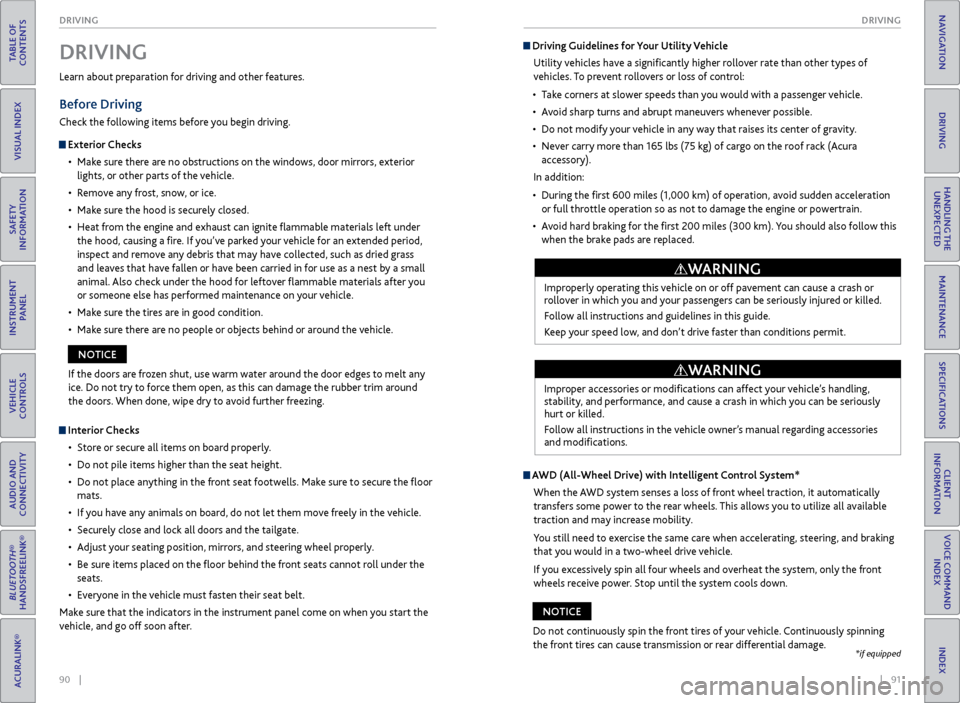
vehicle, and go off soon after. If the doors are frozen shut, use warm water around the door edges to melt any
ice. Do not try to force them open, as this can damage the rubber trim around
the doors. When done, wipe dry to avoid further freezing.
NOTICE
Driving Guidelines for Your Utility Vehicle
Utility vehicles have a significantly higher rollover rate than other types of
vehicles. To prevent rollovers or loss of control:
• Take corners at slower speeds than you would with a passenger vehicle.
• Avoid sharp turns and abrupt maneuvers whenever possible.
• Do not modify your vehicle in any way that raises its center of gravity.
• Never carry more than 165 lbs (75 kg) of cargo on the roof rack (Acura
accessory).
In addition:
• During the first 600 miles (1,000 km) of operation, avoid sudden acceleration
or full throttle operation so as not to damage the engine or powertrain.
• Avoid hard braking for the first 200 miles (300 km). You should also follow this
when the brake pads are replaced.
Improperly operating this vehicle on or off pavement can cause a crash or
rollover in which you and your passengers can be seriously injured or killed.
Follow all instructions and guidelines in this guide.
Keep your speed low, and don’t drive faster than conditions permit.
WARNING
Improper accessories or modifications can affect your vehicle’s handling,
stability, and performance, and cause a crash in which you can be seriously
hurt or killed.
Follow all instructions in the vehicle owner’s manual regarding accessories
and modifications.
WARNING
AWD (All-Wheel Drive) with Intelligent Control System*
When the AWD system senses a loss of front wheel traction, it automatically
transfers some power to the rear wheels. This allows you to utilize all available
traction and may increase mobility.
You still need to exercise the same care when accelerating, steering, and braking
that you would in a two-wheel drive vehicle.
If you excessively spin all four wheels and overheat the system, only the front
wheels receive power. Stop until the system cools down.
Do not continuously spin the front tires of your vehicle. Continuously spinning
the front tires can cause transmission or rear differential damage.
NOTICE
*if equipped
Page 52 of 81
96 || 97
DRIVING
DRIVING
TABLE OF
CONTENTS
INDEX
VISUAL INDEX
VOICE COMMAND INDEX
SAFETY
INFORMATION
CLIENT
INFORMATION
INSTRUMENT PANEL
SPECIFICATIONS
VEHICLE
CONTROLS
MAINTENANCE
AUDIO AND
CONNECTIVITY
HANDLING THE UNEXPECTED
BLUETOOTH®
HANDSFREELINK®
DRIVING
ACURALINK®
NAVIGATION
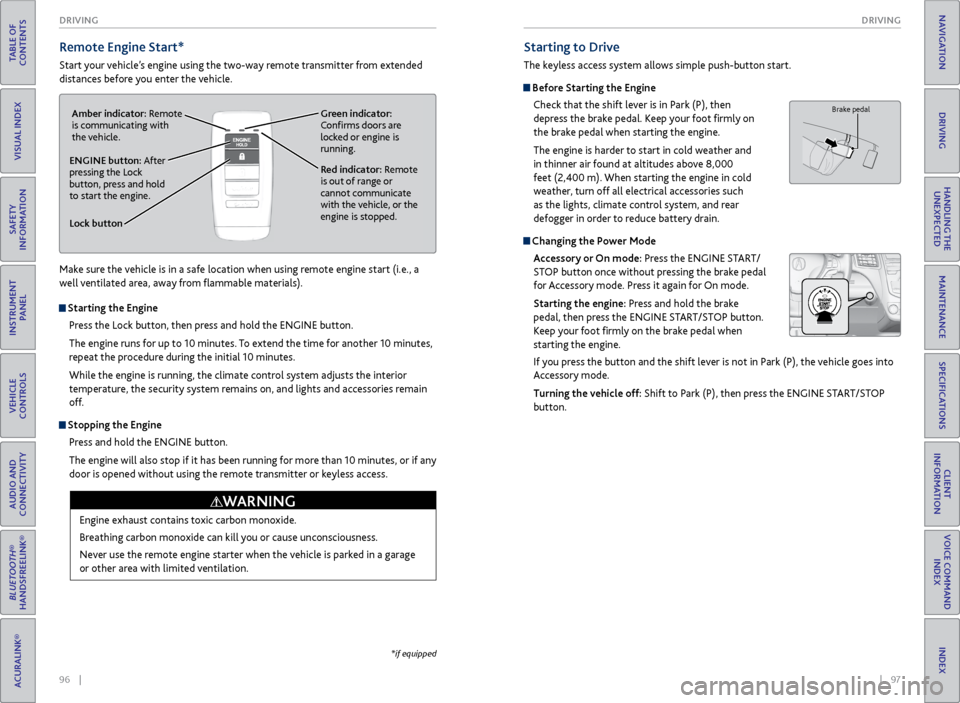
Remote Engine Start*
Start your vehicle’s engine using the two-way remote transmitter from extended
distances before you enter the vehicle.
*if equipped
Starting to Drive
The keyless access system allows simple push-button start.
Before Starting the Engine
Check that the shift lever is in Park (P), then
depress the brake pedal. Keep your foot firmly on
the brake pedal when starting the engine.
The engine is harder to start in cold weather and
in thinner air found at altitudes above 8,000
feet (2,400 m). When starting the engine in cold
weather, turn off all electrical accessories such
as the lights, climate control system, and rear
defogger in order to reduce battery drain.
Changing the Power Mode
Accessory or On mode: Press the ENGINE START/
STOP button once without pressing the brake pedal
for Accessory mode. Press it again for On mode.
Starting the engine: Press and hold the brake
pedal, then press the ENGINE START/STOP button.
Keep your foot firmly on the brake pedal when
starting the engine.
If you press the button and the shift lever is not in Park (P), the vehicle goes into
Accessory mode.
Turning the vehicle off: Shift to Park (P), then press the ENGINE START/STOP
button.
Brake pedal
Lock button
ENGINE button: After
pressing the Lock
button, press and hold
to start the engine.Red indicator: Remote
is out of range or
cannot communicate
with the vehicle, or the
engine is stopped.
Amber indicator: Remote
is communicating with
the vehicle.
Green indicator:
Confirms doors are
locked or engine is
running.
Starting the Engine
Press the Lock button, then press and hold the ENGINE button.
The engine runs for up to 10 minutes. To extend the time for another 10 minutes,
repeat the procedure during the initial 10 minutes.
While the engine is running, the climate control system adjusts the interior
temperature, the security system remains on, and lights and accessories remain
off.
Stopping the EnginePress and hold the ENGINE button.
The engine will also stop if it has been running for more than 10 minutes, or if any
door is opened without using the remote transmitter or keyless access.
Engine exhaust contains toxic carbon monoxide.
Breathing carbon monoxide can kill you or cause unconsciousness.
Never use the remote engine starter when the vehicle is parked in a garage
or other area with limited ventilation.
WARNING
Make sure the vehicle is in a safe location when using remote engine start (i.e., a
well ventilated area, away from flammable materials).
Page 60 of 81
112 || 113
HANDLING THE UNEXPECTED
DRIVING
TABLE OF
CONTENTS
INDEX
VISUAL INDEX
VOICE COMMAND INDEX
SAFETY
INFORMATION
CLIENT
INFORMATION
INSTRUMENT PANEL
SPECIFICATIONS
VEHICLE
CONTROLS
MAINTENANCE
AUDIO AND
CONNECTIVITY
HANDLING THE UNEXPECTED
BLUETOOTH®
HANDSFREELINK®
DRIVING
ACURALINK®
NAVIGATION
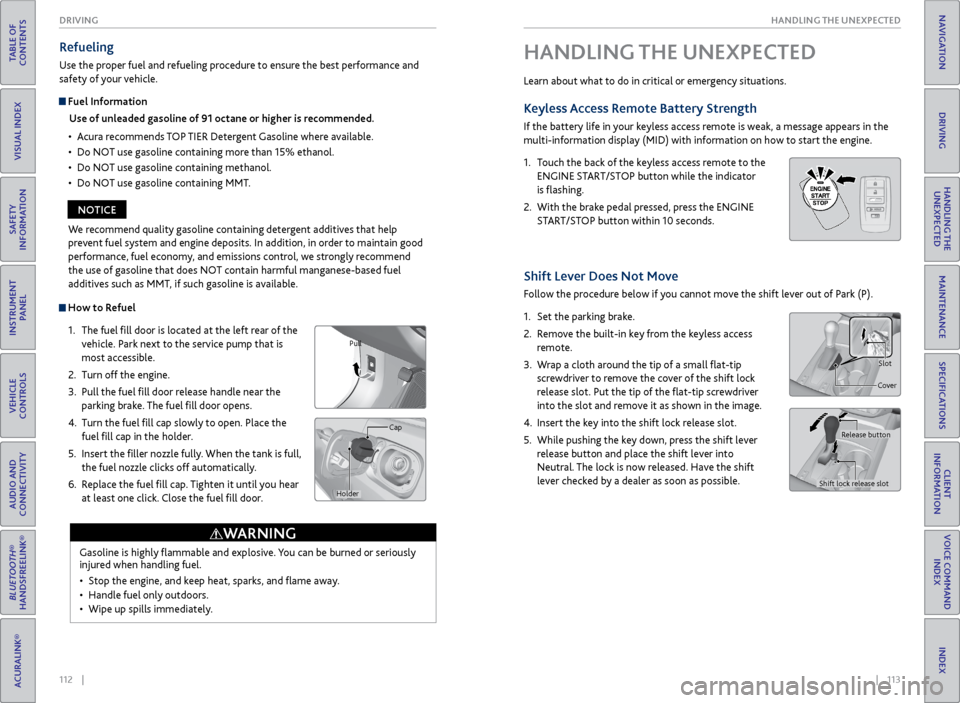
How to Refuel
1. The fuel fill door is located at the left rear of the
vehicle. Park next to the service pump that is
most accessible.
2. Turn off the engine.
3. Pull the fuel fill door release handle near the
parking brake. The fuel fill door opens.
4. Turn the fuel fill cap slowly to open. Place the
fuel fill cap in the holder.
5. Insert the filler nozzle fully. When the tank is full,
the fuel nozzle clicks off automatically.
6. Replace the fuel fill cap. Tighten it until you hear
at least one click. Close the fuel fill door.
Refueling
Use the proper fuel and refueling procedure to ensure the best performance and
safety of your vehicle.
Fuel Information
Use of unleaded gasoline of 91 octane or higher is recommended.
• Acura recommends TOP TIER Detergent Gasoline where available.
• Do NOT use gasoline containing more than 15% ethanol.
• Do NOT use gasoline containing methanol.
• Do NOT use gasoline containing MMT.
Gasoline is highly flammable and explosive. You can be burned or seriously
injured when handling fuel.
• Stop the engine, and keep heat, sparks, and flame away.
• Handle fuel only outdoors.
• Wipe up spills immediately.
WARNING
Pull
Cap
Holder
We recommend quality gasoline containing detergent additives that help
prevent fuel system and engine deposits. In addition, in order to maintain good
performance, fuel economy, and emissions control, we strongly recommend
the use of gasoline that does NOT contain harmful manganese-based fuel
additives such as MMT, if such gasoline is available.
NOTICE Learn about what to do in critical or emergency situations.
Keyless Access
Remote Battery Strength
If the battery life in your keyless access remote is weak, a message appears in the
multi-information display (MID) with information on how to start the engine.
1. Touch the back of the keyless access remote to the
ENGINE START/STOP button while the indicator
is flashing.
2. With the brake pedal pressed, press the ENGINE
START/STOP button within 10 seconds.
HANDLING THE UNEXPECTED
HOLD
Shift Lever Does Not Move
Follow the procedure below if you cannot move the shift lever out of Park (P).
1. Set the parking brake.
2. Remove the built-in key from the keyless access
remote.
3. Wrap a cloth around the tip of a small flat-tip
screwdriver to remove the cover of the shift lock
release slot. Put the tip of the flat-tip screwdriver
into the slot and remove it as shown in the image.
4. Insert the key into the shift lock release slot.
5. While pushing the key down, press the shift lever
release button and place the shift lever into
Neutral. The lock is now released. Have the shift
lever checked by a dealer as soon as possible.
Slot
Cover
Release button
Shift lock release slot
Page 62 of 81

116 || 117
HANDLING THE UNEXPECTED
HANDLING THE UNEXPECTED
TABLE OF
CONTENTS
INDEX
VISUAL INDEX
VOICE COMMAND INDEX
SAFETY
INFORMATION
CLIENT
INFORMATION
INSTRUMENT PANEL
SPECIFICATIONS
VEHICLE
CONTROLS
MAINTENANCE
AUDIO AND
CONNECTIVITY
HANDLING THE UNEXPECTED
BLUETOOTH®
HANDSFREELINK®
DRIVING
ACURALINK®
NAVIGATION
Emergency Engine Stop
The ENGINE START/STOP button may be used to stop the engine due to an
emergency situation even while driving. If you must stop the engine, choose one of
the following operations:
• Press and hold the ENGINE START/STOP button for
two seconds, OR
• Firmly press the ENGINE START/STOP button two
times.
The steering wheel will not lock. The power mode changes to ACCESSORY, unless
the shift lever is in Park (P), in which case the power mode changes to VEHICLE OFF.
Because turning off the engine also disables the power assist the engine provides to
the steering and braking systems, it will require significantly more physical effort
and time to steer and slow the vehicle. Downshift gears and use both feet on the
brake pedal, if necessary, to slow the vehicle and stop immediately in a safe place.
Emergency Towing
Call a professional towing service if you need to tow your vehicle.
All models
Flat bed equipment: The operator loads your vehicle on the back of a truck. This is
the best way to transport your vehicle.
2WD models
Wheel lift equipment: The tow truck uses two pivoting arms that go under the front
tires and lift them off the ground. The rear tires remain on the ground. This is an
acceptable way to tow your vehicle.
Trying to lift or tow your vehicle by the bumpers will cause serious damage. The
bumpers are not designed to support the vehicle’s weight.
Improper towing such as towing behind a motorhome or other motor vehicle can
damage the transmission.
NOTICE
Do not press the button while driving unless it is absolutely necessary for the
engine to be switched off.
NOTICE
Tire Pressure Monitoring System (TPMS)
Monitors the tire pressure while you are driving.
If your vehicle’s tire pressure becomes significantly low, the low tire pressure
indicator comes on and a message appears on the multi-information display. Press
the Info button on the steering wheel to view the tire pressure monitor to see
pressure readings for each tire (see page 28).
Driving on an extremely underinflated tire can cause it to overheat. An
overheated tire can fail. Always inflate your tires to the specified pressure.
NOTICE
What to Do
Stop your vehicle in a safe place. Check the tire pressure and adjust the pressure
to the specified level. The specified tire pressure is on a label on the driver’s
doorjamb.
The specific tire
with low pressure is
displayed.
Page 66 of 81
124 || 125
HANDLING THE UNEXPECTED
HANDLING THE UNEXPECTED
TABLE OF
CONTENTS
INDEX
VISUAL INDEX
VOICE COMMAND INDEX
SAFETY
INFORMATION
CLIENT
INFORMATION
INSTRUMENT PANEL
SPECIFICATIONS
VEHICLE
CONTROLS
MAINTENANCE
AUDIO AND
CONNECTIVITY
HANDLING THE UNEXPECTED
BLUETOOTH®
HANDSFREELINK®
DRIVING
ACURALINK®
NAVIGATION
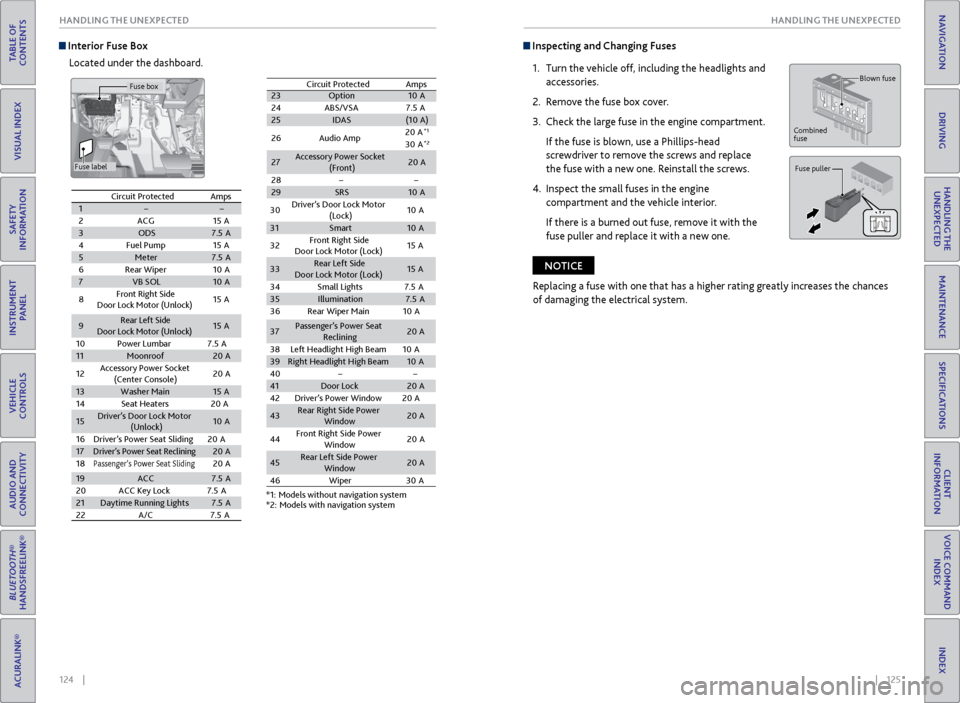
Interior Fuse Box
Located under the dashboard. Inspecting and Changing Fuses
1. Turn the vehicle off, including the headlights and
accessories.
2. Remove the fuse box cover.
3. Check the large fuse in the engine compartment.
If the fuse is blown, use a Phillips-head
screwdriver to remove the screws and replace
the fuse with a new one. Reinstall the screws.
4. Inspect the small fuses in the engine
compartment and the vehicle interior.
If there is a burned out fuse, remove it with the
fuse puller and replace it with a new one.
Blown fuse
Combined
fuse
Fuse puller
Replacing a fuse with one that has a higher rating greatly increases the chances
of damaging the electrical system.
NOTICE
Circuit ProtectedAmps12ACG15 A3ODS7.5A4Fuel Pump15A5Meter7.5A6Rear Wiper10 A7VB SOL10A
8Front Right Side
Door Lock Motor (Unlock)15 A
9Rear Left Side
Door Lock Motor (Unlock )15A
10 Power Lumbar 7.5A
11Moonroof20A
12 Accessory Power Socket
(Center Console )20
A
13Washer Main15A
14 Seat Heaters 20A
15Driver’s Door Lock Motor
(Unlock)10A
16 Driver’s Power Seat Sliding2 0A
17Driver’s Power Seat Reclinin g20A
18Passenger’s Power Seat Slidin g20A
19ACC7.5A
20 ACC Key Lock 7.5A
21Daytime Running Lights7.5A
22 A/C 7.5A
23 Option 10A
24 ABS/VSA7 .5A
25 IDAS (10A )
26 Audio Amp 20
A
*1
30 A*2
27 Accessory Power Socket
(Front) 20
A
28
29 SRS 10A
Circuit Protected
Amps
*1: Models without navigation system
*2: Models with navigation system
30
Driver’s Door Lock Motor
(Lock) 10
A
31 Smart 10A
32 Front Right Side
Door Lock Motor (Lock) 15
A
33 Rear Left Sid
e
Door Lock Motor (Lock) 15
A
34 Small Lights 7.5A
35 Illumination 7.5A
36 Rear Wiper Main 10A
37 Passenger’s Power Seat
Reclining 20
A
38 Left Headlight High Beam 10A
39 Right Headlight High Beam 10A
40
41 Door Lock 20A
42 Driver’s Power Window 20A
43 Rear Right Side Power
Window 20
A
44 Front Right Side Power
Window 20
A
45 Rear Left Side Power
Window 20
A
46 Wiper3 0A
Circuit Protected Amps
1
2 ACG 15A
3 ODS 7.5A
4 Fuel Pump 15A
5 Meter 7.5A
6 Rear Wiper 10A
7 VB SOL 10A
8 Front Right Side
Door Lock Motor (Unlock) 15
A
9 Rear Left Side
Door Lock Motor (Unlock )15
A
10 Power Lumbar 7.5A
11 Moonroof 20A
12 Accessory Power Socket
(Center Console )20
A
13 Washer Main 15A
14 Seat Heaters 20A
15 Driver’s Door Lock Motor
(Unlock) 10
A
16 Driver’s Power Seat Sliding2 0A
17
Driver’s Power Seat Reclinin g20A
18Passenger’s Power Seat Slidin g20A
19 ACC 7.5A
20 ACC Key Lock 7.5A
21 Daytime Running Light s7.5A
22 A/C 7.5A
23Option10 A
24 ABS/VSA7.5A25IDAS(10A )
26 Audio Amp 20
A*1
30 A*2
27Accessory Power Socket
(Front)20 A
28
29SRS10 A
Circuit ProtectedAmps
*1: Models without navigation system*2: Models with navigation system
30
Driver’s Door Lock Motor
(Lock) 10
A
31Smar t10A
32 Front Right Side
Door Lock Motor (Lock) 15
A
33Rear Left Sid e
Door Lock Motor (Lock)15 A
34 Small Lights 7.5A
35Illumination7.5A
36 Rear Wiper Main 10A
37Passenger’s Power Seat
Reclining20 A
38 Left Headlight High Beam 10A
39Right Headlight High Beam10A
4041Door Lock20 A
42 Driver’s Power Window 20A
43Rear Right Side Power
Window20A
44 Front Right Side Power
Window 20
A
45Rear Left Side Power
Window20A
46 Wipe
r30A
Fuse box
Fuse label
Page 76 of 81

144 || 145
CLIENT INFORMATION
CLIENT INFORMATION
TABLE OF
CONTENTS
INDEX
VISUAL INDEX
VOICE COMMAND INDEX
SAFETY
INFORMATION
CLIENT
INFORMATION
INSTRUMENT PANEL
SPECIFICATIONS
VEHICLE
CONTROLS
MAINTENANCE
AUDIO AND
CONNECTIVITY
HANDLING THE UNEXPECTED
BLUETOOTH®
HANDSFREELINK®
DRIVING
ACURALINK®
NAVIGATION
Learn about information specific to you as an Acura client and how to get help.
Frequently Asked Questions/Troubleshooting
Below are some frequently asked questions and troubleshooting items that you
may have about the vehicle.
Q: How do I set the vehicle clock?
A: For vehicles without navigation, see page 49. For vehicles with navigation, the
time is automatically set using GPS signals.
Q: Why doesn’t the vehicle start when I press the ENGINE START/STOP button?
A: The brake pedal must be pressed to start the engine.
Q: What is the AUTO setting on my headlight lever?
A: When in the AUTO position, the vehicle’s exterior lights will automatically turn
on or off depending on the ambient lighting.
Q: Only the driver’s door unlocks when I shift to Park (P). Can all doors unlock?
A: You can change door lock or unlock settings in the multi-information display
using the Vehicle Settings menu (see page 29), or using the SETTINGS button
(see page 48).
Q: Why won’t the driver’s door unlock when I grab the door handle, even though the
keyless access remote is within range?
A: If you pull the handle too quickly, the system may not have time to confirm the
door is unlocked. Wait to hear a beep to confirm the door is unlocked. If you are
wearing gloves, the system may be slow to respond.
Q: After my battery was disconnected or went dead, the audio system is asking for a
code. Where do I find this?
A: In most cases, you do not need to enter a code. Turn on the vehicle and the audio
system, and press and hold the power button until the system reactivates.
Q: Why can’t I operate Pandora through the audio system?
A: Audio may be streaming through Bluetooth® Audio. Make sure Pandora mode
is selected and the phone cable is properly connected to the USB port. Some
phones may prompt you to “Allow” a connection.
Q: Is my phone compatible with Bluetooth features?
A: Visit www.acura.com/handsfreelink (U.S) or www.handsfreelink.ca (Canada) to
check phone compatibility for Bluetooth® Audio, Bluetooth® HandsFreeLink®,
and SMS text messaging.
CLIENT INFORMATION
Contact Us
Acura dealer personnel are trained professionals. They should be able to answer
all your questions. If you encounter a problem that your dealership does not solve
to your satisfaction, please discuss it with the dealership’s service manager or
general manager. If you are dissatisfied with the decision made by the dealership’s
management, contact Acura Client Relations/Services.
U.S. owners:
American Honda Motor Co., Inc.
Acura Client Relations
1919 Torrance Blvd.
Mail Stop 500-2N-7E
Torrance, CA 90501-2746
Tel: (800) 382-2238
In Puerto Rico and
the U.S. Virgin Islands:
Bella International
P.O. Box 190816
San Juan, PR 00919-0816
Tel: (787) 620-7546 Canadian owners:
Honda Canada, Inc.
Acura Client Services
180 Honda Blvd.
Markham, ON
L6C 0H9
Tel: (888) 922-8729
Fax: (877) 939-0909
e-mail: [email protected]
When you call or write, please give us the following information:
• Vehicle Identification Number
• Date of purchase
• Odometer reading of your vehicle
• Your name, address, and telephone number
• A detailed description of the problem
• Name of the dealer who sold the vehicle to you
Q: Every
time I press the Talk button, the system gives me voice prompts. Can I turn
these off?*
A: Press the SETTINGS button. Use the interface dial to select System Settings, and
then Voice Prompt. Select Off.
Q: Why can’t I select an item using the interface dial?*
A: To prevent driver distraction, certain items are limited or inoperable while the
vehicle is moving. Use voice commands or pull over to select the items.
Q: Where can I find the vehicle identification number (VIN)?
A: Check the label on the driver’s doorjamb.
*if equipped
Page 80 of 81
152 || 153
INDEX
VOICE COMMAND INDEX
TABLE OF
CONTENTS
INDEX
VISUAL INDEX
VOICE COMMAND INDEX
SAFETY
INFORMATION
CLIENT
INFORMATION
INSTRUMENT PANEL
SPECIFICATIONS
VEHICLE
CONTROLS
MAINTENANCE
AUDIO AND
CONNECTIVITY
HANDLING THE UNEXPECTED
BLUETOOTH®
HANDSFREELINK®
DRIVING
ACURALINK®
NAVIGATION
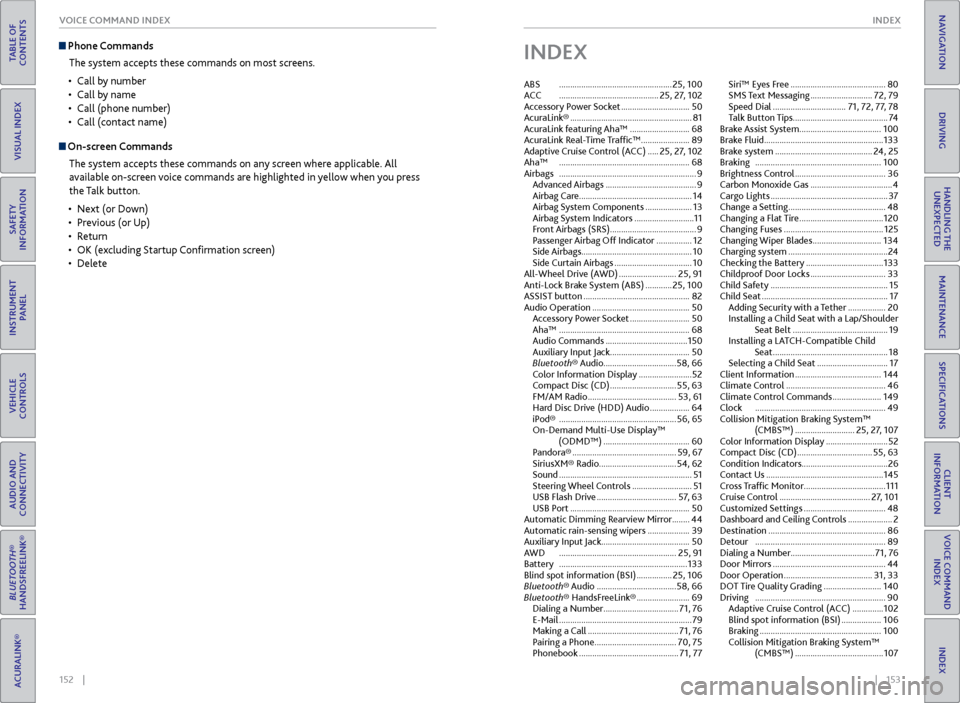
Phone Commands
The system accepts these commands on most screens.
• Call by number
• Call by name
• Call (phone number)
• Call (contact name)
On-screen Commands
The system accepts these commands on any screen where applicable. All
available on-screen voice commands are highlighted in yellow when you press
the Talk button.
• Next (or Down)
• Previous (or Up)
• Return
• OK (excluding Startup Confirmation screen)
• Delete
INDEX
ABS ................................................... 25, 100
ACC ............................................. 25, 27, 102
Accessory Power Socket ............................... 50
AcuraLink® ....................................................... 81
AcuraLink featuring Aha™ ........................... 68
AcuraLink Real-Time Traffic™ ...................... 89
Adaptive Cruise Control (ACC) ..... 25, 27, 102
Aha™ ........................................................... 68
Airbags .............................................................. 9
Advanced Airbags ......................................... 9
Airbag Care ................................................... 14
Airbag System Components ..................... 13
Airbag System Indicators ........................... 11
Front Airbags (SRS) ....................................... 9
Passenger Airbag Off Indicator ................ 12
Side Airbags .................................................. 10
Side Curtain Airbags ................................... 10
All-Wheel Drive (AWD) .......................... 25, 91
Anti-Lock Brake System (ABS) ............ 25, 100
ASSIST button ................................................ 82
Audio Operation ............................................ 50
Accessory Power Socket ........................... 50
Aha™ ........................................................... 68
Audio Commands ..................................... 150
Auxiliary Input Jack .................................... 50
Bluetooth® Audio ................................. 58, 66
Color Information Display ........................ 52
Compact Disc (CD) .............................. 55, 63
FM/AM Radio ........................................ 53, 61
Hard Disc Drive (HDD) Audio .................. 64
iPod® ..................................................... 56, 65
On-Demand Multi-Use Display™ (ODMD™) ....................................... 60
Pandora® ............................................... 59, 67
SiriusXM® Radio................................... 54, 62
Sound ............................................................ 51
Steering Wheel Controls ........................... 51
USB Flash Drive .................................... 57, 63
USB Port ...................................................... 50
Automatic Dimming Rearview Mirror ........44
Automatic rain-sensing wipers ................... 39
Auxiliary Input Jack ........................................ 50
AWD ..................................................... 25, 91
Battery .......................................................... 133
Blind spot information (BSI) ................ 25, 106
Bluetooth® Audio .................................... 58, 66
Bluetooth® HandsFreeLink® ........................ 69
Dialing a Number .................................. 71, 76
E-Mail ............................................................ 79
Making a Call ......................................... 71, 76
Pairing a Phone ..................................... 70, 75
Phonebook ............................................. 71, 77Siri™ Eyes Free ...........................................
80
SMS Text Messaging ............................ 72, 79
Speed Dial ................................. 71, 72, 77, 78
Talk Button Tips ........................................... 74
Brake Assist System ..................................... 100
Brake Fluid ...................................................... 133
Brake system ............................................ 24, 25
Braking ......................................................... 100
Brightness Control ......................................... 36
Carbon Monoxide Gas ..................................... 4
Cargo Lights ..................................................... 37
Change a Setting ............................................ 48
Changing a Flat Tire ...................................... 120
Changing Fuses ............................................. 125
Changing Wiper Blades ............................... 134
Charging system ............................................. 24
Checking the Battery ................................... 133
Childproof Door Locks .................................. 33
Child Safety ..................................................... 15
Child Seat ......................................................... 17
Adding Security with a Tether ................. 20
Installing a Child Seat with a Lap/Shoulder Seat Belt ........................................... 19
Installing a LATCH-Compatible Child Seat .................................................... 18
Selecting a Child Seat ................................ 17
Client Information ....................................... 144
Climate Control ............................................. 46
Climate Control Commands ...................... 149
Clock ........................................................... 49
Collision Mitigation Braking System™ (CMBS™) ........................... 25, 27, 107
Color Information Display ............................ 52
Compact Disc (CD) .................................. 55, 63
Condition Indicators ....................................... 26
Contact Us ..................................................... 145
Cross Traffic Monitor ..................................... 111
Cruise Control ......................................... 27, 101
Customized Settings ..................................... 48
Dashboard and Ceiling Controls .................... 2
Destination ..................................................... 86
Detour ........................................................... 89
Dialing a Number ...................................... 71, 76
Door Mirrors ................................................... 44
Door Operation ........................................ 31, 33
DOT Tire Quality Grading .......................... 140
Driving ........................................................... 90
Adaptive Cruise Control (ACC) .............. 102
Blind spot information (BSI) .................. 106
Braking ....................................................... 100
Collision Mitigation Braking System™ (CMBS™) ........................................ 107
Page 81 of 81
154 || 155
INDEX
INDEX
TABLE OF
CONTENTS
INDEX
VISUAL INDEX
VOICE COMMAND INDEX
SAFETY
INFORMATION
CLIENT
INFORMATION
INSTRUMENT PANEL
SPECIFICATIONS
VEHICLE
CONTROLS
MAINTENANCE
AUDIO AND
CONNECTIVITY
HANDLING THE UNEXPECTED
BLUETOOTH®
HANDSFREELINK®
DRIVING
ACURALINK®
NAVIGATION
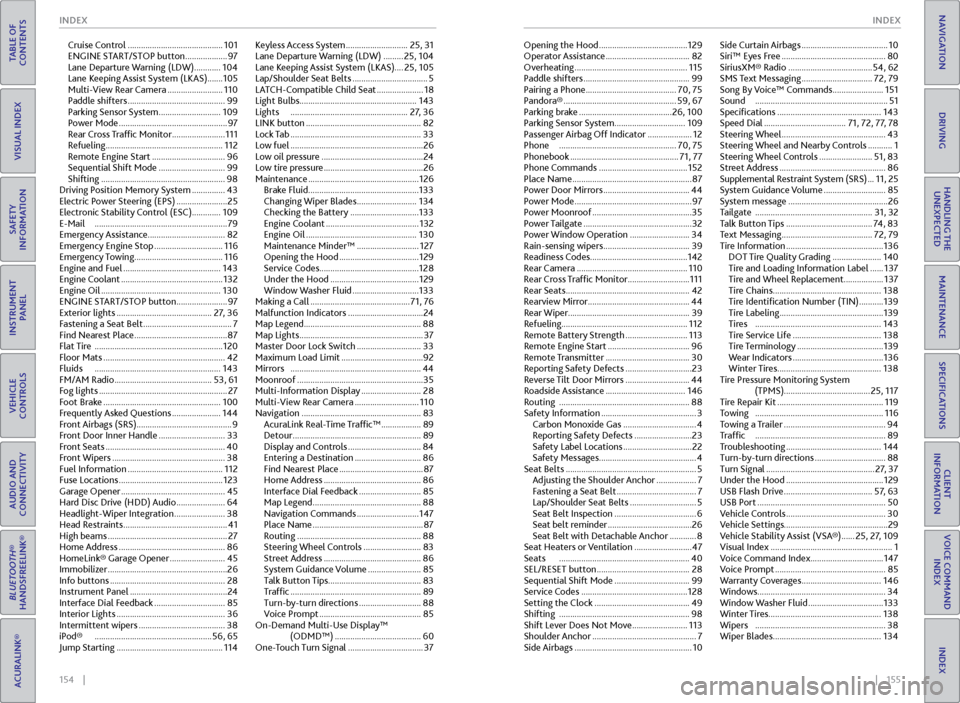
Cruise Control ........................................... 101
ENGINE START/STOP button ................... 97
Lane Departure Warning (LDW) ............ 104
Lane Keeping Assist System (LKAS) ....... 105
Multi-View Rear Camera ......................... 110
Paddle shifters ............................................ 99
Parking Sensor System ............................ 109
Power Mode ................................................. 97
Rear Cross Traffic Monitor ........................ 111
Refueling ..................................................... 112
Remote Engine Start ................................. 96
Sequential Shift Mode .............................. 99
Shifting ........................................................ 98
Driving Position Memory System ............... 43
Electric Power Steering (EPS) ....................... 25
Electronic Stability Control (ESC)............. 109
E-Mail ............................................................ 79
Emergency Assistance ...................................82
Emergency Engine Stop ............................... 116
Emergency Towing ........................................ 116
Engine and Fuel ............................................ 143
Engine Coolant .............................................. 132
Engine Oil ...................................................... 130
ENGINE START/STOP button ....................... 97
Exterior lights ........................................... 27, 36
Fastening a Seat Belt ........................................ 7
Find Nearest Place .......................................... 87
Flat Tire .......................................................... 120
Floor Mats ....................................................... 42
Fluids ......................................................... 143
FM/AM Radio ............................................ 53, 61
Fog lights .......................................................... 27
Foot Brake ..................................................... 100
Frequently Asked Questions ...................... 144
Front Airbags (SRS) ........................................... 9
Front Door Inner Handle .............................. 33
Front Seats ...................................................... 40
Front Wipers ................................................... 38
Fuel Information ........................................... 112
Fuse Locations ............................................... 123
Garage Opener ............................................... 45
Hard Disc Drive (HDD) Audio ...................... 64
Headlight-Wiper Integration ....................... 38
Head Restraints ............................................... 41
High beams ...................................................... 27
Home Address ................................................ 86
HomeLink® Garage Opener ......................... 45
Immobilizer ...................................................... 26
Info buttons .................................................... 28
Instrument Panel ............................................ 24
Interface Dial Feedback ................................ 85
Interior Lights ................................................. 36
Intermittent wipers ....................................... 38
iPod® ..................................................... 56, 65
Jump Starting ................................................ 114Keyless Access System ............................
25, 31
Lane Departure Warning (LDW) ......... 25, 104
Lane Keeping Assist System (LKAS) ....25, 105
Lap/Shoulder Seat Belts .................................. 5
LATCH-Compatible Child Seat ..................... 18
Light Bulbs ..................................................... 143
Lights ..................................................... 27, 36
LINK button .................................................... 82
Lock Tab ........................................................... 33
Low fuel ............................................................ 26
Low oil pressure .............................................. 24
Low tire pressure ............................................. 26
Maintenance .................................................. 126
Brake Fluid .................................................. 133
Changing Wiper Blades ........................... 134
Checking the Battery ............................... 133
Engine Coolant .......................................... 132
Engine Oil .................................................. 130
Maintenance Minder™ ............................ 127
Opening the Hood .................................... 129
Service Codes ............................................. 128
Under the Hood ........................................ 129
Window Washer Fluid .............................. 133
Making a Call ............................................. 71, 76
Malfunction Indicators .................................. 24
Map Legend ..................................................... 88
Map Lights ........................................................ 37
Master Door Lock Switch ............................. 33
Maximum Load Limit ..................................... 92
Mirrors ........................................................... 44
Moonroof ......................................................... 35
Multi-Information Display ........................... 28
Multi-View Rear Camera ............................. 110
Navigation ...................................................... 83
AcuraLink Real-Time Traffic™ .................. 89
Detour .......................................................... 89
Display and Controls ................................. 84
Entering a Destination .............................. 86
Find Nearest Place ...................................... 87
Home Address ............................................ 86
Interface Dial Feedback ............................ 85
Map Legend ................................................. 88
Navigation Commands ............................ 147
Place Name .................................................. 87
Routing ........................................................ 88
Steering Wheel Controls .......................... 83
Street Address ............................................ 86
System Guidance Volume ........................ 85
Talk Button Tips .......................................... 83
Traffic ........................................................... 89
Turn-by-turn directions ............................ 88
Voice Prompt .............................................. 85
On-Demand Multi-Use Display™ (ODMD™) ....................................... 60
One-Touch Turn Signal .................................. 37Opening the Hood ........................................
129
Operator Assistance ...................................... 82
Overheating ................................................... 115
Paddle shifters ................................................ 99
Pairing a Phone ......................................... 70, 75
Pandora® ................................................... 59, 67
Parking brake .......................................... 26, 100
Parking Sensor System ................................ 109
Passenger Airbag Off Indicator .................... 12
Phone ..................................................... 70, 75
Phonebook ................................................. 71, 77
Phone Commands ........................................ 152
Place Name ...................................................... 87
Power Door Mirrors ....................................... 44
Power Mode ..................................................... 97
Power Moonroof ............................................. 35
Power Tailgate ................................................. 32
Power Window Operation ........................... 34
Rain-sensing wipers ....................................... 39
Readiness Codes ............................................ 142
Rear Camera .................................................. 110
Rear Cross Traffic Monitor ............................ 111
Rear Seats ........................................................ 42
Rearview Mirror ..............................................
44
Rear Wiper ....................................................... 39
Refueling ......................................................... 112
Remote Battery Strength ............................ 113
Remote Engine Start ..................................... 96
Remote Transmitter ...................................... 30
Reporting Safety Defects .............................. 23
Reverse Tilt Door Mirrors ............................. 44
Roadside Assistance .................................... 146
Routing ........................................................... 88
Safety Information ........................................... 3
Carbon Monoxide Gas ................................. 4
Reporting Safety Defects .......................... 23
Safety Label Locations ............................... 22
Safety Messages ............................................ 4
Seat Belts ........................................................... 5
Adjusting the Shoulder Anchor .................. 7
Fastening a Seat Belt .................................... 7
Lap/Shoulder Seat Belts .............................. 5
Seat Belt Inspection ..................................... 6
Seat belt reminder ...................................... 26
Seat Belt with Detachable Anchor ............ 8
Seat Heaters or Ventilation .......................... 47
Seats ........................................................... 40
SEL/RESET button .......................................... 28
Sequential Shift Mode .................................. 99
Service Codes ................................................ 128
Setting the Clock ........................................... 49
Shifting ........................................................... 98
Shift Lever Does Not Move ......................... 113
Shoulder Anchor ............................................... 7
Side Airbags ..................................................... 10Side Curtain Airbags .......................................
10
Siri™ Eyes Free ............................................... 80
SiriusXM® Radio ...................................... 54, 62
SMS Text Messaging ................................ 72, 79
Song By Voice™ Commands ....................... 151
Sound ............................................................ 51
Specifications ............................................... 143
Speed Dial ..................................... 71, 72, 77, 78
Steering Wheel ............................................... 43
Steering Wheel and Nearby Controls ........... 1
Steering Wheel Controls ........................ 51, 83
Street Address ................................................ 86
Supplemental Restraint System (SRS) ... 11, 25
System Guidance Volume ............................ 85
System message ............................................. 26
Tailgate ..................................................... 31, 32
Talk Button Tips ....................................... 74, 83
Text Messaging ......................................... 72, 79
Tire Information ............................................ 136
DOT Tire Quality Grading ...................... 140
Tire and Loading Information Label ...... 137
Tire and Wheel Replacement.................. 137
Tire Chains ................................................. 138
Tire Identification Number (TIN) ........... 139
Tire Labeling ............................................... 139
Tires ......................................................... 143
Tire Service Life ........................................ 138
Tire Terminology ....................................... 139
Wear Indicators ......................................... 136
Winter Tires ............................................... 138
Tire Pressure Monitoring System (TPMS)....................................... 25, 117
Tire Repair Kit ................................................ 119
Towing .......................................................... 116
Towing a Trailer .............................................. 94
Traffic ........................................................... 89
Troubleshooting ........................................... 144
Turn-by-turn directions ................................ 88
Turn Signal ................................................. 27, 37
Under the Hood ............................................ 129
USB Flash Drive ........................................ 57, 63
USB Port .......................................................... 50
Vehicle Controls ............................................. 30
Vehicle Settings ............................................... 29
Vehicle Stability Assist (VSA®) ...... 25, 27, 109
Visual Index ....................................................... 1
Voice Command Index ................................. 147
Voice Prompt .................................................. 85
Warranty Coverages .................................... 146
Windows .......................................................... 34
Window Washer Fluid .................................. 133
Winter Tires ................................................... 138
Wipers ........................................................... 38
Wiper Blades ................................................. 134