pressure Acura RDX 2016 Owner's Guide
[x] Cancel search | Manufacturer: ACURA, Model Year: 2016, Model line: RDX, Model: Acura RDX 2016Pages: 81, PDF Size: 17.94 MB
Page 2 of 81
TABLE OF
CONTENTS
INDEX
VISUAL INDEX
VOICE COMMAND INDEX
SAFETY
INFORMATION
CLIENT
INFORMATION
INSTRUMENT PANEL
SPECIFICATIONS
VEHICLE
CONTROLS
MAINTENANCE
AUDIO AND
CONNECTIVITY
HANDLING THE UNEXPECTED
BLUETOOTH®
HANDSFREELINK®
DRIVING
ACURALINK®
NAVIGATION
Devices That Emit Radio Waves
The following products and systems on your vehicle emit radio waves when in
operation:
• AcuraLink®
• Audio system
• Blind spot information system
• Bluetooth® Audio
• Bluetooth® HandsFreeLink®
• Collision Mitigation Braking
System™ (CMBS™) •
HomeLink® Universal Transceiver
• Immobilizer system
• Remote engine starter
• Remote transmitter
• Keyless Access System
• Tire Pressure Monitoring System
DISCLOSURES
Event Data Recorders
This vehicle is equipped with an event data recorder (EDR). The main purpose
of an EDR is to record, in certain crash or near crash-like situations, such as an air
bag deployment or hitting a road obstacle, data that will assist in understanding
how a vehicle’s systems performed. The EDR is designed to record data related
to vehicle dynamics and safety systems for a short period of time, typically
30 seconds or less. The EDR in this vehicle is designed to record such data as:
• How various systems in your vehicle were operating;
• Whether or not the driver and passenger safety belts were buckled/
fastened;
• How far (if at all) the driver was depressing the accelerator and/or brake
pedal; and,
• How fast the vehicle was traveling.
These data can help provide a better understanding of the circumstances in which
crashes and injuries occur. NOTE: EDR data are recorded by your vehicle only if a
non-trivial crash situation occurs; no data are recorded by the EDR under normal
driving conditions and no personal data (e.g., name, gender, age, and crash
location) are recorded. However, other parties, such as law enforcement, could
combine the EDR data with the type of personally identifying data routinely
acquired during a crash investigation.
To read data recorded by an EDR, special equipment is required, and access to
the vehicle or the EDR is needed. In addition to the vehicle manufacturer, other
parties such as law enforcement that have the special equipment can read the
information if they have access to the vehicle or the EDR.
The data belong to the vehicle owner and may not be accessed by anyone else
except as legally required or with the permission of the vehicle owner.
Service Diagnostic Recorders This vehicle is equipped with service-related devices that record information
about powertrain performance. The data can be used to verify emissions law
requirements and/or help technicians diagnose and solve service problems. It
may also be combined with data from other sources for research purposes, but it
remains confidential.
Each of the above complies with the appropriate requirements or the required
standards of FCC (Federal Communications Commission) and Industry Canada,
described below:
As required by
the FCC:
This device complies with Part 15 of the FCC rules. Operation is subject to the
following two conditions: (1) This device may not cause harmful interference, and
(2) this device must accept any interference received, including interference that
may cause undesired operation.
Changes or modifications not expressly approved by the party responsible for
compliance could void the user’s authority to operate the equipment.
As required by Industry Canada:
This device complies with Industry Canada Standard RSS-Gen/210/251/310.
Operation is subject to the following two conditions: (1) this device may not
cause interference, and (2) this device must accept any interference, including
interference that may cause undesired operation of the device.
California Perchlorate Contamination Prevention Act
The airbags, seat belt tensioners, and CR-type batteries in this vehicle may
contain perchlorate materials—special handling may apply. See www.dtsc.ca.gov/
hazardouswaste/perchlorate/ for more information.
California Proposition 65 WarningWARNING: This product contains or emits chemicals known to the state of
California to cause cancer and birth defects or other reproductive harm.
Page 4 of 81
| 1
VISUAL INDEX
INDEX
VOICE COMMAND
INDEX
CLIENT
INFORMATION
SPECIFICATIONS
MAINTENANCE
HANDLING THE UNEXPECTED
DRIVING
NAVIGATION
TABLE OF
CONTENTS
VISUAL INDEX
SAFETY
INFORMATION
INSTRUMENT PANEL
VEHICLE
CONTROLS
AUDIO AND
CONNECTIVITY
BLUETOOTH®
HANDSFREELINK®
ACURALINK®
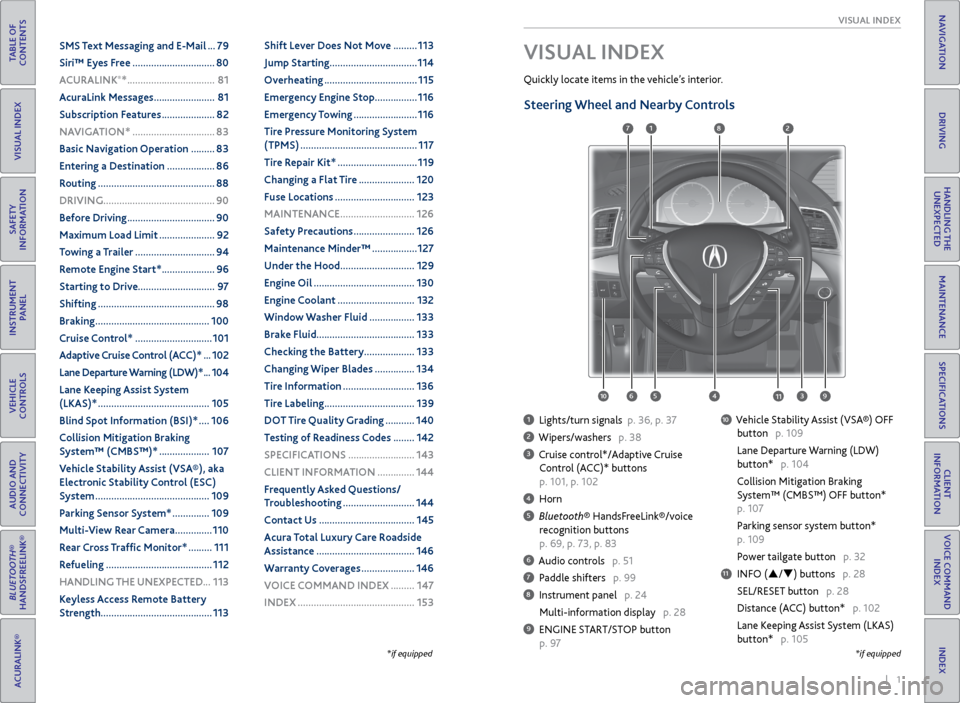
1 Lights/turn signals p. 36, p. 37
2 Wipers/washers p. 38
3 Cruise control*/Adaptive Cruise
Control (ACC)* buttons
p. 101, p. 102
4 Horn
5 Bluetooth® HandsFreeLink®/voice
recognition buttons
p. 69, p. 73, p. 83
6 Audio controls p. 51
7 Paddle shifters p. 99
8 Instrument panel p. 24
Multi-information display p. 28
9 ENGINE START/STOP button
p. 97
10 Vehicle Stability Assist (VSA®) OFF
button p. 109
Lane Departure Warning (LDW)
button* p. 104
Collision Mitigation Braking
System™ (CMBS™) OFF button*
p. 107
Parking sensor system button*
p. 109
Power tailgate button p. 32
11 INFO (p/q) buttons p. 28
SEL/RESET button p. 28
Distance (ACC) button* p. 102
Lane Keeping Assist System (LKAS)
button* p. 105
VISUAL INDEX
Quickly locate items in the vehicle’s interior.
*if equipped
Steering Wheel and Nearby Controls
*if equipped
1
3495
782
11106
SMS Text Messaging and E-Mail ... 79
Siri™ Eyes Free ............................... 80
A CURALINK
®* ................................. 81
AcuraLink Messages ....................... 81
Subscription Features .................... 82
NAVIGATION* ............................... 83
Basic Navigation Operation ......... 83
Entering a Destination .................. 86
Routing ............................................ 88
DRIVING .......................................... 90
Before Driving ................................. 90
Maximum Load Limit ..................... 92
Towing a Trailer .............................. 94
Remote Engine Start* .................... 96
Starting to Drive ............................. 97
Shifting ............................................ 98
Braking ........................................... 100
Cruise Control* ............................. 101
Adaptive Cruise Control (ACC)* ... 102
Lane Departure Warning (LDW)* ... 104
Lane Keeping Assist System
(LKAS)* .......................................... 105
Blind Spot Information (BSI)* .... 106
Collision Mitigation Braking
System™ (CMBS™)* ................... 107
Vehicle Stability Assist (VSA®), aka
Electronic Stability Control (ESC)
System ........................................... 109
Parking Sensor System* .............. 109
Multi-View Rear Camera .............. 110
Rear Cross Traffic Monitor* ......... 111
Refueling ........................................ 112
HANDLING THE UNEXPECTED ...113
Keyless Access Remote Battery
Strength .......................................... 113Shift Lever Does Not Move .........
113
Jump Starting ................................. 114
Overheating ................................... 115
Emergency Engine Stop ................ 116
Emergency Towing ........................ 116
Tire Pressure Monitoring System
(TPMS) ............................................ 117
Tire Repair Kit* .............................. 119
Changing a Flat Tire ..................... 120
Fuse Locations .............................. 123
MAINTENANCE ............................ 126
Safety Precautions ....................... 126
Maintenance Minder™ ................. 127
Under the Hood ............................ 129
Engine Oil ...................................... 130
Engine Coolant ............................. 132
Window Washer Fluid ................. 133
Brake Fluid ..................................... 133
Checking the Battery ................... 133
Changing Wiper Blades ............... 134
Tire Information ........................... 136
Tire Labeling .................................. 139
DOT Tire Quality Grading ........... 140
Testing of Readiness Codes ........ 142
SPECIFICATIONS ......................... 143
CLIENT INFORMATION .............. 144
Frequently Asked Questions/
Troubleshooting ........................... 144
Contact Us .................................... 145
Acura Total Luxury Care Roadside
Assistance ..................................... 146
Warranty Coverages .................... 146
V OICE COMMAND INDEX ......... 147
INDEX ............................................ 153
Page 16 of 81
24 || 25
INSTRUMENT P
ANEL
INSTRUMENT P ANEL
TABLE OF
CONTENTS
INDEX
VISUAL INDEX
VOICE COMMAND INDEX
SAFETY
INFORMATION
CLIENT
INFORMATION
INSTRUMENT PANEL
SPECIFICATIONS
VEHICLE
CONTROLS
MAINTENANCE
AUDIO AND
CONNECTIVITY
HANDLING THE UNEXPECTED
BLUETOOTH®
HANDSFREELINK®
DRIVING
ACURALINK®
NAVIGATION
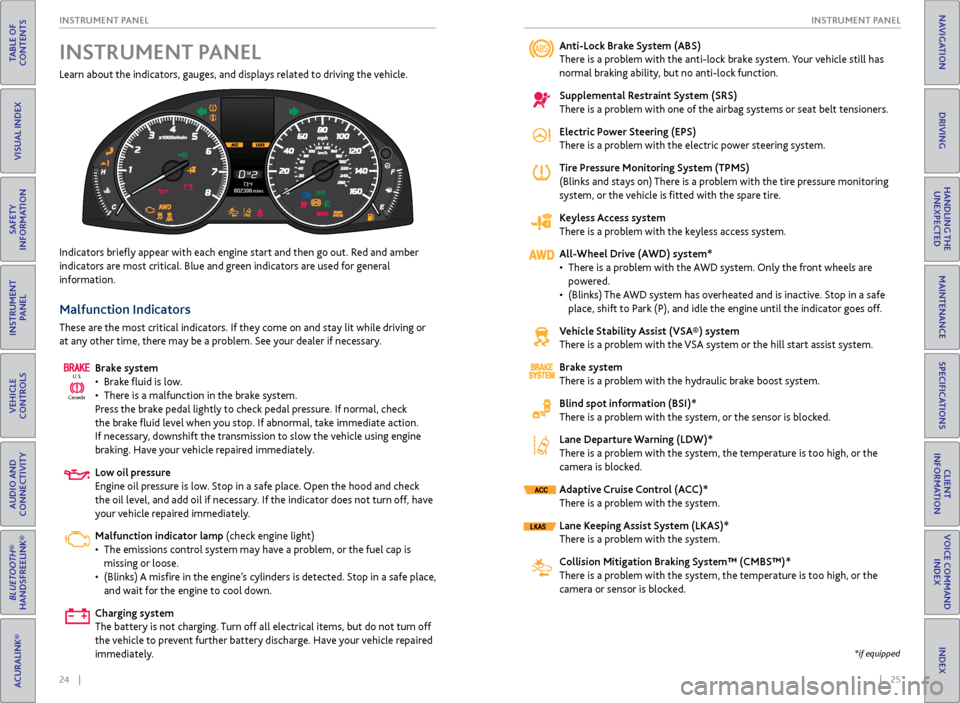
Learn about the indicators, gauges, and displays related to driving the vehicle.
Indicators briefly appear with each engine start and then go out. Red and amber
indicators are most critical. Blue and green indicators are used for general
information.
Malfunction Indicators
These are the most critical indicators. If they come on and stay lit while driving or
at any other time, there may be a problem. See your dealer if necessary.
Brake system
• Brake fluid is low.
• There is a malfunction in the brake system.
Press the brake pedal lightly to check pedal pressure. If normal, check
the brake fluid level when you stop. If abnormal, take immediate action.
If necessary, downshift the transmission to slow the vehicle using engine
braking. Have your vehicle repaired immediately.
Low oil pressure
Engine oil pressure is low. Stop in a safe place. Open the hood and check
the oil level, and add oil if necessary. If the indicator does not turn off, have
your vehicle repaired immediately.
Malfunction indicator lamp (check engine light)
• The emissions control system may have a problem, or the fuel cap is
missing or loose.
• (Blinks) A misfire in the engine’s cylinders is detected. Stop in a safe place,
and wait for the engine to cool down.
Charging system
The battery is not charging. Turn off all electrical items, but do not turn off
the vehicle to prevent further battery discharge. Have your vehicle repaired
immediately.
Canada U.S.
INSTRUMENT P
ANELAnti-Lock Brake System (ABS)
There is a problem with the anti-lock brake system. Your vehicle still has
normal braking ability, but no anti-lock function.
Supplemental Restraint System (SRS)
There is a problem with one of the airbag systems or seat belt tensioners.
Electric Power Steering (EPS)
There is a problem with the electric power steering system.
Tire Pressure Monitoring System (TPMS)
(Blinks and stays on) There is a problem with the tire pressure monitoring
system, or the vehicle is fitted with the spare tire.
Keyless Access system
There is a problem with the keyless access system.
All-Wheel Drive (AWD) system*
• There is a problem with the AWD system. Only the front wheels are
powered.
• (Blinks) The AWD system has overheated and is inactive. Stop in a safe
place, shift to Park (P), and idle the engine until the indicator goes off.
Vehicle Stability Assist (VSA®) system
There is a problem with the VSA system or the hill start assist system.
Brake system
There is a problem with the hydraulic brake boost system.
Blind spot information (BSI)*
There is a problem with the system, or the sensor is blocked.
Lane Departure Warning (LDW)*
There is a problem with the system, the temperature is too high, or the
camera is blocked.
Adaptive Cruise Control (ACC)*
There is a problem with the system.
Lane Keeping Assist System (LKAS)*
There is a problem with the system.
Collision Mitigation Braking System™ (CMBS™)*
There is a problem with the system, the temperature is too high, or the
camera or sensor is blocked.
*if equipped
Page 17 of 81
26 || 27
INSTRUMENT P
ANEL
INSTRUMENT P ANEL
TABLE OF
CONTENTS
INDEX
VISUAL INDEX
VOICE COMMAND INDEX
SAFETY
INFORMATION
CLIENT
INFORMATION
INSTRUMENT PANEL
SPECIFICATIONS
VEHICLE
CONTROLS
MAINTENANCE
AUDIO AND
CONNECTIVITY
HANDLING THE UNEXPECTED
BLUETOOTH®
HANDSFREELINK®
DRIVING
ACURALINK®
NAVIGATION
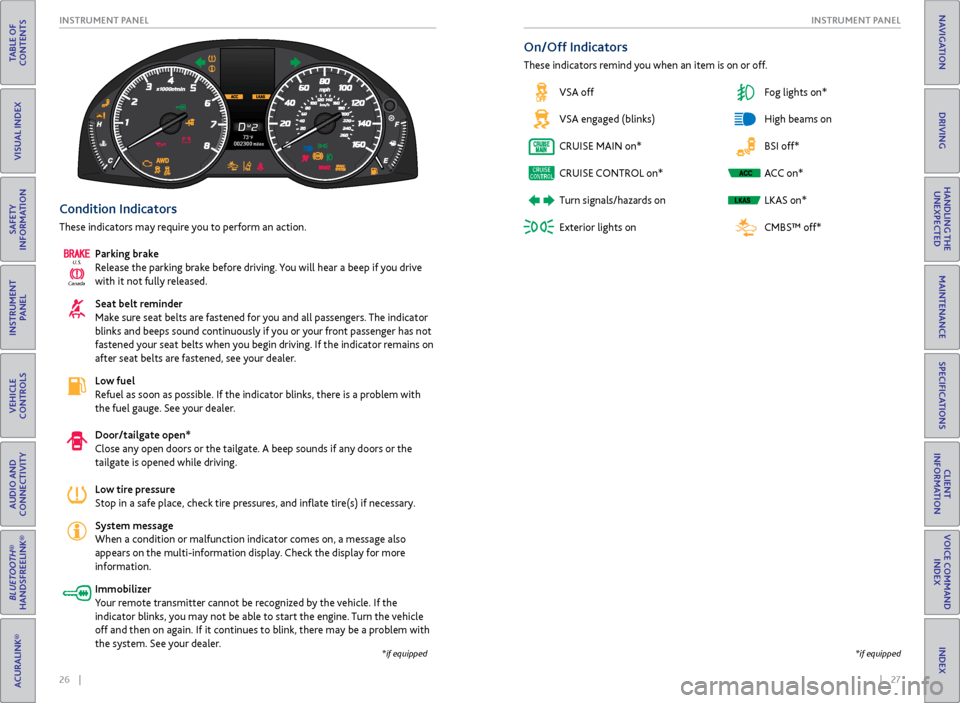
Condition Indicators
These indicators may require you to perform an action.
Parking brake
Release the parking brake before driving. You will hear a beep if you drive
with it not fully released.
Seat belt reminder
Make sure seat belts are fastened for you and all passengers. The indicator
blinks and beeps sound continuously if you or your front passenger has not
fastened your seat belts when you begin driving. If the indicator remains on
after seat belts are fastened, see your dealer.
Low fuel
Refuel as soon as possible. If the indicator blinks, there is a problem with
the fuel gauge. See your dealer.
Door/tailgate open*
Close any open doors or the tailgate. A beep sounds if any doors or the
tailgate is opened while driving.
Low tire pressure
Stop in a safe place, check tire pressures, and inflate tire(s) if necessary.
System message
When a condition or malfunction indicator comes on, a message also
appears on the multi-information display. Check the display for more
information.
Immobilizer
Your remote transmitter cannot be recognized by the vehicle. If the
indicator blinks, you may not be able to start the engine. Turn the vehicle
off and then on again. If it continues to blink, there may be a problem with
the system. See your dealer.
Canada U.S.
*if equipped
*if equipped
On/Off Indicators
These indicators remind you when an item is on or off.
VSA off
VSA engaged (blinks)
CRUISE MAIN on*
CRUISE CONTROL on*
Turn signals/hazards on
Exterior lights on Fog lights on*
High beams on
BSI off*
ACC on*
LKAS on*
CMBS™ off*
Page 18 of 81

28 || 29
INSTRUMENT P
ANEL
INSTRUMENT P ANEL
TABLE OF
CONTENTS
INDEX
VISUAL INDEX
VOICE COMMAND INDEX
SAFETY
INFORMATION
CLIENT
INFORMATION
INSTRUMENT PANEL
SPECIFICATIONS
VEHICLE
CONTROLS
MAINTENANCE
AUDIO AND
CONNECTIVITY
HANDLING THE UNEXPECTED
BLUETOOTH®
HANDSFREELINK®
DRIVING
ACURALINK®
NAVIGATION
Multi-Information Display
Consists of several displays that provide you with useful information.
Main Displays
Odometer,
Outside temperature Trip A,
Outside temperature Trip B,
Outside temperature
Lower Displays
Models with black-and-white display
Main Displays
Odometer,
Outside temperature Trip A,
Outside temperature Trip B,
Outside temperature
Lower Displays
Models with color display
Main display
Vehicle settings Average/instant
fuel economy
Tire pressure for each tire Range
Engine oil lifeElapsed time Turn-by-turn directions*Average speed
Compass*
Main display
Vehicle settings Average/instant
fuel economy
Engine oil life Range
Tire pressure for each tire Elapsed time
Average speed
SEL/RESET button: Scroll
through lower displays. Info (p/q) buttons:
Scroll through upper
displays.
Vehicle Settings
Use the MID to customize certain vehicle features when the vehicle is in Park (P).
You can also use the SETTINGS button* (see page 48).
An example of how to change the Trip A reset timing setting is below. Use the
Info and SEL/RESET buttons to make and enter selections.
1. Scroll to the Vehicle Settings menu and select it.
2. Scroll to Meter Setup and select it.
3. Scroll to “Trip A” Reset Timing and select it.
4. Scroll through the options, and select the one you want.
5. Scroll to Exit, and select it to exit the menus.
*if equipped
Page 62 of 81

116 || 117
HANDLING THE UNEXPECTED
HANDLING THE UNEXPECTED
TABLE OF
CONTENTS
INDEX
VISUAL INDEX
VOICE COMMAND INDEX
SAFETY
INFORMATION
CLIENT
INFORMATION
INSTRUMENT PANEL
SPECIFICATIONS
VEHICLE
CONTROLS
MAINTENANCE
AUDIO AND
CONNECTIVITY
HANDLING THE UNEXPECTED
BLUETOOTH®
HANDSFREELINK®
DRIVING
ACURALINK®
NAVIGATION
Emergency Engine Stop
The ENGINE START/STOP button may be used to stop the engine due to an
emergency situation even while driving. If you must stop the engine, choose one of
the following operations:
• Press and hold the ENGINE START/STOP button for
two seconds, OR
• Firmly press the ENGINE START/STOP button two
times.
The steering wheel will not lock. The power mode changes to ACCESSORY, unless
the shift lever is in Park (P), in which case the power mode changes to VEHICLE OFF.
Because turning off the engine also disables the power assist the engine provides to
the steering and braking systems, it will require significantly more physical effort
and time to steer and slow the vehicle. Downshift gears and use both feet on the
brake pedal, if necessary, to slow the vehicle and stop immediately in a safe place.
Emergency Towing
Call a professional towing service if you need to tow your vehicle.
All models
Flat bed equipment: The operator loads your vehicle on the back of a truck. This is
the best way to transport your vehicle.
2WD models
Wheel lift equipment: The tow truck uses two pivoting arms that go under the front
tires and lift them off the ground. The rear tires remain on the ground. This is an
acceptable way to tow your vehicle.
Trying to lift or tow your vehicle by the bumpers will cause serious damage. The
bumpers are not designed to support the vehicle’s weight.
Improper towing such as towing behind a motorhome or other motor vehicle can
damage the transmission.
NOTICE
Do not press the button while driving unless it is absolutely necessary for the
engine to be switched off.
NOTICE
Tire Pressure Monitoring System (TPMS)
Monitors the tire pressure while you are driving.
If your vehicle’s tire pressure becomes significantly low, the low tire pressure
indicator comes on and a message appears on the multi-information display. Press
the Info button on the steering wheel to view the tire pressure monitor to see
pressure readings for each tire (see page 28).
Driving on an extremely underinflated tire can cause it to overheat. An
overheated tire can fail. Always inflate your tires to the specified pressure.
NOTICE
What to Do
Stop your vehicle in a safe place. Check the tire pressure and adjust the pressure
to the specified level. The specified tire pressure is on a label on the driver’s
doorjamb.
The specific tire
with low pressure is
displayed.
Page 63 of 81

118 || 119
HANDLING THE UNEXPECTED
HANDLING THE UNEXPECTED
TABLE OF
CONTENTS
INDEX
VISUAL INDEX
VOICE COMMAND INDEX
SAFETY
INFORMATION
CLIENT
INFORMATION
INSTRUMENT PANEL
SPECIFICATIONS
VEHICLE
CONTROLS
MAINTENANCE
AUDIO AND
CONNECTIVITY
HANDLING THE UNEXPECTED
BLUETOOTH®
HANDSFREELINK®
DRIVING
ACURALINK®
NAVIGATION
Tire Pressure Monitoring System (TPMS) - Required Federal
Explanation
Each tire, including the spare (if provided), should be checked monthly
when cold and inflated to the inflation pressure recommended by the
vehicle manufacturer on the vehicle placard or tire inflation pressure
label.
(If your vehicle has tires of a different size than the size indicated on the
vehicle placard or tire inflation pressure label, you should determine the
proper tire inflation pressure for those tires.)
As an added safety feature, your vehicle has been equipped with a tire
pressure monitoring system (TPMS) that illuminates a low tire
pressure telltale when one or more of your tires is significantly
under-inflated.
Accordingly, when the low tire pressure telltale illuminates, you should
stop and check your tires as soon as possible, and inflate them to the
proper pressure.
Driving on a significantly under-inflated tire causes the tire to overheat
and can lead to tire failure. Under-inflation also reduces fuel efficiency
and tire tread life, and may affect the vehicle’s handling and stopping
ability.
Please note that the TPMS is not a substitute for proper tire
maintenance, and it is the driver’s responsibility to maintain correct
tire pressure, even if under-inflation has not reached the level to trigger
illumination of the TPMS low tire pressure telltale.
Your vehicle has also been equipped with a TPMS malfunction indicator
to indicate when the system is not operating properly. The TPMS
malfunction indicator is combined with the low tire pressure telltale.
When the system detects a malfunction, the telltale will flash for
approximately one minute and then remain continuously illuminated.
This sequence will continue upon subsequent vehicle start-ups as long as
the malfunction exists.
When the malfunction indicator is illuminated, the system may not be
able to detect or signal low tire pressure as intended.
TPMS malfunctions may occur for a variety of reasons, including the
installation of replacement or alternate tires or wheels on the vehicle
that prevent the TPMS from functioning properly.
Always check the TPMS malfunction telltale after replacing one or
more tires or wheels on your vehicle to ensure that the replacement
or alternate tires and wheels allow the TPMS to continue to function
properly.Tire Repair Kit*
If a tire has a small puncture, you can use the tire repair kit to temporarily repair it.
The puncture must be smaller than 3/16-inch (4 mm) and not in the tire sidewall.
Go to a dealer to have the full-size tire permanently repaired or replaced.
Before Repairing the Tire
1. Park the vehicle on firm, level, non-slippery surface.
2. Make sure the vehicle is in Park (P), and apply the parking brake.
3. Turn on the hazard warning lights, and turn the vehicle off.
Getting Ready to Repair the Tire
1. Open the cargo area floor lid.
2. Take the kit out of the tool box.
3. Place the kit face up on flat ground near the
punctured tire and away from traffic. Do not
place the kit on its side.
4. Follow the instructions in the kit to repair the
tire.
Do not use an unapproved puncture-repairing agent other than the one provided
in the kit that came with your vehicle. If a different agent is used, you may
permanently damage the tire pressure sensor.
NOTICE
Floor lid
Tire repair kit
*if equipped
Page 65 of 81
122 || 123
HANDLING THE UNEXPECTED
HANDLING THE UNEXPECTED
TABLE OF
CONTENTS
INDEX
VISUAL INDEX
VOICE COMMAND INDEX
SAFETY
INFORMATION
CLIENT
INFORMATION
INSTRUMENT PANEL
SPECIFICATIONS
VEHICLE
CONTROLS
MAINTENANCE
AUDIO AND
CONNECTIVITY
HANDLING THE UNEXPECTED
BLUETOOTH®
HANDSFREELINK®
DRIVING
ACURALINK®
NAVIGATION
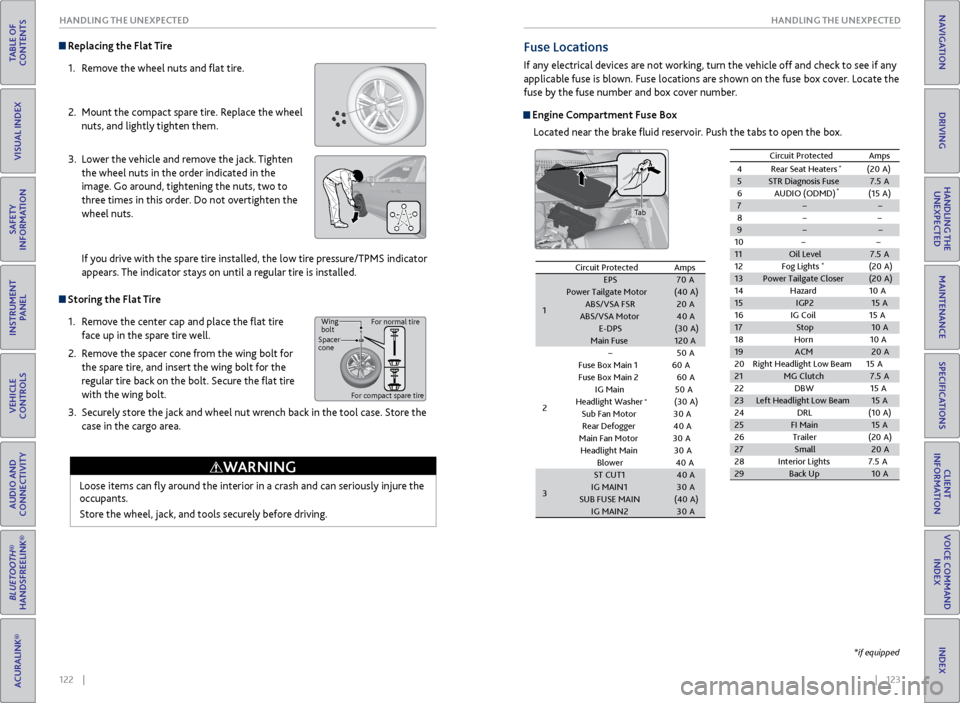
Replacing the Flat Tire
1. Remove the wheel nuts and flat tire.
2. Mount the compact spare tire. Replace the wheel
nuts, and lightly tighten them.
3. Lower the vehicle and remove the jack. Tighten
the wheel nuts in the order indicated in the
image. Go around, tightening the nuts, two to
three times in this order. Do not overtighten the
wheel nuts.
If you drive with the spare tire installed, the low tire pressure/TPMS indicator
appears. The indicator stays on until a regular tire is installed.
Storing the Flat Tire
1. Remove the center cap and place the flat tire
face up in the spare tire well.
2. Remove the spacer cone from the wing bolt for
the spare tire, and insert the wing bolt for the
regular tire back on the bolt. Secure the flat tire
with the wing bolt.
3. Securely store the jack and wheel nut wrench back in the tool case. Store the
case in the cargo area.
Loose items can fly around the interior in a crash and can seriously injure the
occupants.
Store the wheel, jack, and tools securely before driving.
WARNING
Wing
bolt
Spacer
cone For normal tire
For compact spare tire
Fuse Locations
If any electrical devices are not working, turn the vehicle off and check to see if any
applicable fuse is blown. Fuse locations are shown on the fuse box cover. Locate the
fuse by the fuse number and box cover number.
Engine Compartment Fuse Box Located near the brake fluid reservoir. Push the tabs to open the box.
Circuit ProtectedAmps
1
EPS70APower Tailgate Motor(40 A)ABS/VSA FS R20AABS/VSA Moto r40AE-DPS(30A )Main Fuse120A
2
50 A
Fuse Box Main 160AFuse Box Main 260A
IG Main 50A
Headlight Washer(30 A)
Sub Fan Motor30A
Rear Defogger 40A
Main Fan Moto
r30A
Headlight Main 30A
Blowe
r40A
3
ST CUT140 AIG MAIN130ASUB FUSE MAIN(40 A)IG MAIN230A
4R ear Seat Heaters (20A )
5 STR Diagnosis Fus e7.5A
6A UDIO (ODMD) (15A)
7
8
9
10
11 Oil Level 7.5A
12 Fog Lights
*(20A )
13 Power Tailgate Closer (20A )
14 Hazard 10A
15 IGP2 15A
16 IG Coil 15A
17 Stop 10A
18 Horn1 0A
19 ACM 20A
20 Right Headlight Low Bea m15A
21 MG Clutch 7.5A
22 DBW1 5A
23 Left Headlight Low Beam 15A
24 DRL (10A )
25 FI Main 15A
26 Trailer (20A )
27 Small 20A
28 Interior Lights 7.5A
29 Back Up 10A
Circuit Protecte
dAmps
*
*
*
Circuit Protected Amps
1 EPS
70A
Power Tailgate Motor (40A)
ABS/VSA FS R 20A
ABS/VSA Moto r40A
E-DPS (30A)
Main Fuse 120A
2
50A
Fuse Box Main 160A
Fuse Box Main 260A
IG Main 50A
Headlight Washer (30A)
Sub Fan Moto r30A
Rear Defogger 40A
Main Fan Moto r30A
Headlight Main 30A
Blowe r4 0A
3 ST CUT1
40A
IG MAIN1 30A
SUB FUSE MAIN (40A)
IG MAIN2 30A
4R ear Seat Heaters (20A )5STR Diagnosis Fus e7.5A
6A UDIO (ODMD) (15A)
7
8
9
1011Oil Level7.5A
12 Fog Lights*(20A )13Power Tailgate Closer(20A )
14 Hazard 10A
15IGP215A
16 IG Coil 15A
17Stop10 A
18 Horn10A19ACM20A
20 Right Headlight Low Bea m15A
21MG Clutch7.5A
22 DBW15A23Left Headlight Low Beam15A
24 DRL (10A )
25FI Main15A
26 Trailer (20A )
27Small20A
28 Interior Lights 7.5A
29Back Up10A
Circuit Protecte dAmps
*
*
*
*if equipped
Tab
Page 70 of 81
132 || 133
MAINTENANCE
MAINTENANCE
TABLE OF
CONTENTS
INDEX
VISUAL INDEX
VOICE COMMAND INDEX
SAFETY
INFORMATION
CLIENT
INFORMATION
INSTRUMENT PANEL
SPECIFICATIONS
VEHICLE
CONTROLS
MAINTENANCE
AUDIO AND
CONNECTIVITY
HANDLING THE UNEXPECTED
BLUETOOTH®
HANDSFREELINK®
DRIVING
ACURALINK®
NAVIGATION
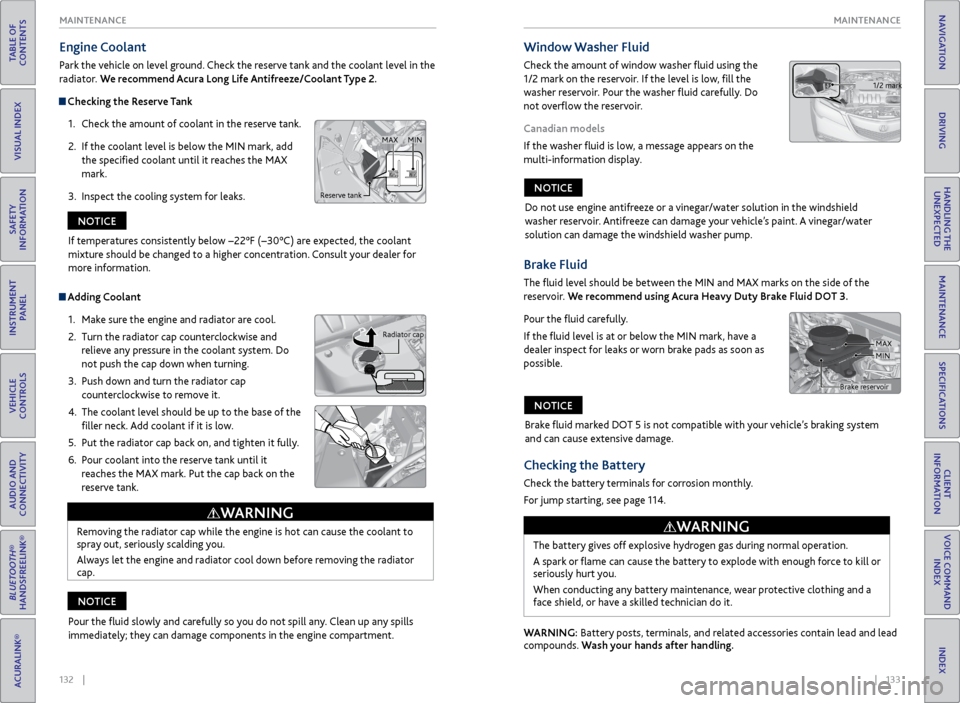
Engine Coolant
Park the vehicle on level ground. Check the reserve tank and the coolant level in the
radiator. We recommend Acura Long Life Antifreeze/Coolant Type 2.
Checking the Reserve Tank
1. Check the amount of coolant in the reserve tank.
2. If the coolant level is below the MIN mark, add
the specified coolant until it reaches the MAX
mark.
3. Inspect the cooling system for leaks.
Adding Coolant
1. Make sure the engine and radiator are cool.
2. Turn the radiator cap counterclockwise and
relieve any pressure in the coolant system. Do
not push the cap down when turning.
3. Push down and turn the radiator cap
counterclockwise to remove it.
4. The coolant level should be up to the base of the
filler neck. Add coolant if it is low.
5. Put the radiator cap back on, and tighten it fully.
6. Pour coolant into the reserve tank until it
reaches the MAX mark. Put the cap back on the
reserve tank.
Removing the radiator cap while the engine is hot can cause the coolant to
spray out, seriously scalding you.
Always let the engine and radiator cool down before removing the radiator
cap.
WARNING
Reserve tank MAX
MIN
Radiator cap
If temperatures consistently below −22°F (−30°C) are expected, the coolant
mixture should be changed to a higher concentration. Consult your dealer for
more information.
NOTICE
Pour the fluid slowly and carefully so you do not spill any. Clean up any spills
immediately; they can damage components in the engine compartment.
NOTICE
Window Washer Fluid
Check the amount of window washer fluid using the
1/2 mark on the reservoir. If the level is low, fill the
washer reservoir. Pour the washer fluid carefully. Do
not overflow the reservoir.
Canadian models
If the washer fluid is low, a message appears on the
multi-information display.
1/2 mark
Do not use engine antifreeze or a vinegar/water solution in the windshield
washer reservoir. Antifreeze can damage your vehicle’s paint. A vinegar/water
solution can damage the windshield washer pump.
NOTICE
Checking the Battery
Check the battery terminals for corrosion monthly.
For jump starting, see page 114.
The battery gives off explosive hydrogen gas during normal operation.
A spark or flame can cause the battery to explode with enough force to kill or
seriously hurt you.
When conducting any battery maintenance, wear protective clothing and a
face shield, or have a skilled technician do it.
WARNING
WARNING: Battery posts, terminals, and related accessories contain lead and lead
compounds. Wash your hands after handling.
Brake Fluid
The fluid level should be between the MIN and MAX marks on the side of the
reservoir. We recommend using Acura Heavy Duty Brake Fluid DOT 3.
Pour the fluid carefully.
If the fluid level is at or below the MIN mark, have a
dealer inspect for leaks or worn brake pads as soon as
possible.
Brake fluid marked DOT 5 is not compatible with your vehicle’s braking system
and can cause extensive damage.
NOTICE
Brake reservoir MAX
MIN
Page 72 of 81

136 || 137
MAINTENANCE
MAINTENANCE
TABLE OF
CONTENTS
INDEX
VISUAL INDEX
VOICE COMMAND INDEX
SAFETY
INFORMATION
CLIENT
INFORMATION
INSTRUMENT PANEL
SPECIFICATIONS
VEHICLE
CONTROLS
MAINTENANCE
AUDIO AND
CONNECTIVITY
HANDLING THE UNEXPECTED
BLUETOOTH®
HANDSFREELINK®
DRIVING
ACURALINK®
NAVIGATION
Tire Information
To safely operate your vehicle, your tires must be of the proper type and size, in
good condition with adequate tread, and properly inflated.
Inflation Guidelines
• Properly inflated tires provide the best combination of handling, tread life, and
comfort. Refer to the driver’s doorjamb label or the specifications (see page
143) for the specified pressure.
• Underinflated tires wear unevenly, adversely affect handling and fuel economy,
and are more likely to fail from overheating.
• Overinflated tires make your vehicle ride harshly, are more prone to road
hazards, and wear unevenly.
• Every day before you drive, look at each of the tires. If one looks lower than the
others, check the pressure with a tire gauge.
• Measure the air pressure when tires are cold. This means the vehicle has been
parked for at least 3 hours, or driven less than 1 mile (1.6 km). If necessary, add
or release air until the specified pressure is reached. If checked when hot, tire
pressure can be as much as 4-6 psi (30-40 kPa, 0.3-0.5 kgf/cm
2) higher than
checked when cold.
• At least once a month or before long trips, use a gauge to measure the pressure
in all tires, including the spare. Even tires in good condition can lose 1-2 psi
(10-20 kPa, 0.1-0.2 kgf/cm
2) per month.
Inspection Guidelines
Every time you inflate the tires, check for the following:
• Any damage to tires, including bumps, bulges, cuts, splits, or cracks in the side
or tread. Remove any foreign objects and inspect for air leaks. Replace tires if
you see fabric or cord.
• Uneven or excessive tread wear. Have a dealer check the wheel alignment.
• Cracks or other damage around the valve stems.
Wear Indicators
The groove where the wear indicator is located is
1/16 inch (1.6 mm) shallower than elsewhere on the
tire. If the tread has worn so low that the indicator
is exposed, replace the tire. Worn out tires have
poor traction on wet roads.
Example of a wear
indicator mark
Tire and Loading Information Label
The label attached to the driver’s doorjamb provides necessary tire and
loading information. Using
tires that are excessively worn or improperly inflated can cause
a crash in which you can be seriously hurt or killed.
Follow all instructions in this owner’s manual regarding tire inflation
and maintenance.
WARNING
Original
tire sizes Number of
people your
vehicle can carry Proper
cold tire
pressureTotal weight
your vehicle
can carry (do
not exceed)
Tire and Wheel Replacement
Replace your tires with radials of the same size, load range, speed rating, and
maximum cold tire pressure rating (as shown on the tire’s sidewall). Using
tires of a different size or construction can cause certain vehicle systems to
work incorrectly. It is best to replace all four tires at the same time. If that isn’t
possible, replace the front or rear tires in pairs.
If you change or replace a wheel, make sure that the wheel’s specifications match
those of the original wheels. Only use TPMS-specified wheels approved for your
vehicle.
Installing improper tires on your vehicle can affect handling and stability.
This can cause a crash in which you can be seriously hurt or killed.
Always use the size and type of tires recommended in the owner’s manual.
WARNING