cruise Acura RDX 2016 User Guide
[x] Cancel search | Manufacturer: ACURA, Model Year: 2016, Model line: RDX, Model: Acura RDX 2016Pages: 445, PDF Size: 15.25 MB
Page 282 of 445
281
uuWhen Driving uCruise Control*
Driving
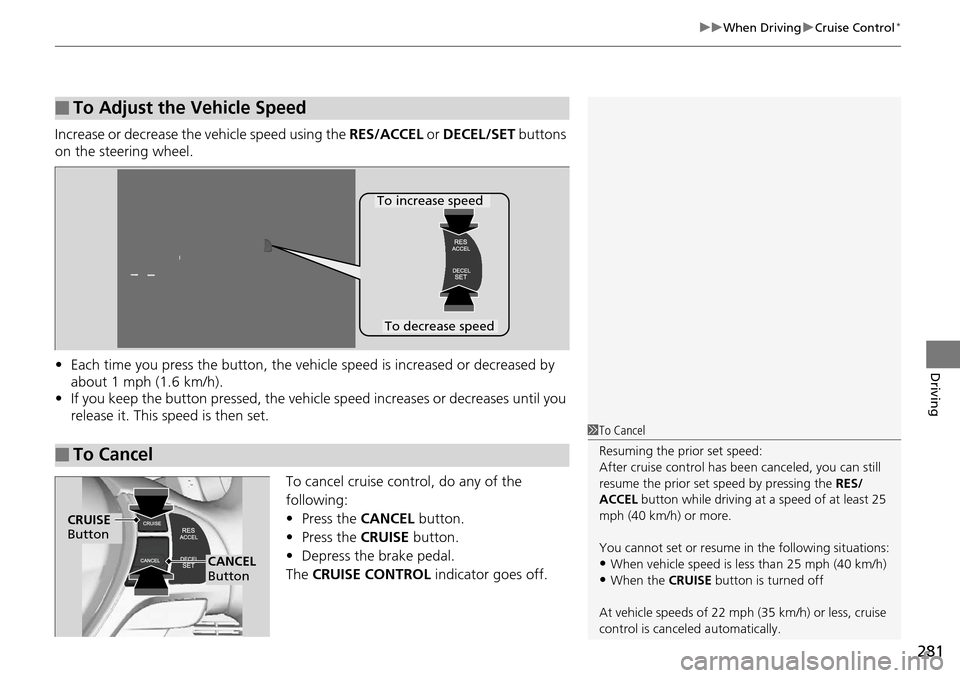
Increase or decrease the vehicle speed using the RES/ACCEL or DECEL/SET buttons
on the steering wheel.
• Each time you press the button, the vehicl e speed is increased or decreased by
about 1 mph (1.6 km/h).
• If you keep the button pressed, the vehicl e speed increases or decreases until you
release it. This speed is then set.
To cancel cruise control, do any of the
following:
•Press the CANCEL button.
• Press the CRUISE button.
• Depress the brake pedal.
The CRUISE CONTROL indicator goes off.
■To Adjust the Vehicle Speed
■To Cancel
To decrease speed
To increase speed
1To Cancel
Resuming the prior set speed:
After cruise control has be en canceled, you can still
resume the prior set speed by pressing the RES/
ACCEL button while driving at a speed of at least 25
mph (40 km/h) or more.
You cannot set or resume in the following situations:
•When vehicle speed is less than 25 mph (40 km/h)
•When the CRUISE button is turned off
At vehicle speeds of 22 m ph (35 km/h) or less, cruise
control is canceled automatically.
CRUISE
Button
CANCEL
Button
Page 285 of 445
284
uuWhen Driving uAdaptive Cruise Control (ACC)*
Driving
Adaptive Cruise Control (ACC)*
Helps maintain a constant vehicle speed and a set following distance behind a
vehicle detected ahead of yours, without you having to keep your foot on the brake
or the accelerator.1 Adaptive Cruise Control (ACC)*
Important Reminder
As with any system, there are limits to ACC. Use the
brake pedal whenever necessary, and always keep a
safe distance between your vehicle and other vehicles.
The radar sensor for ACC is shared with the collision
mitigation braking system
TM (CMBSTM).
2 Collision Mitigation Braking SystemTM
(CMBSTM)* P. 318
You can read about handling information for the
camera equipped with this system. 2 Front Sensor Camera
* P. 282
3WARNING
Improper use of ACC can lead to a crash.
Use ACC only when travelling on open
highways in good weather.
3WARNING
ACC has limited braking capability.
When your vehicle speed drops below
22 mph (35 km/h), ACC will
automatically cancel and no longer will
apply your vehicle’s brakes.
Always be prepared to apply the brake
pedal when conditions require.
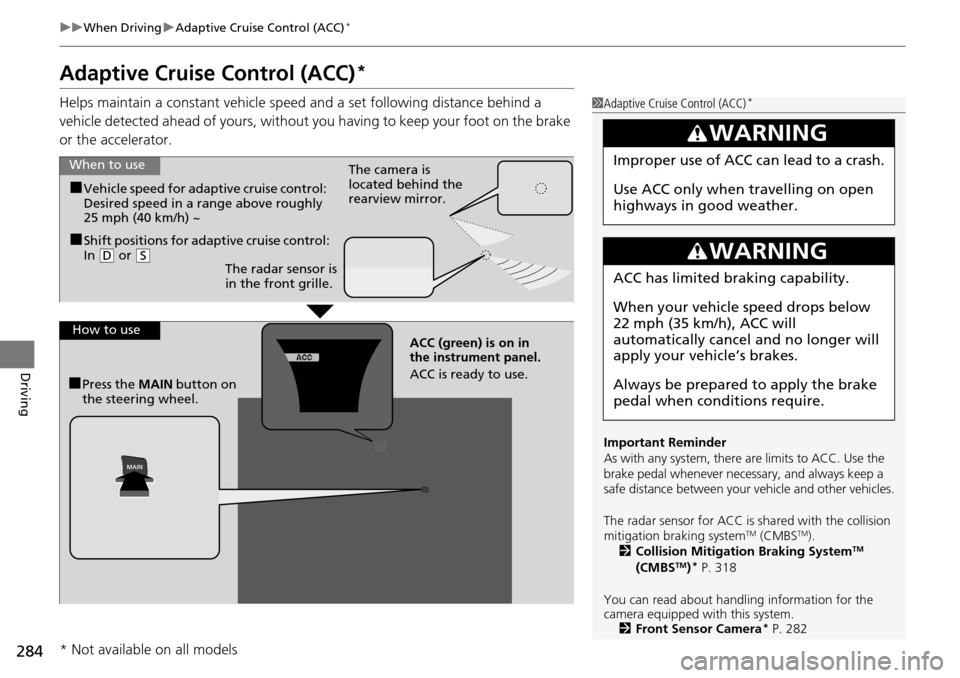
When to use
How to use
■Vehicle speed for adaptive cruise control:
Desired speed in a range above roughly
25 mph (40 km/h) ~ The camera is
located behind the
rearview mirror.
■Shift positions for adaptive cruise control:
In (
D or (S
■Press the MAIN button on
the steering wheel. ACC (green) is on in
the instrument panel.
ACC is ready to use.
The radar sensor is
in the front grille.
* Not available on all models
Page 286 of 445
Continued285
uuWhen Driving uAdaptive Cruise Control (ACC)*
Driving
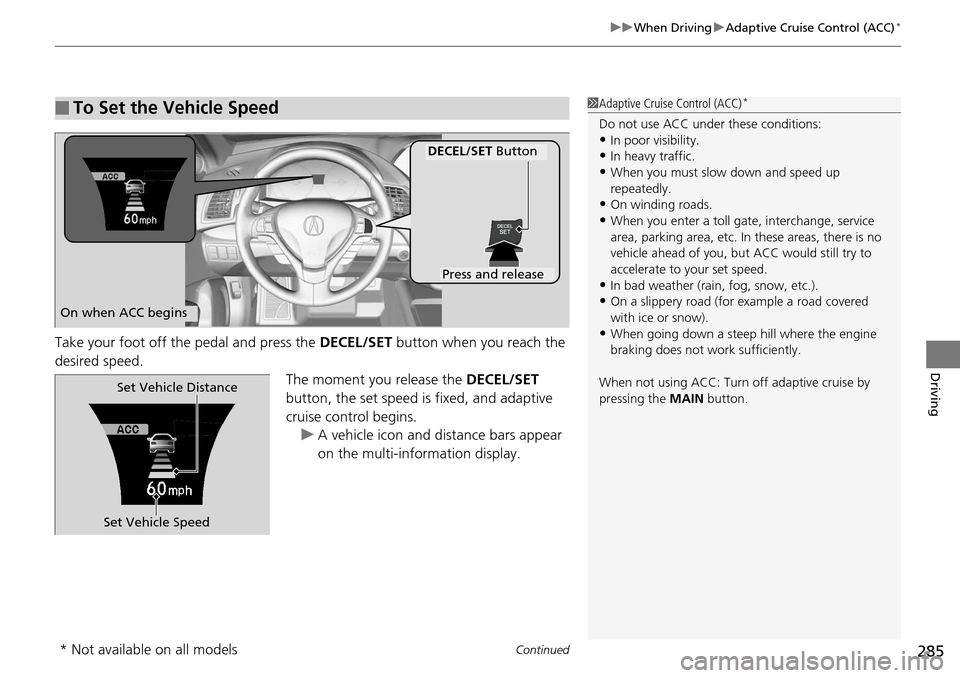
Take your foot off the pedal and press the DECEL/SET button when you reach the
desired speed. The moment you release the DECEL/SET
button, the set speed is fixed, and adaptive
cruise control begins. u A vehicle icon and distance bars appear
on the multi-information display.
■To Set the Vehicle Speed1Adaptive Cruise Control (ACC)*
Do not use ACC under these conditions:•In poor visibility.
•In heavy traffic.
•When you must slow down and speed up
repeatedly.
•On winding roads.
•When you enter a toll gate, interchange, service
area, parking area, etc. In these areas, there is no
vehicle ahead of you, but ACC would still try to
accelerate to your set speed.
•In bad weather (rain, fog, snow, etc.).
•On a slippery road (for example a road covered
with ice or snow).
•When going down a steep hill where the engine
braking does not work sufficiently.
When not using ACC: Turn off adaptive cruise by
pressing the MAIN button.
On when ACC begins
Press and release
DECEL/SET Button
Set Vehicle SpeedSet Vehicle Distance
* Not available on all models
Page 287 of 445
uuWhen Driving uAdaptive Cruise Control (ACC)*
286
Driving
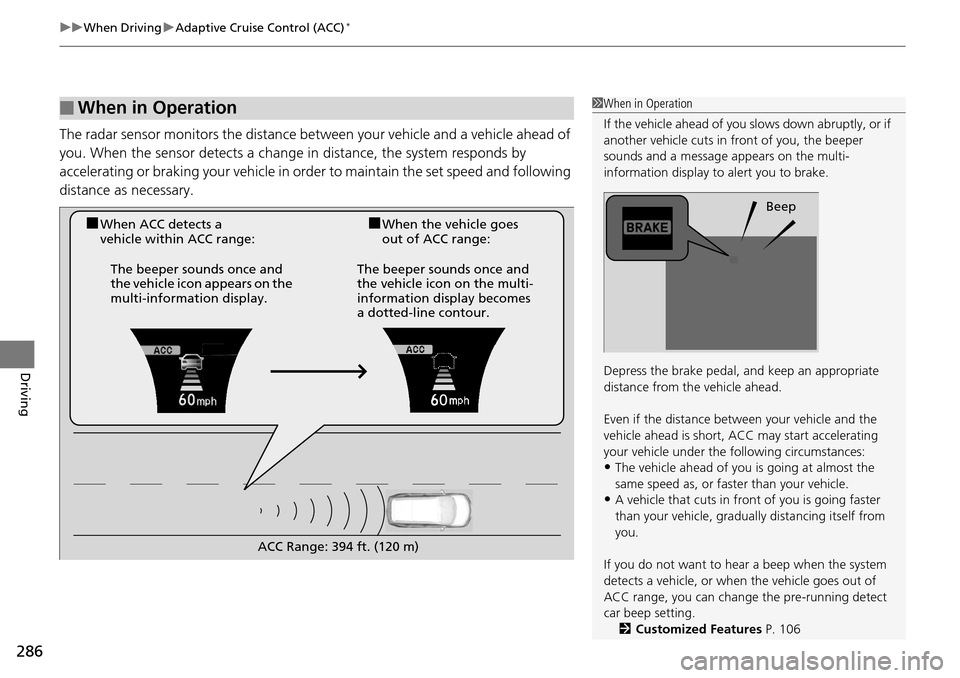
The radar sensor monitors the distance be tween your vehicle and a vehicle ahead of
you. When the sensor detects a change in distance, the system responds by
accelerating or braking your vehicle in orde r to maintain the set speed and following
distance as necessary.
■When in Operation1 When in Operation
If the vehicle ahead of you slows down abruptly, or if
another vehicle cuts in front of you, the beeper
sounds and a message appears on the multi-
information display to alert you to brake.
Depress the brake pedal, and keep an appropriate
distance from the vehicle ahead.
Even if the distance betw een your vehicle and the
vehicle ahead is short, ACC may start accelerating
your vehicle under the following circumstances:
•The vehicle ahead of you is going at almost the
same speed as, or fast er than your vehicle.
•A vehicle that cuts in front of you is going faster
than your vehicle, gradua lly distancing itself from
you.
If you do not want to hear a beep when the system
detects a vehicle, or when the vehicle goes out of
ACC range, you can change the pre-running detect
car beep setting.
2 Customized Features P. 106
Beep
■When ACC detects a
vehicle within ACC range:■When the vehicle goes
out of ACC range:
The beeper sounds once and
the vehicle icon appears on the
multi-information display. The beeper sounds once and
the vehicle icon on the multi-
information display becomes
a dotted-line contour.
ACC Range: 394 ft. (120 m)
Page 288 of 445
Continued287
uuWhen Driving uAdaptive Cruise Control (ACC)*
Driving
■There is no vehicle ahead
Your vehicle cruises at the set speed.
■A vehicle ahead is within ACC range and going slower than the set speed
Your vehicle slows down, and maintains the same speed as the speed of the vehicle
ahead to maintain the set following distance.
■A vehicle ahead is within ACC ra nge and going at a steady speed
Your vehicle follows the vehicle ahead of it, keeping a constant distance, without
going beyond the set speed.
■A vehicle ahead goes out of range
ACC accelerates your vehicle to th e set speed, and then maintains it.
■When you depress the accelerator pedal
You can temporarily increase the vehicle speed . In this case, there is no audible or
visual alerts even if a vehicle is in ACC range.
ACC stays on unless you cancel it. Once you release the accelerator pedal, the
system resumes the set speed.
1 When in Operation
Limitations
Be aware that ACC has limitations. For example, it is
not designed to operate wh en a vehicle ahead of
yours is going slower than 12 mph (20 km/h) or is
parked. Smaller vehicles, such as motorcycles, may
also be difficult for the sy stem to detect depending
on their size.
You must always be prepar ed to use the brake pedal
to maintain a safe distan ce with other vehicles.
ACC may momentarily apply br akes or sound an alert
if there is a vehicle or building adjacent to your
vehicle and:
•You make a sudden turn or are driving on a narrow
road.
•You abruptly move the steering wheel.•Your vehicle is unusuall y positioned within your
lane (e.g., at a slight diag onal to the lane direction).
Page 289 of 445
uuWhen Driving uAdaptive Cruise Control (ACC)*
288
Driving
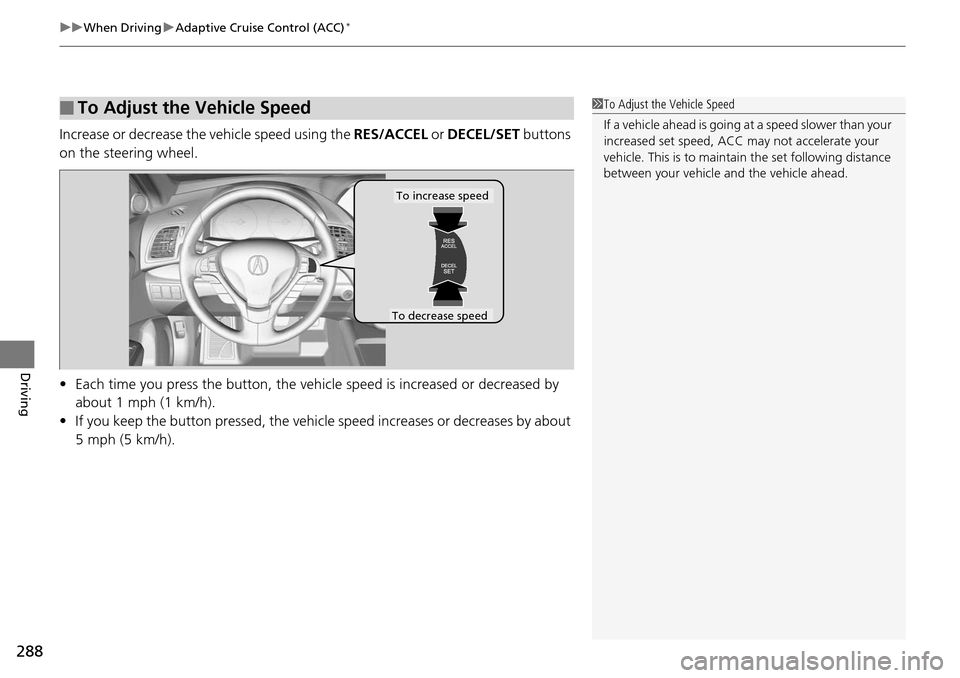
Increase or decrease the vehicle speed using the RES/ACCEL or DECEL/SET buttons
on the steering wheel.
• Each time you press the button, the vehicl e speed is increased or decreased by
about 1 mph (1 km/h).
• If you keep the button pressed, the vehicl e speed increases or decreases by about
5 mph (5 km/h).
■To Adjust the Vehicle Speed1 To Adjust the Vehicle Speed
If a vehicle ahead is going at a speed slower than your
increased set speed, ACC may not accelerate your
vehicle. This is to maintain the set following distance
between your vehicle and the vehicle ahead.
To increase speed
To decrease speed
Page 290 of 445
Continued289
uuWhen Driving uAdaptive Cruise Control (ACC)*
Driving
Press the (distance) button to change ACC
range.
Each time you press th e button, the following
distance (the distance behind a vehicle
detected ahead of you) setting cycles through
short, middle, long, and extra long following
distances.
Determine the most appropriate following
distance setting based on your specific driving
conditions. Be sure to adhere to any following
distance requirements set by local regulation.
■To Change Vehicle Distance1 To Change Vehicle Distance
The driver must in all circumstances preserve a
sufficient brakin g distance from the vehicle which
precedes it and be aware that minimum distances of
spacing can be provided by the provisions of the
Motorway Code locally applicable and that it is the
driver’s responsibility to respect those laws.
Distance Button
Page 291 of 445
290
uuWhen Driving uAdaptive Cruise Control (ACC)*
Driving
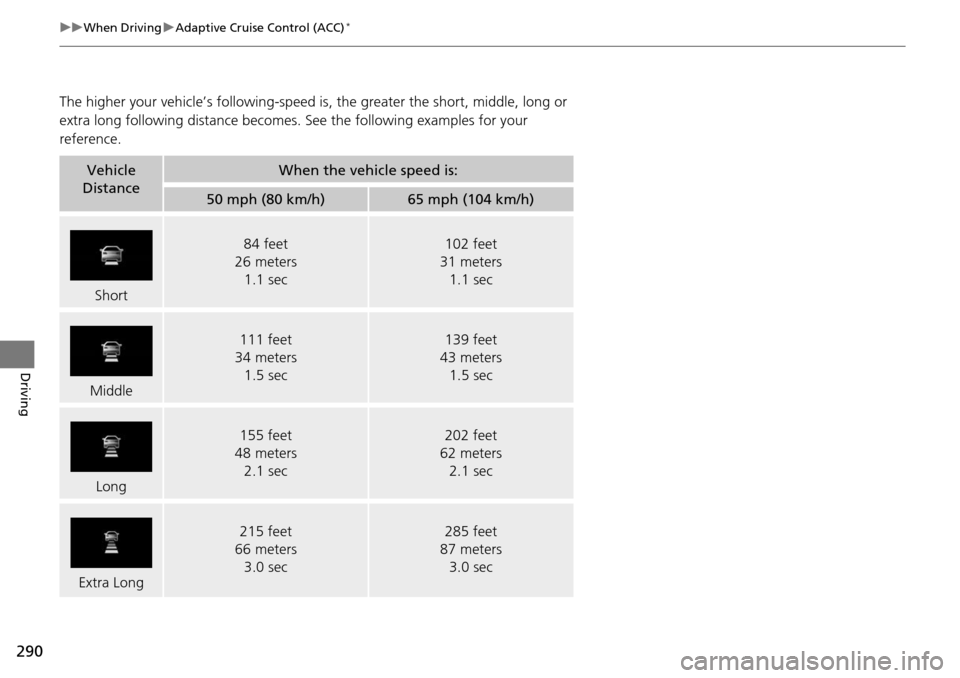
The higher your vehicle’s following-speed is , the greater the short, middle, long or
extra long following distance becomes. See the following examples for your
reference.
Vehicle
DistanceWhen the vehicle speed is:
50 mph (80 km/h)65 mph (104 km/h)
Short
84 feet
26 meters 1.1 sec102 feet
31 meters 1.1 sec
Middle
111 feet
34 meters 1.5 sec139 feet
43 meters 1.5 sec
Long
155 feet
48 meters 2.1 sec202 feet
62 meters 2.1 sec
Extra Long
215 feet
66 meters
3.0 sec285 feet
87 meters
3.0 sec
Page 292 of 445

Continued291
uuWhen Driving uAdaptive Cruise Control (ACC)*
Driving
To cancel ACC, do any of the following:
• Press the CANCEL button.
• Press the MAIN button.
• Depress the brake pedal.
■Automatic ca ncellation
The beeper sounds and a message appears on the multi-information display when
ACC is automatically canceled. Any of these conditions may cause the ACC
cancellation:
• Your vehicle speed slows down to 22 mph (35 km/h) and below.
• Bad weather (rain, fog, snow, etc.).
• When the radar sensor in the front grille gets dirty.
• The vehicle ahead of yo u cannot be detected.
• An abnormal tire condition is de tected, or the tires are skidding.
• Driving on a mountainous road, or driving off road for extended periods.
• Abrupt steering wheel movement.
• When the ABS, VSA ® or CMBS
TM is activated.
• When the ABS or VSA ® indicator comes on.
■To Cancel1To Cancel
Resuming the prior set speed: After you have
canceled adaptive cruise c ontrol, you can resume the
prior set speed while it is still displayed. Press the
RES/ACCEL button when driving at a speed of at
least 25 mph (40 km/h) or more.
You cannot set or resume in the following situations:
•When vehicle speed is less than 25 mph (40 km/h)•When the MAIN button is turned off
1 Automatic cancellation
ACC Off comes on for about three seconds when
ACC has been automatically canceled.
Even though ACC has been automatically canceled,
you can still resume the prior set speed. Wait until the
condition that caused ACC to cancel improves, then
press the DECEL/SET button.
Page 293 of 445
uuWhen Driving uAdaptive Cruise Control (ACC)*
292
Driving
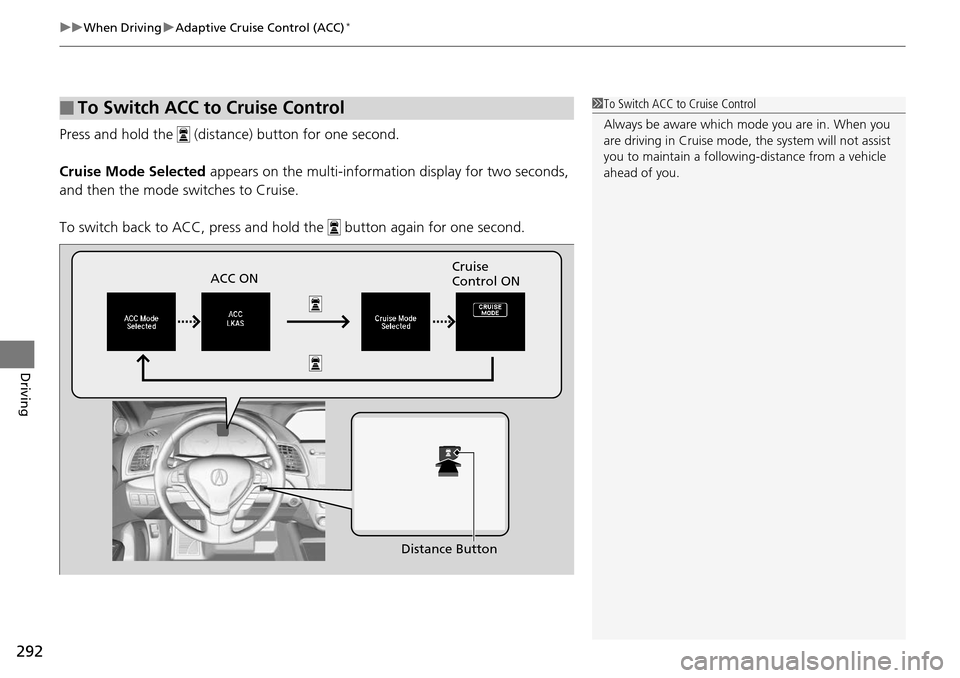
Press and hold the (dista nce) button for one second.
Cruise Mode Selected appears on the multi-information display for two seconds,
and then the mode switches to Cruise.
To switch back to ACC, press and hold the butt on again for one second.
■To Switch ACC to Cruise Control1To Switch ACC to Cruise Control
Always be aware which mode you are in. When you
are driving in Cruise mode, the system will not assist
you to maintain a followi ng-distance from a vehicle
ahead of you.
ACC ON Cruise
Control ON
Distance Button