acc Acura RDX 2016 Owner's Guide
[x] Cancel search | Manufacturer: ACURA, Model Year: 2016, Model line: RDX, Model: Acura RDX 2016Pages: 445, PDF Size: 15.25 MB
Page 69 of 445
68
uuIndicators u
Instrument Panel
*1:On the left: Models without full color display
On the right: Models with full color display
*2:Models with full color display
*3:Models without full color display
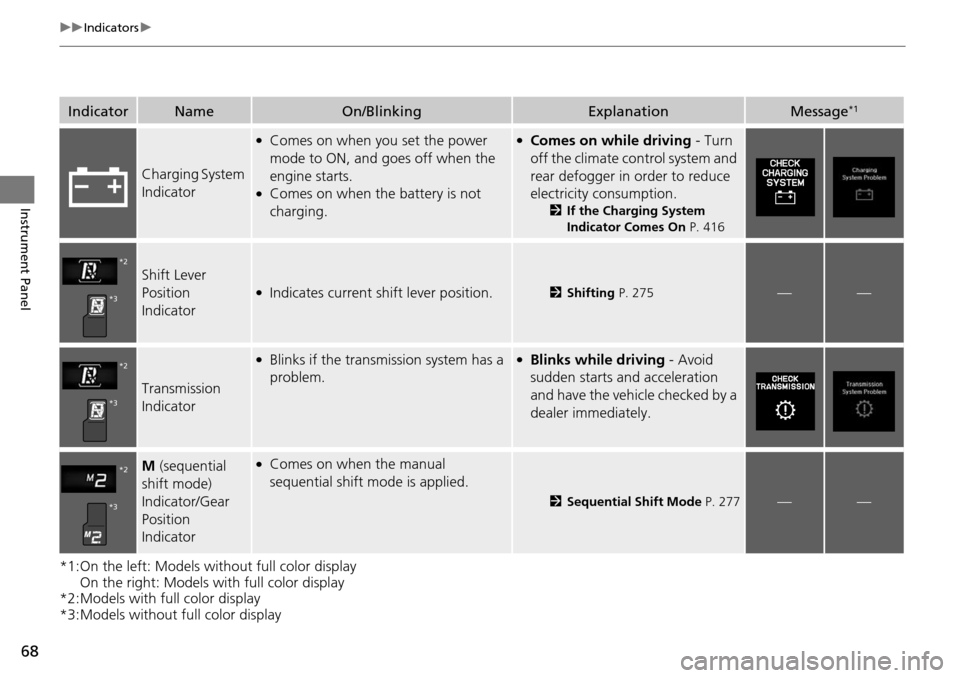
IndicatorNameOn/BlinkingExplanationMessage*1
Charging System
Indicator
●Comes on when you set the power
mode to ON, and goes off when the
engine starts.
●Comes on when the battery is not
charging.
●Comes on while driving - Turn
off the climate control system and
rear defogger in order to reduce
electricity consumption.
2 If the Charging System
Indicator Comes On P. 416
Shift Lever
Position
Indicator●Indicates current shift lever position.2Shifting P. 275——
Transmission
Indicator
●Blinks if the transmission system has a
problem.●Blinks while driving - Avoid
sudden starts and acceleration
and have the vehicle checked by a
dealer immediately.
M (sequential
shift mode)
Indicator/Gear
Position
Indicator●Comes on when the manual
sequential shift mode is applied.
2 Sequential Shift Mode P. 277——
*2
*3
*2
*3
*2
*3
Page 75 of 445
74
uuIndicators u
Instrument Panel
*1:On the left: Models without full color display
On the right: Models with full color display
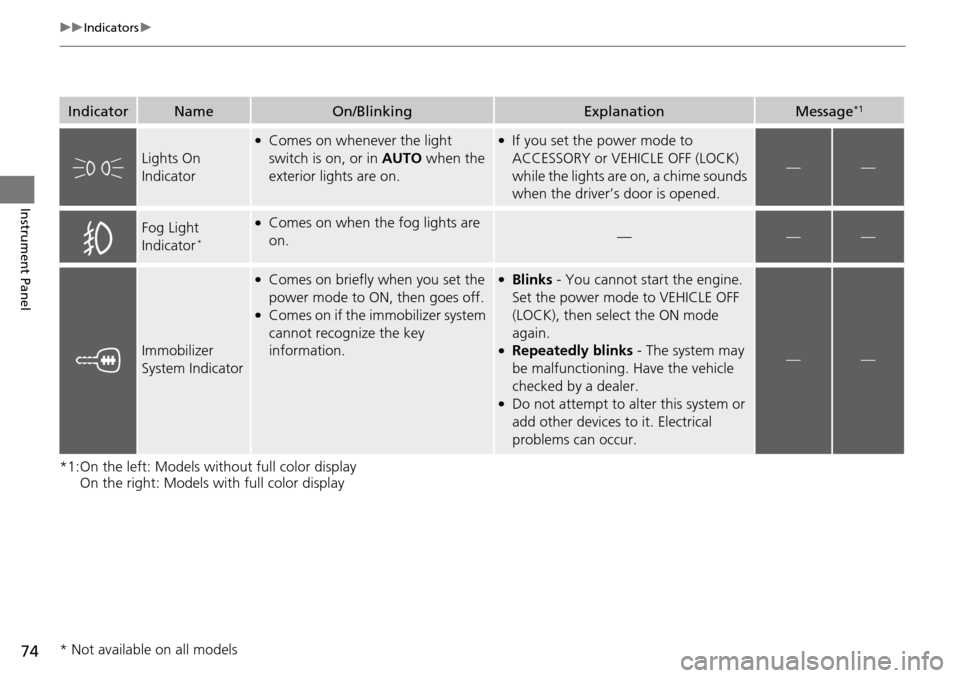
IndicatorNameOn/BlinkingExplanationMessage*1
Lights On
Indicator
●Comes on whenever the light
switch is on, or in AUTO when the
exterior lights are on.●If you set the power mode to
ACCESSORY or VEHICLE OFF (LOCK)
while the lights are on, a chime sounds
when the driver’s door is opened.
——
Fog Light
Indicator*
●Comes on when the fog lights are
on.———
Immobilizer
System Indicator
●Comes on briefly when you set the
power mode to ON, then goes off.
●Comes on if the immobilizer system
cannot recognize the key
information.
●Blinks - You cannot start the engine.
Set the power mode to VEHICLE OFF
(LOCK), then select the ON mode
again.
●Repeatedly blinks - The system may
be malfunctioning. Have the vehicle
checked by a dealer.
●Do not attempt to alter this system or
add other devices to it. Electrical
problems can occur.
——
* Not available on all models
Page 77 of 445
76
uuIndicators u
Instrument Panel
*1:On the left: Models without full color display
On the right: Models with full color display
*2:Models with full color display
*3:Models without full color display
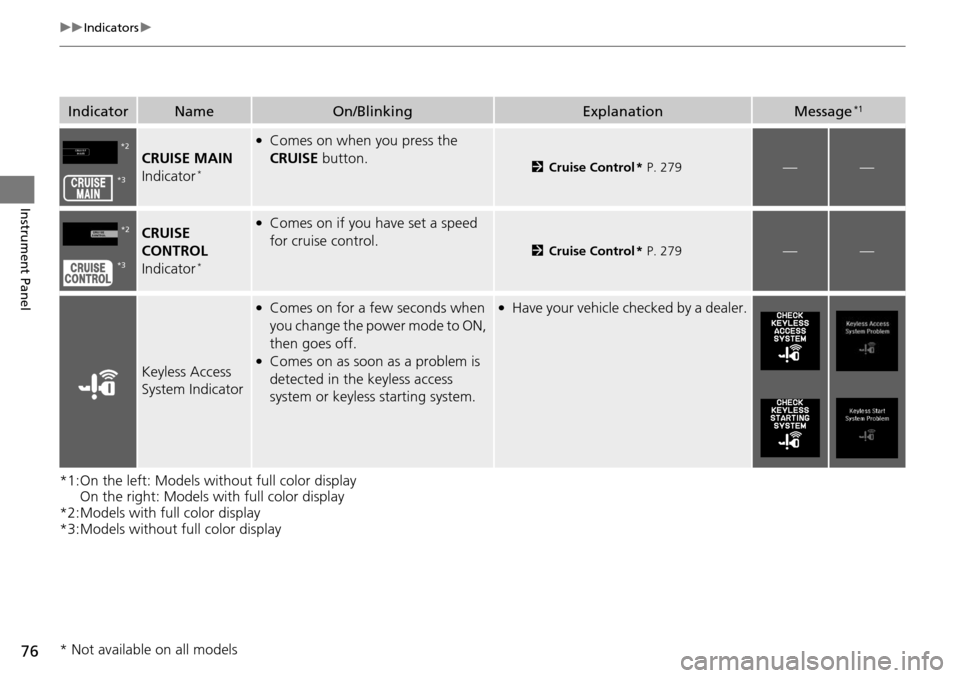
IndicatorNameOn/BlinkingExplanationMessage*1
CRUISE MAIN
Indicator*
●Comes on when you press the
CRUISE button.
2Cruise Control * P. 279——
CRUISE
CONTROL
Indicator
*
●Comes on if you have set a speed
for cruise control.
2 Cruise Control * P. 279——
Keyless Access
System Indicator
●Comes on for a few seconds when
you change the power mode to ON,
then goes off.
●Comes on as soon as a problem is
detected in the keyless access
system or keyless starting system.
●Have your vehicle checked by a dealer.
*2
*3
*2
*3
* Not available on all models
Page 78 of 445
77
uuIndicators u
Continued
Instrument Panel
*1:On the left: Models wi thout full color display
On the right: Models with full color display
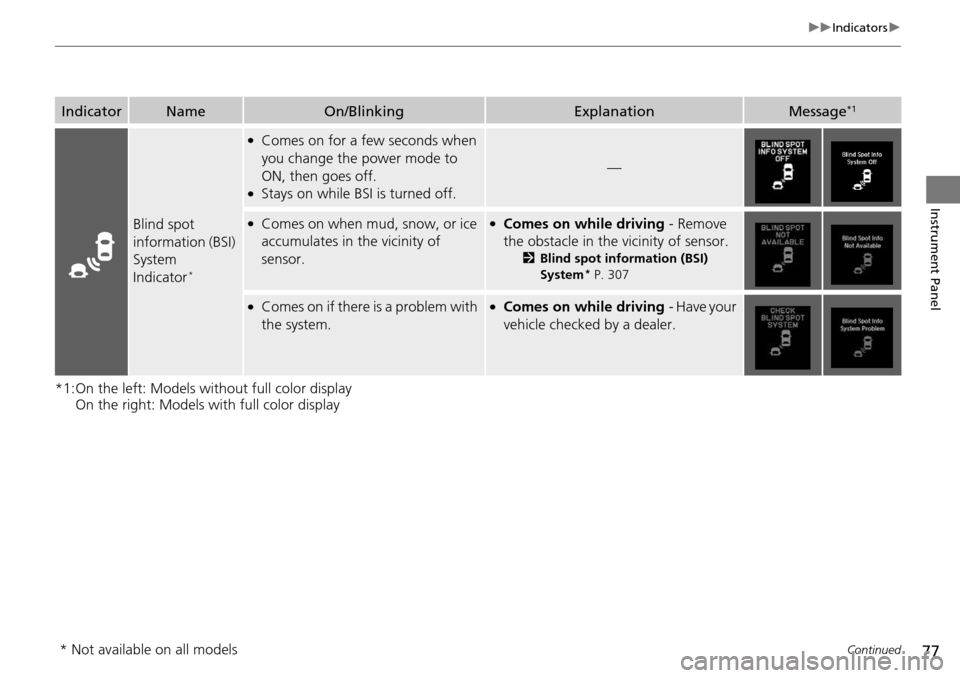
IndicatorNameOn/BlinkingExplanationMessage*1
Blind spot
information (BSI)
System
Indicator
*
●Comes on for a few seconds when
you change the power mode to
ON, then goes off.
●Stays on while BSI is turned off.
—
●Comes on when mud, snow, or ice
accumulates in the vicinity of
sensor.●Comes on while driving - Remove
the obstacle in the vicinity of sensor.
2 Blind spot information (BSI)
System* P. 307
●Comes on if there is a problem with
the system.●Comes on while driving - Have your
vehicle checked by a dealer.
* Not available on all models
Page 80 of 445
79
uuIndicators u
Continued
Instrument Panel
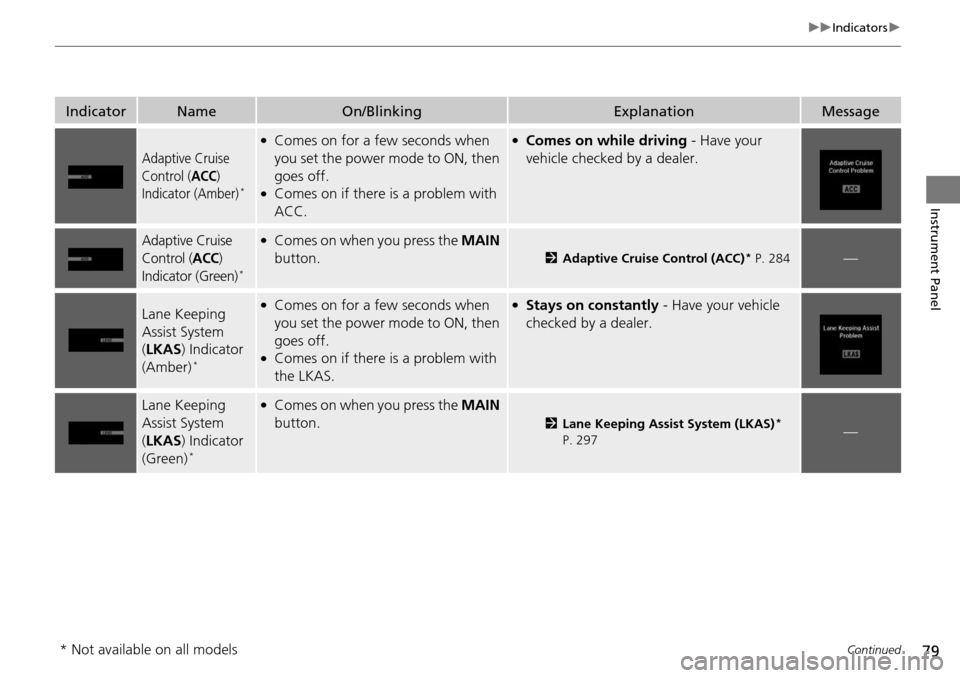
IndicatorNameOn/BlinkingExplanationMessage
Adaptive Cruise
Control (
ACC)
Indicator (Amber)*
●Comes on for a few seconds when
you set the power mode to ON, then
goes off.
●Comes on if there is a problem with
ACC.
●Comes on while driving - Have your
vehicle checked by a dealer.
Adaptive Cruise
Control (
ACC)
Indicator (Green)*
●Comes on when you press the MAIN
button.
2 Adaptive Cruise Control (ACC)* P. 284—
Lane Keeping
Assist System
(LKAS ) Indicator
(Amber)
*
●Comes on for a few seconds when
you set the power mode to ON, then
goes off.
●Comes on if there is a problem with
the LKAS.
●Stays on constantly - Have your vehicle
checked by a dealer.
Lane Keeping
Assist System
( LKAS ) Indicator
(Green)
*
●Comes on when you press the MAIN
button.
2 Lane Keeping Assist System (LKAS)*
P. 297—
* Not available on all models
Page 86 of 445
85
uuIndicators uMulti-Information Display Warning and Information Messages
Continued
Instrument Panel
*1:On the left: Models wi thout full color display
On the right: Models with full color display
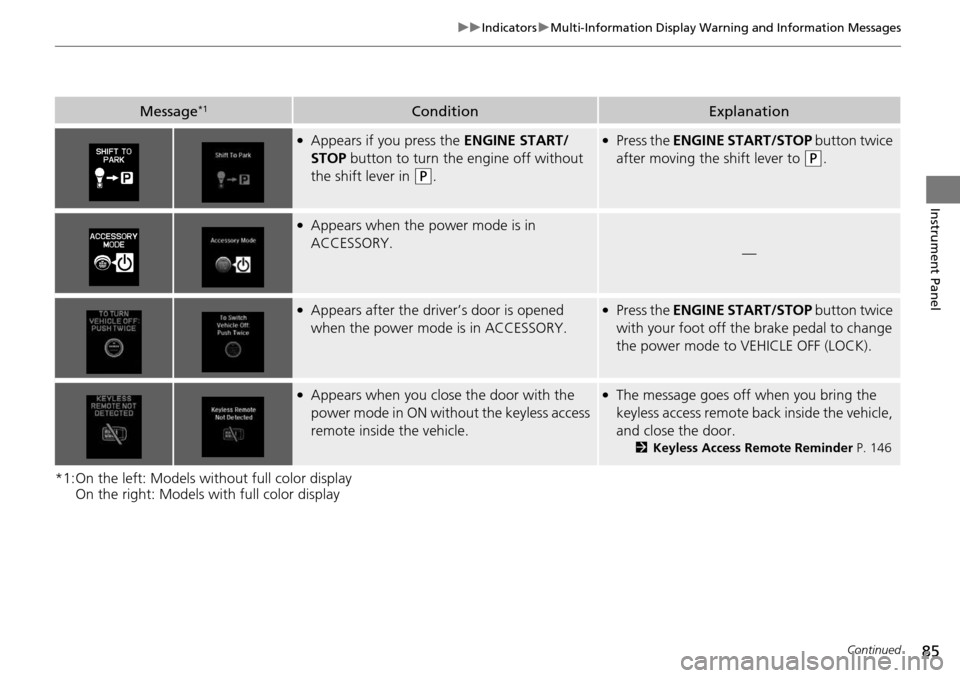
Message*1ConditionExplanation
●Appears if you press the ENGINE START/
STOP button to turn the engine off without
the shift lever in
(P.
●Press the ENGINE START/STOP button twice
after moving the shift lever to
(P.
●Appears when the power mode is in
ACCESSORY.
—
●Appears after the driver’s door is opened
when the power mode is in ACCESSORY.●Press the ENGINE START/STOP button twice
with your foot off the brake pedal to change
the power mode to VEHICLE OFF (LOCK).
●Appears when you close the door with the
power mode in ON without the keyless access
remote inside the vehicle.●The message goes off when you bring the
keyless access remote back inside the vehicle,
and close the door.
2 Keyless Access Remote Reminder P. 146
Page 87 of 445
86
uuIndicators uMulti-Information Display Warn ing and Information Messages
Instrument Panel
*1:On the left: Models without full color display
On the right: Models with full color display
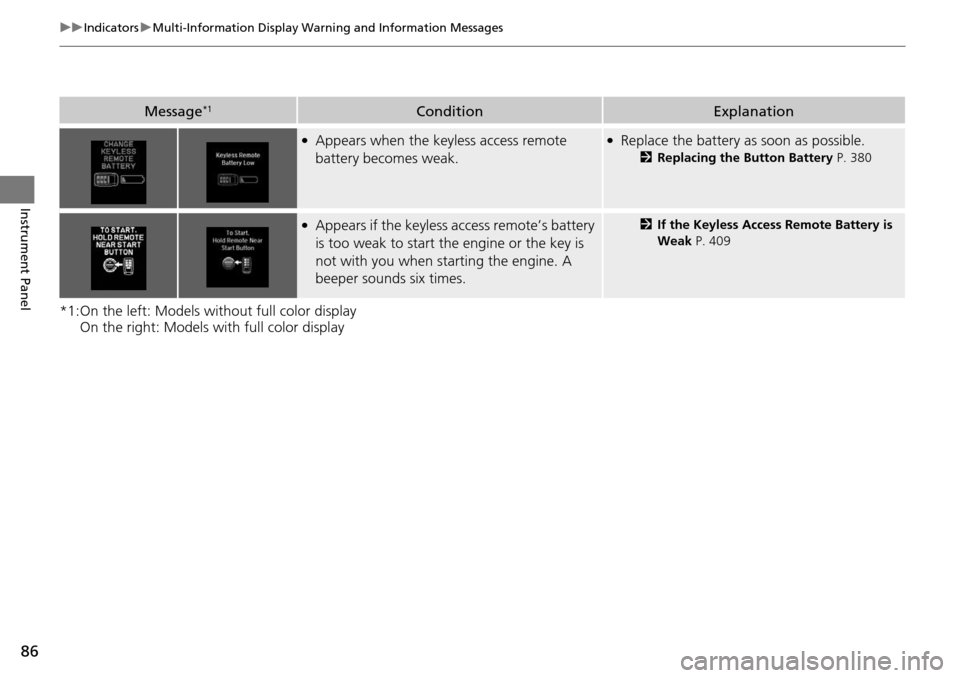
Message*1ConditionExplanation
●Appears when the keyless access remote
battery becomes weak.●Replace the battery as soon as possible.
2Replacing the Button Battery P. 380
●Appears if the keyless access remote’s battery
is too weak to start the engine or the key is
not with you when starting the engine. A
beeper sounds six times.2If the Keyless Access Remote Battery is
Weak P. 409
Page 90 of 445
89
uuIndicators uMulti-Information Display Warning and Information Messages
Continued
Instrument Panel
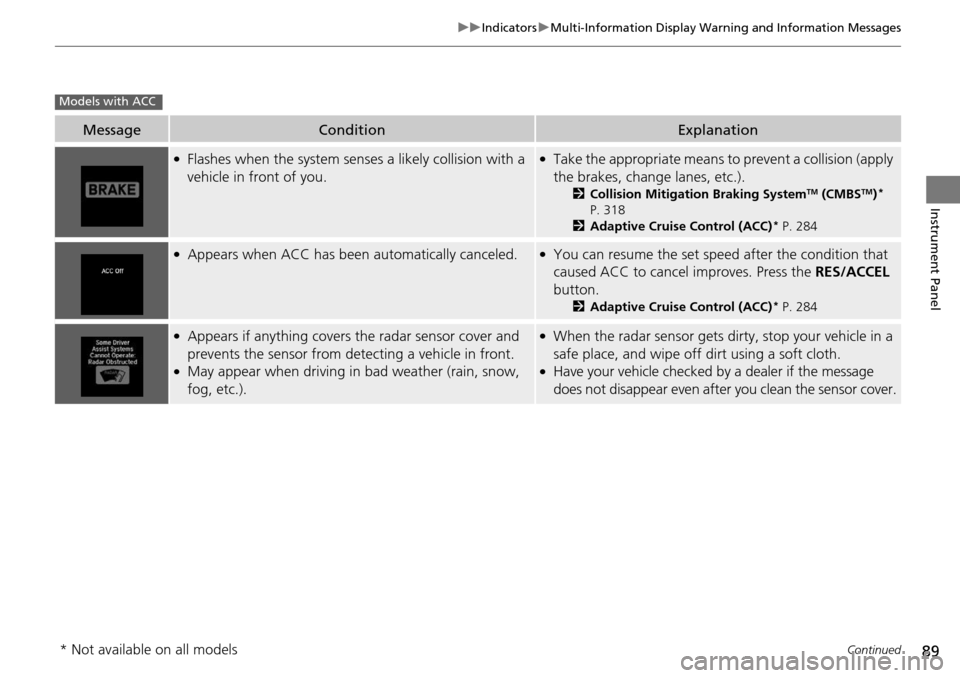
MessageConditionExplanation
●Flashes when the system sens es a likely collision with a
vehicle in front of you.●Take the appropriate means to prevent a collision (apply
the brakes, change lanes, etc.).
2 Collision Mitigation Braking SystemTM (CMBSTM)*
P. 318
2 Adaptive Cruise Control (ACC)
* P. 284
●Appears when ACC has been automatically canceled.●You can resume the set speed after the condition that
caused ACC to cancel improves. Press the RES/ACCEL
button.
2 Adaptive Cruise Control (ACC)* P. 284
●Appears if anything covers the radar sensor cover and
prevents the sensor from detecting a vehicle in front.
●May appear when driving in bad weather (rain, snow,
fog, etc.).
●When the radar sensor gets dirty, stop your vehicle in a
safe place, and wipe off dirt using a soft cloth.
●Have your vehicle checked by a dealer if the message
does not disappear even after you clean the sensor cover.
Models with ACC
* Not available on all models
Page 91 of 445
90
uuIndicators uMulti-Information Display Warn ing and Information Messages
Instrument Panel
*1:On the left: Models without full color display
On the right: Models with full color display
Message*1ConditionExplanation
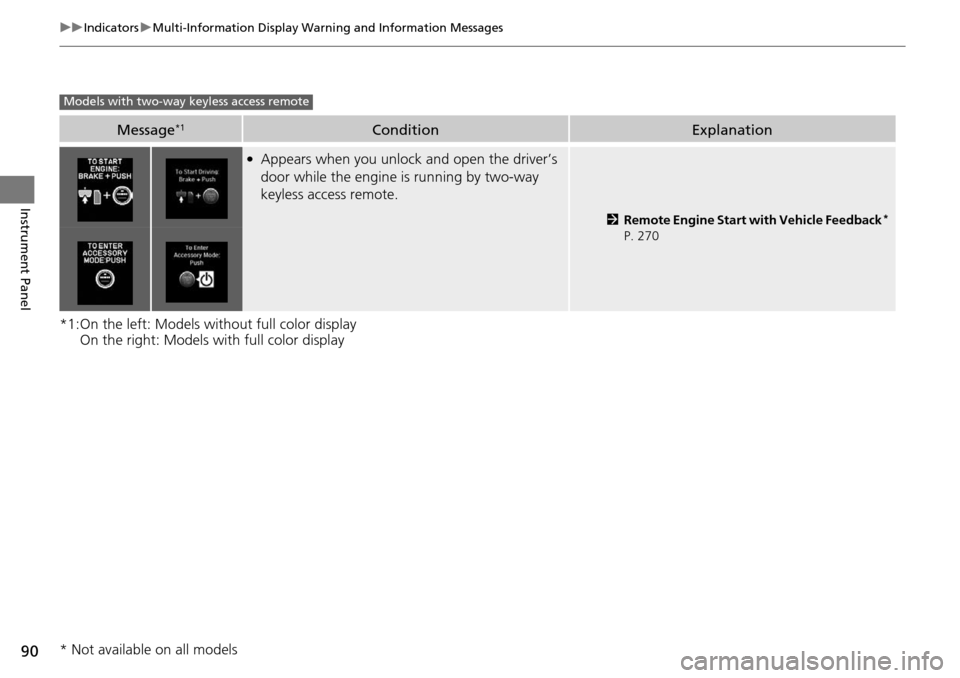
●Appears when you unlock and open the driver’s
door while the engine is running by two-way
keyless access remote.
2Remote Engine Start with Vehicle Feedback*
P. 270
Models with two-way keyless access remote
* Not available on all models
Page 93 of 445
92
uuIndicators uMulti-Information Display Warn ing and Information Messages
Instrument Panel
MessageConditionExplanation
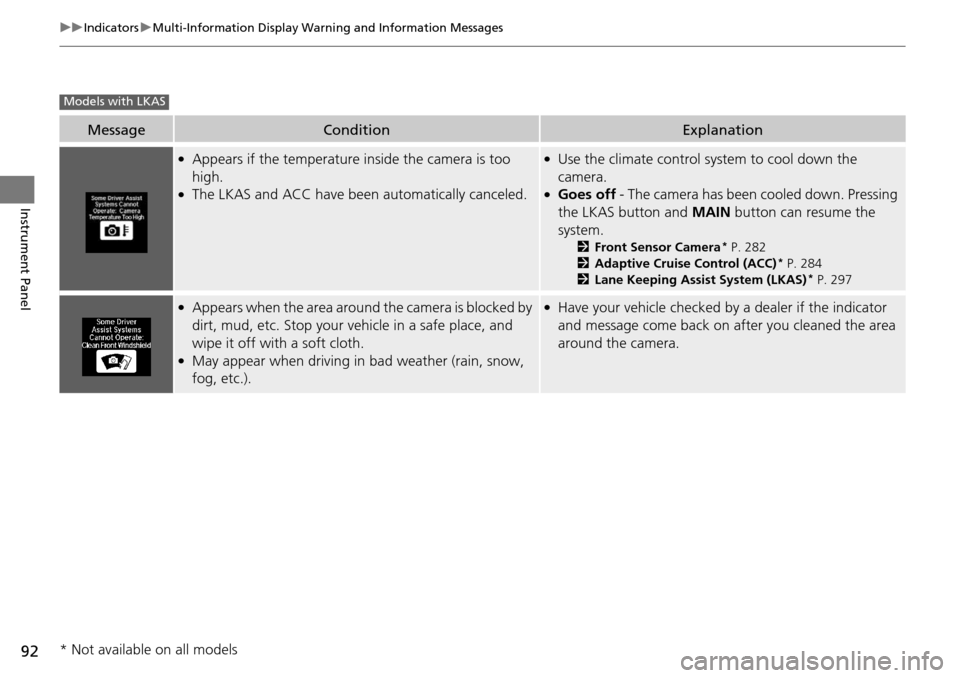
●Appears if the temperature inside the camera is too
high.
●The LKAS and ACC have been automatically canceled.
●Use the climate control system to cool down the
camera.
●Goes off - The camera has been cooled down. Pressing
the LKAS button and MAIN button can resume the
system.
2 Front Sensor Camera* P. 282
2 Adaptive Cruise Control (ACC)* P. 284
2 Lane Keeping Assist System (LKAS)* P. 297
●Appears when the area around the camera is blocked by
dirt, mud, etc. Stop your ve hicle in a safe place, and
wipe it off with a soft cloth.
●May appear when driving in bad weather (rain, snow,
fog, etc.).
●Have your vehicle checked by a dealer if the indicator
and message come back on after you cleaned the area
around the camera.
Models with LKAS
* Not available on all models