Reverse Acura RDX 2016 Owner's Manual
[x] Cancel search | Manufacturer: ACURA, Model Year: 2016, Model line: RDX, Model: Acura RDX 2016Pages: 445, PDF Size: 15.25 MB
Page 14 of 445
13
Quick Reference Guide
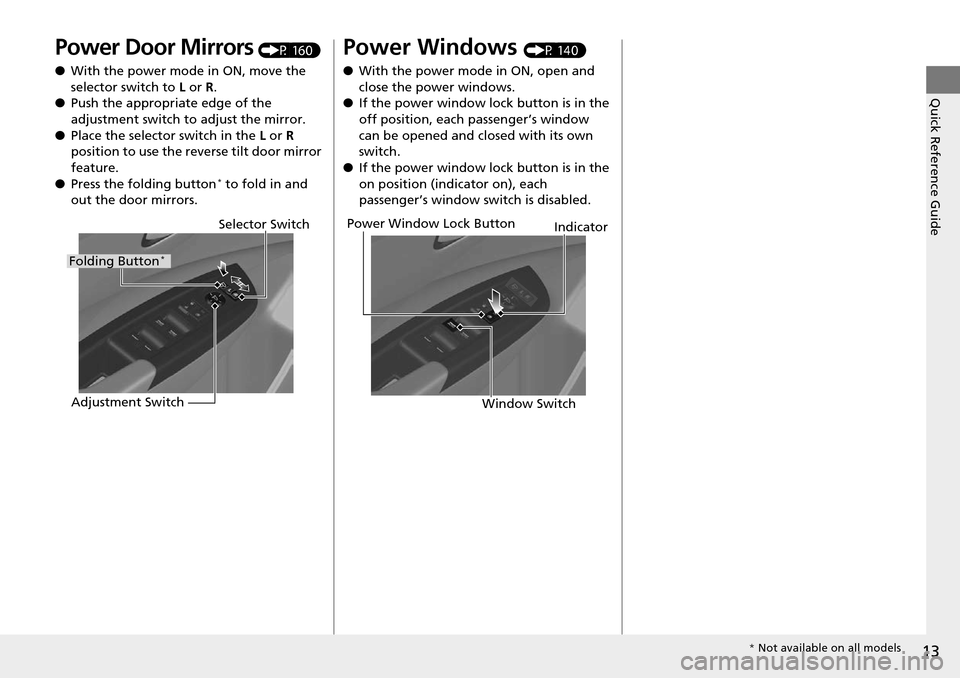
Power Door Mirrors (P 160)
● With the power mode in ON, move the
selector switch to L or R .
● Push the appropriate edge of the
adjustment switch to adjust the mirror.
● Place the selector switch in the L or R
position to use the reverse tilt door mirror
feature.
● Press the folding button
* to fold in and
out the door mirrors.
Selector Switch
Adjustment Switch
Folding Button*
Power Windows (P 140)
● With the power mode in ON, open and
close the power windows.
● If the power window lock button is in the
off position, each passenger’s window
can be opened and closed with its own
switch.
● If the power window lock button is in the
on position (indicator on), each
passenger’s window switch is disabled.
Power Window Lock Button
Window SwitchIndicator
*
Not available on all models
Page 17 of 445
16
Quick Reference Guide
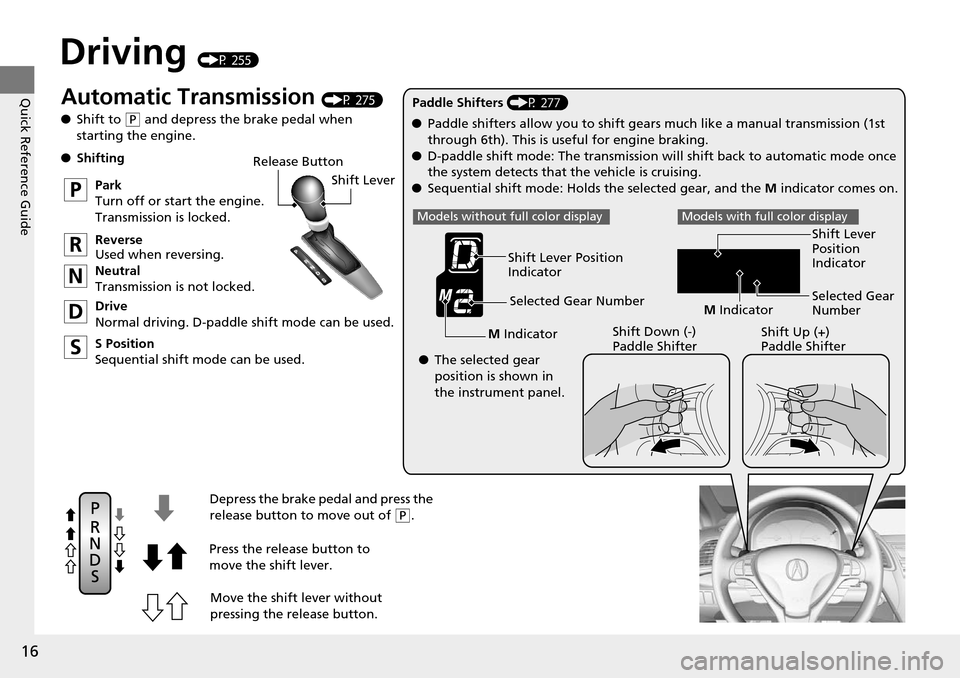
Driving (P 255)
Release ButtonShift Lever
Depress the brake pedal and press the
release button to move out of
( P.
Move the shift lever without
pressing the release button.
Press the release button to
move the shift lever.
●
Shifting
Park
Turn off or start the engine.
Transmission is locked.
Reverse
Used when reversing.
Neutral
Transmission is not locked.
Drive
Normal driving. D-paddle shift mode can be used.
S Position
Sequential shift mode can be used. Paddle Shifters (P 277)
M Indicator Shift Down (-)
Paddle Shifter Shift Up (+)
Paddle Shifter
●
Paddle shifters allow you to shift gea rs much like a manual transmission (1st
through 6th). This is useful for engine braking.
● D-paddle shift mode: The transmission will shift back to automatic mode once
the system detects that the vehicle is cruising.
● Sequential shift mode: Holds the selected gear, and the M indicator comes on.
Selected Gear Number
Automatic Transmission (P 275)
● Shift to
(P and depress the brake pedal when
starting the engine.
Shift Lever Position
Indicator
● The selected gear
position is shown in
the instrument panel.
Models without fu ll color displayModels with full color display
M Indicator Selected Gear
Number Shift Lever
Position
Indicator
Page 135 of 445
uuOpening and Closing the Tailgate uOpening/Closing the Power Tailgate
134
Controls
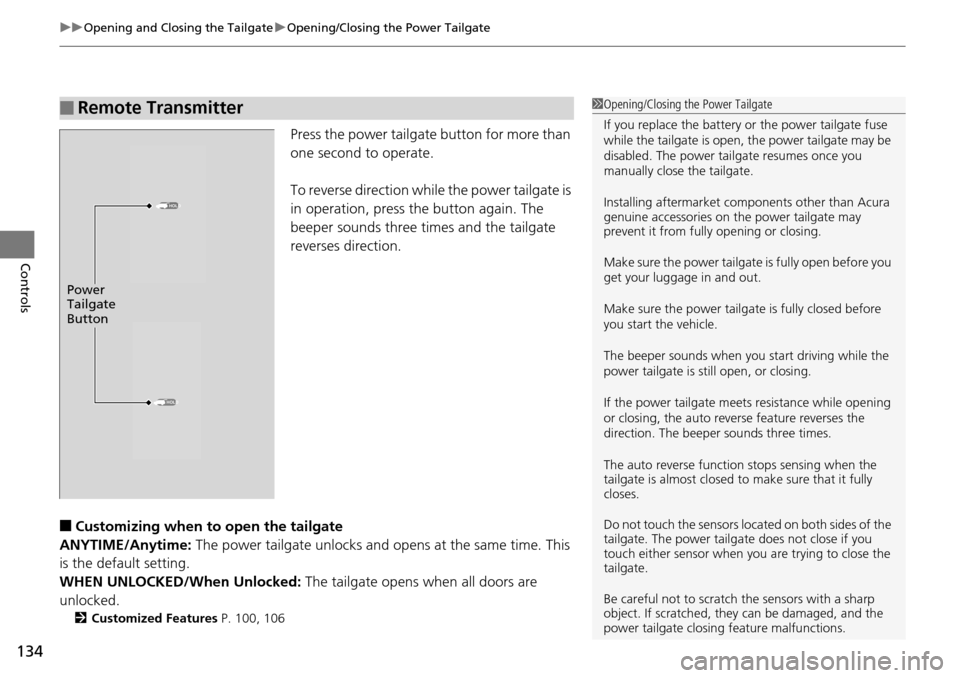
Press the power tailgate button for more than
one second to operate.
To reverse direction while the power tailgate is
in operation, press the button again. The
beeper sounds three times and the tailgate
reverses direction.
■Customizing when to open the tailgate
ANYTIME/Anytime: The power tailgate unlocks and opens at the same time. This
is the default setting.
WHEN UNLOCKED/When Unlocked: The tailgate opens when all doors are
unlocked.
2 Customized Features P. 100, 106
■Remote Transmitter1Opening/Closing the Power Tailgate
If you replace the battery or the power tailgate fuse
while the tailgate is open, the power tailgate may be
disabled. The power tail gate resumes once you
manually close the tailgate.
Installing aftermarket com ponents other than Acura
genuine accessories on the power tailgate may
prevent it from fully opening or closing.
Make sure the power tailgate is fully open before you
get your luggage in and out.
Make sure the power tailgate is fully closed before
you start the vehicle.
The beeper sounds when you start driving while the
power tailgate is still open, or closing.
If the power tailgate meet s resistance while opening
or closing, the auto reverse feature reverses the
direction. The beeper sounds three times.
The auto reverse function stops sensing when the
tailgate is almost closed to make sure that it fully
closes.
Do not touch the sensors located on both sides of the
tailgate. The power tailga te does not close if you
touch either sensor when you are trying to close the
tailgate.
Be careful not to scratch the sensors with a sharp
object. If scratched, they can be damaged, and the
power tailgate closing feature malfunctions.
HOLD
HOLD
Power
Tailgate
Button
Page 136 of 445

Continued135
uuOpening and Closing the Tailgate uOpening/Closing the Power Tailgate
Controls
To open or close the power tailgate, press the
power tailgate button on the dashboard for
about one second. The beeper sounds and
some exterior lights flash.
To reverse direction while the power tailgate is
in operation, press the button again. The
beeper sounds three times and the tailgate
reverses direction.
Press the button on the tailgate to close the
power tailgate.
If you press the button again while the power
tailgate is closing, it stops and reverses
direction.
If you manually close the power tailgate, it latches automatically.
■Power Tailgate Button
Power Tailgate Button
■Power Tailgate Close Button1 Power Tailgate Close Button
If you push the power tailga te close button while the
tailgate is automaticall y opening or closing, the
power tailgate ope ration stops. Use caution if the
tailgate stops in the middle of either operation. It may
suddenly swing up or down.
Power Tailgate
Close Button
■Auto-Closer
1 Auto-Closer
The auto-closer feature does not activate if you push
the tailgate release button while the power tailgate is
closing.
Do not put any force on the tailgate while the power
tailgate is latching.
Keep your hands away from the tailgate when you
manually close the tailga te and let it latch
automatically. It is dange rous to put your hands
around the tailgate as it st arts to latch itself.
Page 141 of 445
140
Controls
Opening and Closing the Windows
Opening/Closing the Power Windows
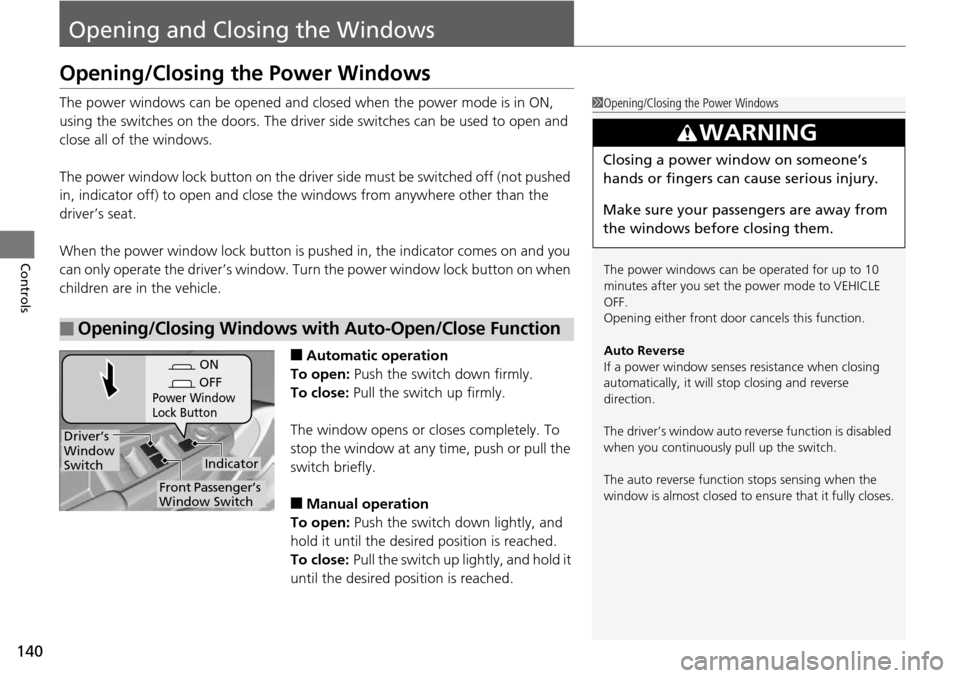
The power windows can be opened and closed when the power mode is in ON,
using the switches on the do ors. The driver side switches can be used to open and
close all of the windows.
The power window lock button on the driver side must be switched off (not pushed
in, indicator off) to open and close th e windows from anywhere other than the
driver’s seat.
When the power window lock button is pu shed in, the indicator comes on and you
can only operate the driver’s window. Turn the power window lock button on when
children are in the vehicle.
■Automatic operation
To open: Push the switch down firmly.
To close: Pull the switch up firmly.
The window opens or closes completely. To
stop the window at any time, push or pull the
switch briefly.
■Manual operation
To open: Push the switch down lightly, and
hold it until the desired position is reached.
To close: Pull the switch up lightly, and hold it
until the desired position is reached.
■Opening/Closing Windows with Auto-Open/Close Function
1 Opening/Closing the Power Windows
The power windows can be operated for up to 10
minutes after you set the power mode to VEHICLE
OFF.
Opening either front door cancels this function.
Auto Reverse
If a power window senses resistance when closing
automatically, it will stop closing and reverse
direction.
The driver’s window auto re verse function is disabled
when you continuously pull up the switch.
The auto reverse function stops sensing when the
window is almost closed to en sure that it fully closes.
3WARNING
Closing a power window on someone’s
hands or fingers can cause serious injury.
Make sure your passengers are away from
the windows before closing them.
ON
OFF
Power Window
Lock Button
Indicator
Driver’s
Window
Switch
Front Passenger’s
Window Switch
Page 144 of 445
143
Controls
Opening and Closing the Moonroof
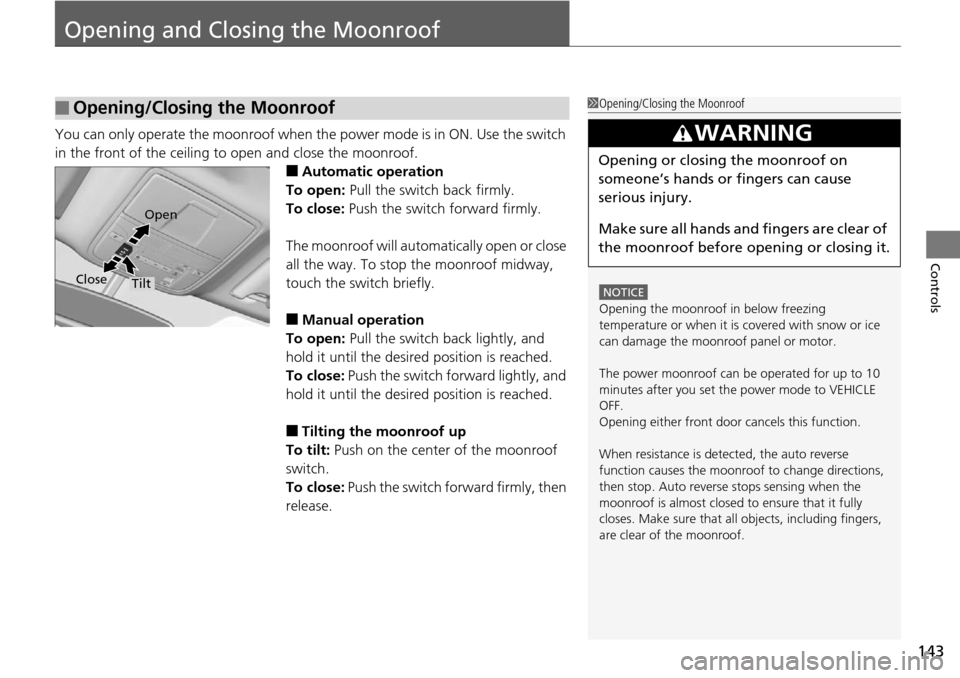
You can only operate the moonroof when the power mode is in ON. Use the switch
in the front of the ceiling to open and close the moonroof.
■Automatic operation
To open: Pull the switch back firmly.
To close: Push the switch forward firmly.
The moonroof will automatically open or close
all the way. To stop the moonroof midway,
touch the switch briefly.
■Manual operation
To open: Pull the switch back lightly, and
hold it until the desired position is reached.
To close: Push the switch forward lightly, and
hold it until the desired position is reached.
■Tilting the moonroof up
To tilt: Push on the center of the moonroof
switch.
To close: Push the switch forward firmly, then
release.
■Opening/Closing the Moonroof1 Opening/Closing the Moonroof
NOTICE
Opening the moonroof in below freezing
temperature or when it is covered with snow or ice
can damage the moonr oof panel or motor.
The power moonroof can be operated for up to 10
minutes after you set the power mode to VEHICLE
OFF.
Opening either front door cancels this function.
When resistance is detected, the auto reverse
function causes the moonroof to change directions,
then stop. Auto reverse stops sensing when the
moonroof is almost closed to ensure that it fully
closes. Make sure that al l objects, including fingers,
are clear of the moonroof.
3WARNING
Opening or closing the moonroof on
someone’s hands or fingers can cause
serious injury.
Make sure all hands and fingers are clear of
the moonroof before opening or closing it.
Open
Close
Tilt
Page 154 of 445
153
uuOperating the Switches Around the Steering Wheel uWipers and Washers
Controls
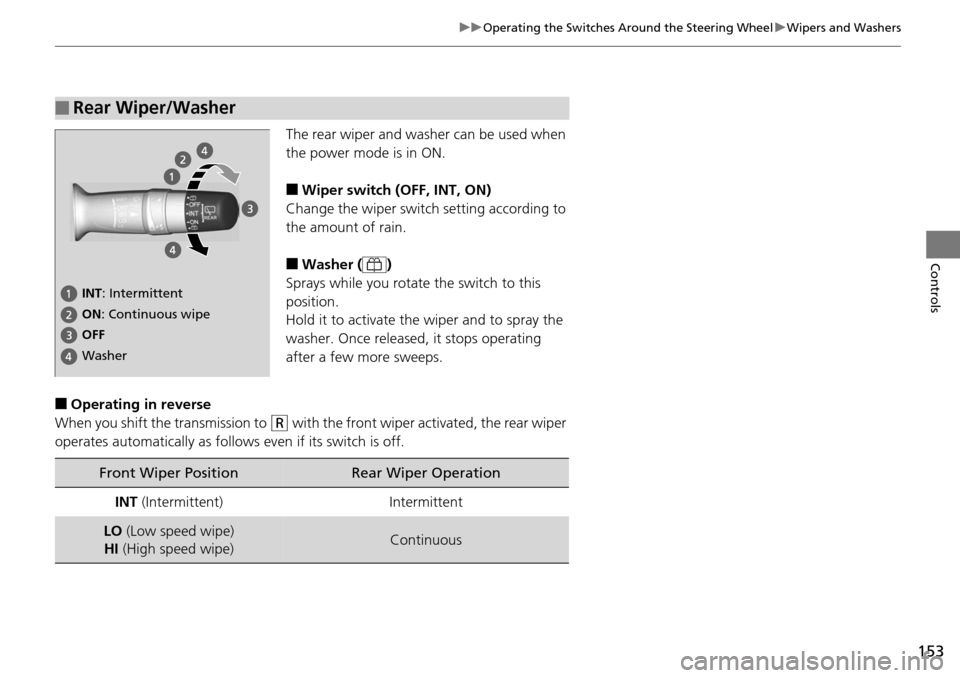
The rear wiper and washer can be used when
the power mode is in ON.
■Wiper switch (OFF, INT, ON)
Change the wiper switch setting according to
the amount of rain.
■Washer ( )
Sprays while you rotate the switch to this
position.
Hold it to activate th e wiper and to spray the
washer. Once released, it stops operating
after a few more sweeps.
■Operating in reverse
When you shift the transmission to
(R with the front wiper activated, the rear wiper
operates automatically as follows even if its switch is off.
■Rear Wiper/Washer
INT: Intermittent
OFF ON : Continuous wipe
Washer
Front Wiper PositionRear Wiper Operation
INT (Intermittent)Intermittent
LO (Low speed wipe)
HI (High speed wipe)Continuous
Page 161 of 445
160
uuAdjusting the Mirrors uPower Door Mirrors
Controls
Power Door Mirrors
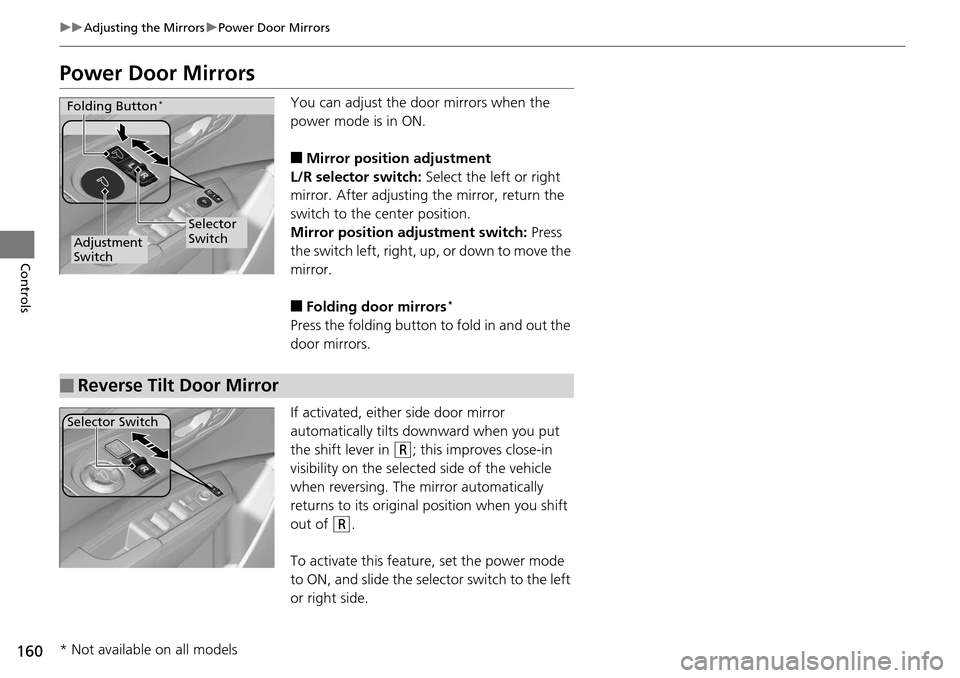
You can adjust the do or mirrors when the
power mode is in ON.
■Mirror position adjustment
L/R selector switch: Select the left or right
mirror. After adjusting the mirror, return the
switch to the center position.
Mirror position adjustment switch: Press
the switch left, right, up, or down to move the
mirror.
■Folding door mirrors*
Press the folding button to fold in and out the
door mirrors.
If activated, either side door mirror
automatically tilts do wnward when you put
the shift lever in
(R; this improves close-in
visibility on the selected side of the vehicle
when reversing. The mirror automatically
returns to its original position when you shift
out of
(R.
To activate this feature, set the power mode
to ON, and slide the selector switch to the left
or right side.
Selector
Switch
Adjustment
Switch
Folding Button*
■Reverse Tilt Door Mirror
Selector Switch
* Not available on all models
Page 223 of 445
222
Features
HomeLink® Universal Transceiver
The HomeLink ® Universal Transceiver can be pr ogrammed to operate up to three
remote controlled devices around your home, such as garage doors, lighting, or
home security systems.
Refer to the safety information that came wi th your garage door opener to test that
the safety features are functioning properly. If you do not have the safety
information, contact the manufacturer.
Before programming HomeLink, make sure that people and objects are out of the
way of the garage or gate to prevent potential injury or damage.
When programming a garage door opener, park just outside the garage door’s
path.
Training HomeLink
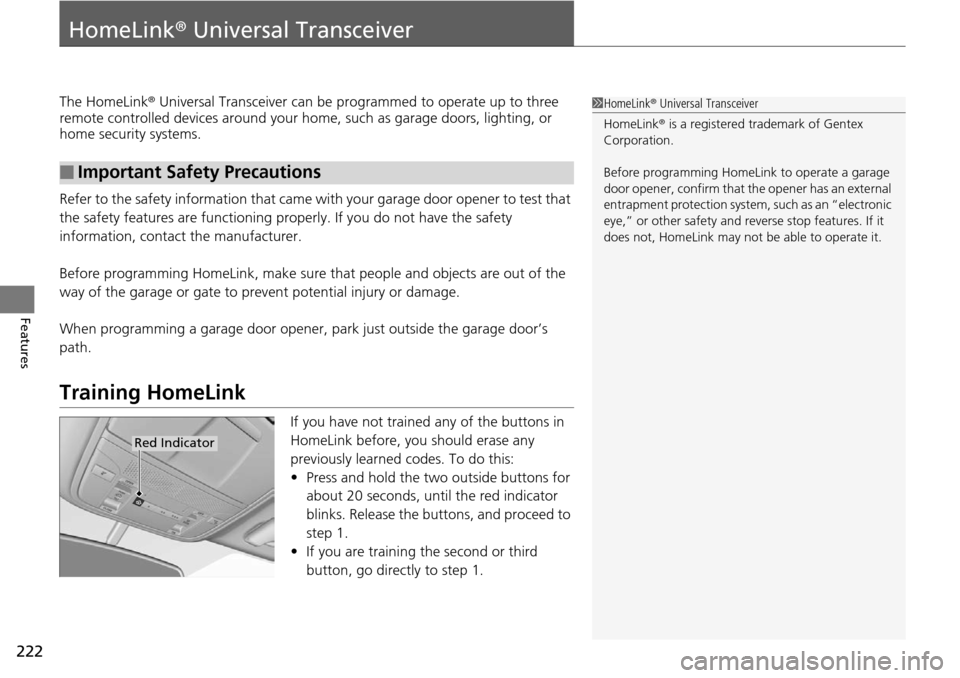
If you have not trained any of the buttons in
HomeLink before, you should erase any
previously learned codes. To do this:
• Press and hold the two outside buttons for
about 20 seconds, until the red indicator
blinks. Release the bu ttons, and proceed to
step 1.
• If you are training the second or third
button, go directly to step 1.
■Important Safety Precautions
1HomeLink ® Universal Transceiver
HomeLink® is a registered tra demark of Gentex
Corporation.
Before programming HomeLi nk to operate a garage
door opener, confirm that the opener has an external
entrapment protection system, such as an “electronic
eye,” or other safety and reverse stop features. If it
does not, HomeLink may not be able to operate it.
Red Indicator
Page 276 of 445
275
uuWhen Driving uShifting
Continued
Driving
Shifting
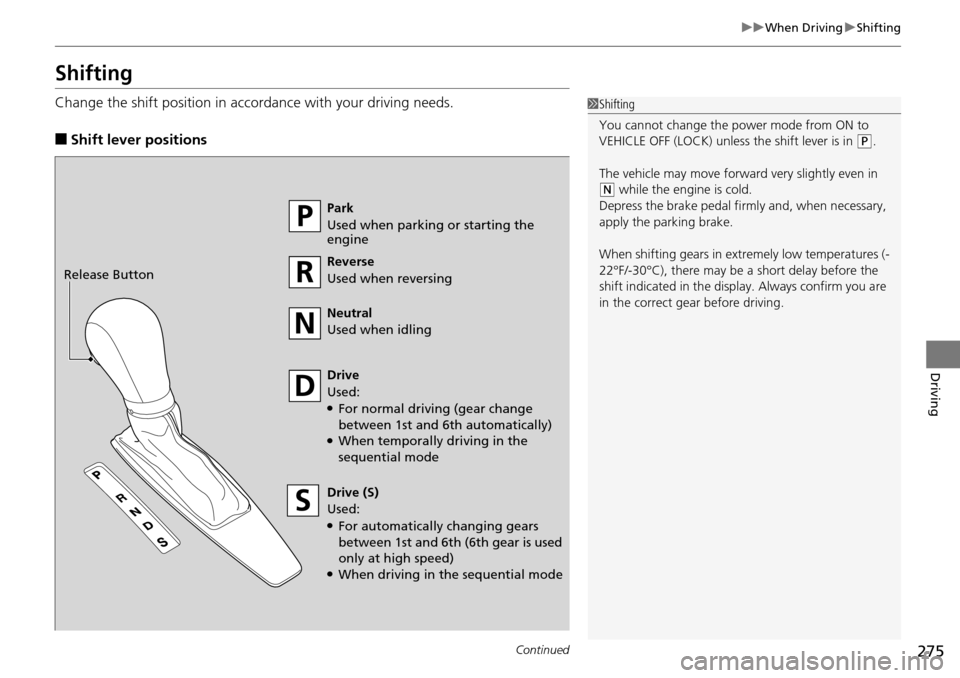
Change the shift position in accordance with your driving needs.
■Shift lever positions
1Shifting
You cannot change the pow er mode from ON to
VEHICLE OFF (LOCK) unless the shift lever is in
( P.
The vehicle may move forward very slightly even in
(N while the engine is cold.
Depress the brake pe dal firmly and, when necessary,
apply the parking brake.
When shifting gears in extremely low temperatures (-
22°F/-30°C), there may be a short delay before the
shift indicated in the display. Always confirm you are
in the correct gear before driving.
Park
Used when parking or starting the
engine
Reverse
Used when reversing
Neutral
Used when idling
Drive
Used:
●For normal driving (gear change
between 1st and 6th automatically)
●When temporally driving in the
sequential mode
Drive (S)
Used:
●For automatically changing gears
between 1st and 6th (6th gear is used
only at high speed)
●When driving in the sequential mode
Release Button