bluetooth Acura RDX 2017 User Guide
[x] Cancel search | Manufacturer: ACURA, Model Year: 2017, Model line: RDX, Model: Acura RDX 2017Pages: 449, PDF Size: 10.88 MB
Page 227 of 449
226
uuBluetooth ® HandsFreeLink ®u HFL Menus
Features
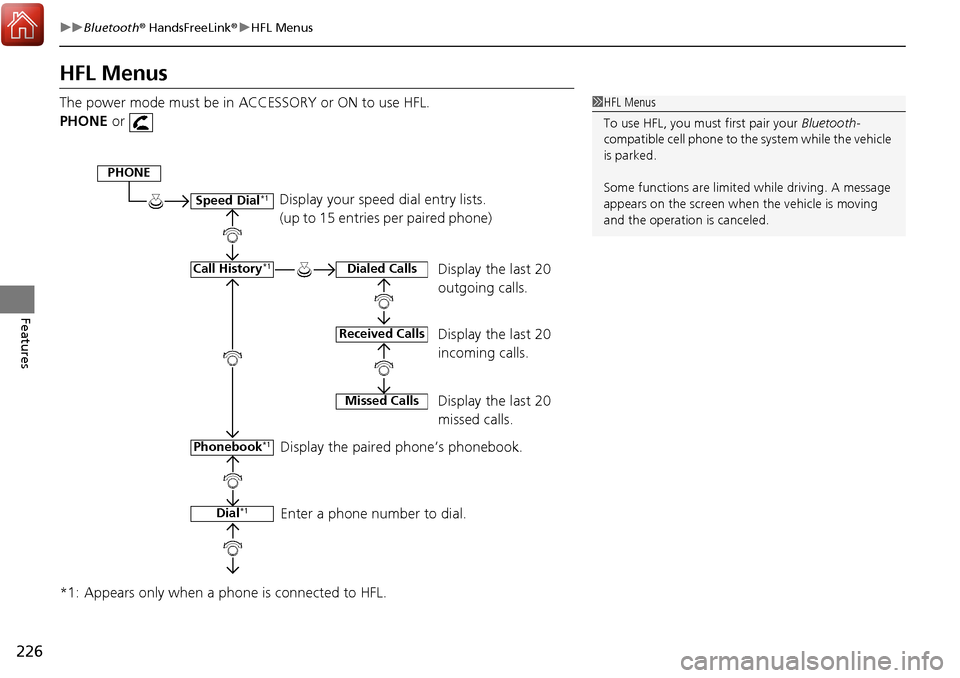
HFL Menus
The power mode must be in ACCESSORY or ON to use HFL.
PHONE or
*1: Appears only when a phone is connected to HFL.1 HFL Menus
To use HFL, you must first pair your Bluetooth-
compatible cell phone to th e system while the vehicle
is parked.
Some functions are limited while driving. A message
appears on the screen when the vehicle is moving
and the operation is canceled.
Display your speed dial entry lists.
(up to 15 entries per paired phone)
Display the last 20
outgoing calls.
Display the last 20
incoming calls.
Display the last 20
missed calls.
Display the paired phone’s phonebook.
Enter a phone number to dial.
PHONE
Speed Dial*1
Call History*1
Phonebook*1
Dial*1
Dialed Calls
Received Calls
Missed Calls
Page 228 of 449
227
uuBluetooth ® HandsFreeLink ®u HFL Menus
Continued
Features
*1: Appears only when a phone is connected to HFL.
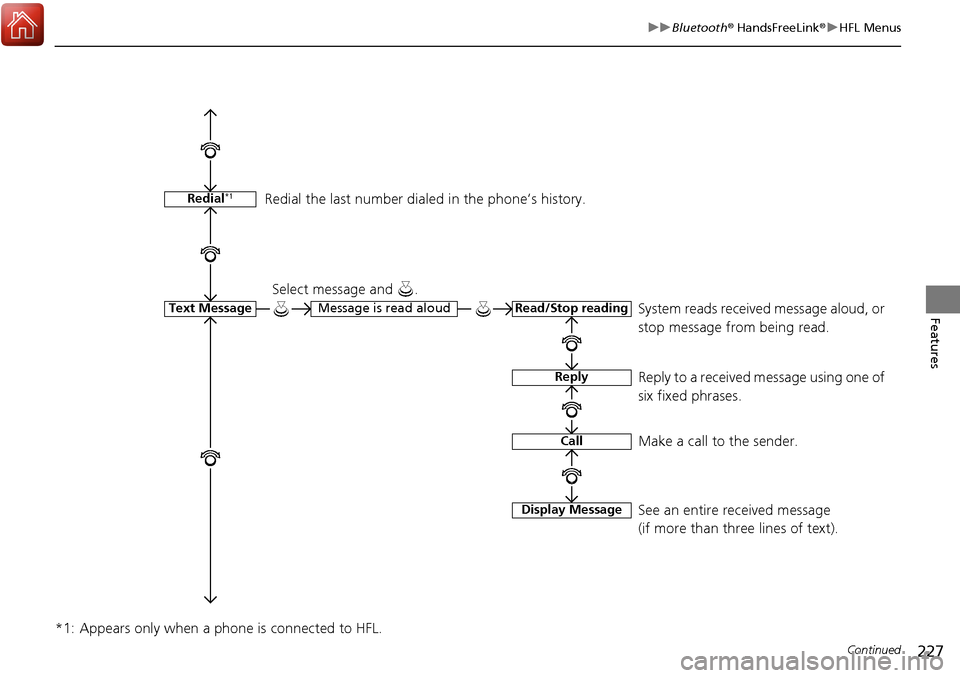
Redial*1
Text MessageRead/Stop readingMessage is read aloud
Reply
Call
Display Message
System reads received message aloud, or
stop message from being read.
Select message and .
Reply to a received message using one of
six fixed phrases.
Make a call to the sender.
See an entire received message
(if more than three lines of text).
Redial the last number dial
ed in the phone’s history.
Page 229 of 449
228
uuBluetooth ® HandsFreeLink ®u HFL Menus
Features
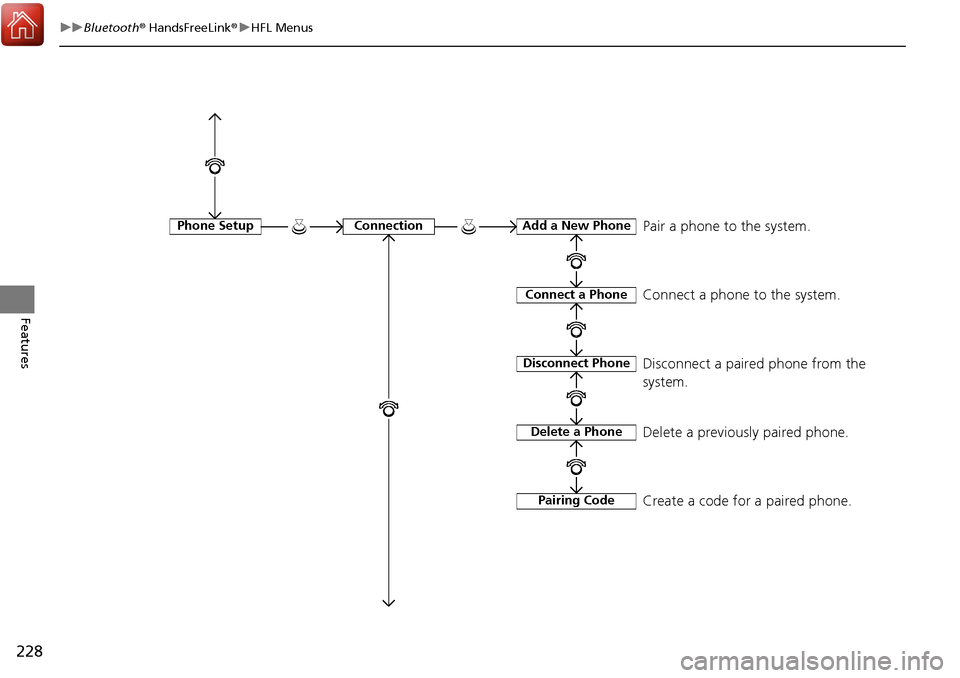
Phone SetupConnectionAdd a New Phone
Connect a Phone
Disconnect Phone
Delete a Phone
Pairing Code
Pair a phone to the system.
Connect a phone to the system.
Disconnect a paired phone from the
system.
Delete a previously paired phone.
Create a code for a paired phone.
Page 230 of 449
229
uuBluetooth ® HandsFreeLink ®u HFL Menus
Continued
Features
*1: Appears only when a phone is connected to HFL.
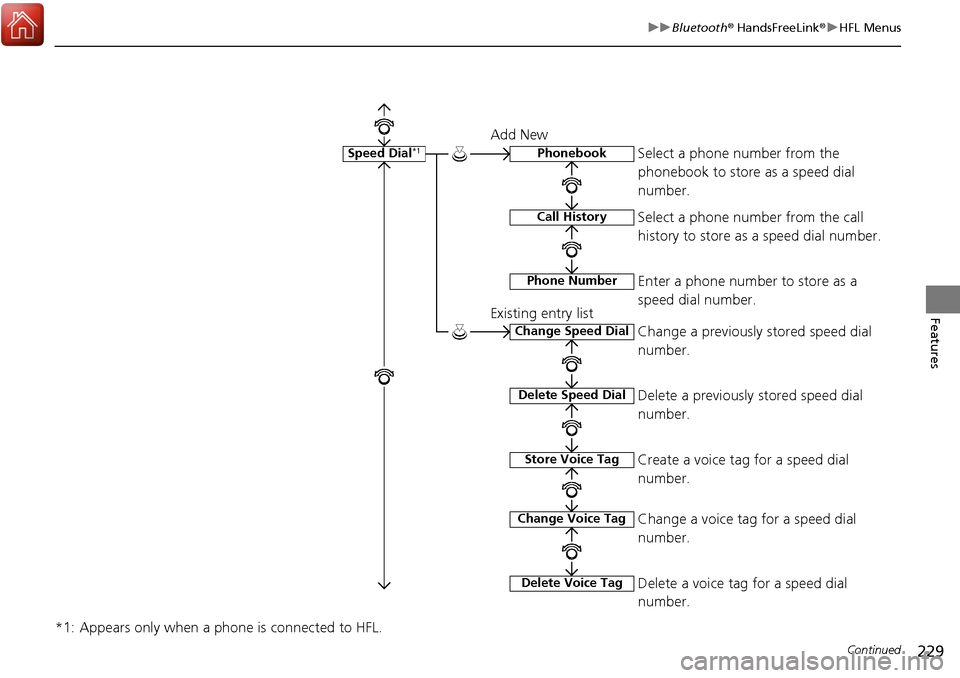
Speed Dial*1Phonebook
Call History
Phone Number
Change Speed Dial
Delete Speed Dial
Store Voice Tag
Change Voice Tag
Delete Voice Tag
Add New
Existing entry list Select a phone number from the
phonebook to store as a speed dial
number.
Select a phone number from the call
history to store as a speed dial number.
Enter a phone number to store as a
speed dial number.
Change a previously stored speed dial
number.
Delete a previously stored speed dial
number.
Create a voice tag for a speed dial
number.
Change a voice tag for a speed dial
number.
Delete a voice tag for a speed dial
number.
Page 231 of 449

230
uuBluetooth ® HandsFreeLink ®u HFL Menus
Features
*1: Appears only when a phone is connected to HFL.
Passcode*1
Auto Transfer
Caller ID InfoName Priority
Number Priority
Text Message Notice
System Clear
Set calls to automatically transfer from your phone to HFL when you
enter the vehicle.
Prioritize the caller’s name as the
caller ID.
Prioritize the caller’s phone number as
the caller ID.
Create a security PIN for a paired phone.
Turn incoming text message notifications on or off.
Clear the system of all paired phone s, phonebook entries, and security
codes.
Page 232 of 449
Continued231
uuBluetooth ® HandsFreeLink ®u HFL Menus
Features
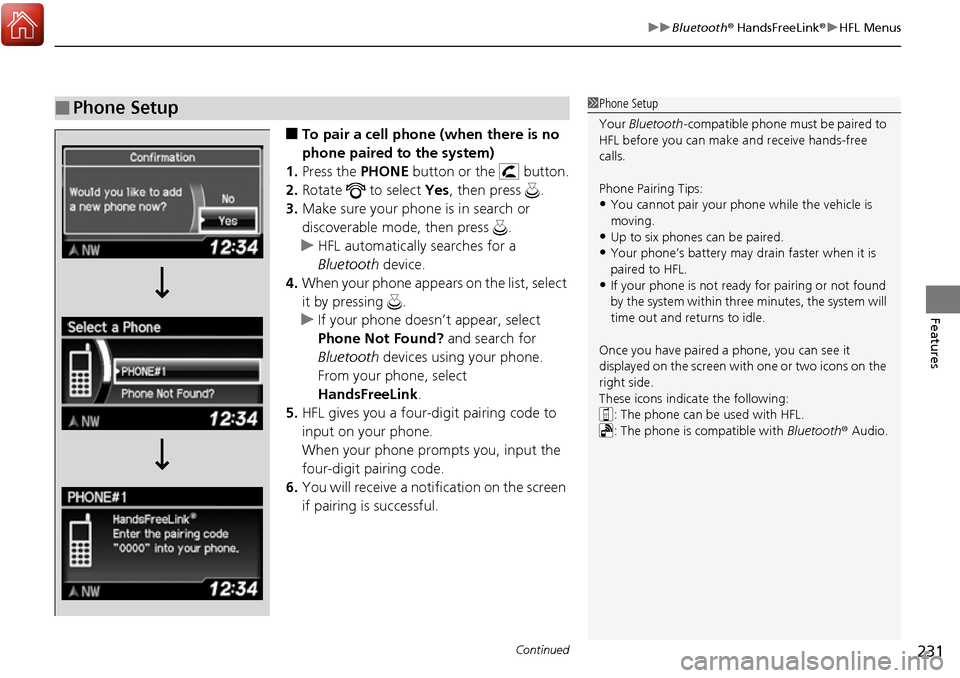
■To pair a cell phone (when there is no
phone paired to the system)
1. Press the PHONE button or the button.
2. Rotate to select Yes, then press .
3. Make sure your phone is in search or
discoverable mode, then press .
u HFL automatically searches for a
Bluetooth device.
4. When your phone appears on the list, select
it by pressing .
u If your phone doesn’t appear, select
Phone Not Found? and search for
Bluetooth devices using your phone.
From your phone, select
HandsFreeLink .
5. HFL gives you a four-digit pairing code to
input on your phone.
When your phone prompts you, input the
four-digit pairing code.
6. You will receive a notif ication on the screen
if pairing is successful.
■Phone Setup1 Phone Setup
Your Bluetooth -compatible phone must be paired to
HFL before you can make and receive hands-free
calls.
Phone Pairing Tips:
•You cannot pair your phone while the vehicle is
moving.
•Up to six phones can be paired.
•Your phone’s battery may dr ain faster when it is
paired to HFL.
•If your phone is not ready for pairing or not found
by the system within three minutes, the system will
time out and returns to idle.
Once you have paired a phone, you can see it
displayed on the screen with one or two icons on the
right side.
These icons indicate the following: : The phone can be used with HFL.
: The phone is compatible with Bluetooth® Audio.
Page 233 of 449

232
uuBluetooth ® HandsFreeLink ®u HFL Menus
Features
■To pair a cell phone (when a phone has
already been paired to the system)
1. Press the PHONE button or the button.
u If a prompt appears asking to connect to
a phone, select No and proceed with
step 2.
2. Rotate to select Phone Setup, then
press .
3. Rotate to select Connection, then press
.
4. Rotate to select Add a New Phone,
then press .
u The screen changes to Select Location.
5. Rotate to select Empty, then press .
Page 234 of 449
233
uuBluetooth ® HandsFreeLink ®u HFL Menus
Continued
Features
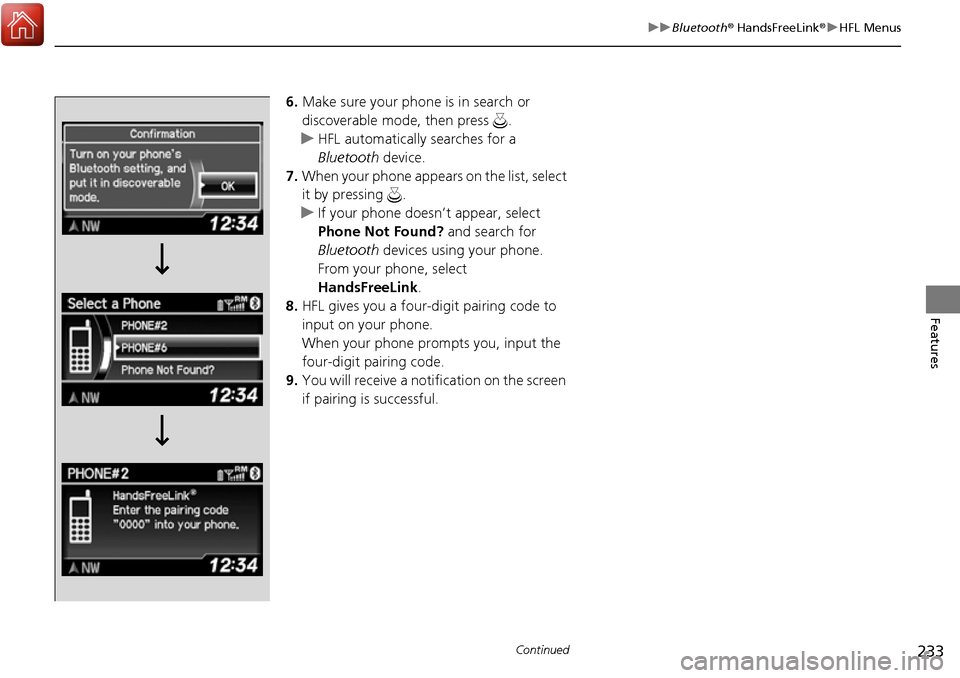
6. Make sure your phone is in search or
discoverable mode, then press .
u HFL automatically searches for a
Bluetooth device.
7. When your phone appears on the list, select
it by pressing .
u If your phone doesn’t appear, select
Phone Not Found? and search for
Bluetooth devices using your phone.
From your phone, select
HandsFreeLink .
8. HFL gives you a four-digit pairing code to
input on your phone.
When your phone prompts you, input the
four-digit pairing code.
9. You will receive a notif ication on the screen
if pairing is successful.
Page 235 of 449
uuBluetooth ® HandsFreeLink ®u HFL Menus
234
Features
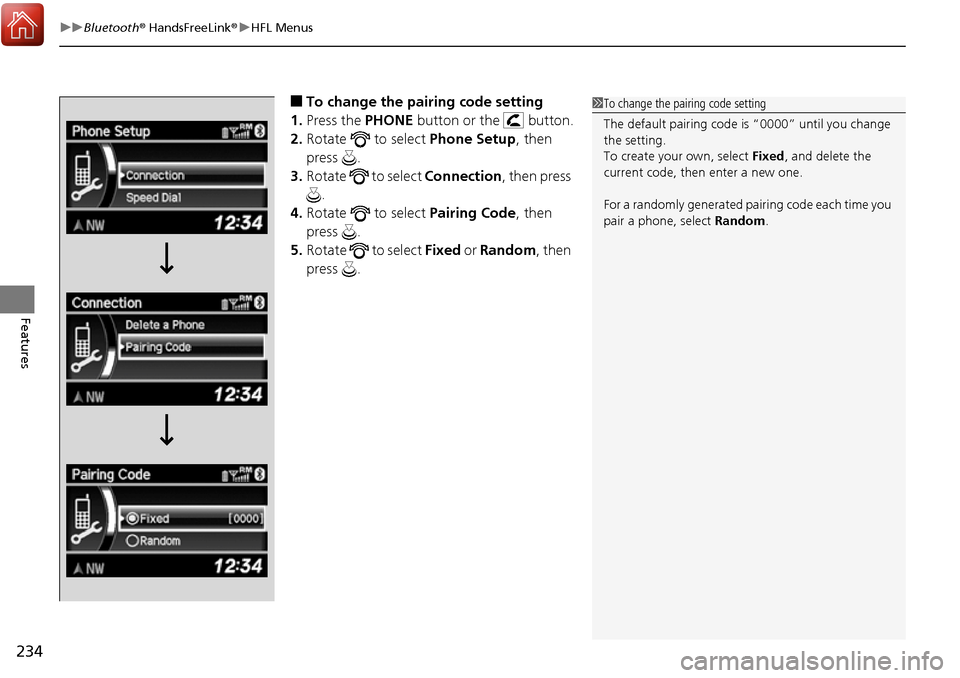
■To change the pairing code setting
1. Press the PHONE button or the button.
2. Rotate to select Phone Setup, then
press .
3. Rotate to select Connection, then press
.
4. Rotate to select Pairing Code, then
press .
5. Rotate to select Fixed or Random , then
press .1 To change the pairing code setting
The default pairing code is “0000” until you change
the setting.
To create your own, select Fixed, and delete the
current code, then enter a new one.
For a randomly generated pa iring code each time you
pair a phone, select Random .
Page 236 of 449

235
uuBluetooth ® HandsFreeLink ®u HFL Menus
Continued
Features
■To delete a paired phone
1. Press the PHONE button or the button.
2. Rotate to select Phone Setup, then
press .
u Repeat the procedure to select
Connection , then Delete a Phone .
3. Rotate to select a phone you want to
delete, then press .
4. You will receive a confirmation message on
the screen. Rotate to select Yes, then
press .
u You will receive a notification on the
screen if it is successful.