brake Acura RDX 2017 User Guide
[x] Cancel search | Manufacturer: ACURA, Model Year: 2017, Model line: RDX, Model: Acura RDX 2017Pages: 449, PDF Size: 10.88 MB
Page 70 of 449
69
uuIndicators u
Continued
Instrument Panel
*1:On the left: Models wi thout full color display
On the right: Models with full color display
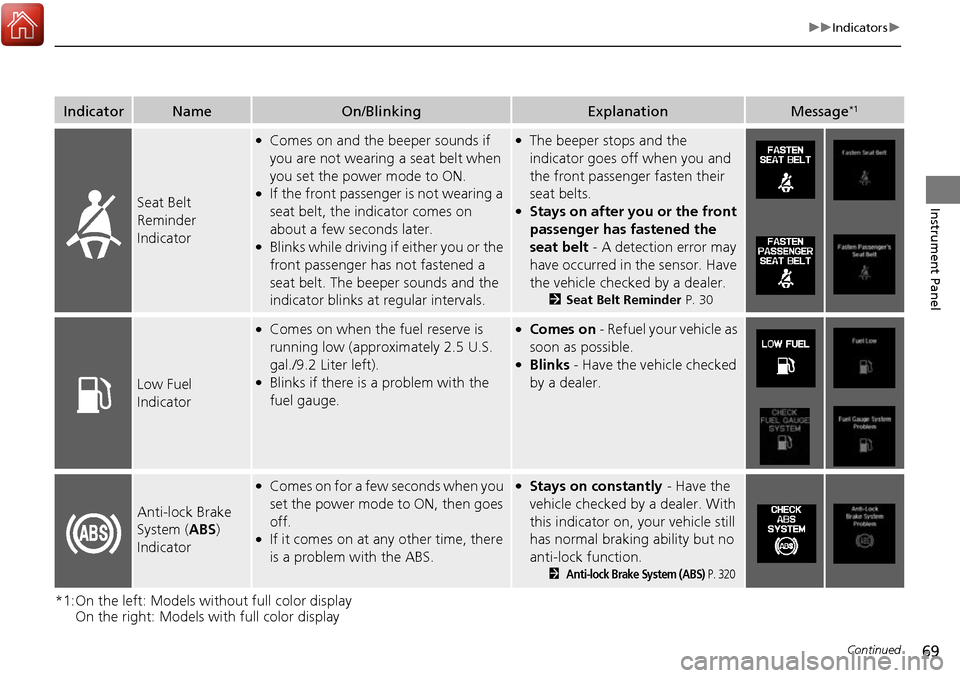
IndicatorNameOn/BlinkingExplanationMessage*1
Seat Belt
Reminder
Indicator
●Comes on and the beeper sounds if
you are not wearing a seat belt when
you set the power mode to ON.
●If the front passenger is not wearing a
seat belt, the indicator comes on
about a few seconds later.
●Blinks while driving if either you or the
front passenger has not fastened a
seat belt. The beeper sounds and the
indicator blinks at regular intervals.
●The beeper stops and the
indicator goes off when you and
the front passenger fasten their
seat belts.
●Stays on after you or the front
passenger has fastened the
seat belt - A detection error may
have occurred in the sensor. Have
the vehicle checked by a dealer.
2 Seat Belt Reminder P. 30
Low Fuel
Indicator
●Comes on when the fuel reserve is
running low (approximately 2.5 U.S.
gal./9.2 Liter left).
●Blinks if there is a problem with the
fuel gauge.
●Comes on - Refuel your vehicle as
soon as possible.
●Blinks - Have the vehicle checked
by a dealer.
Anti-lock Brake
System ( ABS)
Indicator
●Comes on for a few seconds when you
set the power mode to ON, then goes
off.
●If it comes on at any other time, there
is a problem with the ABS.
●Stays on constantly - Have the
vehicle checked by a dealer. With
this indicator on, your vehicle still
has normal braking ability but no
anti-lock function.
2Anti-lock Brake System (ABS) P. 320
Page 85 of 449
84
uuIndicators uMulti-Information Display Warn ing and Information Messages
Instrument Panel
*1:On the left: Models without full color display
On the right: Models with full color display
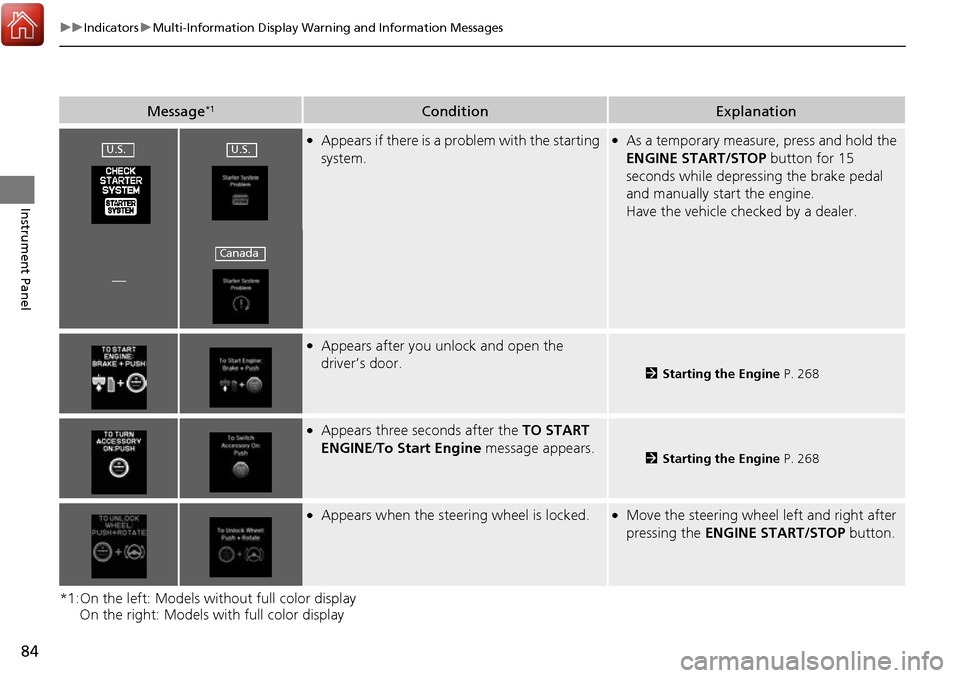
Message*1ConditionExplanation
●Appears if there is a problem with the starting
system.●As a temporary measure, press and hold the
ENGINE START/STOP button for 15
seconds while depressing the brake pedal
and manually start the engine.
Have the vehicle checked by a dealer.
—
●Appears after you unlock and open the
driver’s door.
2 Starting the Engine P. 268
●Appears three seconds after the TO START
ENGINE/ To Start Engine message appears.
2Starting the Engine P. 268
●Appears when the steering wheel is locked.●Move the steering wheel left and right after
pressing the ENGINE START/STOP button.
U.S.U.S.
Canada
Page 86 of 449
85
uuIndicators uMulti-Information Display Warning and Information Messages
Continued
Instrument Panel
*1:On the left: Models wi thout full color display
On the right: Models with full color display
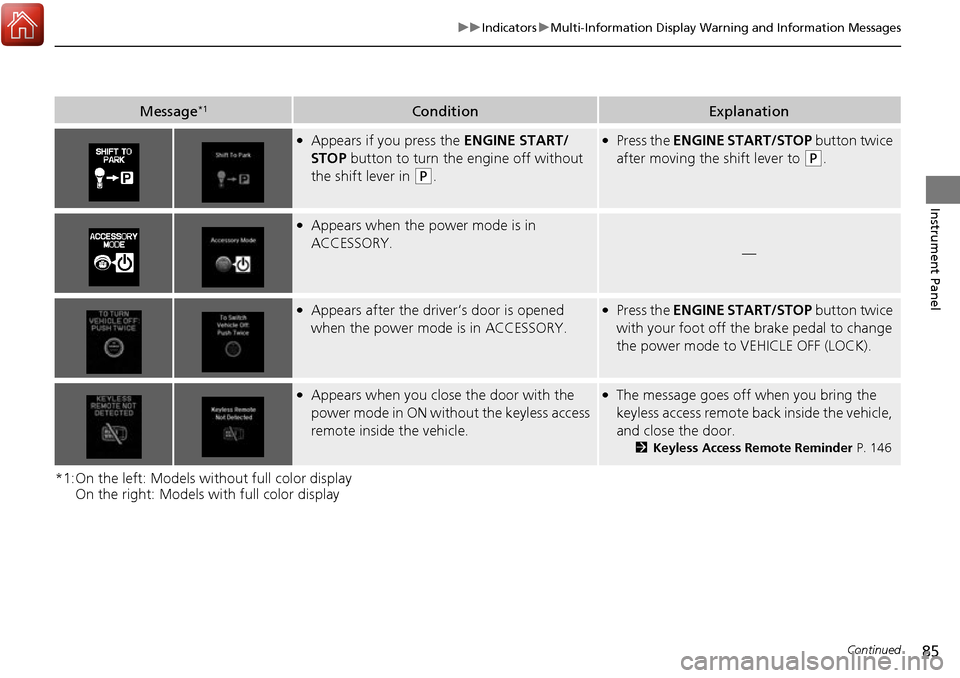
Message*1ConditionExplanation
●Appears if you press the ENGINE START/
STOP button to turn the engine off without
the shift lever in
(P.
●Press the ENGINE START/STOP button twice
after moving the shift lever to
(P.
●Appears when the power mode is in
ACCESSORY.
—
●Appears after the driver’s door is opened
when the power mode is in ACCESSORY.●Press the ENGINE START/STOP button twice
with your foot off the brake pedal to change
the power mode to VEHICLE OFF (LOCK).
●Appears when you close the door with the
power mode in ON without the keyless access
remote inside the vehicle.●The message goes off when you bring the
keyless access remote back inside the vehicle,
and close the door.
2Keyless Access Remote Reminder P. 146
Page 90 of 449
89
uuIndicators uMulti-Information Display Warning and Information Messages
Continued
Instrument Panel
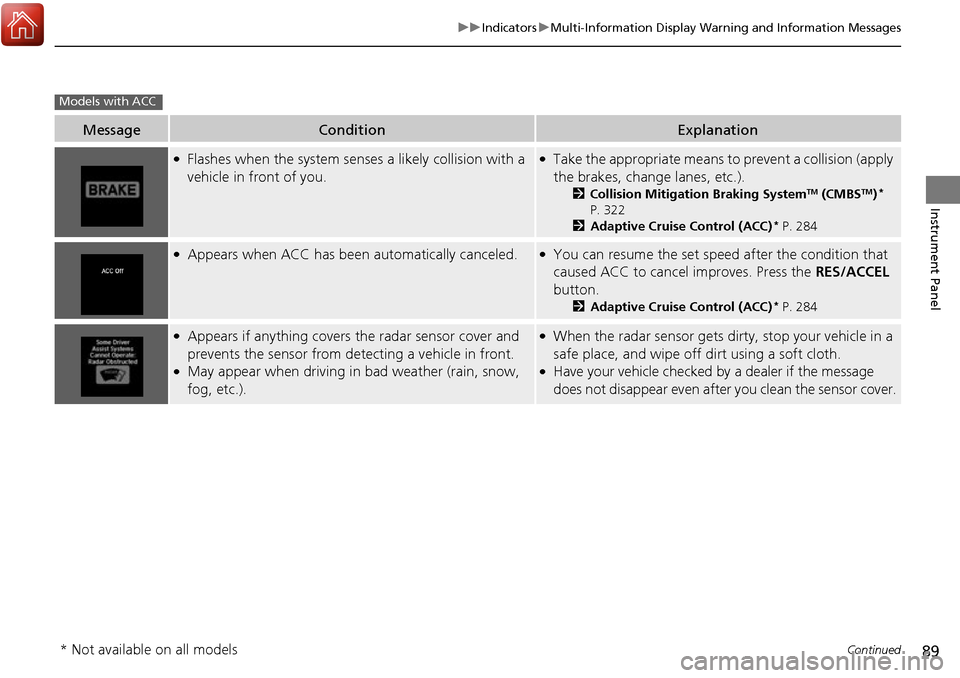
MessageConditionExplanation
●Flashes when the system sens es a likely collision with a
vehicle in front of you.●Take the appropriate means to prevent a collision (apply
the brakes, change lanes, etc.).
2 Collision Mitigation Braking SystemTM (CMBSTM)*
P. 322
2 Adaptive Cruise Control (ACC)
* P. 284
●Appears when ACC has been automatically canceled.●You can resume the set speed after the condition that
caused ACC to cancel improves. Press the RES/ACCEL
button.
2 Adaptive Cruise Control (ACC)* P. 284
●Appears if anything covers the radar sensor cover and
prevents the sensor from detecting a vehicle in front.
●May appear when driving in bad weather (rain, snow,
fog, etc.).
●When the radar sensor gets dirty, stop your vehicle in a
safe place, and wipe off dirt using a soft cloth.
●Have your vehicle checked by a dealer if the message
does not disappear even after you clean the sensor cover.
Models with ACC
* Not available on all models
Page 92 of 449
91
uuIndicators uMulti-Information Display Warning and Information Messages
Continued
Instrument Panel
MessageConditionExplanation
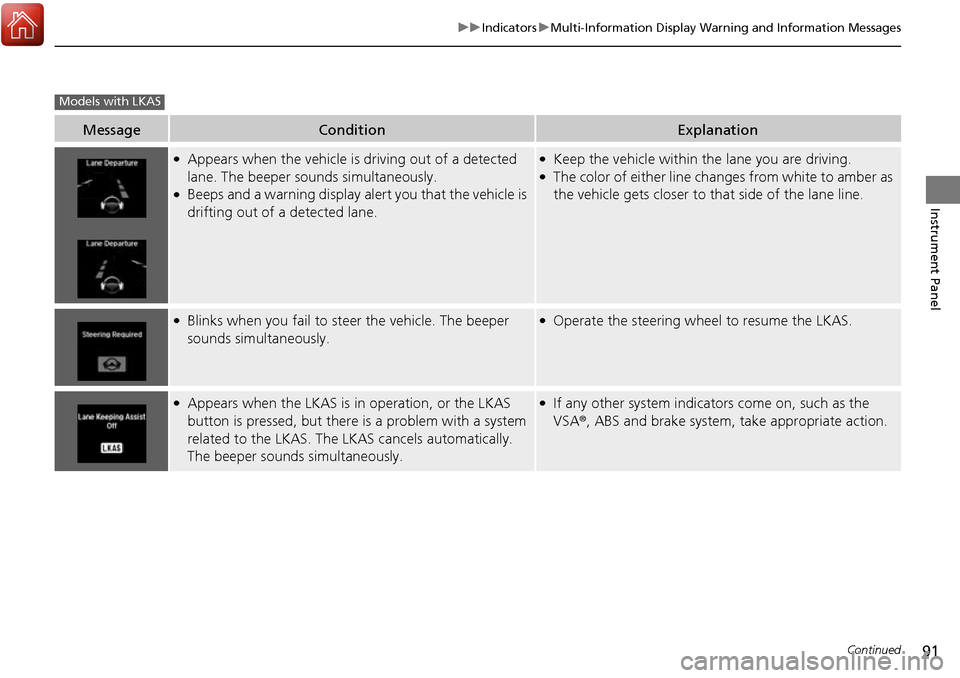
●Appears when the vehicle is driving out of a detected
lane. The beeper sounds simultaneously.
●Beeps and a warning display alert you that the vehicle is
drifting out of a detected lane.
●Keep the vehicle within the lane you are driving.●The color of either line changes from white to amber as
the vehicle gets closer to that side of the lane line.
●Blinks when you fail to steer the vehicle. The beeper
sounds simultaneously.●Operate the steering wheel to resume the LKAS.
●Appears when the LKAS is in operation, or the LKAS
button is pressed, but there is a problem with a system
related to the LKAS. The LKAS cancels automatically.
The beeper sounds simultaneously.●If any other system indicators come on, such as the
VSA ®, ABS and brake system, take appropriate action.
Models with LKAS
Page 145 of 449
144
Controls
Operating the Switches Around the Steering Wheel
ENGINE START/STOP Button
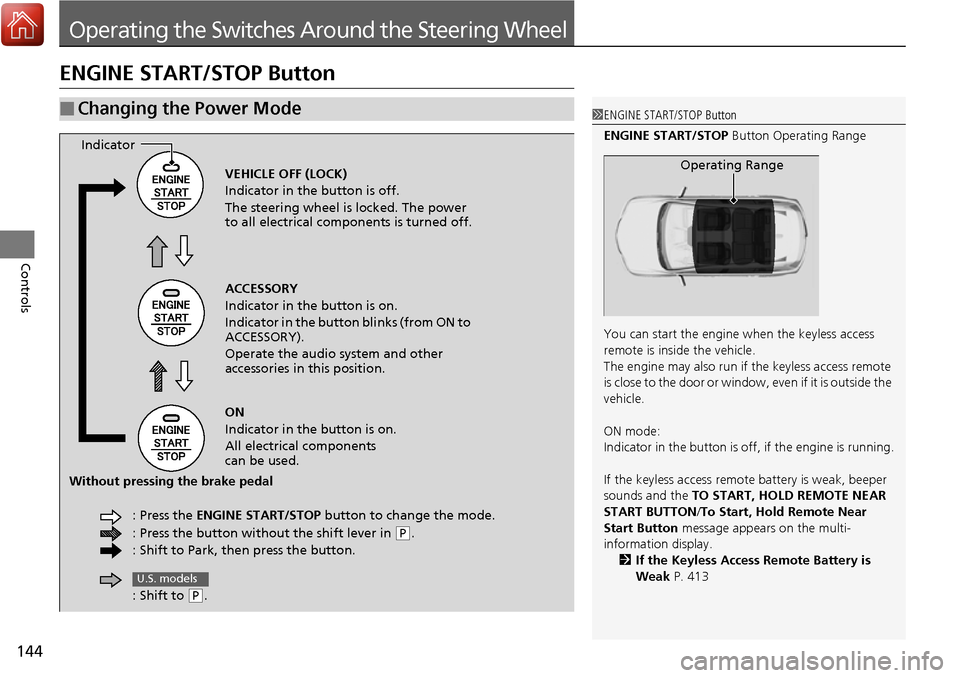
■Changing the Power Mode1ENGINE START/STOP Button
ENGINE START/STOP Button Operating Range
You can start the engine when the keyless access
remote is inside the vehicle.
The engine may also run if the keyless access remote
is close to the door or window, even if it is outside the
vehicle.
ON mode:
Indicator in the button is of f, if the engine is running.
If the keyless access remote battery is weak, beeper
sounds and the TO START, HOLD REMOTE NEAR
START BUTTON /To Start, Hold Remote Near
Start Button message appears on the multi-
information display. 2 If the Keyless Access Remote Battery is
Weak P. 413
Operating RangeVEHICLE OFF (LOCK)
Indicator in the button is off.
The steering wheel is locked. The power
to all electrical components is turned off.
ACCESSORY
Indicator in the button is on.
Indicator in the button blinks (from ON to
ACCESSORY).
Operate the audio system and other
accessories in this position.
ON
Indicator in the button is on.
All electrical components
can be used.
: Press the ENGINE START/STOP button to change the mode.
: Press the button without the shift lever in
( P.
: Shift to Park, then press the button.
Indicator
Without pressing the brake pedal
: Shift to
(P.
U.S. models
Page 151 of 449
150
uuOperating the Switches Around the Steering Wheel uFog Lights*
Controls
Fog Lights*
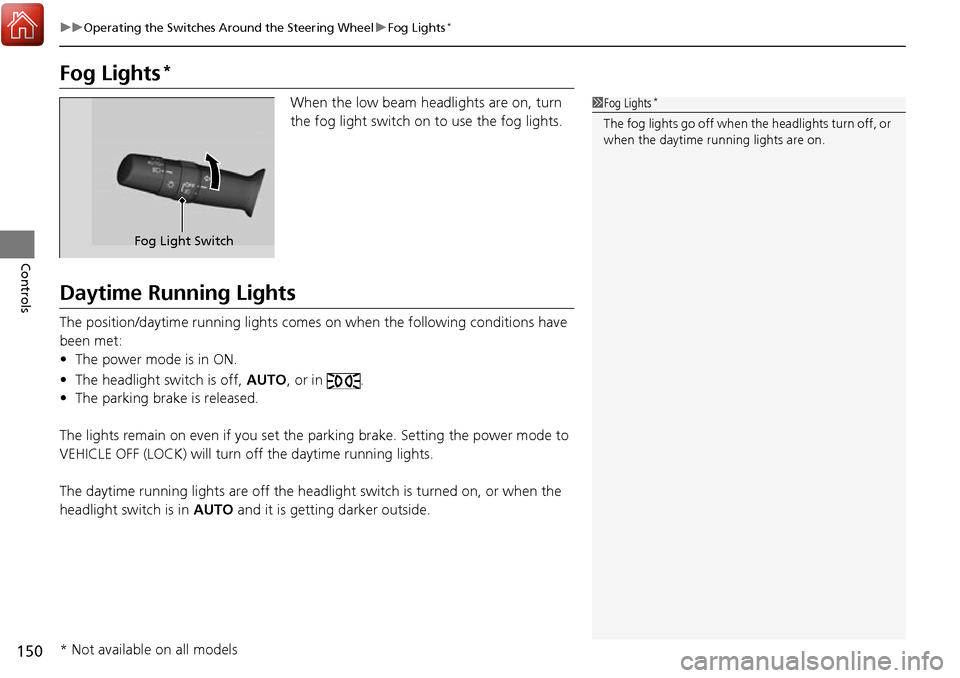
When the low beam headlights are on, turn
the fog light switch on to use the fog lights.
Daytime Running Lights
The position/daytime running lights comes on when the following conditions have
been met:
• The power mode is in ON.
• The headlight switch is off, AUTO, or in .
• The parking brake is released.
The lights remain on even if you set the parking brake. Setting the power mode to
VEHICLE OFF (LOCK) will turn off the daytime running lights.
The daytime running lights are off the headli ght switch is turned on, or when the
headlight switch is in AUTO and it is getting darker outside.
1Fog Lights*
The fog lights go off when th e headlights turn off, or
when the daytime running lights are on.
Fog Light Switch
* Not available on all models
Page 158 of 449
157
uuOperating the Switches Around the Steering Wheel uDriving Position Memory System
Controls
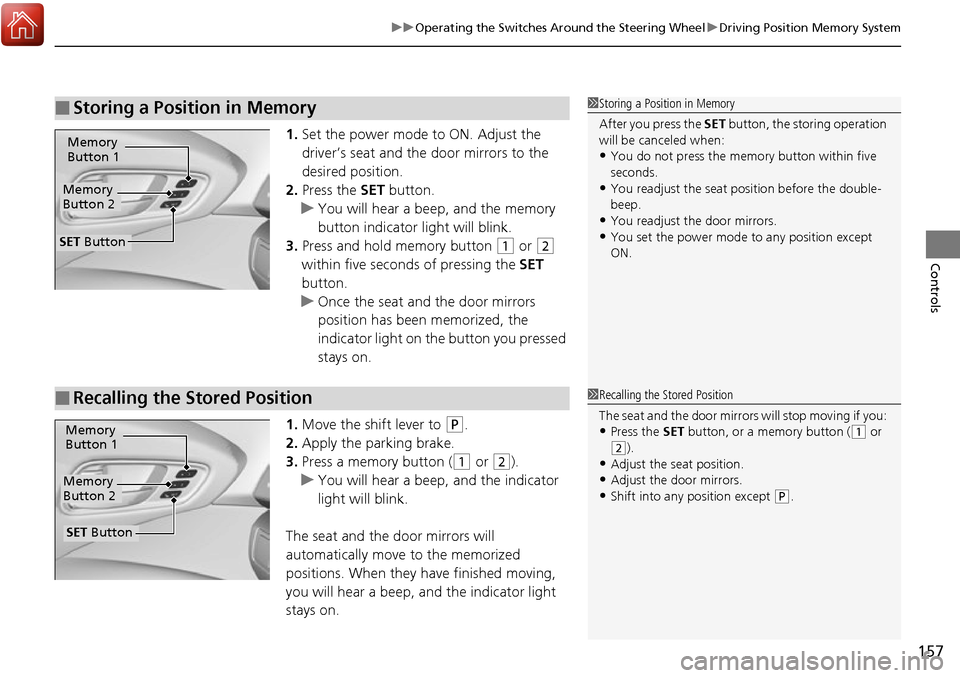
1. Set the power mode to ON. Adjust the
driver’s seat and the door mirrors to the
desired position.
2. Press the SET button.
u You will hear a beep, and the memory
button indicator light will blink.
3. Press and hold memory button
(1 or (2
within five seconds of pressing the SET
button.
u Once the seat and the door mirrors
position has been memorized, the
indicator light on the button you pressed
stays on.
1. Move the shift lever to
(P.
2. Apply the parking brake.
3. Press a memory button (
(1 or (2).
u You will hear a beep, and the indicator
light will blink.
The seat and the door mirrors will
automatically move to the memorized
positions. When they have finished moving,
you will hear a beep, and the indicator light
stays on.
■Storing a Position in Memory1 Storing a Position in Memory
After you press the SET button, the storing operation
will be canceled when:
•You do not press the memory button within five
seconds.
•You readjust the seat position before the double-
beep.
•You readjust the door mirrors.•You set the power mode to any position except
ON.
Memory
Button 1
Memory
Button 2
SET Button
■Recalling the Stored Position1 Recalling the Stored Position
The seat and the door mirror s will stop moving if you:
•Press the SET button, or a memory button ((1 or (2).
•Adjust the seat position.
•Adjust the door mirrors.•Shift into any position except (P.
Memory
Button 1
Memory
Button 2
SET Button
Page 168 of 449
167
uuAdjusting the Seats uRear Seats
Continued
Controls
Rear Seats
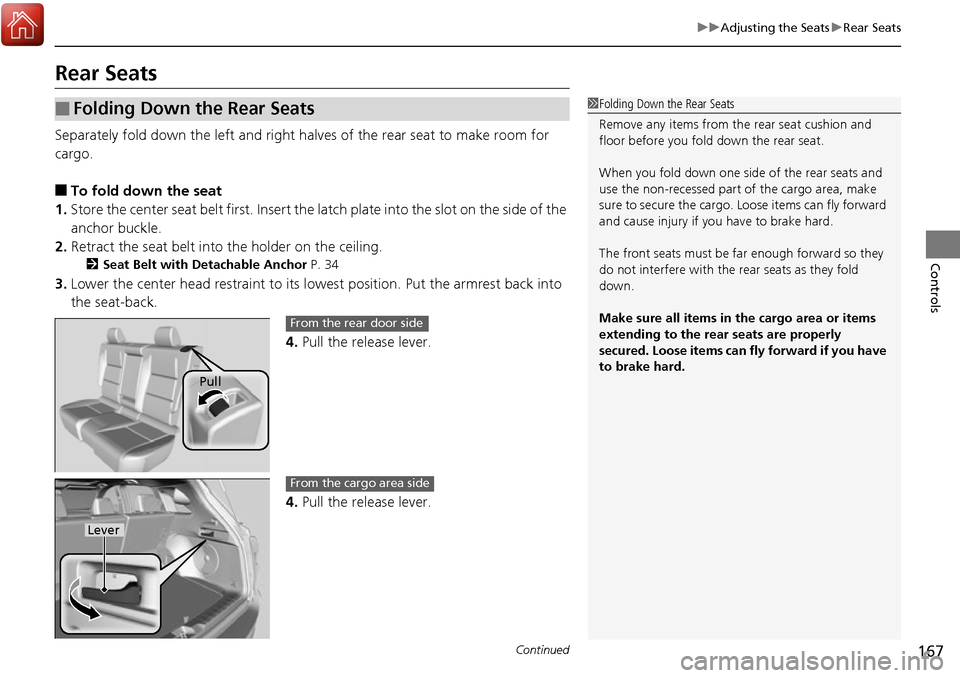
Separately fold down the left and right ha lves of the rear seat to make room for
cargo.
■To fold down the seat
1. Store the center seat belt first. Insert the la tch plate into the slot on the side of the
anchor buckle.
2. Retract the seat belt into the holder on the ceiling.
2 Seat Belt with Detachable Anchor P. 34
3.Lower the center head restraint to its lo west position. Put the armrest back into
the seat-back.
4.Pull the release lever.
4. Pull the release lever.
■Folding Down the Rear Seats1Folding Down the Rear Seats
Remove any items from th e rear seat cushion and
floor before you fold down the rear seat.
When you fold down one side of the rear seats and
use the non-recessed part of the cargo area, make
sure to secure the cargo. Loose items can fly forward
and cause injury if you have to brake hard.
The front seats must be far enough forward so they
do not interfere with the rear seats as they fold
down.
Make sure all items in the cargo area or items
extending to the rear seats are properly
secured. Loose items can fly forward if you have
to brake hard.
Pull
From the rear door side
Lever
From the cargo area side
Page 256 of 449
255
Driving
This chapter discusses driving, refueling, and information on items such as accessories.
Before Driving................................... 256
Towing a Trailer ................................ 261
Off-Highway Driving Guidelines ..... 266
When Driving Starting the Engine .......................... 268
Precautions While Driving................. 273
Automatic Transmission ................... 274
Shifting ............................................ 275
Cruise Control
*................................ 279
Front Sensor Camera*...................... 282
Adaptive Cruise Control (ACC)*....... 284
Lane Departure Warning (LDW)*...... 297Lane Keeping Assist System (LKAS)*..... 301 Vehicle Stability Assist (VSA
®), aka Electronic
Stability Control (ESC), System ........... 309
Blind spot information (BSI) System
*.... 311All-Wheel Drive (AWD) with Intelligent Control System*..................................................... 314Tire Pressure Monitoring System (TPMS) ... 314Tire Pressure Monitoring System (TPMS) - Required Federal Explanation ......... 316
Braking Brake System ................................... 318
Anti-lock Brake System (ABS) ........... 320
Brake Assist System.......................... 321 Collision Mitigation Braking System
TM
(CMBSTM)*..................................... 322
Parking Your Vehicle When Stopped ................................ 330
Parking Sensor System
*................... 331
Cross Traffic Monitor*..................... 335
Multi-View Rear Camera .................. 338
Refueling Fuel Information .............................. 339
How to Refuel ................................. 340
Fuel Economy and CO
2 Emissions .... 341
Accessories and Modifications ........ 342
* Not available on all models