ACC Acura RDX 2017 Owner's Guide
[x] Cancel search | Manufacturer: ACURA, Model Year: 2017, Model line: RDX, Model: Acura RDX 2017Pages: 449, PDF Size: 10.88 MB
Page 69 of 449
68
uuIndicators u
Instrument Panel
*1:On the left: Models without full color display
On the right: Models with full color display
*2:Models with full color display
*3:Models without full color display
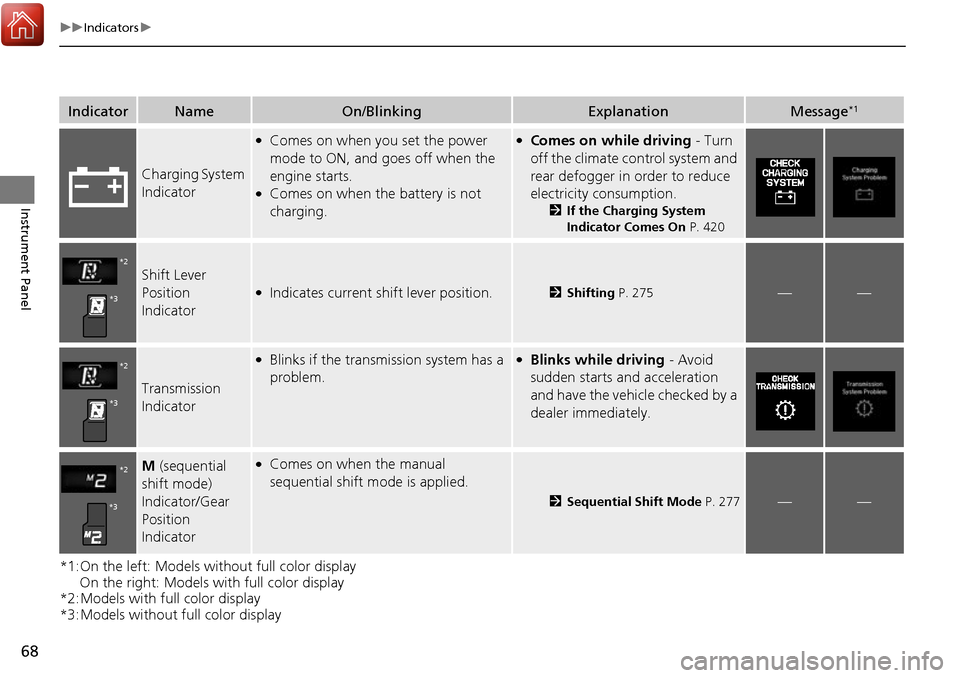
IndicatorNameOn/BlinkingExplanationMessage*1
Charging System
Indicator
●Comes on when you set the power
mode to ON, and goes off when the
engine starts.
●Comes on when the battery is not
charging.
●Comes on while driving - Turn
off the climate control system and
rear defogger in order to reduce
electricity consumption.
2 If the Charging System
Indicator Comes On P. 420
Shift Lever
Position
Indicator●Indicates current shift lever position.2Shifting P. 275——
Transmission
Indicator
●Blinks if the transmission system has a
problem.●Blinks while driving - Avoid
sudden starts and acceleration
and have the vehicle checked by a
dealer immediately.
M (sequential
shift mode)
Indicator/Gear
Position
Indicator●Comes on when the manual
sequential shift mode is applied.
2 Sequential Shift Mode P. 277——
*2
*3
*2
*3
*2
*3
Page 75 of 449
74
uuIndicators u
Instrument Panel
*1:On the left: Models without full color display
On the right: Models with full color display
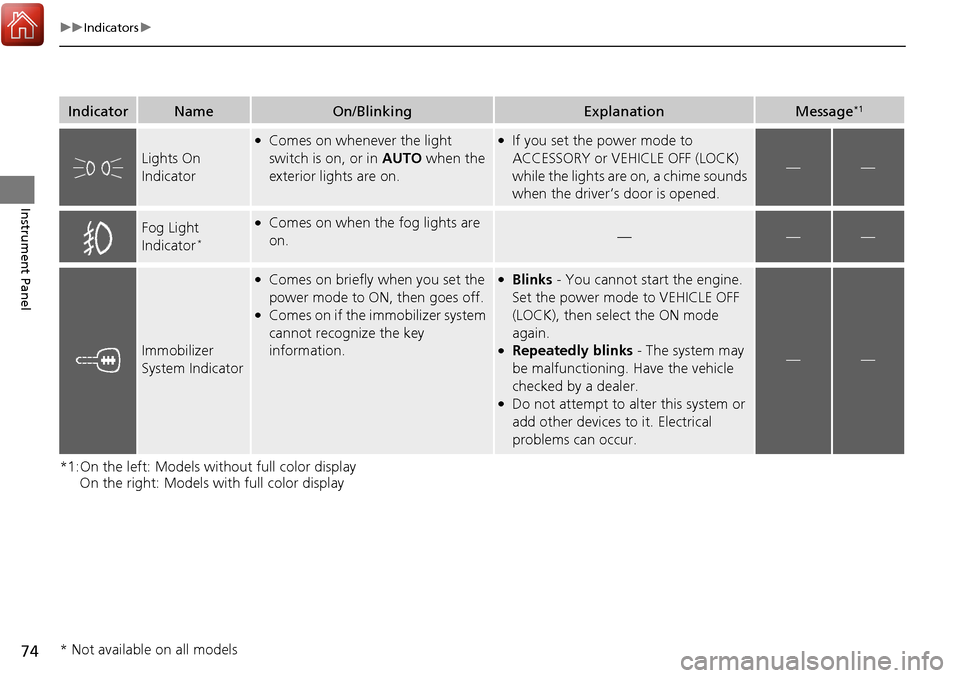
IndicatorNameOn/BlinkingExplanationMessage*1
Lights On
Indicator
●Comes on whenever the light
switch is on, or in AUTO when the
exterior lights are on.●If you set the power mode to
ACCESSORY or VEHICLE OFF (LOCK)
while the lights are on, a chime sounds
when the driver’s door is opened.
——
Fog Light
Indicator*
●Comes on when the fog lights are
on.———
Immobilizer
System Indicator
●Comes on briefly when you set the
power mode to ON, then goes off.
●Comes on if the immobilizer system
cannot recognize the key
information.
●Blinks - You cannot start the engine.
Set the power mode to VEHICLE OFF
(LOCK), then select the ON mode
again.
●Repeatedly blinks - The system may
be malfunctioning. Have the vehicle
checked by a dealer.
●Do not attempt to alter this system or
add other devices to it. Electrical
problems can occur.
——
* Not available on all models
Page 77 of 449
76
uuIndicators u
Instrument Panel
*1:On the left: Models without full color display
On the right: Models with full color display
*2:Models with full color display
*3:Models without full color display
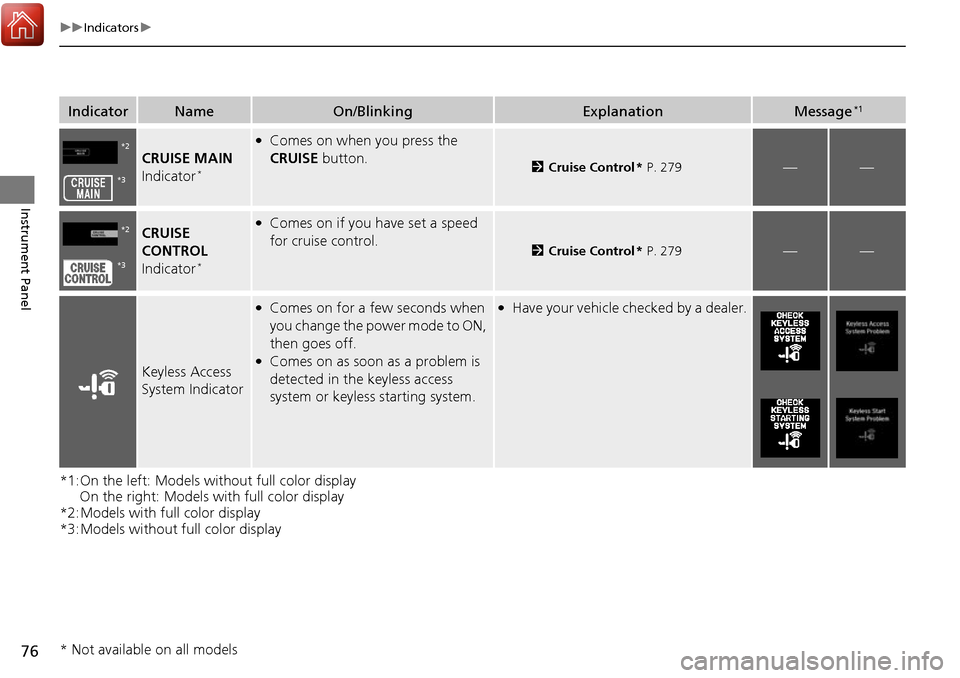
IndicatorNameOn/BlinkingExplanationMessage*1
CRUISE MAIN
Indicator*
●Comes on when you press the
CRUISE button.
2Cruise Control * P. 279——
CRUISE
CONTROL
Indicator
*
●Comes on if you have set a speed
for cruise control.
2 Cruise Control * P. 279——
Keyless Access
System Indicator
●Comes on for a few seconds when
you change the power mode to ON,
then goes off.
●Comes on as soon as a problem is
detected in the keyless access
system or keyless starting system.
●Have your vehicle ch ecked by a dealer.
*2
*3
*2
*3
* Not available on all models
Page 78 of 449
77
uuIndicators u
Continued
Instrument Panel
*1:On the left: Models wi thout full color display
On the right: Models with full color display
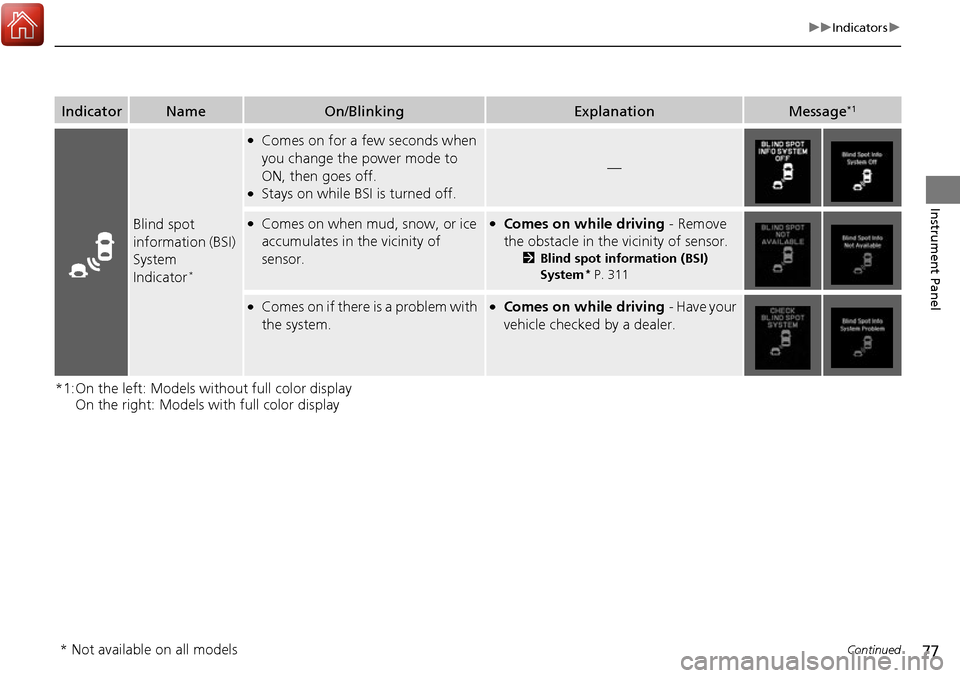
IndicatorNameOn/BlinkingExplanationMessage*1
Blind spot
information (BSI)
System
Indicator
*
●Comes on for a few seconds when
you change the power mode to
ON, then goes off.
●Stays on while BS I is turned off.
—
●Comes on when mud, snow, or ice
accumulates in the vicinity of
sensor.●Comes on while driving - Remove
the obstacle in the vicinity of sensor.
2 Blind spot information (BSI)
System* P. 311
●Comes on if there is a problem with
the system.●Comes on while driving - Have your
vehicle checked by a dealer.
* Not available on all models
Page 80 of 449

79
uuIndicators u
Continued
Instrument Panel
IndicatorNameOn/BlinkingExplanationMessage
Adaptive Cruise
Control (
ACC)
Indicator (Amber)*
●Comes on for a few seconds when
you set the power mode to ON, then
goes off.
●Comes on if there is a problem with
ACC.
●Comes on while driving - Have your
vehicle checked by a dealer.
Adaptive Cruise
Control (
ACC)
Indicator (Green)*
●Comes on when you press the MAIN
button.
2 Adaptive Cruise Control (ACC)* P. 284—
Lane Keeping
Assist System
(LKAS ) Indicator
(Amber)
*
●Comes on for a few seconds when
you set the power mode to ON, then
goes off.
●Comes on if there is a problem with
the LKAS.
●Stays on constantly - Have your vehicle
checked by a dealer.
Lane Keeping
Assist System
( LKAS ) Indicator
(Green)
*
●Comes on when you press the MAIN
button.
2 Lane Keeping Assist System (LKAS)*
P. 301—
* Not available on all models
Page 86 of 449
85
uuIndicators uMulti-Information Display Warning and Information Messages
Continued
Instrument Panel
*1:On the left: Models wi thout full color display
On the right: Models with full color display
Message*1ConditionExplanation
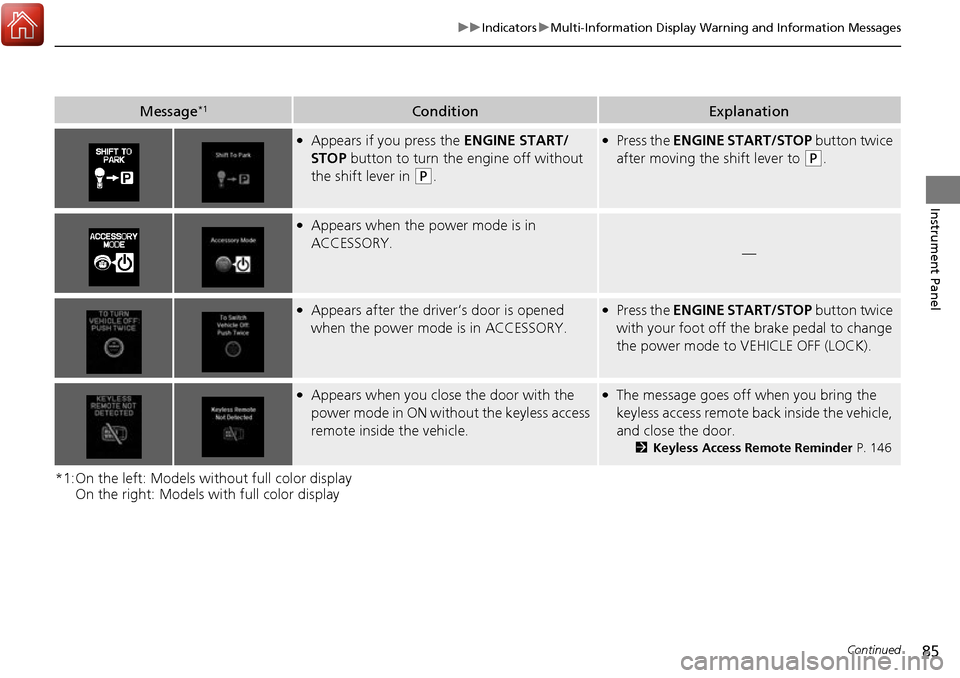
●Appears if you press the ENGINE START/
STOP button to turn the engine off without
the shift lever in
(P.
●Press the ENGINE START/STOP button twice
after moving the shift lever to
(P.
●Appears when the power mode is in
ACCESSORY.
—
●Appears after the driver’s door is opened
when the power mode is in ACCESSORY.●Press the ENGINE START/STOP button twice
with your foot off the brake pedal to change
the power mode to VEHICLE OFF (LOCK).
●Appears when you close the door with the
power mode in ON without the keyless access
remote inside the vehicle.●The message goes off when you bring the
keyless access remote back inside the vehicle,
and close the door.
2Keyless Access Remote Reminder P. 146
Page 87 of 449
86
uuIndicators uMulti-Information Display Warn ing and Information Messages
Instrument Panel
*1:On the left: Models without full color display
On the right: Models with full color display
Message*1ConditionExplanation
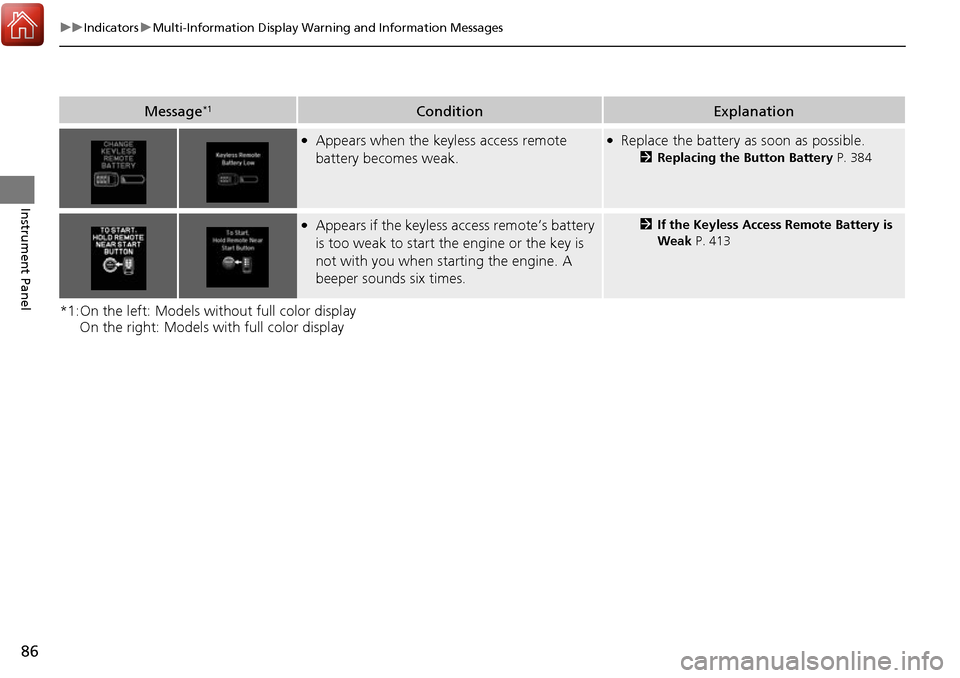
●Appears when the keyless access remote
battery becomes weak.●Replace the battery as soon as possible.
2Replacing the Button Battery P. 384
●Appears if the keyless access remote’s battery
is too weak to start the engine or the key is
not with you when starting the engine. A
beeper sounds six times.2 If the Keyless Access Remote Battery is
Weak P. 413
Page 90 of 449
89
uuIndicators uMulti-Information Display Warning and Information Messages
Continued
Instrument Panel
MessageConditionExplanation
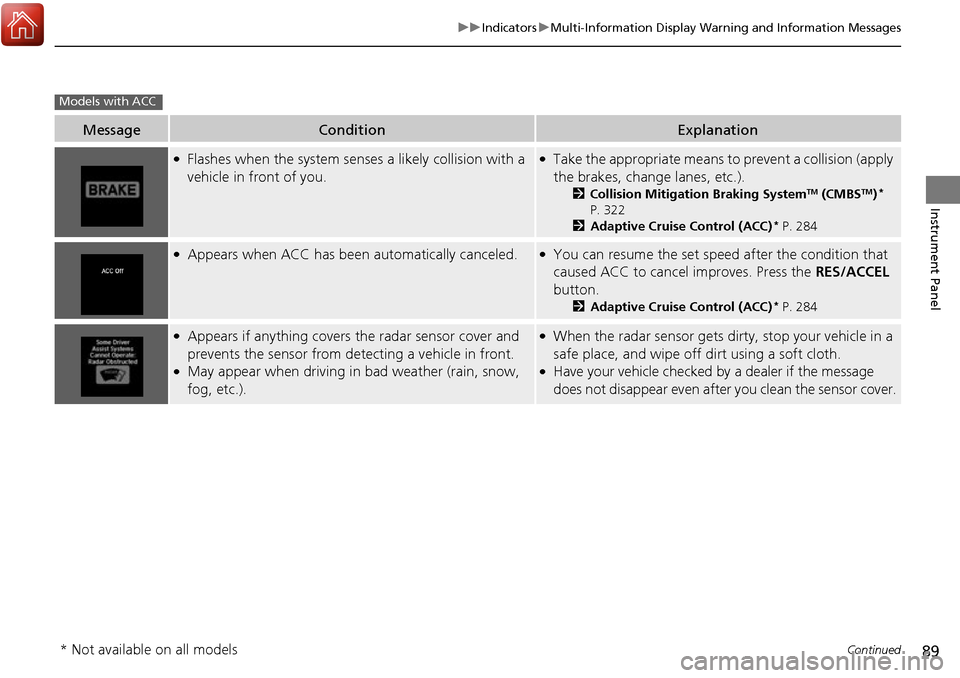
●Flashes when the system sens es a likely collision with a
vehicle in front of you.●Take the appropriate means to prevent a collision (apply
the brakes, change lanes, etc.).
2 Collision Mitigation Braking SystemTM (CMBSTM)*
P. 322
2 Adaptive Cruise Control (ACC)
* P. 284
●Appears when ACC has been automatically canceled.●You can resume the set speed after the condition that
caused ACC to cancel improves. Press the RES/ACCEL
button.
2 Adaptive Cruise Control (ACC)* P. 284
●Appears if anything covers the radar sensor cover and
prevents the sensor from detecting a vehicle in front.
●May appear when driving in bad weather (rain, snow,
fog, etc.).
●When the radar sensor gets dirty, stop your vehicle in a
safe place, and wipe off dirt using a soft cloth.
●Have your vehicle checked by a dealer if the message
does not disappear even after you clean the sensor cover.
Models with ACC
* Not available on all models
Page 91 of 449
90
uuIndicators uMulti-Information Display Warn ing and Information Messages
Instrument Panel
MessageConditionExplanation
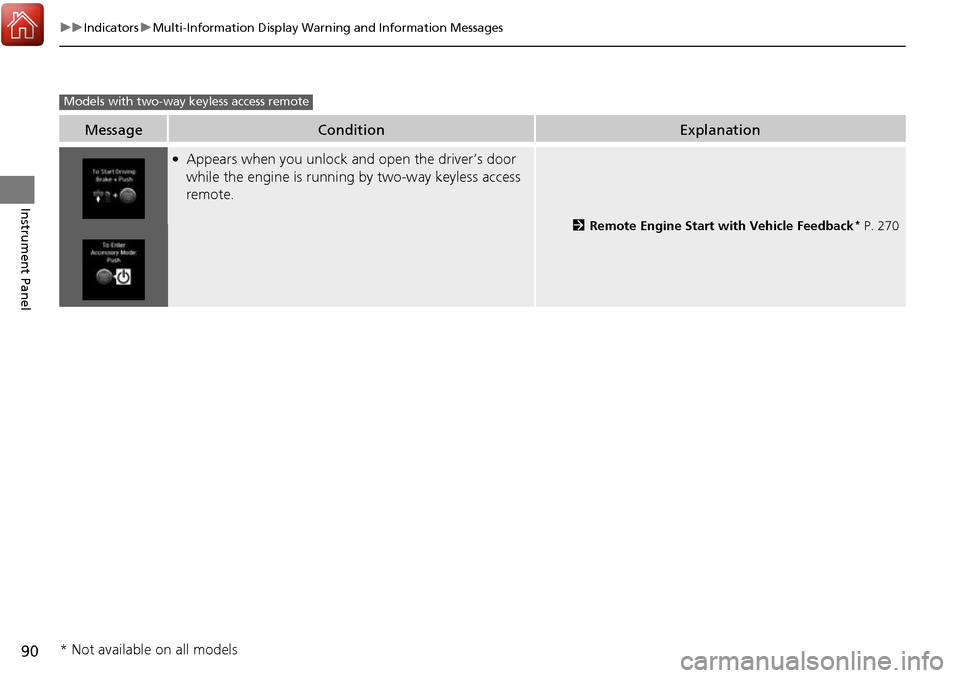
●Appears when you unlock and open the driver’s door
while the engine is running by two-way keyless access
remote.
2 Remote Engine Start with Vehicle Feedback* P. 270
Models with two-way keyless access remote
* Not available on all models
Page 93 of 449
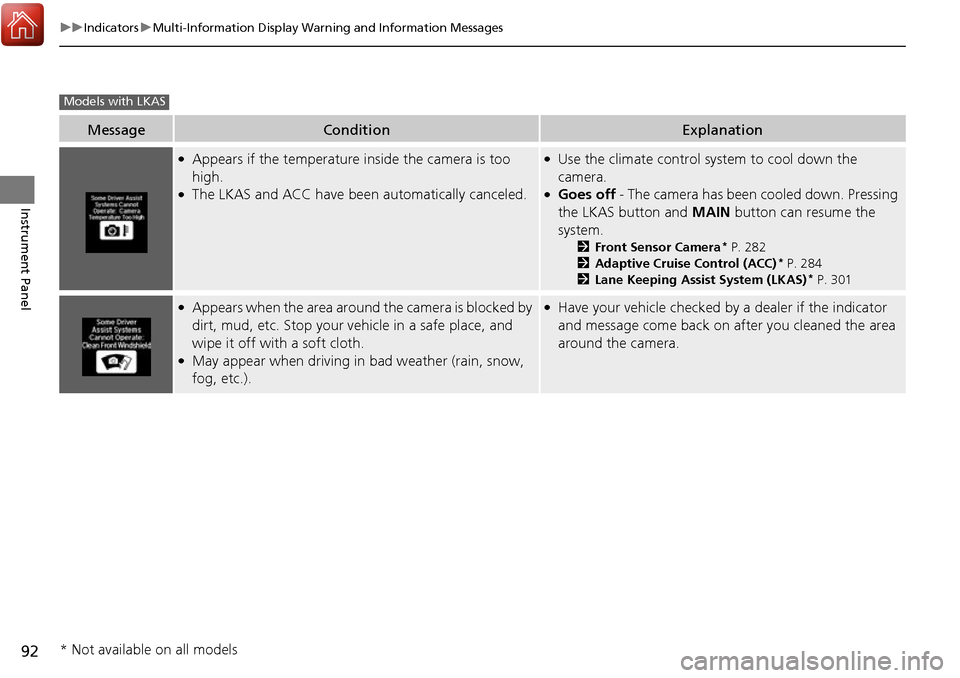
92
uuIndicators uMulti-Information Display Warn ing and Information Messages
Instrument Panel
MessageConditionExplanation
●Appears if the temperature inside the camera is too
high.
●The LKAS and ACC have been automatically canceled.
●Use the climate control system to cool down the
camera.
●Goes off - The camera has been cooled down. Pressing
the LKAS button and MAIN button can resume the
system.
2 Front Sensor Camera* P. 282
2 Adaptive Cruise Control (ACC)* P. 284
2 Lane Keeping Assist System (LKAS)* P. 301
●Appears when the area around the camera is blocked by
dirt, mud, etc. Stop your ve hicle in a safe place, and
wipe it off with a soft cloth.
●May appear when driving in bad weather (rain, snow,
fog, etc.).
●Have your vehicle checked by a dealer if the indicator
and message come back on after you cleaned the area
around the camera.
Models with LKAS
* Not available on all models