oil Acura RDX 2017 Owner's Guide
[x] Cancel search | Manufacturer: ACURA, Model Year: 2017, Model line: RDX, Model: Acura RDX 2017Pages: 449, PDF Size: 10.88 MB
Page 355 of 449
354
uuMaintenance Under the Hood uOil Check
Maintenance
Oil Check
We recommend that you check the engi ne oil level every time you refuel.
Park the vehicle on level ground.
Wait approximately three minutes after turn ing the engine off before you check the
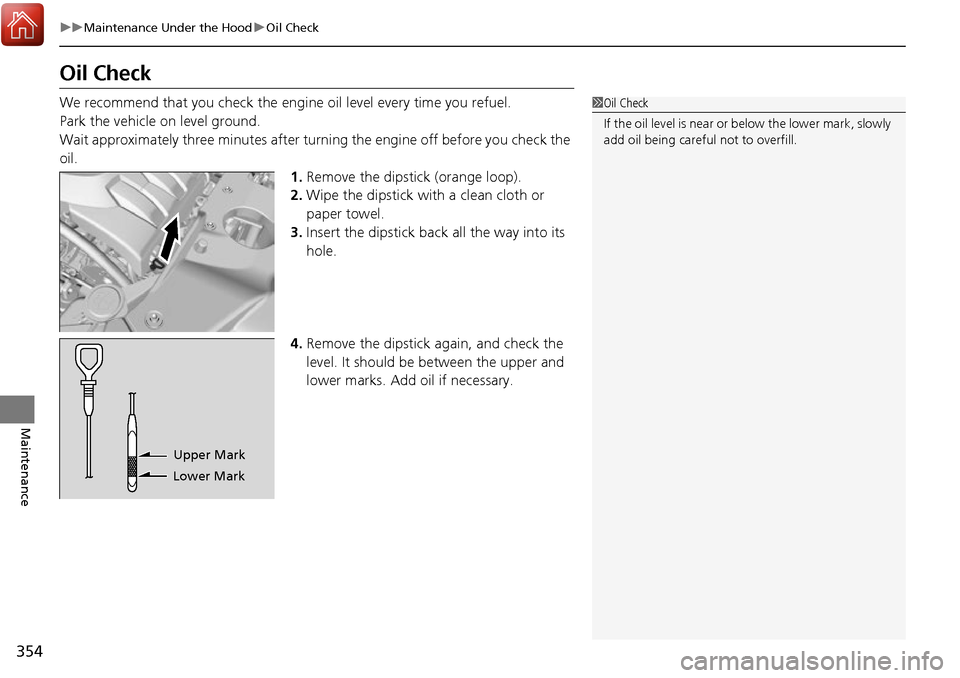
oil. 1.Remove the dipstick (orange loop).
2. Wipe the dipstick with a clean cloth or
paper towel.
3. Insert the dipstick back all the way into its
hole.
4. Remove the dipstick again, and check the
level. It should be between the upper and
lower marks. Add oil if necessary.1Oil Check
If the oil level is near or below the lower mark, slowly
add oil being careful not to overfill.
Lower MarkUpper Mark
Page 356 of 449
355
uuMaintenance Under the Hood uAdding Engine Oil
Maintenance
Adding Engine Oil
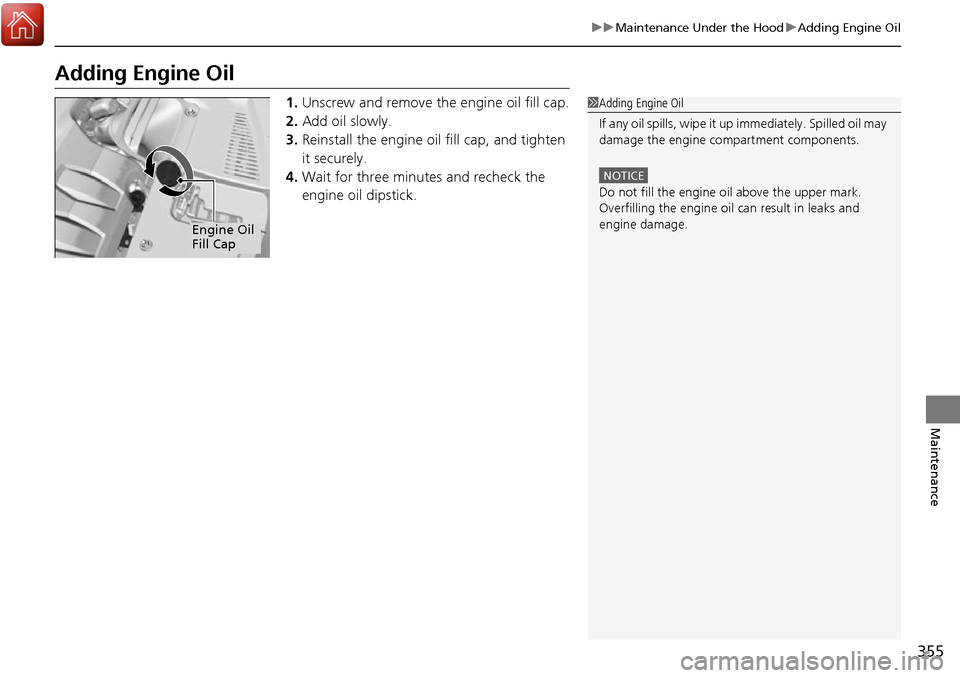
1. Unscrew and remove the engine oil fill cap.
2. Add oil slowly.
3. Reinstall the engine oil fill cap, and tighten
it securely.
4. Wait for three minutes and recheck the
engine oil dipstick.1Adding Engine Oil
If any oil spills, wipe it up immediately. Spilled oil may
damage the engine compartment components.
NOTICE
Do not fill the engine oil above the upper mark.
Overfilling the engine oil can result in leaks and
engine damage.
Engine Oil
Fill Cap
Page 357 of 449
356
uuMaintenance Under the Hood uChanging the Engine Oil and Oil Filter
Maintenance
Changing the Engine Oil and Oil Filter
You must change the engine oil and oil filter regularly in order to maintain the
engine’s lubrication. The engine may be damaged if they are not changed regularly.
Change the oil and filter in accordance with the maintenance message on the multi-
information display. 1.Run the engine until it reaches normal
operating temperature, and then turn the
engine off.
2. Open the hood and remove the engine oil
fill cap.
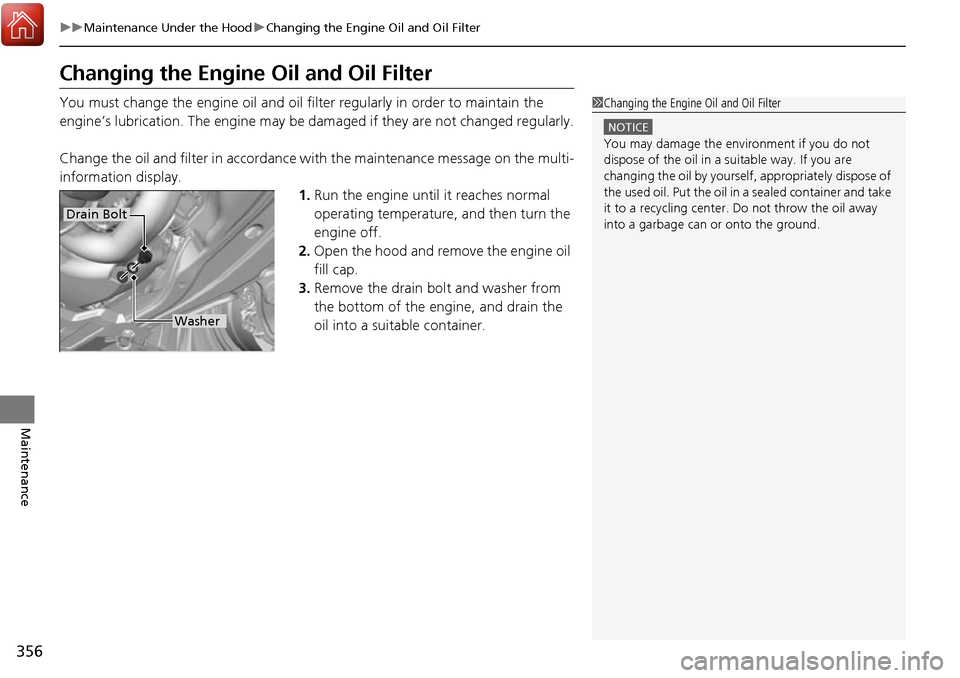
3. Remove the drain bolt and washer from
the bottom of the engine, and drain the
oil into a suitable container.1Changing the Engine Oil and Oil Filter
NOTICE
You may damage the environment if you do not
dispose of the oil in a suitable way. If you are
changing the oil by yourself , appropriately dispose of
the used oil. Put the oil in a sealed container and take
it to a recycling center. Do not throw the oil away
into a garbage can or onto the ground.
Drain Bolt
Washer
Page 358 of 449
357
uuMaintenance Under the Hood uChanging the Engine Oil and Oil Filter
Maintenance
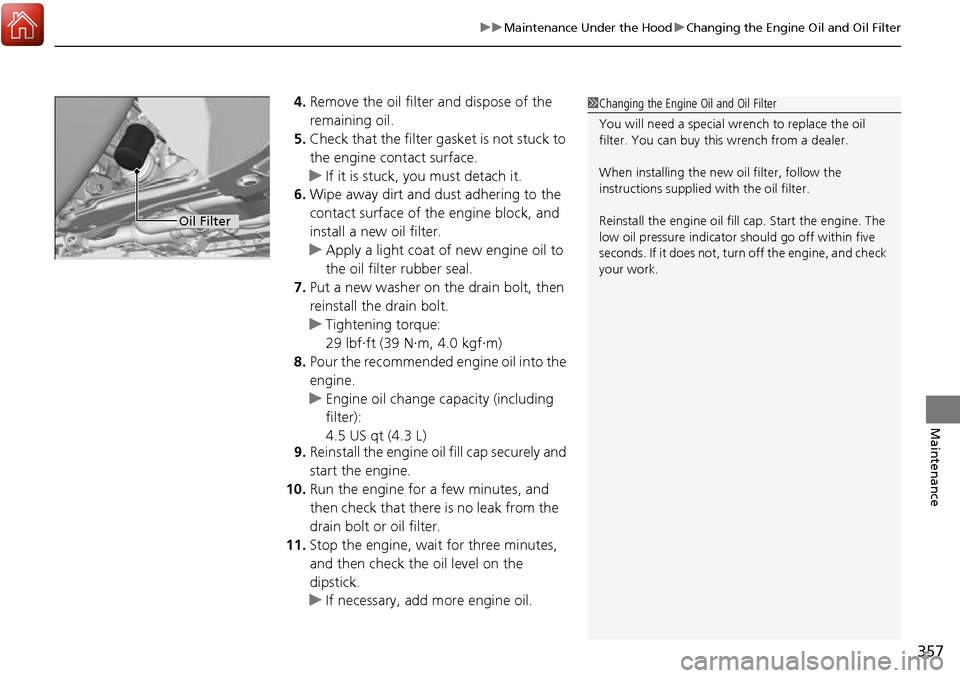
4. Remove the oil filter and dispose of the
remaining oil.
5. Check that the filter gasket is not stuck to
the engine contact surface.
u If it is stuck, you must detach it.
6. Wipe away dirt and dust adhering to the
contact surface of the engine block, and
install a new oil filter.
u Apply a light coat of new engine oil to
the oil filter rubber seal.
7. Put a new washer on the drain bolt, then
reinstall the drain bolt.
u Tightening torque:
29 lbf∙ft (39 N∙m, 4.0 kgf∙m)
8. Pour the recommended engine oil into the
engine.
u Engine oil change capacity (including
filter):
4.5 US qt (4.3 L)
9. Reinstall the engine oil fill cap securely and
start the engine.
10. Run the engine for a few minutes, and
then check that there is no leak from the
drain bolt or oil filter.
11. Stop the engine, wait for three minutes,
and then check the oil level on the
dipstick.
u If necessary, add more engine oil.1Changing the Engine Oil and Oil Filter
You will need a special wrench to replace the oil
filter. You can buy this wrench from a dealer.
When installing the new oil filter, follow the
instructions supplied with the oil filter.
Reinstall the engine oil fill cap. Start the engine. The
low oil pressure indicator should go off within five
seconds. If it does not, turn off the engine, and check
your work.
Oil Filter
Page 364 of 449
363Continued
Maintenance
Replacing Light Bulbs
Headlight Bulbs
Headlight bulbs are LED type. Have an authorized Acura dealer inspect and replace
the light assembly
Fog Light Bulbs*
When replacing, use the following bulbs.
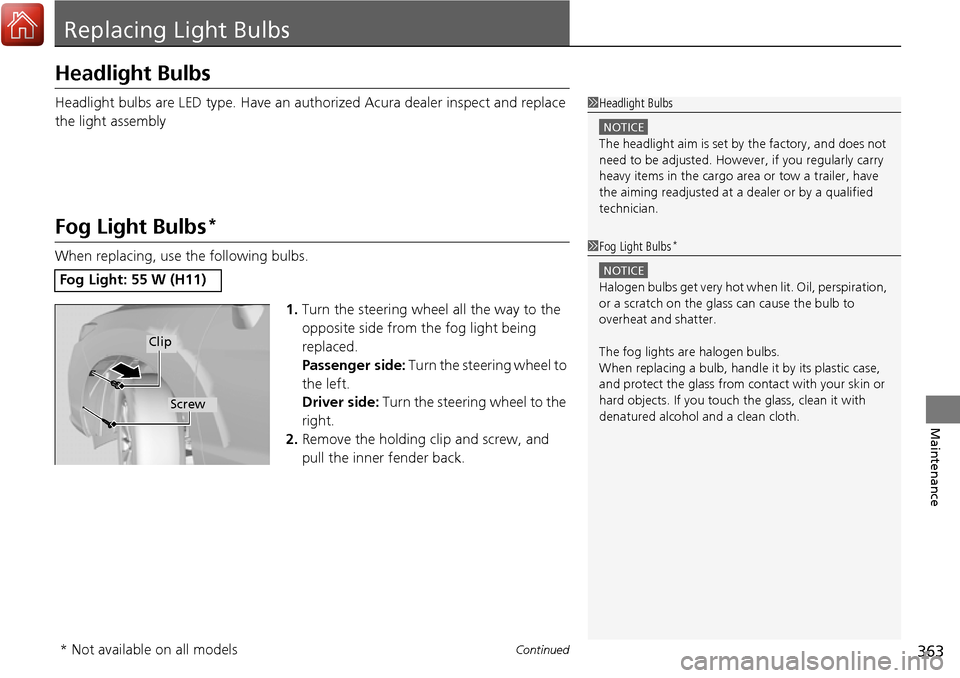
1.Turn the steering wheel all the way to the
opposite side from the fog light being
replaced.
Passenger side: Turn the steering wheel to
the left.
Driver side: Turn the steering wheel to the
right.
2. Remove the holding clip and screw, and
pull the inner fender back.
Fog Light: 55 W (H11)
1Headlight Bulbs
NOTICE
The headlight aim is set by the factory, and does not
need to be adjusted. Howeve r, if you regularly carry
heavy items in the cargo area or tow a trailer, have
the aiming readjusted at a dealer or by a qualified
technician.
1 Fog Light Bulbs*
NOTICE
Halogen bulbs get very hot wh en lit. Oil, perspiration,
or a scratch on the glass can cause the bulb to
overheat and shatter.
The fog lights ar e halogen bulbs.
When replacing a bulb, handl e it by its plastic case,
and protect the glass from c ontact with your skin or
hard objects. If you touch the glass, clean it with
denatured alcohol and a clean cloth.
Clip
Screw
* Not available on all models
Page 391 of 449
uuCleaning uExterior Care
390
Maintenance
A good coat of automotive body wax helps protect your vehicle’s paint from the
elements. Wax will wear off over time an d expose your vehicle’s paint to the
elements, so reapply as necessary.
If you get gasoline, oil, engine coolant, or battery fluid on resin coated parts, they
may be stained or the coating may peel. Prom ptly wipe it away using a soft cloth and
clean water.
Wipe using a glass cleaner.
Aluminum is susceptible to deteriorat ion caused by salt and other road
contaminants. Use a sponge and mild detergent to wipe away promptly.
Be careful not to use harsh chemicals (inc luding some commercial wheel cleaners) or
a stiff brush. They can damage the clear coat of the aluminum alloy wheels that
helps keep the aluminum from corroding and tarnishing.
■Applying Wax
■Maintaining the Bumpers and Other Resin Coated Parts
■Cleaning the Window
■Maintaining Aluminum Wheels
1 Applying Wax
NOTICE
Chemical solvents and strong cleaners can damage
the paint, metal, and plasti c on your vehicle. Wipe up
spills immediately.
1 Maintaining the Bumpers an d Other Resin Coated Parts
Ask a dealer about the correct coating material when
you want to repair the pa inted surface of the parts
made of resin.
Page 394 of 449
393
Handling the Unexpected
This chapter explains how to handle unexpected troubles.
ToolsTypes of Tools .................................. 394
If a Tire Goes Flat Changing a Flat Tire
*....................... 395
Temporarily Repair ing a Flat Tire*..... 401
Engine Does Not Start Checking the Engine ........................ 412
If the Keyless Access Remote Battery is Weak ............................................. 413
Emergency Engine Stop ................... 414
Jump Starting .................................... 415
Shift Lever Does Not Move .............. 417Overheating
How to Handle Overheating............. 418
Indicator, Coming On/Blinking
If the Low Oil Pressure Indicator Comes On ............................................. 420
If the Charging System Indicator Comes
On ................................................. 420
If the Malfunction Indicator Lamp Comes On or Blinks ................................... 421
If the Brake System Indicator (Red) Comes On .................................................... 422
If the Electric Power Steering (EPS) System
Indicator Comes On............................ 422
If the Low Tire Pressure/TPMS Indicator Comes On or Blinks ....................... 423
Fuses Fuse Locations ................................. 424
Inspecting and Changing Fuses ........ 426
Emergency Towing ........................... 427
When You Cannot Open the Tailgate..... 428
* Not available on all models
Page 421 of 449
420
Handling the Unexpected
Indicator, Coming On/Blinking
If the Low Oil Pressure Indicator Comes On
■Reasons for the indicator to come on
Comes on when the engine oil pressure is low.
■What to do as soon as the indicator comes on
1. Immediately park the vehicle in a safe place.
2. If necessary, turn the ha zard warning lights on.
■What to do after parking the vehicle
1. Stop the engine and let it sit for about one minute.
2. Open the hood and check the oil level.
u Add oil as necessary.
3. Start the engine and check the low oil pressure indicator.
u The indicator goes off: Start driving again.
u The indicator does not go off within 10 seconds: Stop the
engine and contact a dealer for repairs immediately.
If the Charging System Indicator Comes On
■Reasons for the indicator to come on
Comes on when the battery is not being charged.
■What to do when the indicator comes on
Turn off the climate con trol system, rear defogger, and other electrical
systems, and immediately contact a dealer for repairs.
1 If the Low Oil Pressure Indicator Comes On
NOTICE
Running the engine with low oil pressure can cause
serious mechanical damage almost immediately.
1If the Charging System Indicator Comes On
If you need to stop temporarily, do not turn off the
engine. Restarting the engi ne may rapidly discharge
the battery.
Page 425 of 449
424
Handling the Unexpected
Fuses
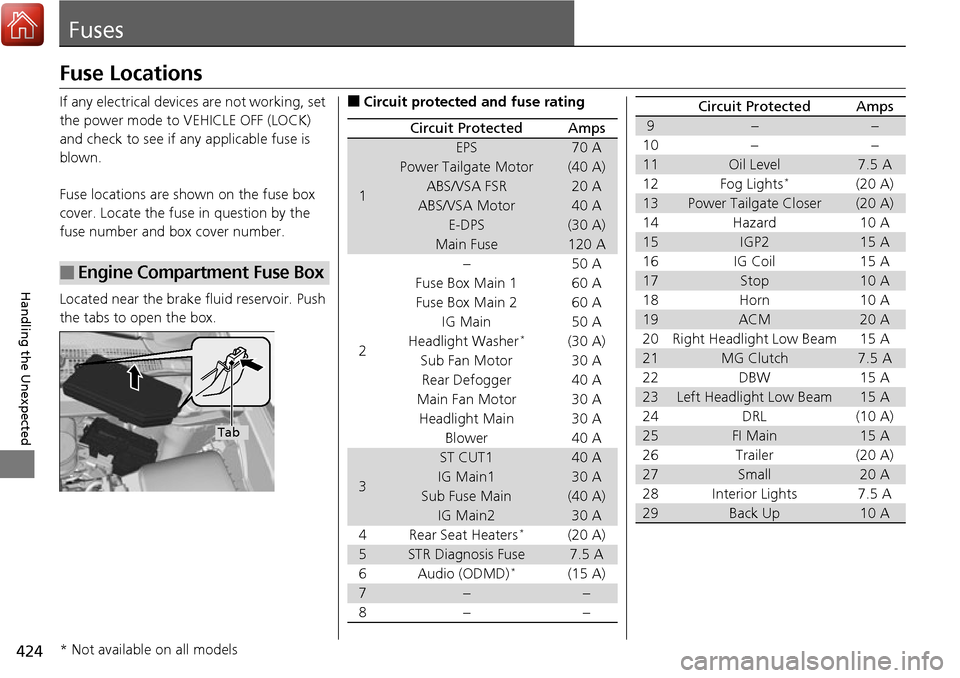
Fuse Locations
If any electrical devices are not working, set
the power mode to VEHICLE OFF (LOCK)
and check to see if any applicable fuse is
blown.
Fuse locations are shown on the fuse box
cover. Locate the fuse in question by the
fuse number and box cover number.
Located near the brake fluid reservoir. Push
the tabs to open the box.
■Engine Compartment Fuse Box
Tab
■Circuit protected and fuse rating
Circuit ProtectedAmps
1
EPS70 A
Power Tailgate Motor(40 A)
ABS/VSA FSR20 A
ABS/VSA Motor40 A
E-DPS(30 A)
Main Fuse120 A
2
−50 A
Fuse Box Main 1 60 A
Fuse Box Main 260 A
IG Main 50 A
Headlight Washer*(30 A)
Sub Fan Motor 30 A Rear Defogger 40 A
Main Fan Motor 30 A Headlight Main 30 A Blower 40 A
3
ST CUT140 A
IG Main130 A
Sub Fuse Main(40 A)
IG Main230 A
4 Rear Seat Heaters*(20 A)
5STR Diagnosis Fuse7.5 A
6Audio (ODMD)*(15 A)
7−−
8− −
9−−
10 − −
11Oil Level7.5 A
12 Fog Lights*(20 A)
13Power Tailgate Closer(20 A)
14 Hazard 10 A
15IGP215 A
16 IG Coil 15 A
17Stop10 A
18 Horn 10 A
19ACM20 A
20 Right Headlight Low Beam 15 A
21MG Clutch7.5 A
22 DBW 15 A
23Left Headlight Low Beam15 A
24 DRL (10 A)
25FI Main15 A
26 Trailer (20 A)
27Small20 A
28 Interior Lights 7.5 A
29Back Up10 A
Circuit ProtectedAmps
* Not available on all models
Page 431 of 449
430
Information
Specifications
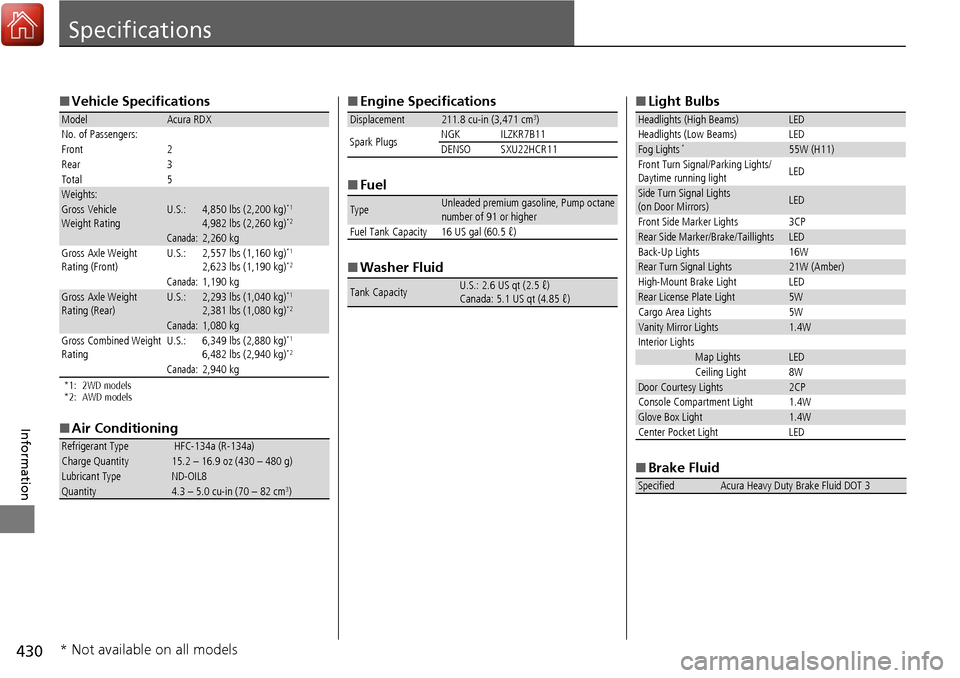
■Vehicle Specifications
*1: 2WD models
*2: AWD models
■Air Conditioning
ModelAcura RDX
No. of Passengers:
Front 2
Rear 3
Total 5
Weights:Gross Vehicle
Weight RatingU.S.:4,850 lbs (2,200 kg)*1
4,982 lbs (2,260 kg)*2
Canada:2,260 kgGross Axle Weight
Rating (Front)U.S.:2,557 lbs (1,160 kg)*1
2,623 lbs (1,190 kg)*2
Canada:1,190 kgGross Axle Weight
Rating (Rear)U.S.:2,293 lbs (1,040 kg)*1
2,381 lbs (1,080 kg)*2
Canada:1,080 kg
Gross Combined Weight
Rating U.S.: 6,349 lbs (2,880 kg)*1
6,482 lbs (2,940 kg)*2
Canada:2,940 kg
Refrigerant Type HFC-134a (R-134a)Charge Quantity15.2 – 16.9 oz (430 – 480 g)Lubricant TypeND-OIL8Quantity4.3 – 5.0 cu-in (70 – 82 cm3)
■
Engine Specifications
■ Fuel
■ Washer Fluid
Displacement211.8 cu-in (3,471 cm3)
Spark Plugs NGK ILZKR7B11
DENSO SXU22HCR11
TypeUnleaded premium gasoline, Pump octane
number of 91 or higher
Fuel Tank Capacity 16 US gal (60.5 ℓ)
Tank CapacityU.S.: 2.6 US qt (2.5 ℓ)
Canada: 5.1 US qt (4.85 ℓ)
■ Light Bulbs
■ Brake Fluid
Headlights (High Beams)LED
Headlights (Low Beams) LED
Fog Lights*55W (H11)
Front Turn Signal/Parking Lights/
Daytime running light LED
Side Turn Signal Lights
(on Door Mirrors)LED
Front Side Marker Lights 3CP
Rear Side Marker/Brake/TaillightsLED
Back-Up Lights 16W
Rear Turn Signal Lights21W (Amber)
High-Mount Brake Light LED
Rear License Plate Light5W
Cargo Area Lights 5W
Vanity Mirror Lights1.4W
Interior Lights
Map LightsLED
Ceiling Light 8W
Door Courtesy Lights2CP
Console Compartment Light 1.4W
Glove Box Light1.4W
Center Pocket Light LED
SpecifiedAcura Heavy Duty Brake Fluid DOT 3
* Not available on all models