belt Acura RDX 2017 Service Manual
[x] Cancel search | Manufacturer: ACURA, Model Year: 2017, Model line: RDX, Model: Acura RDX 2017Pages: 449, PDF Size: 10.88 MB
Page 167 of 449
uuAdjusting the Seats uAdjusting the Seat Positions
166
Controls
After all occupants have adjusted their seats and head restraints, and put on their
seat belts, it is very important that they continue to sit upright, well back in their
seats, with their feet on the floor, until the vehicle is safely parked and the engine is
off.
Sitting improperly can increase the chance of injury during a crash. For example, if
an occupant slouches, lies down, turns si deways, sits forward, leans forward or
sideways, or puts one or both feet up, the chance of injury during a crash is greatly
increased.
In addition, an occupant who is out of position in the front seat can be seriously or
fatally injured in a crash by striking interior parts of the vehicle or being struck by an
inflating front airbag.
■Maintain a Proper Sitting Position1 Maintain a Proper Sitting Position
3WARNING
Sitting improperly or out of position can
result in serious injury or death in a crash.
Always sit upright, well back in the seat,
with your feet on the floor.
Page 168 of 449
167
uuAdjusting the Seats uRear Seats
Continued
Controls
Rear Seats
Separately fold down the left and right ha lves of the rear seat to make room for
cargo.
■To fold down the seat
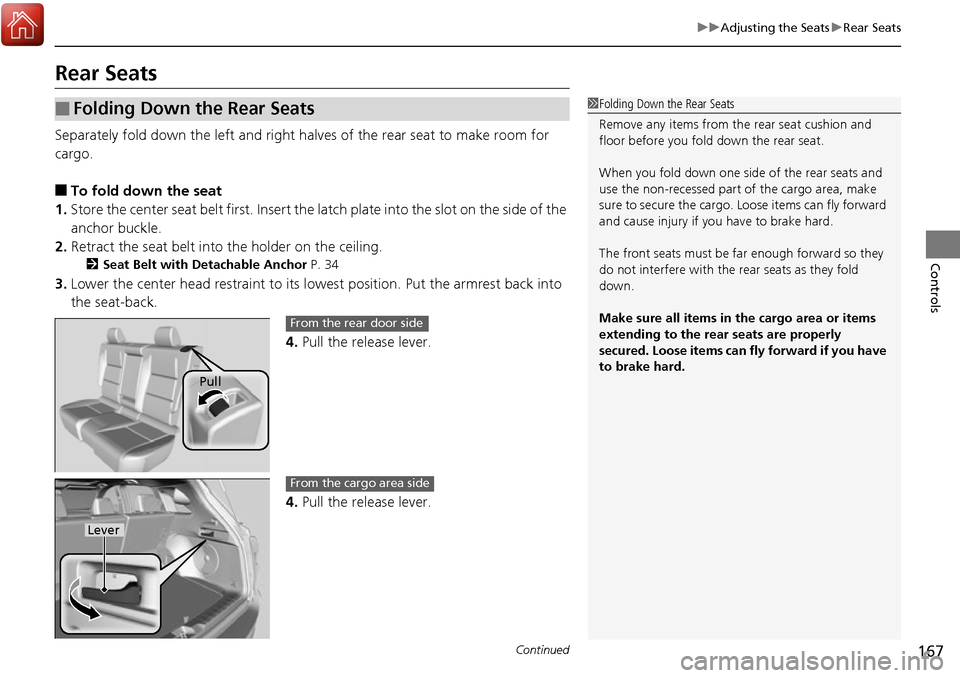
1. Store the center seat belt first. Insert the la tch plate into the slot on the side of the
anchor buckle.
2. Retract the seat belt into the holder on the ceiling.
2 Seat Belt with Detachable Anchor P. 34
3.Lower the center head restraint to its lo west position. Put the armrest back into
the seat-back.
4.Pull the release lever.
4. Pull the release lever.
■Folding Down the Rear Seats1Folding Down the Rear Seats
Remove any items from th e rear seat cushion and
floor before you fold down the rear seat.
When you fold down one side of the rear seats and
use the non-recessed part of the cargo area, make
sure to secure the cargo. Loose items can fly forward
and cause injury if you have to brake hard.
The front seats must be far enough forward so they
do not interfere with the rear seats as they fold
down.
Make sure all items in the cargo area or items
extending to the rear seats are properly
secured. Loose items can fly forward if you have
to brake hard.
Pull
From the rear door side
Lever
From the cargo area side
Page 169 of 449
uuAdjusting the Seats uArmrest
168
Controls
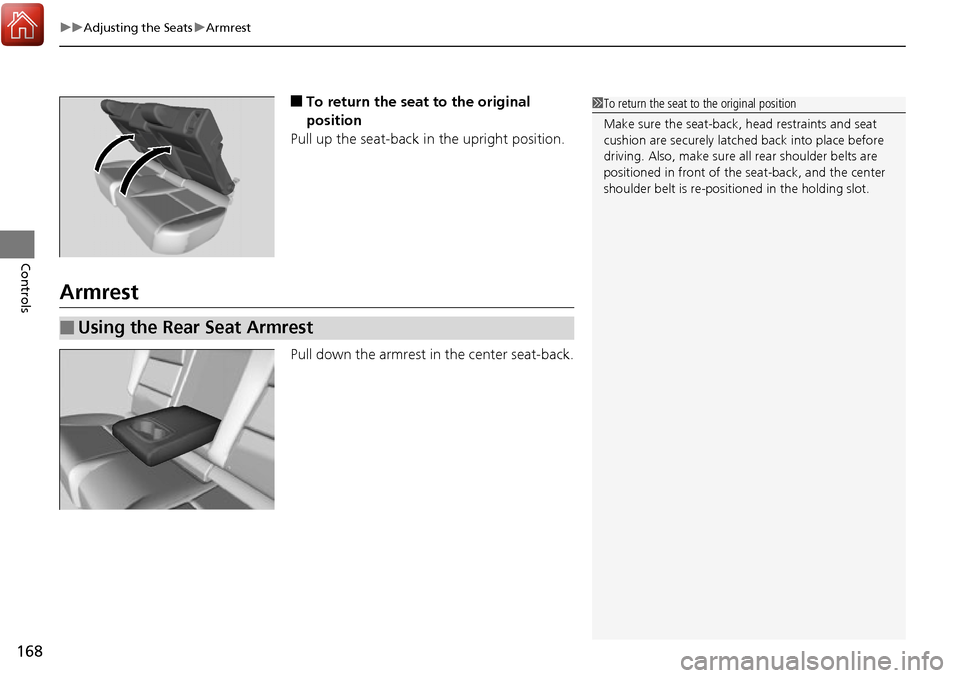
■To return the seat to the original
position
Pull up the seat-back in the upright position.
Armrest
Pull down the armrest in the center seat-back.
1To return the seat to the original position
Make sure the seat-back, head restraints and seat
cushion are securely latche d back into place before
driving. Also, make sure all rear shoulder belts are
positioned in front of the seat-back, and the center
shoulder belt is re-posit ioned in the holding slot.
■Using the Rear Seat Armrest
Page 172 of 449
171
uuInterior Lights/Interior Convenience Items uInterior Convenience Items
Continued
Controls
Interior Convenience Items
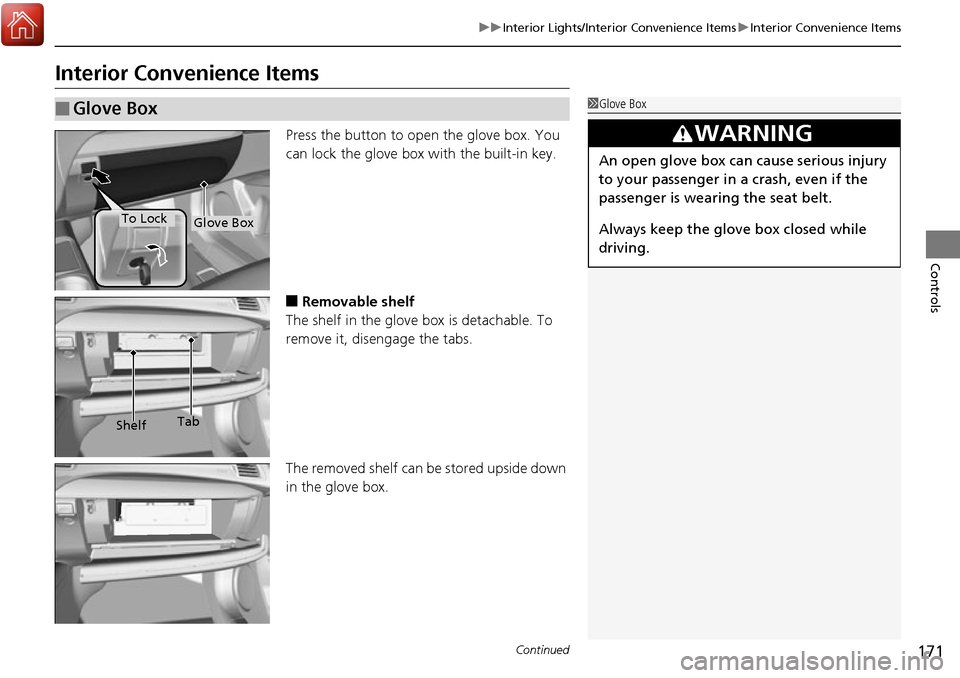
Press the button to open the glove box. You
can lock the glove box with the built-in key.
■Removable shelf
The shelf in the glove box is detachable. To
remove it, disengage the tabs.
The removed shelf can be stored upside down
in the glove box.
■Glove Box1 Glove Box
3WARNING
An open glove box can cause serious injury
to your passenger in a crash, even if the
passenger is wearing the seat belt.
Always keep the glove box closed while
driving.
Glove BoxTo Lock
Shelf Tab
Page 259 of 449
258
uuBefore Driving uDriving Preparation
Driving
• Be sure items placed on the floor behind the front seats cannot roll under the
seats.
u They can interfere with the driver’s ability to operate the pedals, the operation
of the seats, or the operation of the sensors under the seats.
• Everyone in the vehicle must fasten their seat belt.
2Fastening a Seat Belt P. 32
•Make sure that the indicators in the ins trument panel come on when you start the
vehicle, and go off soon after.
u Always have a dealer check the vehicle if a problem is indicated.
2 Indicators P. 66
Page 267 of 449

266
Driving
Off-Highway Driving Guidelines
General Information
Your vehicle has been designed primarily for use on pavement, however, its higher
ground clearance allows you to occasionally travel on unpaved roads. It is not
designed for trail-blazing, or othe r challenging off-road activities.
If you decide to drive on unpaved roads, you will find that it requires somewhat
different driving skills and that your vehicle will handle somewhat differently than it
does on pavement. Pay attention to the precautions and tips in this section, and get
acquainted with your vehicle before leaving the pavement.
Important Safety Precautions
To avoid loss of control or rollover, be sure to follow all precautions and
recommendations:
• Be sure to store cargo properly and do not exceed your cargo load limits.
2 Maximum Load Limit P. 259
•Whenever you drive, make sure you and your passengers always wear seat belts.
• Keep your speed low, and never go faster than the conditions allow.
• It’s up to you to continually assess the situation and drive within the limits.
1Off-Highway Driving Guidelines
Failure to operate your vehi cle correctly might result
in a crash or a rollover. 2 Important Handling Information P. 26
2 Precautions While Driving P. 273
3WARNING
Improperly operating this vehicle on or off-
pavement can cause a crash or rollover in
which you and your passengers could be
seriously injured or killed.
•Follow all instructions and guidelines in
this owner’s manual.
• Keep your speed low, and don’t drive
faster than conditions permit.
Page 350 of 449
349
uuMaintenance MinderTMuTo Use Maintenance MinderTM
Continued
Maintenance
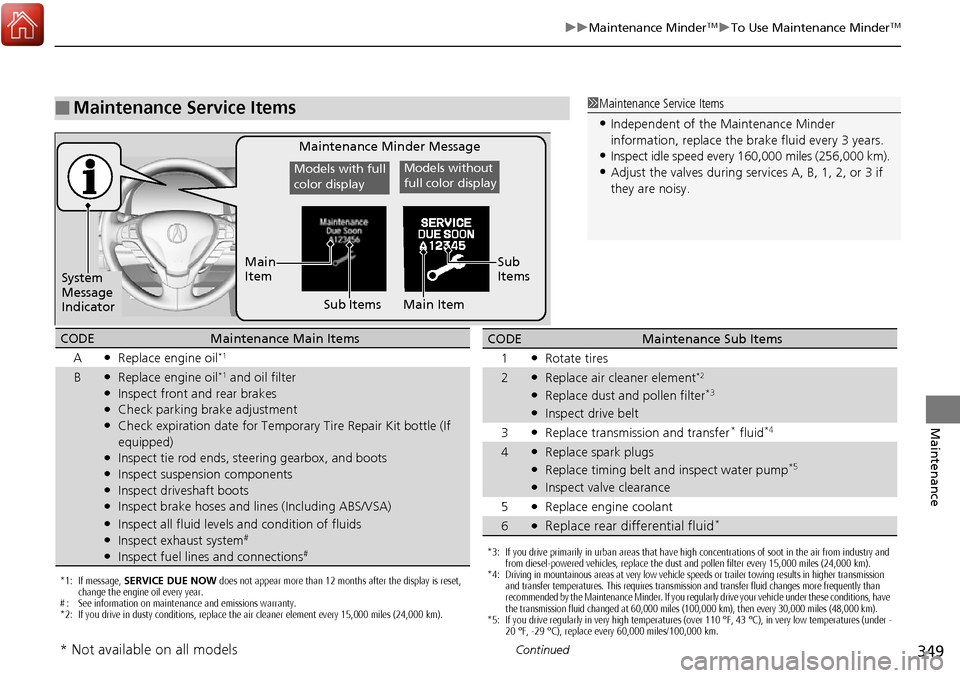
■Maintenance Service Items1Maintenance Service Items
•Independent of the Maintenance Minder
information, replace the brake fluid every 3 years.
•Inspect idle speed every 16 0,000 miles (256,000 km).
•Adjust the valves during services A, B, 1, 2, or 3 if
they are noisy.
Maintenance Minder Message
System
Message
Indicator Sub Items
Main
Item
*1: If message,
SERVICE DUE NOW does not appear more than 12 months after the display is reset,
change the engine oil every year.
# : See information on maintenance and emissions warranty.
*2: If you drive in dusty conditions, replace the air cleaner element every 15,000 miles (24,000 km).
CODEMaintenance Main Items
A
●Replace engine oil*1
B●Replace engine oil*1 and oil filter●Inspect front and rear brakes●Check parking brake adjustment●Check expiration date for Temporary Tire Repair Kit bottle (If
equipped)
●Inspect tie rod ends, steering gearbox, and boots●Inspect suspension components●Inspect driveshaft boots●Inspect brake hoses and lin es (Including ABS/VSA)●Inspect all fluid levels and condition of fluids●Inspect exhaust system#
●Inspect fuel lines and connections#*3: If you drive primarily in urban areas that have high concentrations of soot in the air from industry and
from diesel-powered vehicles, replace the dust and pollen filter every 15,000 miles (24,000 km).
*4: Driving in mountainous areas at very low vehicle speeds or trailer towing results in higher transmission and transfer temperatures. This requires transmission and transfer fluid changes more frequently than
recommended by the Maintenance Minder. If you regularly drive your vehicle under these conditions, have
the transmission fluid changed at 60,000 miles (100,000 km), then every 30,000 miles (48,000 km).
*5: If you drive regularly in very high temperatures (over 110 °F, 43 °C), in very low temperatures (under -
20 °F, -29 °C), replace every 60,000 miles/100,000 km.
CODEMaintenance Sub Items
1
●Rotate tires
2●Replace air cleaner element*2
●Replace dust and pollen filter*3
●Inspect drive belt
3
●Replace transmission and transfer* fluid*4
4●Replace spark plugs●Replace timing belt an d inspect water pump*5
●Inspect valve clearance
5
●Replace engine coolant
6●Replace rear differential fluid*
Models with full
color displayModels without
full color display
Sub
Items
Main Item
* Not available on all models
Page 388 of 449
387Continued
Maintenance
Cleaning
Interior Care
Use a damp cloth with a mixture of mild detergent and warm water to remove dirt.
Use a clean cloth to remove detergent residue.
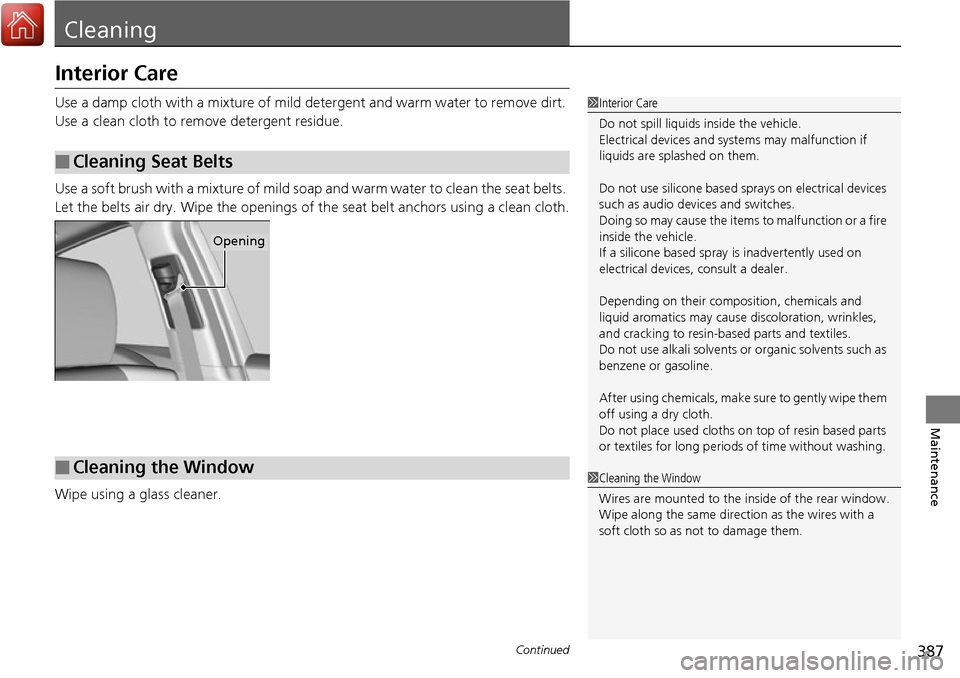
Use a soft brush with a mixture of mild soap and warm water to clean the seat belts.
Let the belts air dry. Wipe the openings of the seat belt anchors using a clean cloth.
Wipe using a glass cleaner.
■Cleaning Seat Belts
1 Interior Care
Do not spill liquids inside the vehicle.
Electrical devices and systems may malfunction if
liquids are splashed on them.
Do not use silicone based sp rays on electrical devices
such as audio devices and switches.
Doing so may cause the items to malfunction or a fire
inside the vehicle.
If a silicone based spray is inadvertently used on
electrical devices, consult a dealer.
Depending on their compos ition, chemicals and
liquid aromatics may cause discoloration, wrinkles,
and cracking to resin-ba sed parts and textiles.
Do not use alkali solvents or organic solvents such as
benzene or gasoline.
After using chemical s, make sure to gently wipe them
off using a dry cloth.
Do not place used cloths on top of resin based parts
or textiles for long periods of time without washing.
Opening
■Cleaning the Window1Cleaning the Window
Wires are mounted to the in side of the rear window.
Wipe along the same direct ion as the wires with a
soft cloth so as not to damage them.
Page 438 of 449
437Continued
Information
Warranty Coverages
■U.S. Owners
Your new vehicle is covered by these warranties:
New Vehicle Limited Warranty – covers your new vehicle, except for the
emissions control systems and accessorie s, against defects in materials and
workmanship.
Emissions Control Systems Defects Warranty and Emissions Performance
Warranty – these two warranties cover your ve hicle’s emissions control systems.
Time, mileage, and coverage are conditiona l. Please read your warranty booklet for
exact information.
Seat Belt Limited Warranty – a seat belt that fails to function properly is covered
by a limited warranty. Please read your warranty booklet for details.
Rust Perforation Limited Warranty – all exterior body panels are covered for
rust-through from the inside for the specified time peri od with no mileage limit.
Accessory Limite d Warranty – Acura accessories are covered under this warranty.
Time and mileage limits depend on the type of accessory and other factors. Please
read your warranty booklet for details.
Replacement Parts Limited Warranty – covers all Acura replacement parts
against defects in mate rials and workmanship.
Page 442 of 449
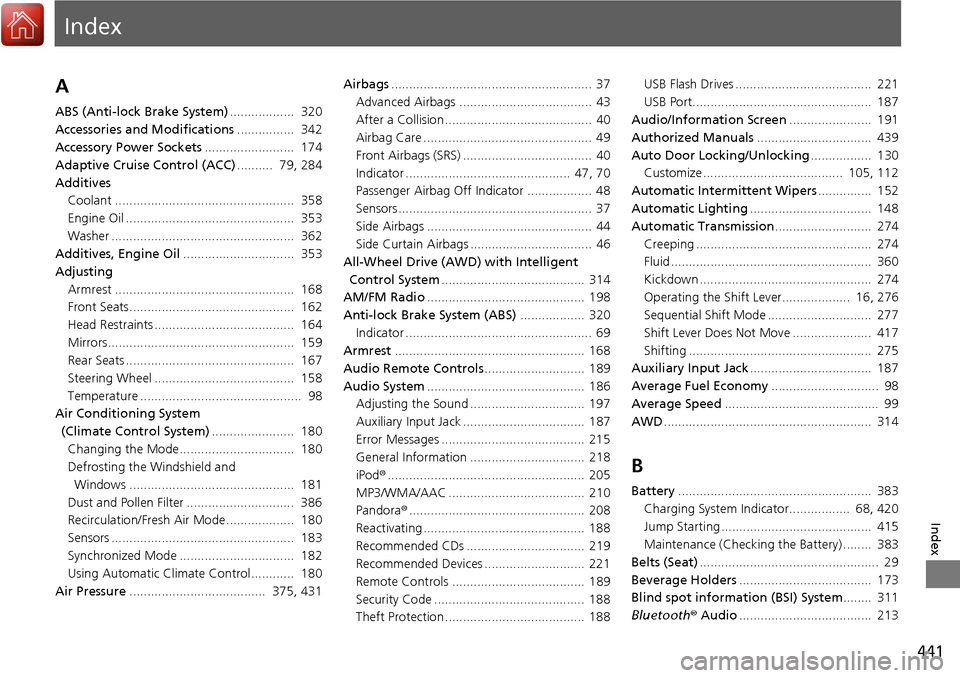
Index
441
Index
Index
A
ABS (Anti-lock Brake System).................. 320
Accessories and Modifications ................ 342
Accessory Power Sockets ......................... 174
Adaptive Cruise Control (ACC) .......... 79, 284
Additives Coolant .................................................. 358
Engine Oil ............................................... 353
Washer ................................................... 362
Additives, Engine Oil ............................... 353
Adjusting
Armrest .................................................. 168
Front Seats.............................................. 162
Head Restraints ....................................... 164
Mirrors.................................................... 159
Rear Seats ............................................... 167
Steering Wheel ....................................... 158
Temperature ............................................. 98
Air Conditioning System
(Climate Control System) ....................... 180
Changing the Mode................................ 180
Defrosting the Windshield and
Windows .............................................. 181
Dust and Pollen Filter .............................. 386
Recirculation/Fresh Air Mode................... 180
Sensors ................................................... 183
Synchronized Mode ................................ 182
Using Automatic Climate Control............ 180
Air Pressure ...................................... 375, 431 Airbags
........................................................ 37
Advanced Airbags ..................................... 43
After a Collision ......................................... 40
Airbag Care ............................................... 49
Front Airbags (SRS) .................................... 40
Indicator .............................................. 47, 70
Passenger Airbag Off Indicator .................. 48
Sensors ...................................................... 37
Side Airbags .............................................. 44
Side Curtain Airbags .................................. 46
All-Wheel Drive (AWD) with Intelligent
Control System ........................................ 314
AM/FM Radio ............................................ 198
Anti-lock Brake System (ABS) .................. 320
Indicator .................................................... 69
Armrest ..................................................... 168
Audio Remote Controls ............................ 189
Audio System ............................................ 186
Adjusting the Sound ................................ 197
Auxiliary Input Jack .................................. 187
Error Messages ........................................ 215
General Information ................................ 218
iPod ®....................................................... 205
MP3/WMA/AAC ...................................... 210
Pandora ®................................................. 208
Reactivating ............................................. 188
Recommended CDs ................................. 219
Recommended Devices ............................ 221
Remote Controls ..................................... 189
Security Code .......................................... 188
Theft Protection ....................................... 188 USB Flash Drives ...................................... 221
USB Port.................................................. 187
Audio/Information Screen ....................... 191
Authorized Manuals ................................ 439
Auto Door Locking/Unlocking ................. 130
Customize ....................................... 105, 112
Automatic Intermittent Wipers ............... 152
Automatic Lighting .................................. 148
Automatic Transmission ........................... 274
Creeping ................................................. 274
Fluid ........................................................ 360
Kickdown ................................................ 274
Operating the Shift Lever................... 16, 276
Sequential Shift Mode ............................. 277
Shift Lever Does Not Move ...................... 417
Shifting ................................................... 275
Auxiliary Input Jack .................................. 187
Average Fuel Economy .............................. 98
Average Speed ........................................... 99
AWD .......................................................... 314
B
Battery ...................................................... 383
Charging System Indicator................. 68, 420
Jump Starting .......................................... 415
Maintenance (Checki ng the Battery) ........ 383
Belts (Seat) .................................................. 29
Beverage Holders ..................................... 173
Blind spot information (BSI) System ........ 311
Bluetooth ® Audio ..................................... 213