instrument panel Acura RDX 2017 Workshop Manual
[x] Cancel search | Manufacturer: ACURA, Model Year: 2017, Model line: RDX, Model: Acura RDX 2017Pages: 449, PDF Size: 10.88 MB
Page 110 of 449

109
uuGauges and Multi-Information Display uMulti-Information Display
Continued
Instrument Panel
■List of customizable options
*1:Default Setting Setup Group Customizable Features
Description Selectable Settings
Driver Assist
System
Setup
*
Forward Collision
Warning Distance*Changes at which distance CMBSTM alerts.Long/Normal*1/Short
ACC Forward Vehicle
Detect Beep*Causes the system to beep when the system detects a
vehicle, or when the vehicl e goes out of the ACC range.On/Off*1
ACC Display Speed Unit*Changes the speed unit for ACC on the multi-
information display.mph*1/km/h (U.S.)
mph /km/h*1 (Canada)
Lane Keeping Assist
Suspend Beep*Causes the system to beep when the LKAS is suspended.On/Off*1
Blind Spot Info*Changes the setting for th e blind spot information.Audible And Visual
Alert*1/Visual Alert /Off
* Not available on all models
Page 111 of 449
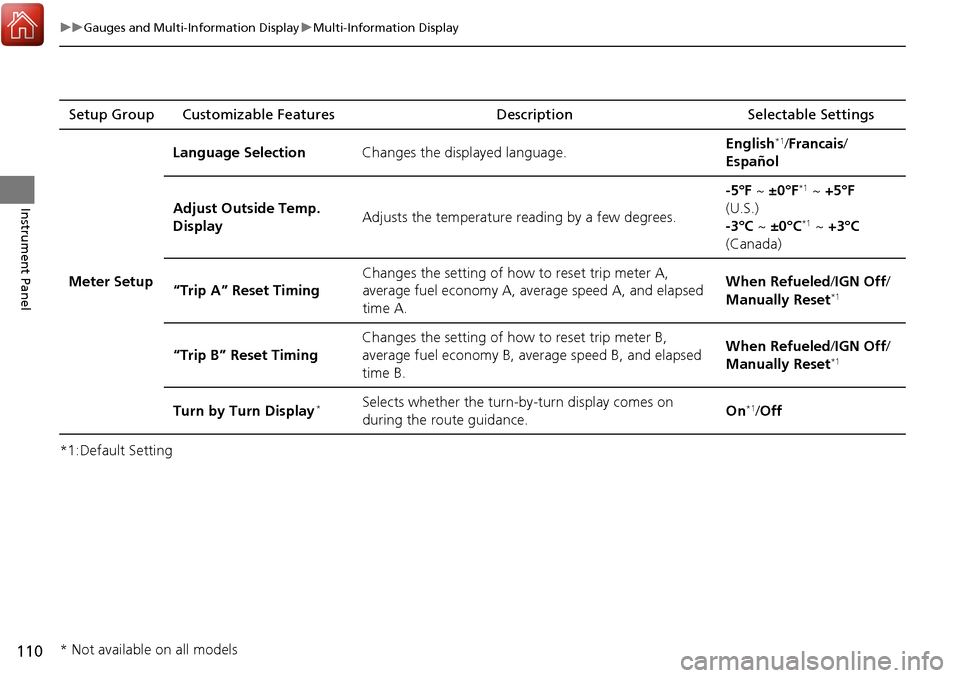
110
uuGauges and Multi-Information Display uMulti-Information Display
Instrument Panel
*1:Default SettingSetup Group Customizable Features
Description Selectable Settings
Meter Setup Language Selection
Changes the displayed language. English
*1/
Francais /
Español
Adjust Outside Temp.
Display Adjusts the temperature reading by a few degrees. -5°F ~
±0°F
*1 ~ +5°F
(U.S.)
-3°C ~ ±0°C
*1 ~ +3°C
(Canada)
“Trip A” Reset Timing Changes the setting of how to reset trip meter A,
average fuel economy A, average speed A, and elapsed
time A. When Refueled
/IGN Off/
Manually Reset
*1
“Trip B” Reset Timing Changes the setting of how to reset trip meter B,
average fuel economy B, av
erage speed B, and elapsed
time B. When Refueled
/IGN Off/
Manually Reset*1
Turn by Turn Display*Selects whether the turn-b y-turn display comes on
during the route guidance. On*1/
Off
* Not available on all models
Page 112 of 449
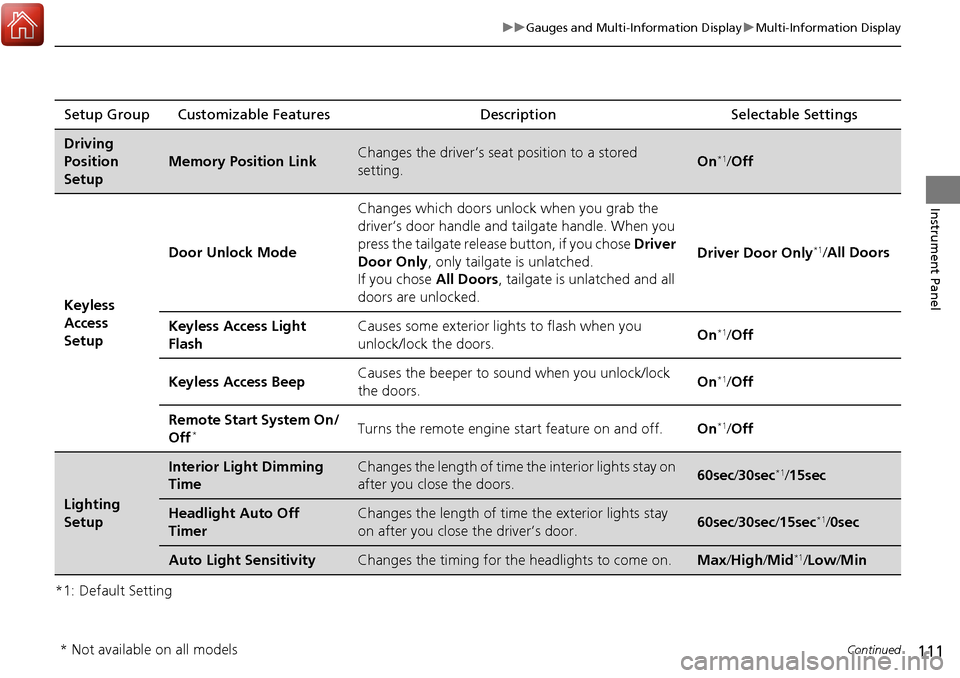
111
uuGauges and Multi-Information Display uMulti-Information Display
Continued
Instrument Panel
*1: Default SettingSetup Group Customizable Features
Description Selectable Settings
Driving
Position
Setup
Memory Position LinkChanges the driver’s seat position to a stored
setting.On*1/ Off
Keyless
Access
Setup Door Unlock Mode
Changes which doors unlock when you grab the
driver’s door handle and tailgate handle. When you
press the tailgate release button, if you chose
Driver
Door Only , only tailgate is unlatched.
If you chose All Doors, tailgate is unlatched and all
doors are unlocked. Driver Door Only
*1/
All Doors
Keyless Access Light
Flash Causes some exterior li
ghts to flash when you
unlock/lock the doors. On
*1/
Off
Keyless Access Beep Causes the beeper to so
und when you unlock/lock
the doors. On
*1/
Off
Remote Start System On/
Off
*Turns the remote engine start feature on and off. On*1/Off
Lighting
Setup
Interior Light Dimming
TimeChanges the length of time the interior lights stay on
after you close the doors.60sec /30sec*1/15sec
Headlight Auto Off
TimerChanges the length of time the exterior lights stay
on after you close the driver’s door.60sec /30sec /15sec*1/ 0sec
Auto Light SensitivityChanges the timing for th e headlights to come on.Max/High /Mid*1/Low /Min
* Not available on all models
Page 113 of 449
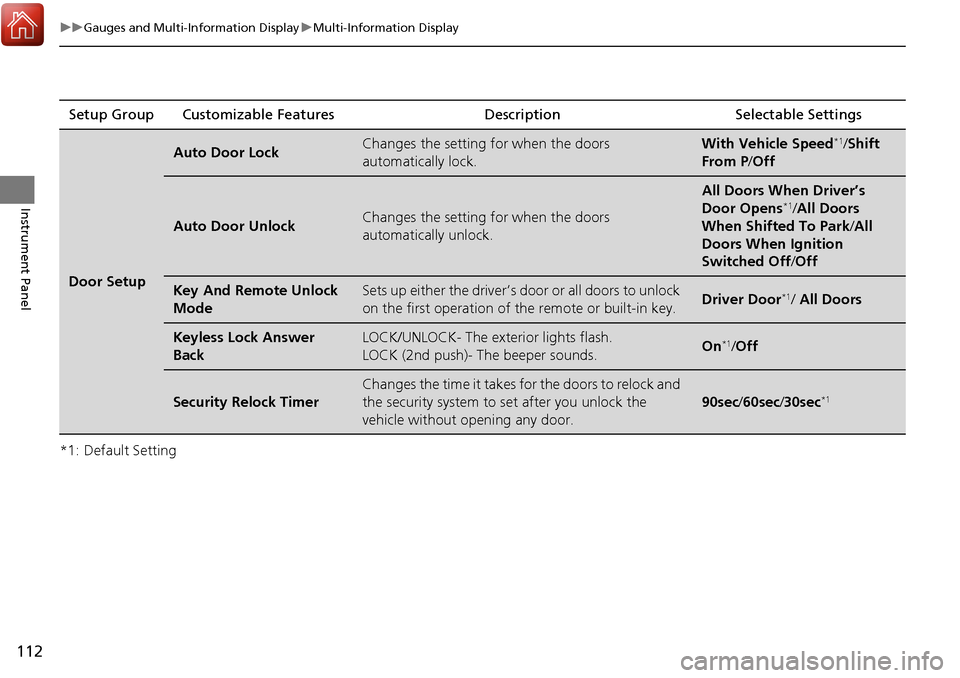
112
uuGauges and Multi-Information Display uMulti-Information Display
Instrument Panel
*1: Default SettingSetup Group Customizable Features Description Selectable Settings
Door Setup
Auto Door LockChanges the setting for when the doors
automatically lock.With Vehicle Speed*1/
Shift
From P /Off
Auto Door UnlockChanges the setting for when the doors
automatically unlock.
All Doors When Driver’s
Door Opens*1/All Doors
When Shifted To Park /All
Doors When Ignition
Switched Off /Off
Key And Remote Unlock
ModeSets up either the driver’s door or all doors to unlock
on the first operation of the remote or built-in key.Driver Door*1/ All Doors
Keyless Lock Answer
BackLOCK/UNLOCK- The exterior lights flash.
LOCK (2nd push)- The beeper sounds.On*1/Off
Security Relock Timer
Changes the time it takes for the doors to relock and
the security system to set after you unlock the
vehicle without opening any door.
90sec /60sec /30sec*1
Page 114 of 449
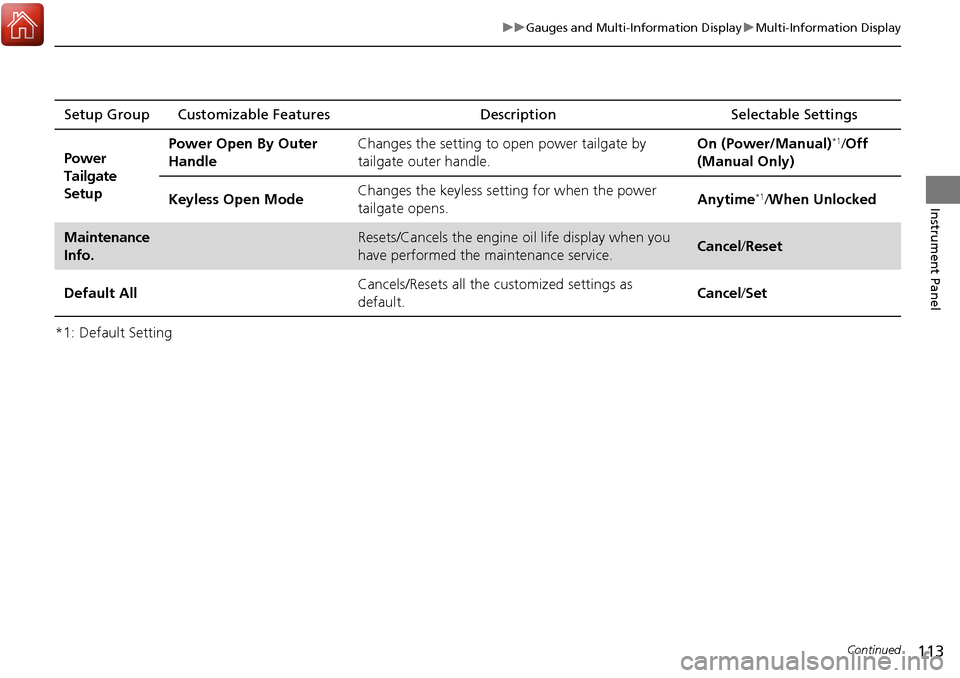
113
uuGauges and Multi-Information Display uMulti-Information Display
Continued
Instrument Panel
*1: Default SettingSetup Group Customizable Features
Description Selectable Settings
Power
Tailgate
Setup Power Open By Outer
Handle
Changes the setting to open power tailgate by
tailgate outer handle. On (Power/Manual)
*1/
Off
(Manual Only)
Keyless Open Mode Changes the keyless setting
for when the power
tailgate opens. Anytime
*1/
When Unlocked
Maintenance
Info.Resets/Cancels the engine oil life display when you
have performed the maintenance service. Cancel /Reset
Default All Cancels/Resets all the customized settings as
default. Cancel
/Set
Page 115 of 449
114
uuGauges and Multi-Information Display uMulti-Information Display
Instrument Panel
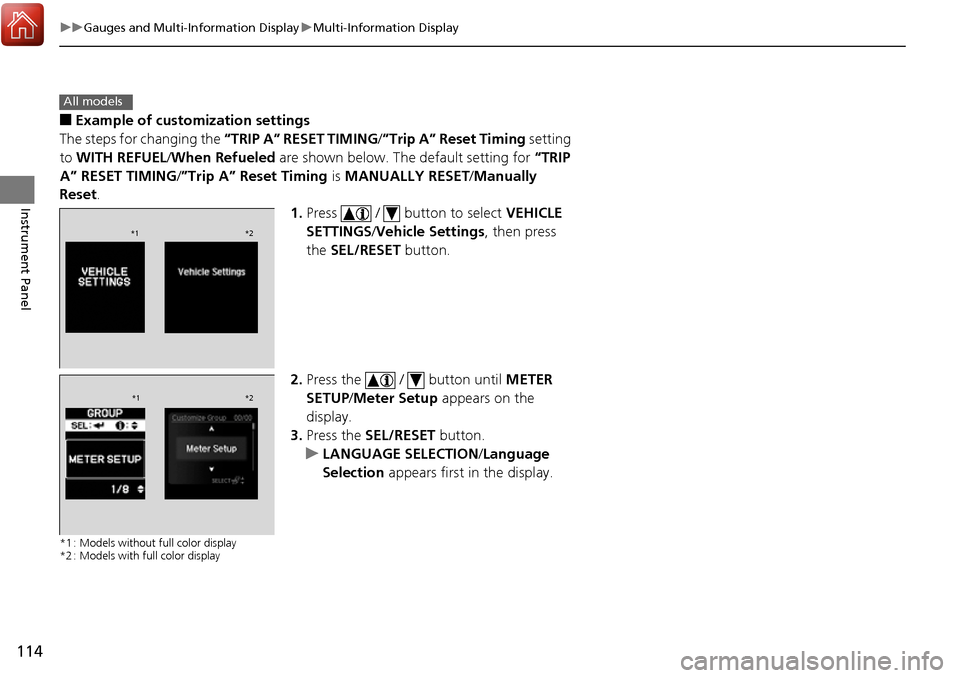
■Example of customization settings
The steps for changing the “TRIP A” RESET TIMING /”Trip A” Reset Timing setting
to WITH REFUEL /When Refueled are shown below. The default setting for “TRIP
A” RESET TIMING/ ”Trip A” Reset Timing is MANUALLY RESET/Manually
Reset .
1.Press / button to select VEHICLE
SETTINGS /Vehicle Settings , then press
the SEL/RESET button.
2. Press the / button until METER
SETUP/ Meter Setup appears on the
display.
3. Press the SEL/RESET button.
u LANGUAGE SELECTION /Language
Selection appears first in the display.
*1 : Models without full color display
*2 : Models with full color display
All models
*1 *2
*1*2
Page 116 of 449

115
uuGauges and Multi-Information Display uMulti-Information Display
Instrument Panel
4. Press the / button until “TRIP
A”RESET TIMING /”Trip A” Reset Timing
appears on the display, then press the SEL/
RESET button.
u The display swit ches to the
customization setup screen, where you
can select WITH REFUEL /When
Refueled, IGN OFF/IGN Off ,
MANUALLY RESET/ Manually Reset,
or EXIT /Exit .
5. Press the / button and select WITH
REFUEL /When Refueled , then press the
SEL/RESET button.
u The WITH REFUEL /When Refueled
setup screen appears, then the display
returns to the customization menu
screen.
6. Press the / button until EXIT/Exit
appears on the display, then press the SEL/
RESET button.
7. Repeat Step 6 until you return to the
normal screen.
*1 : Models without full color display
*2 : Models with full color display
*1 *2
*1*2
*1*2
Page 139 of 449
uuSecurity System uSecurity System Alarm
138
Controls
■Setting the security system alarm
The security system alarm automatically sets when the following conditions have
been met:
• The power mode is in VEHICLE OFF (LOCK).
• The hood is closed.
• All doors and the tailgate are locked from outside with the key, remote
transmitter, or keyless access system.
■When the security system alarm sets
The security system alarm indicator in the instrument panel blinks. When the
blinking interval changes after about 15 se conds, the security system alarm is set.
■To cancel the security system alarm
The security system alarm is canceled when the vehicle is unlocked using the remote
transmitter, keyless ac cess system, or the power mode is set to ON. The security
system alarm indicator goe s off at the same time.
1Security System Alarm
Do not set the security system alarm when someone
is in the vehicle or a window is open. The system can
accidentally activate when:
•Unlocking the door with the lock tab.•Moving the shift lever out of ( P.
If the battery goes dead after you have set the
security system alarm, the security alarm may go off
once the battery is re charged or replaced.
If this occurs, deactivate the security system alarm by
unlocking a door using the remote transmitter, or
keyless access system.
Do not attempt to alter th is system or add another
device to it.
Page 150 of 449
149
uuOperating the Switches Around the Steering Wheel uLight Switches
Controls
The headlights automatically come on when the wipers are used several times within
certain number of intervals while the headlight switch is in
#Y. The headlights
automatically go off a few minutes after the wipers are stopped.
The headlights, all other exterior lights, a nd the instrument panel lights turn off 15
seconds after you set the po wer mode to VEHICLE OFF (LOCK), take the remote with
you, and close the driver’s door.
If you set the power mode to VEHICLE OFF (LOCK) with the headlight switch on, but
do not open the door, the lights turn off after 10 minutes (three minutes, if the
switch is in the
#Y position).
The lights turn on again when you unlock or open the driver’s door. If you unlock
the door, but do not open it within 15 seconds, the lights go off. If you open the
driver’s door, you will hear a lights on reminder chime.
■Headlight Integration with Wiper*
■Automatic Lighting Off Feature
1 Headlight Integration with Wiper*
This feature activates while the headlights are in
#Y. The instrument pane l brightness does not
change when the headlights come on.
If the ambient light is da rk, the automatic lighting
control overrides this feat ure, and the headlights
come on whether or not the wipers cycle several
times.
1 Automatic Lighting Off Feature
You can change the headlight auto off timer setting.
2 Customized Features P. 100, 106
* Not available on all models
Page 155 of 449
154
uuOperating the Switches Around the Steering Wheel uBrightness Control
Controls
Brightness Control
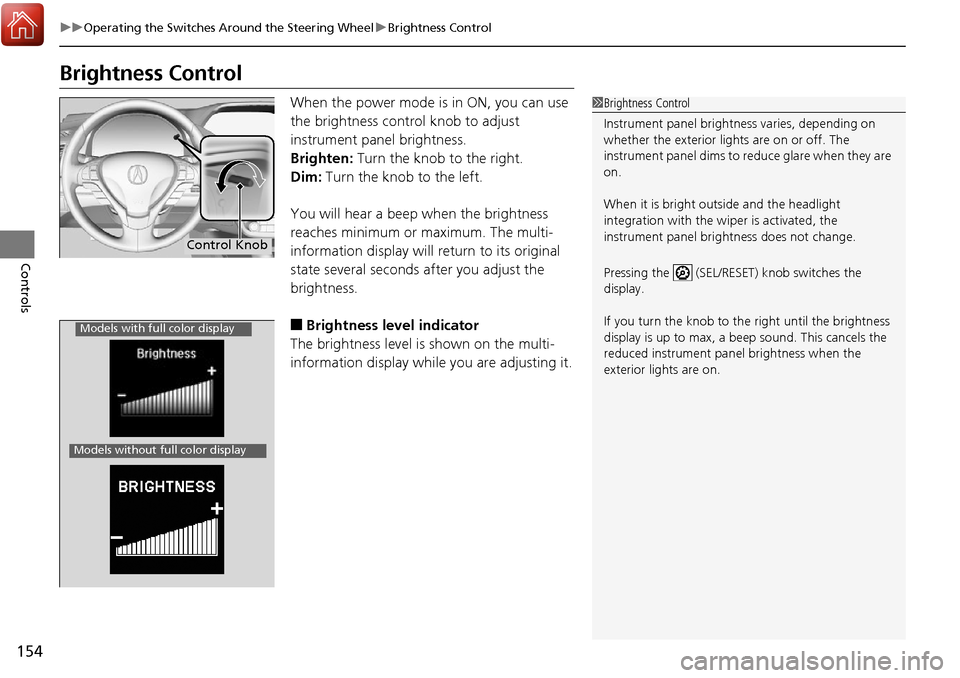
When the power mode is in ON, you can use
the brightness control knob to adjust
instrument panel brightness.
Brighten: Turn the knob to the right.
Dim: Turn the knob to the left.
You will hear a beep when the brightness
reaches minimum or maximum. The multi-
information display will return to its original
state several seconds after you adjust the
brightness.
■Brightness level indicator
The brightness level is shown on the multi-
information display while you are adjusting it.
1 Brightness Control
Instrument panel brightne ss varies, depending on
whether the exterior lights are on or off. The
instrument panel dims to reduce glare when they are
on.
When it is bright out side and the headlight
integration with the wi per is activated, the
instrument panel bri ghtness does not change.
Pressing the (SEL/RESET) knob switches the
display.
If you turn the knob to the right until the brightness
display is up to max, a beep sound. This cancels the
reduced instrument panel brightness when the
exterior lights are on.
Control Knob
Models with full color display
Models without full color display