At temp Acura RDX 2018 User Guide
[x] Cancel search | Manufacturer: ACURA, Model Year: 2018, Model line: RDX, Model: Acura RDX 2018Pages: 453, PDF Size: 20.13 MB
Page 86 of 453
85
uuIndicators uMulti-Information Display Warning and Information Messages
Continued
Instrument Panel
*1:On the left: Models wi thout full color display
On the right: Models with full color display
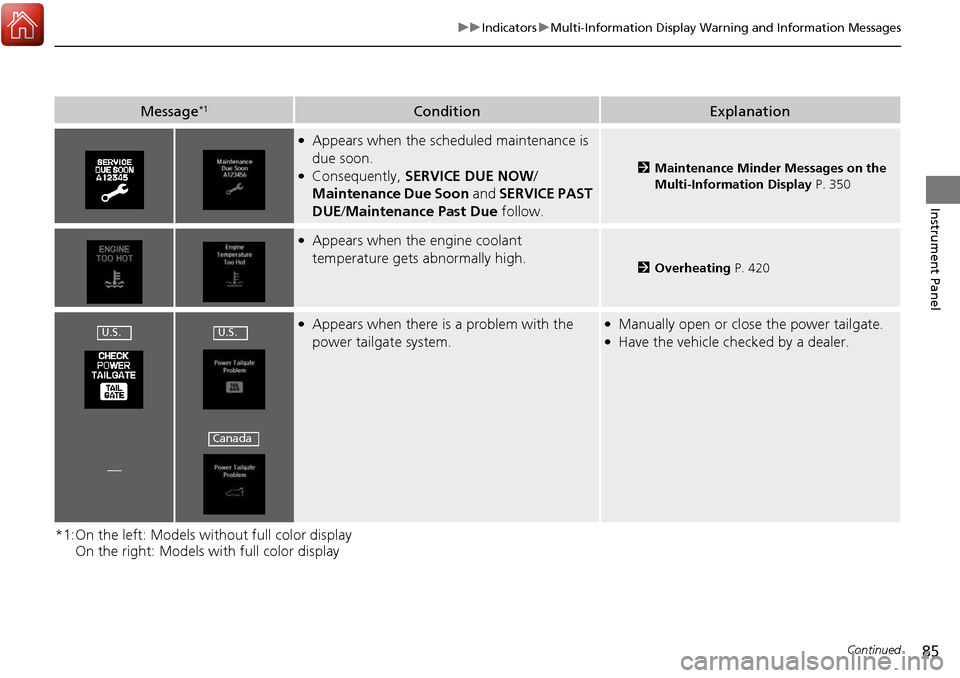
Message*1ConditionExplanation
●Appears when the scheduled maintenance is
due soon.
●Consequently, SERVICE DUE NOW /
Maintenance Due Soon and SERVICE PAST
DUE /Maintenance Past Due follow.2Maintenance Minder Messages on the
Multi-Information Display P. 350
●Appears when the engine coolant
temperature gets abnormally high.
2Overheating P. 420
●Appears when there is a problem with the
power tailgate system.●Manually open or close the power tailgate.●Have the vehicle checked by a dealer.
—
U.S.U.S.
Canada
Page 87 of 453
86
uuIndicators uMulti-Information Display Warn ing and Information Messages
Instrument Panel
*1:On the left: Models without full color display
On the right: Models with full color display
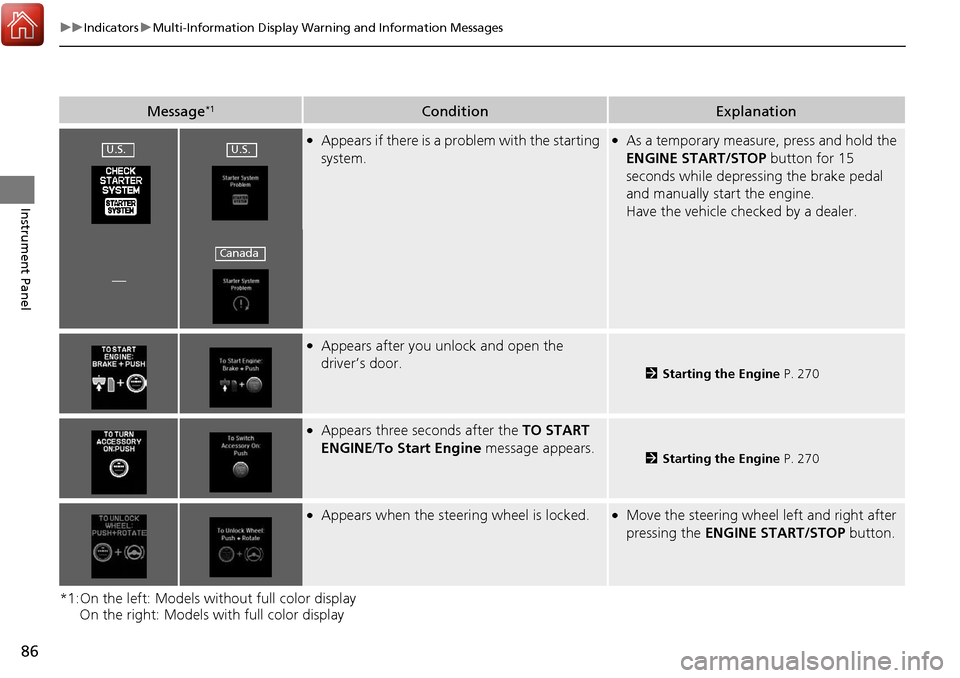
Message*1ConditionExplanation
●Appears if there is a problem with the starting
system.●As a temporary measure, press and hold the
ENGINE START/STOP button for 15
seconds while depressing the brake pedal
and manually start the engine.
Have the vehicle checked by a dealer.
—
●Appears after you unlock and open the
driver’s door.
2 Starting the Engine P. 270
●Appears three seconds after the TO START
ENGINE/ To Start Engine message appears.
2Starting the Engine P. 270
●Appears when the steering wheel is locked.●Move the steering wheel left and right after
pressing the ENGINE START/STOP button.
U.S.U.S.
Canada
Page 95 of 453
94
uuIndicators uMulti-Information Display Warn ing and Information Messages
Instrument Panel
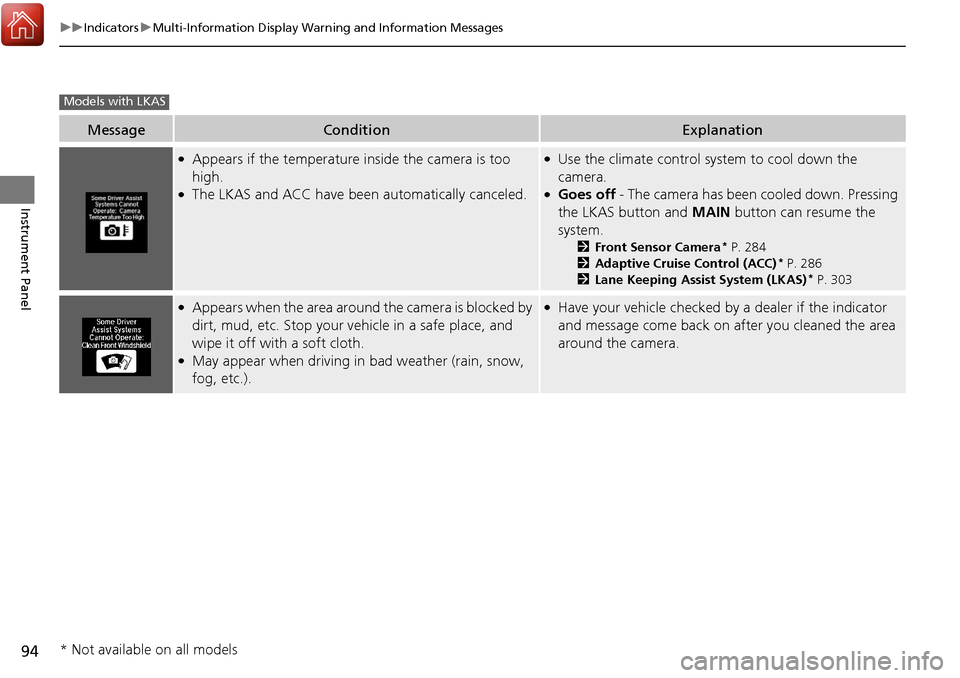
MessageConditionExplanation
●Appears if the temperature inside the camera is too
high.
●The LKAS and ACC have been automatically canceled.
●Use the climate control system to cool down the
camera.
●Goes off - The camera has been cooled down. Pressing
the LKAS button and MAIN button can resume the
system.
2 Front Sensor Camera* P. 284
2 Adaptive Cruise Control (ACC)* P. 286
2 Lane Keeping Assist System (LKAS)* P. 303
●Appears when the area around the camera is blocked by
dirt, mud, etc. Stop your ve hicle in a safe place, and
wipe it off with a soft cloth.
●May appear when driving in bad weather (rain, snow,
fog, etc.).
●Have your vehicle checked by a dealer if the indicator
and message come back on after you cleaned the area
around the camera.
Models with LKAS
* Not available on all models
Page 96 of 453
95
Instrument Panel
Gauges and Multi-Information Display
Gauges
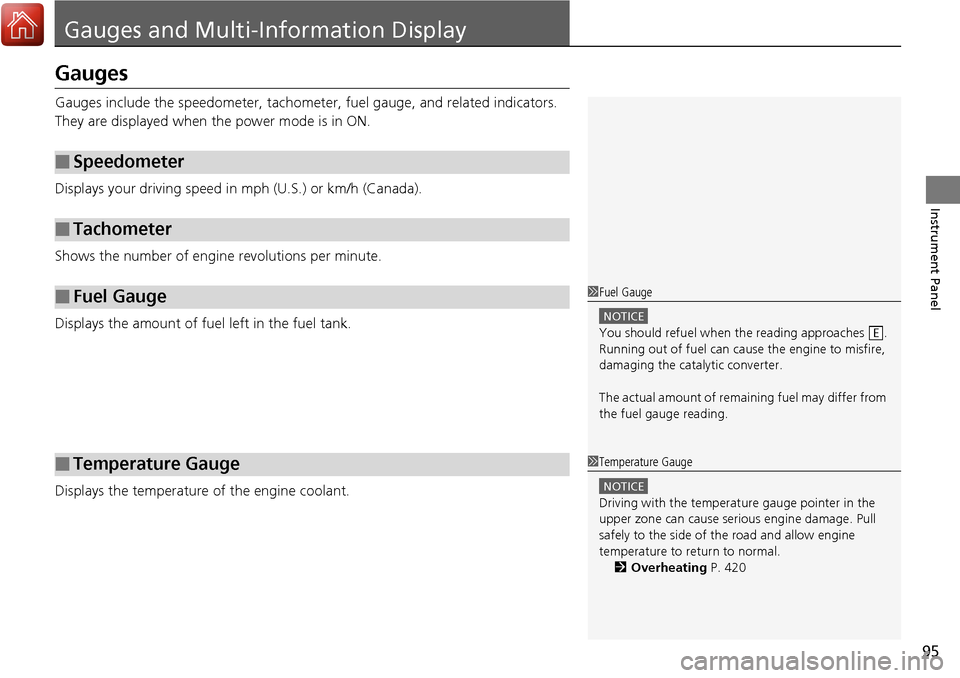
Gauges include the speedometer, tachometer, fuel gauge, and related indicators.
They are displayed when the power mode is in ON.
Displays your driving speed in mph (U.S.) or km/h (Canada).
Shows the number of engine revolutions per minute.
Displays the amount of fuel left in the fuel tank.
Displays the temperature of the engine coolant.
■Speedometer
■Tachometer
■Fuel Gauge
■Temperature Gauge
1Fuel Gauge
NOTICE
You should refuel when the reading approaches .
Running out of fuel can cause the engine to misfire,
damaging the cata lytic converter.
The actual amount of remain ing fuel may differ from
the fuel gauge reading.E
1 Temperature Gauge
NOTICE
Driving with the temperat ure gauge pointer in the
upper zone can cause serious engine damage. Pull
safely to the side of th e road and allow engine
temperature to return to normal.
2 Overheating P. 420
Page 97 of 453
96
uuGauges and Multi-Information Display uMulti-Information Display
Instrument Panel
Multi-Information Display
The multi-information display shows the od ometer, trip meter, outside temperature
indicator, and other gauges. It also disp lays important messages such as warnings
and other helpful information.
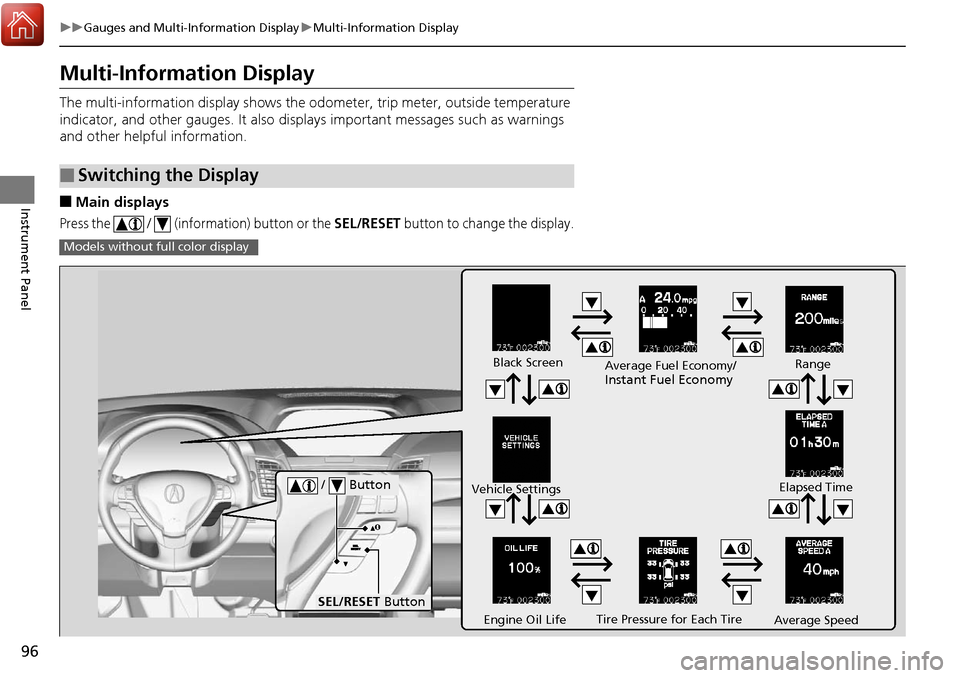
■Main displays
Press the / (information) button or the SEL/RESET button to change the display.
■Switching the Display
Models without fu ll color display
Tire Pressure for Each Tire
Black Screen
Engine Oil Life
Vehicle Settings
Average SpeedRange
Elapsed Time
Average Fuel Economy/
Instant Fuel Economy
/ Button
SEL/RESET
Button
Page 99 of 453
98
uuGauges and Multi-Information Display uMulti-Information Display
Instrument Panel
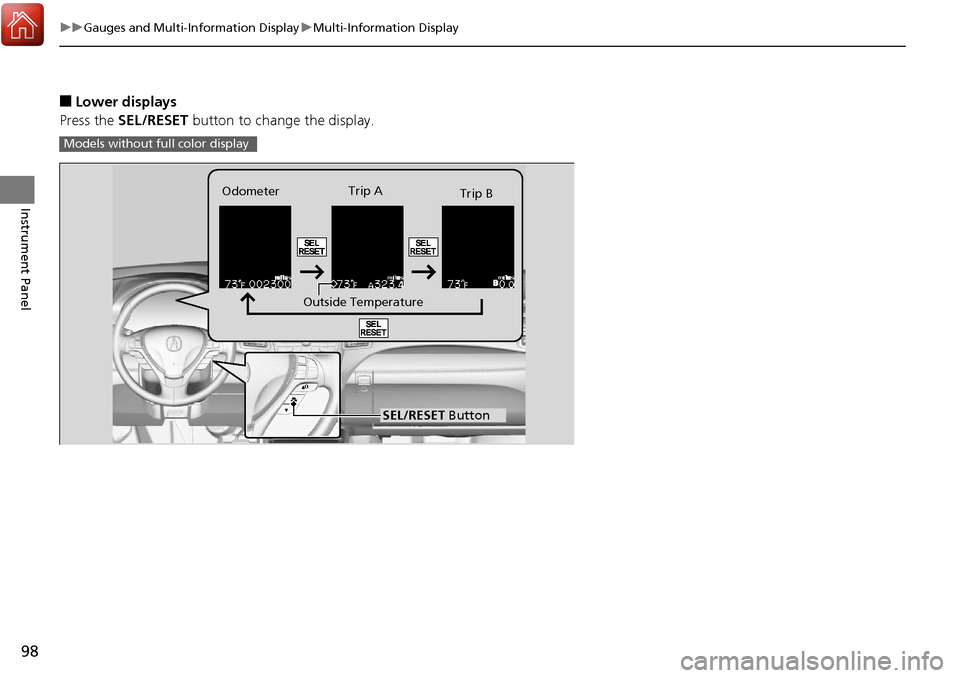
■Lower displays
Press the SEL/RESET button to change the display.
Models without fu ll color display
SEL/RESET Button
Outside TemperatureTrip A
Trip B
Odometer
Page 100 of 453
99
uuGauges and Multi-Information Display uMulti-Information Display
Continued
Instrument Panel
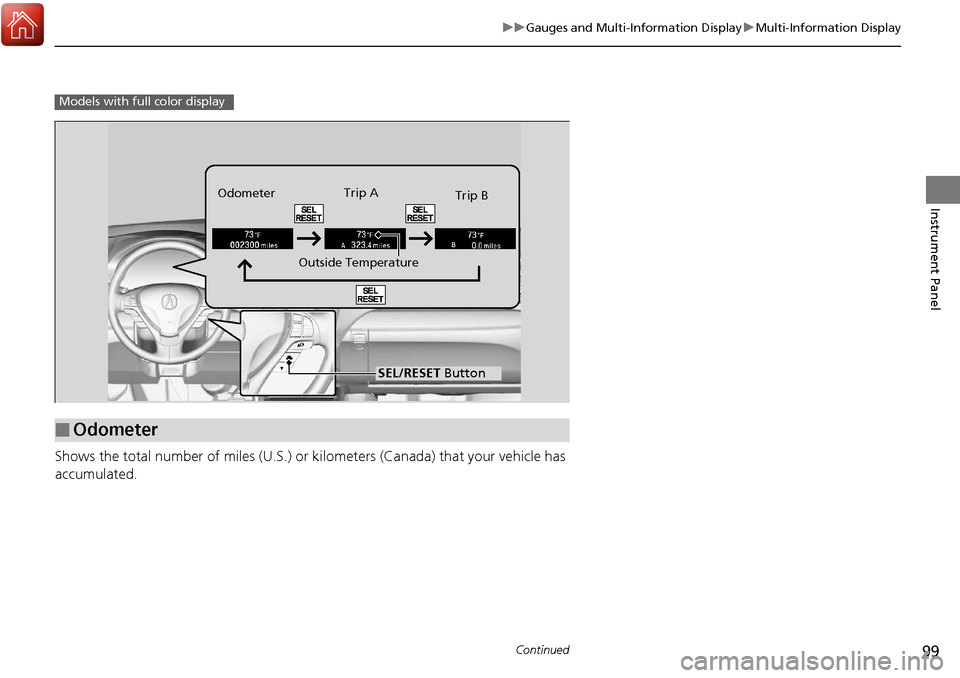
Shows the total number of miles (U.S.) or kilometers (Canada) that your vehicle has
accumulated.
Models with full color display
■Odometer
SEL/RESET Button
Outside TemperatureTrip A
Trip B
Odometer
Page 101 of 453
uuGauges and Multi-Information Display uMulti-Information Display
100
Instrument Panel
Shows the total number of miles (U.S.) or kilometers (Canada) driven since the last
reset. Meters A and B can be used to measure two separate trips.
■Resetting a trip meter
To reset a trip meter, display it, then press and hold the SEL/RESET button. The trip
meter is reset to 0.0.
Shows the outside temperature in Fahr enheit (U.S.) or Celsius (Canada).
■Adjusting the outside temperature display
Adjust the temperature reading up to ±5°F or ±3°C if the temperature reading
seems incorrect.
Shows the estimated average fuel economy of each trip meter in mpg (U.S.) or l/100
km (Canada). The display is updated at set intervals. When a trip meter is reset, the
average fuel economy is also reset.
Shows the instant fuel economy as a bar gr aph in mpg (U.S.) or l/100 km (Canada).
■Trip Meter
■Outside Temperature
■Average Fuel Economy
■Instant Fuel Economy
1Trip Meter
Switch between trip meter A and trip meter B by
pressing the SEL/RESET button.
1Outside Temperature
The temperature sensor is in the front bumper.
Road heat and exhaust fr om another vehicle can
affect the temperature reading when your vehicle
speed is less than 19 mph (30 km/h).
It may take several minutes for the display to be
updated after the temperature reading has stabilized.
Use the multi-information display’s customized
features to correct the temperature. 2 Customized Features P. 102, 108
1Average Fuel Economy
You can change when to reset the average fuel
economy.
2 Customized Features P. 102, 108
Page 104 of 453
103
uuGauges and Multi-Information Display uMulti-Information Display
Continued
Instrument Panel
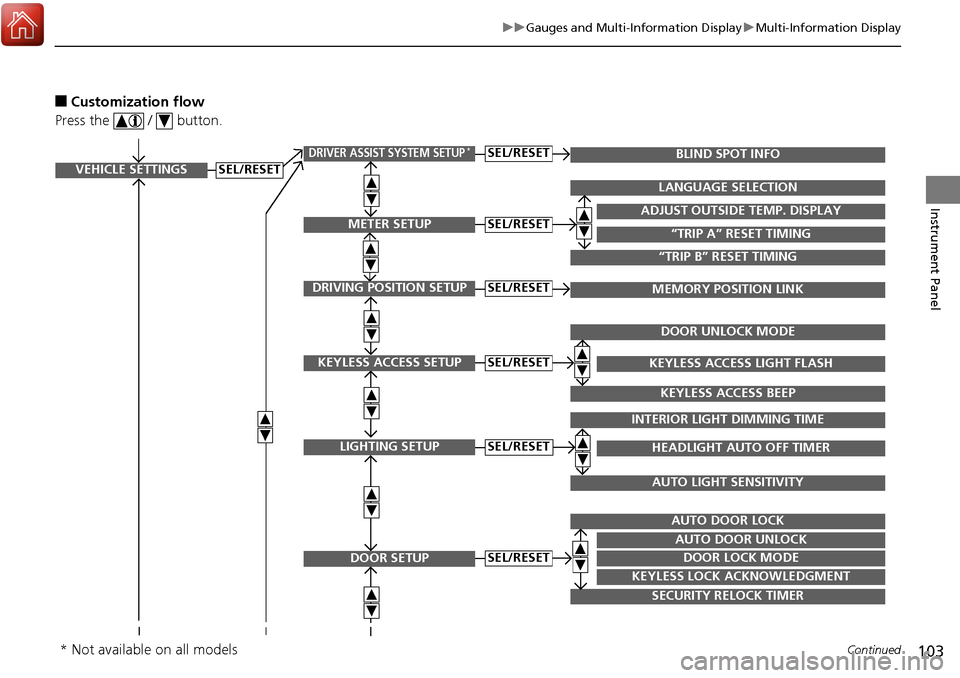
■Customization flow
Press the / button.
VEHICLE SETTINGS
METER SETUP
DRIVING POSITION SETUP
KEYLESS ACCESS SETUP
LIGHTING SETUP
DOOR SETUP
“TRIP A” RESET TIMING
ADJUST OUTSIDE TEMP. DISPLAY
LANGUAGE SELECTION
“TRIP B” RESET TIMING
MEMORY POSITION LINK
KEYLESS ACCESS LIGHT FLASH
DOOR UNLOCK MODE
KEYLESS ACCESS BEEP
HEADLIGHT AUTO OFF TIMER
INTERIOR LIGHT DIMMING TIME
AUTO LIGHT SENSITIVITY
DOOR LOCK MODE
AUTO DOOR UNLOCK
AUTO DOOR LOCK
KEYLESS LOCK ACKNOWLEDGMENT
SECURITY RELOCK TIMER
SEL/RESET
SEL/RESET
SEL/RESET
SEL/RESET
SEL/RESET
SEL/RESET
DRIVER ASSIST SYSTEM SETUP*BLIND SPOT INFOSEL/RESET
* Not available on all models
Page 106 of 453
105
uuGauges and Multi-Information Display uMulti-Information Display
Continued
Instrument Panel
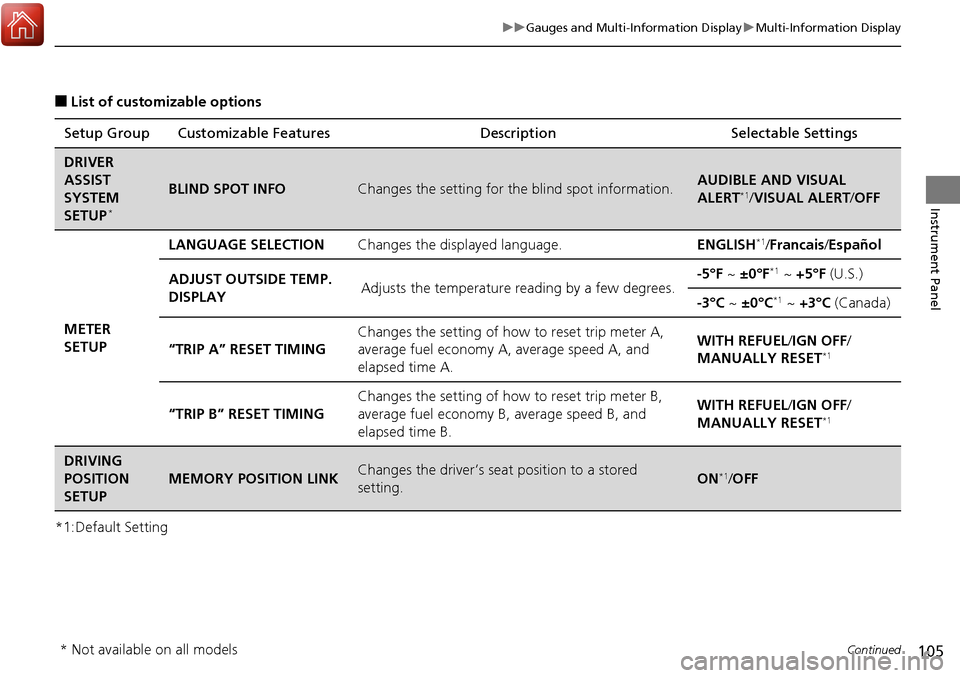
■List of customizable options
*1:Default Setting Setup Group Customizable Features
Description Selectable Settings
DRIVER
ASSIST
SYSTEM
SETUP
*
BLIND SPOT INFOChanges the setting for the blind spot information.AUDIBLE AND VISUAL
ALERT*1/VISUAL ALERT /OFF
METER
SETUP LANGUAGE SELECTION
Changes the displayed language. ENGLISH
*1/Francais /Español
ADJUST OUTSIDE TEMP.
DISPLAY Adjusts the temperature reading by a few degrees. -5°F ~
±0°F
*1 ~ +5°F (U.S.)
-3°C ~ ±0°C
*1 ~ +3°C (Canada)
“TRIP A” RESET TIMING Changes the setting of how to reset trip meter A,
average fuel economy A,
average speed A, and
elapsed time A. WITH REFUEL/
IGN OFF/
MANUALLY RESET
*1
“TRIP B” RESET TIMING Changes the setting of ho
w to reset trip meter B,
average fuel economy B, average speed B, and
elapsed time B. WITH REFUEL/
IGN OFF/
MANUALLY RESET*1
DRIVING
POSITION
SETUP
MEMORY POSITION LINKChanges the driver’s seat position to a stored
setting.ON*1/ OFF
* Not available on all models