Door Acura RDX 2018 User Guide
[x] Cancel search | Manufacturer: ACURA, Model Year: 2018, Model line: RDX, Model: Acura RDX 2018Pages: 453, PDF Size: 20.13 MB
Page 36 of 453
Continued35
uuSeat Belts uFastening a Seat Belt
Safe Driving
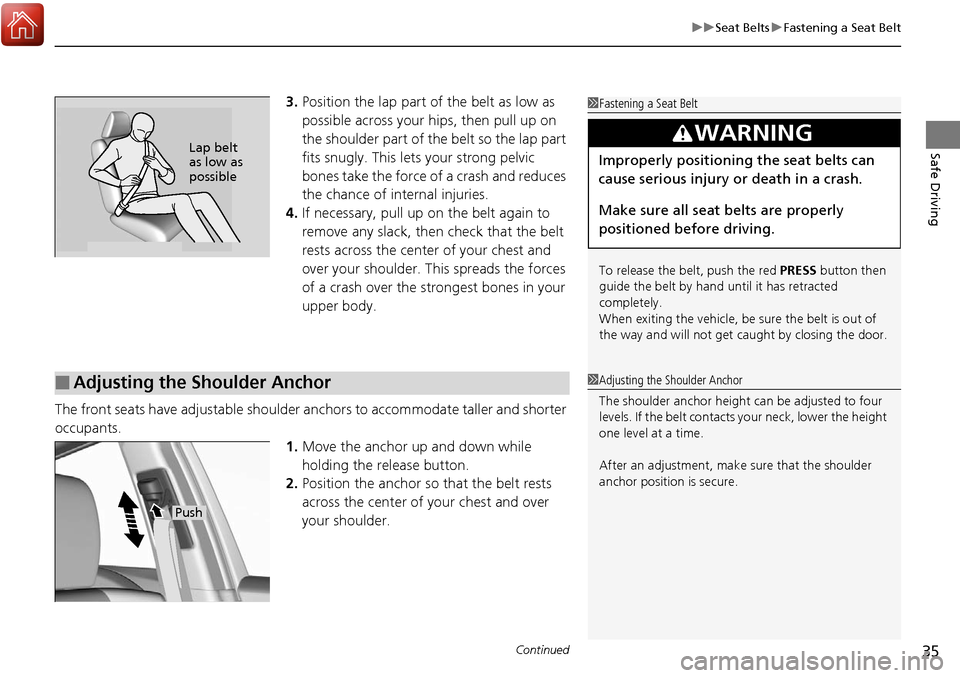
3. Position the lap part of the belt as low as
possible across your hips, then pull up on
the shoulder part of the belt so the lap part
fits snugly. This lets your strong pelvic
bones take the force of a crash and reduces
the chance of internal injuries.
4. If necessary, pull up on the belt again to
remove any slack, then check that the belt
rests across the center of your chest and
over your shoulder. This spreads the forces
of a crash over the strongest bones in your
upper body.
The front seats have adjustab le shoulder anchors to accommodate taller and shorter
occupants.
1.Move the anchor up and down while
holding the release button.
2. Position the anchor so that the belt rests
across the center of your chest and over
your shoulder.1 Fastening a Seat Belt
To release the belt, push the red PRESS button then
guide the belt by hand until it has retracted
completely.
When exiting the vehicle, be sure the belt is out of
the way and will not get ca ught by closing the door.
3WARNING
Improperly positioning the seat belts can
cause serious injury or death in a crash.
Make sure all seat belts are properly
positioned before driving.Lap belt
as low as
possible
■Adjusting the Shoulder Anchor1Adjusting the Shoulder Anchor
The shoulder anchor height can be adjusted to four
levels. If the belt contacts your neck, lower the height
one level at a time.
After an adjustment, make sure that the shoulder
anchor position is secure.
Push
Page 54 of 453
53
uuChild Safety uProtecting Child Passengers
Safe Driving
• Any child who is too small to wear a seat belt correctly must be restrained in an
approved child seat that is properly secured to the vehicle using either the lap belt
portion of the lap/shoulder belt or the lower anchors of the LATCH system.
• Never hold a child on your lap because it is impossible to protect them in the
event of a collision.
• Never put a seat belt over yourself and a child. During a crash, the belt would
likely press deep into the child and cause serious or fatal injuries.
• Never let two children use the same seat belt. Both children could be very
seriously injured in a crash.
• Do not allow children to operate the doors, windows or seat adjustments.
• Do not leave children in the vehicle unatte nded, especially in hot weather when
the inside of the vehicle can get hot enough to kill them. They could also activate
vehicle controls causing it to move unexpectedly.1 Protecting Child Passengers
To deactivate a lockable retractor, release the buckle
and allow the seat belt to wind up all the way.
To remind you of the pa ssenger’s front airbag
hazards and child safety, y our vehicle warning came
with a label on the dashboard (U.S. models) and has
labels on the front visors. Pl ease read and follow the
instructions on these labels.
2 Safety Labels P. 65
3WARNING
Allowing a child to play with a seat belt or
wrap one around their neck can result in
serious injury or death.
Instruct children not to play with any seat
belt and make sure any unused seat belt a
child can reach is buckled, fully retracted,
and locked.
Page 65 of 453
64
Safe Driving
Exhaust Gas Hazard
Carbon Monoxide Gas
The engine exhaust from this vehicle contains carbon monoxide, a colorless,
odorless, and highly toxic gas. As long as you properly maintain your vehicle, carbon
monoxide gas will not get into the interior.
■Have the exhaust system in spected for leaks whenever
• The exhaust system is m aking an unusual noise.
• The exhaust system may have been damaged.
• The vehicle is raised for an oil change.
When you operate a vehicle with the tailgat e open, airflow can pull exhaust gas into
the interior and create a hazardous conditio n. If you must drive with the tailgate
open, open all the windows and set the climate control system as shown below.
1. Select the fresh air mode.
2. Select the mode.
3. Set the fan speed to high.
4. Set the temperature control to a comfortable setting.
Adjust the climate control system in the same manner if you sit in your parked
vehicle with the engine running.
1 Carbon Monoxide Gas
An enclosed area such as a garage can quickly fill up
with carbon monoxide gas.
Do not run the engine with the garage door closed.
Even when the garage door is open, drive out of the
garage immediately afte r starting the engine.
3WARNING
Carbon monoxide gas is toxic.
Breathing it can cause unconsciousness and
even kill you.
Avoid any enclosed areas or activities that
expose you to carbon monoxide.
Page 75 of 453
74
uuIndicators u
Instrument Panel
*1:On the left: Models without full color display
On the right: Models with full color display
*2:Models without full color display
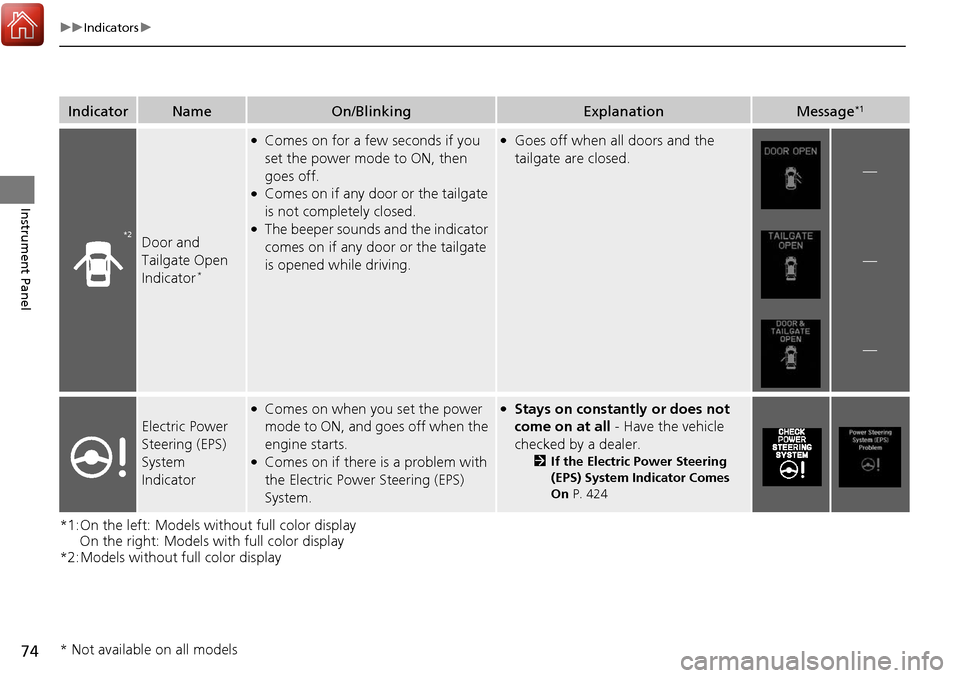
IndicatorNameOn/BlinkingExplanationMessage*1
Door and
Tailgate Open
Indicator
*
●Comes on for a few seconds if you
set the power mode to ON, then
goes off.
●Comes on if any door or the tailgate
is not completely closed.
●The beeper sounds and the indicator
comes on if any door or the tailgate
is opened while driving.
●Goes off when all doors and the
tailgate are closed.
—
—
—
Electric Power
Steering (EPS)
System
Indicator
●Comes on when you set the power
mode to ON, and go es off when the
engine starts.
●Comes on if there is a problem with
the Electric Power Steering (EPS)
System.
●Stays on constantly or does not
come on at all - Have the vehicle
checked by a dealer.
2 If the Electric Power Steering
(EPS) System Indicator Comes
On P. 424
*2
* Not available on all models
Page 77 of 453
76
uuIndicators u
Instrument Panel
*1:On the left: Models without full color display
On the right: Models with full color display
IndicatorNameOn/BlinkingExplanationMessage*1
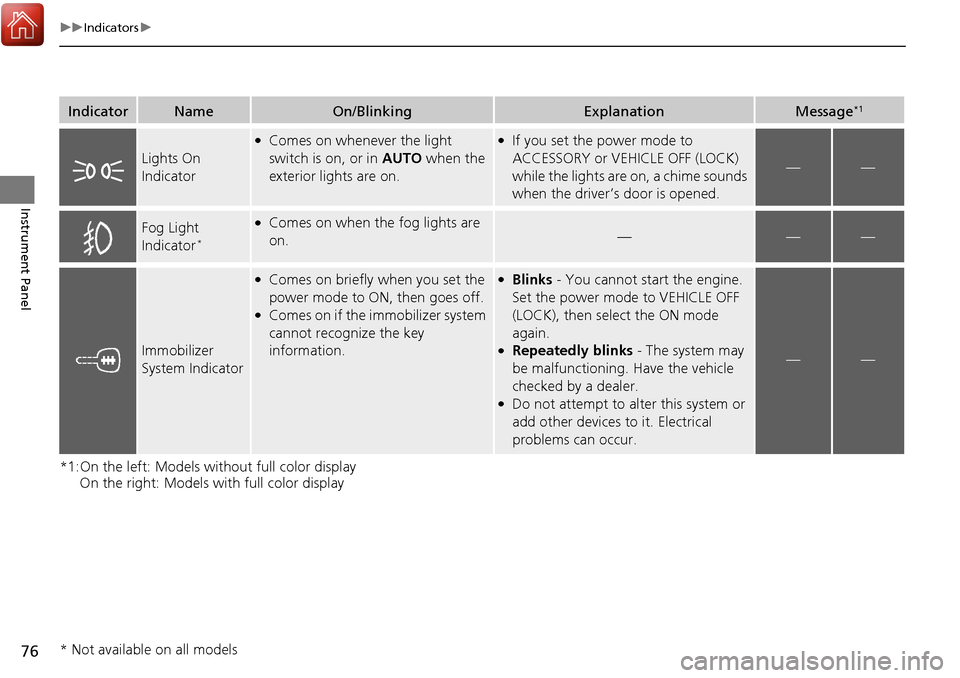
Lights On
Indicator
●Comes on whenever the light
switch is on, or in AUTO when the
exterior lights are on.●If you set the power mode to
ACCESSORY or VEHICLE OFF (LOCK)
while the lights are on, a chime sounds
when the driver’s door is opened.
——
Fog Light
Indicator*
●Comes on when the fog lights are
on.———
Immobilizer
System Indicator
●Comes on briefly when you set the
power mode to ON, then goes off.
●Comes on if the immobilizer system
cannot recognize the key
information.
●Blinks - You cannot start the engine.
Set the power mode to VEHICLE OFF
(LOCK), then select the ON mode
again.
●Repeatedly blinks - The system may
be malfunctioning. Have the vehicle
checked by a dealer.
●Do not attempt to alter this system or
add other devices to it. Electrical
problems can occur.
——
* Not available on all models
Page 87 of 453
86
uuIndicators uMulti-Information Display Warn ing and Information Messages
Instrument Panel
*1:On the left: Models without full color display
On the right: Models with full color display
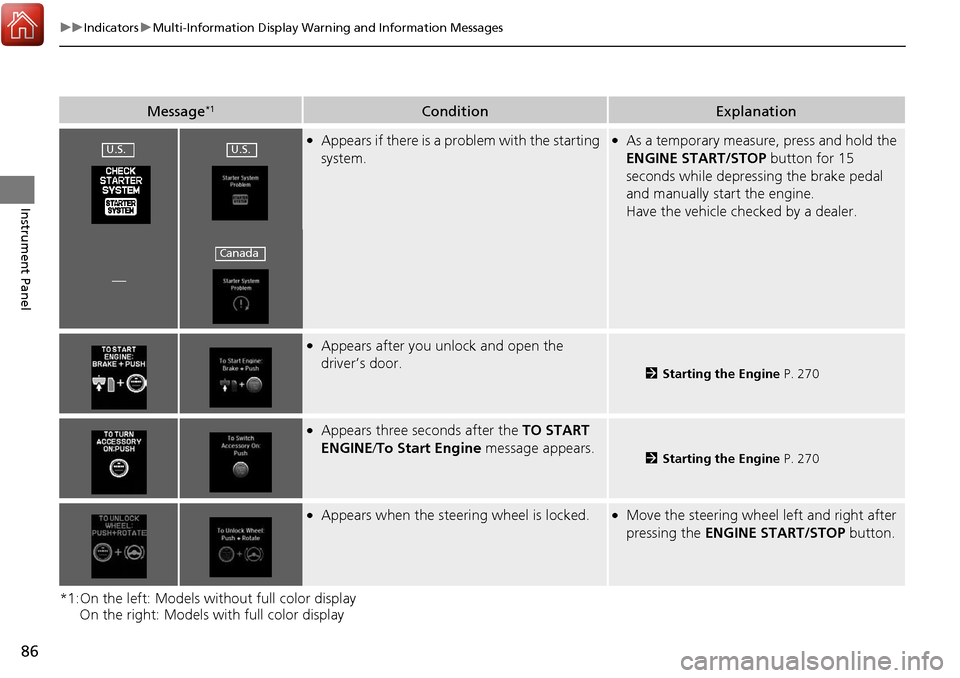
Message*1ConditionExplanation
●Appears if there is a problem with the starting
system.●As a temporary measure, press and hold the
ENGINE START/STOP button for 15
seconds while depressing the brake pedal
and manually start the engine.
Have the vehicle checked by a dealer.
—
●Appears after you unlock and open the
driver’s door.
2 Starting the Engine P. 270
●Appears three seconds after the TO START
ENGINE/ To Start Engine message appears.
2Starting the Engine P. 270
●Appears when the steering wheel is locked.●Move the steering wheel left and right after
pressing the ENGINE START/STOP button.
U.S.U.S.
Canada
Page 88 of 453
87
uuIndicators uMulti-Information Display Warning and Information Messages
Continued
Instrument Panel
*1:On the left: Models wi thout full color display
On the right: Models with full color display
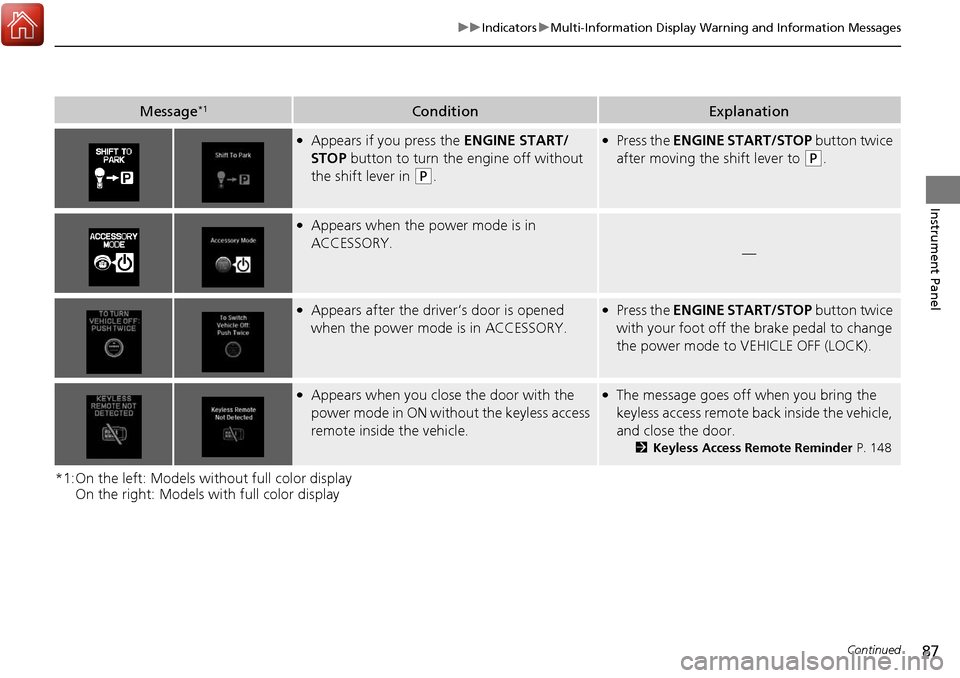
Message*1ConditionExplanation
●Appears if you press the ENGINE START/
STOP button to turn the engine off without
the shift lever in
(P.
●Press the ENGINE START/STOP button twice
after moving the shift lever to
(P.
●Appears when the power mode is in
ACCESSORY.
—
●Appears after the driver’s door is opened
when the power mode is in ACCESSORY.●Press the ENGINE START/STOP button twice
with your foot off the brake pedal to change
the power mode to VEHICLE OFF (LOCK).
●Appears when you close the door with the
power mode in ON without the keyless access
remote inside the vehicle.●The message goes off when you bring the
keyless access remote back inside the vehicle,
and close the door.
2Keyless Access Remote Reminder P. 148
Page 90 of 453
89
uuIndicators uMulti-Information Display Warning and Information Messages
Continued
Instrument Panel
*1:On the left: Models wi thout full color display
On the right: Models with full color display
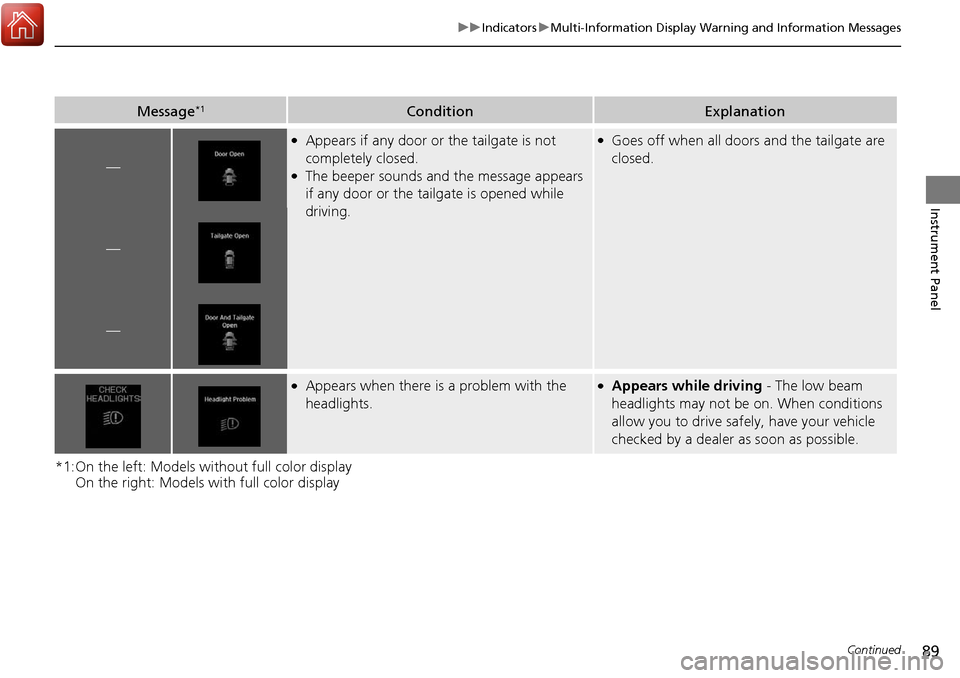
Message*1ConditionExplanation
—
●Appears if any door or the tailgate is not
completely closed.
●The beeper sounds and the message appears
if any door or the tailgate is opened while
driving.
●Goes off when all doors and the tailgate are
closed.
—
—
●Appears when there is a problem with the
headlights.●Appears while driving - The low beam
headlights may not be on. When conditions
allow you to drive safely, have your vehicle
checked by a dealer as soon as possible.
Page 93 of 453
92
uuIndicators uMulti-Information Display Warn ing and Information Messages
Instrument Panel
MessageConditionExplanation
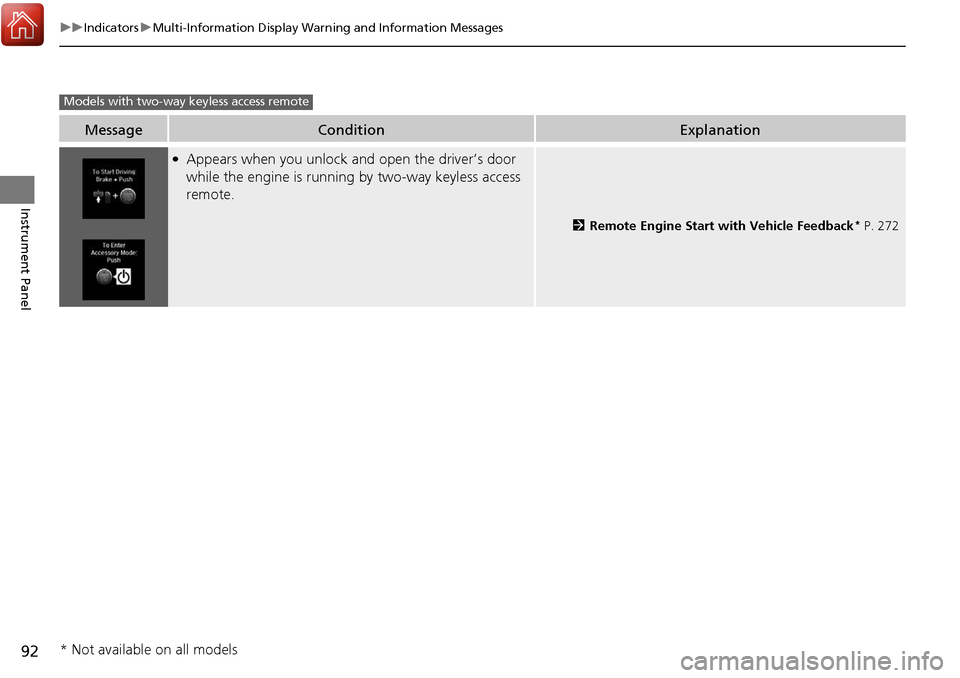
●Appears when you unlock and open the driver’s door
while the engine is running by two-way keyless access
remote.
2Remote Engine Start with Vehicle Feedback* P. 272
Models with two-way keyless access remote
* Not available on all models
Page 103 of 453
uuGauges and Multi-Information Display uMulti-Information Display
102
Instrument Panel
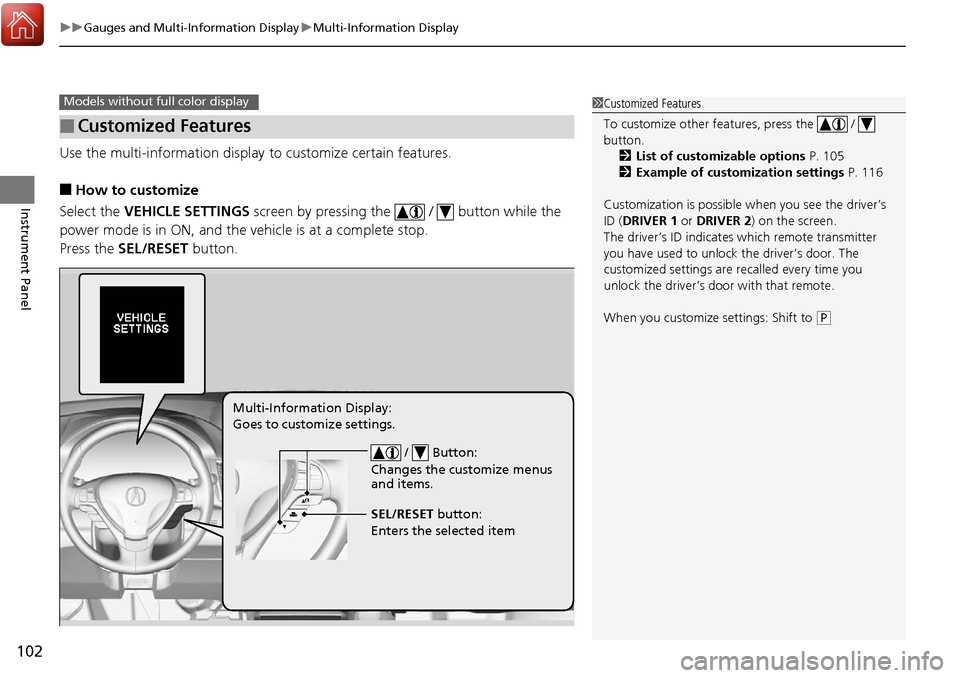
Use the multi-information display to customize certain features.
■How to customize
Select the VEHICLE SETTINGS screen by pressing the / button while the
power mode is in ON, and the vehicle is at a complete stop.
Press the SEL/RESET button.
■Customized Features
Models without fu ll color display1Customized Features
To customize other features, press the /
button.
2 List of customizable options P. 105
2 Example of customization settings P. 116
Customization is possible when you see the driver’s
ID ( DRIVER 1 or DRIVER 2) on the screen.
The driver’s ID indicates which remote transmitter
you have used to unlock the driver’s door. The
customized settings are recalled every time you
unlock the driver’s door with that remote.
When you customize settings: Shift to
( P
/ Button:
Changes the customize menus
and items.
Multi-Information Display:
Goes to customize settings.
SEL/RESET button:
Enters the selected item