cargo Acura RDX 2018 User Guide
[x] Cancel search | Manufacturer: ACURA, Model Year: 2018, Model line: RDX, Model: Acura RDX 2018Pages: 453, PDF Size: 20.13 MB
Page 266 of 453
265
uuTowing a Trailer uTowing Preparation
Driving
■Trailer light
Trailer lights and equipment must comply with federal, state, province/territory, and
local regulations. Check with your local trailer sales or rental agency for the
requirements in the area where you plan to tow.
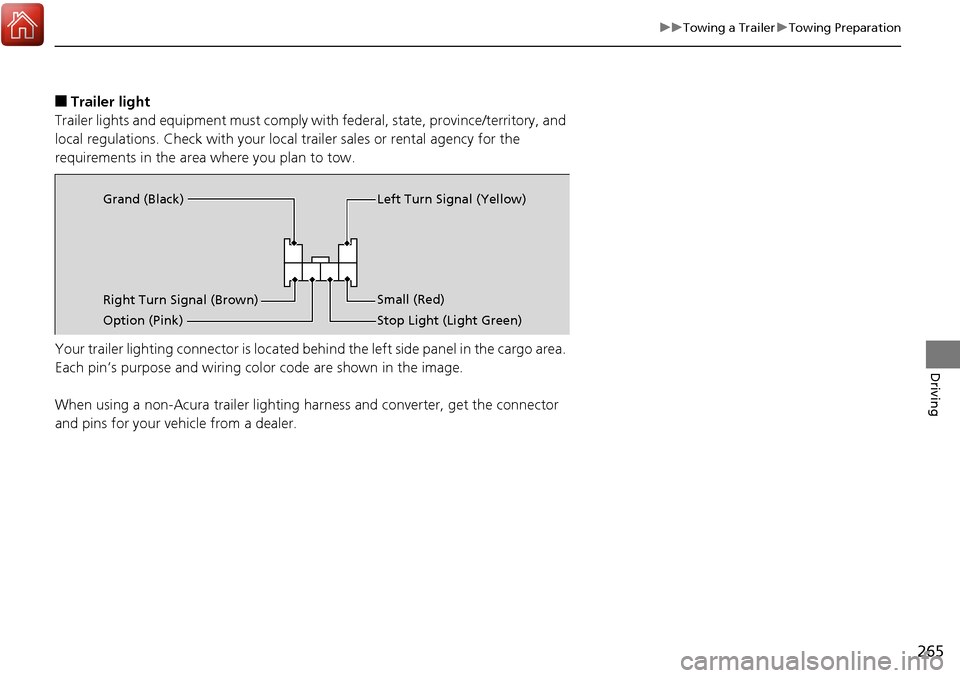
Your trailer lighting connector is located behind the left side panel in the cargo area.
Each pin’s purpose and wiring co lor code are shown in the image.
When using a non-Acura trailer lighting ha rness and converter, get the connector
and pins for your vehicle from a dealer.
Right Turn Signal (Brown) Left Turn Signal (Yellow)
Small (Red)
Stop Light (Light Green)
Option (Pink) Grand (Black)
Page 269 of 453
268
Driving
Off-Highway Driving Guidelines
General Information
Your vehicle has been designed primarily for use on pavement, however, its higher
ground clearance allows you to occasionally travel on unpaved roads. It is not
designed for trail-blazing, or othe r challenging off-road activities.
If you decide to drive on unpaved roads, you will find that it requires somewhat
different driving skills and that your vehicle will handle somewhat differently than it
does on pavement. Pay attention to the precautions and tips in this section, and get
acquainted with your vehicle before leaving the pavement.
Important Safety Precautions
To avoid loss of control or rollover, be sure to follow all precautions and
recommendations:
• Be sure to store cargo properly and do not exceed your cargo load limits.
2 Maximum Load Limit P. 261
•Whenever you drive, make sure you and your passengers always wear seat belts.
• Keep your speed low, and never go faster than the conditions allow.
• It’s up to you to continually assess the situation and drive within the limits.
1Off-Highway Driving Guidelines
Failure to operate your vehi cle correctly might result
in a crash or a rollover. 2 Important Handling Information P. 28
2 Precautions While Driving P. 275
3WARNING
Improperly operating this vehicle on or off-
pavement can cause a crash or rollover in
which you and your passengers could be
seriously injured or killed.
•Follow all instructions and guidelines in
this owner’s manual.
• Keep your speed low, and don’t drive
faster than conditions permit.
Page 292 of 453
Continued291
uuWhen Driving uAdaptive Cruise Control (ACC)*
Driving
The system may automatically shut off and the ACC indicator will come on under
certain conditions. Some examples of thes e conditions are listed below. Other
conditions may reduce some of the ACC functions.
2 Front Sensor Camera* P. 284
■Environmental conditions
Driving in bad weather (r ain, fog, snow, etc.).
■Roadway conditions
Driving on a snowy or wet roadway (obscure d lane marking, vehicle tracks, reflected
lights, road spra y, high contrast).
■Vehicle conditions
• The outside of the windshield is blocked by dirt, mud, leaves, wet snow, etc.
• An abnormal tire or wheel condition (wro ng sized, varied size or construction,
improperly inflated, compact spare tire
*, etc.).
• The camera temperature gets too hot.
• The parking brake is applied.
• When the front grille is dirty.
• When the front of the vehicle tilts up du e to heavy cargo in the cargo space or
rear seats.
• When tire chains are installed.
■ACC Conditions and Limitations1ACC Conditions and Limitations
The radar sensor for ACC is shared with the Collision
Mitigation Braking System
TM (CMBSTM).
2 Collision Mitigation Braking SystemTM
(CMBSTM)* P. 324
You can read about handling information for the
camera equipped with this system. 2 Front Sensor Camera
* P. 284
* Not available on all models
Page 344 of 453
343
Driving
Fuel Economy and CO2 Emissions
Improving Fuel Economy and Reducing CO2 Emissions
Achieving fuel economy and reducing CO2 emissions is dependent on several
factors, including driving conditions, load weight, idling time, driving habits, and
vehicle condition. Depending on these and other factors, you may not achieve the
rated fuel economy of this vehicle.
You can optimize your fuel economy with proper maintenance of your vehicle.
Always maintain your vehicle in accordance with the messages displayed on the
multi-information display.
• Use the recommended viscosity engine oil, displaying the API Certification Seal.
• Maintain the specified tire pressure.
• Do not load the vehicle with excess cargo.
• Keep your vehicle clean. A buildup of snow or mud on your vehicle’s underside
adds weight and increases wind resistance.
■Maintenance and Fuel Economy
1Improving Fuel Economy and Reducing CO2 Emissions
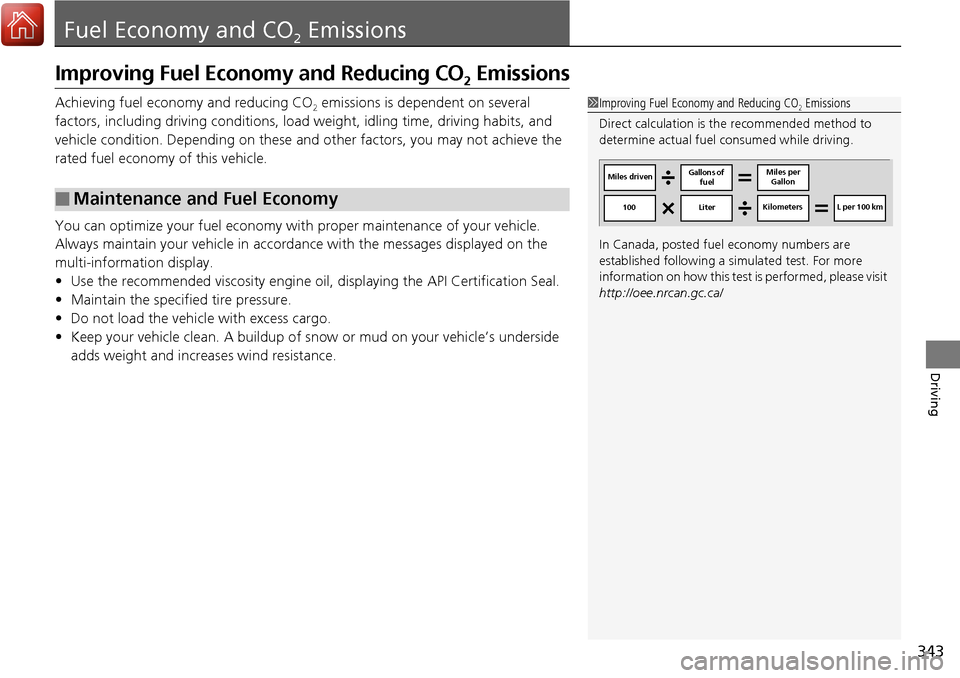
Direct calculation is the recommended method to
determine actual fuel consumed while driving.
In Canada, posted fuel economy numbers are
established following a simulated test. For more
information on how this test is performed, please visit
http://oee.nrcan.gc.ca/
Miles driven Gallons of
fuel Miles per
Gallon
100 LiterKilometers L per 100 km
Page 366 of 453
365Continued
Maintenance
Replacing Light Bulbs
Headlight Bulbs
Headlight bulbs are LED type. Have an authorized Acura dealer inspect and replace
the light assembly.
Fog Light Bulbs*
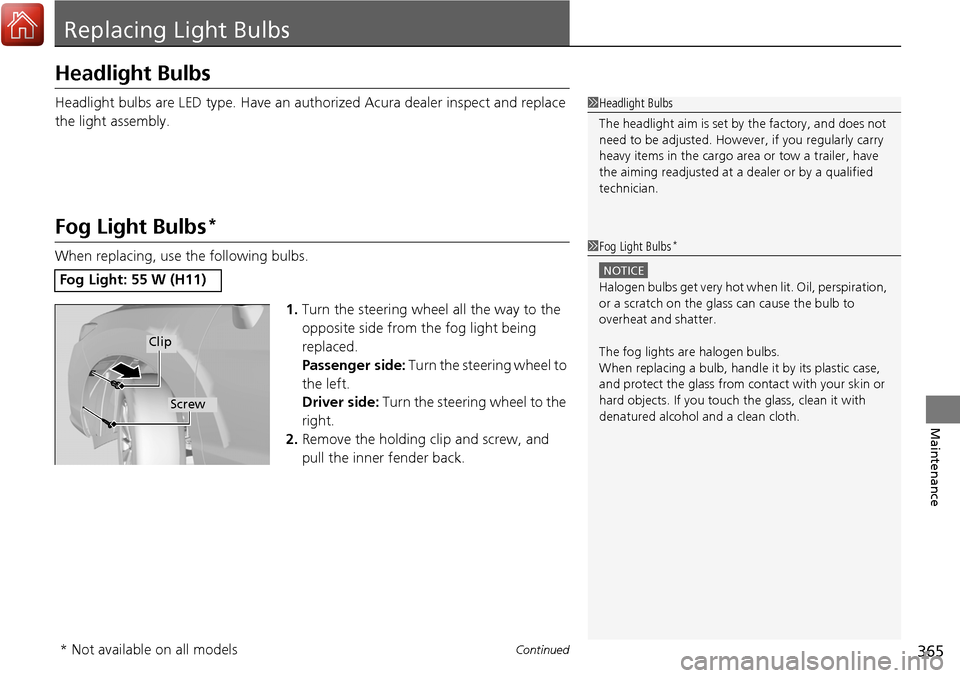
When replacing, use the following bulbs.
1.Turn the steering wheel all the way to the
opposite side from the fog light being
replaced.
Passenger side: Turn the steering wheel to
the left.
Driver side: Turn the steering wheel to the
right.
2. Remove the holding clip and screw, and
pull the inner fender back.
Fog Light: 55 W (H11)
1Headlight Bulbs
The headlight aim is set by the factory, and does not
need to be adjusted. Howeve r, if you regularly carry
heavy items in the cargo area or tow a trailer, have
the aiming readjusted at a dealer or by a qualified
technician.
1 Fog Light Bulbs*
NOTICE
Halogen bulbs get very hot wh en lit. Oil, perspiration,
or a scratch on the glass can cause the bulb to
overheat and shatter.
The fog lights ar e halogen bulbs.
When replacing a bulb, handl e it by its plastic case,
and protect the glass from c ontact with your skin or
hard objects. If you touch the glass, clean it with
denatured alcohol and a clean cloth.
Clip
Screw
* Not available on all models
Page 399 of 453
398
uuIf a Tire Goes Flat uChanging a Flat Tire*
Handling the Unexpected
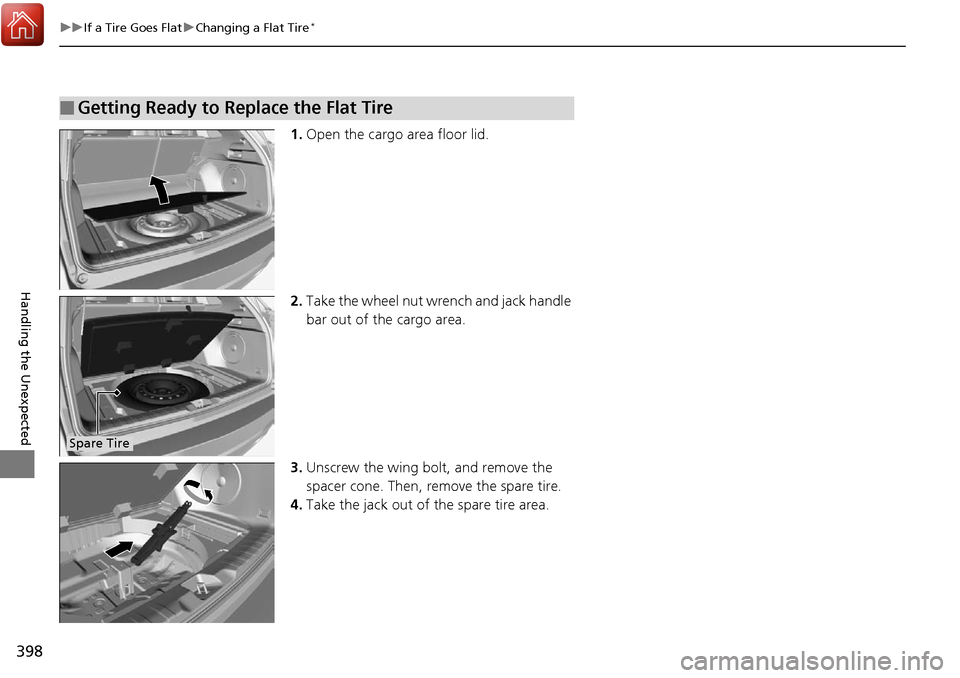
1. Open the cargo area floor lid.
2. Take the wheel nut wrench and jack handle
bar out of the cargo area.
3. Unscrew the wing bolt, and remove the
spacer cone. Then, remove the spare tire.
4. Take the jack out of the spare tire area.
■Getting Ready to Replace the Flat Tire
Spare Tire
Page 403 of 453
uuIf a Tire Goes Flat uChanging a Flat Tire*
402
Handling the Unexpected
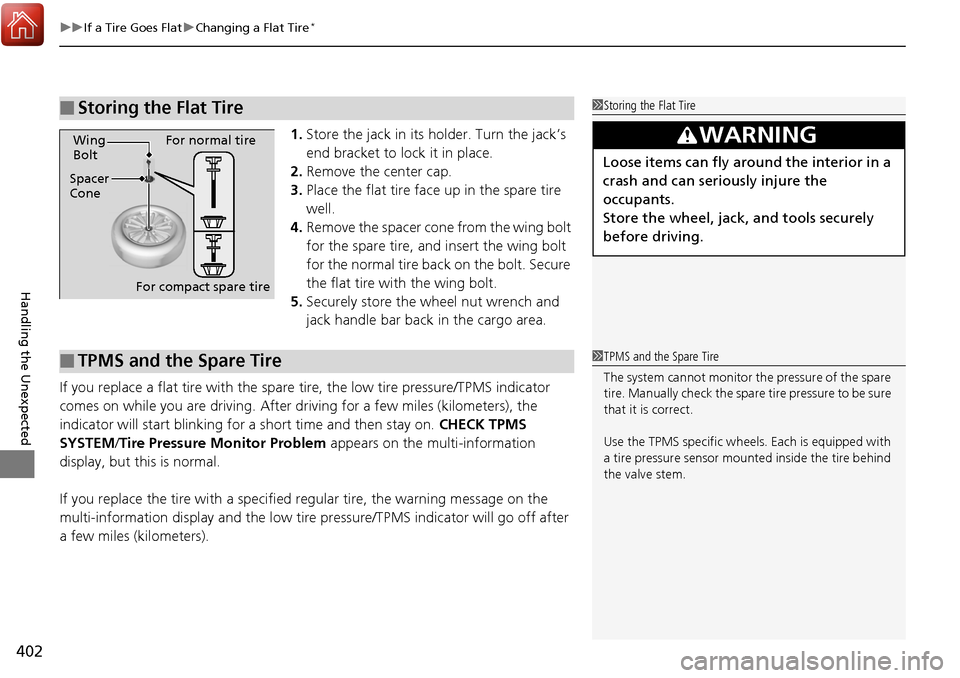
1. Store the jack in its holder. Turn the jack’s
end bracket to lock it in place.
2. Remove the center cap.
3. Place the flat tire face up in the spare tire
well.
4. Remove the spacer cone from the wing bolt
for the spare tire, and insert the wing bolt
for the normal tire back on the bolt. Secure
the flat tire with the wing bolt.
5. Securely store the wheel nut wrench and
jack handle bar back in the cargo area.
If you replace a flat tire with the spare tire, the low tire pressure/TPMS indicator
comes on while you are driving. After driving for a few miles (kilometers), the
indicator will start blinking for a short time and then stay on. CHECK TPMS
SYSTEM/ Tire Pressure Monitor Problem appears on the multi-information
display, but this is normal.
If you replace the tire with a specified regular tire, the warning message on the
multi-information display and the low tire pressure/TPMS indicator will go off after
a few miles (kilometers).
■Storing the Flat Tire1 Storing the Flat Tire
3WARNING
Loose items can fly around the interior in a
crash and can seriously injure the
occupants.
Store the wheel, jack, and tools securely
before driving.Spacer
ConeWing
Bolt
For compact spare tireFor normal tire
■TPMS and the Spare Tire1
TPMS and the Spare Tire
The system cannot monitor th e pressure of the spare
tire. Manually check the spare tire pressure to be sure
that it is correct.
Use the TPMS specific wheels. Each is equipped with
a tire pressure sensor mount ed inside the tire behind
the valve stem.
Page 405 of 453
uuIf a Tire Goes Flat uTemporarily Repairing a Flat Tire*
404
Handling the Unexpected
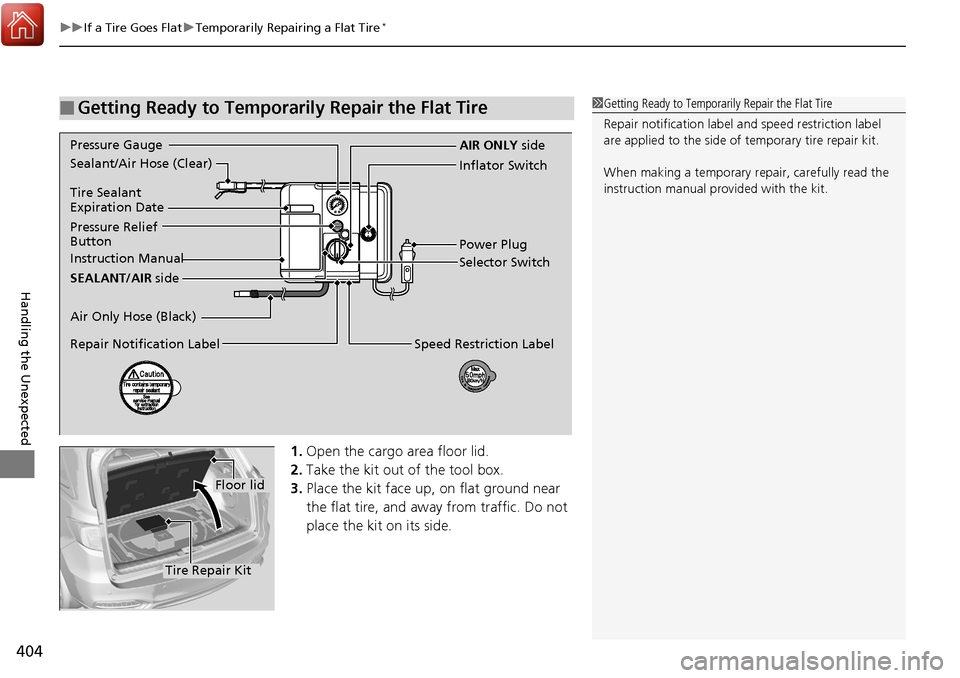
1. Open the cargo area floor lid.
2. Take the kit out of the tool box.
3. Place the kit face up, on flat ground near
the flat tire, and away from traffic. Do not
place the kit on its side.
■Getting Ready to Temporarily Repair the Flat Tire1Getting Ready to Temporarily Repair the Flat Tire
Repair notificati on label and speed restriction label
are applied to the side of temporary tire repair kit.
When making a temporary repair, carefully read the
instruction manual provided with the kit.
Instruction Manual
Air Only Hose (Black) Pressure Relief
Button Inflator Switch
Selector Switch
SEALANT/AIR side
Sealant/Air Hose (Clear)
AIR ONLY
side
Power Plug
Pressure Gauge
Tire Sealant
Expiration Date
Repair Notification Label
Speed Restriction Label
Floor lid
Tire Repair Kit
Page 412 of 453
Continued411
uuIf a Tire Goes Flat uTemporarily Repairing a Flat Tire*
Handling the Unexpected
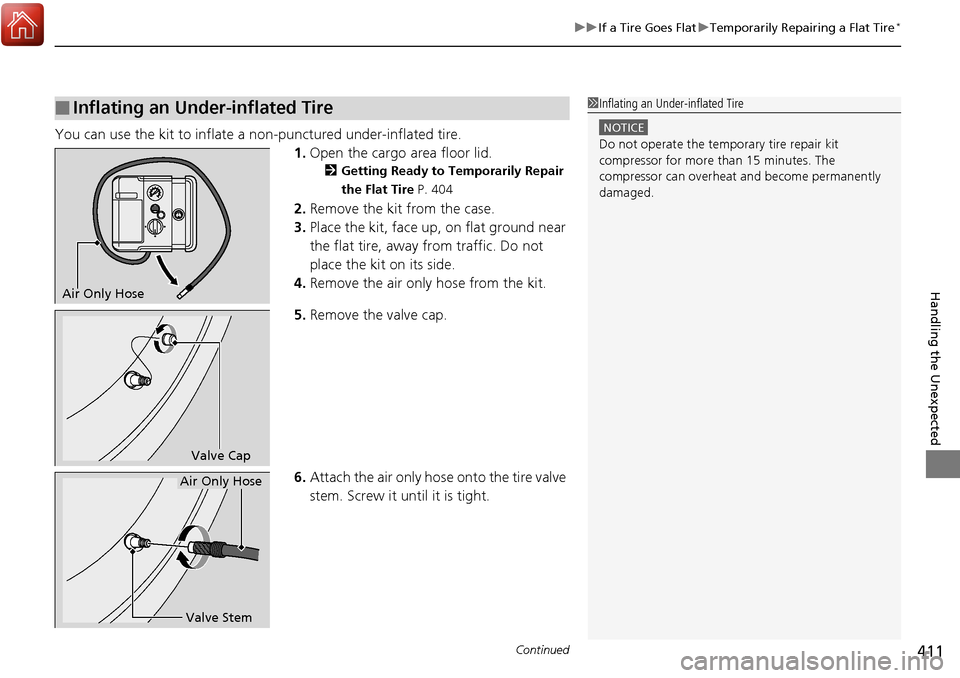
You can use the kit to inflate a non-punctured under-inflated tire.
1.Open the cargo area floor lid.
2 Getting Ready to Temporarily Repair
the Flat Tire P. 404
2.Remove the kit from the case.
3. Place the kit, face up, on flat ground near
the flat tire, away from traffic. Do not
place the kit on its side.
4. Remove the air only hose from the kit.
5. Remove the valve cap.
6. Attach the air only hose onto the tire valve
stem. Screw it until it is tight.
■Inflating an Under-inflated Tire1Inflating an Under-inflated Tire
NOTICE
Do not operate the temporary tire repair kit
compressor for more than 15 minutes. The
compressor can overheat and become permanently
damaged.
Air Only Hose
Valve Cap
Valve Stem
Air Only Hose
Page 433 of 453
432
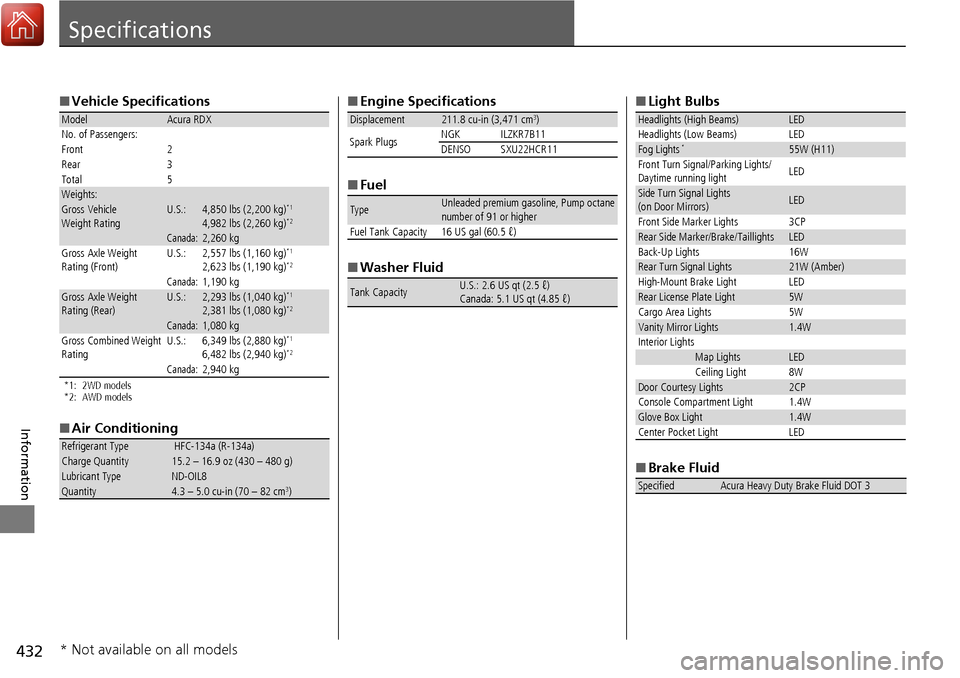
Information
Specifications
■Vehicle Specifications
*1: 2WD models
*2: AWD models
■Air Conditioning
ModelAcura RDX
No. of Passengers:
Front 2
Rear 3
Total 5
Weights:Gross Vehicle
Weight RatingU.S.:4,850 lbs (2,200 kg)*1
4,982 lbs (2,260 kg)*2
Canada:2,260 kgGross Axle Weight
Rating (Front)U.S.:2,557 lbs (1,160 kg)*1
2,623 lbs (1,190 kg)*2
Canada:1,190 kgGross Axle Weight
Rating (Rear)U.S.:2,293 lbs (1,040 kg)*1
2,381 lbs (1,080 kg)*2
Canada:1,080 kg
Gross Combined Weight
Rating U.S.: 6,349 lbs (2,880 kg)*1
6,482 lbs (2,940 kg)*2
Canada:2,940 kg
Refrigerant Type HFC-134a (R-134a)Charge Quantity15.2 – 16.9 oz (430 – 480 g)Lubricant TypeND-OIL8Quantity4.3 – 5.0 cu-in (70 – 82 cm3)
■
Engine Specifications
■ Fuel
■ Washer Fluid
Displacement211.8 cu-in (3,471 cm3)
Spark Plugs NGK ILZKR7B11
DENSO SXU22HCR11
TypeUnleaded premium gasoline, Pump octane
number of 91 or higher
Fuel Tank Capacity 16 US gal (60.5 ℓ)
Tank CapacityU.S.: 2.6 US qt (2.5 ℓ)
Canada: 5.1 US qt (4.85 ℓ)
■ Light Bulbs
■ Brake Fluid
Headlights (High Beams)LED
Headlights (Low Beams) LED
Fog Lights*55W (H11)
Front Turn Signal/Parking Lights/
Daytime running light LED
Side Turn Signal Lights
(on Door Mirrors)LED
Front Side Marker Lights 3CP
Rear Side Marker/Brake/TaillightsLED
Back-Up Lights 16W
Rear Turn Signal Lights21W (Amber)
High-Mount Brake Light LED
Rear License Plate Light5W
Cargo Area Lights 5W
Vanity Mirror Lights1.4W
Interior Lights
Map LightsLED
Ceiling Light 8W
Door Courtesy Lights2CP
Console Compartment Light 1.4W
Glove Box Light1.4W
Center Pocket Light LED
SpecifiedAcura Heavy Duty Brake Fluid DOT 3
* Not available on all models