fuel Acura RDX 2018 User Guide
[x] Cancel search | Manufacturer: ACURA, Model Year: 2018, Model line: RDX, Model: Acura RDX 2018Pages: 453, PDF Size: 20.13 MB
Page 101 of 453
uuGauges and Multi-Information Display uMulti-Information Display
100
Instrument Panel
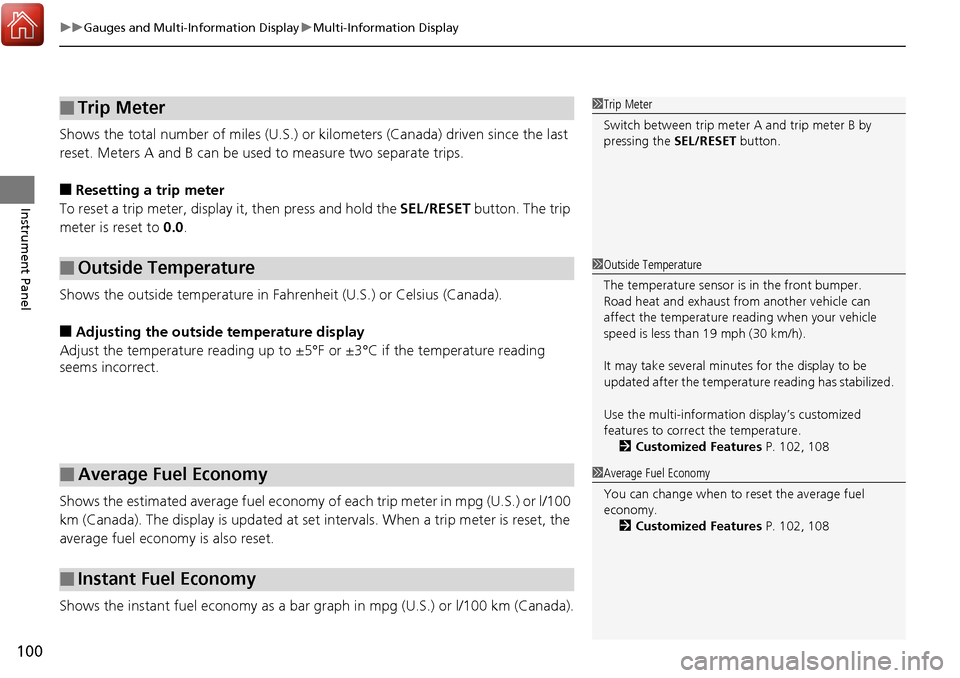
Shows the total number of miles (U.S.) or kilometers (Canada) driven since the last
reset. Meters A and B can be used to measure two separate trips.
■Resetting a trip meter
To reset a trip meter, display it, then press and hold the SEL/RESET button. The trip
meter is reset to 0.0.
Shows the outside temperature in Fahr enheit (U.S.) or Celsius (Canada).
■Adjusting the outside temperature display
Adjust the temperature reading up to ±5°F or ±3°C if the temperature reading
seems incorrect.
Shows the estimated average fuel economy of each trip meter in mpg (U.S.) or l/100
km (Canada). The display is updated at set intervals. When a trip meter is reset, the
average fuel economy is also reset.
Shows the instant fuel economy as a bar gr aph in mpg (U.S.) or l/100 km (Canada).
■Trip Meter
■Outside Temperature
■Average Fuel Economy
■Instant Fuel Economy
1Trip Meter
Switch between trip meter A and trip meter B by
pressing the SEL/RESET button.
1Outside Temperature
The temperature sensor is in the front bumper.
Road heat and exhaust fr om another vehicle can
affect the temperature reading when your vehicle
speed is less than 19 mph (30 km/h).
It may take several minutes for the display to be
updated after the temperature reading has stabilized.
Use the multi-information display’s customized
features to correct the temperature. 2 Customized Features P. 102, 108
1Average Fuel Economy
You can change when to reset the average fuel
economy.
2 Customized Features P. 102, 108
Page 102 of 453
Continued101
uuGauges and Multi-Information Display uMulti-Information Display
Instrument Panel
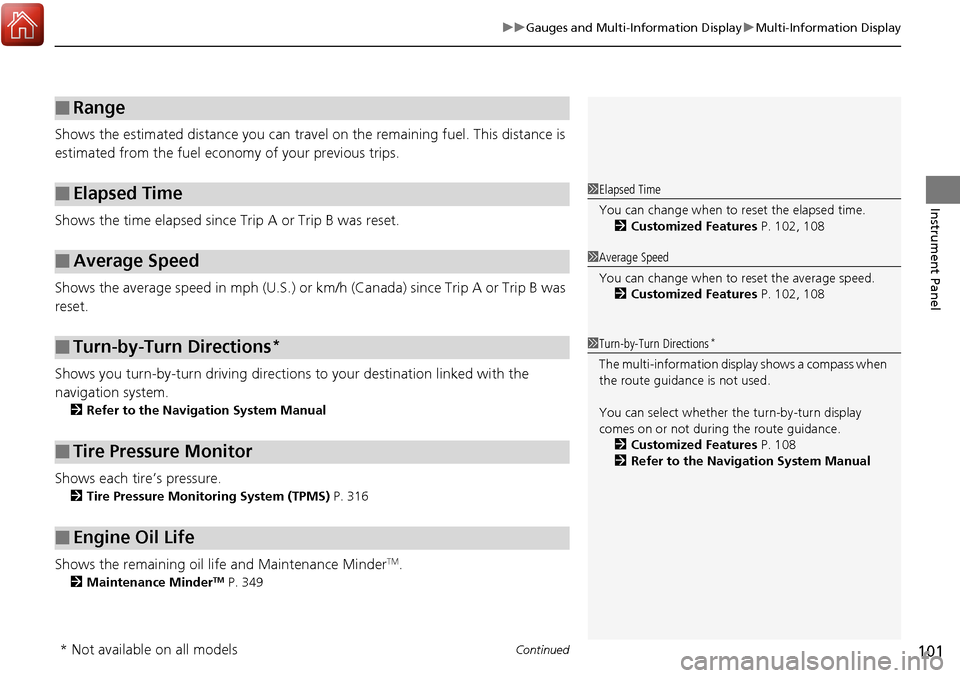
Shows the estimated distance you can travel on the remaining fuel. This distance is
estimated from the fuel economy of your previous trips.
Shows the time elapsed since Trip A or Trip B was reset.
Shows the average speed in mph (U.S.) or km/h (Canada) since Trip A or Trip B was
reset.
Shows you turn-by-turn driv ing directions to your destination linked with the
navigation system.
2 Refer to the Navigation System Manual
Shows each tire’s pressure.
2Tire Pressure Monitoring System (TPMS) P. 316
Shows the remaining oil life and Maintenance MinderTM.
2Maintenance MinderTM P. 349
■Range
■Elapsed Time
■Average Speed
■Turn-by-Turn Directions*
■Tire Pressure Monitor
■Engine Oil Life
1Elapsed Time
You can change when to reset the elapsed time.
2 Customized Features P. 102, 108
1Average Speed
You can change when to reset the average speed.
2 Customized Features P. 102, 108
1Turn-by-Turn Directions*
The multi-information disp lay shows a compass when
the route guidance is not used.
You can select whether the turn-by-turn display
comes on or not during the route guidance. 2 Customized Features P. 108
2 Refer to the Navigation System Manual
* Not available on all models
Page 106 of 453
105
uuGauges and Multi-Information Display uMulti-Information Display
Continued
Instrument Panel
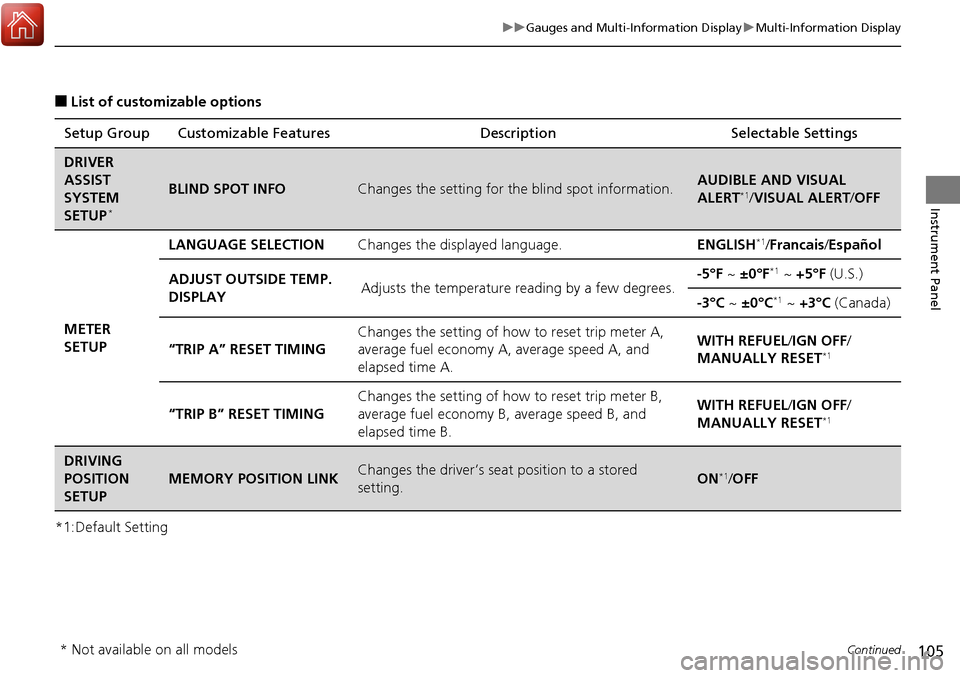
■List of customizable options
*1:Default Setting Setup Group Customizable Features
Description Selectable Settings
DRIVER
ASSIST
SYSTEM
SETUP
*
BLIND SPOT INFOChanges the setting for the blind spot information.AUDIBLE AND VISUAL
ALERT*1/VISUAL ALERT /OFF
METER
SETUP LANGUAGE SELECTION
Changes the displayed language. ENGLISH
*1/Francais /Español
ADJUST OUTSIDE TEMP.
DISPLAY Adjusts the temperature reading by a few degrees. -5°F ~
±0°F
*1 ~ +5°F (U.S.)
-3°C ~ ±0°C
*1 ~ +3°C (Canada)
“TRIP A” RESET TIMING Changes the setting of how to reset trip meter A,
average fuel economy A,
average speed A, and
elapsed time A. WITH REFUEL/
IGN OFF/
MANUALLY RESET
*1
“TRIP B” RESET TIMING Changes the setting of ho
w to reset trip meter B,
average fuel economy B, average speed B, and
elapsed time B. WITH REFUEL/
IGN OFF/
MANUALLY RESET*1
DRIVING
POSITION
SETUP
MEMORY POSITION LINKChanges the driver’s seat position to a stored
setting.ON*1/ OFF
* Not available on all models
Page 113 of 453
112
uuGauges and Multi-Information Display uMulti-Information Display
Instrument Panel
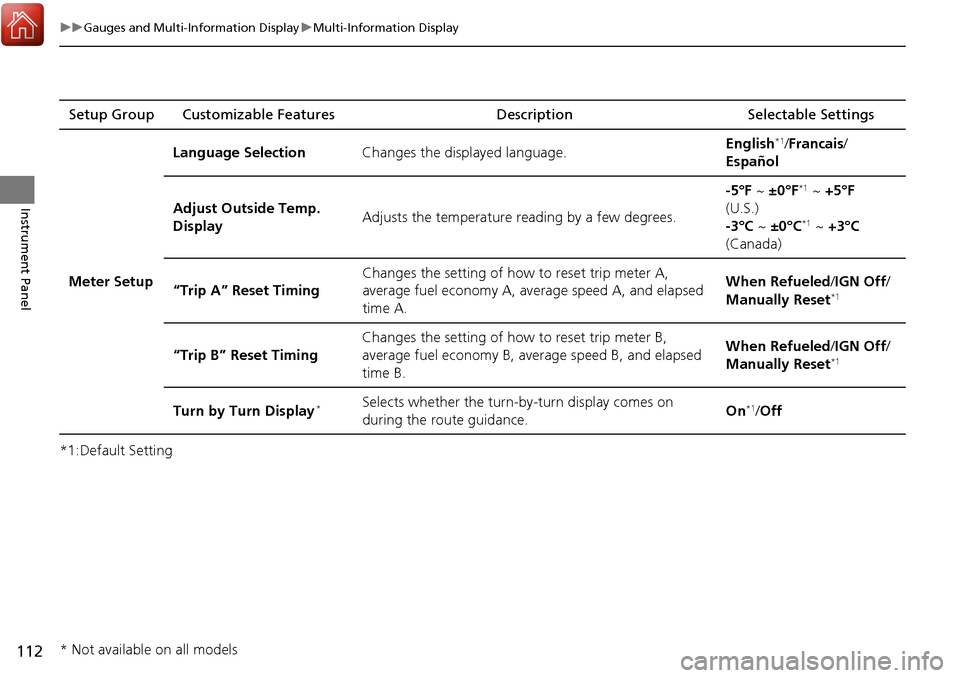
*1:Default SettingSetup Group Customizable Features
Description Selectable Settings
Meter Setup Language Selection
Changes the displayed language. English
*1/
Francais /
Español
Adjust Outside Temp.
Display Adjusts the temperature reading by a few degrees. -5°F ~
±0°F
*1 ~ +5°F
(U.S.)
-3°C ~ ±0°C
*1 ~ +3°C
(Canada)
“Trip A” Reset Timing Changes the setting of how to reset trip meter A,
average fuel economy A, average speed A, and elapsed
time A. When Refueled
/IGN Off/
Manually Reset
*1
“Trip B” Reset Timing Changes the setting of how to reset trip meter B,
average fuel economy B, av
erage speed B, and elapsed
time B. When Refueled
/IGN Off/
Manually Reset*1
Turn by Turn Display*Selects whether the turn-b y-turn display comes on
during the route guidance. On*1/
Off
* Not available on all models
Page 117 of 453
116
uuGauges and Multi-Information Display uMulti-Information Display
Instrument Panel
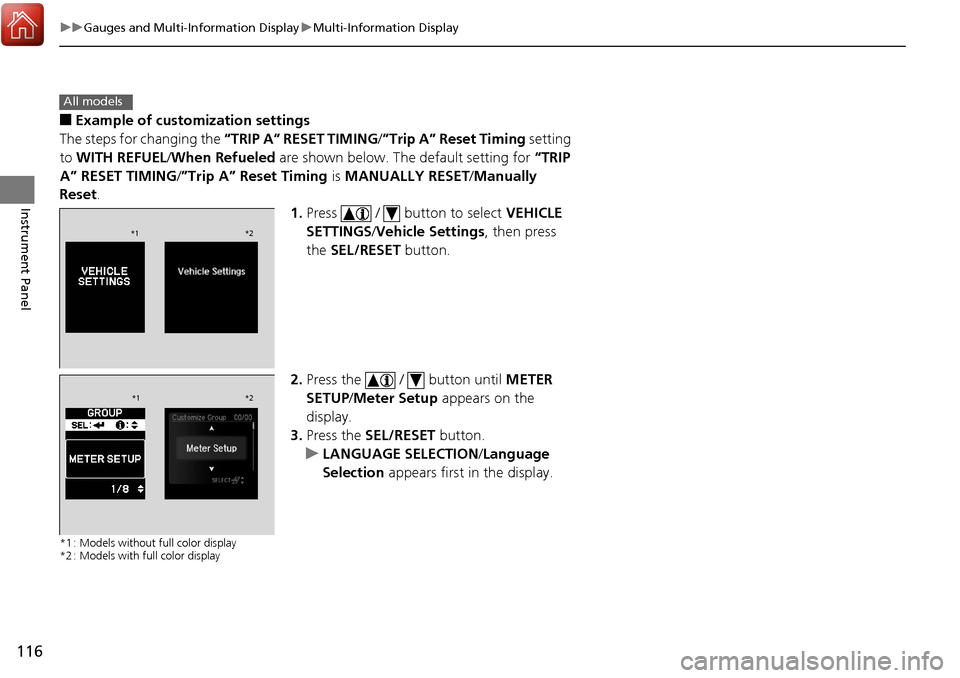
■Example of customization settings
The steps for changing the “TRIP A” RESET TIMING /”Trip A” Reset Timing setting
to WITH REFUEL /When Refueled are shown below. The default setting for “TRIP
A” RESET TIMING/ ”Trip A” Reset Timing is MANUALLY RESET/Manually
Reset .
1.Press / button to select VEHICLE
SETTINGS /Vehicle Settings , then press
the SEL/RESET button.
2. Press the / button until METER
SETUP/ Meter Setup appears on the
display.
3. Press the SEL/RESET button.
u LANGUAGE SELECTION /Language
Selection appears first in the display.
*1 : Models without full color display
*2 : Models with full color display
All models
*1 *2
*1*2
Page 118 of 453
117
uuGauges and Multi-Information Display uMulti-Information Display
Instrument Panel
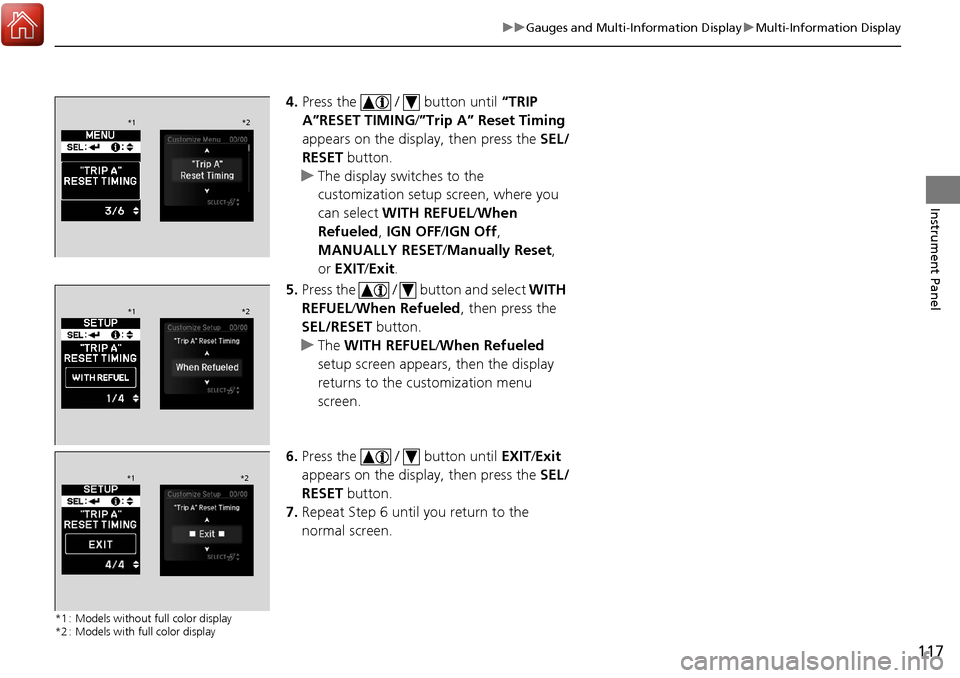
4. Press the / button until “TRIP
A”RESET TIMING /”Trip A” Reset Timing
appears on the display, then press the SEL/
RESET button.
u The display swit ches to the
customization setup screen, where you
can select WITH REFUEL /When
Refueled, IGN OFF/IGN Off ,
MANUALLY RESET/ Manually Reset,
or EXIT /Exit .
5. Press the / button and select WITH
REFUEL /When Refueled , then press the
SEL/RESET button.
u The WITH REFUEL /When Refueled
setup screen appears, then the display
returns to the customization menu
screen.
6. Press the / button until EXIT/Exit
appears on the display, then press the SEL/
RESET button.
7. Repeat Step 6 until you return to the
normal screen.
*1 : Models without full color display
*2 : Models with full color display
*1 *2
*1*2
*1*2
Page 258 of 453
257
Driving
This chapter discusses driving, refueling, and information on items such as accessories.
Before Driving................................... 258
Towing a Trailer ................................ 263
Off-Highway Driving Guidelines ..... 268
When Driving Starting the Engine .......................... 270
Precautions While Driving................. 275
Automatic Transmission ................... 276
Shifting ............................................ 277
Cruise Control
*................................ 281
Front Sensor Camera*...................... 284
Adaptive Cruise Control (ACC)*....... 286
Lane Departure Warning (LDW)*...... 299Lane Keeping Assist System (LKAS)*..... 303 Vehicle Stability Assist (VSA
®), aka Electronic
Stability Control (ESC), System ........... 311
Blind spot information (BSI) System
*.... 313All-Wheel Drive (AWD) with Intelligent Control System*..................................................... 316Tire Pressure Monitoring System (TPMS) ... 316Tire Pressure Monitoring System (TPMS) - Required Federal Explanation ......... 318
Braking Brake System ................................... 320
Anti-lock Brake System (ABS) ........... 322
Brake Assist System.......................... 323 Collision Mitigation Braking System
TM
(CMBSTM)*..................................... 324
Parking Your Vehicle When Stopped ................................ 332
Parking Sensor System
*................... 333
Cross Traffic Monitor*..................... 337
Multi-View Rear Camera .................. 340
Refueling Fuel Information .............................. 341
How to Refuel ................................. 342
Fuel Economy and CO
2 Emissions .... 343
* Not available on all models
Page 272 of 453
Continued271
uuWhen Driving uStarting the Engine
Driving
You can turn the engine off when the vehicle is completely stopped.
1. Shift to
(P.
2. Press the ENGINE START/STOP button with your foot on the brake pedal.
■Stopping the Engine1Starting the Engine
The immobilizer system pr otects your vehicle from
theft. If an improperly code d key (or other device) is
used, the engine’s fuel system is disabled.
2 Immobilizer System P. 139
Page 279 of 453
uuWhen Driving uShifting
278
Driving
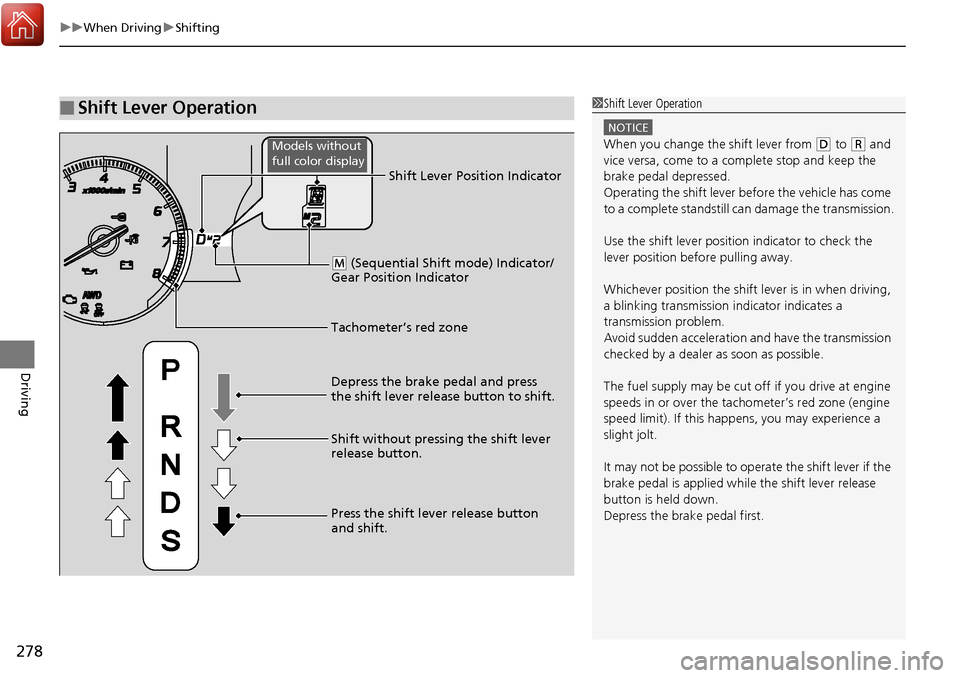
■Shift Lever Operation1Shift Lever Operation
NOTICE
When you change the shift lever from (D to (R and
vice versa, come to a complete stop and keep the
brake pedal depressed.
Operating the shift lever be fore the vehicle has come
to a complete standstill can damage the transmission.
Use the shift lever position indicator to check the
lever position befo re pulling away.
Whichever position the shift lever is in when driving,
a blinking transmission indicator indicates a
transmission problem.
Avoid sudden acceleration and have the transmission
checked by a dealer as soon as possible.
The fuel supply may be cut of f if you drive at engine
speeds in or over the tachometer’s red zone (engine
speed limit). If this happe ns, you may experience a
slight jolt.
It may not be possible to operate the shift lever if the
brake pedal is applied while the shift lever release
button is held down.
Depress the brake pedal first.
Tachometer’s red zone Shift Lever Position Indicator
Depress the brake pedal and press
the shift lever release button to shift.
Shift without pressing the shift lever
release button.
Press the shift lever release button
and shift.
( M (Sequential Shift mode) Indicator/
Gear Position Indicator
Models without
full color display
Page 319 of 453
318
uuWhen Driving uTire Pressure Monitoring System (TPMS) - Required Federal Explanation
Driving
Tire Pressure Monitoring System (TPMS) - Required
Federal Explanation
Each tire, including the spare (i f provided), should be checked
monthly when cold and inflated to the inflation pressure
recommended by the vehicle manufacturer on the vehicle placard
or tire inflation pressure label.
(If your vehicle has tires of a different size than the size indicated
on the vehicle placard or tire infl ation pressure label, you should
determine the proper tire inflat ion pressure for those tires.)
As an added safety feature, your vehicle has been equipped with
a tire pressure monitoring system (TPMS) that illuminates a low
tire pressure telltale
when one or more of your tire s is significantly under-inflated.
Accordingly, when the low tire pr essure telltale illuminates, you
should stop and check your tires as soon as possible, and inflate
them to the proper pressure.
Driving on a significantly under-in flated tire causes the tire to
overheat and can lead to tire fail ure. Under-inflation also reduces
fuel efficiency and tire tread li fe, and may affect the vehicle’s
handling and stopping ability.
Please note that the TPMS is not a substitute for proper tire
maintenance, and it is the driver ’s responsibility to maintain