led Acura RDX 2018 User Guide
[x] Cancel search | Manufacturer: ACURA, Model Year: 2018, Model line: RDX, Model: Acura RDX 2018Pages: 453, PDF Size: 20.13 MB
Page 57 of 453
uuChild Safety uSafety of Infants and Small Children
56
Safe DrivingMost child seats are LATCH-compatible (L ower Anchors and Tethers for CHildren).
Some have a rigid-type connector, while ot hers have a flexible-type connector. Both
are equally easy to use. Some existing and previously owned child seats can only be
installed using the seat belt. Whichever type you choose, follow the child seat
manufacturer’s use and care instructions as well as the instructions in this manual.
Proper installation is key to ma ximizing your child’s safety.
In seating positions and vehicles not equipped with LATCH, a LATCH compatible
child seat can be installed using the seat belt and a top tether for added security.
This is because all child seats are required to be designed so that they can be secured
with a lap belt or the lap part of a lap/shoulder belt. In addition, the child seat
manufacturer may advise that a seat belt be used to attach a LATCH-compatible seat
once a child reaches a specified weight. Please read the child seat owner’s manual
for proper installation instructions.
■Important consideration wh en selecting a child seat
Make sure the child seat meets th e following three requirements:
• The child seat is the correct type and size for the child.
• The child seat is the correct type for the seating position.
• The child seat is compliant with Federal Motor Vehicle Safety Standard 213 or
Canadian Motor Vehicle Safety Standard 213.
■Selecting a Child Seat1Selecting a Child Seat
Installation of a LATCH-co mpatible child seat is
simple.
LATCH-compatible child s eats have been developed
to simplify the installati on process and reduce the
likelihood of injuries caused by incorrect installation.
Page 59 of 453
uuChild Safety uSafety of Infants and Small Children
58
Safe Driving
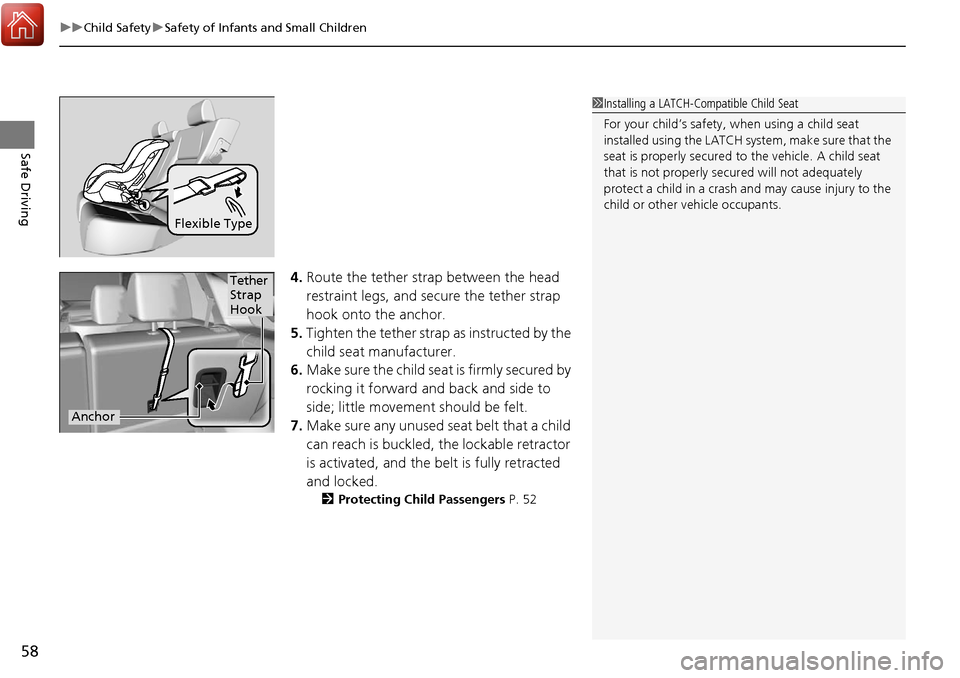
4. Route the tether strap between the head
restraint legs, and secure the tether strap
hook onto the anchor.
5. Tighten the tether strap as instructed by the
child seat manufacturer.
6. Make sure the child seat is firmly secured by
rocking it forward and back and side to
side; little movement should be felt.
7. Make sure any unused se at belt that a child
can reach is buckled, the lockable retractor
is activated, and the be lt is fully retracted
and locked.
2 Protecting Child Passengers P. 52
Flexible Type
1Installing a LATCH-Compatible Child Seat
For your child’s safety, when using a child seat
installed using the LATCH system, make sure that the
seat is properly secured to the vehicle. A child seat
that is not properly secu red will not adequately
protect a child in a crash and may cause injury to the
child or other vehicle occupants.
Tether
Strap
Hook
Anchor
Page 60 of 453
Continued59
uuChild Safety uSafety of Infants and Small Children
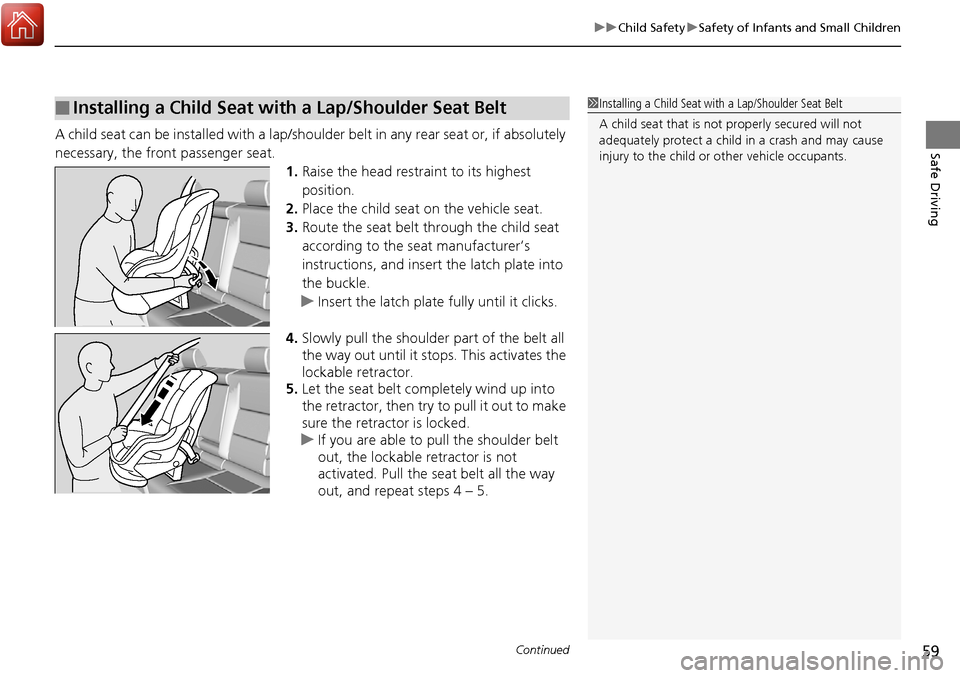
Safe DrivingA child seat can be installed with a lap/shoulder belt in any rear seat or, if absolutely
necessary, the front passenger seat.
1.Raise the head restraint to its highest
position.
2. Place the child seat on the vehicle seat.
3. Route the seat belt through the child seat
according to the seat manufacturer’s
instructions, and insert the latch plate into
the buckle.
u Insert the latch plate fully until it clicks.
4. Slowly pull the shoulder part of the belt all
the way out until it stops. This activates the
lockable retractor.
5. Let the seat belt completely wind up into
the retractor, then try to pull it out to make
sure the retractor is locked.
u If you are able to pull the shoulder belt
out, the lockable retractor is not
activated. Pull the seat belt all the way
out, and repeat steps 4 – 5.
■Installing a Child Seat with a Lap/Shoulder Seat Belt1 Installing a Child Seat with a Lap/Shoulder Seat Belt
A child seat that is not properly secured will not
adequately protect a child in a crash and may cause
injury to the child or other vehicle occupants.
Page 61 of 453
uuChild Safety uSafety of Infants and Small Children
60
Safe Driving
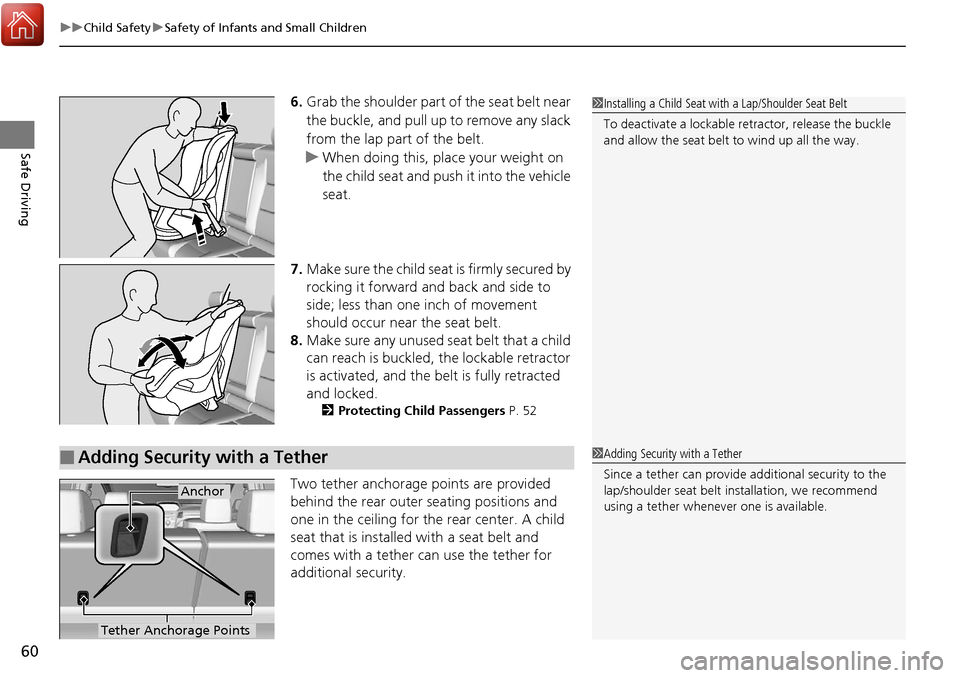
6. Grab the shoulder part of the seat belt near
the buckle, and pull up to remove any slack
from the lap part of the belt.
u When doing this, place your weight on
the child seat and push it into the vehicle
seat.
7. Make sure the child seat is firmly secured by
rocking it forward and back and side to
side; less than one inch of movement
should occur near the seat belt.
8. Make sure any unused se at belt that a child
can reach is buckled, the lockable retractor
is activated, and the be lt is fully retracted
and locked.
2 Protecting Child Passengers P. 52
Two tether anchorage points are provided
behind the rear outer seating positions and
one in the ceiling for the rear center. A child
seat that is installed with a seat belt and
comes with a tether can use the tether for
additional security.
1Installing a Child Seat with a Lap/Shoulder Seat Belt
To deactivate a lockable retractor, release the buckle
and allow the seat belt to wind up all the way.
■Adding Security with a Tether1 Adding Security with a Tether
Since a tether can provide additional security to the
lap/shoulder seat belt in stallation, we recommend
using a tether whenever one is available.
Tether Anchorage Points
Anchor
Page 76 of 453
75
uuIndicators u
Continued
Instrument Panel
*1:On the left: Models wi thout full color display
On the right: Models with full color display
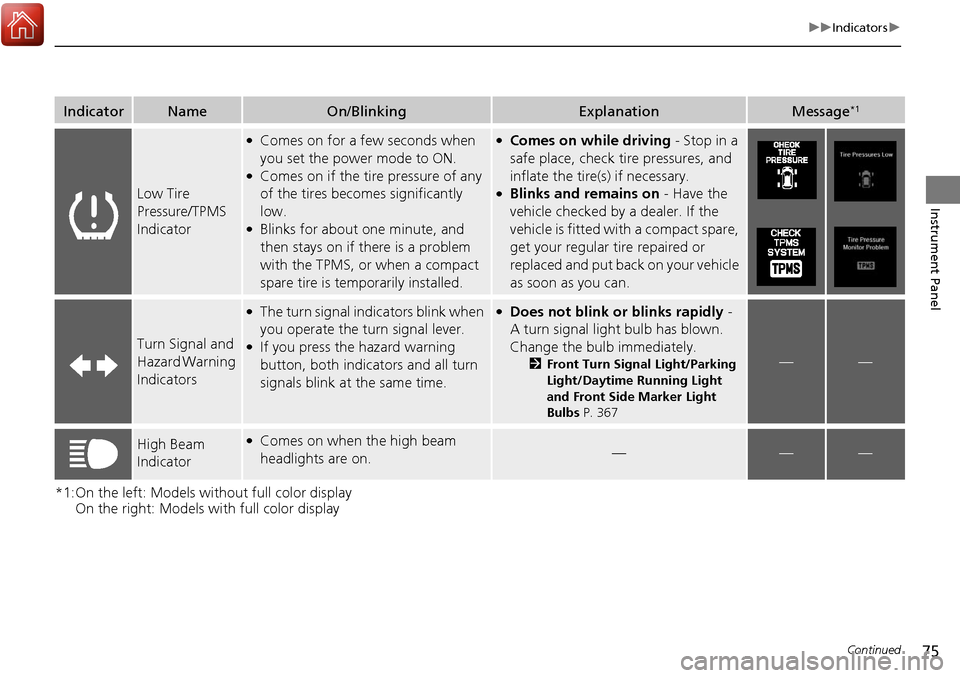
IndicatorNameOn/BlinkingExplanationMessage*1
Low Tire
Pressure/TPMS
Indicator
●Comes on for a few seconds when
you set the power mode to ON.
●Comes on if the tire pressure of any
of the tires becomes significantly
low.
●Blinks for about one minute, and
then stays on if there is a problem
with the TPMS, or when a compact
spare tire is temporarily installed.
●Comes on while driving - Stop in a
safe place, check tire pressures, and
inflate the tire(s) if necessary.
●Blinks and remains on - Have the
vehicle checked by a dealer. If the
vehicle is fitted with a compact spare,
get your regular tire repaired or
replaced and put back on your vehicle
as soon as you can.
Turn Signal and
Hazard Warning
Indicators
●The turn signal indicators blink when
you operate the turn signal lever.
●If you press the hazard warning
button, both indicators and all turn
signals blink at the same time.
●Does not blink or blinks rapidly -
A turn signal light bulb has blown.
Change the bulb immediately.
2 Front Turn Signal Light/Parking
Light/Daytime Running Light
and Front Side Marker Light
Bulbs P. 367——
High Beam
Indicator●Comes on when the high beam
headlights are on.———
Page 78 of 453
77
uuIndicators u
Continued
Instrument Panel
*1:On the left: Models wi thout full color display
On the right: Models with full color display
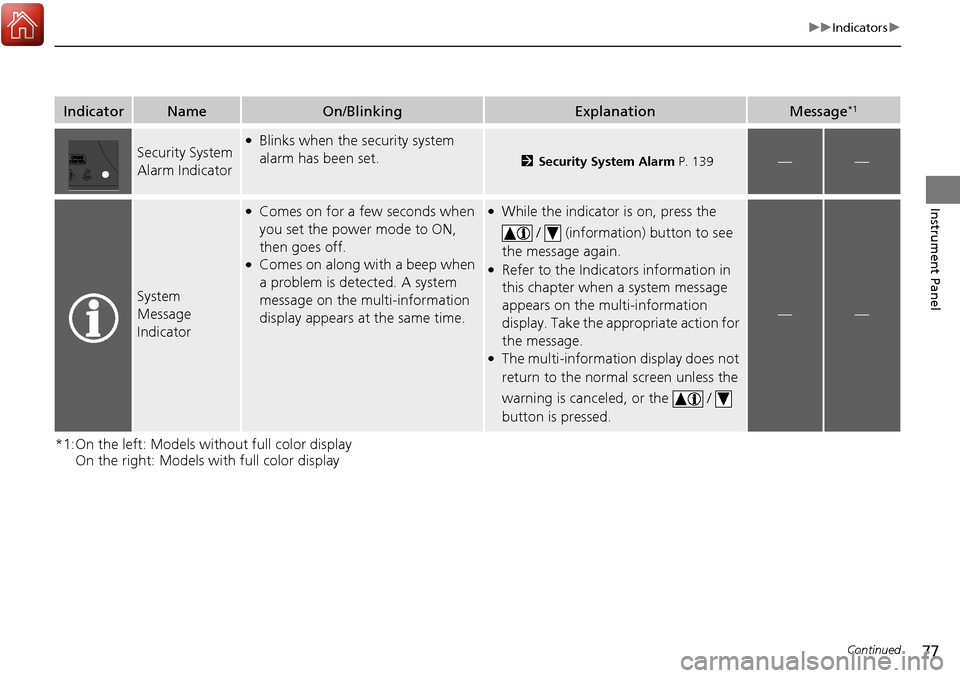
IndicatorNameOn/BlinkingExplanationMessage*1
Security System
Alarm Indicator●Blinks when the security system
alarm has been set.
2 Security System Alarm P. 139——
System
Message
Indicator
●Comes on for a few seconds when
you set the power mode to ON,
then goes off.
●Comes on along with a beep when
a problem is detected. A system
message on the multi-information
display appears at the same time.
●While the indicator is on, press the
/ (information) button to see
the message again.
●Refer to the Indicators information in
this chapter when a system message
appears on the multi-information
display. Take the appropriate action for
the message.
●The multi-information display does not
return to the normal screen unless the
warning is canceled, or the /
button is pressed.
——
Page 85 of 453
84
uuIndicators uMulti-Information Display Warn ing and Information Messages
Instrument Panel
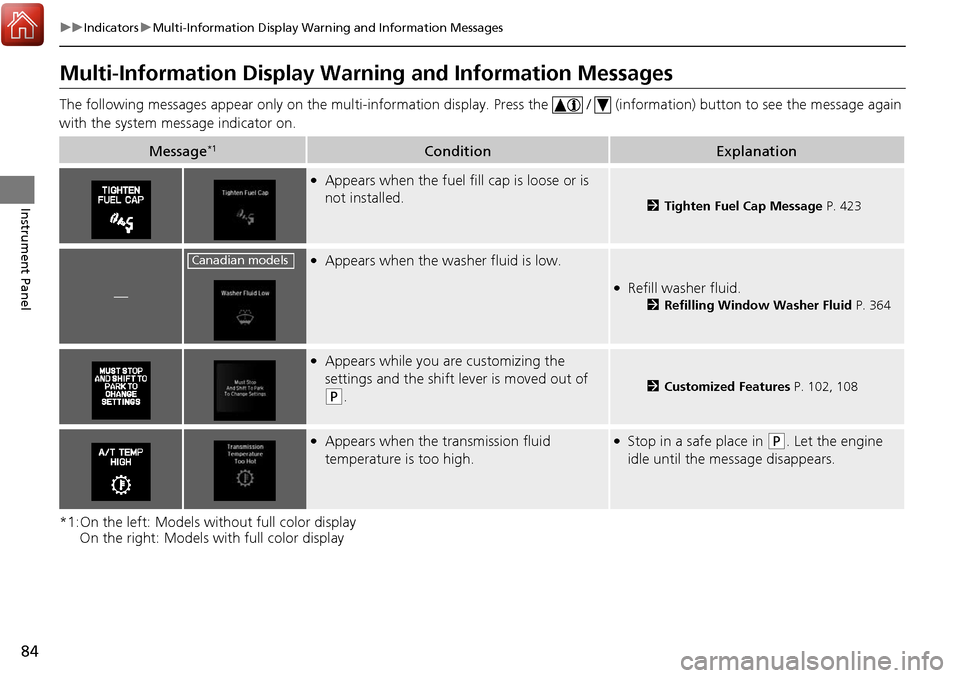
Multi-Information Display Warn ing and Information Messages
The following messages appear only on the multi-information display. Press the / (information) button to see the message again
with the system me ssage indicator on.
*1:On the left: Models without full color display On the right: Models with full color display
Message*1ConditionExplanation
●Appears when the fuel fill cap is loose or is
not installed.
2Tighten Fuel Cap Message P. 423
—
●Appears when the washer fluid is low.
●Refill washer fluid.
2Refilling Window Washer Fluid P. 364
●Appears while you are customizing the
settings and the shift lever is moved out of
(P.2Customized Features P. 102, 108
●Appears when the transmission fluid
temperature is too high.●Stop in a safe place in (P. Let the engine
idle until the message disappears.
Canadian models
Page 86 of 453
85
uuIndicators uMulti-Information Display Warning and Information Messages
Continued
Instrument Panel
*1:On the left: Models wi thout full color display
On the right: Models with full color display
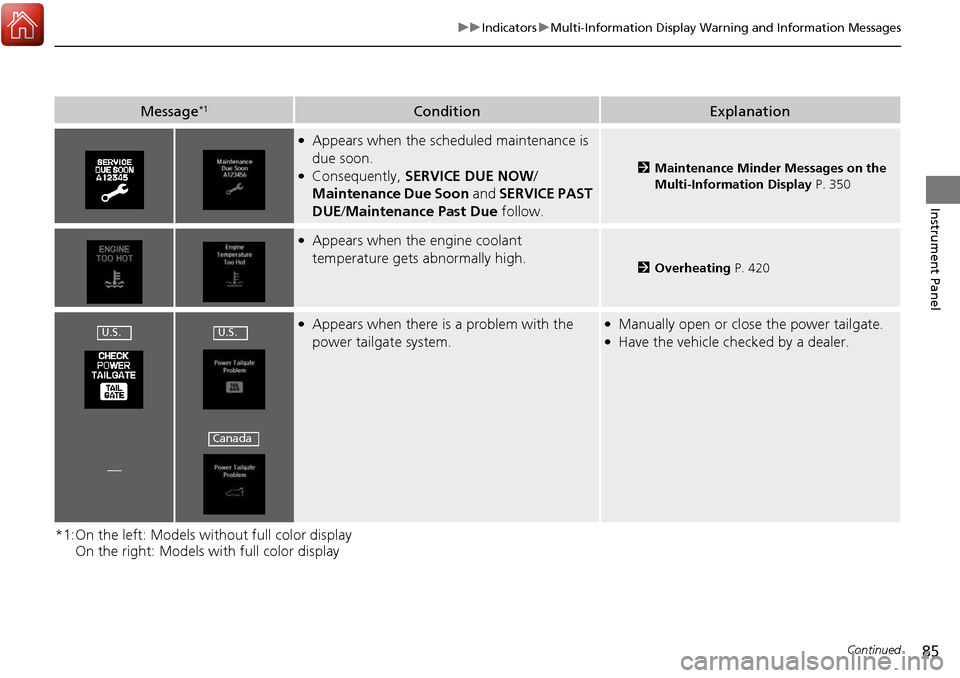
Message*1ConditionExplanation
●Appears when the scheduled maintenance is
due soon.
●Consequently, SERVICE DUE NOW /
Maintenance Due Soon and SERVICE PAST
DUE /Maintenance Past Due follow.2Maintenance Minder Messages on the
Multi-Information Display P. 350
●Appears when the engine coolant
temperature gets abnormally high.
2Overheating P. 420
●Appears when there is a problem with the
power tailgate system.●Manually open or close the power tailgate.●Have the vehicle checked by a dealer.
—
U.S.U.S.
Canada
Page 92 of 453
91
uuIndicators uMulti-Information Display Warning and Information Messages
Continued
Instrument Panel
MessageConditionExplanation
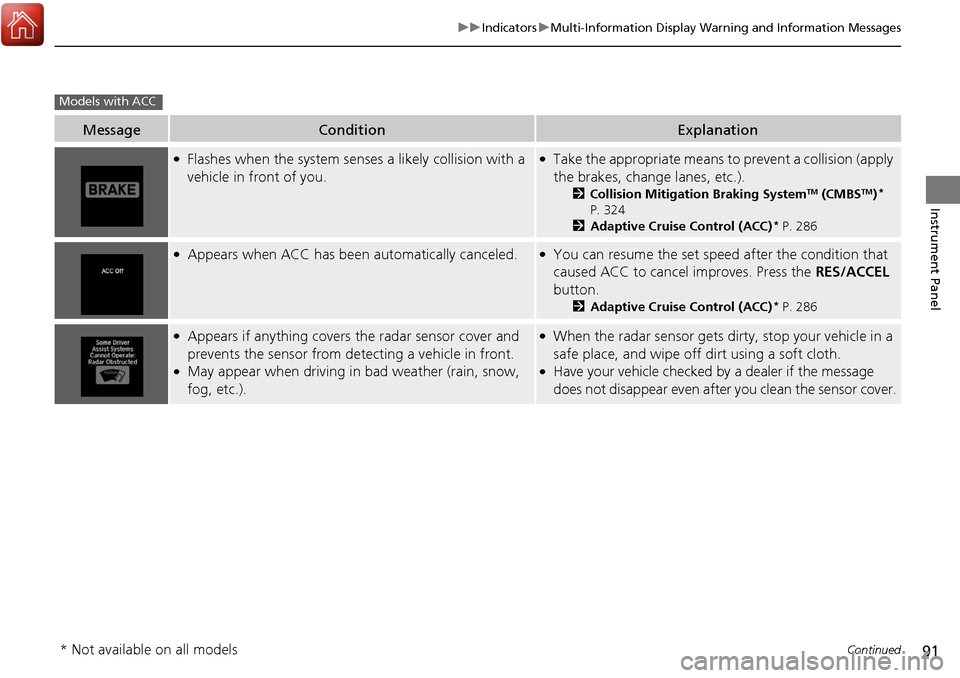
●Flashes when the system sens es a likely collision with a
vehicle in front of you.●Take the appropriate means to prevent a collision (apply
the brakes, change lanes, etc.).
2 Collision Mitigation Braking SystemTM (CMBSTM)*
P. 324
2 Adaptive Cruise Control (ACC)
* P. 286
●Appears when ACC has been automatically canceled.●You can resume the set speed after the condition that
caused ACC to cancel improves. Press the RES/ACCEL
button.
2 Adaptive Cruise Control (ACC)* P. 286
●Appears if anything covers the radar sensor cover and
prevents the sensor from detecting a vehicle in front.
●May appear when driving in bad weather (rain, snow,
fog, etc.).
●When the radar sensor gets dirty, stop your vehicle in a
safe place, and wipe off dirt using a soft cloth.
●Have your vehicle checked by a dealer if the message
does not disappear even after you clean the sensor cover.
Models with ACC
* Not available on all models
Page 95 of 453
94
uuIndicators uMulti-Information Display Warn ing and Information Messages
Instrument Panel
MessageConditionExplanation
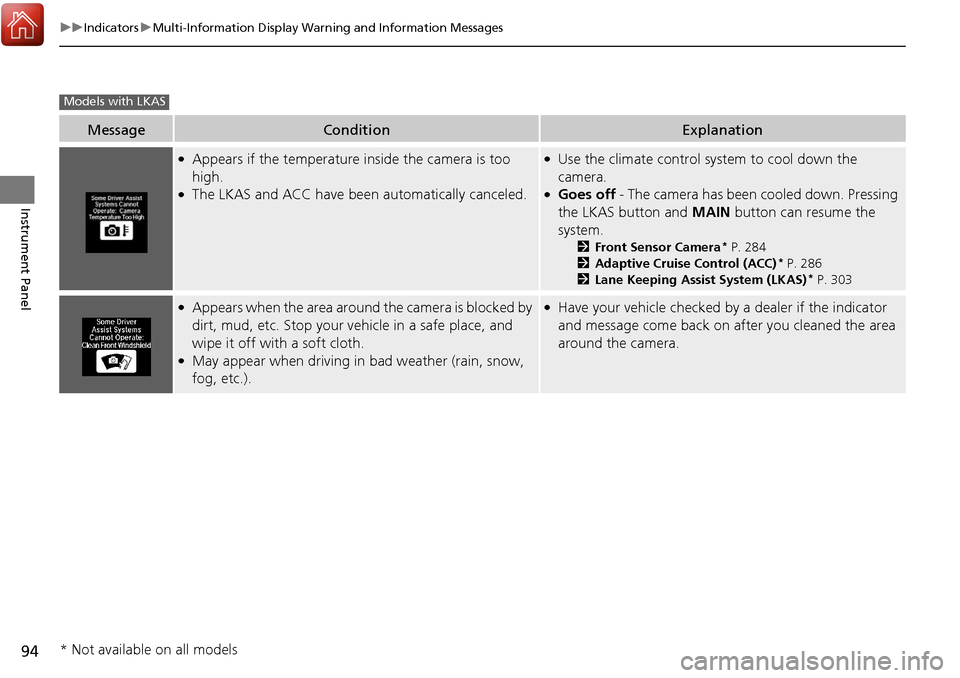
●Appears if the temperature inside the camera is too
high.
●The LKAS and ACC have been automatically canceled.
●Use the climate control system to cool down the
camera.
●Goes off - The camera has been cooled down. Pressing
the LKAS button and MAIN button can resume the
system.
2 Front Sensor Camera* P. 284
2 Adaptive Cruise Control (ACC)* P. 286
2 Lane Keeping Assist System (LKAS)* P. 303
●Appears when the area around the camera is blocked by
dirt, mud, etc. Stop your ve hicle in a safe place, and
wipe it off with a soft cloth.
●May appear when driving in bad weather (rain, snow,
fog, etc.).
●Have your vehicle checked by a dealer if the indicator
and message come back on after you cleaned the area
around the camera.
Models with LKAS
* Not available on all models