Sound Acura RDX 2018 Owner's Guide
[x] Cancel search | Manufacturer: ACURA, Model Year: 2018, Model line: RDX, Model: Acura RDX 2018Pages: 453, PDF Size: 20.13 MB
Page 147 of 453
146
Controls
Operating the Switches Around the Steering Wheel
ENGINE START/STOP Button
■Changing the Power Mode1ENGINE START/STOP Button
ENGINE START/STOP Button Operating Range
You can start the engine when the keyless access
remote is inside the vehicle.
The engine may also run if the keyless access remote
is close to the door or window, even if it is outside the
vehicle.
ON mode:
Indicator in the button is of f, if the engine is running.
If the keyless access remote battery is weak, beeper
sounds and the TO START, HOLD REMOTE NEAR
START BUTTON /To Start, Hold Remote Near
Start Button message appears on the multi-
information display. 2 If the Keyless Access Remote Battery is
Weak P. 415
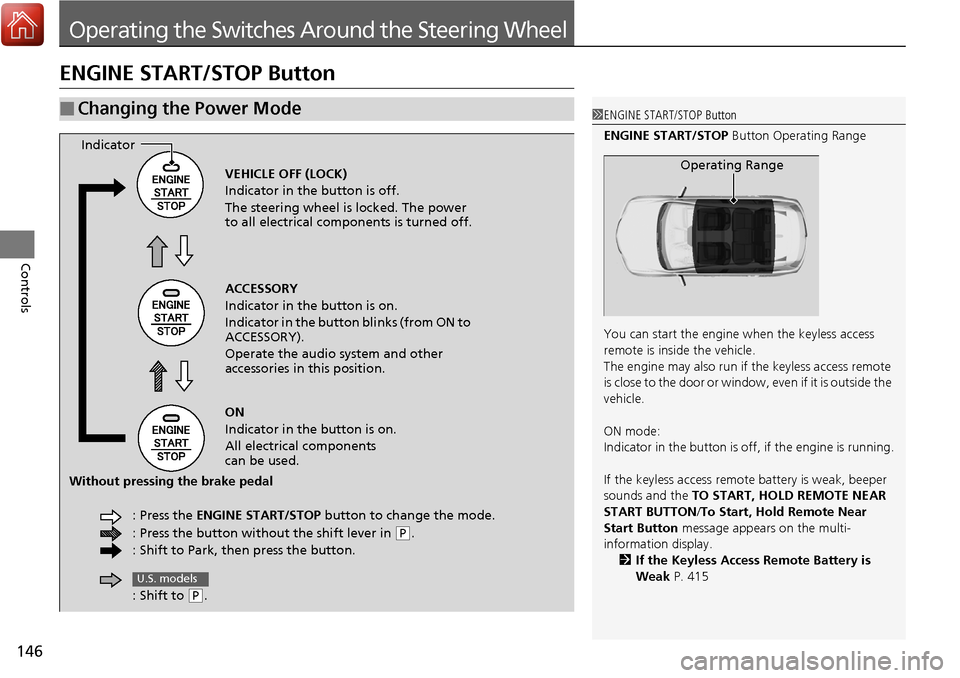
Operating RangeVEHICLE OFF (LOCK)
Indicator in the button is off.
The steering wheel is locked. The power
to all electrical components is turned off.
ACCESSORY
Indicator in the button is on.
Indicator in the button blinks (from ON to
ACCESSORY).
Operate the audio system and other
accessories in this position.
ON
Indicator in the button is on.
All electrical components
can be used.
: Press the ENGINE START/STOP button to change the mode.
: Press the button without the shift lever in
( P.
: Shift to Park, then press the button.
Indicator
Without pressing the brake pedal
: Shift to
(P.
U.S. models
Page 148 of 453
Continued147
uuOperating the Switches Around the Steering Wheel uENGINE START/STOP Button
Controls
If you open the driver’s door when the power mode is set to ACCESSORY, a warning
buzzer sounds.
■Power Mode Reminder1ENGINE START/STOP Button
If the power mode does not change from VEHICLE
OFF to ACCESSORY, press the ENGINE START/STOP
button while moving the st eering wheel left and
right. The steering wheel will unlock, allowing the
mode to change.
Page 149 of 453
uuOperating the Switches Around the Steering Wheel uENGINE START/STOP Button
148
Controls
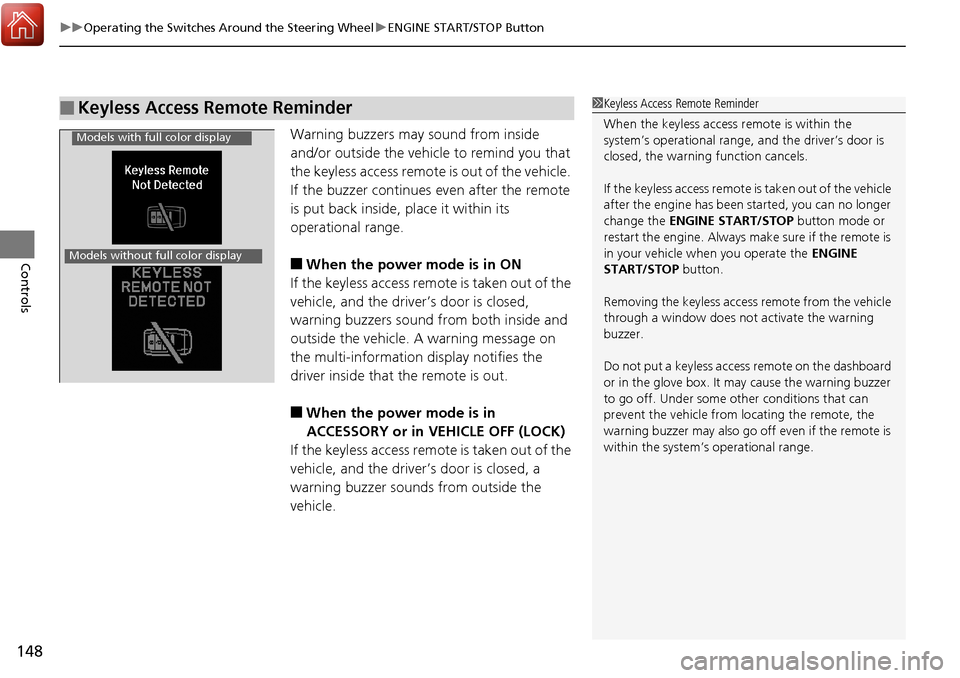
Warning buzzers may sound from inside
and/or outside the vehicle to remind you that
the keyless access remote is out of the vehicle.
If the buzzer continues even after the remote
is put back inside, place it within its
operational range.
■When the power mode is in ON
If the keyless access remote is taken out of the
vehicle, and the driver’s door is closed,
warning buzzers sound from both inside and
outside the vehicle. A warning message on
the multi-information display notifies the
driver inside that the remote is out.
■When the power mode is in
ACCESSORY or in VEHICLE OFF (LOCK)
If the keyless access remote is taken out of the
vehicle, and the driver’s door is closed, a
warning buzzer sounds from outside the
vehicle.
■Keyless Access Remote Reminder1 Keyless Access Remote Reminder
When the keyless access remote is within the
system’s operational range, and the driver’s door is
closed, the warni ng function cancels.
If the keyless access remote is taken out of the vehicle
after the engine has been started, you can no longer
change the ENGINE START/STOP button mode or
restart the engine. Always make sure if the remote is
in your vehicle when you operate the ENGINE
START/STOP button.
Removing the keyless access remote from the vehicle
through a window does not activate the warning
buzzer.
Do not put a keyless access remote on the dashboard
or in the glove box. It may cause the warning buzzer
to go off. Under some other conditions that can
prevent the vehicle from locating the remote, the
warning buzzer may al so go off even if the remote is
within the system’s operational range.
Models with full color display
Models without full color display
Page 150 of 453
149
uuOperating the Switches Around the Steering Wheel uTurn Signals
Continued
Controls
Turn Signals
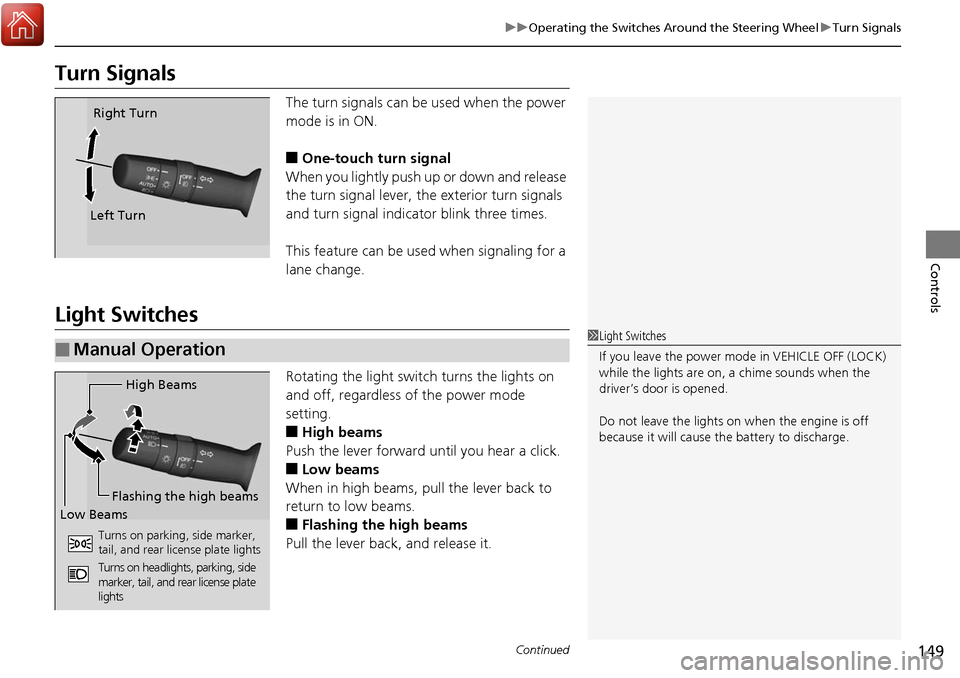
The turn signals can be used when the power
mode is in ON.
■One-touch turn signal
When you lightly push up or down and release
the turn signal lever, th e exterior turn signals
and turn signal indicator blink three times.
This feature can be used when signaling for a
lane change.
Light Switches
Rotating the light switch turns the lights on
and off, regardless of the power mode
setting.
■High beams
Push the lever forward until you hear a click.
■Low beams
When in high beams, pull the lever back to
return to low beams.
■Flashing the high beams
Pull the lever back, and release it.
Right Turn
Left Turn
■Manual Operation1 Light Switches
If you leave the power mode in VEHICLE OFF (LOCK)
while the lights are on, a chime sounds when the
driver’s door is opened.
Do not leave the lights on when the engine is off
because it will cause the battery to discharge.
High Beams
Flashing the high beams
Low Beams
Turns on parking, side marker,
tail, and rear license plate lights
Turns on headlights, parking, side
marker, tail, and rear license plate
lights
Page 157 of 453
156
uuOperating the Switches Around the Steering Wheel uBrightness Control
Controls
Brightness Control
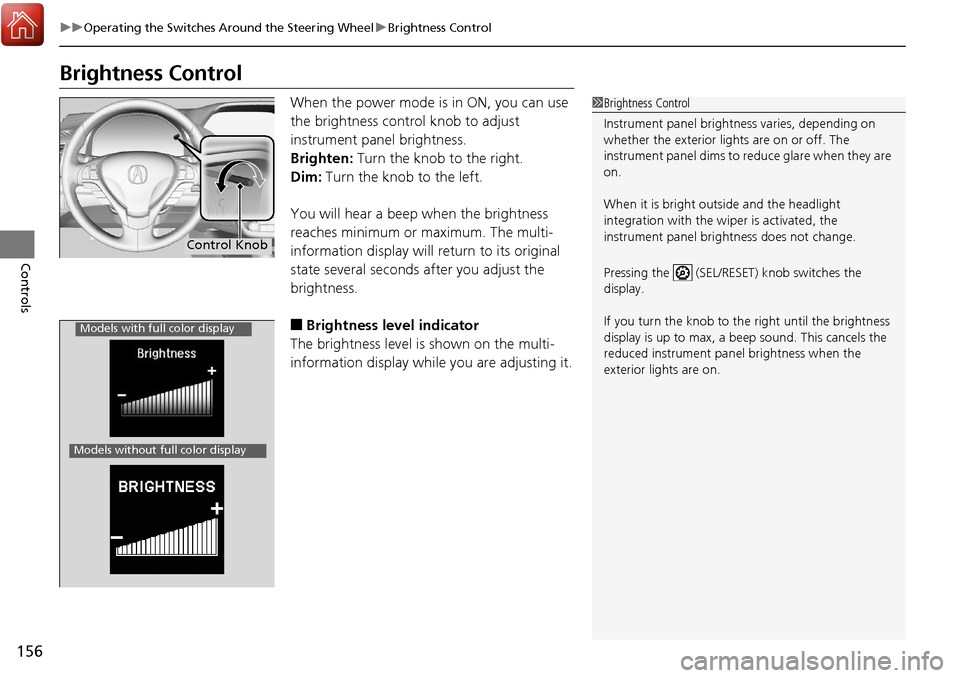
When the power mode is in ON, you can use
the brightness control knob to adjust
instrument panel brightness.
Brighten: Turn the knob to the right.
Dim: Turn the knob to the left.
You will hear a beep when the brightness
reaches minimum or maximum. The multi-
information display will return to its original
state several seconds after you adjust the
brightness.
■Brightness level indicator
The brightness level is shown on the multi-
information display while you are adjusting it.
1 Brightness Control
Instrument panel brightne ss varies, depending on
whether the exterior lights are on or off. The
instrument panel dims to reduce glare when they are
on.
When it is bright out side and the headlight
integration with the wi per is activated, the
instrument panel bri ghtness does not change.
Pressing the (SEL/RESET) knob switches the
display.
If you turn the knob to the right until the brightness
display is up to max, a beep sound. This cancels the
reduced instrument panel brightness when the
exterior lights are on.
Control Knob
Models with full color display
Models without full color display
Page 188 of 453
187
Features
This chapter describes how to operate technology features.
Audio System*
About Your Audio System ................ 188
USB Port .......................................... 189
Auxiliary Input Jack .......................... 189
Audio System Theft Protection ......... 190
Audio Remote Controls .................... 191
Audio System Basic Operation
*....... 192
Audio/Information Screen ................ 193
Wallpaper Setup .............................. 196
Display Setup ................................... 198
Adjusting the Sound ........................ 199
Playing the AM/FM Radio ................. 200
Playing the SiriusXM ® Radio ............. 202 Playing a CD .................................... 204
Playing an iPod ................................ 207
Playing Pandora
®............................. 210
Playing a USB Flash Drive ................. 212
Playing Bluetooth ® Audio................. 215
Audio Error Messages
*..................... 217
General Information on the Audio System
*............................................ 220
HomeLink ® Universal Transceiver
Training HomeLink ........................... 224
Bluetooth® HandsFreeLink®
Using HFL ........................................ 226
HFL Menus....................................... 228 Compass
*.......................................... 255
* Not available on all models
Page 193 of 453
192
Features
Audio System Basic Operation*
To use the audio system function, the power mode must be in ACCESSORY or ON.
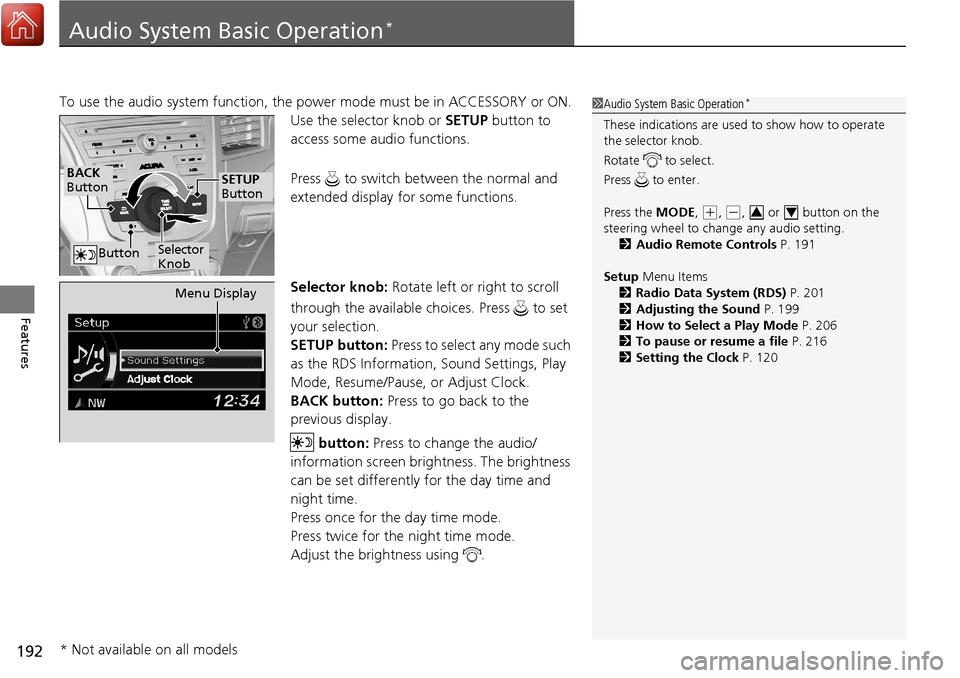
Use the selector knob or SETUP button to
access some audio functions.
Press to switch between the normal and
extended display fo r some functions.
Selector knob: Rotate left or right to scroll
through the available choices. Press to set
your selection.
SETUP button: Press to select any mode such
as the RDS Information, Sound Settings, Play
Mode, Resume/Pause, or Adjust Clock.
BACK button: Press to go back to the
previous display.
button: Press to change the audio/
information screen brightness. The brightness
can be set differently for the day time and
night time.
Press once for the day time mode.
Press twice for the night time mode.
Adjust the brightness using . 1 Audio System Basic Operation*
These indications are used to show how to operate
the selector knob.
Rotate to select.
Press to enter.
Press the MODE,
(+, (-, or button on the
steering wheel to cha nge any audio setting.
2 Audio Remote Controls P. 191
Setup Menu Items
2 Radio Data System (RDS) P. 201
2 Adjusting the Sound P. 199
2 How to Select a Play Mode P. 206
2 To pause or resume a file P. 216
2 Setting the Clock P. 12034
BACK
Button
Selector
Knob
SETUP
Button
Button
Menu Display
* Not available on all models
Page 200 of 453
199
uuAudio System Basic Operation*uAdjusting the Sound
Features
Adjusting the Sound
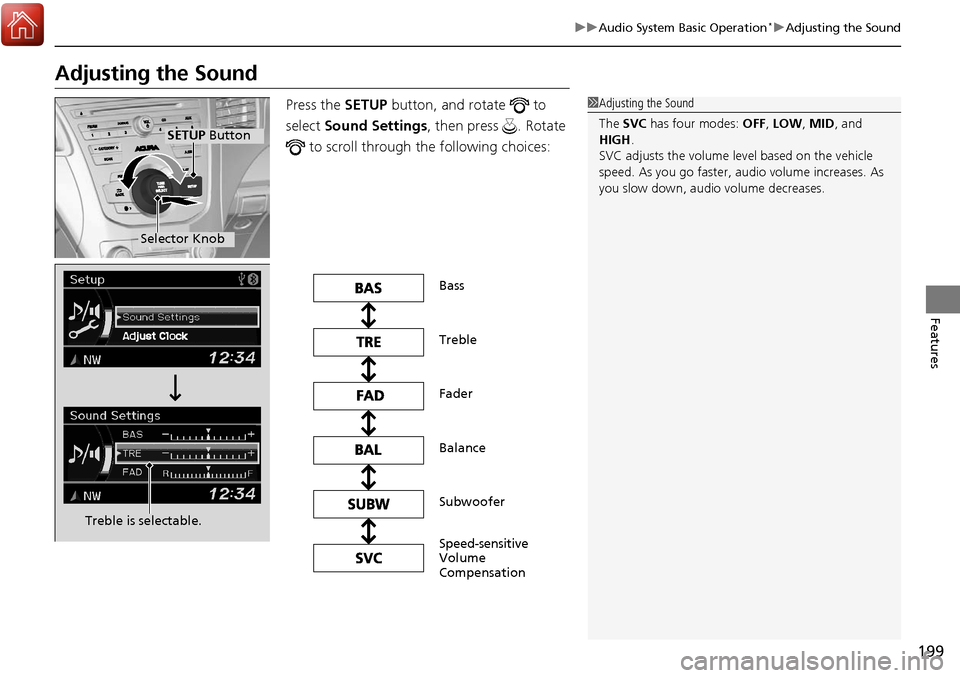
Press the SETUP button, and rotate to
select Sound Settings , then press . Rotate
to scroll through the following choices:1 Adjusting the Sound
The SVC has four modes: OFF, LOW, MID, and
HIGH .
SVC adjusts the volume level based on the vehicle
speed. As you go faster, audio volume increases. As
you slow down, audi o volume decreases.
Selector Knob
SETUP Button
Treble is selectable.
Speed-sensitive
Volume
Compensation Bass
Subwoofer Treble
Balance Fader
Page 213 of 453
212
uuAudio System Basic Operation*uPlaying a USB Flash Drive
Features
Playing a USB Flash Drive
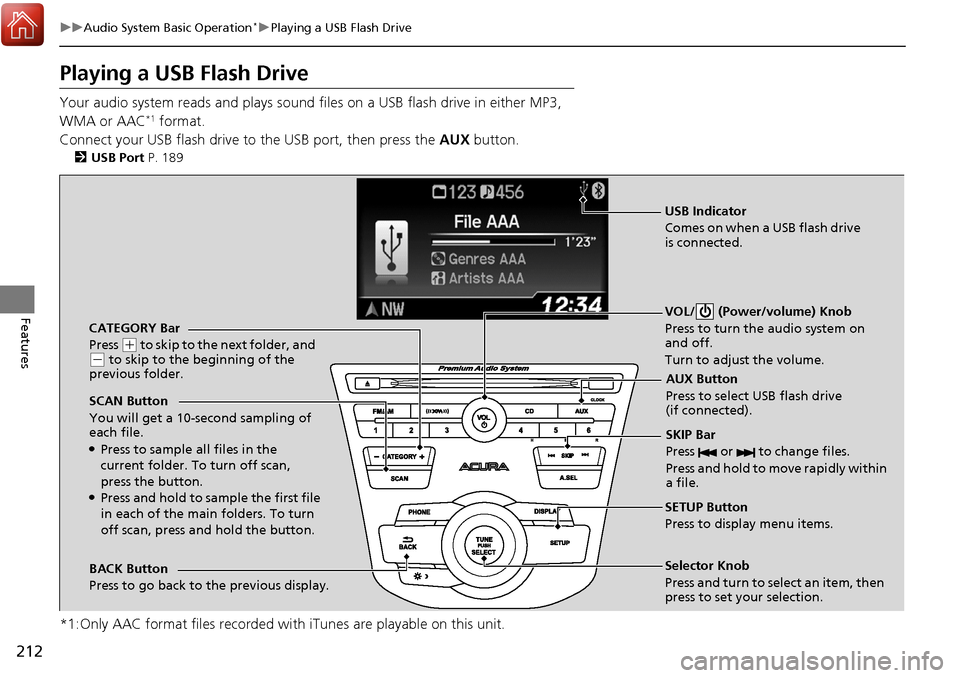
Your audio system reads and plays sound files on a USB flash drive in either MP3,
WMA or AAC*1 format.
Connect your USB flash drive to the USB port, then press the AUX button.
2USB Port P. 189
*1:Only AAC format files recorded with iTunes are playable on this unit.
CATEGORY Bar
Press
(+ to skip to the next folder, and (- to skip to the beginning of the
previous folder.
SCAN Button
You will get a 10-second sampling of
each file.
●Press to sample all files in the
current folder. To turn off scan,
press the button.
●Press and hold to sample the first file
in each of the main folders. To turn
off scan, press and hold the button. VOL/ (Power/volume) Knob
Press to turn the audio system on
and off.
Turn to adjust the volume.
SKIP Bar
Press or to change files.
Press and hold to move rapidly within
a file.
SETUP Button
Press to display menu items.
Selector Knob
Press and turn to select an item, then
press to set your selection.
AUX Button
Press to select USB flash drive
(if connected).
USB Indicator
Comes on when a USB flash drive
is connected.
BACK Button
Press to go back to the previous display.
Page 249 of 453
uuBluetooth ® HandsFreeLink ®u HFL Menus
248
Features
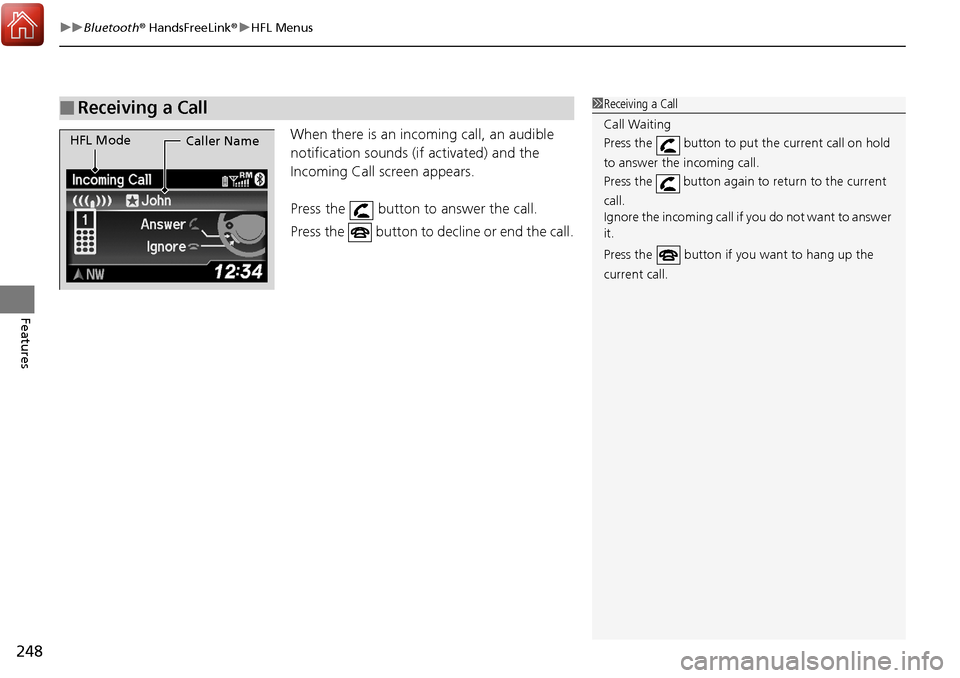
When there is an incoming call, an audible
notification sounds (i f activated) and the
Incoming Call screen appears.
Press the button to answer the call.
Press the button to decline or end the call.
■Receiving a Call1 Receiving a Call
Call Waiting
Press the button to put the current call on hold
to answer the incoming call.
Press the button again to return to the current
call.
Ignore the incoming call if you do not want to answer
it.
Press the button if you want to hang up the
current call.
HFL Mode Caller Name