engine Acura RDX 2018 Owner's Guide
[x] Cancel search | Manufacturer: ACURA, Model Year: 2018, Model line: RDX, Model: Acura RDX 2018Pages: 453, PDF Size: 20.13 MB
Page 89 of 453
88
uuIndicators uMulti-Information Display Warn ing and Information Messages
Instrument Panel
*1:On the left: Models without full color display
On the right: Models with full color display
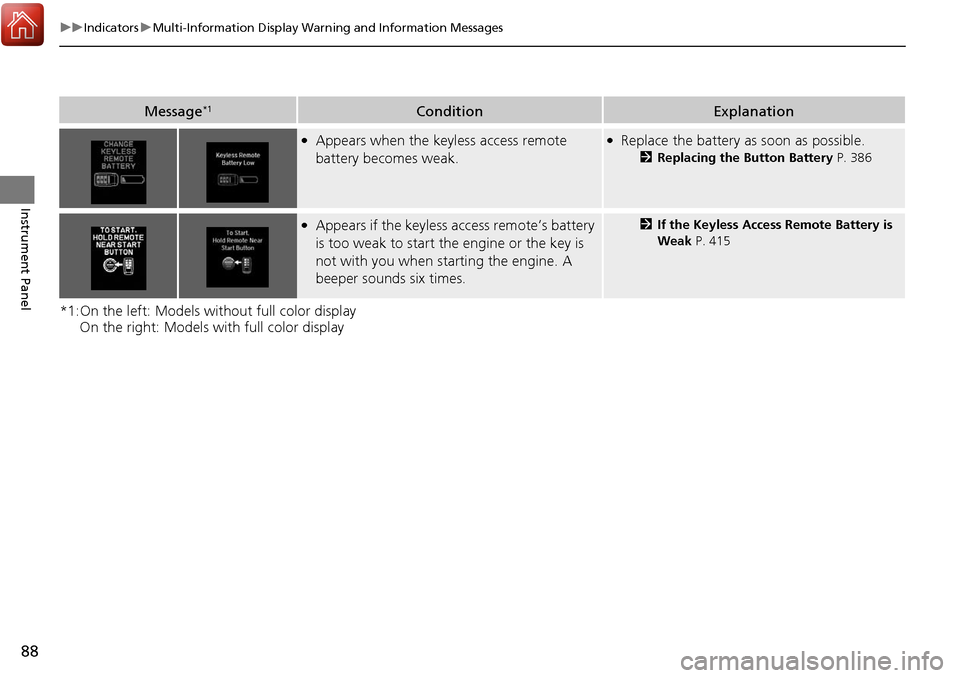
Message*1ConditionExplanation
●Appears when the keyless access remote
battery becomes weak.●Replace the battery as soon as possible.
2Replacing the Button Battery P. 386
●Appears if the keyless access remote’s battery
is too weak to start the engine or the key is
not with you when starting the engine. A
beeper sounds six times.2 If the Keyless Access Remote Battery is
Weak P. 415
Page 93 of 453
92
uuIndicators uMulti-Information Display Warn ing and Information Messages
Instrument Panel
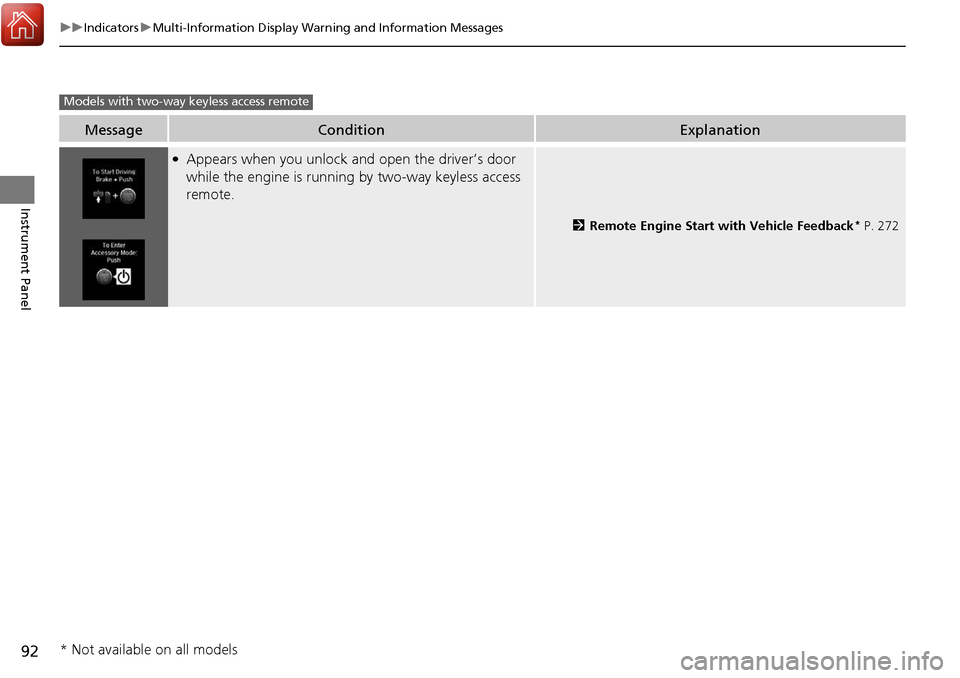
MessageConditionExplanation
●Appears when you unlock and open the driver’s door
while the engine is running by two-way keyless access
remote.
2Remote Engine Start with Vehicle Feedback* P. 272
Models with two-way keyless access remote
* Not available on all models
Page 96 of 453
95
Instrument Panel
Gauges and Multi-Information Display
Gauges
Gauges include the speedometer, tachometer, fuel gauge, and related indicators.
They are displayed when the power mode is in ON.
Displays your driving speed in mph (U.S.) or km/h (Canada).
Shows the number of engine revolutions per minute.
Displays the amount of fuel left in the fuel tank.
Displays the temperature of the engine coolant.
■Speedometer
■Tachometer
■Fuel Gauge
■Temperature Gauge
1Fuel Gauge
NOTICE
You should refuel when the reading approaches .
Running out of fuel can cause the engine to misfire,
damaging the cata lytic converter.
The actual amount of remain ing fuel may differ from
the fuel gauge reading.E
1 Temperature Gauge
NOTICE
Driving with the temperat ure gauge pointer in the
upper zone can cause serious engine damage. Pull
safely to the side of th e road and allow engine
temperature to return to normal.
2 Overheating P. 420
Page 97 of 453
96
uuGauges and Multi-Information Display uMulti-Information Display
Instrument Panel
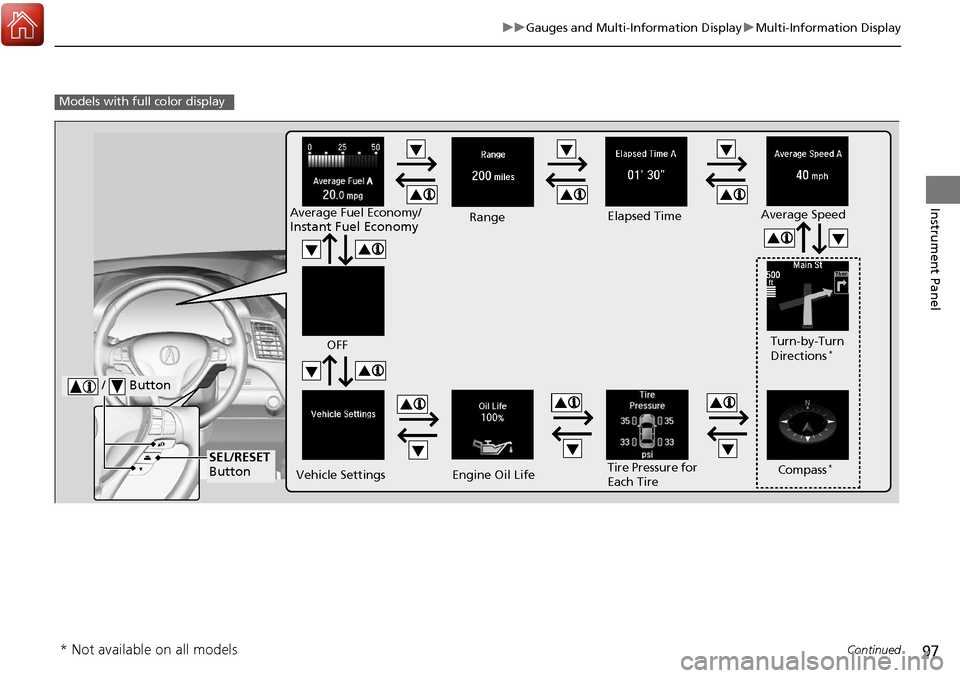
Multi-Information Display
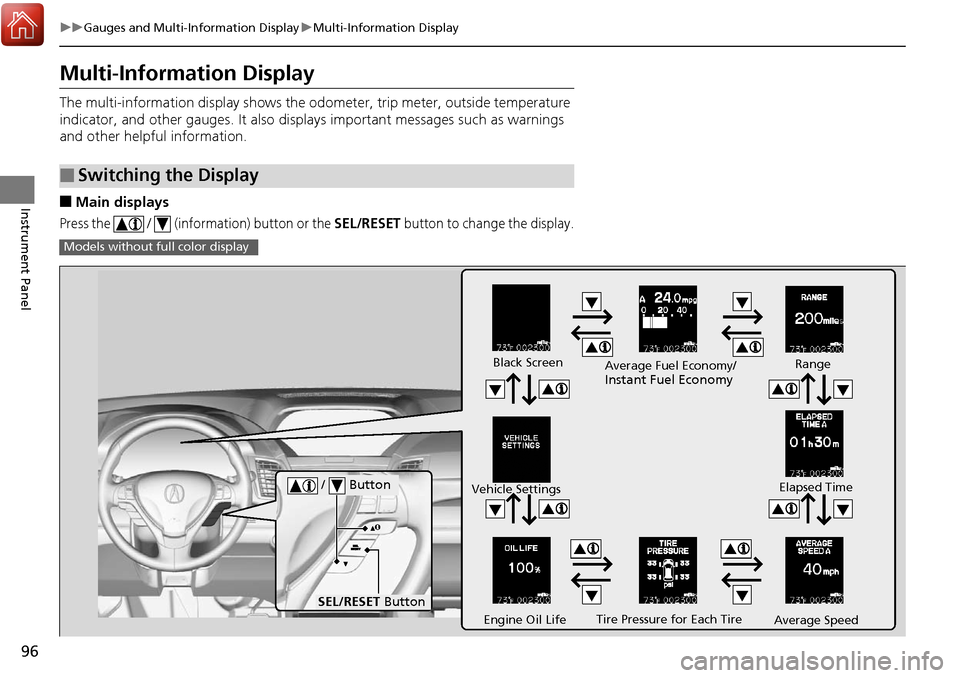
The multi-information display shows the od ometer, trip meter, outside temperature
indicator, and other gauges. It also disp lays important messages such as warnings
and other helpful information.
■Main displays
Press the / (information) button or the SEL/RESET button to change the display.
■Switching the Display
Models without fu ll color display
Tire Pressure for Each Tire
Black Screen
Engine Oil Life
Vehicle Settings
Average SpeedRange
Elapsed Time
Average Fuel Economy/
Instant Fuel Economy
/ Button
SEL/RESET
Button
Page 98 of 453
97
uuGauges and Multi-Information Display uMulti-Information Display
Continued
Instrument Panel
Models with full color display
Tire Pressure for
Each Tire Turn-by-Turn
Directions
*
Engine Oil Life
Vehicle Settings Average Speed
Range Elapsed Time
Average Fuel Economy/
Instant Fuel Economy
/ Button
SEL/RESET
ButtonCompass*
OFF
* Not available on all models
Page 102 of 453
Continued101
uuGauges and Multi-Information Display uMulti-Information Display
Instrument Panel
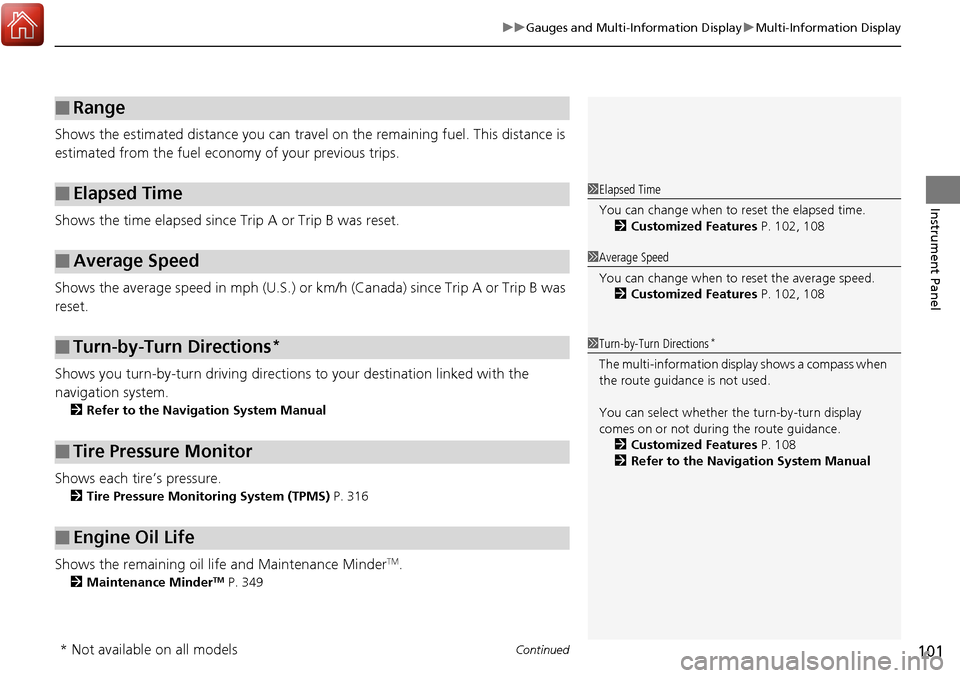
Shows the estimated distance you can travel on the remaining fuel. This distance is
estimated from the fuel economy of your previous trips.
Shows the time elapsed since Trip A or Trip B was reset.
Shows the average speed in mph (U.S.) or km/h (Canada) since Trip A or Trip B was
reset.
Shows you turn-by-turn driv ing directions to your destination linked with the
navigation system.
2 Refer to the Navigation System Manual
Shows each tire’s pressure.
2Tire Pressure Monitoring System (TPMS) P. 316
Shows the remaining oil life and Maintenance MinderTM.
2Maintenance MinderTM P. 349
■Range
■Elapsed Time
■Average Speed
■Turn-by-Turn Directions*
■Tire Pressure Monitor
■Engine Oil Life
1Elapsed Time
You can change when to reset the elapsed time.
2 Customized Features P. 102, 108
1Average Speed
You can change when to reset the average speed.
2 Customized Features P. 102, 108
1Turn-by-Turn Directions*
The multi-information disp lay shows a compass when
the route guidance is not used.
You can select whether the turn-by-turn display
comes on or not during the route guidance. 2 Customized Features P. 108
2 Refer to the Navigation System Manual
* Not available on all models
Page 108 of 453
107
uuGauges and Multi-Information Display uMulti-Information Display
Continued
Instrument Panel
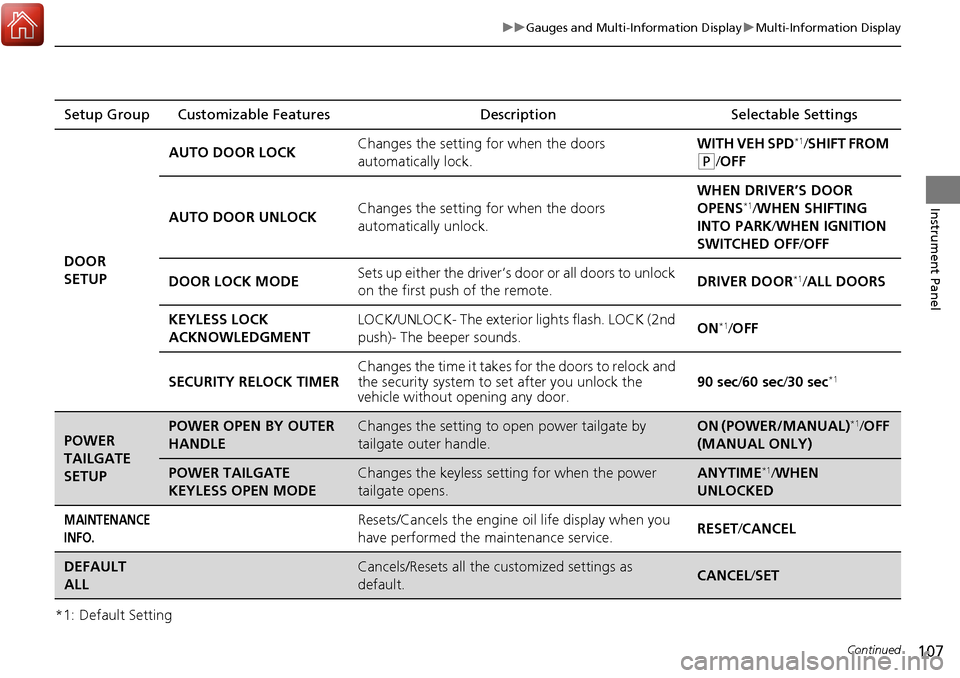
*1: Default SettingSetup Group Customizable Features
Description Selectable Settings
DOOR
SETUP AUTO DOOR LOCK
Changes the setting for when the doors
automatically lock. WITH VEH SPD
*1/
SHIFT FROM
(P/OFF
AUTO DOOR UNLOCK Changes the setting for when the doors
automatically unlock. WHEN DRIVER’S DOOR
OPENS
*1/
WHEN SHIFTING
INTO PARK/ WHEN IGNITION
SWITCHED OFF /OFF
DOOR LOCK MODE Sets up either the driver’s door or all doors to unlock
on the first push of the remote. DRIVER DOOR
*1/
ALL DOORS
KEYLESS LOCK
ACKNOWLEDGMENT LOCK/UNLOCK- The exterior
lights flash. LOCK (2nd
push)- The beeper sounds. ON
*1/
OFF
SECURITY RELOCK TIMER Changes the time it takes for the doors to relock and
the security system to set after you unlock the
vehicle without op
ening any door. 90 sec
/60 sec/ 30 sec
*1
POWER
TAILGATE
SETUPPOWER OPEN BY OUTER
HANDLEChanges the setting to open power tailgate by
tailgate outer handle.ON (POWER/MANUAL)*1/OFF
(MANUAL ONLY)
POWER TAILGATE
KEYLESS OPEN MODEChanges the keyless setting for when the power
tailgate opens.ANYTIME*1/ WHEN
UNLOCKED
MAINTENANCE
INFO.Resets/Cancels the engine oil life display when you
have performed the maintenance service. RESET
/CANCEL
DEFAULT
ALLCancels/Resets all the customized settings as
default.CANCEL /SET
Page 114 of 453
113
uuGauges and Multi-Information Display uMulti-Information Display
Continued
Instrument Panel
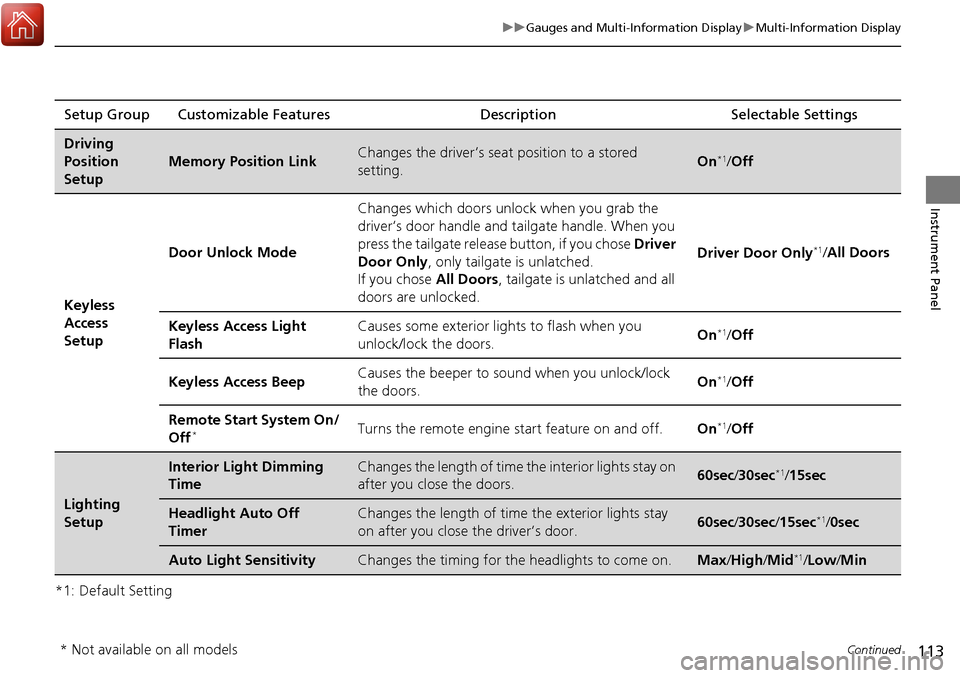
*1: Default SettingSetup Group Customizable Features
Description Selectable Settings
Driving
Position
Setup
Memory Position LinkChanges the driver’s seat position to a stored
setting.On*1/ Off
Keyless
Access
Setup Door Unlock Mode
Changes which doors unlock when you grab the
driver’s door handle and tailgate handle. When you
press the tailgate release button, if you chose
Driver
Door Only , only tailgate is unlatched.
If you chose All Doors, tailgate is unlatched and all
doors are unlocked. Driver Door Only
*1/
All Doors
Keyless Access Light
Flash Causes some exterior li
ghts to flash when you
unlock/lock the doors. On
*1/
Off
Keyless Access Beep Causes the beeper to so
und when you unlock/lock
the doors. On
*1/
Off
Remote Start System On/
Off
*Turns the remote engine start feature on and off. On*1/Off
Lighting
Setup
Interior Light Dimming
TimeChanges the length of time the interior lights stay on
after you close the doors.60sec /30sec*1/15sec
Headlight Auto Off
TimerChanges the length of time the exterior lights stay
on after you close the driver’s door.60sec /30sec /15sec*1/ 0sec
Auto Light SensitivityChanges the timing for th e headlights to come on.Max/High /Mid*1/Low /Min
* Not available on all models
Page 116 of 453
115
uuGauges and Multi-Information Display uMulti-Information Display
Continued
Instrument Panel
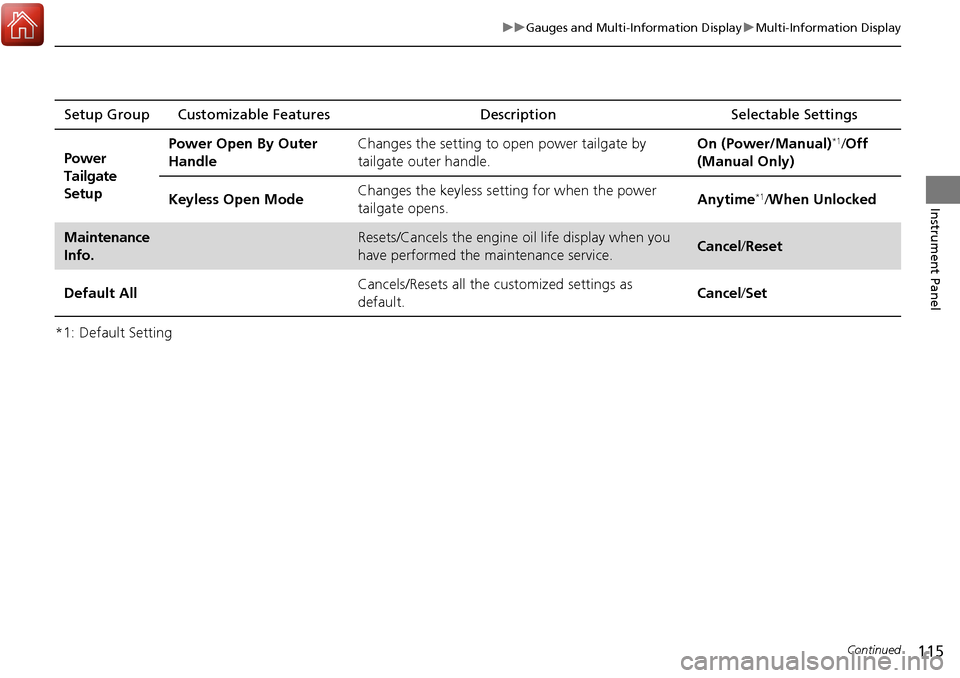
*1: Default SettingSetup Group Customizable Features
Description Selectable Settings
Power
Tailgate
Setup Power Open By Outer
Handle
Changes the setting to open power tailgate by
tailgate outer handle. On (Power/Manual)
*1/
Off
(Manual Only)
Keyless Open Mode Changes the keyless setting
for when the power
tailgate opens. Anytime
*1/
When Unlocked
Maintenance
Info.Resets/Cancels the engine oil life display when you
have performed the maintenance service. Cancel /Reset
Default All Cancels/Resets all the customized settings as
default. Cancel
/Set
Page 120 of 453
119
Controls
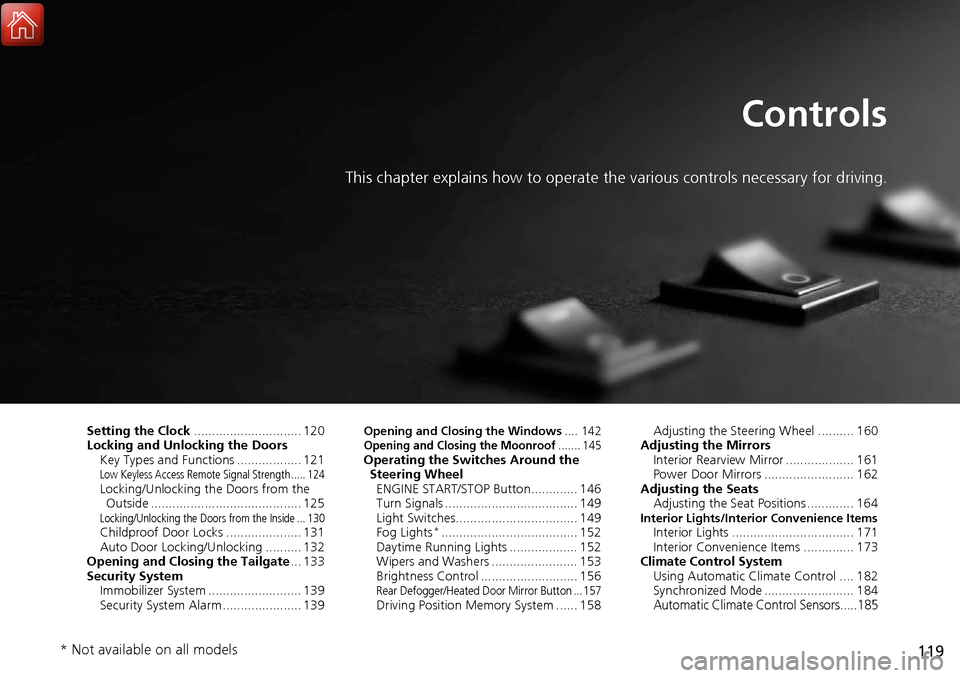
This chapter explains how to operate the various controls necessary for driving.
Setting the Clock.............................. 120
Locking and Unlocking the Doors Key Types and Functions .................. 121
Low Keyless Access Remote Signal Strength ..... 124Locking/Unlocking the Doors from the Outside .......................................... 125
Locking/Unlocking the Doors from the Inside ... 130Childproof Door Locks ..................... 131
Auto Door Locking/Unlocking .......... 132
Opening and Closing the Tailgate ... 133
Security System Immobilizer System .......................... 139
Security System Alarm ...................... 139
Opening and Closing the Windows .... 142Opening and Closing the Moonroof....... 145Operating the Switches Around the
Steering Wheel ENGINE START/STOP Button............. 146
Turn Signals ..................................... 149
Light Switches.................................. 149
Fog Lights
*...................................... 152
Daytime Running Lights ................... 152
Wipers and Washers ........................ 153
Brightness Control ........................... 156
Rear Defogger/Heated Door Mirror Button ... 157Driving Position Memory System ...... 158 Adjusting the Steering Wheel .......... 160
Adjusting the Mirrors Interior Rearview Mirror ................... 161
Power Door Mirrors ......................... 162
Adjusting the Seats Adjusting the Seat Positions ............. 164
Interior Lights/Interior Convenience ItemsInterior Lights .................................. 171
Interior Convenience Items .............. 173
Climate Control System Using Automatic Climate Control .... 182
Synchronized Mode ......................... 184
Automatic Climate Control Sensors.....185
* Not available on all models