mirror Acura RDX 2018 Owner's Guide
[x] Cancel search | Manufacturer: ACURA, Model Year: 2018, Model line: RDX, Model: Acura RDX 2018Pages: 453, PDF Size: 20.13 MB
Page 287 of 453
286
uuWhen Driving uAdaptive Cruise Control (ACC)*
Driving
Adaptive Cruise Control (ACC)*
Helps maintain a constant vehicle speed and a set following-distance behind a
vehicle detected ahead of yours, without you having to keep your foot on the brake
or the accelerator.
When ACC slows your vehicle by applying the brakes, your vehicle’s brake lights will
illuminate.1 Adaptive Cruise Control (ACC)*
Important Reminder
As with any system, there are limits to ACC. Use the
brake pedal whenever necessary, and always keep a
safe distance between your vehicle and other vehicles.
3WARNING
Improper use of ACC can lead to a crash.
Use ACC only when travelling on open
highways in good weather.
3WARNING
ACC has limited braking capability.
When your vehicle speed drops below
22 mph (35 km/h), ACC will
automatically cancel and no longer will
apply your vehicle’s brakes.
Always be prepared to apply the brake
pedal when conditions require.
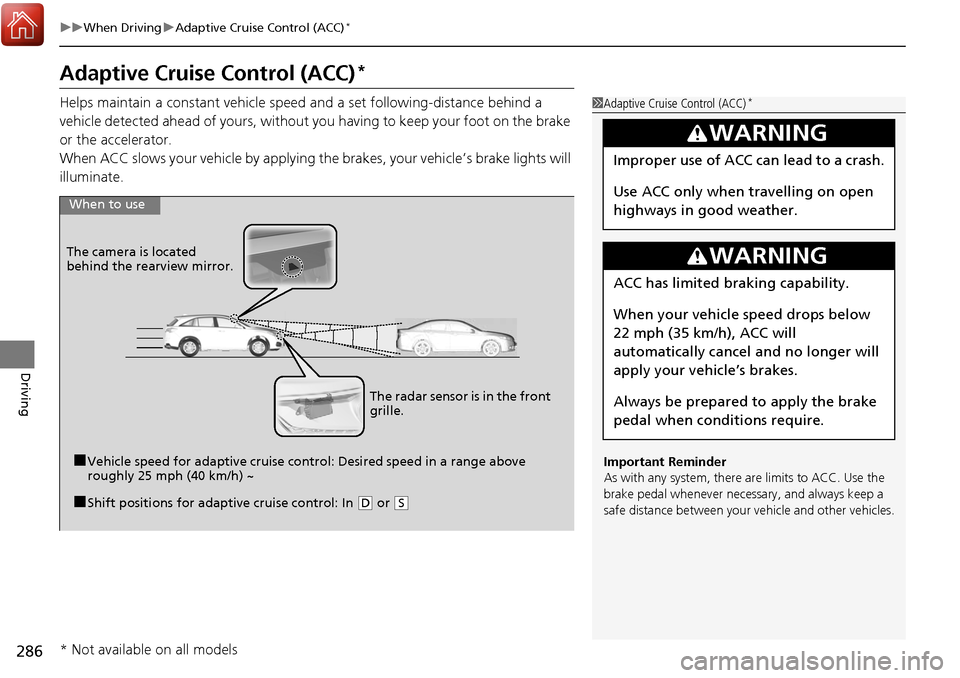
When to use
■Vehicle speed for adaptive cruise co ntrol: Desired speed in a range above
roughly 25 mph (40 km/h) ~
The camera is located
behind the rearview mirror.
■Shift positions for adaptive cruise control: In (
D or (S
The radar sensor is in the front
grille.
* Not available on all models
Page 297 of 453
uuWhen Driving uAdaptive Cruise Control (ACC)*
296
Driving
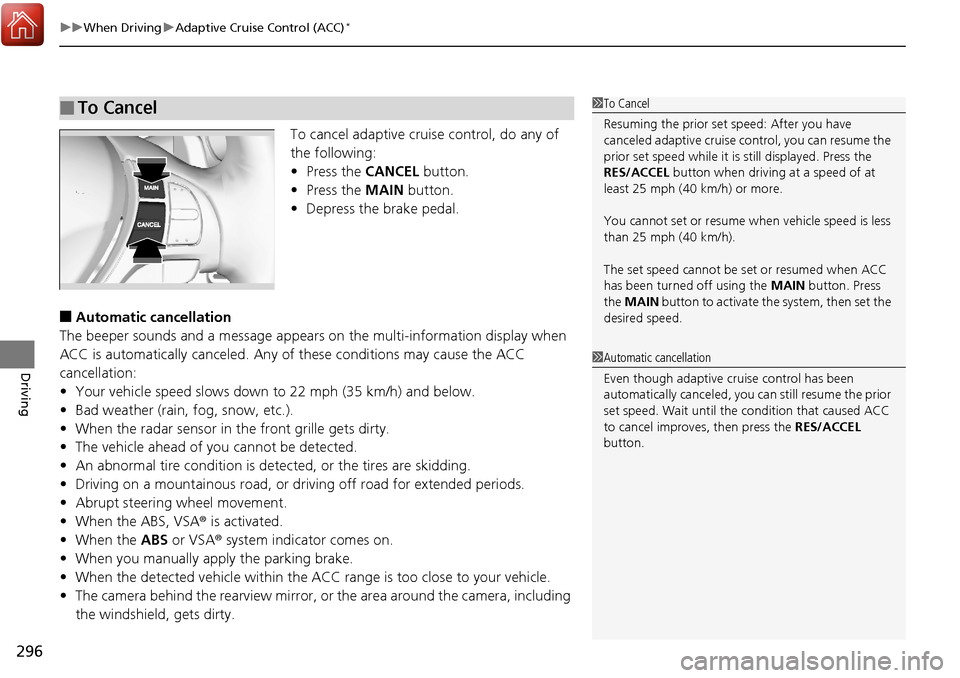
To cancel adaptive cruise control, do any of
the following:
• Press the CANCEL button.
• Press the MAIN button.
• Depress the brake pedal.
■Automatic cancellation
The beeper sounds and a me ssage appears on the multi-information display when
ACC is automatically canceled. Any of these conditions may cause the ACC
cancellation:
• Your vehicle speed slows down to 22 mph (35 km/h) and below.
• Bad weather (rain, fog, snow, etc.).
• When the radar sensor in the front grille gets dirty.
• The vehicle ahead of you cannot be detected.
• An abnormal tire condition is dete cted, or the tires are skidding.
• Driving on a mountainous road, or driving off road for extended periods.
• Abrupt steering wheel movement.
• When the ABS, VSA ® is activated.
• When the ABS or VSA ® system indicator comes on.
• When you manually apply the parking brake.
• When the detected vehicle within the ACC range is too close to your vehicle.
• The camera behind the rearview mirror, or the area around the camera, including
the windshield, gets dirty.
■To Cancel1 To Cancel
Resuming the prior set speed: After you have
canceled adaptive cruise c ontrol, you can resume the
prior set speed while it is still displayed. Press the
RES/ACCEL button when driving at a speed of at
least 25 mph (40 km/h) or more.
You cannot set or resume wh en vehicle speed is less
than 25 mph (40 km/h).
The set speed cannot be set or resumed when ACC
has been turned off using the MAIN button. Press
the MAIN button to activate the system, then set the
desired speed.
1 Automatic cancellation
Even though adaptive crui se control has been
automatically canceled, you can still resume the prior
set speed. Wait until the condition that caused ACC
to cancel improves, then press the RES/ACCEL
button.
Page 309 of 453
308
uuWhen Driving uLane Keeping Assist System (LKAS)*
Driving
■The LKAS may automatically be canceled when:
• The camera temperature gets too high.
• The camera behind the rearview mirror, or the area around the camera, including
the windshield, gets dirty.
• When driving through a sharp curve.
• When driving at a speed in excess of approximately 90 mph (145 km/h).
• When the ABS or VSA ® systems engage.
A beeper will sound if the LKAS is automatically canceled.
Page 314 of 453
313
uuWhen Driving uBlind spot information (BSI) System*
Continued
Driving
Blind spot informa tion (BSI) System*
Is designed to detect vehicles in specified alert zones adjacent to your vehicle,
particularly in harder to see areas commonly known as “blind spots.”
When the system detects vehicles approach ing from behind in adjacent lanes, the
appropriate indicator comes on for a few se conds, providing assistance when you
change lanes.
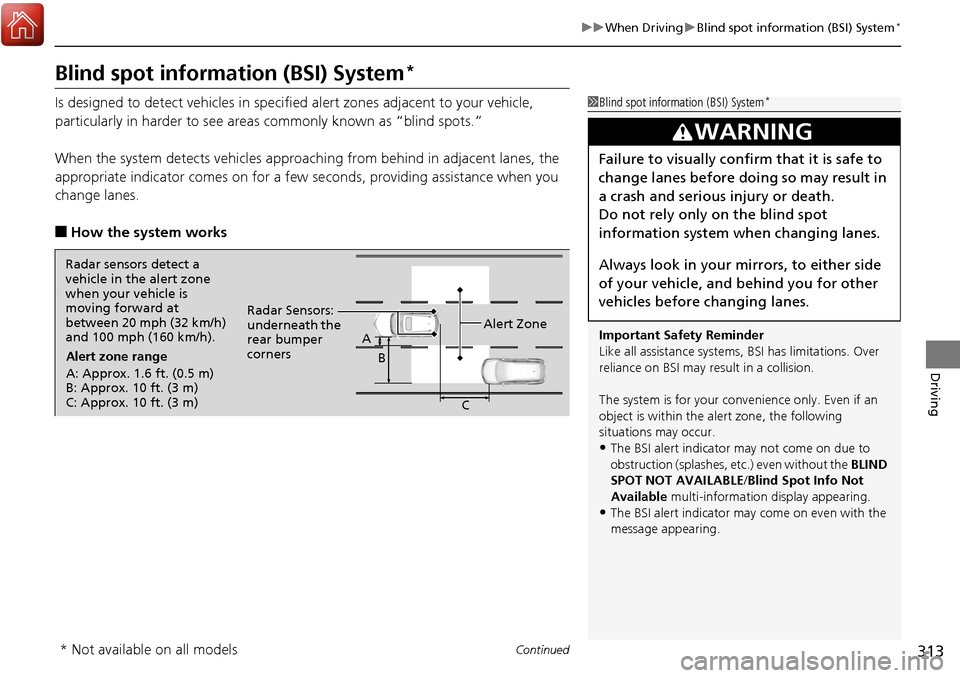
■How the system works
1 Blind spot inform ation (BSI) System*
Important Safety Reminder
Like all assistance systems, BSI has limitations. Over
reliance on BSI may re sult in a collision.
The system is for your convenience only. Even if an
object is within the alert zone, the following
situations may occur.
•The BSI alert indicator may not come on due to
obstruction (splashes, et c.) even without the BLIND
SPOT NOT AVAILABLE/Blind Spot Info Not
Available multi-information display appearing.
•The BSI alert indicator may come on even with the
message appearing.
3WARNING
Failure to visually confirm that it is safe to
change lanes before doing so may result in
a crash and serious injury or death.
Do not rely only on the blind spot
information system wh en changing lanes.
Always look in your mirrors, to either side
of your vehicle, and behind you for other
vehicles before changing lanes.
Radar sensors detect a
vehicle in the alert zone
when your vehicle is
moving forward at
between 20 mph (32 km/h)
and 100 mph (160 km/h). Alert zone range
A: Approx. 1.6 ft. (0.5 m)
B: Approx. 10 ft. (3 m)
C: Approx. 10 ft. (3 m) Radar Sensors:
underneath the
rear bumper
corners
Alert Zone
A
B
C
* Not available on all models
Page 325 of 453
324
uuBraking uCollision Mitigation Braking SystemTM (CMBSTM)*
Driving
Collision Mitigati on Braking SystemTM (CMBSTM)*
Can assist you when there is a possibility of your vehicle colliding with a vehicle or a
pedestrian detected in front of yours. The CMBSTM is designed to alert you when a
potential collision is determined, as well as to reduce your vehicle speed to help
minimize collision severity when a collision is deemed unavoidable.
■How the system works
1 Collision Mitigation Braking SystemTM (CMBSTM)*
Important Safety Reminder
The CMBSTM is designed to reduce the severity of an
unavoidable collision. It does not prevent collision nor
stop the vehicle automatically. It is still your
responsibility to operate the brake pedal and steering
wheel appropriately acco rding to the driving
conditions.
The CMBS
TM may not activate or may not detect a
vehicle in front of y our vehicle under certain
conditions:
2 CMBS
TM Conditions and Limitations P. 328
You can read about handling information for the
camera equipped with this system. 2 Front Sensor Camera
* P. 284
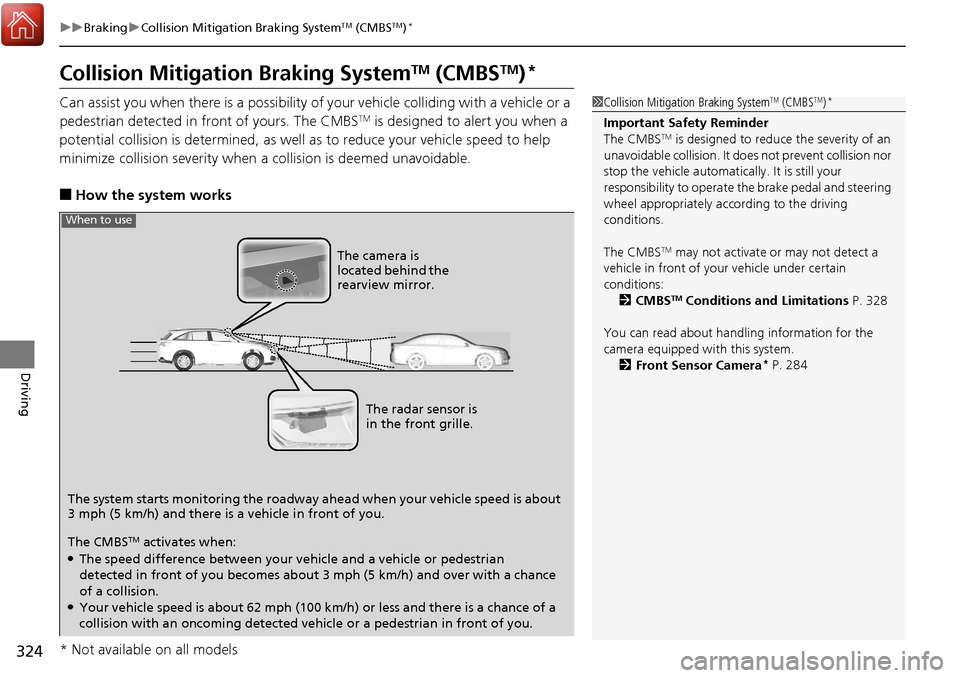
The system starts monitoring the roadway ah ead when your vehicle speed is about
3 mph (5 km/h) and there is a vehicle in front of you. The radar sensor is
in the front grille.
The CMBS
TM activates when:●The speed difference between your vehicle and a vehicle or pedestrian
detected in front of you becomes about 3 mph (5 km/h) and over with a chance
of a collision.
●Your vehicle speed is about 62 mph (100 km/h) or less and there is a chance of a
collision with an oncoming detected vehicle or a pedestrian in front of you. The camera is
located behind the
rearview mirror.
When to use
* Not available on all models
Page 338 of 453
337
uuParking Your Vehicle uCross Traffic Monitor*
Continued
Driving
Cross Traffic Monitor*
Monitors the rear corner areas using the radar sensors when reversing, and alerts
you if a vehicle approaching from a rear corner is detected.
The system is convenient when you are backing out of a parking space.1 Cross Traffic Monitor*
The parking sensor system’s alerting buzzer overrides
the Cross Traffic Monitor buzzer when the sensors
are detecting obstacles at the closest range.
3CAUTION
Cross Traffic Monitor cannot detect all
approaching vehicles and may not detect
an approaching vehicle at all.
Failure to visually confirm that it is safe to
back up the vehicle before doing so may
result in a collision.
Do not solely rely on the system when
reversing; always also use your mirrors, and
look behind and to the sides of your vehicle
before reversing.
Models with Parking Sensor System
* Not available on all models
Page 367 of 453
uuReplacing Light Bulbs uSide Turn Signal Light/Emergency Indicator Light Bulbs
366
Maintenance
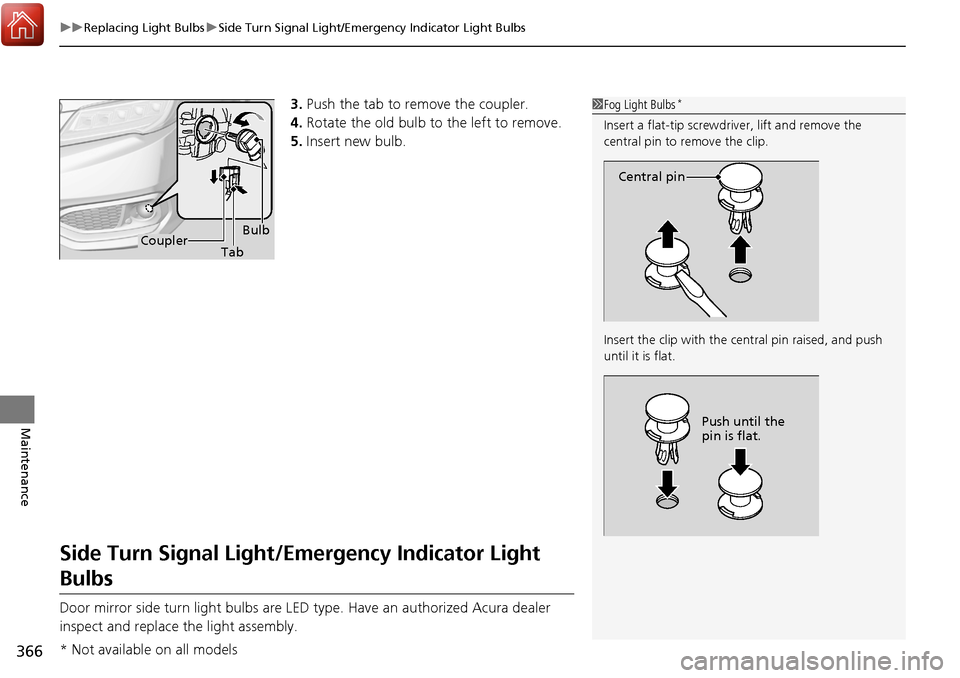
3. Push the tab to remove the coupler.
4. Rotate the old bulb to the left to remove.
5. Insert new bulb.
Side Turn Signal Light/Emergency Indicator Light
Bulbs
Door mirror side turn light bulbs are LED type. Have an authorized Acura dealer
inspect and replace the light assembly.
1Fog Light Bulbs*
Insert a flat-tip screwdriver, lift and remove the
central pin to remove the clip.
Insert the clip with the central pin raised, and push
until it is flat.
Central pin
Push until the
pin is flat.
BulbCoupler Tab
* Not available on all models
Page 392 of 453
391
uuCleaning uExterior Care
Continued
Maintenance
Exterior Care
Dust off the vehicle body after you drive.
Regularly inspect your vehicle for scra tches on painted surfaces. A scratch on a
painted surface can result in body rust. If you find a scratch, promptly repair it.
Wash the vehicle regularly. Wash more frequently when driving in the following
conditions:
• If driving on roads with road salt.
• If driving in coastal areas.
• If tar, soot, bird droppings, insects, or tree sap are stuck to painted surfaces.
Fold in the door mirrors.
Make sure to follow the instructions indicated on the automated car wash.
• Keep sufficient distance between the cleaning nozzle and the vehicle body.
• Take particular care around the windows. Standing too close may cause water to
enter the vehicle interior.
• Do not spray high pressure water directly into the engine compartment. Instead,
use low pressure water and a mild detergent.
■Washing the Vehicle
■Using an Automated Car Wash
■Using High Pressure Cleaners
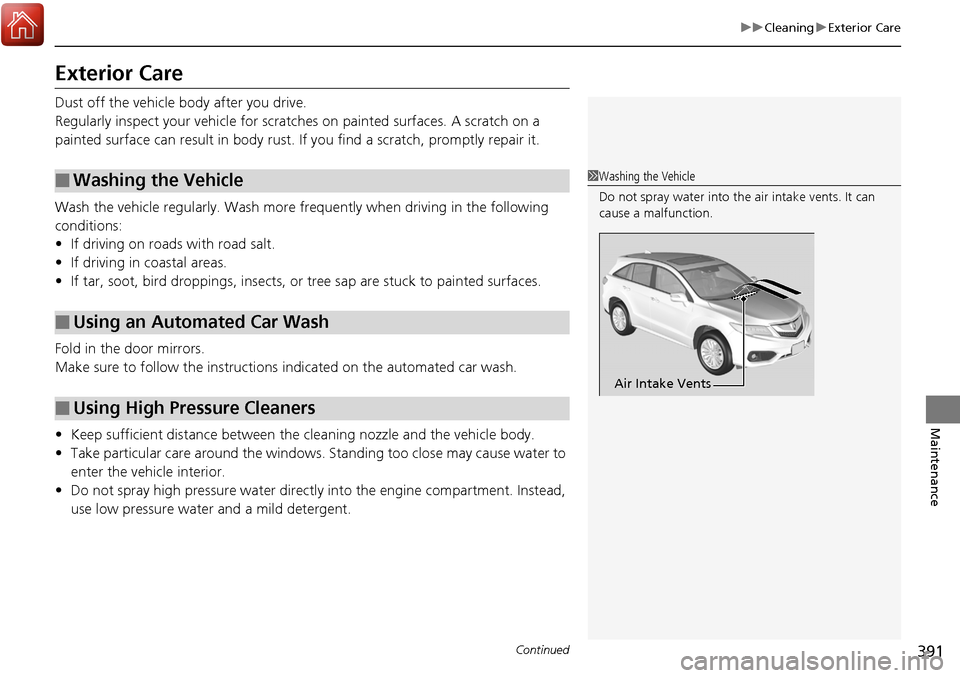
1Washing the Vehicle
Do not spray water into the air intake vents. It can
cause a malfunction.
Air Intake Vents
Page 433 of 453
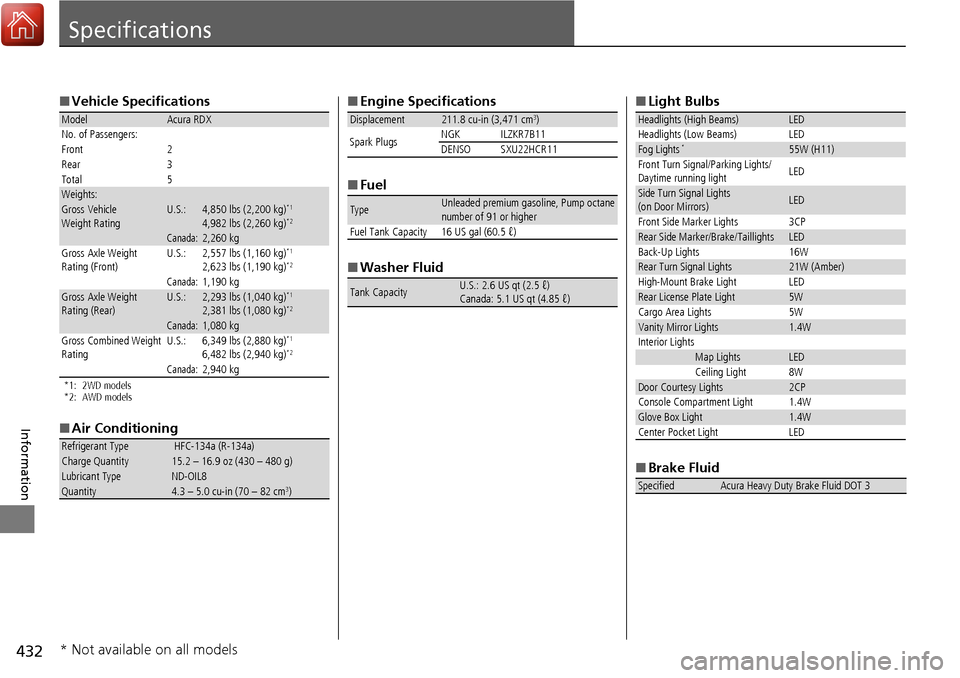
432
Information
Specifications
■Vehicle Specifications
*1: 2WD models
*2: AWD models
■Air Conditioning
ModelAcura RDX
No. of Passengers:
Front 2
Rear 3
Total 5
Weights:Gross Vehicle
Weight RatingU.S.:4,850 lbs (2,200 kg)*1
4,982 lbs (2,260 kg)*2
Canada:2,260 kgGross Axle Weight
Rating (Front)U.S.:2,557 lbs (1,160 kg)*1
2,623 lbs (1,190 kg)*2
Canada:1,190 kgGross Axle Weight
Rating (Rear)U.S.:2,293 lbs (1,040 kg)*1
2,381 lbs (1,080 kg)*2
Canada:1,080 kg
Gross Combined Weight
Rating U.S.: 6,349 lbs (2,880 kg)*1
6,482 lbs (2,940 kg)*2
Canada:2,940 kg
Refrigerant Type HFC-134a (R-134a)Charge Quantity15.2 – 16.9 oz (430 – 480 g)Lubricant TypeND-OIL8Quantity4.3 – 5.0 cu-in (70 – 82 cm3)
■
Engine Specifications
■ Fuel
■ Washer Fluid
Displacement211.8 cu-in (3,471 cm3)
Spark Plugs NGK ILZKR7B11
DENSO SXU22HCR11
TypeUnleaded premium gasoline, Pump octane
number of 91 or higher
Fuel Tank Capacity 16 US gal (60.5 ℓ)
Tank CapacityU.S.: 2.6 US qt (2.5 ℓ)
Canada: 5.1 US qt (4.85 ℓ)
■ Light Bulbs
■ Brake Fluid
Headlights (High Beams)LED
Headlights (Low Beams) LED
Fog Lights*55W (H11)
Front Turn Signal/Parking Lights/
Daytime running light LED
Side Turn Signal Lights
(on Door Mirrors)LED
Front Side Marker Lights 3CP
Rear Side Marker/Brake/TaillightsLED
Back-Up Lights 16W
Rear Turn Signal Lights21W (Amber)
High-Mount Brake Light LED
Rear License Plate Light5W
Cargo Area Lights 5W
Vanity Mirror Lights1.4W
Interior Lights
Map LightsLED
Ceiling Light 8W
Door Courtesy Lights2CP
Console Compartment Light 1.4W
Glove Box Light1.4W
Center Pocket Light LED
SpecifiedAcura Heavy Duty Brake Fluid DOT 3
* Not available on all models
Page 444 of 453
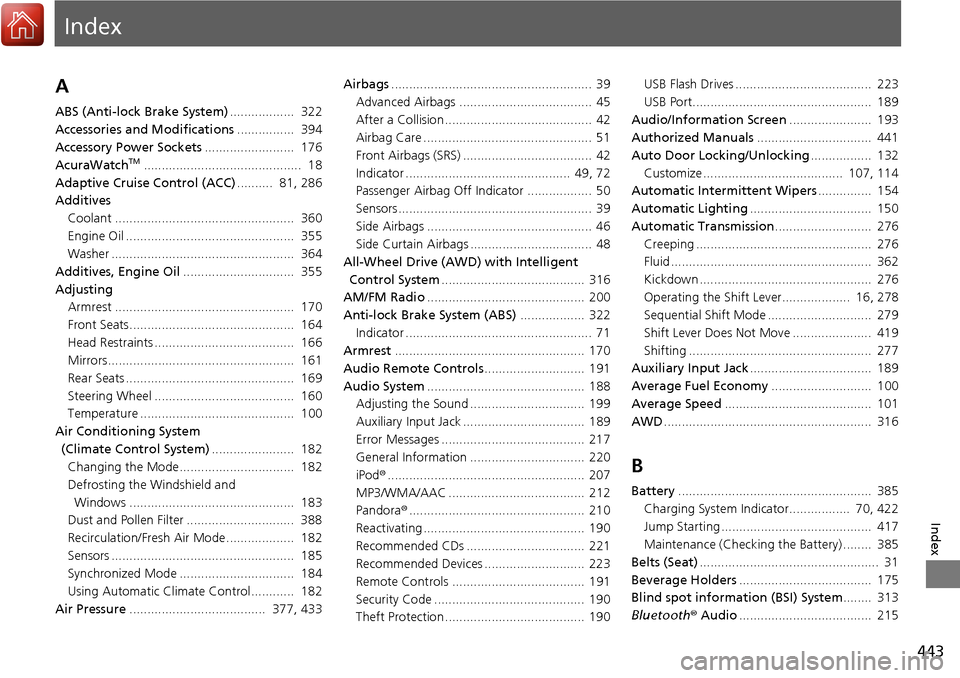
Index
443
Index
Index
A
ABS (Anti-lock Brake System).................. 322
Accessories and Modifications ................ 394
Accessory Power Sockets ......................... 176
AcuraWatch
TM............................................ 18
Adaptive Cruise Control (ACC) .......... 81, 286
Additives Coolant .................................................. 360
Engine Oil ............................................... 355
Washer ................................................... 364
Additives, Engine Oil ............................... 355
Adjusting Armrest .................................................. 170
Front Seats.............................................. 164
Head Restraints ....................................... 166
Mirrors.................................................... 161
Rear Seats ............................................... 169
Steering Wheel ....................................... 160
Temperature ........................................... 100
Air Conditioning System (Climate Control System) ....................... 182
Changing the Mode................................ 182
Defrosting the Windshield and Windows .............................................. 183
Dust and Pollen Filter .............................. 388
Recirculation/Fresh Air Mode................... 182
Sensors ................................................... 185
Synchronized Mode ................................ 184
Using Automatic Climate Control............ 182
Air Pressure ...................................... 377, 433 Airbags
........................................................ 39
Advanced Airbags ..................................... 45
After a Collision ......................................... 42
Airbag Care ............................................... 51
Front Airbags (SRS) .................................... 42
Indicator .............................................. 49, 72
Passenger Airbag Off Indicator .................. 50
Sensors ...................................................... 39
Side Airbags .............................................. 46
Side Curtain Airbags .................................. 48
All-Wheel Drive (AWD) with Intelligent
Control System ........................................ 316
AM/FM Radio ............................................ 200
Anti-lock Brake System (ABS) .................. 322
Indicator .................................................... 71
Armrest ..................................................... 170
Audio Remote Controls ............................ 191
Audio System ............................................ 188
Adjusting the Sound ................................ 199
Auxiliary Input Jack .................................. 189
Error Messages ........................................ 217
General Information ................................ 220
iPod ®....................................................... 207
MP3/WMA/AAC ...................................... 212
Pandora ®................................................. 210
Reactivating ............................................. 190
Recommended CDs ................................. 221
Recommended Devices ............................ 223
Remote Controls ..................................... 191
Security Code .......................................... 190
Theft Protection ....................................... 190 USB Flash Drives ...................................... 223
USB Port.................................................. 189
Audio/Information Screen ....................... 193
Authorized Manuals ................................ 441
Auto Door Locking/Unlocking ................. 132
Customize ....................................... 107, 114
Automatic Intermittent Wipers ............... 154
Automatic Lighting .................................. 150
Automatic Transmission ........................... 276
Creeping ................................................. 276
Fluid ........................................................ 362
Kickdown ................................................ 276
Operating the Shift Lever................... 16, 278
Sequential Shift Mode ............................. 279
Shift Lever Does Not Move ...................... 419
Shifting ................................................... 277
Auxiliary Input Jack .................................. 189
Average Fuel Economy ............................ 100
Average Speed ......................................... 101
AWD .......................................................... 316
B
Battery ...................................................... 385
Charging System Indicator................. 70, 422
Jump Starting .......................................... 417
Maintenance (Checki ng the Battery) ........ 385
Belts (Seat) .................................................. 31
Beverage Holders ..................................... 175
Blind spot information (BSI) System ........ 313
Bluetooth ® Audio ..................................... 215