snow Acura RDX 2018 Owner's Guide
[x] Cancel search | Manufacturer: ACURA, Model Year: 2018, Model line: RDX, Model: Acura RDX 2018Pages: 453, PDF Size: 20.13 MB
Page 329 of 453
328
uuBraking uCollision Mitigation Braking SystemTM (CMBSTM)*
Driving
The system may automatically shut off and the CMBSTM indicator will come on under
certain conditions. Some examples of th ese conditions are listed below. Other
conditions may reduce some of the CMBS
TM functions.
2 Front Sensor Camera* P. 284
■Environmental conditions
• Driving in bad weather (rain, fog, snow, etc.).
• Sudden changes between light and dark, such as an entrance or exit of a tunnel.
• There is little contrast between objects and the background.
• Driving into low sunlight (e.g., at dawn or dusk).
• Strong light is reflected onto the roadway.
• Driving in the shadows of trees, buildings, etc.
• Roadway objects or structures are misint erpreted as vehicles and pedestrians.
• Reflections on the interior of the front windshield.
■Roadway conditions
• Driving on a snowy or wet roadway (obscured lane marking, vehicle tracks,
reflected lights, road spray, high contrast).
• Driving on curvy, winding, or undulating roads.
■CMBSTM Conditions and Limitations
* Not available on all models
Page 330 of 453
329
uuBraking uCollision Mitigation Braking SystemTM (CMBSTM)*
Continued
Driving
■Vehicle conditions
• Headlight lenses are dirty or the h eadlights are not properly adjusted.
• The outside of the windshield is blocked by dirt, mud, leaves, wet snow, etc.
• The inside of the windshield is fogged.
• An abnormal tire or wheel condition (wro ng sized, varied size or construction,
improperly inflated, compact spare tire
*, etc.).
• When tire chains are installed.
• The vehicle is tilted due to a heavy load or suspension modifications.
• The camera temperature gets too hot.
• Driving with the parking brake applied.
• When the radar sensor in the front grille gets dirty.
■Detection limitations
• A vehicle or pedestrian suddenly crosses in front of you.
• The distance between your vehicle and the vehicle or pedestrian ahead of you is
too short.
• A vehicle cuts in front of you at a slow speed, and it brakes suddenly.
• When you accelerate rapidly and approach the vehicle or pedestrian ahead of you
at high speed.
• The vehicle ahead of you is a motorcycle, bicycle, mobility scooter or other small
vehicle.
• When there are animals in front of your vehicle.
• When you drive on a curved, winding or und ulating road that makes it difficult for
the sensor to properly detect a vehicle in front of you.
• The speed difference between your vehi cle and a vehicle in front of you is
significantly large.
• An oncoming vehicle suddenly comes in front of you.
• Another vehicle suddenly comes in fr ont of you at an intersection, etc.
• Your vehicle abruptly crosses over in front of an oncoming vehicle.
* Not available on all models
Page 334 of 453
333
uuParking Your Vehicle uParking Sensor System*
Continued
Driving
Parking Sensor System*
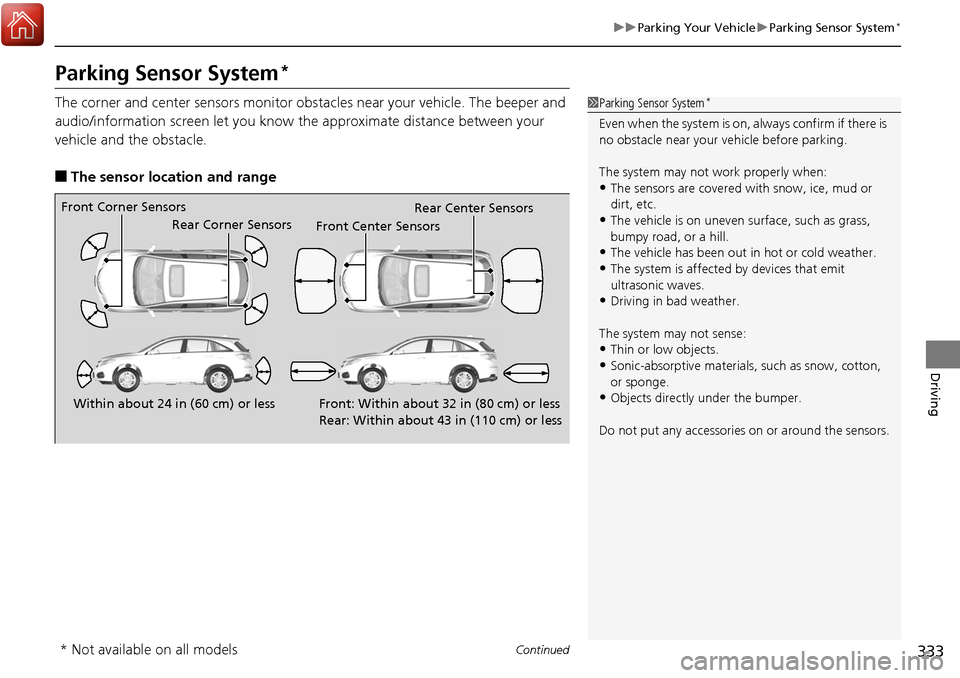
The corner and center sensors monitor obst acles near your vehicle. The beeper and
audio/information screen let you know the approximate distance between your
vehicle and the obstacle.
■The sensor location and range
1 Parking Sensor System*
Even when the system is on, always confirm if there is
no obstacle near your ve hicle before parking.
The system may not work properly when:
•The sensors are covered with snow, ice, mud or
dirt, etc.
•The vehicle is on uneven su rface, such as grass,
bumpy road, or a hill.
•The vehicle has been out in hot or cold weather.•The system is affected by devices that emit
ultrasonic waves.
•Driving in bad weather.
The system may not sense:
•Thin or low objects.•Sonic-absorptive materials, such as snow, cotton,
or sponge.
•Objects directly under the bumper.
Do not put any accessories on or around the sensors.Within about 24 in (60 cm) or less
Front Corner Sensors
Rear Corner Sensors
Rear Center Sensors
Front: Within about 32 in (80 cm) or less
Rear: Within about 43 in (110 cm) or lessFront Center Sensors
* Not available on all models
Page 339 of 453
uuParking Your Vehicle uCross Traffic Monitor*
338
Driving
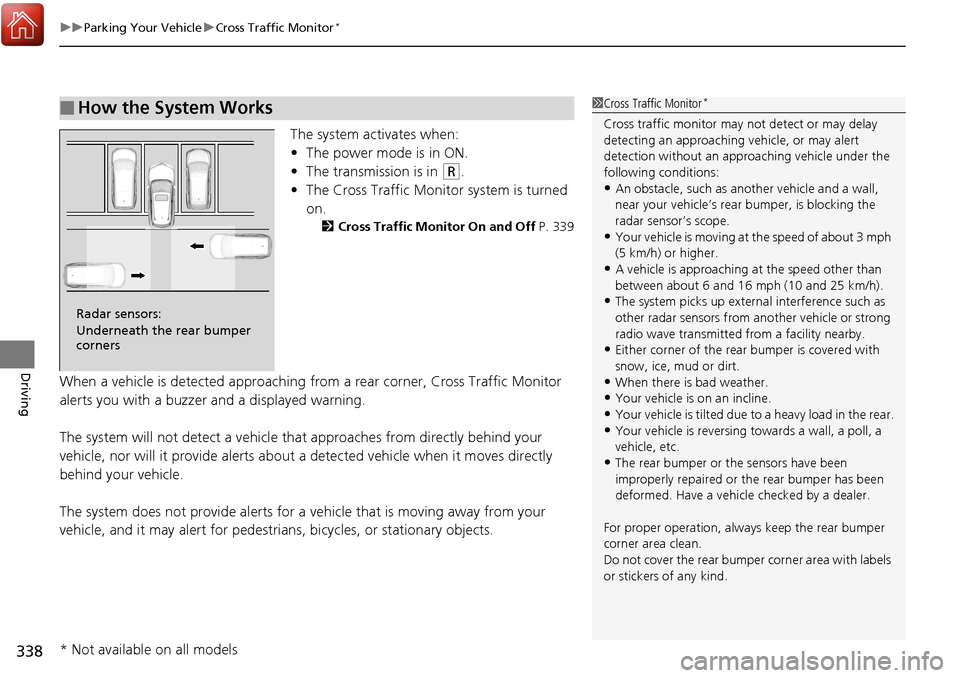
The system activates when:
• The power mode is in ON.
• The transmission is in
(R.
• The Cross Traffic Monitor system is turned
on.
2 Cross Traffic Monitor On and Off P. 339
When a vehicle is detected approaching from a rear corner, Cross Traffic Monitor
alerts you with a buzzer and a displayed warning.
The system will not detect a vehicle that approaches from directly behind your
vehicle, nor will it provide alerts about a detected vehicle when it moves directly
behind your vehicle.
The system does not provide alerts for a vehicle that is moving away from your
vehicle, and it may alert for pedestri ans, bicycles, or stationary objects.
■How the System Works1Cross Traffic Monitor*
Cross traffic monitor may not detect or may delay
detecting an approaching vehicle, or may alert
detection without an appr oaching vehicle under the
following conditions:
•An obstacle, such as a nother vehicle and a wall,
near your vehicle’s rear bumper, is blocking the
radar sensor’s scope.
•Your vehicle is moving at the speed of about 3 mph
(5 km/h) or higher.
•A vehicle is approaching at the speed other than
between about 6 and 16 mph (10 and 25 km/h).
•The system picks up external interference such as
other radar sensors from an other vehicle or strong
radio wave transmitted fr om a facility nearby.
•Either corner of the rear bumper is covered with
snow, ice, mud or dirt.
•When there is bad weather.
•Your vehicle is on an incline.
•Your vehicle is tilted due to a heavy load in the rear.
•Your vehicle is reversing towards a wall, a poll, a
vehicle, etc.
•The rear bumper or the sensors have been
improperly repaired or the rear bumper has been
deformed. Have a vehicle checked by a dealer.
For proper operation, always keep the rear bumper
corner area clean.
Do not cover the rear bumper corner area with labels
or stickers of any kind.
Radar sensors:
Underneath the rear bumper
corners
* Not available on all models
Page 340 of 453
339
uuParking Your Vehicle uCross Traffic Monitor*
Driving
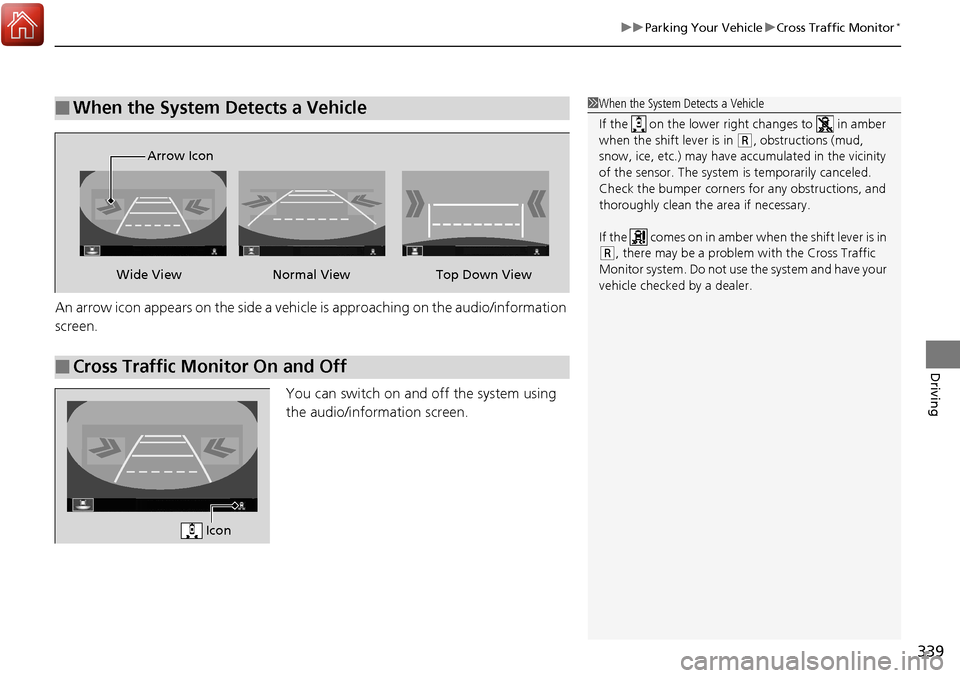
An arrow icon appears on the side a vehicle is approaching on the audio/information
screen.
You can switch on and off the system using
the audio/information screen.
■When the System Detects a Vehicle1When the System Detects a Vehicle
If the on the lower right changes to in amber
when the shift lever is in
( R, obstructions (mud,
snow, ice, etc.) may have ac cumulated in the vicinity
of the sensor. The system is temporarily canceled.
Check the bumper corners for any obstructions, and
thoroughly clean the area if necessary.
If the comes on in amber when the shift lever is in
( R, there may be a problem with the Cross Traffic
Monitor system. Do not use the system and have your
vehicle checked by a dealer.
■Cross Traffic Monitor On and Off
Wide View Normal View
Arrow IconTop Down View
Icon
Page 344 of 453
343
Driving
Fuel Economy and CO2 Emissions
Improving Fuel Economy and Reducing CO2 Emissions
Achieving fuel economy and reducing CO2 emissions is dependent on several
factors, including driving conditions, load weight, idling time, driving habits, and
vehicle condition. Depending on these and other factors, you may not achieve the
rated fuel economy of this vehicle.
You can optimize your fuel economy with proper maintenance of your vehicle.
Always maintain your vehicle in accordance with the messages displayed on the
multi-information display.
• Use the recommended viscosity engine oil, displaying the API Certification Seal.
• Maintain the specified tire pressure.
• Do not load the vehicle with excess cargo.
• Keep your vehicle clean. A buildup of snow or mud on your vehicle’s underside
adds weight and increases wind resistance.
■Maintenance and Fuel Economy
1Improving Fuel Economy and Reducing CO2 Emissions
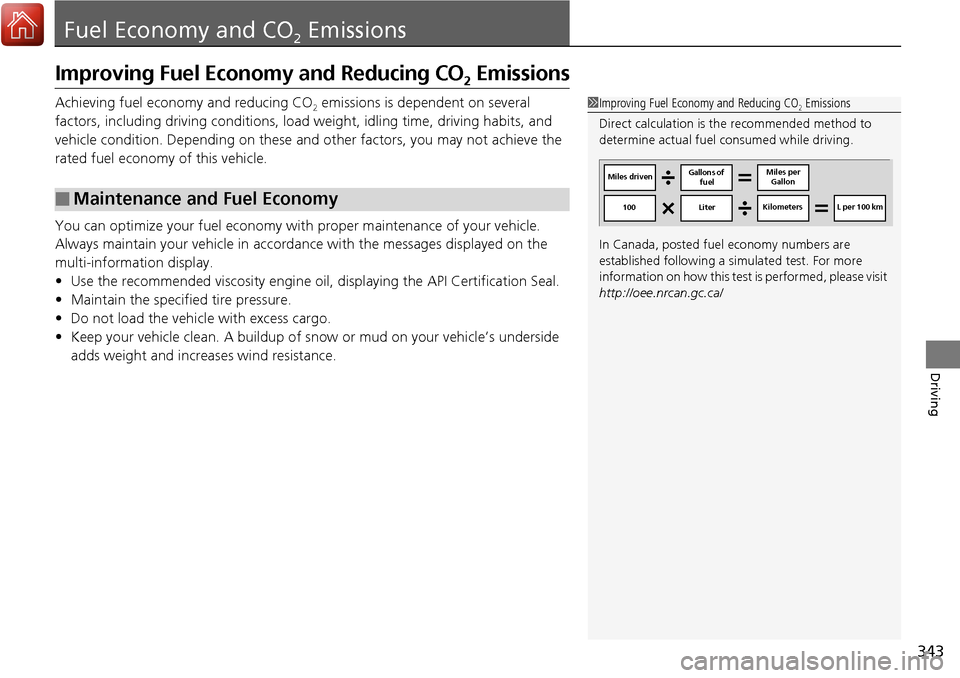
Direct calculation is the recommended method to
determine actual fuel consumed while driving.
In Canada, posted fuel economy numbers are
established following a simulated test. For more
information on how this test is performed, please visit
http://oee.nrcan.gc.ca/
Miles driven Gallons of
fuel Miles per
Gallon
100 LiterKilometers L per 100 km
Page 385 of 453
384
uuChecking and Maintaining Tires uWinter Tires
Maintenance
Winter Tires
If driving on snowy or frozen roads, mount all season marked “M+S” tires, snow
tires, or tire chains; reduce speed; and ma intain sufficient distance between vehicles
when driving.
Be particularly careful when operating the steering wheel or brakes to prevent
skidding.
Use tire chains, snow tires, or all season ti res when necessary or according to the law.
When mounting, refer to the following points.
For winter tires:
• Select the size and load ranges that are the same as the original tires.
• Mount the tires to all four wheels.
For tire chains:
• Install them on the front tires only.
• Because your vehicle has limited tire clearance, we strongly recommend using the
chains listed below:
• Follow the chain manufacturer’s instruction when installing. Mount them as
tightly as you can.
• Check that the chains do not to uch the brake lines or suspension.
• Drive slowly.
Cable-type: SCC Radial Chain TC2212MM
1Winter Tires
NOTICE
Traction devices that are th e wrong size or improperly
installed can damage your vehicle’s brake lines,
suspension, body, and wheels. Stop driving if they are
hitting any part of the vehicle.
When tire chains are mounted, follow the chain
manufacturer’s instructi ons regarding vehicle
operational limits.
If your vehicle is equipped with summer tires, be
aware that these tires are not designed for winter
driving conditions. For more information, contact a
dealer.
3WARNING
Using the wrong chains, or not properly
installing chains, can damage the brake
lines and cause a crash in which you can be
seriously injured or killed.
Follow all instruction s in this owner’s
manual regarding the selection and use of
tire chains.
Page 450 of 453
449
Index
S
Safe Driving................................................ 25
Safety Check ............................................... 30
Safety Labels .............................................. 65
Safety Message ............................................ 1
Seat Belts .................................................... 31
Adjusting the Shoulder Anchor ................. 35
Automatic Seat Belt Tensioners ................. 33
Checking .................................................. 38
Detachable Anchor ................................... 36
Fastening .................................................. 34
Installing a Child Seat with a Lap/Shoulder Seat
Belt ......................................................... 59
Pregnant Women...................................... 37
Reminder .................................................. 32
Warning Indicator ............................... 32, 71
Seat Heaters ............................................. 179
Seats .......................................................... 164
Adjusting ................................................ 164
Front Seats.............................................. 164
Lumbar Support ...................................... 164
Rear Seats ............................................... 169
Seat Heaters ........................... 179, 180, 181
Security System ........................................ 139
Immobilizer System Indicator..................... 76
Security System Alarm Indicator ................ 77
SEL/RESET Button ....................................... 96
Select Lever ........................................ 16, 277
Operation ......................................... 16, 278
Releasing ................................................ 419
Won’t Move ........................................... 419 Selecting a Child Seat
................................. 56
Selector Knob (Audio) .............................. 192
Sequential Shift Mode ............................. 279
Setting the Clock ...................................... 120
Shift Lever ........................................... 16, 277
Shift Lever Position Indicator ............. 70, 278
Shifting (Transmission) ............................. 277
Shoulder Anchor ......................................... 35
Side Airbags ................................................ 46
Side Curtain Airbags ................................... 48
SiriusXM ® Radio ........................................ 202
SMS Text Message ............................ 238, 250
Snow Tires ................................................. 384
Spare Tire .......................................... 397, 433
Spark Plugs ................................................ 432
Specifications ............................................ 432
Specified Fuel .................................... 341, 432
Speedometer .............................................. 95
SRS Airbags (Airbags) ................................. 42
Starting the Engine .................................. 270
Does Not Start ......................................... 414
Jump Starting .......................................... 417
Remote Engine Start ................................ 272
Steering Wheel ......................................... 160
Adjusting ................................................. 160
Stopping .................................................... 332
Summer Tires ............................................ 384
Sunglasses Holder ..................................... 178
Supplemental Restraint System (SRS) ........ 42
Switches (Around the Steering Wheel) ........ 4, 5, 146Synchronized Mode
................................. 184
System Message Indicator .......................... 77
T
Tachometer................................................. 95
Tailgate ..................................................... 133
Unable to Open....................................... 430
Temperature Outside Temperature Display ................... 100
Temperature Gauge ................................... 95
Temperature Sensor ......................... 100, 185
Temporary Tire Repair Kit ....................... 404
Text Message .................................... 238, 250
Time (Setting) ........................................... 120
Tire Pressure Monitoring System
(TPMS) ..................................................... 316
Indicator............................................ 75, 425
Tire Repair Kit ........................................... 403
Tires ........................................................... 376
Air Pressure ..................................... 377, 433
Checking and Maintaining ...................... 376
Inspection ............................................... 376
Labeling .................................................. 377
Puncture (Flat Tire) .......................... 397, 403
Regulations ............................................. 379
Rotation .................................................. 383
Spare Tire ........................................ 397, 433
Summer .................................................. 384
Temporary Tire Repair Kit ........................ 404
Tire Chains .............................................. 384
Page 451 of 453
450
Index
Tire Repair Kit .......................................... 403
Wear Indicators ....................................... 381
Winter ..................................................... 384
Tools .......................................................... 396
Towing a Trailer ........................................ 263
Equipment and Accessories...................... 264
Load Limits .............................................. 263
Towing Your Vehicle ................................ 267
Emergency............................................... 429
TPMS (Tire Pressure Monitoring System) ......... 316
Indicator ............................................ 75, 425
Transmission .............................................. 277
Automatic ............................................... 277
Fluid ........................................................ 362
Number ................................................... 434
Sequential Shift Mode ............................. 279
Shift Lever Position Indicator .............. 70, 278
Trip Meter ................................................. 100
Troubleshooting ....................................... 395
Blown Fuse ...................................... 426, 427
Brake Pedal Vibrates .................................. 21
Buzzer Sounds When Opening Door .......... 22
Emergency Towing .................................. 429
Engine Won’t Start .................................. 414
Noise When Braking .................................. 23
Overheating............................................. 420
Puncture/Flat Tire ............................. 397, 403
Rear Door Won’t Open ...................... 22, 131
Select Lever Won’t Move ......................... 419
Warning Indicators .................................... 68 Turn Signals
.............................................. 149
Indicators (Instrument Panel) ..................... 75
Two-way Keyless Access Remote .................................... 121, 129, 272
U
Unlocking the Doors ................................ 125
Unlocking the Front Doors from the Inside ................................. 12, 130
USB Adapter Cable ................................... 188
USB Flash Drives ....................................... 223
USB Port .................................................... 189
V
Vanity Mirrors ............................................... 7
Vehicle Identification Number ................ 434
Vehicle Stability Assist (VSA ®).................. 311
Off Button............................................... 312
Off Indicator.............................................. 73
System Indicator ................................ 73, 311
Viscosity (Oil) .................................... 355, 433
VSA ® (Vehicle Stability Assist) .................. 311
W
Wallpaper................................................. 196
Warning and Information Messages ......... 84
Warning Indicator On/Blinking ............... 422
Warning Labels ........................................... 65 Warranties (Warranty Manual provided
separately) .............................................. 439
Watts ........................................................ 432
Wear Indicators (Tire) .............................. 381
Wheel Nut Wrench (Jack Handle) ........... 400
Window Washers ..................................... 153
Adding/Refilling Fluid .............................. 364
Switch .................................................... 153
Windows (Opening and Closing) ............ 142
Windshield ............................................... 153
Cleaning ................................................. 392
Defrosting/Defogging ............................. 183
Washer Fluid ........................................... 364
Wiper Blades........................................... 372
Wipers and Washers ............................... 153
Winter Tires .............................................. 384
Snow Tires .............................................. 384
Tire Chains.............................................. 384
Wipers and Washers ................................ 153
Automatic Intermittent Wipers ................ 154
Checking and Replacing Wiper Blades..... 372
Front....................................................... 153
Rear ........................................................ 155
WMA ................................................. 204, 212
Worn Tires ................................................ 376