Drive Acura RDX 2018 Owner's Guide
[x] Cancel search | Manufacturer: ACURA, Model Year: 2018, Model line: RDX, Model: Acura RDX 2018Pages: 453, PDF Size: 20.13 MB
Page 93 of 453
92
uuIndicators uMulti-Information Display Warn ing and Information Messages
Instrument Panel
MessageConditionExplanation
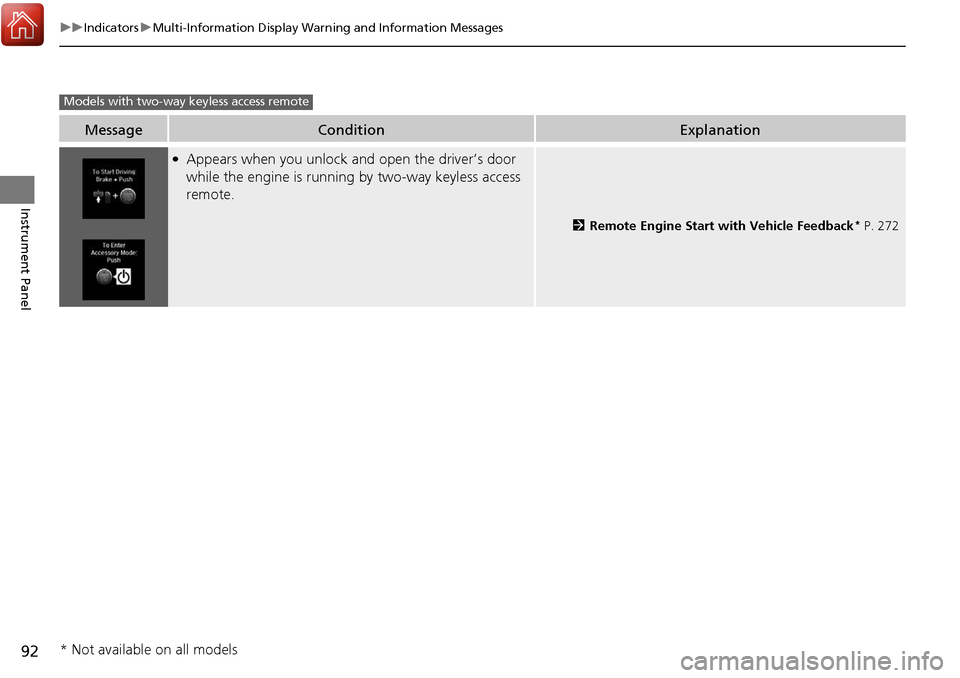
●Appears when you unlock and open the driver’s door
while the engine is running by two-way keyless access
remote.
2Remote Engine Start with Vehicle Feedback* P. 272
Models with two-way keyless access remote
* Not available on all models
Page 101 of 453
uuGauges and Multi-Information Display uMulti-Information Display
100
Instrument Panel
Shows the total number of miles (U.S.) or kilometers (Canada) driven since the last
reset. Meters A and B can be used to measure two separate trips.
■Resetting a trip meter
To reset a trip meter, display it, then press and hold the SEL/RESET button. The trip
meter is reset to 0.0.
Shows the outside temperature in Fahr enheit (U.S.) or Celsius (Canada).
■Adjusting the outside temperature display
Adjust the temperature reading up to ±5°F or ±3°C if the temperature reading
seems incorrect.
Shows the estimated average fuel economy of each trip meter in mpg (U.S.) or l/100
km (Canada). The display is updated at set intervals. When a trip meter is reset, the
average fuel economy is also reset.
Shows the instant fuel economy as a bar gr aph in mpg (U.S.) or l/100 km (Canada).
■Trip Meter
■Outside Temperature
■Average Fuel Economy
■Instant Fuel Economy
1Trip Meter
Switch between trip meter A and trip meter B by
pressing the SEL/RESET button.
1Outside Temperature
The temperature sensor is in the front bumper.
Road heat and exhaust fr om another vehicle can
affect the temperature reading when your vehicle
speed is less than 19 mph (30 km/h).
It may take several minutes for the display to be
updated after the temperature reading has stabilized.
Use the multi-information display’s customized
features to correct the temperature. 2 Customized Features P. 102, 108
1Average Fuel Economy
You can change when to reset the average fuel
economy.
2 Customized Features P. 102, 108
Page 103 of 453
uuGauges and Multi-Information Display uMulti-Information Display
102
Instrument Panel
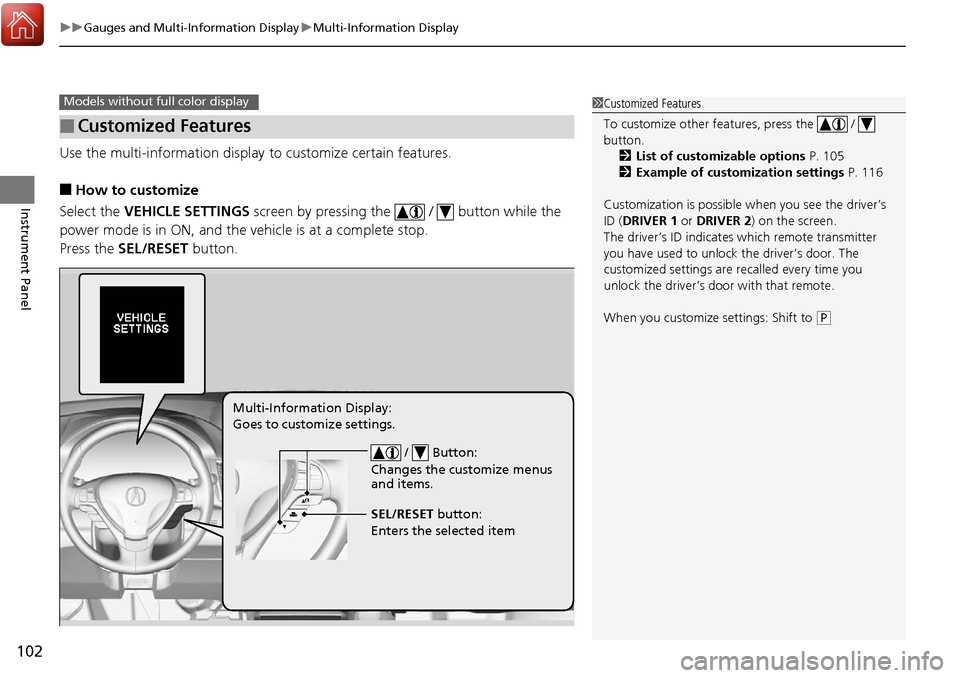
Use the multi-information display to customize certain features.
■How to customize
Select the VEHICLE SETTINGS screen by pressing the / button while the
power mode is in ON, and the vehicle is at a complete stop.
Press the SEL/RESET button.
■Customized Features
Models without fu ll color display1Customized Features
To customize other features, press the /
button.
2 List of customizable options P. 105
2 Example of customization settings P. 116
Customization is possible when you see the driver’s
ID ( DRIVER 1 or DRIVER 2) on the screen.
The driver’s ID indicates which remote transmitter
you have used to unlock the driver’s door. The
customized settings are recalled every time you
unlock the driver’s door with that remote.
When you customize settings: Shift to
( P
/ Button:
Changes the customize menus
and items.
Multi-Information Display:
Goes to customize settings.
SEL/RESET button:
Enters the selected item
Page 104 of 453
103
uuGauges and Multi-Information Display uMulti-Information Display
Continued
Instrument Panel
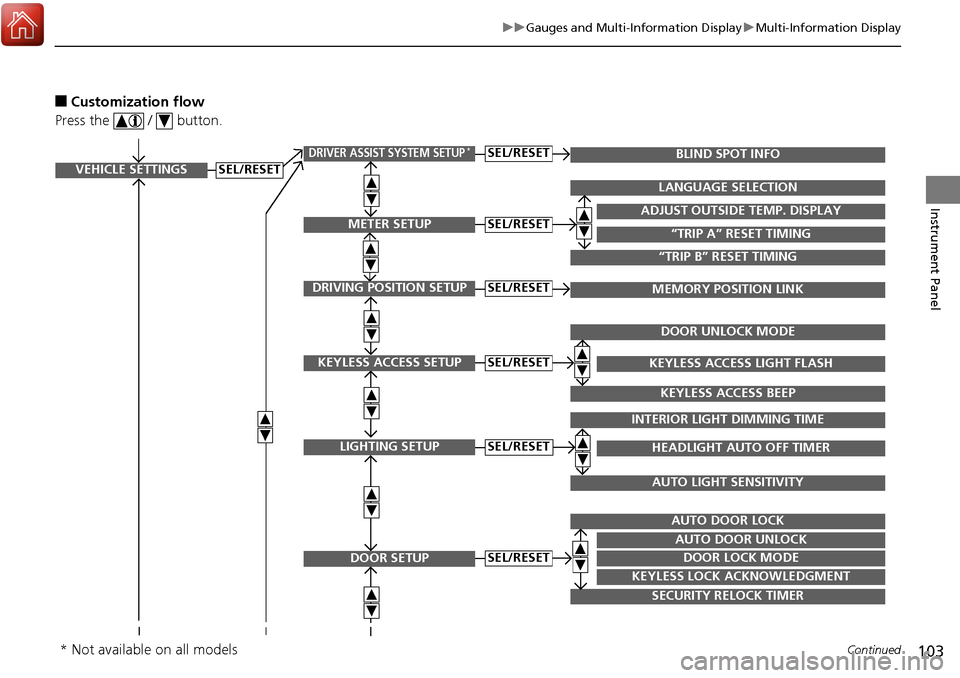
■Customization flow
Press the / button.
VEHICLE SETTINGS
METER SETUP
DRIVING POSITION SETUP
KEYLESS ACCESS SETUP
LIGHTING SETUP
DOOR SETUP
“TRIP A” RESET TIMING
ADJUST OUTSIDE TEMP. DISPLAY
LANGUAGE SELECTION
“TRIP B” RESET TIMING
MEMORY POSITION LINK
KEYLESS ACCESS LIGHT FLASH
DOOR UNLOCK MODE
KEYLESS ACCESS BEEP
HEADLIGHT AUTO OFF TIMER
INTERIOR LIGHT DIMMING TIME
AUTO LIGHT SENSITIVITY
DOOR LOCK MODE
AUTO DOOR UNLOCK
AUTO DOOR LOCK
KEYLESS LOCK ACKNOWLEDGMENT
SECURITY RELOCK TIMER
SEL/RESET
SEL/RESET
SEL/RESET
SEL/RESET
SEL/RESET
SEL/RESET
DRIVER ASSIST SYSTEM SETUP*BLIND SPOT INFOSEL/RESET
* Not available on all models
Page 106 of 453
105
uuGauges and Multi-Information Display uMulti-Information Display
Continued
Instrument Panel
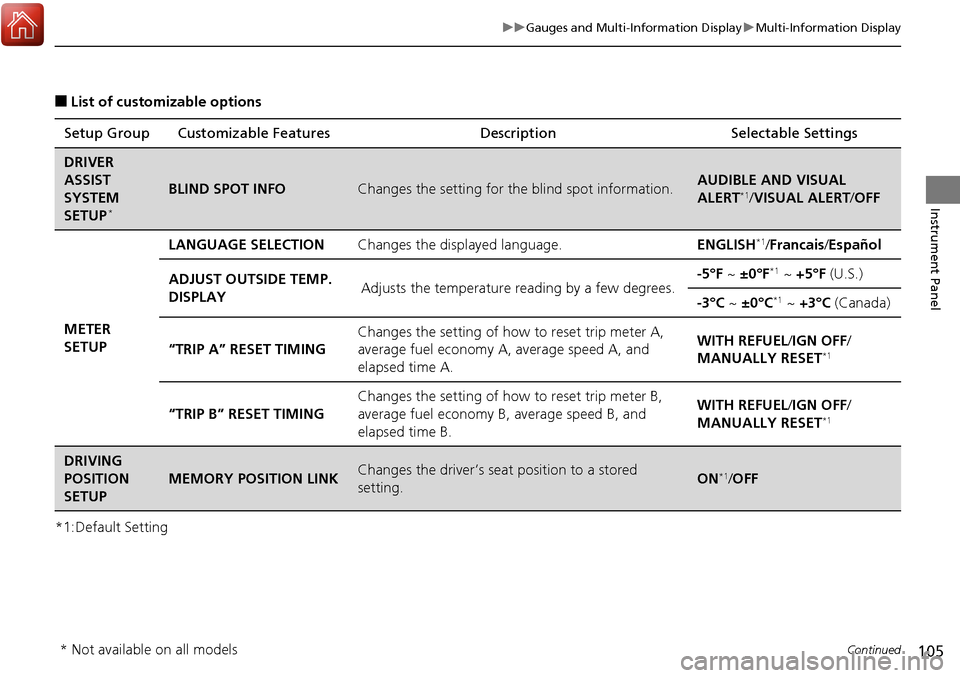
■List of customizable options
*1:Default Setting Setup Group Customizable Features
Description Selectable Settings
DRIVER
ASSIST
SYSTEM
SETUP
*
BLIND SPOT INFOChanges the setting for the blind spot information.AUDIBLE AND VISUAL
ALERT*1/VISUAL ALERT /OFF
METER
SETUP LANGUAGE SELECTION
Changes the displayed language. ENGLISH
*1/Francais /Español
ADJUST OUTSIDE TEMP.
DISPLAY Adjusts the temperature reading by a few degrees. -5°F ~
±0°F
*1 ~ +5°F (U.S.)
-3°C ~ ±0°C
*1 ~ +3°C (Canada)
“TRIP A” RESET TIMING Changes the setting of how to reset trip meter A,
average fuel economy A,
average speed A, and
elapsed time A. WITH REFUEL/
IGN OFF/
MANUALLY RESET
*1
“TRIP B” RESET TIMING Changes the setting of ho
w to reset trip meter B,
average fuel economy B, average speed B, and
elapsed time B. WITH REFUEL/
IGN OFF/
MANUALLY RESET*1
DRIVING
POSITION
SETUP
MEMORY POSITION LINKChanges the driver’s seat position to a stored
setting.ON*1/ OFF
* Not available on all models
Page 107 of 453
106
uuGauges and Multi-Information Display uMulti-Information Display
Instrument Panel
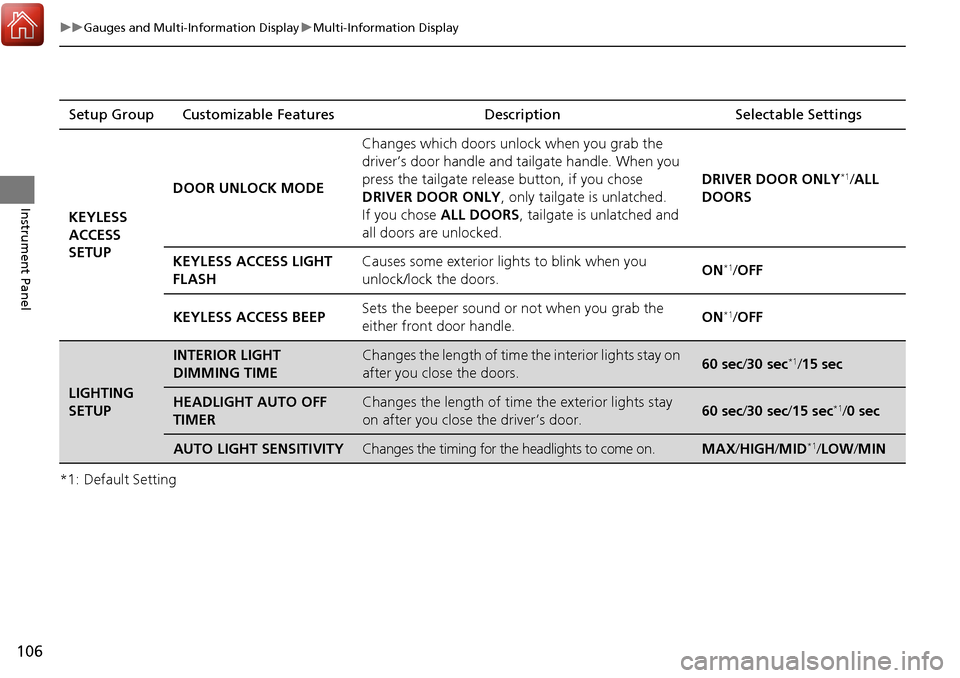
*1: Default SettingSetup Group Customizable Features Description Selectable Settings
KEYLESS
ACCESS
SETUP DOOR UNLOCK MODE
Changes which doors unlock when you grab the
driver’s door handle and
tailgate handle. When you
press the tailgate release button, if you chose
DRIVER DOOR ONLY , only tailgate is unlatched.
If you chose ALL DOORS , tailgate is unlatched and
all doors are unlocked. DRIVER DOOR ONLY
*1/
ALL
DOORS
KEYLESS ACCESS LIGHT
FLASH Causes some exterior lights to blink when you
unlock/lock the doors.
ON
*1/
OFF
KEYLESS ACCESS BEEP Sets the beeper sound or not when you grab the
either front door handle. ON
*1/
OFF
LIGHTING
SETUP
INTERIOR LIGHT
DIMMING TIMEChanges the length of time the interior lights stay on
after you close the doors.60 sec/ 30 sec*1/15 sec
HEADLIGHT AUTO OFF
TIMERChanges the length of time the exterior lights stay
on after you close the driver’s door.60 sec/ 30 sec/15 sec*1/0 sec
AUTO LIGHT SENSITIVITYChanges the timing for the headlights to come on.MAX /HIGH /MID*1/ LOW /MIN
Page 108 of 453
107
uuGauges and Multi-Information Display uMulti-Information Display
Continued
Instrument Panel
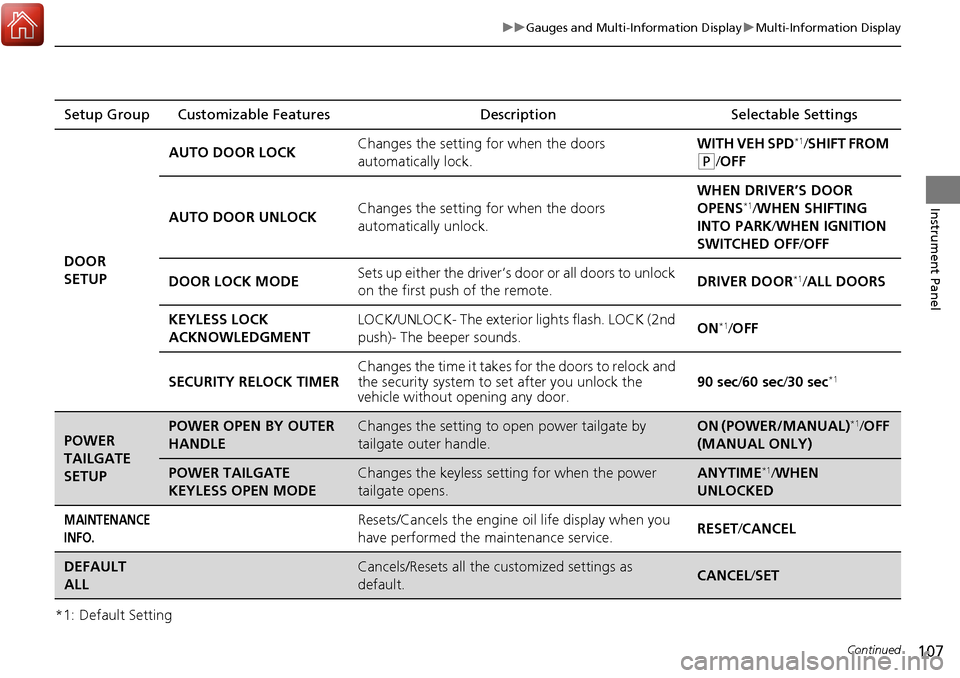
*1: Default SettingSetup Group Customizable Features
Description Selectable Settings
DOOR
SETUP AUTO DOOR LOCK
Changes the setting for when the doors
automatically lock. WITH VEH SPD
*1/
SHIFT FROM
(P/OFF
AUTO DOOR UNLOCK Changes the setting for when the doors
automatically unlock. WHEN DRIVER’S DOOR
OPENS
*1/
WHEN SHIFTING
INTO PARK/ WHEN IGNITION
SWITCHED OFF /OFF
DOOR LOCK MODE Sets up either the driver’s door or all doors to unlock
on the first push of the remote. DRIVER DOOR
*1/
ALL DOORS
KEYLESS LOCK
ACKNOWLEDGMENT LOCK/UNLOCK- The exterior
lights flash. LOCK (2nd
push)- The beeper sounds. ON
*1/
OFF
SECURITY RELOCK TIMER Changes the time it takes for the doors to relock and
the security system to set after you unlock the
vehicle without op
ening any door. 90 sec
/60 sec/ 30 sec
*1
POWER
TAILGATE
SETUPPOWER OPEN BY OUTER
HANDLEChanges the setting to open power tailgate by
tailgate outer handle.ON (POWER/MANUAL)*1/OFF
(MANUAL ONLY)
POWER TAILGATE
KEYLESS OPEN MODEChanges the keyless setting for when the power
tailgate opens.ANYTIME*1/ WHEN
UNLOCKED
MAINTENANCE
INFO.Resets/Cancels the engine oil life display when you
have performed the maintenance service. RESET
/CANCEL
DEFAULT
ALLCancels/Resets all the customized settings as
default.CANCEL /SET
Page 109 of 453
uuGauges and Multi-Information Display uMulti-Information Display
108
Instrument Panel
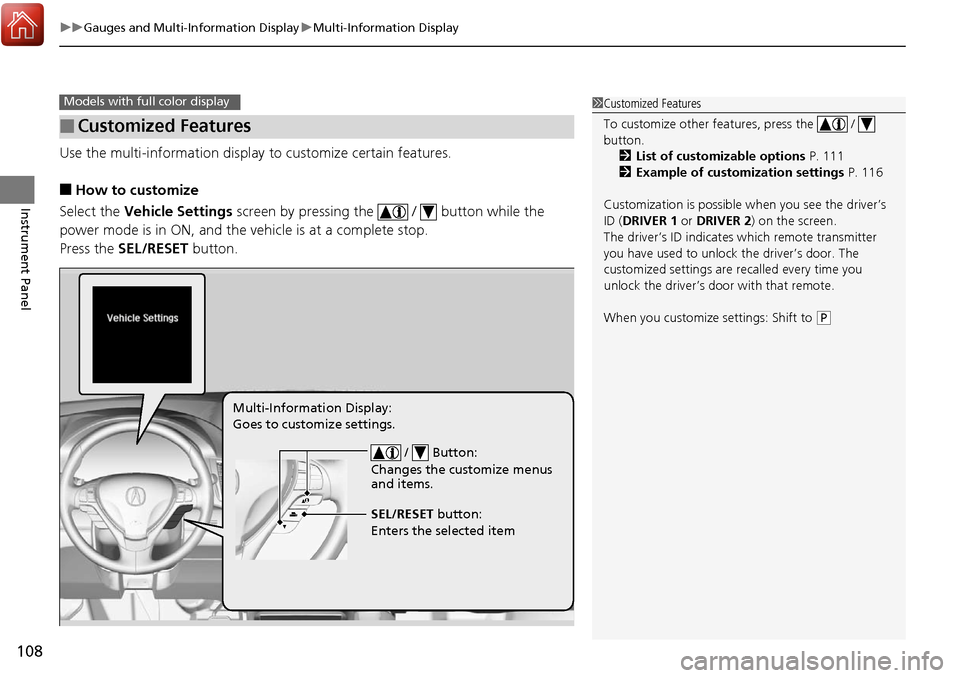
Use the multi-information display to customize certain features.
■How to customize
Select the Vehicle Settings screen by pressing the / button while the
power mode is in ON, and the vehicle is at a complete stop.
Press the SEL/RESET button.
■Customized Features
Models with full color display1Customized Features
To customize other features, press the /
button.
2 List of customizable options P. 111
2 Example of customization settings P. 116
Customization is possible when you see the driver’s
ID ( DRIVER 1 or DRIVER 2) on the screen.
The driver’s ID indicates which remote transmitter
you have used to unlock the driver’s door. The
customized settings are recalled every time you
unlock the driver’s door with that remote.
When you customize settings: Shift to
( P
/ Button:
Changes the customize menus
and items.
Multi-Information Display:
Goes to customize settings.
SEL/RESET button:
Enters the selected item
Page 110 of 453
109
uuGauges and Multi-Information Display uMulti-Information Display
Continued
Instrument Panel
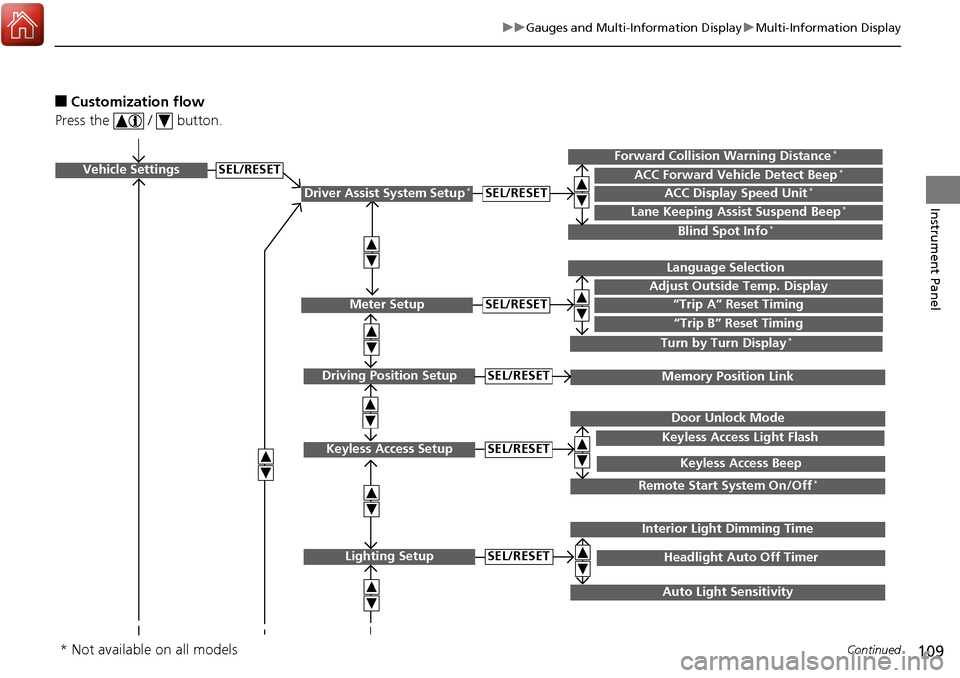
■Customization flow
Press the / button.
Vehicle Settings
Meter Setup
Keyless Access Setup
Lighting Setup
“Trip A” Reset Timing
Adjust Outside Temp. Display
Language Selection
“Trip B” Reset Timing
Keyless Access Light Flash
Door Unlock Mode
Keyless Access Beep
Headlight Auto Off Timer
Interior Light Dimming Time
Auto Light Sensitivity
SEL/RESET
SEL/RESET
SEL/RESET
SEL/RESET
Remote Start System On/Off*
Driver Assist System Setup*ACC Display Speed Unit*ACC Forward Vehicle Detect Beep*Forward Collision Warning Distance*
Lane Keeping Assist Suspend Beep*
Blind Spot Info*
SEL/RESET
Turn by Turn Display*
Driving Position SetupMemory Position LinkSEL/RESET
* Not available on all models
Page 112 of 453
111
uuGauges and Multi-Information Display uMulti-Information Display
Continued
Instrument Panel
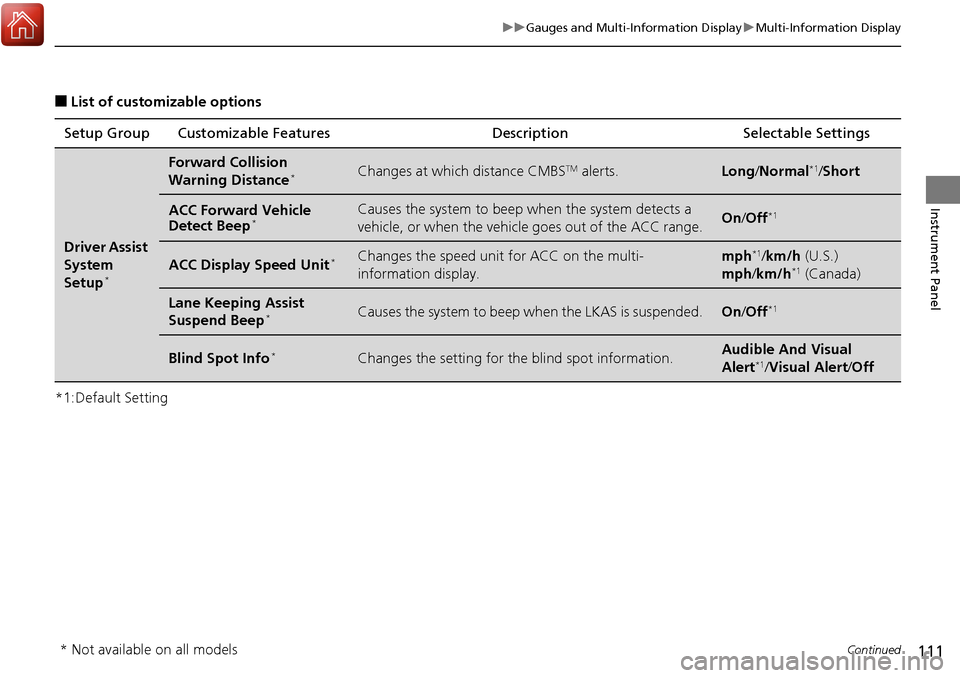
■List of customizable options
*1:Default Setting Setup Group Customizable Features
Description Selectable Settings
Driver Assist
System
Setup
*
Forward Collision
Warning Distance*Changes at which distance CMBSTM alerts.Long/Normal*1/Short
ACC Forward Vehicle
Detect Beep*Causes the system to beep when the system detects a
vehicle, or when the vehicl e goes out of the ACC range.On/Off*1
ACC Display Speed Unit*Changes the speed unit for ACC on the multi-
information display.mph*1/km/h (U.S.)
mph /km/h*1 (Canada)
Lane Keeping Assist
Suspend Beep*Causes the system to beep when the LKAS is suspended.On/Off*1
Blind Spot Info*Changes the setting for th e blind spot information.Audible And Visual
Alert*1/Visual Alert /Off
* Not available on all models