power mode Acura RDX 2018 Manual PDF
[x] Cancel search | Manufacturer: ACURA, Model Year: 2018, Model line: RDX, Model: Acura RDX 2018Pages: 453, PDF Size: 20.13 MB
Page 211 of 453
210
uuAudio System Basic Operation*uPlaying Pandora®
Features
Playing Pandora ®
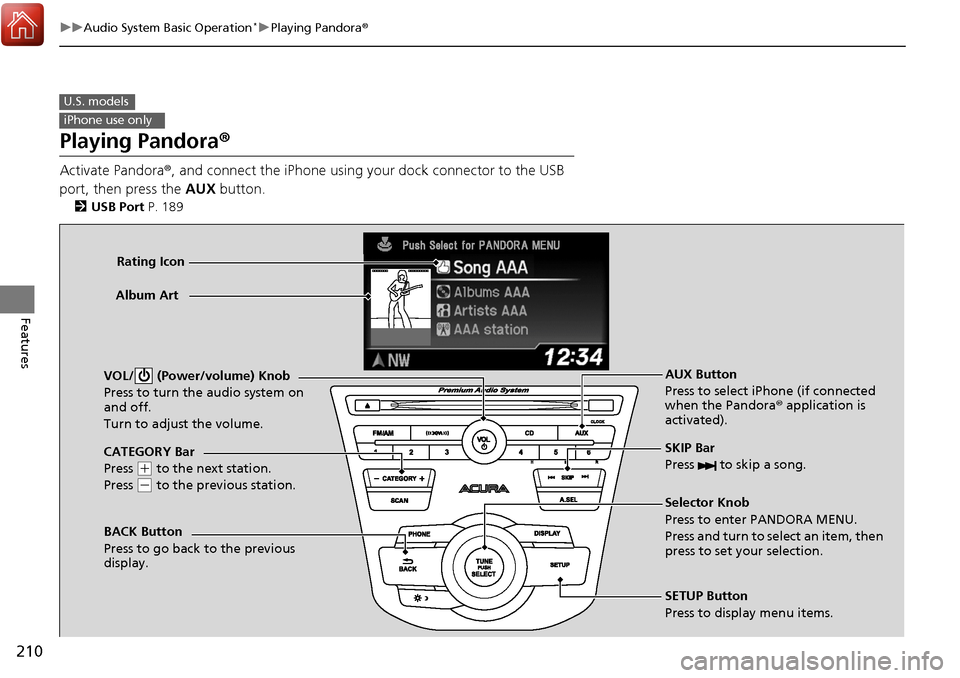
Activate Pandora®, and connect the iPhone using your dock connector to the USB
port, then press the AUX button.
2USB Port P. 189
U.S. models
iPhone use only
CATEGORY Bar
Press
(+ to the next station.
Press
( - to the previous station.
VOL/ (Power/volume) Knob
Press to turn the audio system on
and off.
Turn to adjust the volume.
SKIP Bar
Press to skip a song.
SETUP Button
Press to display menu items. Selector Knob
Press to enter PANDORA MENU.
Press and turn to select an item, then
press to set your selection. AUX Button
Press to select iPhone (if connected
when the Pandora®
application is
activated).
Album Art
Rating Icon
BACK Button
Press to go back to the previous
display.
Page 216 of 453
215
uuAudio System Basic Operation*uPlaying Bluetooth ® Audio
Continued
Features
Playing Bluetooth ® Audio
Your audio system allows you to listen to music from your Bluetooth-compatible
phone.
This function is available when the phone is paired and linked to the vehicle’s
Bluetooth ® HandsFreeLink ® (HFL) system.
2Phone Setup P. 233
1Playing Bluetooth ® Audio
Not all Bluetooth -enabled phones with streaming
audio capabilities are compatible with the system.
For a list of compatible phones:
•U.S.: Visit www.acura.com/handsfreelink , or call 1-
888-528-7876.
•Canada: Visit www.handsfreelink.ca , or call 1-888-
528-7876.
In some states, it may be il legal to perform some data
device functions while driving.
If more than one phone is paired to the HFL system,
there will be a delay before the system begins to play.
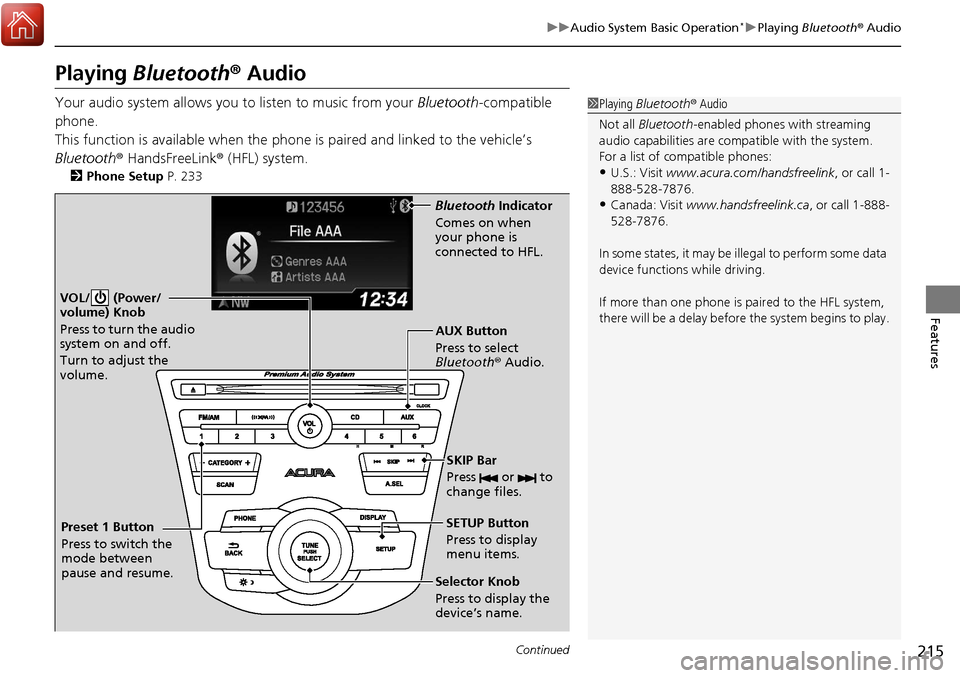
VOL/ (Power/
volume) Knob
Press to turn the audio
system on and off.
Turn to adjust the
volume.
SETUP Button
Press to display
menu items.
Selector Knob
Press to display the
device’s name. AUX Button
Press to select
Bluetooth® Audio.
SKIP Bar
Press or to
change files.
Bluetooth Indicator
Comes on when
your phone is
connected to HFL.
Preset 1 Button
Press to switch the
mode between
pause and resume.
Page 229 of 453
228
uuBluetooth ® HandsFreeLink ®u HFL Menus
Features
HFL Menus
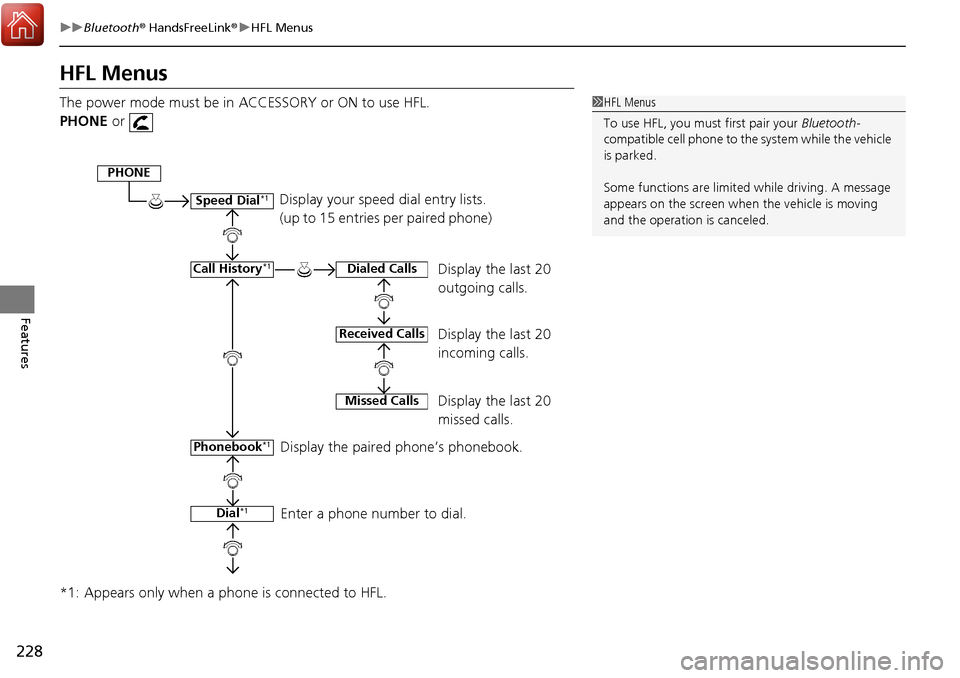
The power mode must be in ACCESSORY or ON to use HFL.
PHONE or
*1: Appears only when a phone is connected to HFL.1 HFL Menus
To use HFL, you must first pair your Bluetooth-
compatible cell phone to th e system while the vehicle
is parked.
Some functions are limited while driving. A message
appears on the screen when the vehicle is moving
and the operation is canceled.
Display your speed dial entry lists.
(up to 15 entries per paired phone)
Display the last 20
outgoing calls.
Display the last 20
incoming calls.
Display the last 20
missed calls.
Display the paired phone’s phonebook.
Enter a phone number to dial.
PHONE
Speed Dial*1
Call History*1
Phonebook*1
Dial*1
Dialed Calls
Received Calls
Missed Calls
Page 256 of 453
255
Features
Compass*
When you set the power mode to ON, the compass self-calibrates, and the compass
display appears.
Compass Calibration
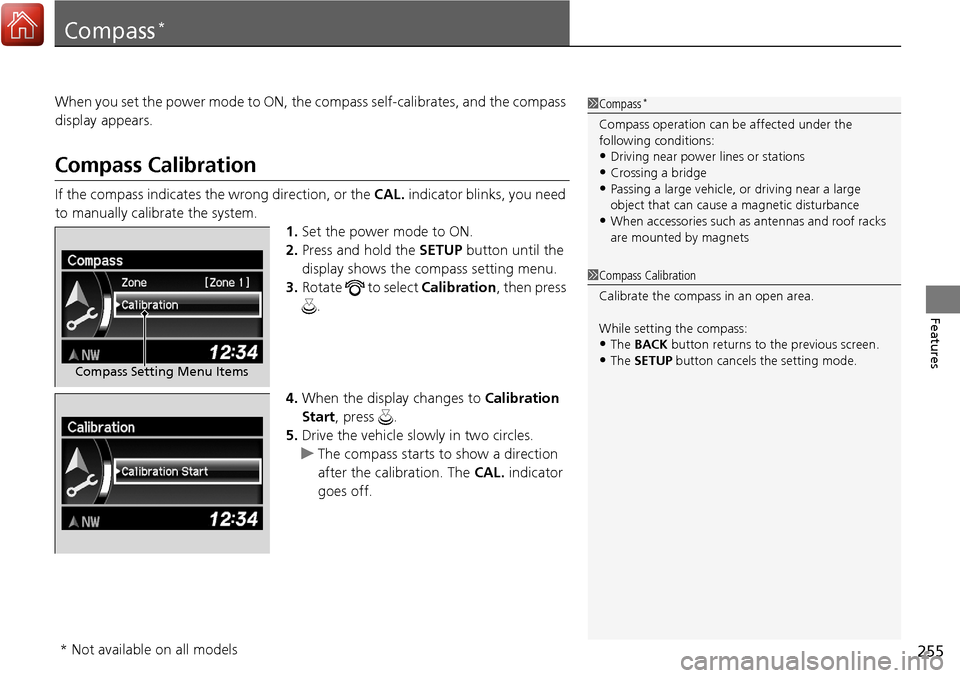
If the compass indicates the wrong direction, or the CAL. indicator blinks, you need
to manually calibrate the system.
1.Set the power mode to ON.
2. Press and hold the SETUP button until the
display shows the compass setting menu.
3. Rotate to select Calibration, then press
.
4. When the display changes to Calibration
Start, press .
5. Drive the vehicle slow ly in two circles.
u The compass starts to show a direction
after the calibration. The CAL. indicator
goes off.
1 Compass*
Compass operation can be affected under the
following conditions:
•Driving near power lines or stations•Crossing a bridge
•Passing a large vehicle, or driving near a large
object that can cause a magnetic disturbance
•When accessories such as antennas and roof racks
are mounted by magnets
Compass Setting Menu Items
1 Compass Calibration
Calibrate the compass in an open area.
While setting the compass:
•The BACK button returns to the previous screen.•The SETUP button cancels the setting mode.
* Not available on all models
Page 257 of 453
256
uuCompass*uCompass Zone Selection
Features
Compass Zone Selection
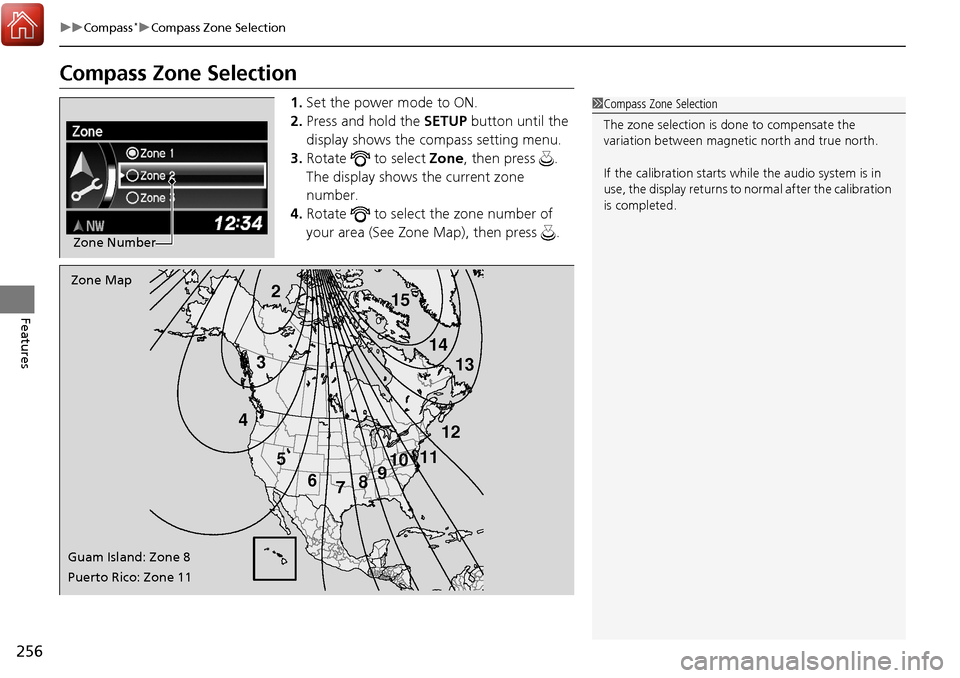
1. Set the power mode to ON.
2. Press and hold the SETUP button until the
display shows the compass setting menu.
3. Rotate to select Zone, then press .
The display shows the current zone
number.
4. Rotate to select the zone number of
your area (See Zone Map), then press .
Zone Number
2
3
4 5678910
111213
14
15Zone Map
Guam Island: Zone 8
Puerto Rico: Zone 11
1 Compass Zone Selection
The zone selection is done to compensate the
variation between magneti c north and true north.
If the calibration starts while the audio system is in
use, the display returns to normal after the calibration
is completed.
Page 273 of 453
uuWhen Driving uStarting the Engine
272
Driving
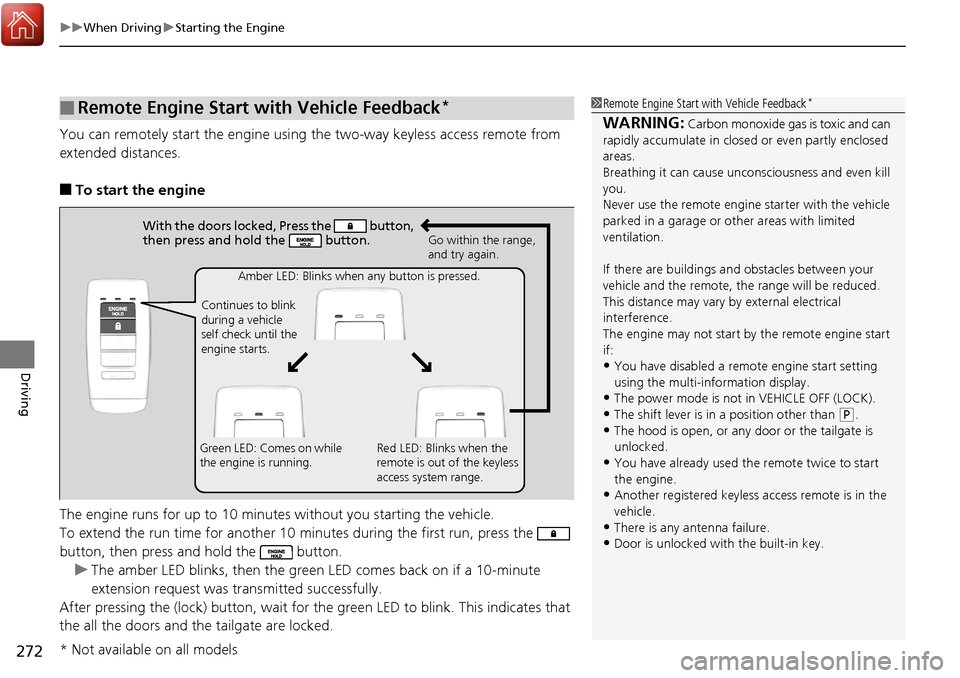
You can remotely start the engine using the two-way keyless access remote from
extended distances.
■To start the engine
The engine runs for up to 10 minutes without you starting the vehicle.
To extend the run time for another 10 minutes during the first run, press the
button, then press and hold the button. u The amber LED blinks, then the green LED comes back on if a 10-minute
extension request was transmitted successfully.
After pressing the (lock) button, wait for th e green LED to blink. This indicates that
the all the doors and the tailgate are locked.
■Remote Engine Start with Vehicle Feedback*1 Remote Engine Start with Vehicle Feedback*
WARNING: Carbon monoxide gas is toxic and can
rapidly accumulate in closed or even partly enclosed
areas.
Breathing it can cause unc onsciousness and even kill
you.
Never use the remote engine starter with the vehicle
parked in a garage or other areas with limited
ventilation.
If there are buildings an d obstacles between your
vehicle and the remote, th e range will be reduced.
This distance may vary by external electrical
interference.
The engine may not start by the remote engine start
if:
•You have disabled a remo te engine start setting
using the multi-information display.
•The power mode is not in VEHICLE OFF (LOCK).
•The shift lever is in a position other than ( P.
•The hood is open, or any door or the tailgate is
unlocked.
•You have already used the remote twice to start
the engine.
•Another registered keyless access remote is in the
vehicle.
•There is any antenna failure.•Door is unlocked with the built-in key.
With the doors locked, Press the button,
then press and hold the button.
Amber LED: Blinks when any button is pressed.
Continues to blink
during a vehicle
self check until the
engine starts. Go within the range,
and try again.
Green LED: Comes on while
the engine is running. Red LED: Blinks when the
remote is out of the keyless
access system range.
* Not available on all models
Page 276 of 453
275
uuWhen Driving uPrecautions While Driving
Driving
Precautions While Driving
Utility vehicles have a significantly higher rollover rate than other types of vehicles.
To prevent rollovers or loss of control:
• Take corners at slower speeds than yo u would with a passenger vehicle.
• Avoid sharp turns and abrupt maneuvers whenever possible.
• Do not modify your vehicle in any way th at you would raise the center of gravity.
• Never carry more than 165 lbs (75 kg) of ca rgo on the roof rack (Acura accessory).
Avoid driving in deep water and on flooded roads. This can damage the engine,
driveline, or cause electrical component failure.
If there is a strong impact with something un der the vehicle, stop in a safe location.
Check the underside of the vehicle for damage or any fluid leaks.
■Driving Guidelines for Your Utility Vehicle
■In Rain
■Other Precautions
1 Driving Guidelines for Your Utility Vehicle
Failure to operate your vehicle correctly might result
in a crash or a rollover. 2 Important Handling Information P. 28
1Precautions While Driving
NOTICE
Do not operate the shift lever while pressing the
accelerator pedal. You could damage the transmission.
NOTICE
If you repeatedly turn the steering wheel at an
extremely low speed, or hold the steering wheel on the
full left or right position for a while, the electric power
steering (EPS) system heats up . The system goes into a
protective mode, and limits its performance. The
steering wheel becomes harder and harder to operate.
Once the system cools down, the EPS system is restored.
Repeated operation under these conditions can
eventually damage the system.
If the power mode is set to ACCESSORY while
driving, the engine will shut down and all steering
and brake power assist functi ons will stop, making it
difficult to control the vehicle.
Do not put the shift lever in
( N, as you will lose
engine braking (and acce leration) performance.
During the first 600 miles (1,000 km) of operation,
avoid sudden acceleration or full throttle operation so
as not to damage the engine or powertrain.
Avoid hard braking for the first 200 miles (300 km). You
should also follow this when the brake pads are replaced.
Page 305 of 453
uuWhen Driving uLane Keeping Assist System (LKAS)*
304
Driving
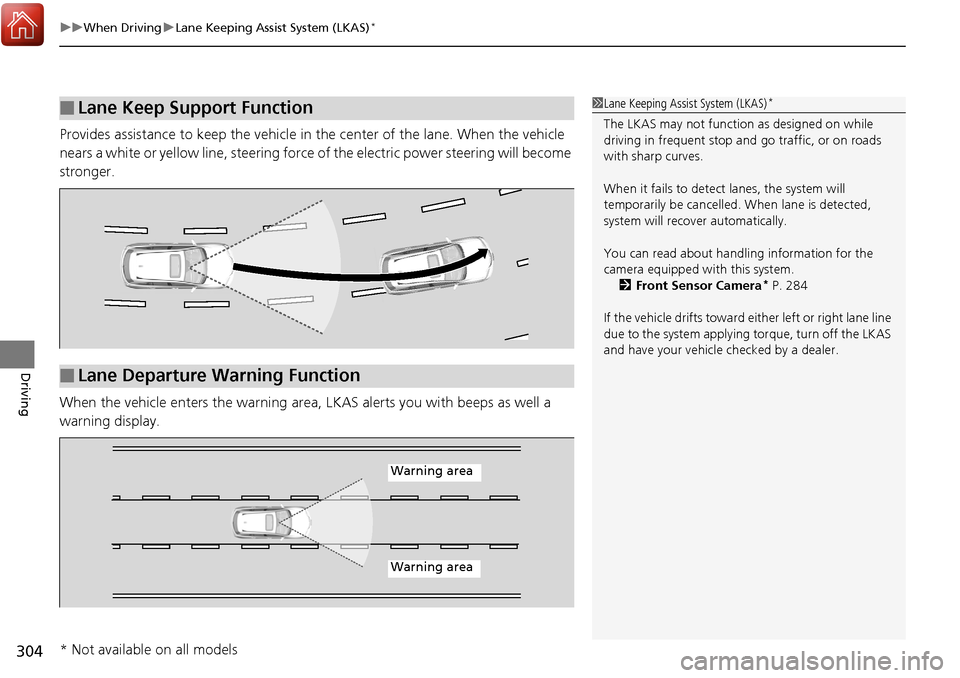
Provides assistance to keep the vehicle in the center of the lane. When the vehicle
nears a white or yellow line, steering force of the electric power steering will become
stronger.
When the vehicle enters th e warning area, LKAS alerts you with beeps as well a
warning display.
■Lane Keep Support Function1 Lane Keeping Assist System (LKAS)*
The LKAS may not functi on as designed on while
driving in frequent stop and go traffic, or on roads
with sharp curves.
When it fails to detect lanes, the system will
temporarily be cancelled. When lane is detected,
system will recover automatically.
You can read about handling information for the
camera equipped with this system. 2 Front Sensor Camera
* P. 284
If the vehicle drifts toward ei ther left or right lane line
due to the system applying torque, turn off the LKAS
and have your vehicle checked by a dealer.
■Lane Departure Warning Function
Warning area
Warning area
* Not available on all models
Page 317 of 453
316
uuWhen Driving uAll-Wheel Drive (AWD) with Intelligent Control System*
Driving
All-Wheel Drive (AWD) with Intelligent Control System*
Your vehicle is equipped with the AWD wi th intelligent control system. When the
system senses a loss of front wheel tracti on, it automatically transfers some power
to the rear wheels. This allows you to ut ilize all available traction and may increase
mobility.
You still need to exercise the same care when accelerating, steering, and braking
that you would in a two wheel drive vehicle.
If you excessively spin all four wheels and overheat the AWD with intelligent control
system, only the front wheels receive power. Stop until the system cools down.
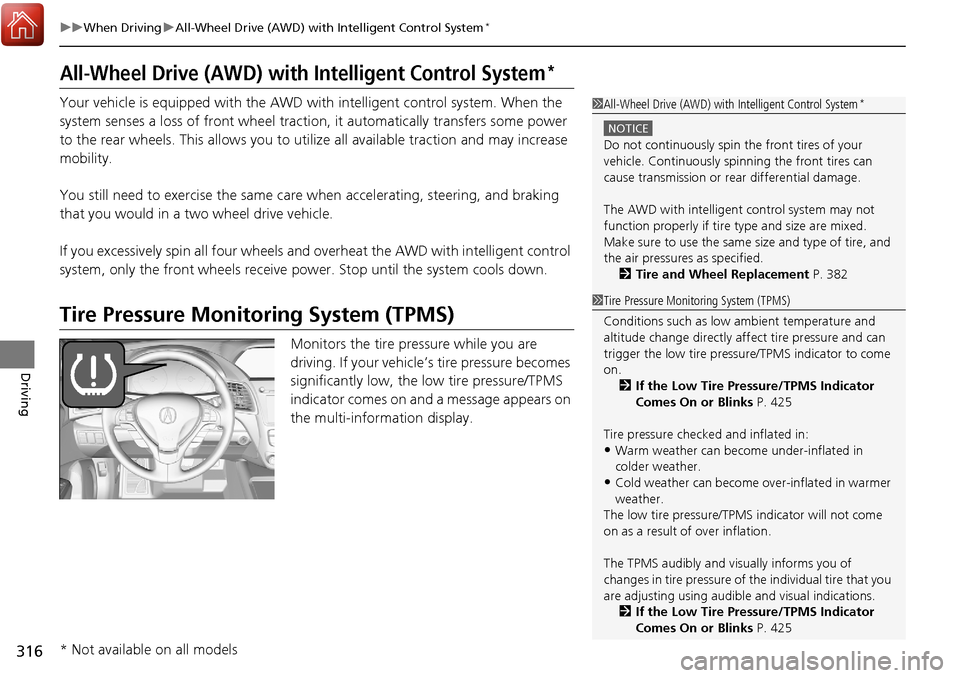
Tire Pressure Monitoring System (TPMS)
Monitors the tire pressure while you are
driving. If your vehicle’s tire pressure becomes
significantly low, the low tire pressure/TPMS
indicator comes on and a message appears on
the multi-information display.
1 All-Wheel Drive (AWD) with Intelligent Control System*
NOTICE
Do not continuously spin the front tires of your
vehicle. Continuously spinning the front tires can
cause transmission or re ar differential damage.
The AWD with intelligent control system may not
function properly if tire ty pe and size are mixed.
Make sure to use the same size and type of tire, and
the air pressures as specified.
2 Tire and Wheel Replacement P. 382
1Tire Pressure Monitoring System (TPMS)
Conditions such as low ambient temperature and
altitude change directly affect tire pressure and can
trigger the low tire pressure/TPMS indicator to come
on.
2 If the Low Tire Pressure/TPMS Indicator
Comes On or Blinks P. 425
Tire pressure checked and inflated in:
•Warm weather can beco me under-inflated in
colder weather.
•Cold weather can become over-inflated in warmer
weather.
The low tire pressure/TPMS indicator will not come
on as a result of over inflation.
The TPMS audibly and visually informs you of
changes in tire pressure of the individual ti re that you
are adjusting using audibl e and visual indications.
2 If the Low Tire Pressure/TPMS Indicator
Comes On or Blinks P. 425
* Not available on all models
Page 318 of 453
317
uuWhen Driving uTire Pressure Monitoring System (TPMS)
Driving
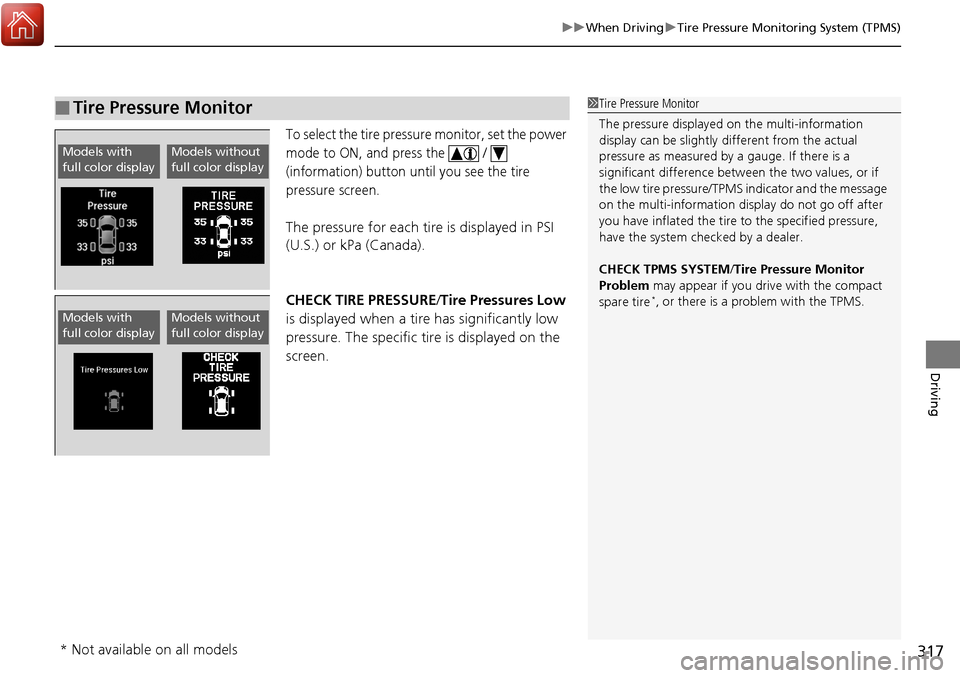
To select the tire pressure monitor, set the power
mode to ON, and press the /
(information) button until you see the tire
pressure screen.
The pressure for each tire is displayed in PSI
(U.S.) or kPa (Canada).
CHECK TIRE PRESSURE /Tire Pressures Low
is displayed when a tire has significantly low
pressure. The specific tire is displayed on the
screen.
■Tire Pressure Monitor1 Tire Pressure Monitor
The pressure displayed on the multi-information
display can be slightly different from the actual
pressure as measured by a gauge. If there is a
significant di fference between the two values, or if
the low tire pressure/TPMS indicator and the message
on the multi-information di splay do not go off after
you have inflated the tire to the specified pressure,
have the system checked by a dealer.
CHECK TPMS SYSTEM /Tire Pressure Monitor
Problem may appear if you drive with the compact
spare tire
*, or there is a problem with the TPMS.
Models with
full color displayModels without
full color display
Models with
full color displayModels without
full color display
* Not available on all models