Starter Acura RDX 2018 Owner's Manual
[x] Cancel search | Manufacturer: ACURA, Model Year: 2018, Model line: RDX, Model: Acura RDX 2018Pages: 453, PDF Size: 20.13 MB
Page 273 of 453
uuWhen Driving uStarting the Engine
272
Driving
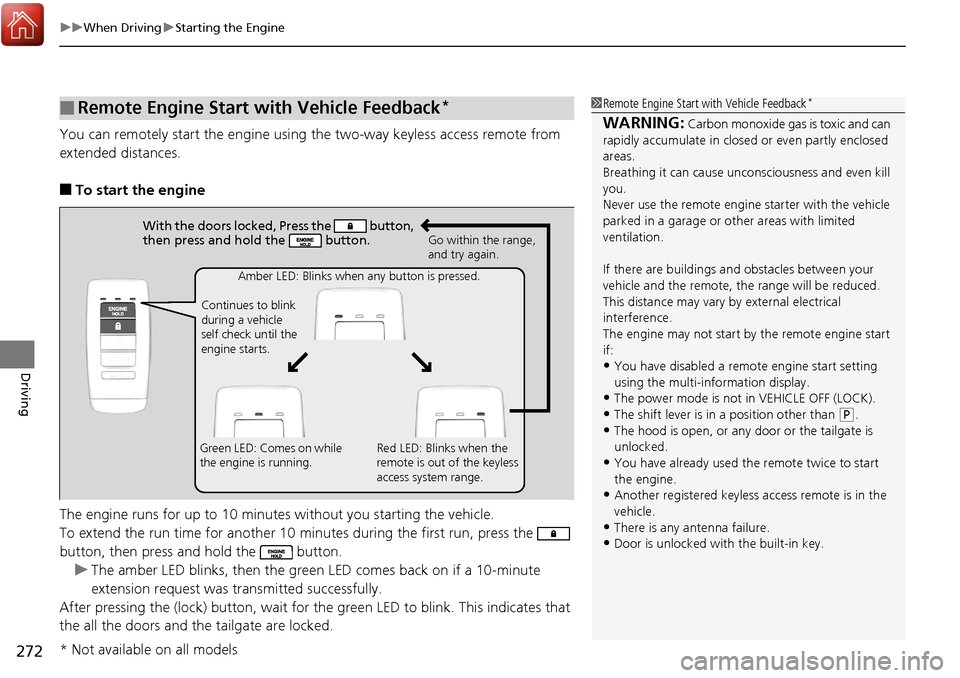
You can remotely start the engine using the two-way keyless access remote from
extended distances.
■To start the engine
The engine runs for up to 10 minutes without you starting the vehicle.
To extend the run time for another 10 minutes during the first run, press the
button, then press and hold the button. u The amber LED blinks, then the green LED comes back on if a 10-minute
extension request was transmitted successfully.
After pressing the (lock) button, wait for th e green LED to blink. This indicates that
the all the doors and the tailgate are locked.
■Remote Engine Start with Vehicle Feedback*1 Remote Engine Start with Vehicle Feedback*
WARNING: Carbon monoxide gas is toxic and can
rapidly accumulate in closed or even partly enclosed
areas.
Breathing it can cause unc onsciousness and even kill
you.
Never use the remote engine starter with the vehicle
parked in a garage or other areas with limited
ventilation.
If there are buildings an d obstacles between your
vehicle and the remote, th e range will be reduced.
This distance may vary by external electrical
interference.
The engine may not start by the remote engine start
if:
•You have disabled a remo te engine start setting
using the multi-information display.
•The power mode is not in VEHICLE OFF (LOCK).
•The shift lever is in a position other than ( P.
•The hood is open, or any door or the tailgate is
unlocked.
•You have already used the remote twice to start
the engine.
•Another registered keyless access remote is in the
vehicle.
•There is any antenna failure.•Door is unlocked with the built-in key.
With the doors locked, Press the button,
then press and hold the button.
Amber LED: Blinks when any button is pressed.
Continues to blink
during a vehicle
self check until the
engine starts. Go within the range,
and try again.
Green LED: Comes on while
the engine is running. Red LED: Blinks when the
remote is out of the keyless
access system range.
* Not available on all models
Page 415 of 453
414
Handling the Unexpected
Engine Does Not Start
Checking the Engine
If the engine does not start, check the starter.
Starter conditionChecklist
Starter doesn’t turn or turns
over slowly.
The battery may be dead. Check
each of the items on the right and
respond accordingly.Check for a message on the multi-information display.
●If the TO START, HOLD REMOTE NEAR START BUTTON /To Start, Hold Remote Near Start
Button message appears
2If the Keyless Access Remote Battery is Weak P. 415
uMake sure the keyless access remo te is in its operating range.
2ENGINE START/STOP Button P. 146
Check brightness of the interior lights.
Turn on the interior lights and check the brightness.
●If the interior lights are dim or do not come on at all
2Battery P. 385●If the interior lights come on normally 2 Fuses P. 426
The starter turns over normally
but the engine doesn’t start.
There may be a problem with the
fuse. Check each of the items on
the right and respond accordingly. Review the engine start procedure.
Follow its instructions, and try to start the engine again.
2
Starting the Engine P. 270
Check the immobilizer system indicator.
When the immobilizer system indicator is blinking, the engine cannot be started.
2Immobilizer System P. 139
Check the fuel level.
There should be enough fuel in the tank.
2 Fuel Gauge P. 95
Check the fuse.
Check all fuses, or have the vehicle checked by a dealer.
2Inspecting and Changing Fuses P. 428
If the problem continues:
2Emergency Towing P. 429
1Checking the Engine
If you must start the vehi cle immediately, use an
assisting vehicle to jump start it.
2 Jump Starting P. 417