engine overheat Acura RDX 2018 Owner's Manual
[x] Cancel search | Manufacturer: ACURA, Model Year: 2018, Model line: RDX, Model: Acura RDX 2018Pages: 453, PDF Size: 20.13 MB
Page 21 of 453
20
Quick Reference Guide
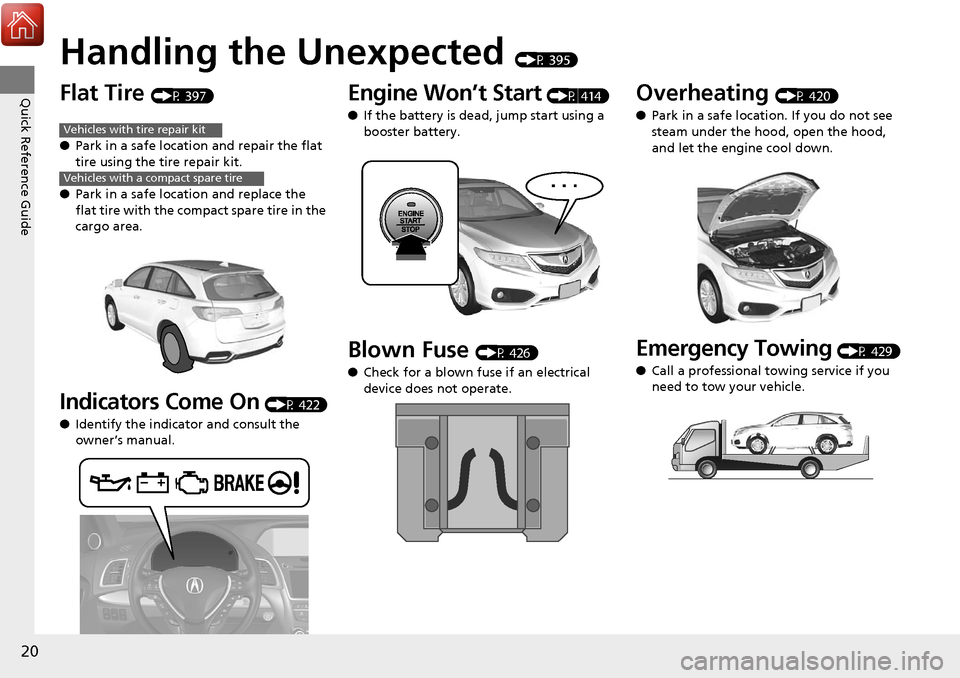
Handling the Unexpected (P 395)
Flat Tire (P 397)
● Park in a safe location and repair the flat
tire using the tire repair kit.
● Park in a safe location and replace the
flat tire with the compact spare tire in the
cargo area.
Indicators Come On (P 422)
● Identify the indicator and consult the
owner’s manual.
Vehicles with tire repair kit
Vehicles with a compact spare tire
Engine Won’t Start (P 414)
● If the battery is dead, jump start using a
booster battery.
Blown Fuse (P 426)
● Check for a blown fuse if an electrical
device does not operate.
Overheating (P 420)
● Park in a safe location. If you do not see
steam under the hood, open the hood,
and let the engine cool down.
Emergency Towing (P 429)
● Call a professional towing service if you
need to tow your vehicle.
Page 73 of 453
72
uuIndicators u
Instrument Panel
*1:On the left: Models without full color display
On the right: Models with full color display
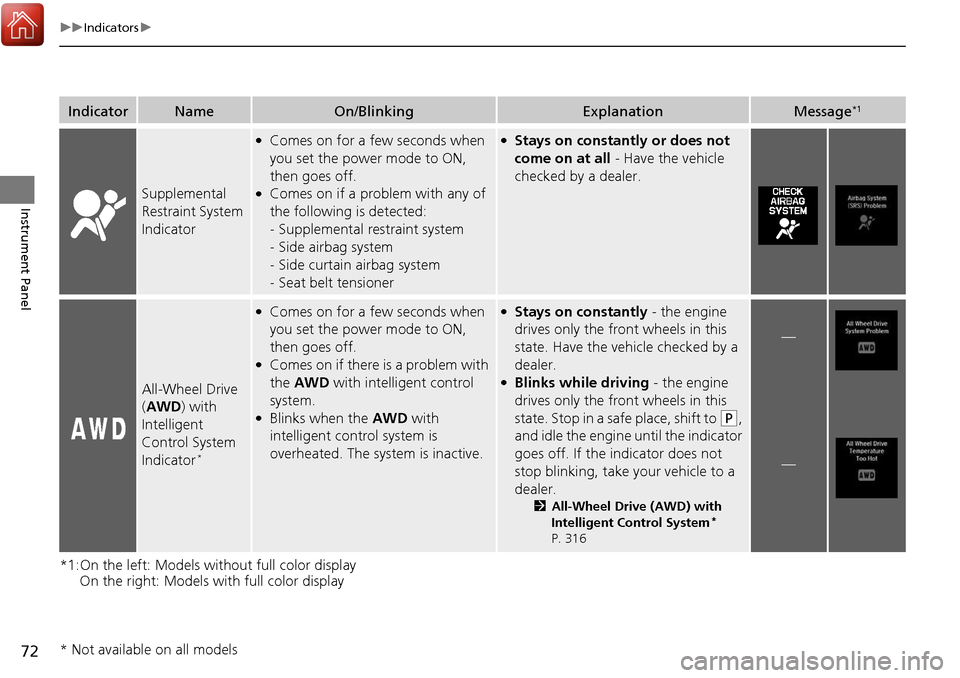
IndicatorNameOn/BlinkingExplanationMessage*1
Supplemental
Restraint System
Indicator
●Comes on for a few seconds when
you set the power mode to ON,
then goes off.
●Comes on if a problem with any of
the following is detected:
-Supplemental restraint system
- Side airbag system
- Side curtain airbag system
- Seat belt tensioner
●Stays on constantly or does not
come on at all - Have the vehicle
checked by a dealer.
All-Wheel Drive
( AWD ) with
Intelligent
Control System
Indicator
*
●Comes on for a few seconds when
you set the power mode to ON,
then goes off.
●Comes on if there is a problem with
the AWD with intelligent control
system.
●Blinks when the AWD with
intelligent control system is
overheated. The system is inactive.
●Stays on constantly - the engine
drives only the front wheels in this
state. Have the vehicle checked by a
dealer.
●Blinks while driving - the engine
drives only the front wheels in this
state. Stop in a safe place, shift to
(P,
and idle the engine until the indicator
goes off. If the indicator does not
stop blinking, take your vehicle to a
dealer.
2 All-Wheel Drive (AWD) with
Intelligent Control System*
P. 316
—
—
* Not available on all models
Page 86 of 453
85
uuIndicators uMulti-Information Display Warning and Information Messages
Continued
Instrument Panel
*1:On the left: Models wi thout full color display
On the right: Models with full color display
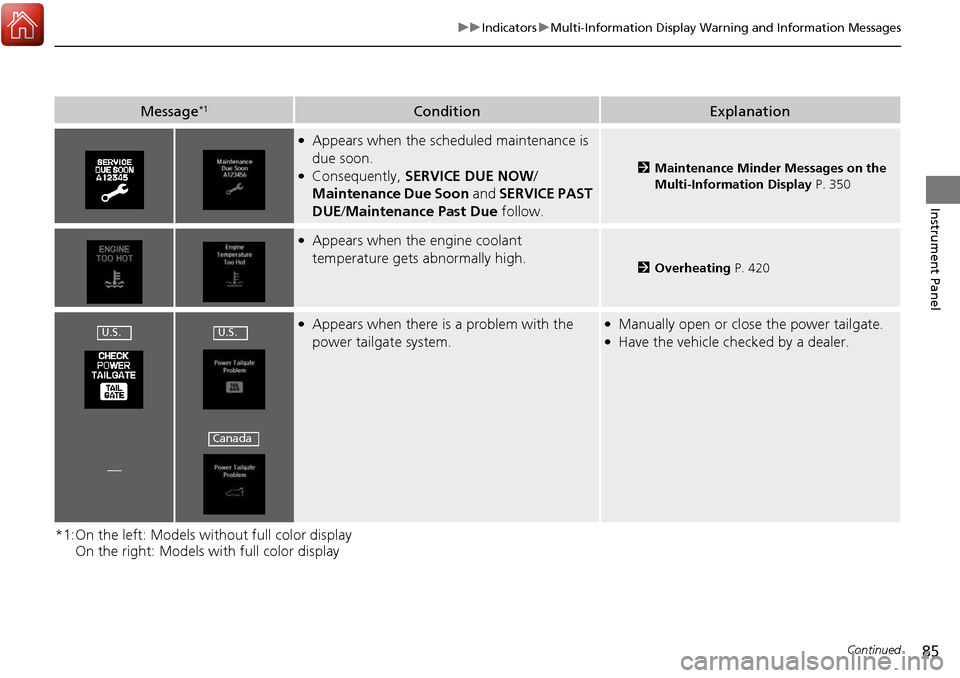
Message*1ConditionExplanation
●Appears when the scheduled maintenance is
due soon.
●Consequently, SERVICE DUE NOW /
Maintenance Due Soon and SERVICE PAST
DUE /Maintenance Past Due follow.2Maintenance Minder Messages on the
Multi-Information Display P. 350
●Appears when the engine coolant
temperature gets abnormally high.
2Overheating P. 420
●Appears when there is a problem with the
power tailgate system.●Manually open or close the power tailgate.●Have the vehicle checked by a dealer.
—
U.S.U.S.
Canada
Page 96 of 453
95
Instrument Panel
Gauges and Multi-Information Display
Gauges
Gauges include the speedometer, tachometer, fuel gauge, and related indicators.
They are displayed when the power mode is in ON.
Displays your driving speed in mph (U.S.) or km/h (Canada).
Shows the number of engine revolutions per minute.
Displays the amount of fuel left in the fuel tank.
Displays the temperature of the engine coolant.
■Speedometer
■Tachometer
■Fuel Gauge
■Temperature Gauge
1Fuel Gauge
NOTICE
You should refuel when the reading approaches .
Running out of fuel can cause the engine to misfire,
damaging the cata lytic converter.
The actual amount of remain ing fuel may differ from
the fuel gauge reading.E
1 Temperature Gauge
NOTICE
Driving with the temperat ure gauge pointer in the
upper zone can cause serious engine damage. Pull
safely to the side of th e road and allow engine
temperature to return to normal.
2 Overheating P. 420
Page 177 of 453
uuInterior Lights/Interior Convenience Items uInterior Convenience Items
176
Controls
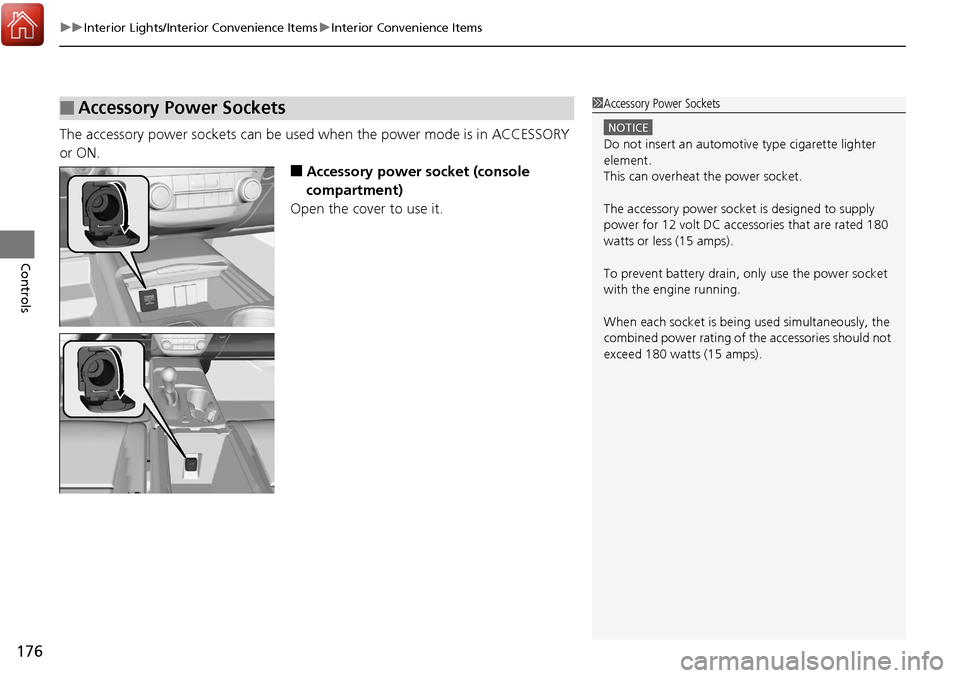
The accessory power sockets can be used when the power mode is in ACCESSORY
or ON.
■Accessory power socket (console
compartment)
Open the cover to use it.
■Accessory Power Sockets1 Accessory Power Sockets
NOTICE
Do not insert an automotive type cigarette lighter
element.
This can overheat the power socket.
The accessory power socket is designed to supply
power for 12 volt DC access ories that are rated 180
watts or less (15 amps).
To prevent battery drain, only use the power socket
with the engine running.
When each socket is bei ng used simultaneously, the
combined power rating of the accessories should not
exceed 180 watts (15 amps).
Page 396 of 453
395
Handling the Unexpected
This chapter explains how to handle unexpected troubles.
ToolsTypes of Tools .................................. 396
If a Tire Goes Flat Changing a Flat Tire
*....................... 397
Temporarily Repair ing a Flat Tire*..... 403
Engine Does Not Start Checking the Engine ........................ 414
If the Keyless Access Remote Battery is Weak ............................................. 415
Emergency Engine Stop ................... 416
Jump Starting .................................... 417
Shift Lever Does Not Move .............. 419Overheating
How to Handle Overheating............. 420
Indicator, Coming On/Blinking
If the Low Oil Pressure Indicator Comes On ............................................. 422
If the Charging System Indicator Comes
On ................................................. 422
If the Malfunction Indicator Lamp Comes On or Blinks ................................... 423
If the Brake System Indicator (Red) Comes On .................................................... 424
If the Electric Power Steering (EPS) System
Indicator Comes On............................ 424
If the Low Tire Pressure/TPMS Indicator Comes On or Blinks ....................... 425
Fuses Fuse Locations ................................. 426
Inspecting and Changing Fuses ........ 428
Emergency Towing ........................... 429
When You Cannot Open the Tailgate..... 430
* Not available on all models
Page 407 of 453
uuIf a Tire Goes Flat uTemporarily Repairing a Flat Tire*
406
Handling the Unexpected
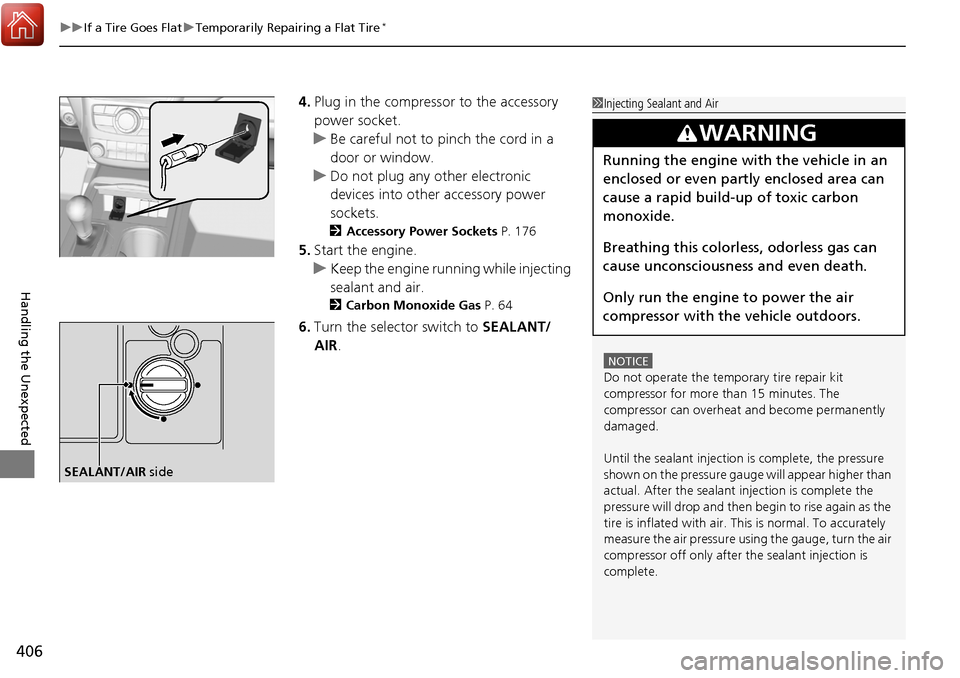
4. Plug in the compressor to the accessory
power socket.
u Be careful not to pinch the cord in a
door or window.
u Do not plug any other electronic
devices into other accessory power
sockets.
2 Accessory Power Sockets P. 176
5.Start the engine.
u Keep the engine running while injecting
sealant and air.
2 Carbon Monoxide Gas P. 64
6.Turn the selector switch to SEALANT/
AIR .
1Injecting Sealant and Air
NOTICE
Do not operate the temporary tire repair kit
compressor for more than 15 minutes. The
compressor can overheat and become permanently
damaged.
Until the sealant injection is complete, the pressure
shown on the pressure gauge will appear higher than
actual. After the sealant injection is complete the
pressure will drop and then begin to rise again as the
tire is inflated with air. This is normal. To accurately
measure the air pressure usi ng the gauge, turn the air
compressor off only after the sealant injection is
complete.
3WARNING
Running the engine with the vehicle in an
enclosed or even partly enclosed area can
cause a rapid build-up of toxic carbon
monoxide.
Breathing this colorless, odorless gas can
cause unconsciousness and even death.
Only run the engine to power the air
compressor with th e vehicle outdoors.
SEALANT/AIR side
Page 421 of 453
420
Handling the Unexpected
Overheating
How to Handle Overheating
Overheating symptoms are as follows:
•The temperature gauge needle is at the mark or the engine suddenly loses
power.
• Steam or spray comes out of the engine compartment.
■First thing to do
1. Immediately park the vehicle in a safe place.
2. Turn off all accessories and turn on the hazard warning lights.
u No steam or spray present: Keep the engine running and open the hood.
u Steam or spray is present: Turn off the engine and wait until it subsides.
Then, open the hood.
1 How to Handle Overheating
NOTICE
Continuing to drive with the temperature gauge
needle at the mark may damage the engine.
3WARNING
Steam and spray from an overheated
engine can seriously scald you.
Do not open the hood if steam is coming
out.
H
H
Page 422 of 453
421
uuOverheating uHow to Handle Overheating
Handling the Unexpected
■Next thing to do
1.Check that the cooling fan is operating and
stop the engine once the temperature
gauge needle comes down.
u If the cooling fan is not operating,
immediately stop the engine.
2. Once the engine has cooled down, inspect
the coolant level and check the cooling
system components for leaks.
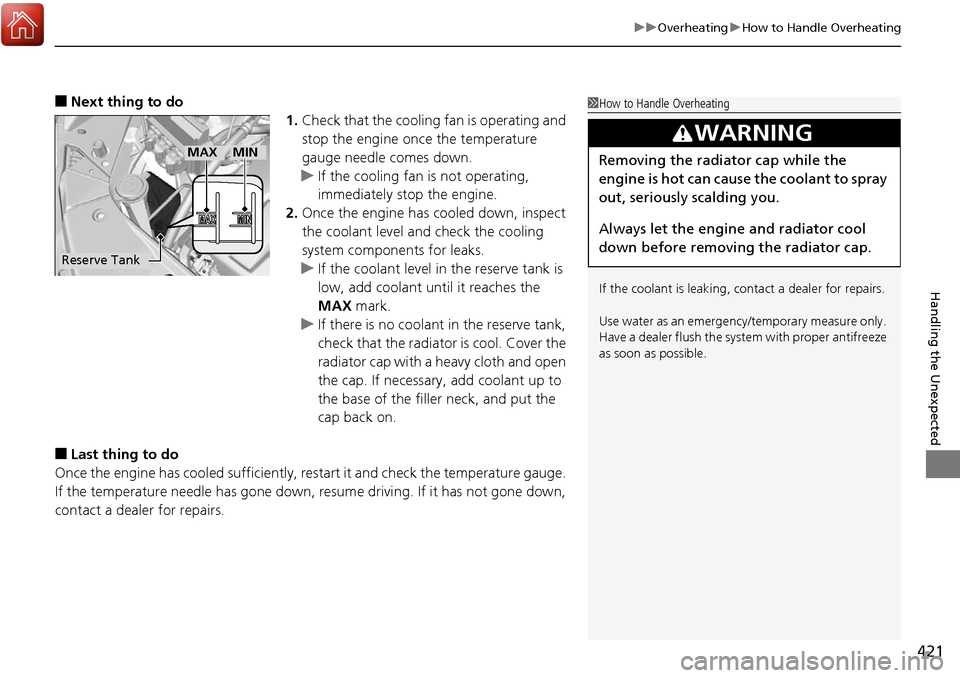
u If the coolant level in the reserve tank is
low, add coolant until it reaches the
MAX mark.
u If there is no coolant in the reserve tank,
check that the radiator is cool. Cover the
radiator cap with a heavy cloth and open
the cap. If necessary, add coolant up to
the base of the filler neck, and put the
cap back on.
■Last thing to do
Once the engine has cooled sufficiently, re start it and check the temperature gauge.
If the temperature needle has gone down, resume driving. If it has not gone down,
contact a dealer for repairs.
1 How to Handle Overheating
If the coolant is leaking, contact a dealer for repairs.
Use water as an emergency/temporary measure only.
Have a dealer flush the system with proper antifreeze
as soon as possible.
3WARNING
Removing the radiator cap while the
engine is hot can cause the coolant to spray
out, seriously scalding you.
Always let the engine and radiator cool
down before removing the radiator cap.
Reserve Tank
MAXMIN
Page 445 of 453
444
Index
Bluetooth® HandsFreeLink ®..................... 226
Booster Seats (For Children) ....................... 63
Brake System ............................................. 320
Anti-lock Brake System (ABS) ................... 322
Brake Assist System ................................. 323
Fluid ........................................................ 363
Foot Brake ............................................... 321
Indicator ............................................ 68, 424
Parking Brake .......................................... 320
Brightness Control (Instrument Panel) .... 156
BSI (Blind spot information) System ........ 313
Bulb Replacement ..................................... 365
Back-Up Light and Taillight ...................... 370
Brake Light/Taillight/Rear Side Marker Light and
Rear Turn Signal Light Bulbs ................... 368
Fog Lights ................................................ 365
Front Turn Signal Light /Parking Light/Daytime
Running Light and Front Side Marker Light
Bulbs ..................................................... 367
Headlights ............................................... 365
High-Mount Brake Light .......................... 371
Rear License Plate Light............................ 371
Side Turn Signal Light /Emergency Indicator
Light ...................................................... 366
Bulb Specifications .................................... 432
C
Carbon Monoxide Gas ................................ 64
Cargo Hook ............................................... 177
Carrying Cargo .................................. 259, 261 CD Player
................................................... 204
Certification Label .................................... 434
Changing Bulbs ........................................ 365
Charging System Indicator ................. 70, 422
Child Safety ................................................. 52
Childproof Door Locks............................. 131
Child Seat .................................................... 52
Booster Seats ............................................ 63
Child Seat for Infants................................. 54
Child Seat for Small Children ..................... 55
Installing a Child Seat with a Lap/Shoulder Seat
Belt ......................................................... 59
Larger Children ......................................... 62
Rear-facing Child Seat ............................... 54
Selecting a Child Seat ................................ 56
Childproof Door Locks ............................. 131
Cleaning the Exterior ............................... 391
Cleaning the Interior ................................ 389
Client Service Information ....................... 442
Climate Control System ............................ 182
Changing the Mode ................................ 182
Defrosting the Windshield and
Windows ............................................... 183
Dust and Pollen Filter............................... 388
Recirculation/Fresh Air Mode ................... 182
Sensors ................................................... 185
Synchronized Mode................................. 184
Using Automatic Climate Control ............ 182
Clock .......................................................... 120
CMBSTM (Collision Mitigation Braking
SystemTM) ................................................. 324 Coat Hook
................................................ 177
Collision Mitigation Braking System
TM
(CMBSTM) ................................................. 324
Compact Spare Tire .......................... 397, 433
Compass .................................................... 255
Console Compartment ............................. 174
Controls .................................................... 119
Coolant (Engine) ...................................... 360
Adding to the Radiator ........................... 361
Adding to the Reserve Tank .................... 360
Overheating ............................................ 420
Creeping (Automatic Transmission) ........ 276
Cross Traffic Monitor ............................... 337
Cruise Control .......................................... 281
Indicator ................................................... 78
Cup Holders .............................................. 175
Customized Features ....................... 102, 108
D
Daytime Running Lights .......................... 152
Dead Battery ............................................ 417
Defrosting the Windshield and Windows ................................................. 183
Detachable Anchor .................................... 36
Devices that Emit Radio Waves ............... 435
Dimming
Headlights .............................................. 149
Rearview Mirror ...................................... 161
Dipstick (Engine Oil) ................................ 356
Directional Signals (Turn Signal) ............. 149