front wheel Acura RDX 2018 Owner's Manual
[x] Cancel search | Manufacturer: ACURA, Model Year: 2018, Model line: RDX, Model: Acura RDX 2018Pages: 453, PDF Size: 20.13 MB
Page 10 of 453
9
Quick Reference Guide
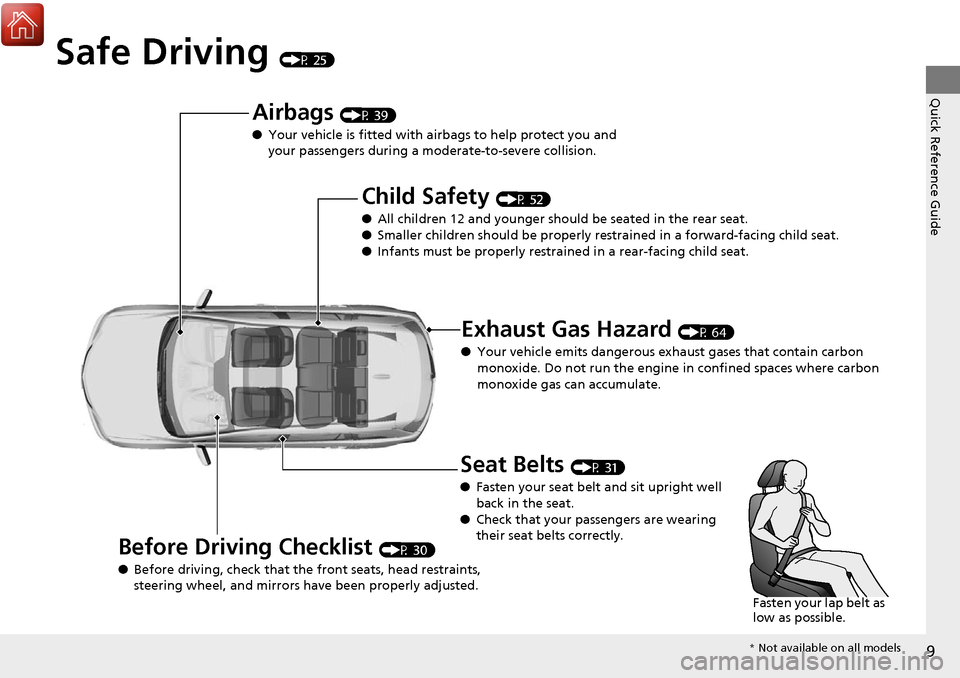
Safe Driving (P 25)
Airbags (P 39)
● Your vehicle is fitted with ai rbags to help protect you and
your passengers during a moderate-to-severe collision.
Child Safety (P 52)
● All children 12 and younger should be seated in the rear seat.
● Smaller children should be properly restra ined in a forward-facing child seat.
● Infants must be properly restraine d in a rear-facing child seat.
Exhaust Gas Hazard (P 64)
● Your vehicle emits dangerous exhaust gases that contain carbon
monoxide. Do not run the engine in confined spaces where carbon
monoxide gas can accumulate.
Before Driving Checklist (P 30)
● Before driving, check that the front seats, head restraints,
steering wheel, and mirrors have been properly adjusted.
Seat Belts (P 31)
● Fasten your seat belt and sit upright well
back in the seat.
● Check that your passengers are wearing
their seat belts correctly.
Fasten your lap belt as
low as possible.
* Not available on all models
Page 13 of 453
12
Quick Reference Guide
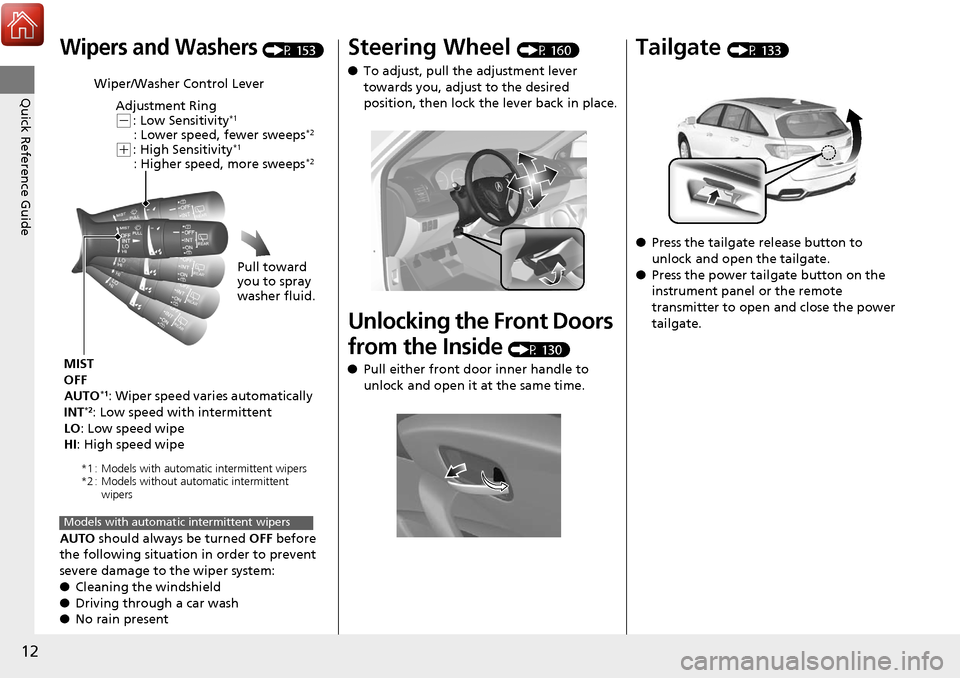
Wipers and Washers (P 153)
AUTO should always be turned OFF before
the following situation in order to prevent
severe damage to the wiper system:
● Cleaning the windshield
● Driving through a car wash
● No rain present
Wiper/Washer Control Lever
Adjustment Ring
(-: Low Sensitivity*1
: Lower speed, fewer sweeps*2
(+: High Sensitivity*1
: Higher speed, more sweeps*2
MIST
OFF
AUTO
*1: Wiper speed varies automatically
INT*2: Low speed with intermittent
LO : Low speed wipe
HI: High speed wipe Pull toward
you to spray
washer fluid.
*1 : Models with automatic intermittent wipers
*2 : Models without automatic intermittent
wipers
Models with automatic intermittent wipers
Steering Wheel (P 160)
● To adjust, pull the adjustment lever
towards you, adjust to the desired
position, then lock the lever back in place.
Unlocking the Front Doors
from the Inside
(P 130)
● Pull either front door inner handle to
unlock and open it at the same time.
Tailgate (P 133)
● Press the tailgate release button to
unlock and open the tailgate.
● Press the power tailgate button on the
instrument panel or the remote
transmitter to open and close the power
tailgate.
Page 41 of 453
40
uuAirbags uAirbag System Components
Safe Driving
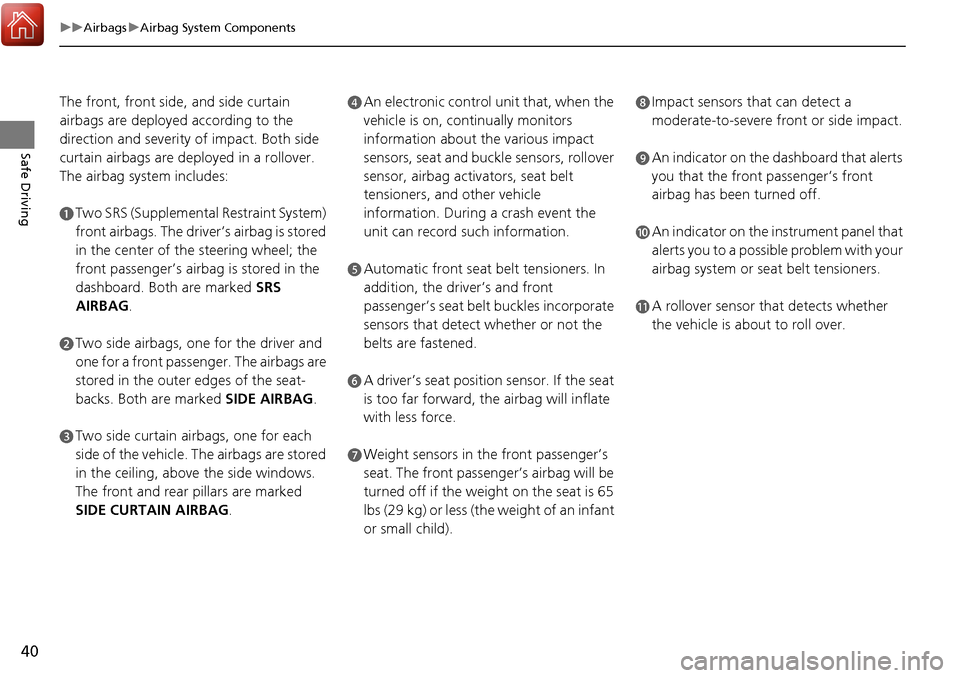
The front, front side, and side curtain
airbags are deployed according to the
direction and severity of impact. Both side
curtain airbags are deployed in a rollover.
The airbag system includes:
aTwo SRS (Supplemental Restraint System)
front airbags. The driver’s airbag is stored
in the center of the steering wheel; the
front passenger’s airbag is stored in the
dashboard. Both are marked SRS
AIRBAG.
bTwo side airbags, one for the driver and
one for a front passenger. The airbags are
stored in the outer edges of the seat-
backs. Both are marked SIDE AIRBAG .
cTwo side curtain airbags, one for each
side of the vehicle. The airbags are stored
in the ceiling, above the side windows.
The front and rear pillars are marked
SIDE CURTAIN AIRBAG.
dAn electronic control unit that, when the
vehicle is on, continually monitors
information about the various impact
sensors, seat and buckle sensors, rollover
sensor, airbag activators, seat belt
tensioners, and other vehicle
information. During a crash event the
unit can record such information.
eAutomatic front seat belt tensioners. In
addition, the driver’s and front
passenger’s seat belt buckles incorporate
sensors that detect whether or not the
belts are fastened.
fA driver’s seat position sensor. If the seat
is too far forward, the airbag will inflate
with less force.
gWeight sensors in the front passenger’s
seat. The front passenger’s airbag will be
turned off if the weight on the seat is 65
lbs (29 kg) or less (the weight of an infant
or small child).
hImpact sensors that can detect a
moderate-to-severe front or side impact.
iAn indicator on the dashboard that alerts
you that the front passenger’s front
airbag has been turned off.
jAn indicator on the instrument panel that
alerts you to a possible problem with your
airbag system or seat belt tensioners.
kA rollover sensor that detects whether
the vehicle is about to roll over.
Page 42 of 453
41
uuAirbags uAirbag System Components
Safe DrivingAirbags can pose serious hazards. To do their job, airbags must inflate with
tremendous force. So, while airbags help sa ve lives, they can cause burns, bruises,
and other minor injuries, and sometimes even fatal ones if occupants are not
wearing their seat belts properly and sitting correctly.
What you should do: Always wear your seat belt properly, and sit upright and as
far back from the steering wheel as possibl e while allowing full control of the
vehicle. A front passenger should move thei r seat as far back from the dashboard as
possible.
Remember, however, that no safety system ca n prevent all injuries or deaths that
can occur in a severe crash, even when s eat belts are properly worn and the airbags
deploy.
Do not place hard or sharp objects between yourself and a front airbag.
Carrying hard or sharp objects on your lap, or driving with a pipe or other sharp
object in your mouth, can result in in juries if your front airbag inflates.
Do not attach or place objects on the front airbag covers. Objects on the
covers marked SRS AIRBAG could interfere with the proper operation of the airbags
or be propelled inside the vehicle an d hurt someone if the airbags inflate.
■Important Facts About Your Airbags1Important Facts About Your Airbags
Do not attempt to deactivate your airbags. Together,
airbags and seat belts pr ovide the best protection.
When driving, keep hands and arms out of the
deployment path of the fro nt airbag by holding each
side of the steering wheel. Do not cross an arm over
the airbag cover.
Page 43 of 453
42
uuAirbags uTypes of Airbags
Safe Driving
Types of Airbags
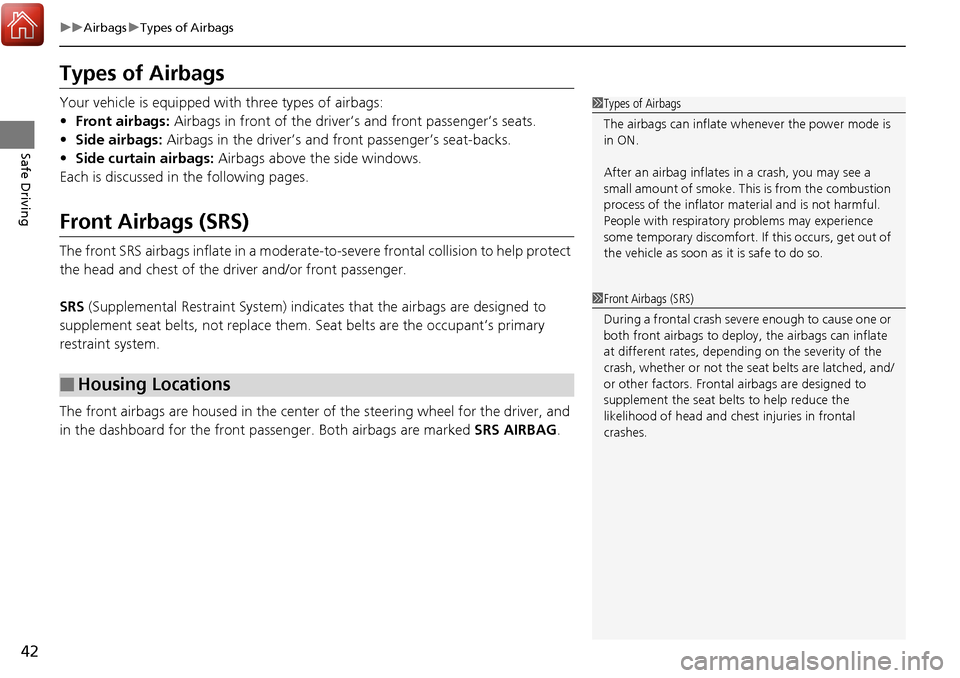
Your vehicle is equipped with three types of airbags:
• Front airbags: Airbags in front of the driver ’s and front passenger’s seats.
• Side airbags: Airbags in the driver’s and front passenger’s seat-backs.
• Side curtain airbags: Airbags above the side windows.
Each is discussed in the following pages.
Front Airbags (SRS)
The front SRS airbags inflate in a moderate-to -severe frontal collision to help protect
the head and chest of the driver and/or front passenger.
SRS (Supplemental Restraint System) indica tes that the airbags are designed to
supplement seat belts, not replace them. Seat belts are the occupant’s primary
restraint system.
The front airbags are housed in the center of the steering wheel for the driver, and
in the dashboard for the front pass enger. Both airbags are marked SRS AIRBAG.
■Housing Locations
1Types of Airbags
The airbags can inflate whenever the power mode is
in ON.
After an airbag inflates in a crash, you may see a
small amount of smoke. This is from the combustion
process of the infl ator material and is not harmful.
People with respiratory pr oblems may experience
some temporary discomfort. If this occurs, get out of
the vehicle as soon as it is safe to do so.
1 Front Airbags (SRS)
During a frontal crash severe enough to cause one or
both front airbags to deploy, the airbags can inflate
at different rates, dependi ng on the severity of the
crash, whether or not the se at belts are latched, and/
or other factors. Frontal airbags are designed to
supplement the seat belts to help reduce the
likelihood of head and chest injuries in frontal
crashes.
Page 73 of 453
72
uuIndicators u
Instrument Panel
*1:On the left: Models without full color display
On the right: Models with full color display
IndicatorNameOn/BlinkingExplanationMessage*1
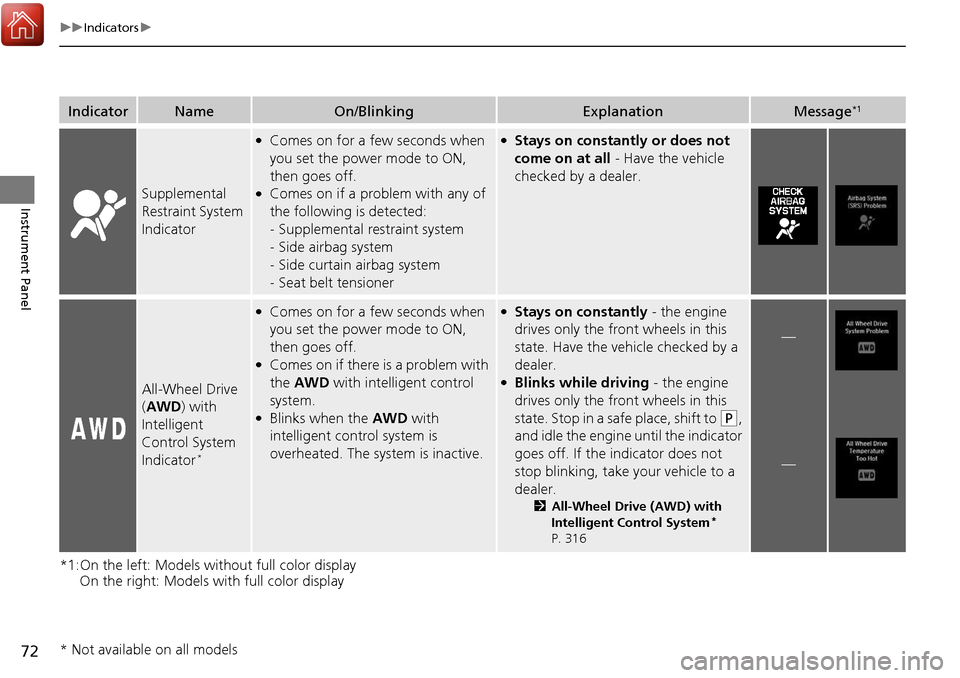
Supplemental
Restraint System
Indicator
●Comes on for a few seconds when
you set the power mode to ON,
then goes off.
●Comes on if a problem with any of
the following is detected:
-Supplemental restraint system
- Side airbag system
- Side curtain airbag system
- Seat belt tensioner
●Stays on constantly or does not
come on at all - Have the vehicle
checked by a dealer.
All-Wheel Drive
( AWD ) with
Intelligent
Control System
Indicator
*
●Comes on for a few seconds when
you set the power mode to ON,
then goes off.
●Comes on if there is a problem with
the AWD with intelligent control
system.
●Blinks when the AWD with
intelligent control system is
overheated. The system is inactive.
●Stays on constantly - the engine
drives only the front wheels in this
state. Have the vehicle checked by a
dealer.
●Blinks while driving - the engine
drives only the front wheels in this
state. Stop in a safe place, shift to
(P,
and idle the engine until the indicator
goes off. If the indicator does not
stop blinking, take your vehicle to a
dealer.
2 All-Wheel Drive (AWD) with
Intelligent Control System*
P. 316
—
—
* Not available on all models
Page 156 of 453
155
uuOperating the Switches Around the Steering Wheel uWipers and Washers
Controls
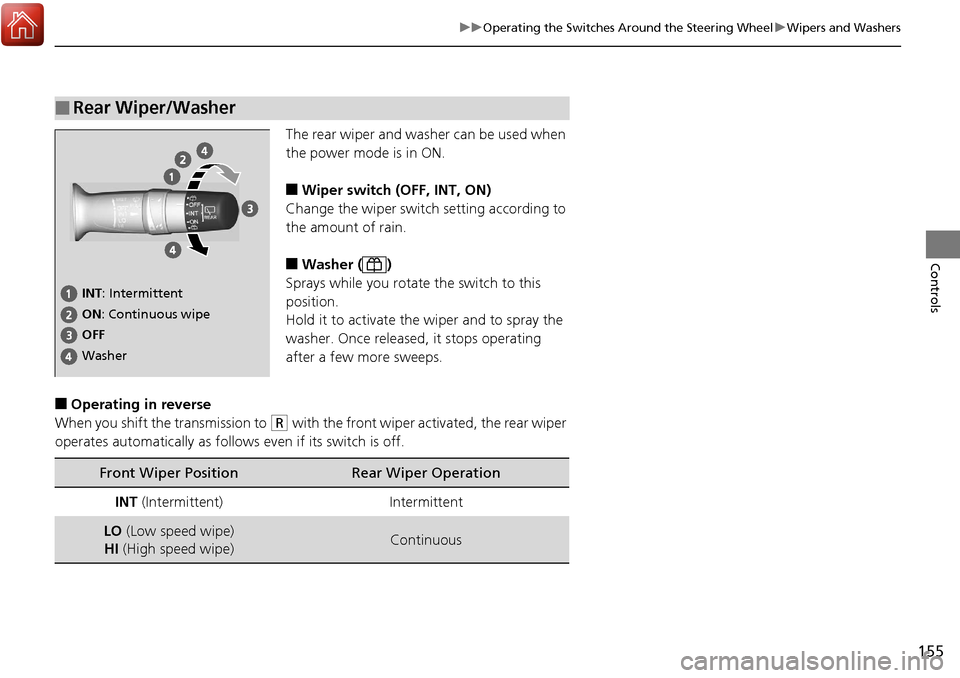
The rear wiper and washer can be used when
the power mode is in ON.
■Wiper switch (OFF, INT, ON)
Change the wiper switch setting according to
the amount of rain.
■Washer ( )
Sprays while you rotate the switch to this
position.
Hold it to activate th e wiper and to spray the
washer. Once released, it stops operating
after a few more sweeps.
■Operating in reverse
When you shift the transmission to
(R with the front wiper activated, the rear wiper
operates automatically as follows even if its switch is off.
■Rear Wiper/Washer
INT: Intermittent
OFF ON : Continuous wipe
Washer
Front Wiper PositionRear Wiper Operation
INT (Intermittent)Intermittent
LO (Low speed wipe)
HI (High speed wipe)Continuous
Page 165 of 453
164
Controls
Adjusting the Seats
Adjusting the Seat Positions
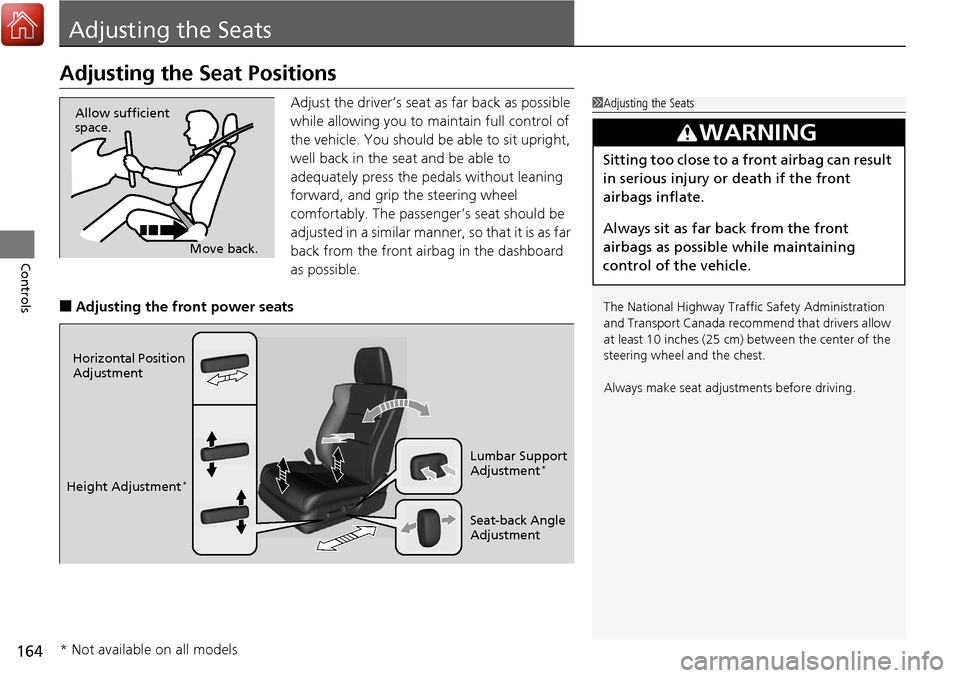
Adjust the driver’s seat as far back as possible
while allowing you to maintain full control of
the vehicle. You should be able to sit upright,
well back in the seat and be able to
adequately press the pedals without leaning
forward, and grip the steering wheel
comfortably. The passenger’s seat should be
adjusted in a similar manner, so that it is as far
back from the front airbag in the dashboard
as possible.
■Adjusting the front power seats
1Adjusting the Seats
The National Highway Traffic Safety Administration
and Transport Cana da recommend that drivers allow
at least 10 inches (25 cm) between the center of the
steering wheel and the chest.
Always make seat adjustments before driving.
3WARNING
Sitting too close to a front airbag can result
in serious injury or death if the front
airbags inflate.
Always sit as far back from the front
airbags as possible while maintaining
control of the vehicle.
Move back.
Allow sufficient
space.
Horizontal Position
Adjustment
Height Adjustment
*
Seat-back Angle
Adjustment Lumbar Support
Adjustment
*
* Not available on all models
Page 166 of 453
Continued165
uuAdjusting the Seats uAdjusting the Seat Positions
Controls
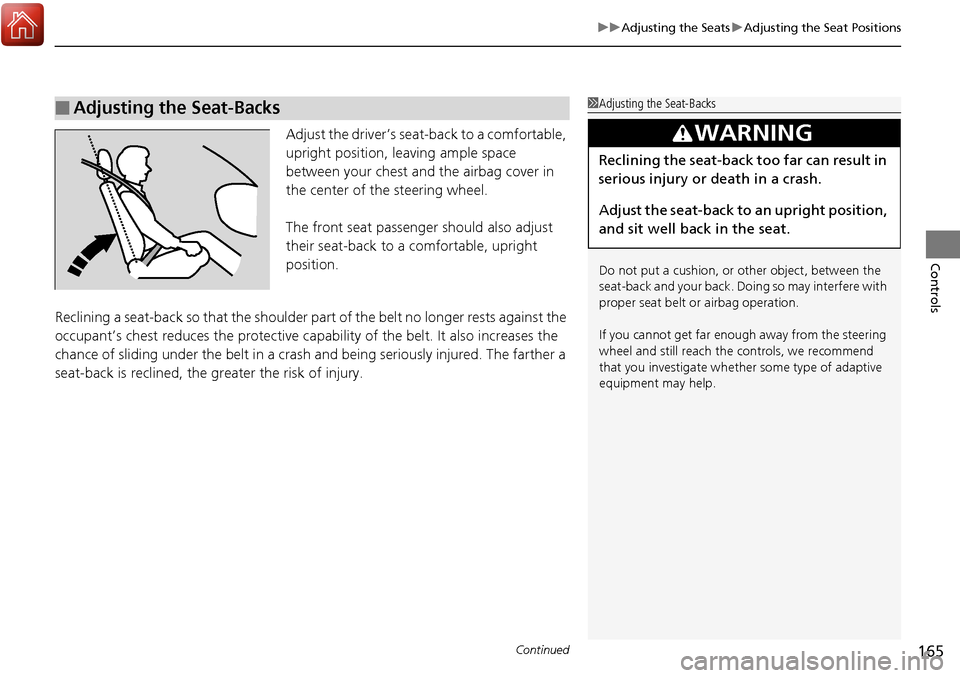
Adjust the driver’s seat -back to a comfortable,
upright position, leaving ample space
between your chest and the airbag cover in
the center of the steering wheel.
The front seat passenger should also adjust
their seat-back to a comfortable, upright
position.
Reclining a seat-back so that the shoulder part of the belt no longer rests against the
occupant’s chest reduces the protective capa bility of the belt. It also increases the
chance of sliding under the belt in a crash and being seriously injured. The farther a
seat-back is reclined, the gr eater the risk of injury.
■Adjusting the Seat-Backs1Adjusting the Seat-Backs
Do not put a cushion, or other object, between the
seat-back and your back. Do ing so may interfere with
proper seat belt or airbag operation.
If you cannot get far e nough away from the steering
wheel and still reach th e controls, we recommend
that you investigate whether some type of adaptive
equipment may help.
3WARNING
Reclining the seat-back too far can result in
serious injury or death in a crash.
Adjust the seat-back to an upright position,
and sit well back in the seat.
Page 258 of 453
257
Driving
This chapter discusses driving, refueling, and information on items such as accessories.
Before Driving................................... 258
Towing a Trailer ................................ 263
Off-Highway Driving Guidelines ..... 268
When Driving Starting the Engine .......................... 270
Precautions While Driving................. 275
Automatic Transmission ................... 276
Shifting ............................................ 277
Cruise Control
*................................ 281
Front Sensor Camera*...................... 284
Adaptive Cruise Control (ACC)*....... 286
Lane Departure Warning (LDW)*...... 299Lane Keeping Assist System (LKAS)*..... 303 Vehicle Stability Assist (VSA
®), aka Electronic
Stability Control (ESC), System ........... 311
Blind spot information (BSI) System
*.... 313All-Wheel Drive (AWD) with Intelligent Control System*..................................................... 316Tire Pressure Monitoring System (TPMS) ... 316Tire Pressure Monitoring System (TPMS) - Required Federal Explanation ......... 318
Braking Brake System ................................... 320
Anti-lock Brake System (ABS) ........... 322
Brake Assist System.......................... 323 Collision Mitigation Braking System
TM
(CMBSTM)*..................................... 324
Parking Your Vehicle When Stopped ................................ 332
Parking Sensor System
*................... 333
Cross Traffic Monitor*..................... 337
Multi-View Rear Camera .................. 340
Refueling Fuel Information .............................. 341
How to Refuel ................................. 342
Fuel Economy and CO
2 Emissions .... 343
* Not available on all models