lkas Acura RDX 2018 Owner's Manual
[x] Cancel search | Manufacturer: ACURA, Model Year: 2018, Model line: RDX, Model: Acura RDX 2018Pages: 453, PDF Size: 20.13 MB
Page 6 of 453
5
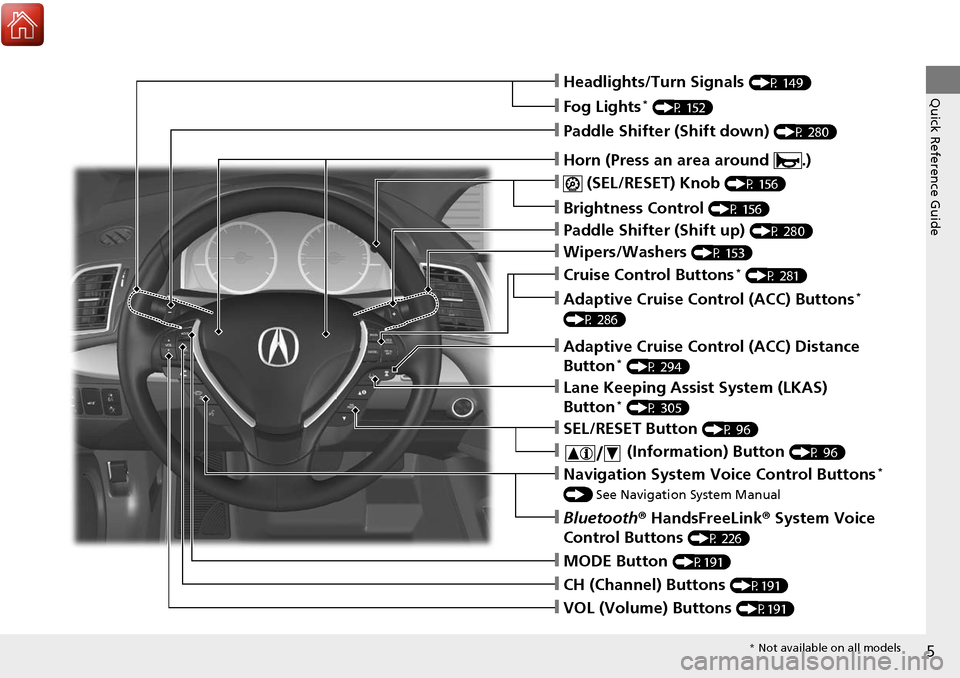
Quick Reference Guide❙Headlights/Turn Signals (P 149)
❙Fog Lights* (P 152)
❙ (SEL/RESET) Knob (P 156)
❙Brightness Control (P 156)
❙MODE Button (P191)
❙CH (Channel) Buttons (P191)
❙VOL (Volume) Buttons (P191)
❙SEL/RESET Button (P 96)
❙Paddle Shifter (Shift down) (P 280)
❙Paddle Shifter (Shift up) (P 280)
❙Wipers/Washers (P 153)
❙Bluetooth® HandsFreeLink ® System Voice
Control Buttons
(P 226)
❙Navigation System Voice Control Buttons*
() See Navigation System Manual
❙ (Information) Button (P 96)
❙Lane Keeping Assist System (LKAS)
Button* (P 305)
❙Adaptive Cruise Control (ACC) Distance
Button* (P 294)
❙Cruise Control Buttons* (P 281)
❙Adaptive Cruise Control (ACC) Buttons*
(P 286)
❙Horn (Press an area around .)
* Not available on all models
Page 11 of 453
10
Quick Reference Guide
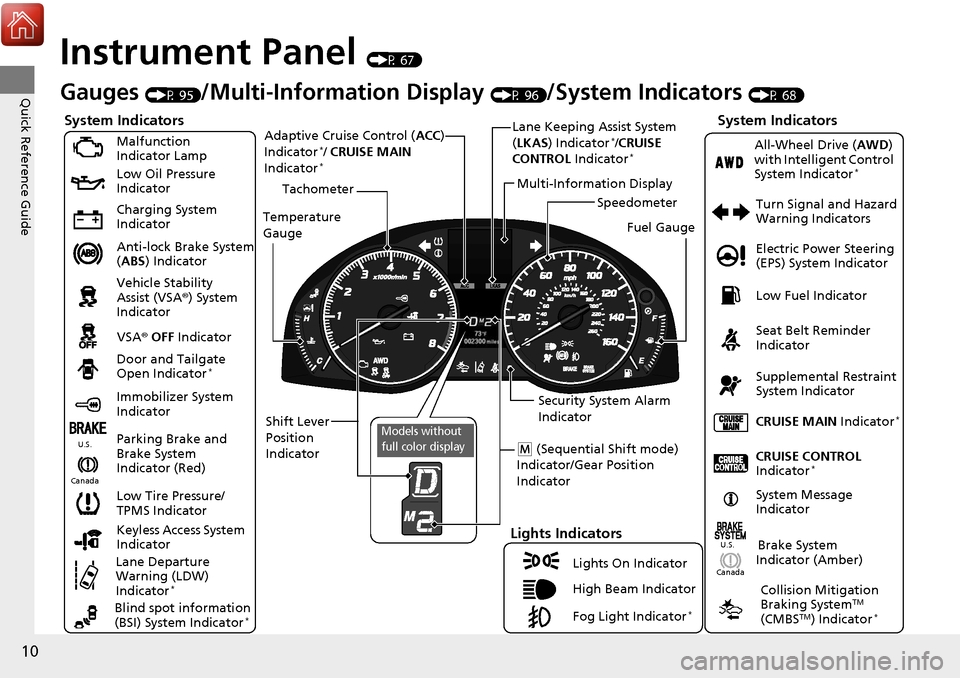
Instrument Panel (P 67)
CanadaU.S.
Turn Signal and Hazard
Warning Indicators
All-Wheel Drive (
AWD)
with Intelligent Control
System Indicator
*
System Indicators
Malfunction
Indicator Lamp
Low Oil Pressure
Indicator
Charging System
Indicator
Anti-lock Brake System
( ABS ) Indicator
Vehicle Stability
Assist (VSA ®) System
Indicator
VSA ® OFF Indicator
Low Tire Pressure/
TPMS Indicator
Lights Indicators
Lights On Indicator
High Beam Indicator
Fog Light Indicator
*
Immobilizer System
Indicator Seat Belt Reminder
Indicator
System Indicators
CRUISE CONTROL
Indicator*
Parking Brake and
Brake System
Indicator (Red) Supplemental Restraint
System Indicator
Door and Tailgate
Open Indicator
*
CRUISE MAIN
Indicator*
Tachometer
Speedometer
Fuel Gauge
Security System Alarm
Indicator
Shift Lever
Position
Indicator Low Fuel Indicator
Gauges (P 95)/Multi-Information Display (P 96)/System Indicators (P 68)
System Message
IndicatorBrake System
Indicator (Amber)
Temperature
Gauge
Electric Power Steering
(EPS) System Indicator
Canada
U.S.
Keyless Access System
Indicator
Lane Departure
Warning (LDW)
Indicator
*
Blind spot information
(BSI) System Indicator*
Collision Mitigation
Braking SystemTM
(CMBSTM) Indicator*
Lane Keeping Assist System
( LKAS) Indicator*/CRUISE
CONTROL Indicator*
Multi-Information Display
(M (Sequential Shift mode)
Indicator/Gear Position
Indicator
Models without
full color display
Adaptive Cruise Control ( ACC)
Indicator*/ CRUISE MAIN
Indicator*
Page 19 of 453
18
Quick Reference Guide
AcuraWatchTM *
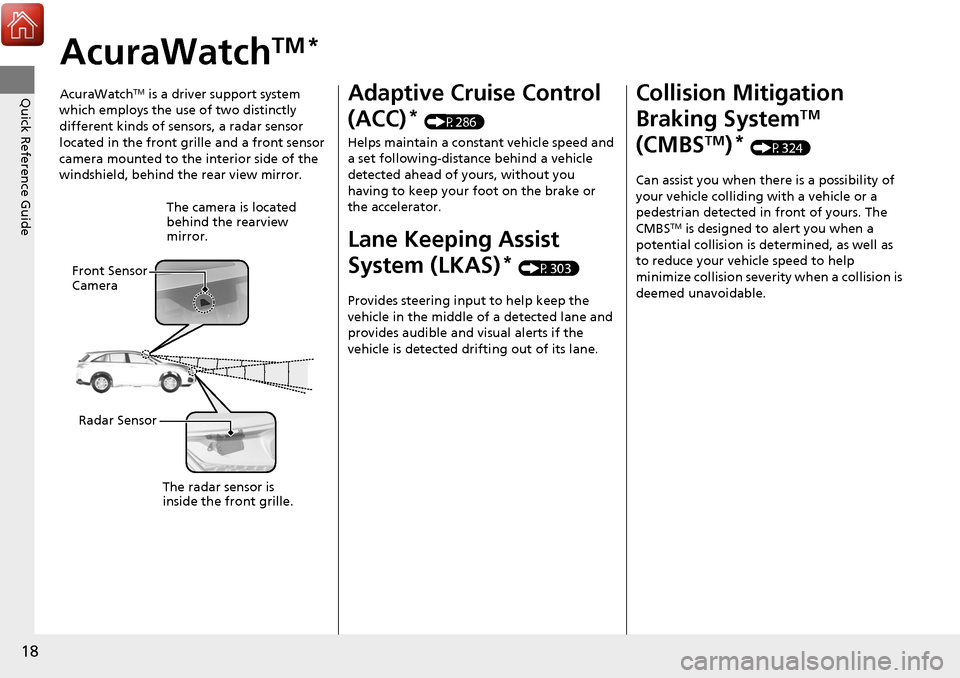
AcuraWatchTM is a driver support system
which employs the use of two distinctly
different kinds of sensors, a radar sensor
located in the front grille and a front sensor
camera mounted to the interior side of the
windshield, behind the rear view mirror.
The camera is located
behind the rearview
mirror.
Front Sensor
Camera
Radar Sensor
The radar sensor is
inside the front grille.
Adaptive Cruise Control
(ACC)
* (P286)
Helps maintain a constant vehicle speed and
a set following-distance behind a vehicle
detected ahead of yours, without you
having to keep your foot on the brake or
the accelerator.
Lane Keeping Assist
System (LKAS)
* (P303)
Provides steering input to help keep the
vehicle in the middle of a detected lane and
provides audible and visual alerts if the
vehicle is detected drifting out of its lane.
Collision Mitigation
Braking System
TM
(CMBS
TM)* (P324)
Can assist you when there is a possibility of
your vehicle colliding with a vehicle or a
pedestrian detected in front of yours. The
CMBS
TM is designed to alert you when a
potential collision is determined, as well as
to reduce your vehicle speed to help
minimize collision severity when a collision is
deemed unavoidable.
Page 82 of 453
81
uuIndicators u
Continued
Instrument Panel
IndicatorNameOn/BlinkingExplanationMessage
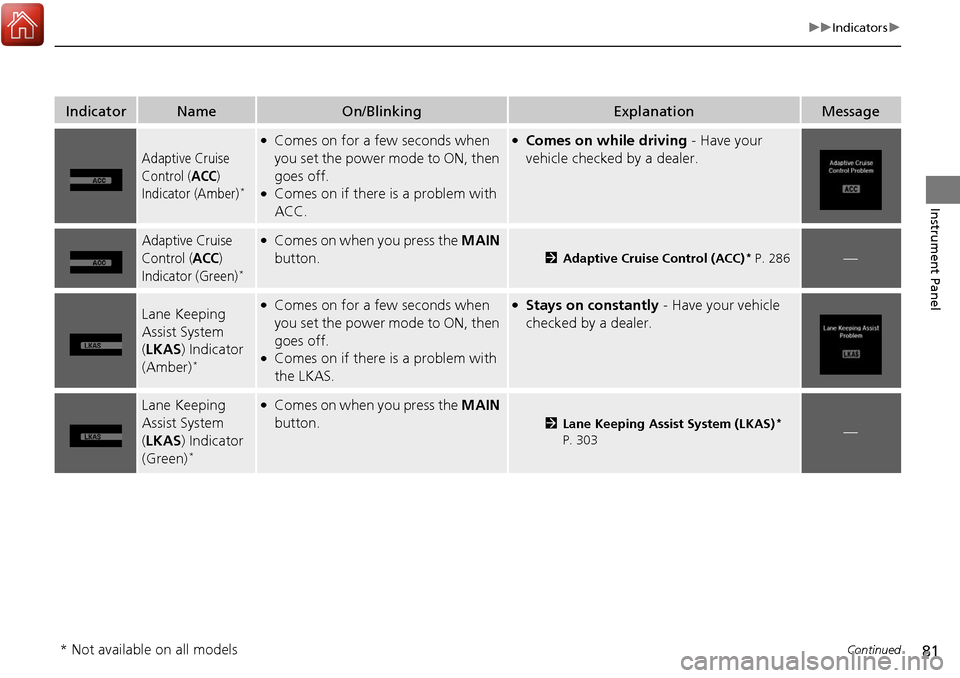
Adaptive Cruise
Control (
ACC)
Indicator (Amber)*
●Comes on for a few seconds when
you set the power mode to ON, then
goes off.
●Comes on if there is a problem with
ACC.
●Comes on while driving - Have your
vehicle checked by a dealer.
Adaptive Cruise
Control (
ACC)
Indicator (Green)*
●Comes on when you press the MAIN
button.
2 Adaptive Cruise Control (ACC)* P. 286—
Lane Keeping
Assist System
(LKAS ) Indicator
(Amber)
*
●Comes on for a few seconds when
you set the power mode to ON, then
goes off.
●Comes on if there is a problem with
the LKAS.
●Stays on constantly - Have your vehicle
checked by a dealer.
Lane Keeping
Assist System
( LKAS ) Indicator
(Green)
*
●Comes on when you press the MAIN
button.
2 Lane Keeping Assist System (LKAS)*
P. 303—
* Not available on all models
Page 94 of 453
93
uuIndicators uMulti-Information Display Warning and Information Messages
Continued
Instrument Panel
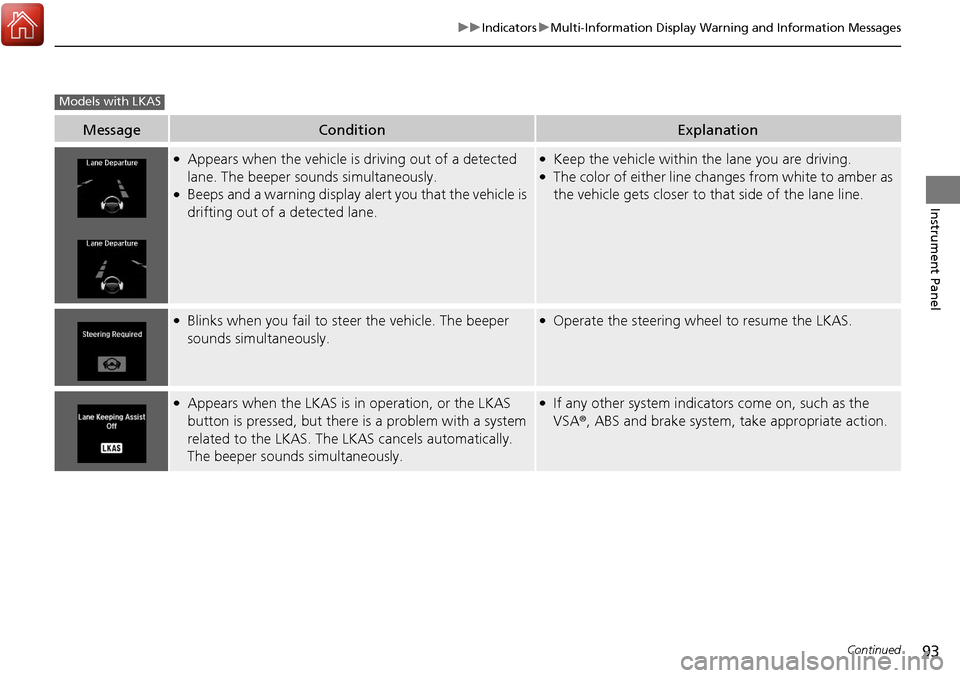
MessageConditionExplanation
●Appears when the vehicle is driving out of a detected
lane. The beeper sounds simultaneously.
●Beeps and a warning display alert you that the vehicle is
drifting out of a detected lane.
●Keep the vehicle within the lane you are driving.●The color of either line changes from white to amber as
the vehicle gets closer to that side of the lane line.
●Blinks when you fail to steer the vehicle. The beeper
sounds simultaneously.●Operate the steering wheel to resume the LKAS.
●Appears when the LKAS is in operation, or the LKAS
button is pressed, but there is a problem with a system
related to the LKAS. The LKAS cancels automatically.
The beeper sounds simultaneously.●If any other system indicators come on, such as the
VSA ®, ABS and brake system, take appropriate action.
Models with LKAS
Page 95 of 453
94
uuIndicators uMulti-Information Display Warn ing and Information Messages
Instrument Panel
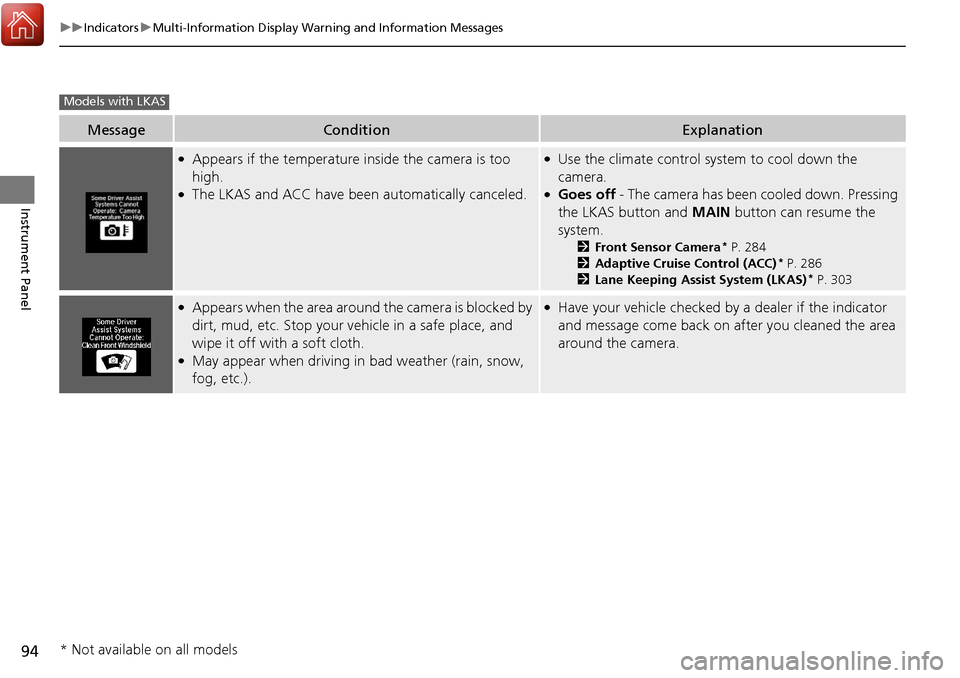
MessageConditionExplanation
●Appears if the temperature inside the camera is too
high.
●The LKAS and ACC have been automatically canceled.
●Use the climate control system to cool down the
camera.
●Goes off - The camera has been cooled down. Pressing
the LKAS button and MAIN button can resume the
system.
2 Front Sensor Camera* P. 284
2 Adaptive Cruise Control (ACC)* P. 286
2 Lane Keeping Assist System (LKAS)* P. 303
●Appears when the area around the camera is blocked by
dirt, mud, etc. Stop your ve hicle in a safe place, and
wipe it off with a soft cloth.
●May appear when driving in bad weather (rain, snow,
fog, etc.).
●Have your vehicle checked by a dealer if the indicator
and message come back on after you cleaned the area
around the camera.
Models with LKAS
* Not available on all models
Page 112 of 453
111
uuGauges and Multi-Information Display uMulti-Information Display
Continued
Instrument Panel
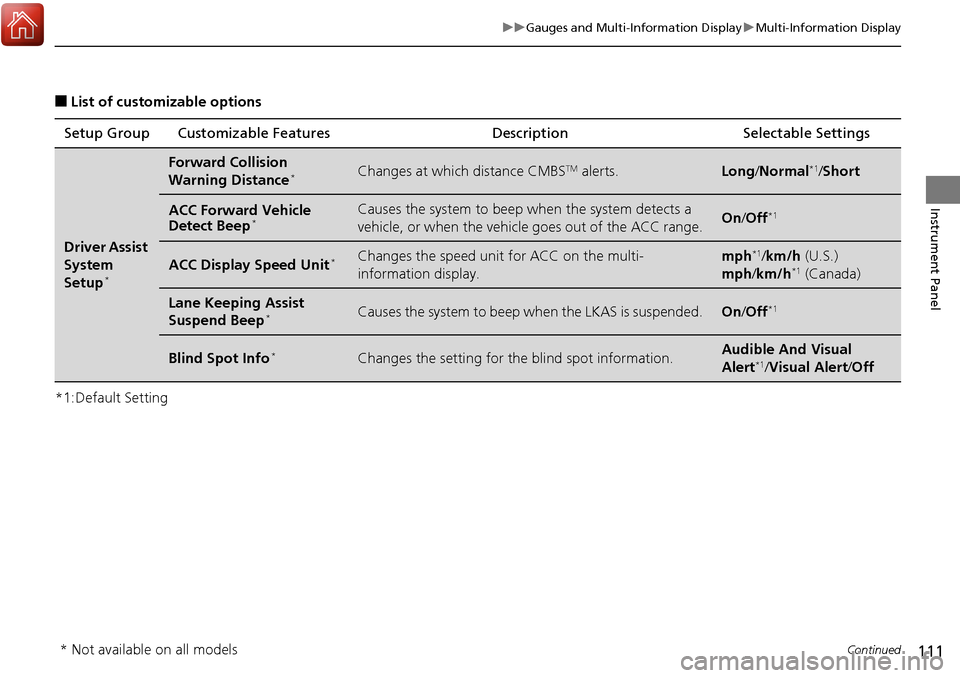
■List of customizable options
*1:Default Setting Setup Group Customizable Features
Description Selectable Settings
Driver Assist
System
Setup
*
Forward Collision
Warning Distance*Changes at which distance CMBSTM alerts.Long/Normal*1/Short
ACC Forward Vehicle
Detect Beep*Causes the system to beep when the system detects a
vehicle, or when the vehicl e goes out of the ACC range.On/Off*1
ACC Display Speed Unit*Changes the speed unit for ACC on the multi-
information display.mph*1/km/h (U.S.)
mph /km/h*1 (Canada)
Lane Keeping Assist
Suspend Beep*Causes the system to beep when the LKAS is suspended.On/Off*1
Blind Spot Info*Changes the setting for th e blind spot information.Audible And Visual
Alert*1/Visual Alert /Off
* Not available on all models
Page 258 of 453
257
Driving
This chapter discusses driving, refueling, and information on items such as accessories.
Before Driving................................... 258
Towing a Trailer ................................ 263
Off-Highway Driving Guidelines ..... 268
When Driving Starting the Engine .......................... 270
Precautions While Driving................. 275
Automatic Transmission ................... 276
Shifting ............................................ 277
Cruise Control
*................................ 281
Front Sensor Camera*...................... 284
Adaptive Cruise Control (ACC)*....... 286
Lane Departure Warning (LDW)*...... 299Lane Keeping Assist System (LKAS)*..... 303 Vehicle Stability Assist (VSA
®), aka Electronic
Stability Control (ESC), System ........... 311
Blind spot information (BSI) System
*.... 313All-Wheel Drive (AWD) with Intelligent Control System*..................................................... 316Tire Pressure Monitoring System (TPMS) ... 316Tire Pressure Monitoring System (TPMS) - Required Federal Explanation ......... 318
Braking Brake System ................................... 320
Anti-lock Brake System (ABS) ........... 322
Brake Assist System.......................... 323 Collision Mitigation Braking System
TM
(CMBSTM)*..................................... 324
Parking Your Vehicle When Stopped ................................ 332
Parking Sensor System
*................... 333
Cross Traffic Monitor*..................... 337
Multi-View Rear Camera .................. 340
Refueling Fuel Information .............................. 341
How to Refuel ................................. 342
Fuel Economy and CO
2 Emissions .... 343
* Not available on all models
Page 285 of 453
284
uuWhen Driving uFront Sensor Camera*
Driving
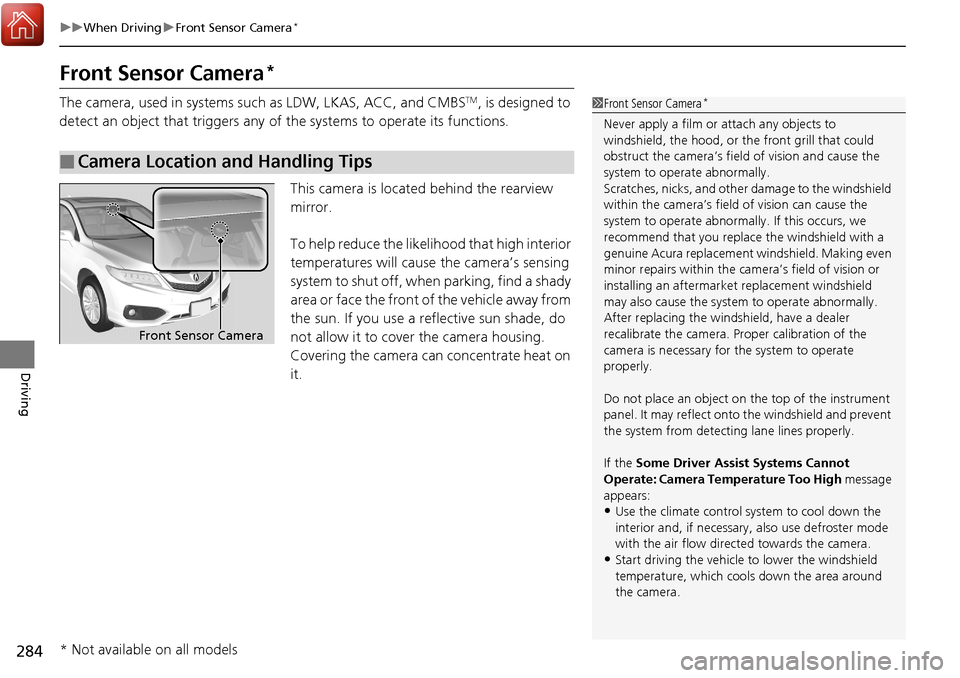
Front Sensor Camera*
The camera, used in systems su ch as LDW, LKAS, ACC, and CMBSTM, is designed to
detect an object that triggers any of the systems to operate its functions.
This camera is located behind the rearview
mirror.
To help reduce the likelihood that high interior
temperatures will cause the camera’s sensing
system to shut off, when parking, find a shady
area or face the front of the vehicle away from
the sun. If you use a re flective sun shade, do
not allow it to cover the camera housing.
Covering the camera can concentrate heat on
it.
■Camera Location and Handling Tips
1 Front Sensor Camera*
Never apply a film or attach any objects to
windshield, the hood, or the front grill that could
obstruct the camera’s fiel d of vision and cause the
system to operate abnormally.
Scratches, nicks, and othe r damage to the windshield
within the camera’s fiel d of vision can cause the
system to operate abnormall y. If this occurs, we
recommend that you replac e the windshield with a
genuine Acura replacement windshield. Making even
minor repairs within the ca mera’s field of vision or
installing an aftermarke t replacement windshield
may also cause the system to operate abnormally.
After replacing the winds hield, have a dealer
recalibrate the camera. Pr oper calibration of the
camera is necessary for the system to operate
properly.
Do not place an object on the top of the instrument
panel. It may reflect onto the windshield and prevent
the system from detecting lane lines properly.
If the Some Driver Assist Systems Cannot
Operate: Camera Temperature Too High message
appears:
•Use the climate control system to cool down the
interior and, if necessary, also use defroster mode
with the air flow directed towards the camera.
•Start driving the vehicle to lower the windshield
temperature, which cool s down the area around
the camera.
Front Sensor Camera
* Not available on all models
Page 288 of 453
Continued287
uuWhen Driving uAdaptive Cruise Control (ACC)*
Driving
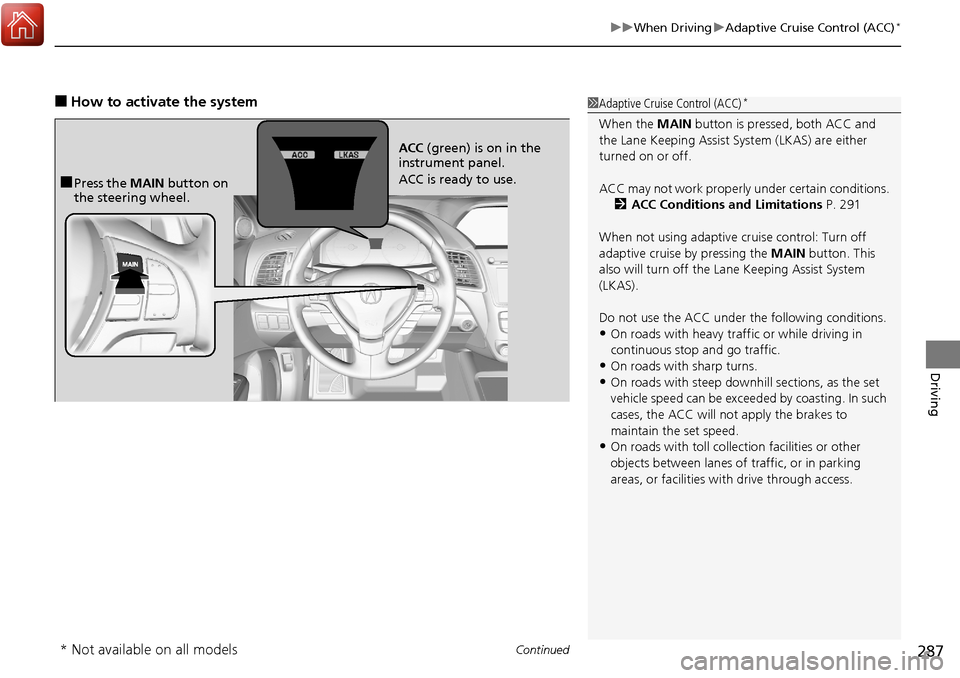
■How to activate the system1Adaptive Cruise Control (ACC)*
When the MAIN button is pressed, both ACC and
the Lane Keeping Assist System (LKAS) are either
turned on or off.
ACC may not work properly under certain conditions.
2 ACC Conditions and Limitations P. 291
When not using adaptive cr uise control: Turn off
adaptive cruise by pressing the MAIN button. This
also will turn off the Lane Keeping Assist System
(LKAS).
Do not use the ACC under the following conditions.
•On roads with heavy traf fic or while driving in
continuous stop and go traffic.
•On roads with sharp turns.•On roads with steep downhill sections, as the set
vehicle speed can be exceeded by coasting. In such
cases, the ACC will not apply the brakes to
maintain the set speed.
•On roads with toll collection facilities or other
objects between lanes of traffic, or in parking
areas, or faci lities with driv e through access.
■Press the MAIN button on
the steering wheel. ACC
(green) is on in the
instrument panel.
ACC is ready to use.
* Not available on all models