tail light Acura RDX 2018 Owner's Manual
[x] Cancel search | Manufacturer: ACURA, Model Year: 2018, Model line: RDX, Model: Acura RDX 2018Pages: 453, PDF Size: 20.13 MB
Page 4 of 453
Contents
Child Safety P. 52Exhaust Gas Hazard P. 64Safety Labels P. 65
Opening and Closing the Tailgate P. 133 Security System P. 139 Opening and Closing the Windows P. 142
Operating the Switches Around the Steering Wheel P. 146 Adjusting the Mirrors P. 161
Interior Lights/Interior Convenience It ems P. 171 Climate Control System P. 182
Audio Error Messages* P. 217General Information on the Audio System* P. 220
Bluetooth® HandsFreeLink ® P. 226 Compass* P. 255
Off-Highway Driving Guidelines P. 268 When Driving P. 270 Braking P. 320
Refueling P. 341 Fuel Economy and CO
2 Emissions P. 343
Maintenance Under the Hood P. 353 Replacing Light Bulbs P. 365
Checking and Maintaining Tires P. 376 Battery P. 385 Remote Transmitter Care P. 386
Accessories and Modifications P. 394
Engine Does Not Start P. 414Jump Starting P. 417 Shift Lever Does Not Move P. 419
Fuses P. 426 Emergency Towing P. 429When You Cannot Open the Tailgate P. 430
Devices that Emit Radio Waves P. 435 Reporting Safety Defects P. 436
Authorized Manuals P. 441 Client Service Information P. 442
Quick Reference GuideP. 4
Safe DrivingP. 25
Instrument PanelP. 67
ControlsP. 119
FeaturesP. 187
DrivingP. 257
MaintenanceP. 345
Handling the UnexpectedP. 395
InformationP. 431
IndexP. 443
Page 9 of 453

Visual Index
8
Quick Reference Guide
❙Windshield Wipers (P 153, 372)
❙How to Refuel (P 342)
❙High-Mount Brake Light (P 371)
❙Opening/Closing the Tailgate
(P 133)
❙Rear Wiper (P 155, 374)
❙Back-Up Lights (P 370)
❙Brake/Taillights (P 368)
❙Rear Turn Signal Lights (P 368)
❙Rear Side Marker Lights (P 368)
❙Power Door Mirrors (P 162)
❙Maintenance Under the Hood (P 353)
❙Fog Lights* (P 152, 365)
❙Multi-View Rear Camera (P 340)
❙Tailgate Release Button (P 134)
❙Headlights (P 149, 365)
❙Front Turn Signal Lights/Parking Lights/
Daytime Running Lights
(P 149, 367)
❙Side Marker Lights (P 149, 367)
❙Tires (P 376, 397)
❙Door Lock/Unlock Control (P 125)
Page 11 of 453
10
Quick Reference Guide
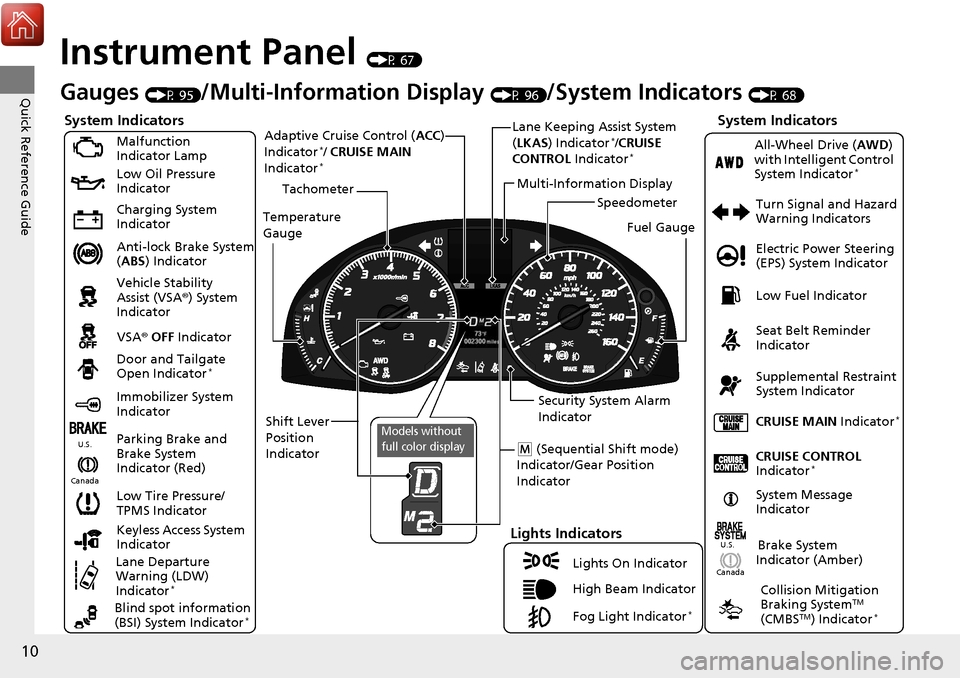
Instrument Panel (P 67)
CanadaU.S.
Turn Signal and Hazard
Warning Indicators
All-Wheel Drive (
AWD)
with Intelligent Control
System Indicator
*
System Indicators
Malfunction
Indicator Lamp
Low Oil Pressure
Indicator
Charging System
Indicator
Anti-lock Brake System
( ABS ) Indicator
Vehicle Stability
Assist (VSA ®) System
Indicator
VSA ® OFF Indicator
Low Tire Pressure/
TPMS Indicator
Lights Indicators
Lights On Indicator
High Beam Indicator
Fog Light Indicator
*
Immobilizer System
Indicator Seat Belt Reminder
Indicator
System Indicators
CRUISE CONTROL
Indicator*
Parking Brake and
Brake System
Indicator (Red) Supplemental Restraint
System Indicator
Door and Tailgate
Open Indicator
*
CRUISE MAIN
Indicator*
Tachometer
Speedometer
Fuel Gauge
Security System Alarm
Indicator
Shift Lever
Position
Indicator Low Fuel Indicator
Gauges (P 95)/Multi-Information Display (P 96)/System Indicators (P 68)
System Message
IndicatorBrake System
Indicator (Amber)
Temperature
Gauge
Electric Power Steering
(EPS) System Indicator
Canada
U.S.
Keyless Access System
Indicator
Lane Departure
Warning (LDW)
Indicator
*
Blind spot information
(BSI) System Indicator*
Collision Mitigation
Braking SystemTM
(CMBSTM) Indicator*
Lane Keeping Assist System
( LKAS) Indicator*/CRUISE
CONTROL Indicator*
Multi-Information Display
(M (Sequential Shift mode)
Indicator/Gear Position
Indicator
Models without
full color display
Adaptive Cruise Control ( ACC)
Indicator*/ CRUISE MAIN
Indicator*
Page 90 of 453
89
uuIndicators uMulti-Information Display Warning and Information Messages
Continued
Instrument Panel
*1:On the left: Models wi thout full color display
On the right: Models with full color display
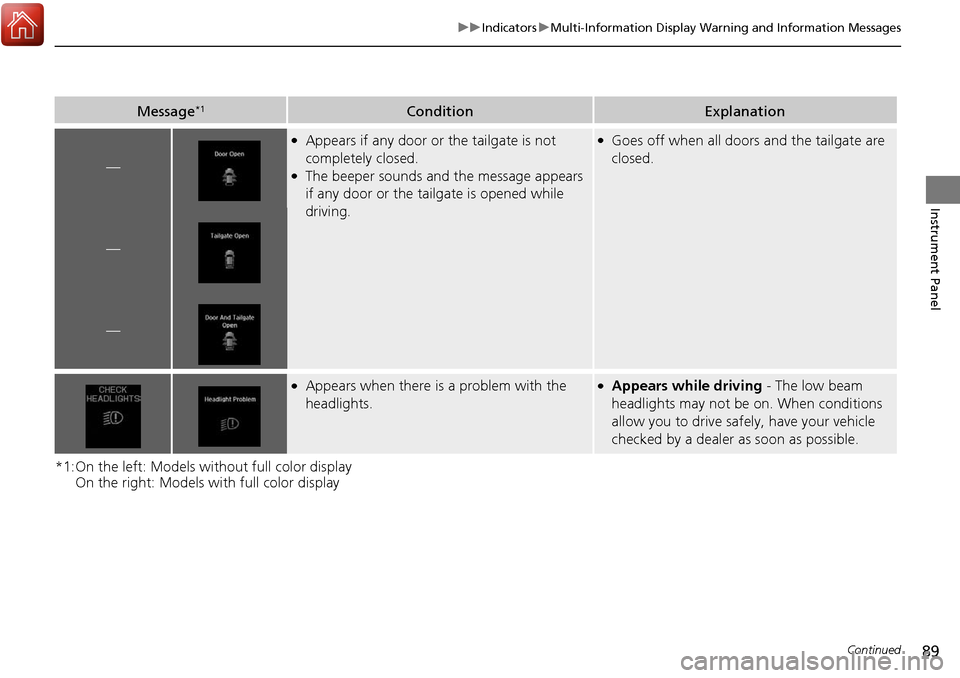
Message*1ConditionExplanation
—
●Appears if any door or the tailgate is not
completely closed.
●The beeper sounds and the message appears
if any door or the tailgate is opened while
driving.
●Goes off when all doors and the tailgate are
closed.
—
—
●Appears when there is a problem with the
headlights.●Appears while driving - The low beam
headlights may not be on. When conditions
allow you to drive safely, have your vehicle
checked by a dealer as soon as possible.
Page 107 of 453
106
uuGauges and Multi-Information Display uMulti-Information Display
Instrument Panel
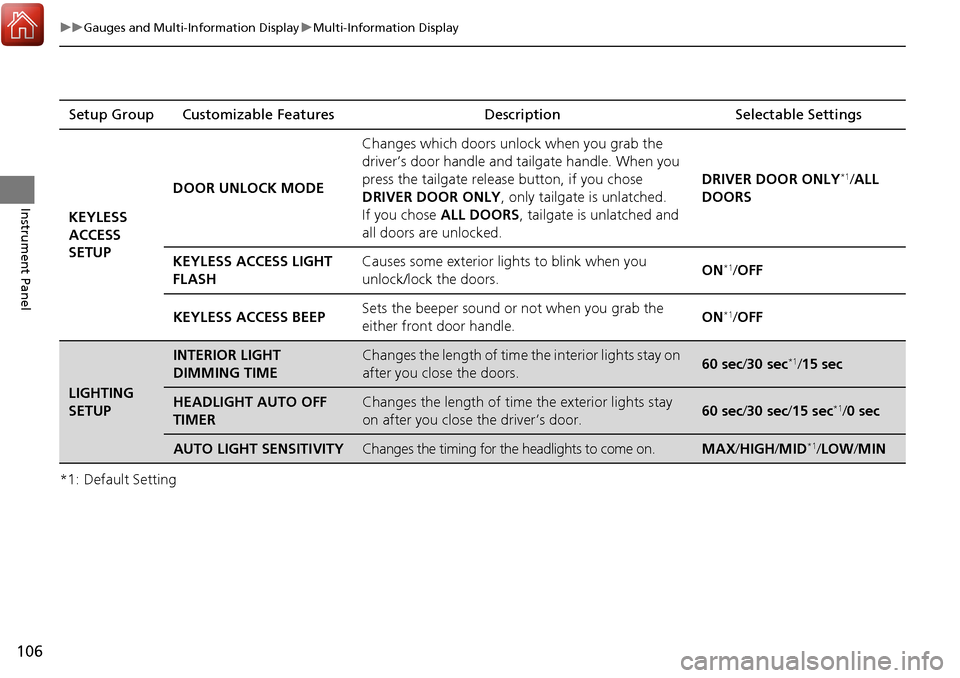
*1: Default SettingSetup Group Customizable Features Description Selectable Settings
KEYLESS
ACCESS
SETUP DOOR UNLOCK MODE
Changes which doors unlock when you grab the
driver’s door handle and
tailgate handle. When you
press the tailgate release button, if you chose
DRIVER DOOR ONLY , only tailgate is unlatched.
If you chose ALL DOORS , tailgate is unlatched and
all doors are unlocked. DRIVER DOOR ONLY
*1/
ALL
DOORS
KEYLESS ACCESS LIGHT
FLASH Causes some exterior lights to blink when you
unlock/lock the doors.
ON
*1/
OFF
KEYLESS ACCESS BEEP Sets the beeper sound or not when you grab the
either front door handle. ON
*1/
OFF
LIGHTING
SETUP
INTERIOR LIGHT
DIMMING TIMEChanges the length of time the interior lights stay on
after you close the doors.60 sec/ 30 sec*1/15 sec
HEADLIGHT AUTO OFF
TIMERChanges the length of time the exterior lights stay
on after you close the driver’s door.60 sec/ 30 sec/15 sec*1/0 sec
AUTO LIGHT SENSITIVITYChanges the timing for the headlights to come on.MAX /HIGH /MID*1/ LOW /MIN
Page 108 of 453
107
uuGauges and Multi-Information Display uMulti-Information Display
Continued
Instrument Panel
*1: Default SettingSetup Group Customizable Features
Description Selectable Settings
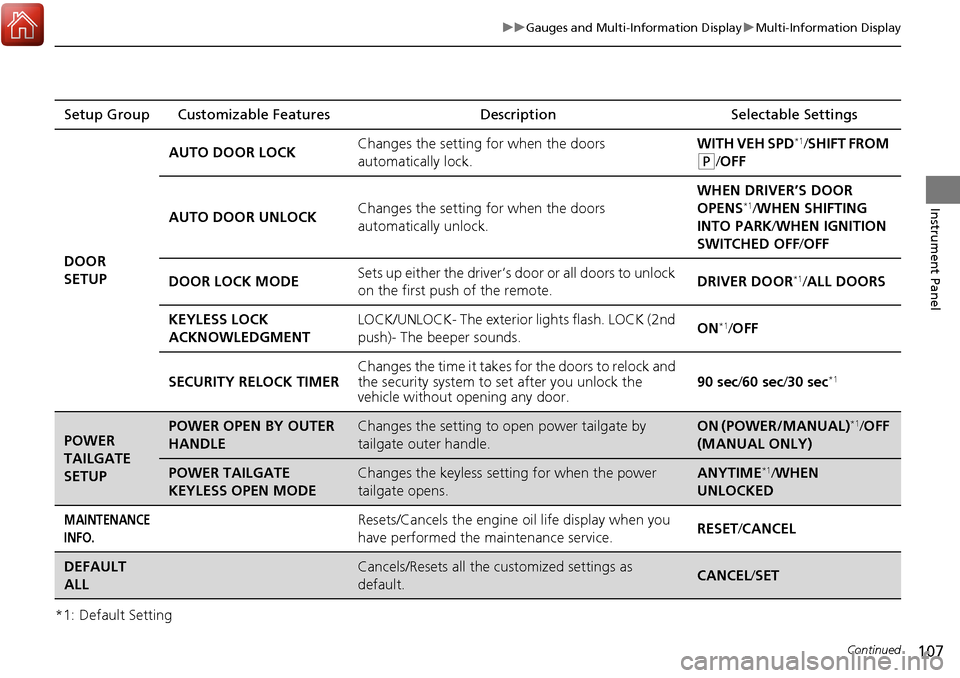
DOOR
SETUP AUTO DOOR LOCK
Changes the setting for when the doors
automatically lock. WITH VEH SPD
*1/
SHIFT FROM
(P/OFF
AUTO DOOR UNLOCK Changes the setting for when the doors
automatically unlock. WHEN DRIVER’S DOOR
OPENS
*1/
WHEN SHIFTING
INTO PARK/ WHEN IGNITION
SWITCHED OFF /OFF
DOOR LOCK MODE Sets up either the driver’s door or all doors to unlock
on the first push of the remote. DRIVER DOOR
*1/
ALL DOORS
KEYLESS LOCK
ACKNOWLEDGMENT LOCK/UNLOCK- The exterior
lights flash. LOCK (2nd
push)- The beeper sounds. ON
*1/
OFF
SECURITY RELOCK TIMER Changes the time it takes for the doors to relock and
the security system to set after you unlock the
vehicle without op
ening any door. 90 sec
/60 sec/ 30 sec
*1
POWER
TAILGATE
SETUPPOWER OPEN BY OUTER
HANDLEChanges the setting to open power tailgate by
tailgate outer handle.ON (POWER/MANUAL)*1/OFF
(MANUAL ONLY)
POWER TAILGATE
KEYLESS OPEN MODEChanges the keyless setting for when the power
tailgate opens.ANYTIME*1/ WHEN
UNLOCKED
MAINTENANCE
INFO.Resets/Cancels the engine oil life display when you
have performed the maintenance service. RESET
/CANCEL
DEFAULT
ALLCancels/Resets all the customized settings as
default.CANCEL /SET
Page 114 of 453
113
uuGauges and Multi-Information Display uMulti-Information Display
Continued
Instrument Panel
*1: Default SettingSetup Group Customizable Features
Description Selectable Settings
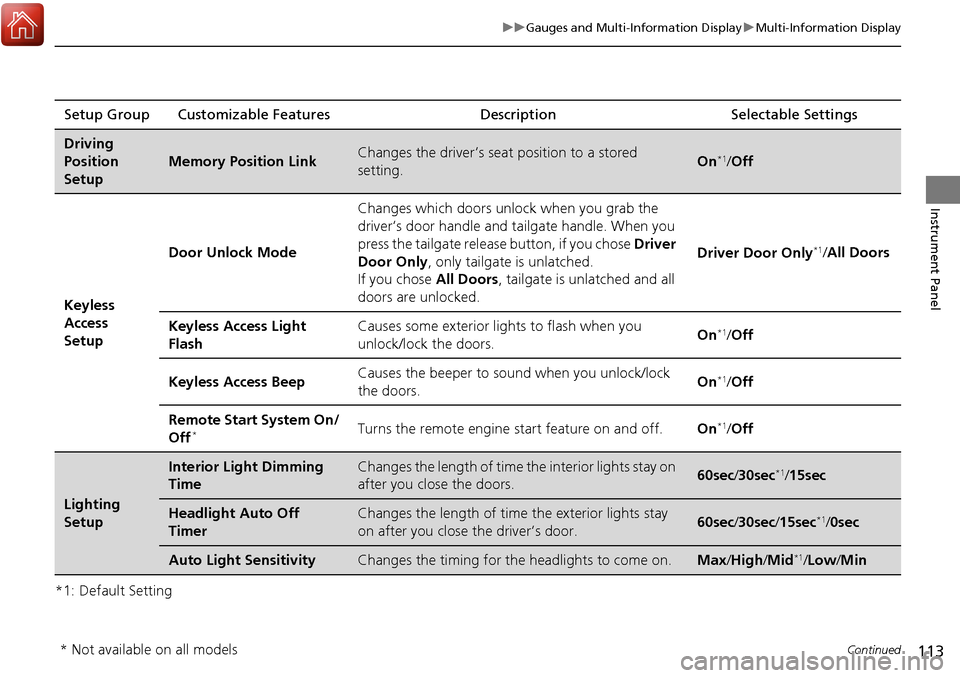
Driving
Position
Setup
Memory Position LinkChanges the driver’s seat position to a stored
setting.On*1/ Off
Keyless
Access
Setup Door Unlock Mode
Changes which doors unlock when you grab the
driver’s door handle and tailgate handle. When you
press the tailgate release button, if you chose
Driver
Door Only , only tailgate is unlatched.
If you chose All Doors, tailgate is unlatched and all
doors are unlocked. Driver Door Only
*1/
All Doors
Keyless Access Light
Flash Causes some exterior li
ghts to flash when you
unlock/lock the doors. On
*1/
Off
Keyless Access Beep Causes the beeper to so
und when you unlock/lock
the doors. On
*1/
Off
Remote Start System On/
Off
*Turns the remote engine start feature on and off. On*1/Off
Lighting
Setup
Interior Light Dimming
TimeChanges the length of time the interior lights stay on
after you close the doors.60sec /30sec*1/15sec
Headlight Auto Off
TimerChanges the length of time the exterior lights stay
on after you close the driver’s door.60sec /30sec /15sec*1/ 0sec
Auto Light SensitivityChanges the timing for th e headlights to come on.Max/High /Mid*1/Low /Min
* Not available on all models
Page 120 of 453
119
Controls
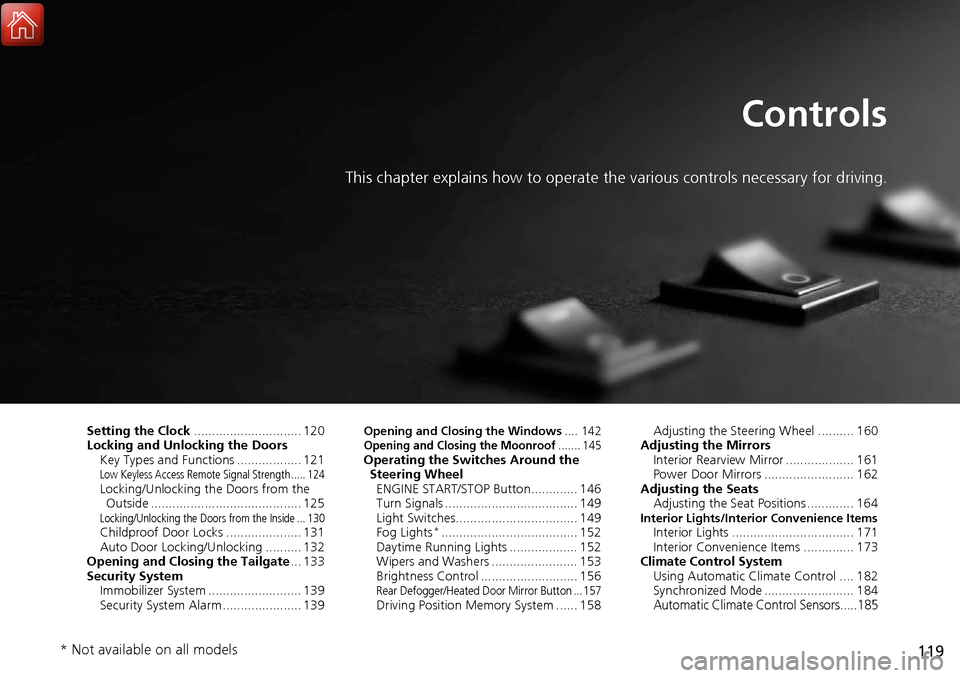
This chapter explains how to operate the various controls necessary for driving.
Setting the Clock.............................. 120
Locking and Unlocking the Doors Key Types and Functions .................. 121
Low Keyless Access Remote Signal Strength ..... 124Locking/Unlocking the Doors from the Outside .......................................... 125
Locking/Unlocking the Doors from the Inside ... 130Childproof Door Locks ..................... 131
Auto Door Locking/Unlocking .......... 132
Opening and Closing the Tailgate ... 133
Security System Immobilizer System .......................... 139
Security System Alarm ...................... 139
Opening and Closing the Windows .... 142Opening and Closing the Moonroof....... 145Operating the Switches Around the
Steering Wheel ENGINE START/STOP Button............. 146
Turn Signals ..................................... 149
Light Switches.................................. 149
Fog Lights
*...................................... 152
Daytime Running Lights ................... 152
Wipers and Washers ........................ 153
Brightness Control ........................... 156
Rear Defogger/Heated Door Mirror Button ... 157Driving Position Memory System ...... 158 Adjusting the Steering Wheel .......... 160
Adjusting the Mirrors Interior Rearview Mirror ................... 161
Power Door Mirrors ......................... 162
Adjusting the Seats Adjusting the Seat Positions ............. 164
Interior Lights/Interior Convenience ItemsInterior Lights .................................. 171
Interior Convenience Items .............. 173
Climate Control System Using Automatic Climate Control .... 182
Synchronized Mode ......................... 184
Automatic Climate Control Sensors.....185
* Not available on all models
Page 122 of 453
121Continued
Controls
Locking and Unlocking the Doors
Key Types and Functions
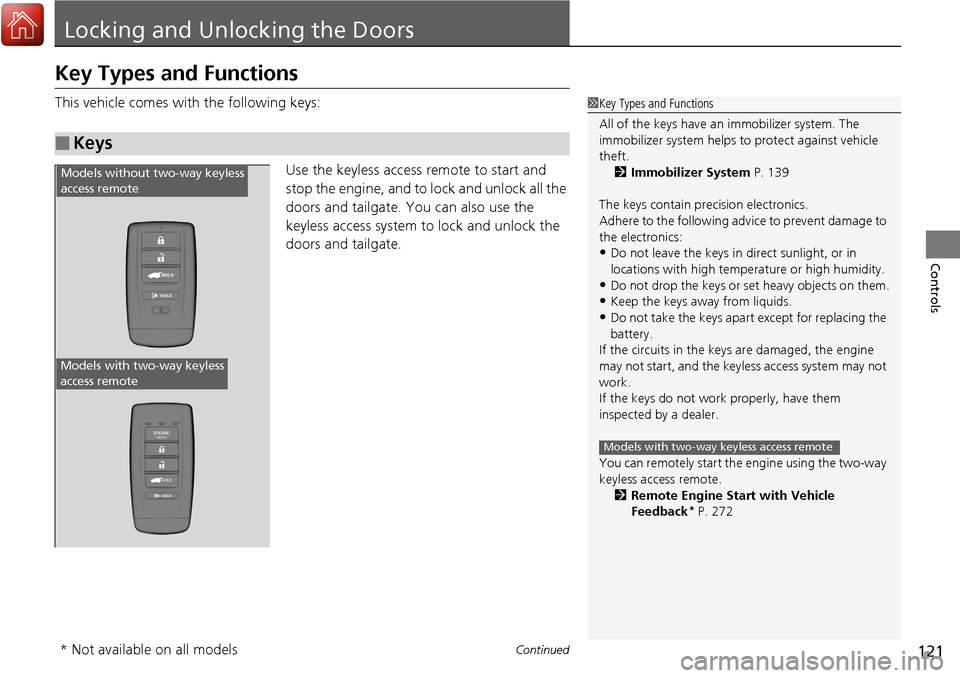
This vehicle comes with the following keys:
Use the keyless access remote to start and
stop the engine, and to lock and unlock all the
doors and tailgate. You can also use the
keyless access system to lock and unlock the
doors and tailgate.
■Keys
1Key Types and Functions
All of the keys have an immobilizer system. The
immobilizer system helps to protect against vehicle
theft. 2 Immobilizer System P. 139
The keys contain precision electronics.
Adhere to the following advi ce to prevent damage to
the electronics:
•Do not leave the keys in direct sunlight, or in
locations with high temperature or high humidity.
•Do not drop the keys or set heavy objects on them.
•Keep the keys away from liquids.
•Do not take the keys apart except for replacing the
battery.
If the circuits in the keys are damaged, the engine
may not start, and the keyless access system may not
work.
If the keys do not work properly, have them
inspected by a dealer.
You can remotely start the engine using the two-way
keyless access remote.
2 Remote Engine Start with Vehicle
Feedback
* P. 272
Models with two-way keyless access remote
HOLD
HOLD
Models without two-way keyless
access remote
Models with two-way keyless
access remote
* Not available on all models
Page 126 of 453
125
uuLocking and Unlocking the Doors uLocking/Unlocking the Doors from the Outside
Continued
Controls
Locking/Unlocking the Doors from the Outside
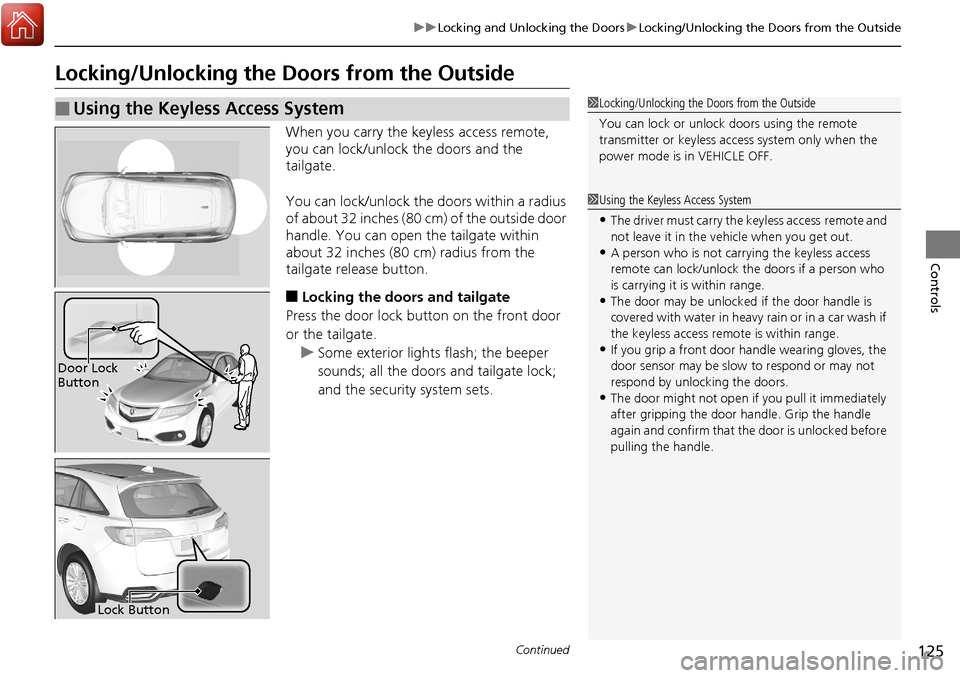
When you carry the keyless access remote,
you can lock/unlock the doors and the
tailgate.
You can lock/unlock the doors within a radius
of about 32 inches (80 cm) of the outside door
handle. You can open the tailgate within
about 32 inches (80 cm) radius from the
tailgate release button.
■Locking the doors and tailgate
Press the door lock button on the front door
or the tailgate.
u Some exterior lights flash; the beeper
sounds; all the doors and tailgate lock;
and the security system sets.
■Using the Keyless Access System1Locking/Unlocking the Doors from the Outside
You can lock or unlock doors using the remote
transmitter or keyless access system only when the
power mode is in VEHICLE OFF.
1Using the Keyless Access System
•The driver must carry the keyless access remote and
not leave it in the ve hicle when you get out.
•A person who is not carryi ng the keyless access
remote can lock/unlock the doors if a person who
is carrying it is within range.
•The door may be unlocked if the door handle is
covered with water in heavy rain or in a car wash if
the keyless access remote is within range.
•If you grip a front door handle wearing gloves, the
door sensor may be slow to respond or may not
respond by unlocking the doors.
•The door might not open if you pull it immediately
after gripping the door handle. Grip the handle
again and confirm that th e door is unlocked before
pulling the handle.
Door Lock
Button
Lock Button