blind spot Acura RDX 2019 User Guide
[x] Cancel search | Manufacturer: ACURA, Model Year: 2019, Model line: RDX, Model: Acura RDX 2019Pages: 649, PDF Size: 33 MB
Page 508 of 649
507
Driving
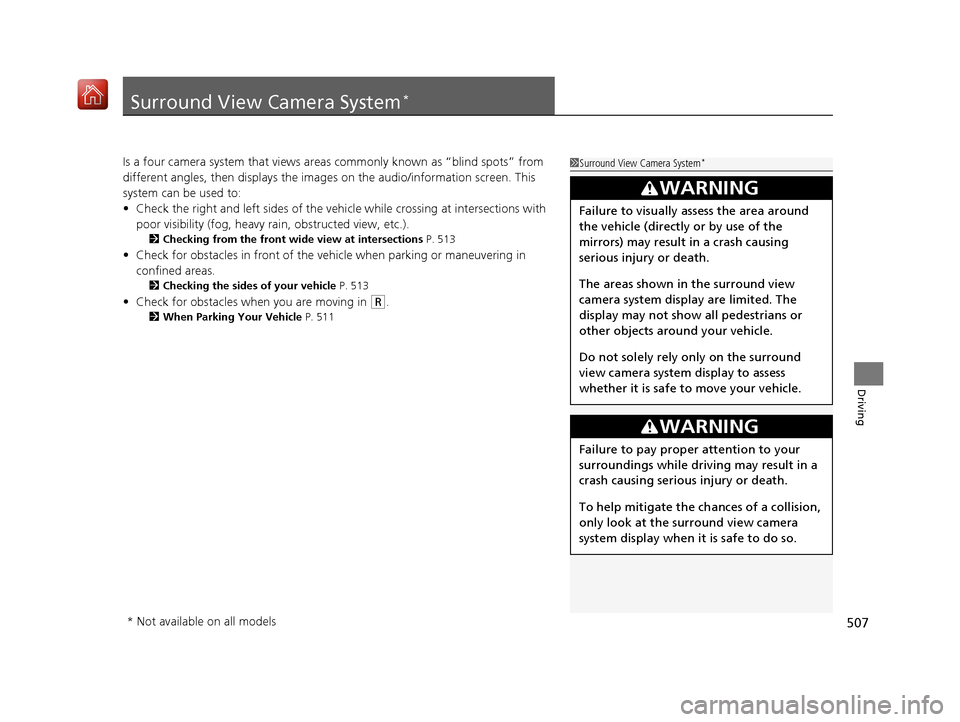
Surround View Camera System*
Is a four camera system that views areas commonly known as “blind spots” from
different angles, then displays the images on the audi o/information screen. This
system can be used to:
• Check the right and left sides of the vehi cle while crossing at intersections with
poor visibility (fog, heavy rain, obstructed view, etc.).
2Checking from the front wide view at intersections P. 513
•Check for obstacles in front of the vehicle when parking or maneuvering in
confined areas.
2 Checking the sides of your vehicle P. 513
•Check for obstacles when you are moving in (R.
2 When Parking Your Vehicle P. 511
1Surround View Camera System*
3WARNING
Failure to visually assess the area around
the vehicle (directly or by use of the
mirrors) may result in a crash causing
serious injury or death.
The areas shown in the surround view
camera system display are limited. The
display may not show all pedestrians or
other objects around your vehicle.
Do not solely rely only on the surround
view camera system display to assess
whether it is safe to move your vehicle.
3WARNING
Failure to pay proper attention to your
surroundings while driv ing may result in a
crash causing serious injury or death.
To help mitigate the ch ances of a collision,
only look at the surround view camera
system display when it is safe to do so.
* Not available on all models
19 ACURA RDX-31TJB6000.book 507 ページ 2018年4月26日 木曜日 午後4時51分
Page 509 of 649
508
uuSurround View Camera System*uDisplaying an Image From the Surround View Cameras
Driving
Displaying an Image From the Surround View
Cameras
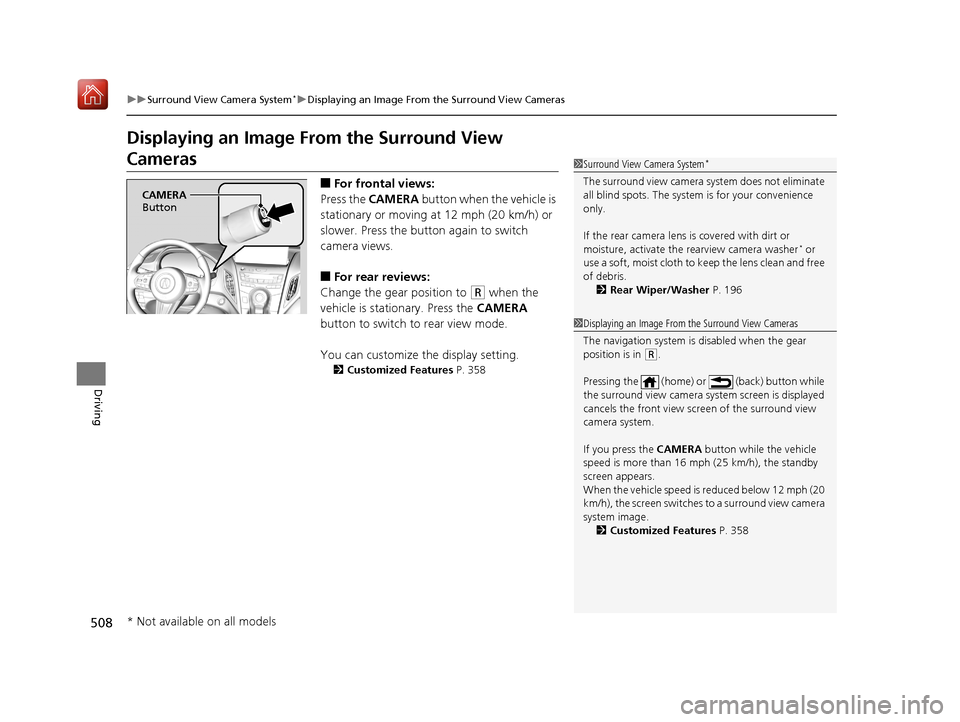
■For frontal views:
Press the CAMERA button when the vehicle is
stationary or moving at 12 mph (20 km/h) or
slower. Press the butto n again to switch
camera views.
■For rear reviews:
Change the gear position to
(R when the
vehicle is stationary. Press the CAMERA
button to switch to rear view mode.
You can customize the display setting.
2 Customized Features P. 358
1Surround View Camera System*
The surround view ca mera system does not eliminate
all blind spots. The system is for your convenience
only.
If the rear camera lens is covered with dirt or
moisture, activate the rearview camera washer
* or
use a soft, moist cloth to keep the lens clean and free
of debris.
2 Rear Wiper/Washer P. 196
CAMERA
Button
1 Displaying an Image From the Surround View Cameras
The navigation system is disabled when the gear
position is in
(R.
Pressing the (home) or (back) button while
the surround view camera system screen is displayed
cancels the front view sc reen of the surround view
camera system.
If you press the CAMERA button while the vehicle
speed is more than 16 mph (25 km/h), the standby
screen appears.
When the vehicle speed is reduced below 12 mph (20
km/h), the screen switches to a surround view camera
system image. 2 Customized Features P. 358
* Not available on all models
19 ACURA RDX-31TJB6000.book 508 ページ 2018年4月26日 木曜日 午後4時51分
Page 512 of 649
511
uuSurround View Camera System*uUsing the Surround View Camera System
Continued
Driving
Using the Surround View Camera System
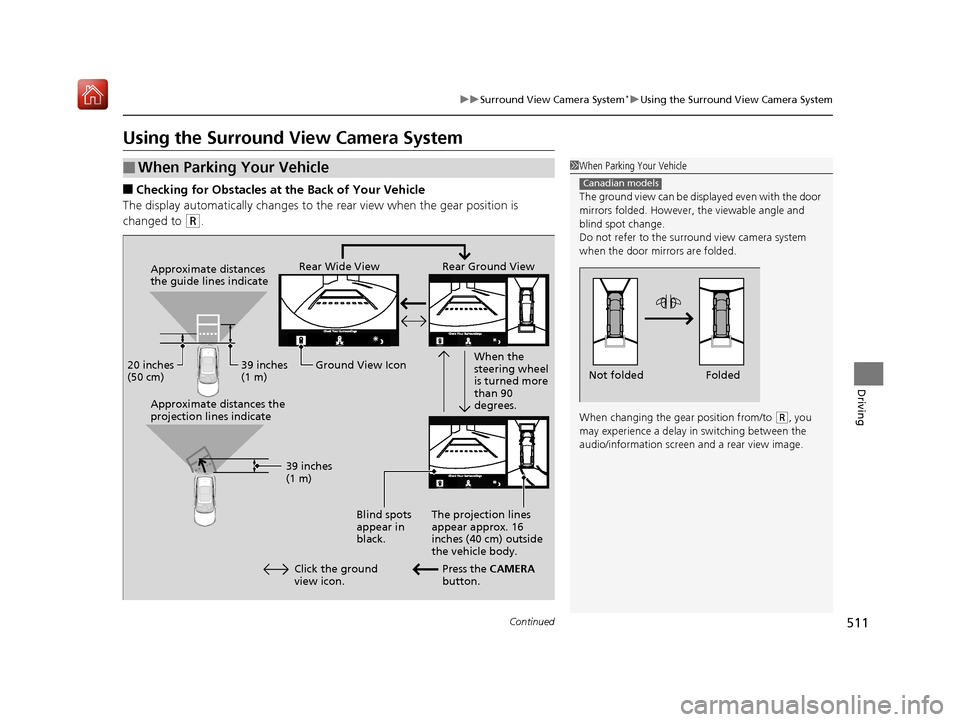
■Checking for Obstacles at the Back of Your Vehicle
The display automatically changes to the rear view when the gear position is
changed to
(R.
■When Parking Your Vehicle1 When Parking Your Vehicle
The ground view can be disp layed even with the door
mirrors folded. However, the viewable angle and
blind spot change.
Do not refer to the surround view camera system
when the door mirrors are folded.
When changing the gear position from/to
( R, you
may experience a delay in switching between the
audio/information screen and a rear view image.
Canadian models
Folded
Not folded
Rear Wide View Rear Ground View
When the
steering wheel
is turned more
than 90
degrees.
The projection lines
appear approx. 16
inches (40 cm) outside
the vehicle body.
Blind spots
appear in
black.
Press the CAMERA
button.
Approximate distances
the guide lines indicate
Approximate distances the
projection lines indicate
39 inches
(1 m)
20 inches
(50 cm)
39 inches
(1 m)
Ground View Icon
Click the ground
view icon.
19 ACURA RDX-31TJB6000.book 511 ページ 2018年4月26日 木曜日 午後4時51分
Page 513 of 649
uuSurround View Camera System*uUsing the Surround View Camera System
512
Driving
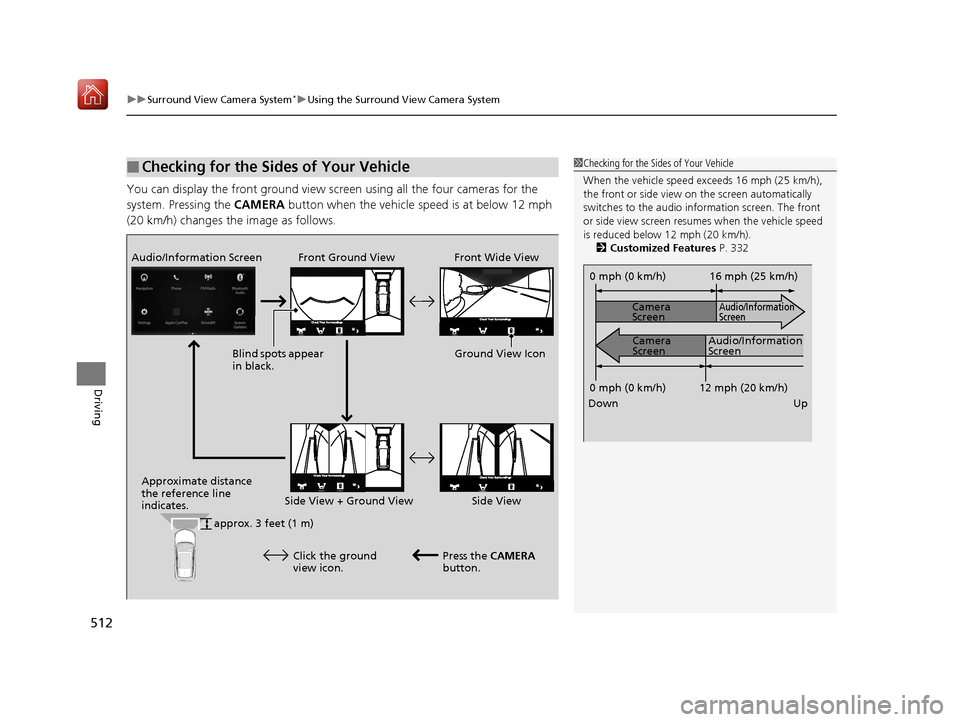
You can display the front ground view screen using all the four cameras for the
system. Pressing the CAMERA button when the vehicle speed is at below 12 mph
(20 km/h) changes the image as follows.
■Checking for the Sides of Your Vehicle1 Checking for the Sides of Your Vehicle
When the vehicle speed exceeds 16 mph (25 km/h),
the front or side view on the screen automatically
switches to the audio information screen. The front
or side view screen resumes when the vehicle speed
is reduced below 12 mph (20 km/h).
2 Customized Features P. 332
0 mph (0 km/h)
Down Up Camera
Screen
Camera
Screen
Audio/Information
Screen
Audio/Information
Screen 16 mph (25 km/h)
12 mph (20 km/h)
0 mph (0 km/h)
Front Ground View Front Wide View
Audio/Information Screen
Approximate distance
the reference line
indicates. Press the CAMERA
button.
approx. 3 feet (1 m) Blind spots appear
in black.
Click the ground
view icon. Ground View Icon
Side View + Ground View Side View
19 ACURA RDX-31TJB6000.book 512 ページ 2018年4月26日 木曜日 午後4時51分
Page 632 of 649
631Continued
Information
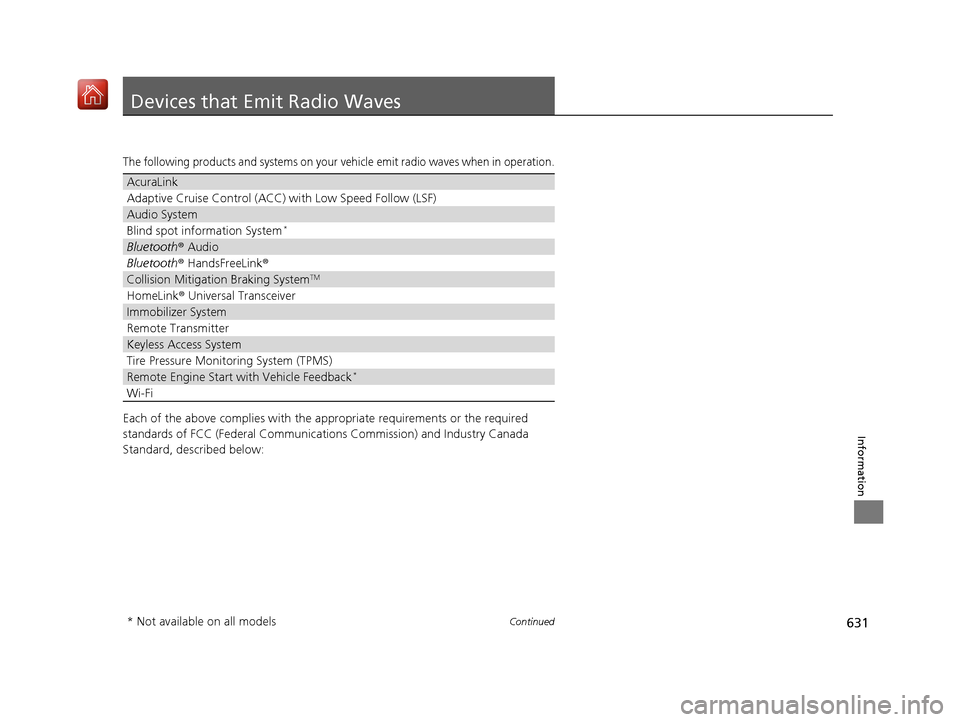
Devices that Emit Radio Waves
The following products and systems on your vehicle emit radio waves when in operation.
Each of the above complies with the appropriate requirements or the required
standards of FCC (Federal Communications Commission) and Industry Canada
Standard, described below:
AcuraLink
Adaptive Cruise Control (ACC) with Low Speed Follow (LSF)
Audio System
Blind spot information System*
Bluetooth® Audio
Bluetooth® HandsFreeLink ®
Collision Mitigati on Braking SystemTM
HomeLink® Universal Transceiver
Immobilizer System
Remote Transmitter
Keyless Access System
Tire Pressure Monitoring System (TPMS)
Remote Engine Start with Vehicle Feedback*
Wi-Fi
* Not available on all models
19 ACURA RDX-31TJB6000.book 631 ページ 2018年4月26日 木曜日 午後4時51分
Page 642 of 649
641
Index
Auxiliary Input Jack................................. 241
Average Fuel Economy ............................ 131
AWD ......................................................... 437
B
Battery ...................................................... 563
Charging System Indicator ................ 79, 609
Jump Starting ......................................... 604
Maintenance (Checking the Battery) ....... 563
Belts (Seat) .................................................. 35
Beverage Holders ..................................... 223
Blind spot information System ................ 438
Bluetooth ® Audio ..................................... 297
Bluetooth ® HandsFreeLink ®.................... 358
Booster Seats (For Children) ...................... 70
Brake System ............................................ 486
Anti-lock Brake System (ABS) .................. 493
Automatic Brake Hold ............................. 491
Brake Assist System................................. 494
Fluid ....................................................... 543
Foot Brake .............................................. 490
Indicator ..................................... 75, 76, 610
Indicator (Red) ........................................ 612
Parking Brake.......................................... 486
Brightness Control (Instrument Panel) ... 198
Built-in Key ............................................... 147
Bulb Replacement .................................... 545
Back-Up Light and Taillight ..................... 548
Fog Lights ............................................... 545 Front Turn Signal,
Parking/Daytime
Running and Front Side Marker Lights ... 545
Headlights ............................................... 545
High-Mount Brake Light .......................... 548
Puddle Lights ........................................... 548
Rear License Plate Light ........................... 548
Rear Turn Signal Light Bulbs .................... 546
Side Turn Signal/Em ergency Indicator
Lights .................................................... 545
Taillights, Brake and Rear Side Marker
Lights .................................................... 547
Taillights/Brake and Back-Up Lights .......... 548
Bulb Specifications ................................... 628
C
CAMERA Button....................................... 508
Carbon Monoxide Gas ................................ 71
Carrying Cargo .................................. 399, 401
Certification Label .................................... 630
Changing Bulbs ......................................... 545
Charging System Indicator ................. 79, 609
Child Safety ................................................. 58
Childproof Door Locks ............................. 161
Child Seat .................................................... 58
Booster Seats ............................................. 70
Child Seat for Infants ................................. 60
Child Seat for Small Children ..................... 61
Installing a Child Seat with a Lap/Shoulder Seat Belt .................................................. 65
Larger Children .......................................... 69 Rear-facing Child Seat ............................... 60
Selecting a Child Seat ................................ 62
Childproof Door Locks ............................. 161
Cleaning the Exterior ............................... 571
Cleaning the Interior ................................ 569
Client Service Information ....................... 639
Climate Control System ............................ 230
Changing the Mode ................................ 230
Defrosting the Windshield and Windows ............................................... 232
Dust and Pollen Filter............................... 568
Rear Temperature Control Dial ................ 234
Recirculation/Fresh Air Mode ................... 230
Sensors ................................................... 235
Synchronized Mode................................. 233
Using Automatic Climate Control ............ 230
Clock .......................................................... 144
CMBSTM (Collision Mitigation Braking
SystemTM) ................................................. 446
Coat Hook ................................................. 225
Collision Mitigation Braking System
TM
(CMBSTM) ................................................. 446
Compact Spare Tire .......................... 579, 629
Console Compartment ............................. 222
Controls ..................................................... 143
Coolant (Engine) ...................................... 540
Adding to the Radiator ............................ 541
Adding to the Reserve Tank..................... 540
Overheating ............................................ 606
Creeping (Automatic Transmission) ........ 417
Cross Traffic Monitor ............................... 501
19 ACURA RDX-31TJB6000.book 641 ページ 2018年4月26日 木曜日 午後4時51分
Page 645 of 649
644
Index
Indicators..................................................... 74
Adaptive Cruise Control (ACC) with Low
Speed Follow (LSF) (Amber) ...................... 91
Adaptive Cruise Control (ACC) with Low Speed Follow (LSF) (Green) ....... 91, 456
Anti-lock Brake System (ABS) ..................... 84
Auto High-Beam ........................................ 87
Auto Idle Stop (Green) ............................... 82
Auto Idle Stop System (Amber) .................. 82
Automatic Brake Hold........................ 77, 491
Automatic Brake Hold System ............ 77, 491
Blind spot information System ................... 95
Charging System ............................... 79, 609
Collision Mitigati on Braking System
TM
(CMBSTM) ................................................. 93
Electric Power Steering (EPS) System .. 84, 611
Fog Light ................................................... 87
Gear Position ............................................. 79
High Beam................................................. 87
Immobilizer System .................................... 88
Lane Keeping Assist System (LKAS) (Amber) ................................................... 91
Lane Keeping Assist System (LKAS) (Green) ............................................ 91, 473
Lights On ................................................... 87
Low Fuel .................................................... 83
Low Oil Pressure ...................................... 608
Low Tire Pressure/TPMS ..................... 86, 613
M (sequential mode ) Indicator/Gear
Selection Indicator ................................... 79
Maintenance Minder ................................. 90 Malfunction Indicator Lamp............... 78, 609
Parking Brake a
nd Brake System
(Amber) ........................................... 76, 612
Parking Brake a nd Brake System
(Red) ....................................... 75, 610, 612
Road Departure Mitigation (RDM) ............. 92
Safety Support (Amber) ............................. 92
Seat Belt Reminder .............................. 36, 83
Security System Alarm ............................... 88
Super Handling-All Wheel Drive
TM
(SH-AWD ®) .............................................. 90
Supplemental Restraint System ............ 55, 84
System Message ........................................ 89
Transmission System.......................... 80, 614
Turn Signal and Hazard Warning ............... 87
Vehicle Stability Assist (VSA ®) OFF ............. 85
Vehicle Stability Assist (VSA ®)
System ............................................ 85, 434
VSA ® OFF ................................................ 435
Information .............................................. 627
Instant Fuel Economy ............................... 131
Instrument Panel ........................................ 73
Brightness Control................................... 198
Integrated Dynamics System (IDS) ........... 426
Dynamic Mode button ............................ 426
Interior Lights ........................................... 219
Interior Rearview Mirror .......................... 204
iPad ........................................................... 311
iPhone ....................................................... 311
iPod ................................................... 291, 311
J
Jack (Wheel Nut Wrench) ........................ 583
Jump Starting ........................................... 604
K
Key Number Tag ...................................... 148
Keyless Access System .............................. 150
Keyless Lockout Prevention ..................... 157
Keys ........................................................... 146
Lockout Prevention ................................. 157
Number Tag............................................ 148
Rear Door Won’t Open ........................... 161
Remote Transmitter ................................ 155
Two-way Keyless Access Remote..... 158, 413
Types and Functions................................ 146
Kickdown (Automatic Transmission) ...... 417
Knee Airbags .............................................. 49
L
Lane Keeping Assist System (LKAS) ........ 471
Language (HFL) ........................................ 360
LATCH (Child Seats) ............................. 63, 67
Legal Information .................................... 325
License Information ................................. 328
Lights ................................................ 186, 545
Automatic............................................... 187
Bulb Replacement ................................... 545
Daytime Running Lights .......................... 190
Fog Lights ............................................... 190
19 ACURA RDX-31TJB6000.book 644 ページ 2018年4月26日 木曜日 午後4時51分