bluetooth Acura RDX 2019 User Guide
[x] Cancel search | Manufacturer: ACURA, Model Year: 2019, Model line: RDX, Model: Acura RDX 2019Pages: 649, PDF Size: 33 MB
Page 298 of 649
297
uuAudio System Basic Operation uPlaying Bluetooth ® Audio
Continued
Features
Playing Bluetooth ® Audio
Your audio system allows you to listen to music from your Bluetooth-compatible
phone.
This function is available when the phone is paired an d connected to the vehicle’s
Bluetooth ® HandsFreeLink ® (HFL) system.
2Phone Setup P. 364
1Playing Bluetooth ® Audio
Not all Bluetooth-enable d phones with streaming
audio capabilities are compat ible with the system. For
a list of compatible phones:
•U.S.: Visit www.handsfreelink.com/Acura or call 1-
888-528-7876.
•Canada: For more info rmation on smartphone
compatibility, call 1-888-528-7876.
It may be illegal to pe rform some data device
functions while driving.
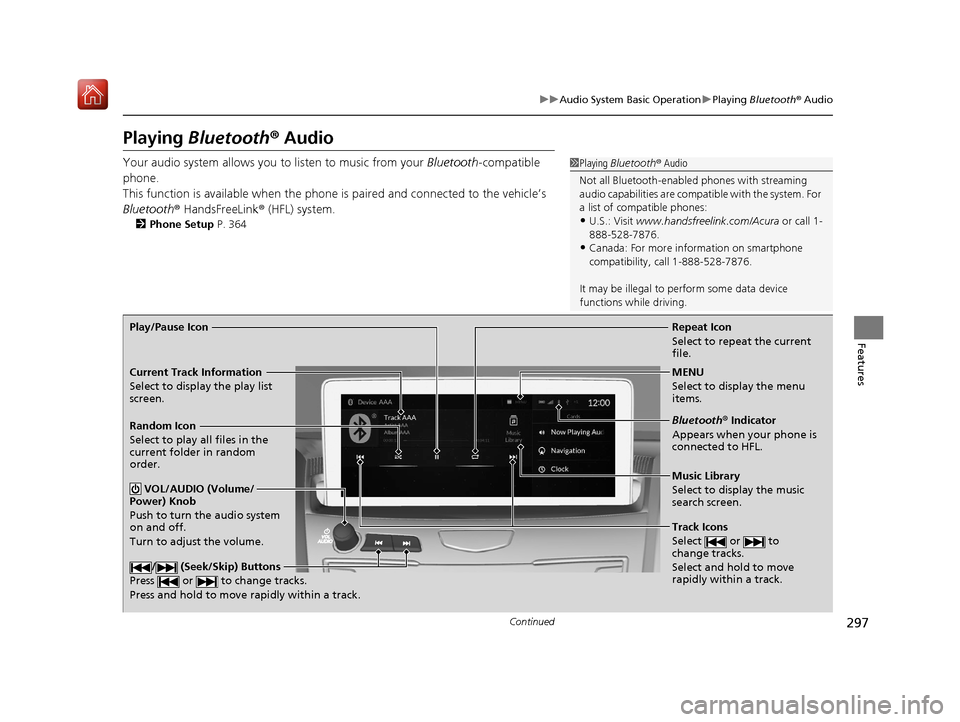
Repeat Icon
Select to repeat the current
file.
Music Library
Select to display the music
search screen.
Track Icons
Select or to
change tracks.
Select and hold to move
rapidly within a track.
Random Icon
Select to play all files in the
current folder in random
order.
VOL/AUDIO (Volume/
Power) Knob
Push to turn the audio system
on and off.
Turn to adjust the volume.
/ (Seek/Skip) Buttons
Press or to change tracks.
Press and hold to move rapidly within a track.
Play/Pause Icon
MENU
Select to display the menu
items.
Bluetooth® Indicator
Appears when your phone is
connected to HFL.
Current Track Information
Select to display the play list
screen.
19 ACURA RDX-31TJB6000.book 297 ページ 2018年4月26日 木曜日 午後4時51分
Page 299 of 649
uuAudio System Basic Operation uPlaying Bluetooth ® Audio
298
Features
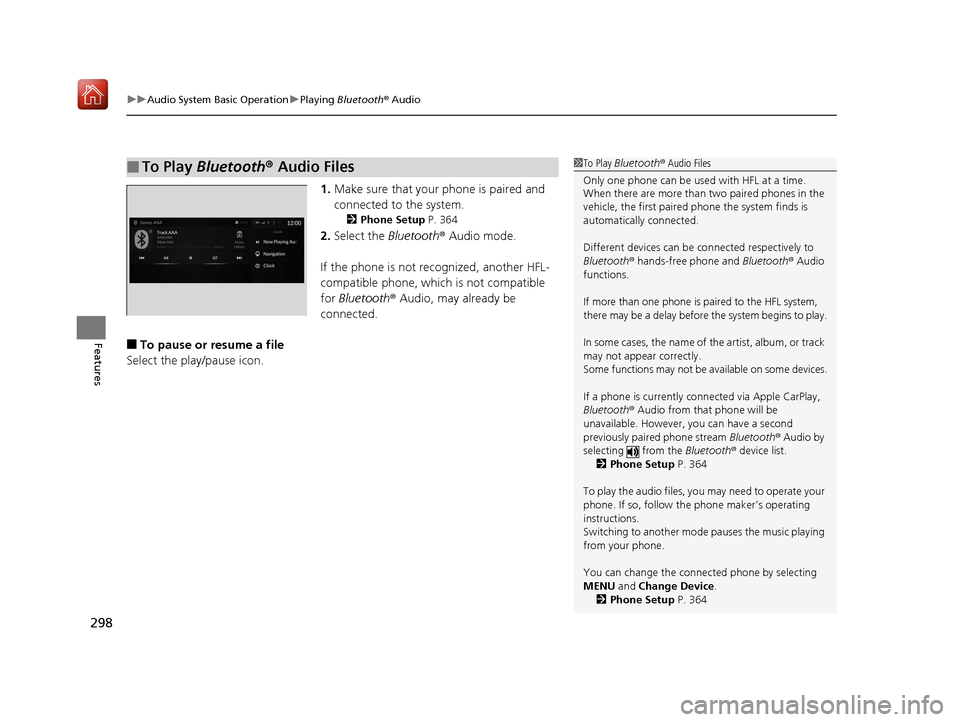
1. Make sure that your phone is paired and
connected to the system.
2 Phone Setup P. 364
2.Select the Bluetooth® Audio mode.
If the phone is not recognized, another HFL-
compatible phone, which is not compatible
for Bluetooth ® Audio, may already be
connected.
■To pause or resume a file
Select the play/pause icon.
■To Play Bluetooth® Audio Files1To Play Bluetooth ® Audio Files
Only one phone can be used with HFL at a time.
When there are more than two paired phones in the
vehicle, the first paired phone the system finds is
automatically connected.
Different devices can be co nnected respectively to
Bluetooth ® hands-free phone and Bluetooth® Audio
functions.
If more than one phone is paired to the HFL system,
there may be a delay before the system begins to play.
In some cases, the name of the artist, album, or track
may not appear correctly.
Some functions may not be available on some devices.
If a phone is currently connected via Apple CarPlay,
Bluetooth ® Audio from that phone will be
unavailable. However, you can have a second
previously paired phone stream Bluetooth® Audio by
selecting from the Bluetooth® device list.
2 Phone Setup P. 364
To play the audio files, y ou may need to operate your
phone. If so, follow the phone maker’s operating
instructions.
Switching to another mode pauses the music playing
from your phone.
You can change the connected phone by selecting
MENU and Change Device.
2 Phone Setup P. 364
19 ACURA RDX-31TJB6000.book 298 ページ 2018年4月26日 木曜日 午後4時51分
Page 300 of 649
299
uuAudio System Basic Operation uPlaying Bluetooth ® Audio
Features
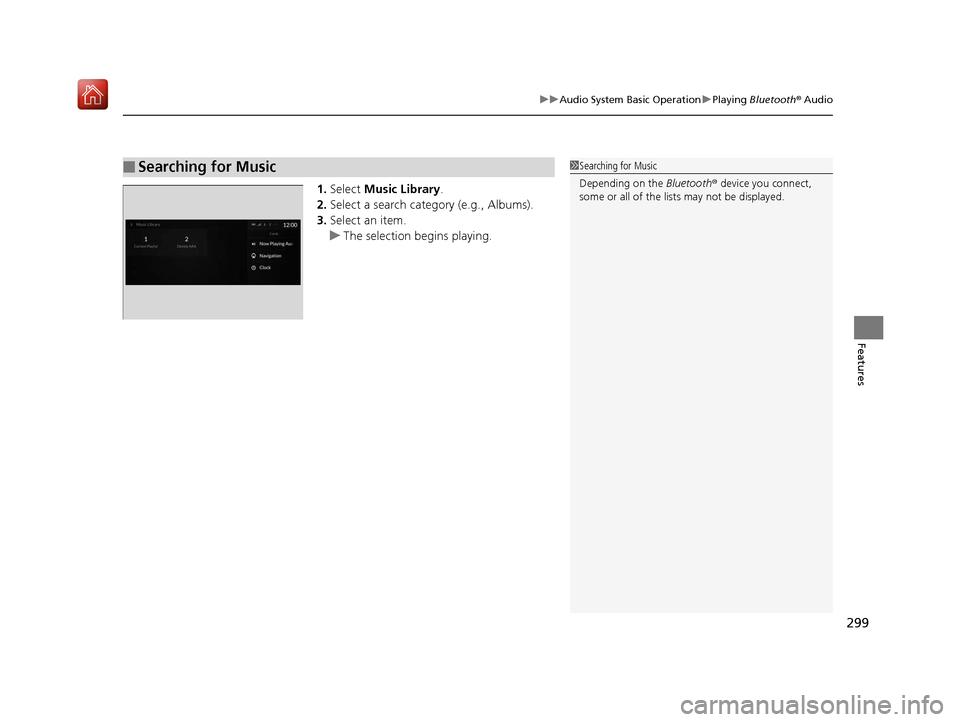
1. Select Music Library .
2. Select a search catego ry (e.g., Albums).
3. Select an item.
u The selection begins playing.
■Searching for Music1Searching for Music
Depending on the Bluetooth® device you connect,
some or all of the list s may not be displayed.
19 ACURA RDX-31TJB6000.book 299 ページ 2018年4月26日 木曜日 午後4時51分
Page 303 of 649
302
uuAudio System Basic Operation uSiri ® Eyes Free
Features
Siri ® Eyes Free
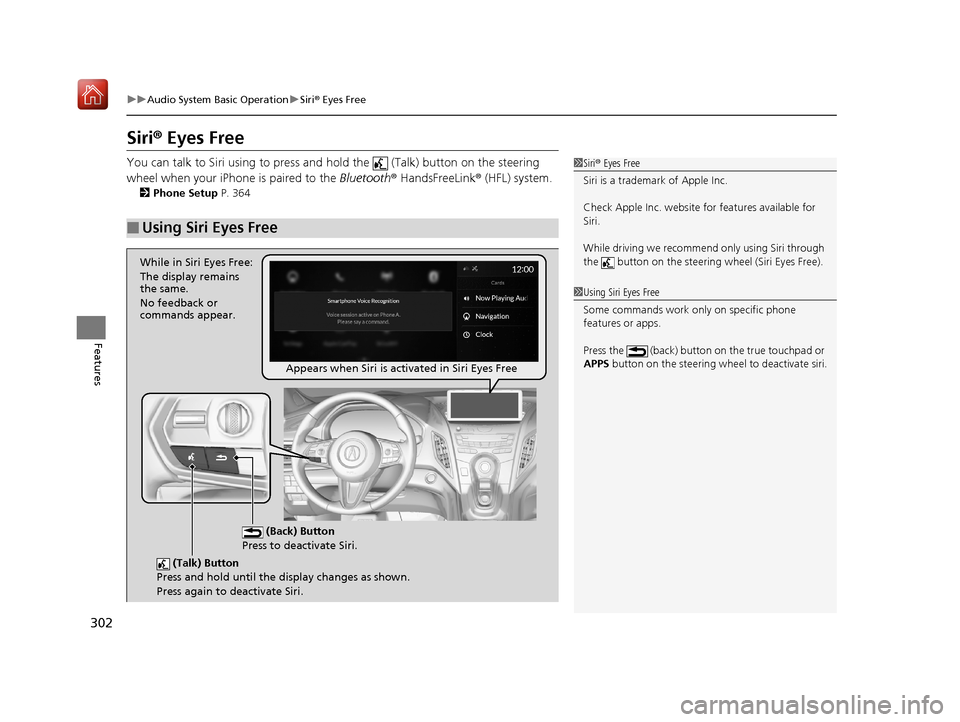
You can talk to Siri using to press and hold the (Talk) button on the steering
wheel when your iPhone is paired to the Bluetooth® HandsFreeLink ® (HFL) system.
2Phone Setup P. 364
■Using Siri Eyes Free
1Siri ® Eyes Free
Siri is a trademark of Apple Inc.
Check Apple Inc. website for features available for
Siri.
While driving we recomme nd only using Siri through
the button on the steering wheel (Siri Eyes Free).
1Using Siri Eyes Free
Some commands work only on specific phone
features or apps.
Press the (back) button on the true touchpad or
APPS button on the steering whee l to deactivate siri.
(Talk) Button
Press and hold until the display changes as shown.
Press again to deactivate Siri.
(Back) Button
Press to deactivate Siri.
While in Siri Eyes Free:
The display remains
the same.
No feedback or
commands appear.
Appears when Siri is activated in Siri Eyes Free
19 ACURA RDX-31TJB6000.book 302 ページ 2018年4月26日 木曜日 午後4時51分
Page 304 of 649
303
uuAudio System Basic Operation uApple CarPlayTM
Continued
Features
Apple CarPlayTM
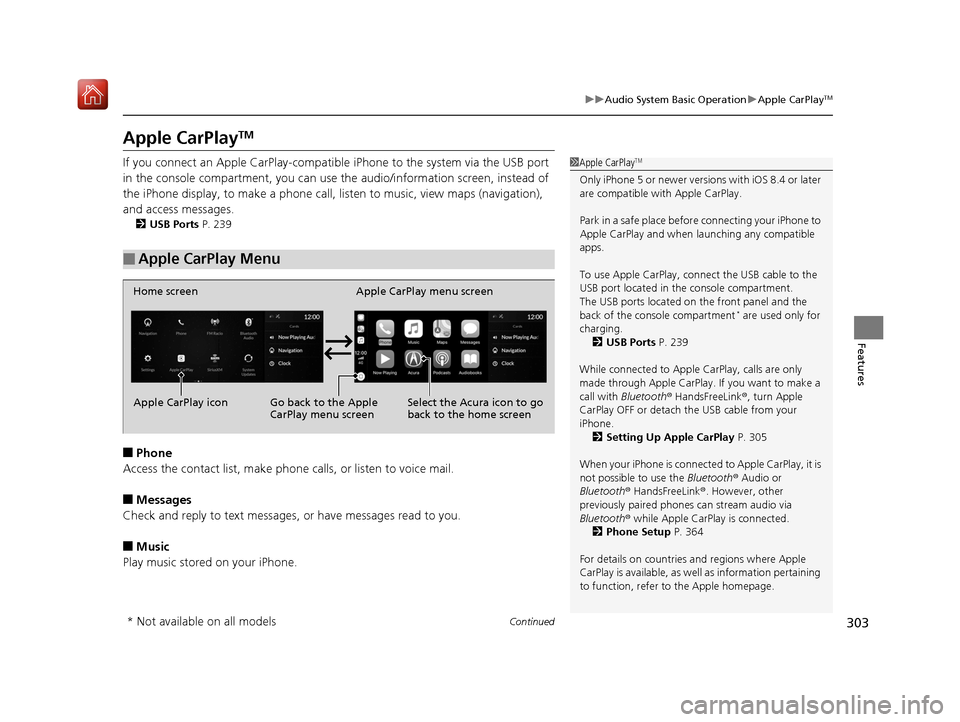
If you connect an Apple CarPlay-compatib le iPhone to the system via the USB port
in the console compartment, you can use the audio/information screen, instead of
the iPhone display, to make a phone call, li sten to music, view maps (navigation),
and access messages.
2 USB Ports P. 239
■Phone
Access the contact list, make phone ca lls, or listen to voice mail.
■Messages
Check and reply to text messages, or have messages read to you.
■Music
Play music stored on your iPhone.
■Apple CarPlay Menu
1 Apple CarPlayTM
Only iPhone 5 or newer versi ons with iOS 8.4 or later
are compatible with Apple CarPlay.
Park in a safe place before connecting your iPhone to
Apple CarPlay and when launching any compatible
apps.
To use Apple CarPlay, connect the USB cable to the
USB port located in the console compartment.
The USB ports located on the front panel and the
back of the console compartment
* are used only for
charging. 2 USB Ports P. 239
While connected to Apple CarPlay, calls are only
made through Apple CarPlay. If you want to make a
call with Bluetooth ® HandsFreeLink ®, turn Apple
CarPlay OFF or detach th e USB cable from your
iPhone.
2 Setting Up Apple CarPlay P. 305
When your iPhone is connected to Apple CarPlay, it is
not possible to use the Bluetooth® Audio or
Bluetooth ® HandsFreeLink ®. However, other
previously paired phones can stream audio via
Bluetooth ® while Apple CarPlay is connected.
2 Phone Setup P. 364
For details on c ountries and regions where Apple
CarPlay is available, as well as information pertaining
to function, refer to the Apple homepage.
Home screen
Apple CarPlay icon Apple CarPlay menu screen
Go back to the Apple
CarPlay menu screen
Select the Acura icon to go
back to the home screen
* Not available on all models
19 ACURA RDX-31TJB6000.book 303 ページ 2018年4月26日 木曜日 午後4時51分
Page 310 of 649
309
uuAudio Error Messages uApple CarPlay
Features
Apple CarPlay
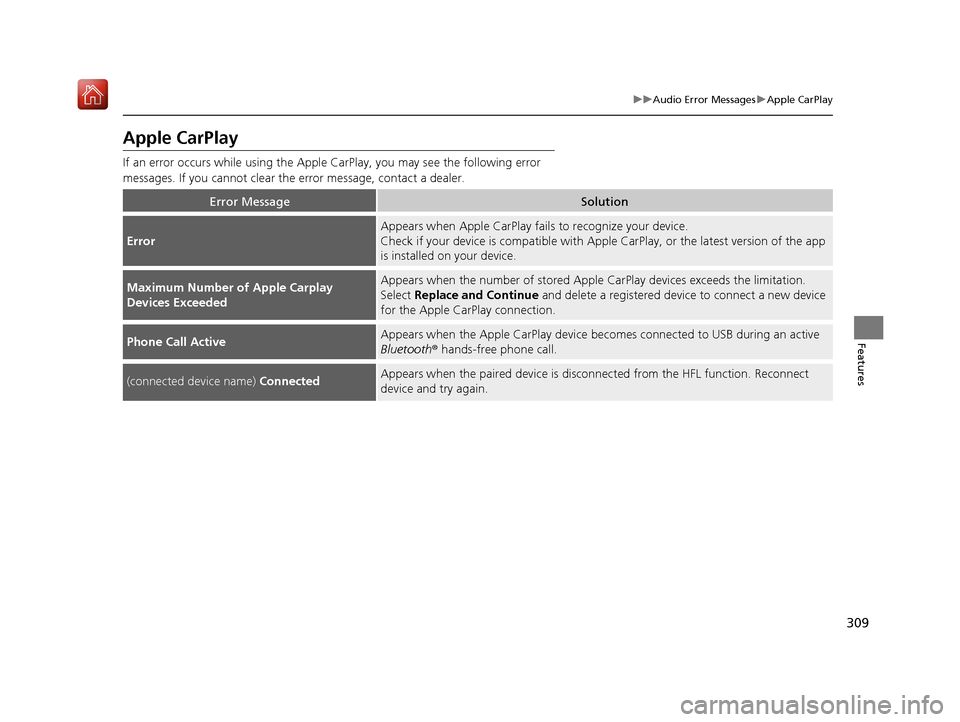
If an error occurs while using the Apple CarPlay, you may see the following error
messages. If you cannot clear th e error message, contact a dealer.
Error MessageSolution
Error
Appears when Apple CarPlay fails to recognize your device.
Check if your device is compatible with Appl e CarPlay, or the latest version of the app
is installed on your device.
Maximum Number of Apple Carplay
Devices ExceededAppears when the number of stored Apple CarPlay devices exceeds the limitation.
Select Replace and Continue and delete a registered device to connect a new device
for the Apple CarPlay connection.
Phone Call ActiveAppears when the Apple CarPlay device beco mes connected to USB during an active
Bluetooth ® hands-free phone call.
(connected device name) ConnectedAppears when the paired device is disc onnected from the HFL function. Reconnect
device and try again.
19 ACURA RDX-31TJB6000.book 309 ページ 2018年4月26日 木曜日 午後4時51分
Page 330 of 649
329
uuGeneral Information on the Audio System uLicense Information
Continued
Features
Use of the Made for Apple badge means th at an accessory has been designed to
connect specifically to the Apple product(s) identified in the badge, and has been
certified by the developer to meet Appl e performance standards. Apple is not
responsible for the operation of this devi ce or its compliance with safety and
regulatory standards.
“The Bluetooth ® word mark and logos are re gistered trademarks owned by
Bluetooth SIG, Inc. and any use of such marks by DENSO CORPORATION is under
license. Other trademarks and trade names are those of their respective owners.”
This product is protected by certain intellectual property rights of Microsoft. Use or
distribution of such technology outside of this product is prohibited without a
license from Microsoft.
■Apple
■Bluetooth
■Windows Media
19 ACURA RDX-31TJB6000.book 329 ページ 2018年4月26日 木曜日 午後4時51分
Page 335 of 649
334
uuCustomized Features u
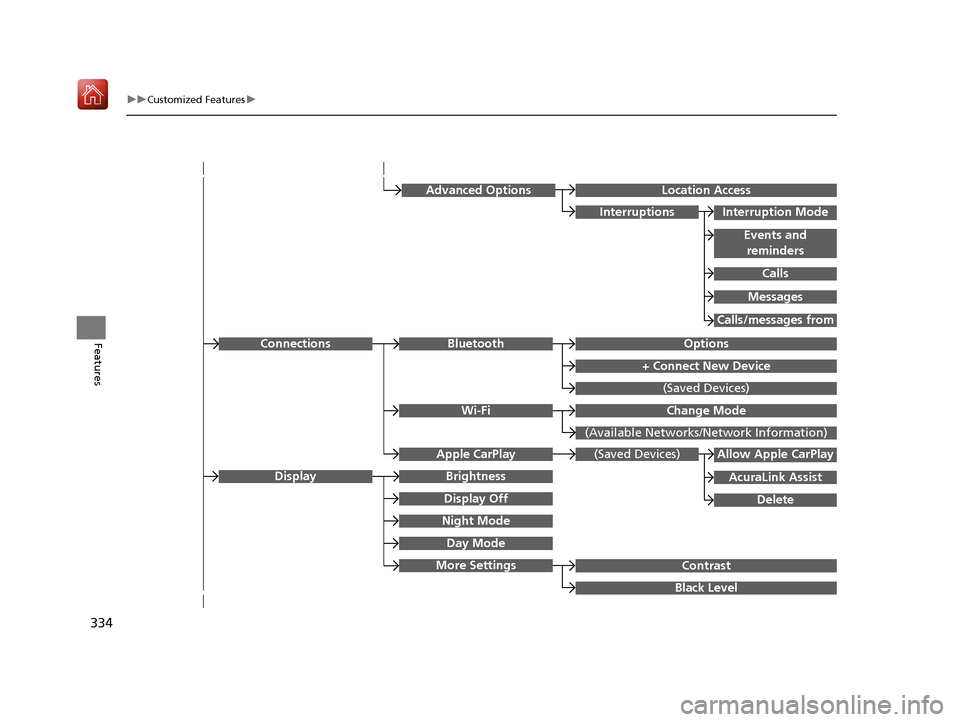
FeaturesOptionsBluetooth
+ Connect New Device
(Saved Devices)
Change Mode
(Available Networks/N etwork Information)
Wi-Fi
Connections
Night Mode
Day Mode
BrightnessDisplay
Contrast
Black Level
More Settings
Display Off
(Saved Devices)
AcuraLink Assist
Allow Apple CarPlay
Delete
Apple CarPlay
Advanced OptionsLocation Access
Events and
reminders
Interruption Mode
Calls
Interruptions
Messages
Calls/messages from
19 ACURA RDX-31TJB6000.book 334 ページ 2018年4月26日 木曜日 午後4時51分
Page 343 of 649
342
uuCustomized Features u
Features
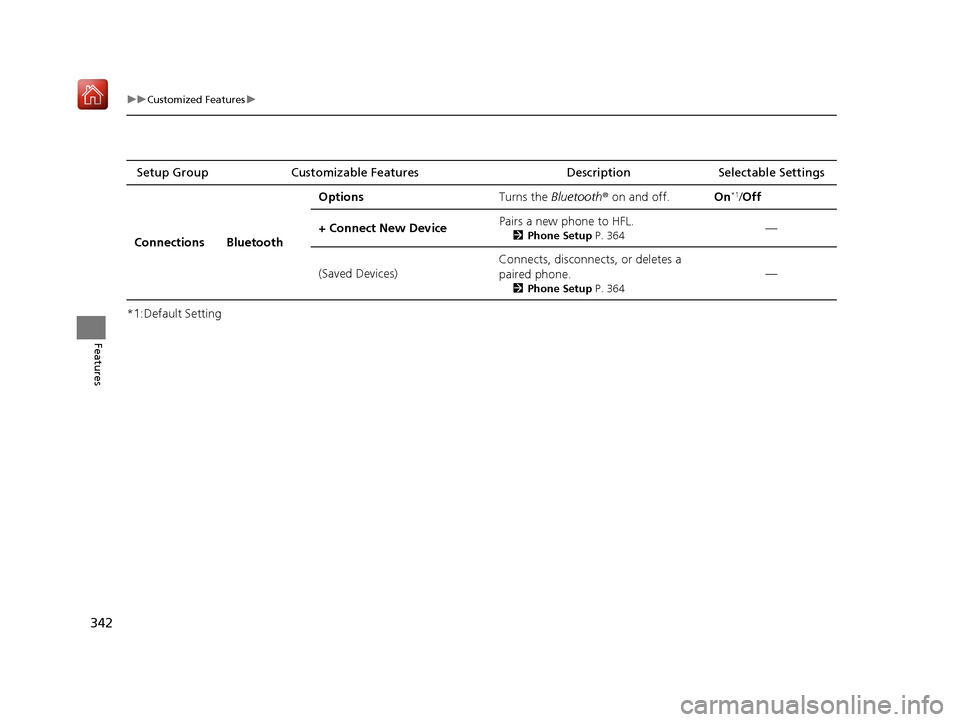
*1:Default SettingSetup Group Customizable Features
Description Selectable Settings
Connections Bluetooth Options
Turns the Bluetooth® on and off. On
*1/Off
+ Connect New Device Pairs a new phone to HFL.
2
Phone Setup P. 364—
(Saved Devices) Connects, disconnects, or deletes a
paired phone.
2
Phone Setup P. 364
—
19 ACURA RDX-31TJB6000.book 342 ページ 2018年4月26日 木曜日 午後4時51分
Page 359 of 649
358
Features
Bluetooth® HandsFreeLink ®
Bluetooth® HandsFreeLink ® (HFL) allows you to place and receive phone calls using
your vehicle’s audio system, without handling your cell phone.
Using HFL
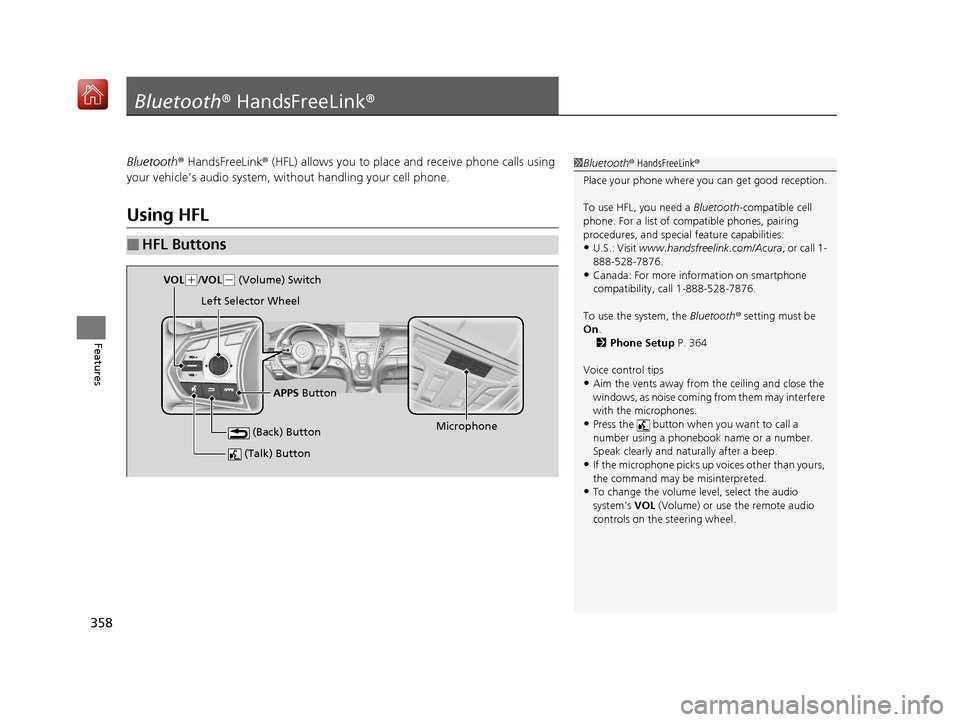
■HFL Buttons
1 Bluetooth ® HandsFreeLink ®
Place your phone where y ou can get good reception.
To use HFL, you need a Bluetooth-compatible cell
phone. For a list of compatible phones, pairing
procedures, and special feature capabilities:
•U.S.: Visit www.handsfreelink.com/Acura, or call 1-
888-528-7876.
•Canada: For more info rmation on smartphone
compatibility, call 1-888-528-7876.
To use the system, the Bluetooth® setting must be
On .
2 Phone Setup P. 364
Voice control tips
•Aim the vents away from the ceiling and close the
windows, as noise coming fr om them may interfere
with the microphones.
•Press the button when you want to call a
number using a phonebook name or a number.
Speak clearly and naturally after a beep.
•If the microphone picks up vo ices other than yours,
the command may be misinterpreted.
•To change the volume level, select the audio
system’s VOL (Volume) or use the remote audio
controls on the steering wheel.
(Talk) Button
Microphone
(Back) Button
VOL( +/VOL(- (Volume) Switch
Left Selector Wheel
APPS Button
19 ACURA RDX-31TJB6000.book 358 ページ 2018年4月26日 木曜日 午後4時51分