carplay Acura RDX 2019 User Guide
[x] Cancel search | Manufacturer: ACURA, Model Year: 2019, Model line: RDX, Model: Acura RDX 2019Pages: 649, PDF Size: 33 MB
Page 310 of 649
309
uuAudio Error Messages uApple CarPlay
Features
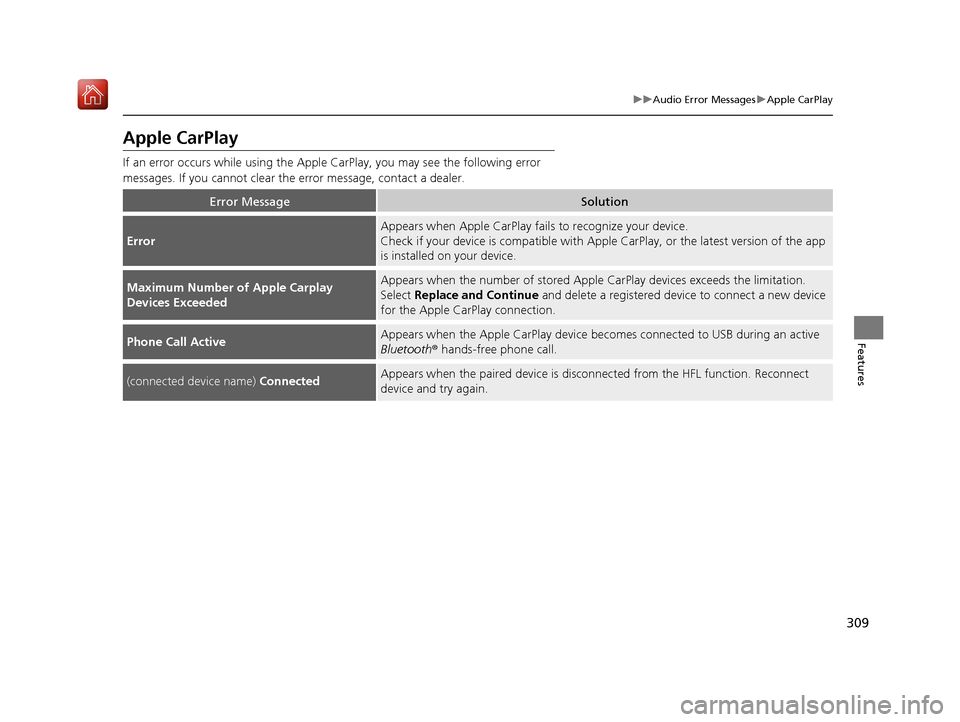
Apple CarPlay
If an error occurs while using the Apple CarPlay, you may see the following error
messages. If you cannot clear th e error message, contact a dealer.
Error MessageSolution
Error
Appears when Apple CarPlay fails to recognize your device.
Check if your device is compatible with Appl e CarPlay, or the latest version of the app
is installed on your device.
Maximum Number of Apple Carplay
Devices ExceededAppears when the number of stored Apple CarPlay devices exceeds the limitation.
Select Replace and Continue and delete a registered device to connect a new device
for the Apple CarPlay connection.
Phone Call ActiveAppears when the Apple CarPlay device beco mes connected to USB during an active
Bluetooth ® hands-free phone call.
(connected device name) ConnectedAppears when the paired device is disc onnected from the HFL function. Reconnect
device and try again.
19 ACURA RDX-31TJB6000.book 309 ページ 2018年4月26日 木曜日 午後4時51分
Page 326 of 649
325
uuGeneral Information on the Audio System uLegal Information on Apple CarPlay
Continued
Features
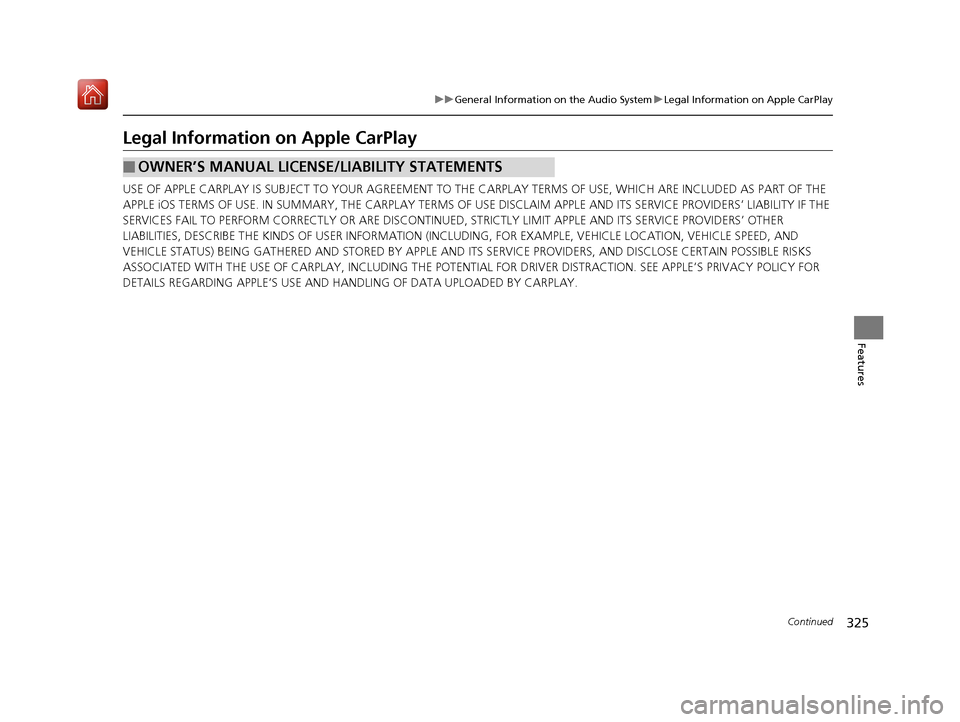
Legal Information on Apple CarPlay
USE OF APPLE CARPLAY IS SUBJECT TO YOUR AGREEMENT TO THE CARPLAY TERMS OF USE, WHICH ARE INCLUDED AS PART OF THE
APPLE iOS TERMS OF USE. IN SUMMARY, THE CARPLAY TERMS OF USE DISCLAIM APPLE AND ITS SERVICE PROVIDERS’ LIABILITY IF THE
SERVICES FAIL TO PERFORM CORRECTLY OR ARE DISCONTINUED, STRICTLY LIMIT APPLE AND ITS SERVICE PROVIDERS’ OTHER
LIABILITIES, DESCRIBE THE KINDS OF USER INFORMATION (INCLUDING, FOR EXAMPL E, VEHICLE LOCATION, VEHICLE SPEED, AND
VEHICLE STATUS) BEING GATHERED AND STORED BY APPLE AND IT S SERVICE PROVIDERS, AND DISCLOSE CERTAIN POSSIBLE RISKS
ASSOCIATED WITH THE USE OF CARPLAY, INCLUDING THE POTENTIAL FOR DRIVER DISTRACTION. SEE APPLE’S PRIVACY POLICY FOR
DETAILS REGARDING APPLE’S USE AND HANDL ING OF DATA UPLOADED BY CARPLAY.
■OWNER’S MANUAL LICENSE/LIABILITY STATEMENTS
19 ACURA RDX-31TJB6000.book 325 ページ 2018年4月26日 木曜日 午後4時51分
Page 327 of 649
326
uuGeneral Information on the Audio System uLegal Information on Apple CarPlay
Features
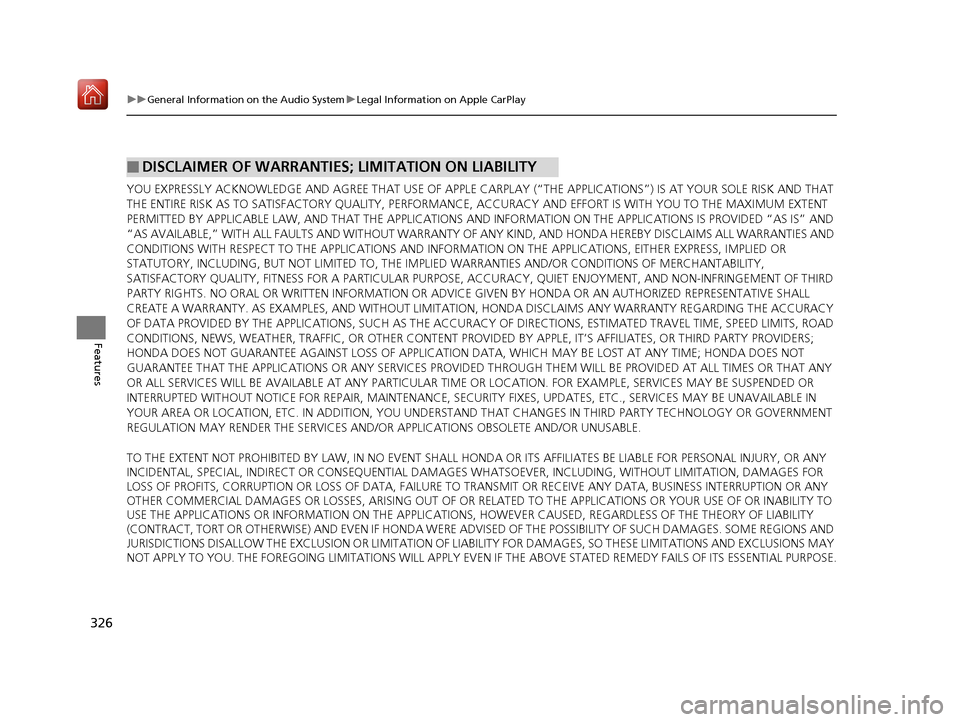
YOU EXPRESSLY ACKNOWLEDGE AND AGREE THAT U SE OF APPLE CARPLAY (“THE APPLICATIONS”) IS AT YOUR SOLE RISK AND THAT
THE ENTIRE RISK AS TO SATISFACTORY QUALITY, PERFORMANCE, ACCURACY AND EFFORT IS WITH YOU TO THE MAXIMUM EXTENT
PERMITTED BY APPLICABLE LAW, AND THAT THE APPLICATIONS AND INFORMATION ON THE APPLICATIONS IS PROVIDED “AS IS” AND
“AS AVAILABLE,” WITH ALL F AULTS AND WITHOUT WARRANTY OF ANY KIND, AND HONDA HEREBY DISCLAIMS ALL WARRANTIES AND
CONDITIONS WITH RESPECT TO THE APPLICATIONS AND INFORMATION ON THE APPLICATIONS, EITHER EXPRESS, IMPLIED OR
STATUTORY, INCLUDING, BUT NOT LIMITED TO, THE IMPLIE D WARRANTIES AND/OR CONDITIONS OF MERCHANTABILITY,
SATISFACTORY QUALITY, FITNESS FOR A PA RTICULAR PURPOSE, ACCURACY, QUIET ENJOYM ENT, AND NON-INFRINGEMENT OF THIRD
PARTY RIGHTS. NO ORAL OR WRITTEN INFORMATION OR ADVICE GIVEN BY HONDA OR AN AUTHORIZED REPRESENTATIVE SHALL
CREATE A WARRANTY. AS EXAMPLES, AND WITHOUT LIMITATION , HONDA DISCLAIMS ANY WARRANTY REGARDING THE ACCURACY
OF DATA PROVIDED BY THE APPLICATIONS, SUCH AS THE ACCURACY OF DIRECTIONS, ESTIMATED TRAVEL TIME, SPEED LIMITS, ROAD
CONDITIONS, NEWS, WEATHER, TRAFFIC, OR OTHER CONTENT PROVIDED BY APPLE, IT’S AFFILIATES, OR THIRD PARTY PROVIDERS;
HONDA DOES NOT GUARANTEE AGAINST LOSS OF APPLICATION DATA, WHICH MAY BE LOST AT ANY TIME; HONDA DOES NOT
GUARANTEE THAT THE APPLICATIONS OR ANY SERVICES PROVIDED THROUGH THEM WILL BE PROVIDED AT ALL TIMES OR THAT ANY
OR ALL SERVICES WILL BE AVAILABLE AT ANY PARTICULAR TIME OR LOCATION. FOR EXAMPLE, SERVICES MAY BE SUSPENDED OR
INTERRUPTED WITHOUT NOTICE FOR REPAIR, MAINTENANCE, SECURIT Y FIXES, UPDATES, ETC., SERVICES MAY BE UNAVAILABLE IN
YOUR AREA OR LOCATION, ETC. IN ADDITION, YOU UNDERSTAND THAT CHANGES IN THIRD PARTY TECHNOLOGY OR GOVERNMENT
REGULATION MAY RENDER THE SERVICES AND/OR APPLICATIONS OBSOLETE AND/OR UNUSABLE.
TO THE EXTENT NOT PROHIBITED BY LAW, IN NO EVENT SHALL HONDA OR ITS AFFILIATES BE LIABLE FOR PERSONAL INJURY, OR ANY
INCIDENTAL, SPECIAL, INDIRECT OR CONSEQUENTIAL DAMAG ES WHATSOEVER, INCLUDING, WITHOUT LIMITATION, DAMAGES FOR
LOSS OF PROFITS, CORRUPTION OR LOSS OF DATA, FAILURE TO TRANSMIT OR RECEIV E ANY DATA, BUSINESS INTERRUPTION OR ANY
OTHER COMMERCIAL DAMAGES OR LOSSES, ARISING OUT OF OR RELATE D TO THE APPLICATIONS OR YOUR USE OF OR INABILITY TO
USE THE APPLICATIONS OR INFORMATION ON THE APPLICATIONS, HOWEVER CAUSED, REGARDLESS OF THE THEORY OF LIABILITY
(CONTRACT, TORT OR OTHERWISE) AND EVEN IF HONDA WERE ADV ISED OF THE POSSIBILITY OF SUCH DAMAGES. SOME REGIONS AND
JURISDICTIONS DISALLOW THE EXCLUSION OR LIMITATION OF LI ABILITY FOR DAMAGES, SO THESE LIMITATIONS AND EXCLUSIONS MAY
NOT APPLY TO YOU. THE FOREGOING LIMITATIONS WILL APPLY EVEN IF THE ABOVE STATED REMEDY FAILS OF ITS ESSENTIAL PURPOSE.
■DISCLAIMER OF WARRANTIES; LIMITATION ON LIABILITY
19 ACURA RDX-31TJB6000.book 326 ページ 2018年4月26日 木曜日 午後4時51分
Page 335 of 649
334
uuCustomized Features u
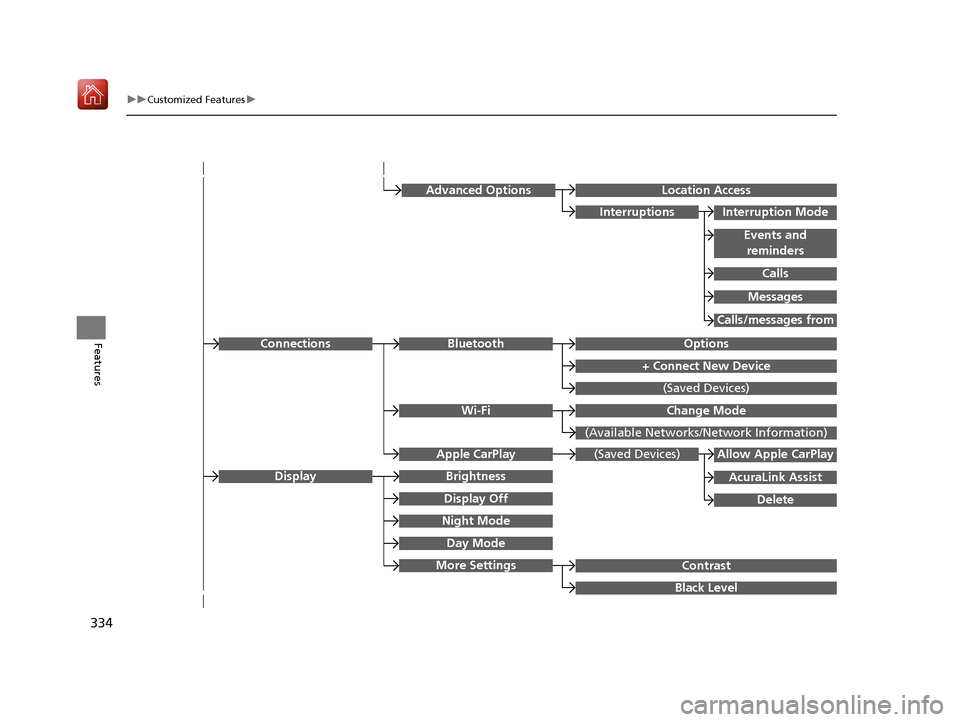
FeaturesOptionsBluetooth
+ Connect New Device
(Saved Devices)
Change Mode
(Available Networks/N etwork Information)
Wi-Fi
Connections
Night Mode
Day Mode
BrightnessDisplay
Contrast
Black Level
More Settings
Display Off
(Saved Devices)
AcuraLink Assist
Allow Apple CarPlay
Delete
Apple CarPlay
Advanced OptionsLocation Access
Events and
reminders
Interruption Mode
Calls
Interruptions
Messages
Calls/messages from
19 ACURA RDX-31TJB6000.book 334 ページ 2018年4月26日 木曜日 午後4時51分
Page 345 of 649
344
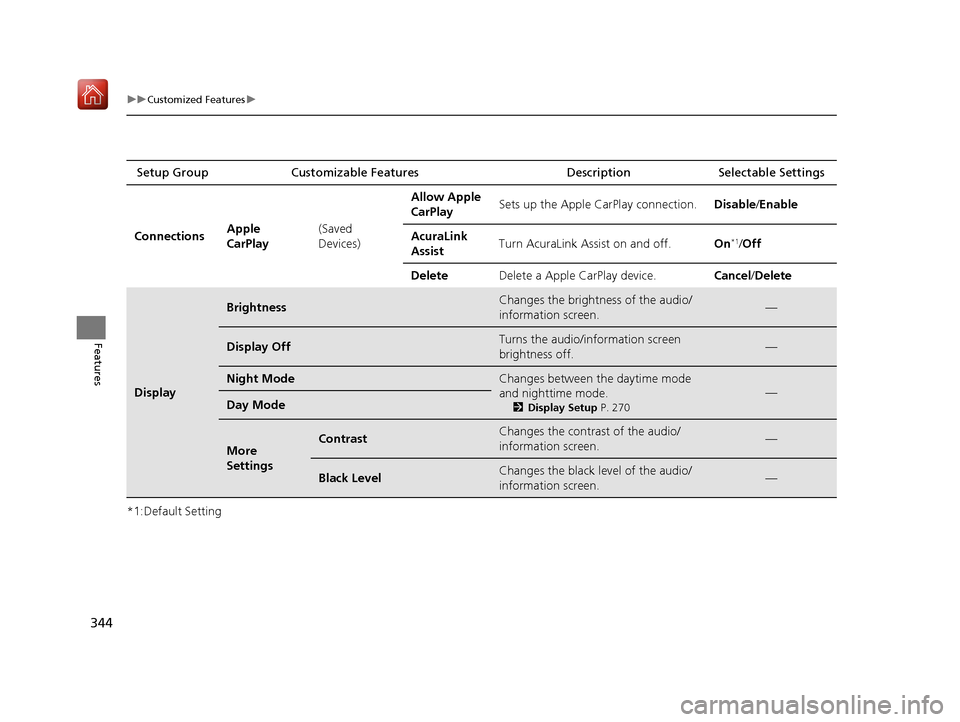
uuCustomized Features u
Features
*1:Default SettingSetup Group Customizable Features
Description Selectable Settings
Connections Apple
CarPlay(Saved
Devices)Allow Apple
CarPlay
Sets up the Apple CarPlay connection.
Disable/Enable
AcuraLink
Assist Turn AcuraLink Assist on and off.
On
*1/Off
Delete Delete a Apple CarPlay device. Cancel/Delete
Display
BrightnessChanges the brightness of the audio/
information screen.—
Display OffTurns the audio/information screen
brightness off.—
Night ModeChanges between the daytime mode
and nighttime mode.
2Display Setup P. 270
—Day Mode
More
SettingsContrastChanges the contrast of the audio/
information screen.—
Black LevelChanges the black level of the audio/
information screen.—
19 ACURA RDX-31TJB6000.book 344 ページ 2018年4月26日 木曜日 午後4時51分
Page 366 of 649
Continued365
uuBluetooth ® HandsFreeLink ®u HFL Menus
Features
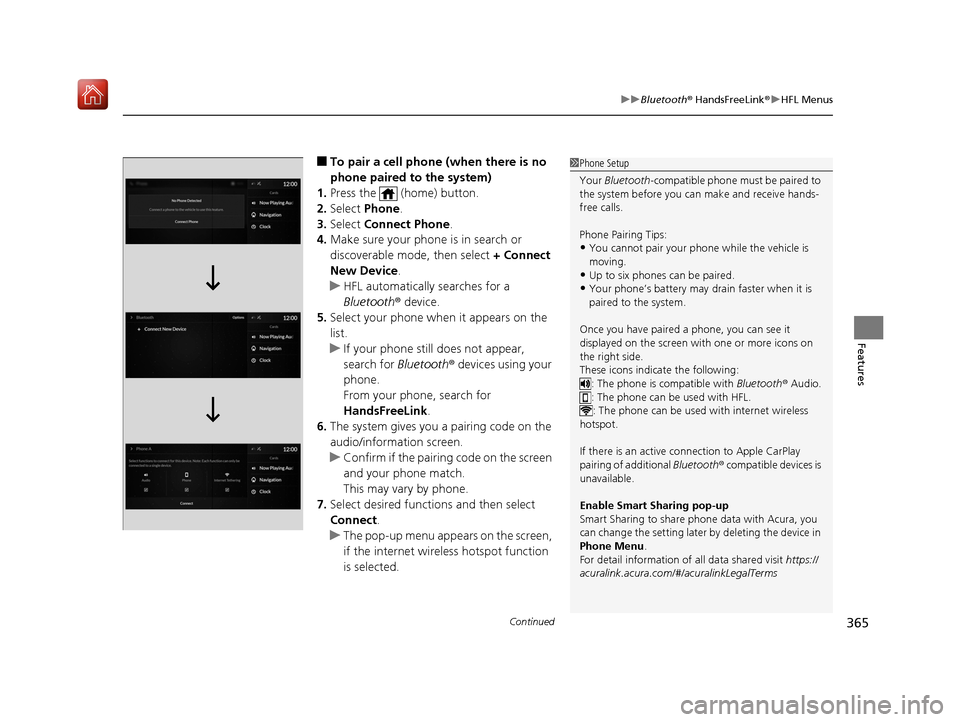
■To pair a cell phone (when there is no
phone paired to the system)
1. Press the (home) button.
2. Select Phone.
3. Select Connect Phone .
4. Make sure your phone is in search or
discoverable mode, then select + Connect
New Device .
u HFL automatically searches for a
Bluetooth ® device.
5. Select your phone when it appears on the
list.
u If your phone still does not appear,
search for Bluetooth® devices using your
phone.
From your phone, search for
HandsFreeLink .
6. The system gives you a pairing code on the
audio/information screen.
u Confirm if the pairing code on the screen
and your phone match.
This may vary by phone.
7. Select desired functions and then select
Connect .
u The pop-up menu appears on the screen,
if the internet wireless hotspot function
is selected.1Phone Setup
Your Bluetooth -compatible phone must be paired to
the system before you ca n make and receive hands-
free calls.
Phone Pairing Tips:
•You cannot pair your phone while the vehicle is
moving.
•Up to six phones can be paired.
•Your phone’s battery may dr ain faster when it is
paired to the system.
Once you have paired a phone, you can see it
displayed on the screen with one or more icons on
the right side.
These icons indicate the following: : The phone is compatible with Bluetooth ® Audio.
: The phone can be used with HFL.
: The phone can be used with internet wireless
hotspot.
If there is an active c onnection to Apple CarPlay
pairing of additional Bluetooth® compatible devices is
unavailable.
Enable Smart Sharing pop-up
Smart Sharing to share phone data with Acura, you
can change the setting later by deleting the device in
Phone Menu .
For detail information of all data shared visit https://
acuralink.acura.com/#/acuralinkLegalTerms
19 ACURA RDX-31TJB6000.book 365 ページ 2018年4月26日 木曜日 午後4時51分
Page 372 of 649
Continued371
uuBluetooth ® HandsFreeLink ®u HFL Menus
Features
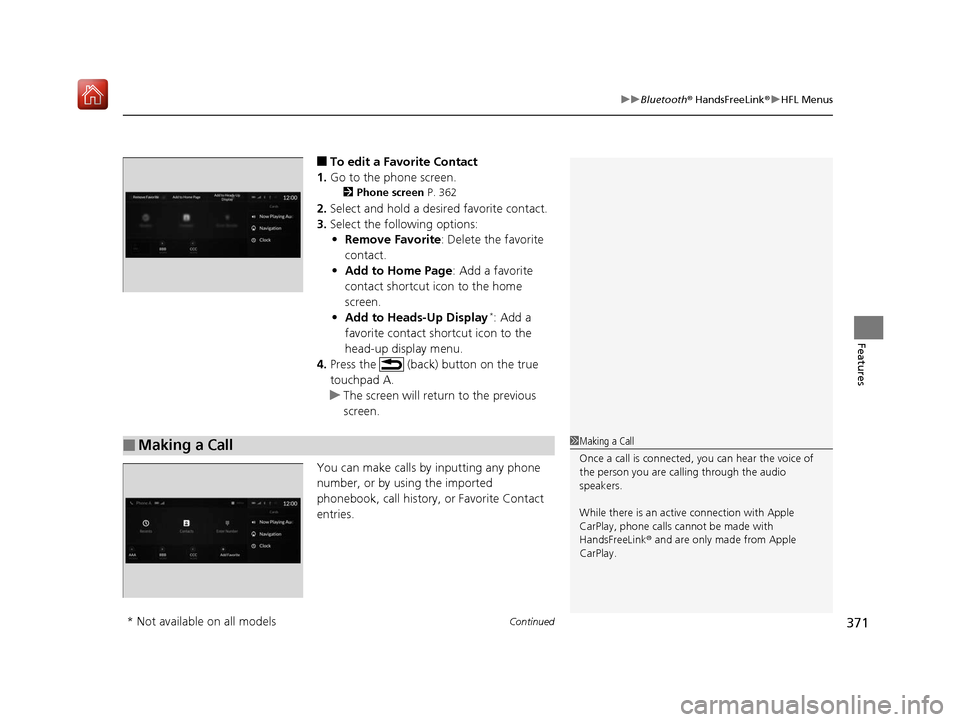
■To edit a Favorite Contact
1. Go to the phone screen.
2 Phone screen P. 362
2.Select and hold a desired favorite contact.
3. Select the following options:
• Remove Favorite : Delete the favorite
contact.
• Add to Home Page : Add a favorite
contact shortcut icon to the home
screen.
• Add to Heads-Up Display
*: Add a
favorite contact shortcut icon to the
head-up display menu.
4. Press the (back) button on the true
touchpad A.
u The screen will return to the previous
screen.
You can make calls by inputting any phone
number, or by using the imported
phonebook, call history, or Favorite Contact
entries.
■Making a Call1 Making a Call
Once a call is connected, you can hear the voice of
the person you are call ing through the audio
speakers.
While there is an active connection with Apple
CarPlay, phone calls ca nnot be made with
HandsFreeLink ® and are only made from Apple
CarPlay.
* Not available on all models
19 ACURA RDX-31TJB6000.book 371 ページ 2018年4月26日 木曜日 午後4時51分
Page 641 of 649
Index
640
Index
Index
A
ABS (Anti-lock Brake System)................... 493
Accessories and Modifications ................. 574
Accessory Power Socket ........................... 225
AcuraLink® ................................................ 387
AcuraWatch
TM............................................. 22
Adaptive Cruise Control (ACC) ................... 91
Adaptive Cruise Control (ACC) with
Low Speed Follow (LSF) .................... 91, 455
Adaptive Front Lighting System (AFS) ..... 189
Additives
Coolant ................................................... 540
Engine Oil ................................................ 535
Washer .................................................... 544
Additives, Engine Oil ................................ 535
Adjusting Armrest ................................................... 218
Front Seats .............................................. 207
Head Restraints........................................ 212
Mirrors .................................................... 204
Rear Seats................................................ 216
Steering Wheel ........................................ 203
Agile Handling Assist ................................ 436
Air Conditioning System (Climate Control System) .................................................... 230
Changing the Mode ................................ 230
Defrosting the Windshield and Windows ............................................... 232
Dust and Pollen Filter ............................... 568
Rear Temperature Control Dial................. 234
Recirculation/Fresh Air Mode ................... 230 Sensors ................................................... 235
Synchronized Mode................................. 233
Using Automatic Climate Control ............ 230
Air Pressure ....................................... 555, 629
Airbags ........................................................ 42
Advanced Airbags ..................................... 48
After a Collision ........................................ 45
Airbag Care............................................... 57
Front Airbags (SRS) .................................... 45
Indicator.............................................. 55, 84
Knee Airbags............................................. 49
Passenger Airbag Off Indicator .................. 56
Sensors ..................................................... 42
Side Airbags .............................................. 52
Side Curtain Airbags.................................. 54
AM/FM Radio ............................................ 274
Anti-lock Brake System (ABS) .................. 493
Indicator.................................................... 84
Apple CarPlay
TM........................................ 303
Armrest ..................................................... 218
Audio Remote Controls ........................... 243
Audio System ............................................ 238
Adjusting the Sound................................ 269
Audio/Information Screen........................ 249
Auxiliary Input Jack.................................. 241
Display Setup .......................................... 270
Error Messages ........................................ 307
General Information ................................ 310
Home Screen........................................... 254
How to Update Wirelessly ....................... 263
How to Update with a USB Device........... 267 How to use Siri
® Eyes Free....................... 302
iPod ........................................................ 291
Limitations for Manual Operation ............ 270
MP3/WMA/AAC ..................................... 294
Reactivating ............................................ 242
Remote Controls ..................................... 243
Security Code ......................................... 242
Status Area ............................................. 259
System Updates ...................................... 263
Theft Protection ...................................... 242
USB Flash Drives.............................. 294, 312
USB Ports ................................................ 239
Audio/Information Screen ....................... 249
Authorized Manuals ................................ 638
Auto Door Locking/Unlocking ................ 162
Auto High-Beam ...................................... 191
Indicator ................................................... 87
Auto Idle Stop .......................................... 428
OFF Button ............................................. 429
Automatic Brake Hold ............................. 491
Indicator ........................................... 77, 491
Automatic Folding Door Mirror .............. 206
Automatic Intermittent Wipers .............. 195
Automatic Lighting .................................. 187
Automatic Transmission .......................... 417
Creeping................................................. 417
Fluid ....................................................... 542
Kickdown ............................................... 417
Operating the Shift Button ...................... 420
Sequential Shift Mode............................. 424
Shifting ................................................... 418
19 ACURA RDX-31TJB6000.book 640 ページ 2018年4月26日 木曜日 午後4時51分