reset Acura RDX 2019 User Guide
[x] Cancel search | Manufacturer: ACURA, Model Year: 2019, Model line: RDX, Model: Acura RDX 2019Pages: 649, PDF Size: 33 MB
Page 336 of 649
335
uuCustomized Features u
Continued
Features
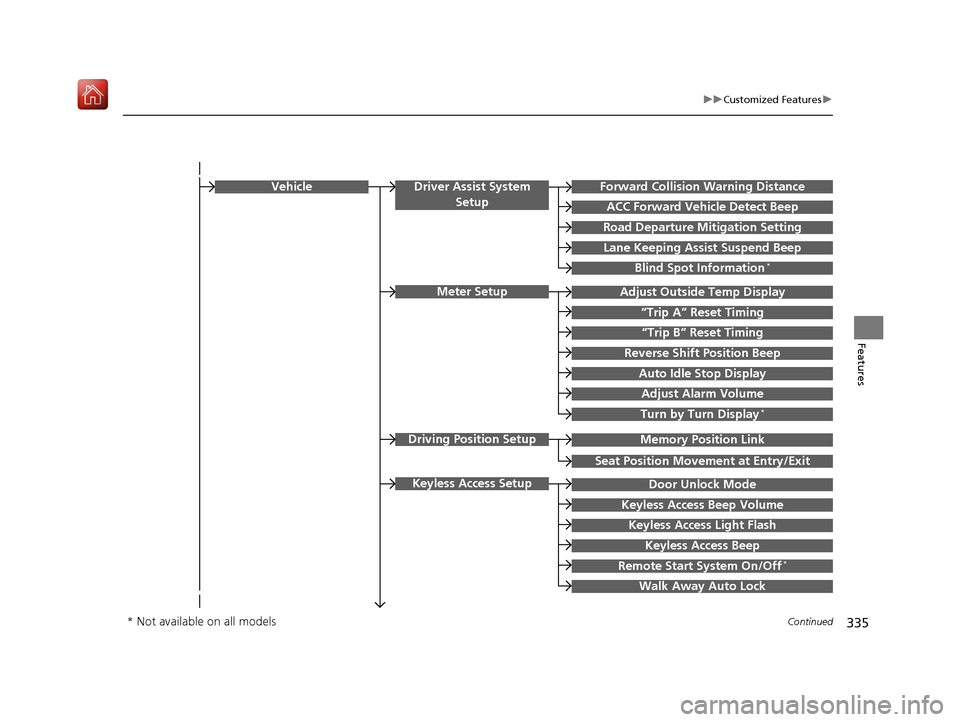
Memory Position Link
“Trip B” Reset Timing
Seat Position Movement at Entry/Exit
Adjust Outside Temp Display
“Trip A” Reset Timing
Meter Setup
Vehicle
Driving Position Setup
Reverse Shift Position Beep
Auto Idle Stop Display
Adjust Alarm Volume
Turn by Turn Display*
Road Departure Mitigation Setting
Forward Collision Warning Distance
ACC Forward Vehicle Detect Beep
Lane Keeping Assist Suspend Beep
Blind Spot Information*
Driver Assist System
Setup
Door Unlock Mode
Keyless Access Beep Volume
Keyless Access Light Flash
Keyless Access Beep
Remote Start System On/Off*
Walk Away Auto Lock
Keyless Access Setup
* Not available on all models
19 ACURA RDX-31TJB6000.book 335 ページ 2018年4月26日 木曜日 午後4時51分
Page 337 of 649
336
uuCustomized Features u
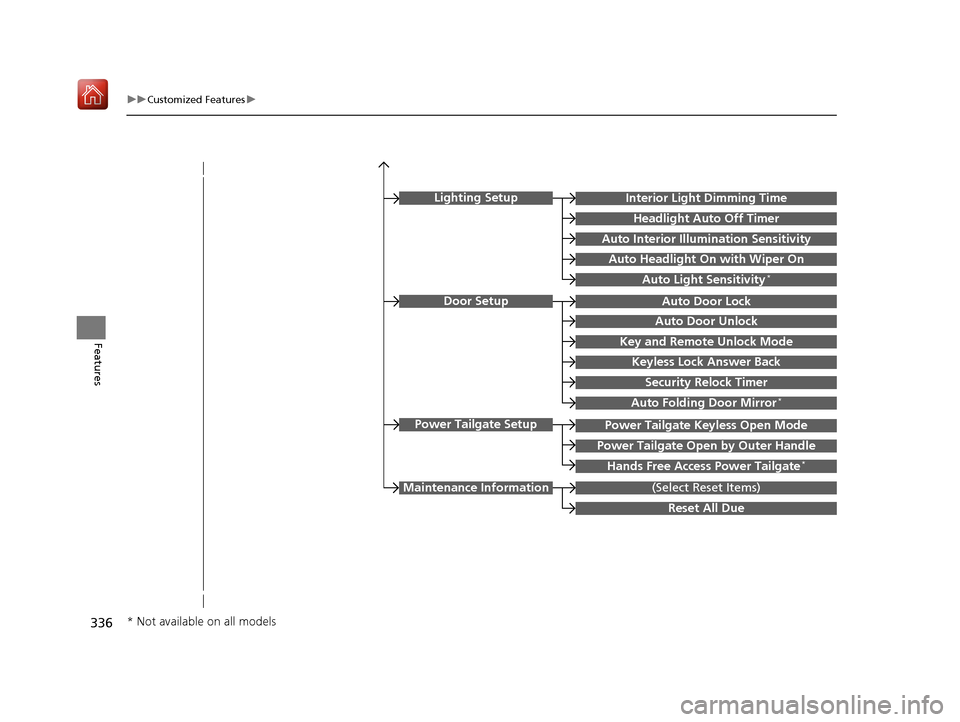
FeaturesKey and Remote Unlock Mode
Auto Door Lock
Auto Door Unlock
Door Setup
Keyless Lock Answer Back
Security Relock Timer
Interior Light Dimming Time
Headlight Auto Off Timer
Auto Interior Illumi nation Sensitivity
(Select Reset Items)Maintenance Information
Auto Headlight On with Wiper On
Auto Light Sensitivity*
Lighting Setup
Auto Folding Door Mirror*
Power Tailgate Keyless Open Mode
Power Tailgate Open by Outer Handle
Hands Free Access Power Tailgate*
Power Tailgate Setup
Reset All Due
* Not available on all models
19 ACURA RDX-31TJB6000.book 336 ページ 2018年4月26日 木曜日 午後4時51分
Page 339 of 649
338
uuCustomized Features u
Features
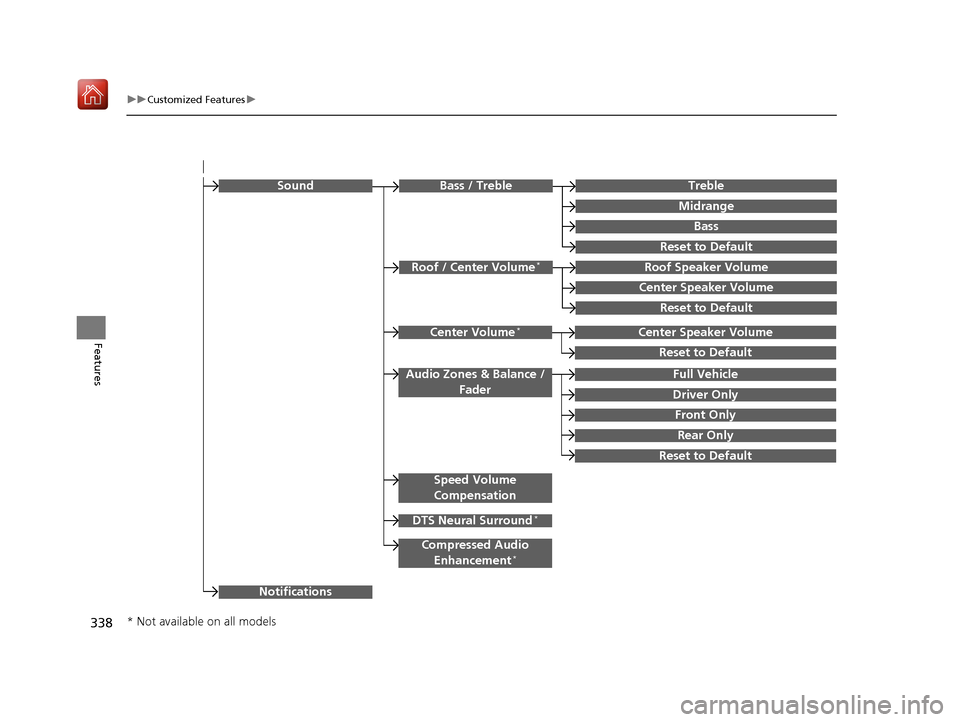
Rear Only
Reset to Default
Front Only
Full Vehicle
Driver Only
Roof Speaker Volume
Center Speaker Volume
Reset to Default
Roof / Center Volume*
Sound
Speed Volume
Compensation
DTS Neural Surround*
Notifications
Compressed Audio
Enhancement*
Treble
Midrange
Bass
Bass / Treble
Center Speaker Volume
Reset to Default
Center Volume*
Reset to Default
Audio Zones & Balance / Fader
* Not available on all models
19 ACURA RDX-31TJB6000.book 338 ページ 2018年4月26日 木曜日 午後4時51分
Page 341 of 649
340
uuCustomized Features u
Features
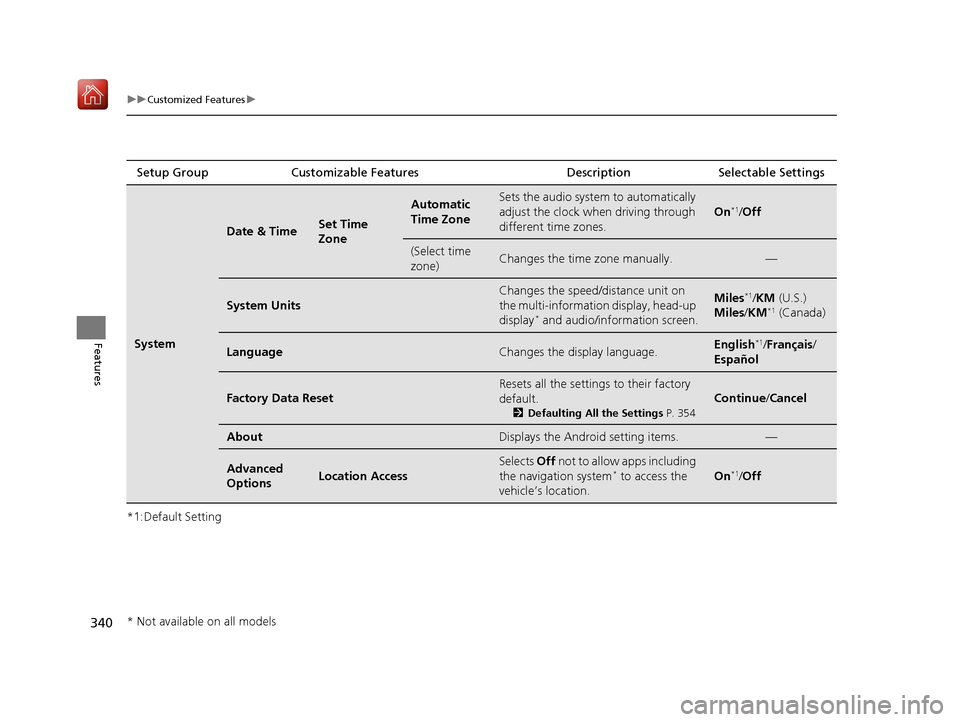
*1:Default SettingSetup Group Customizable Features
Description Selectable Settings
System
Date & TimeSet Time
Zone
Automatic
Time ZoneSets the audio system to automatically
adjust the clock when driving through
different time zones.
On*1/ Off
(Select time
zone)Changes the time zone manually.—
System Units
Changes the speed/di stance unit on
the multi-information display, head-up
display
* and audio/information screen.
Miles*1/ KM (U.S.)
Miles /KM*1 (Canada)
LanguageChanges the display language.English*1/Français /
Español
Factory Data Reset
Resets all the settings to their factory
default.
2 Defaulting All the Settings P. 354
Continue/Cancel
AboutDisplays the Android setting items.—
Advanced
OptionsLocation Access
Selects Off not to allow apps including
the navigation system* to access the
vehicle’s location.On*1/ Off
* Not available on all models
19 ACURA RDX-31TJB6000.book 340 ページ 2018年4月26日 木曜日 午後4時51分
Page 347 of 649
346
uuCustomized Features u
Features
*1:Default SettingSetup Group Customizable Features
Description Selectable Settings
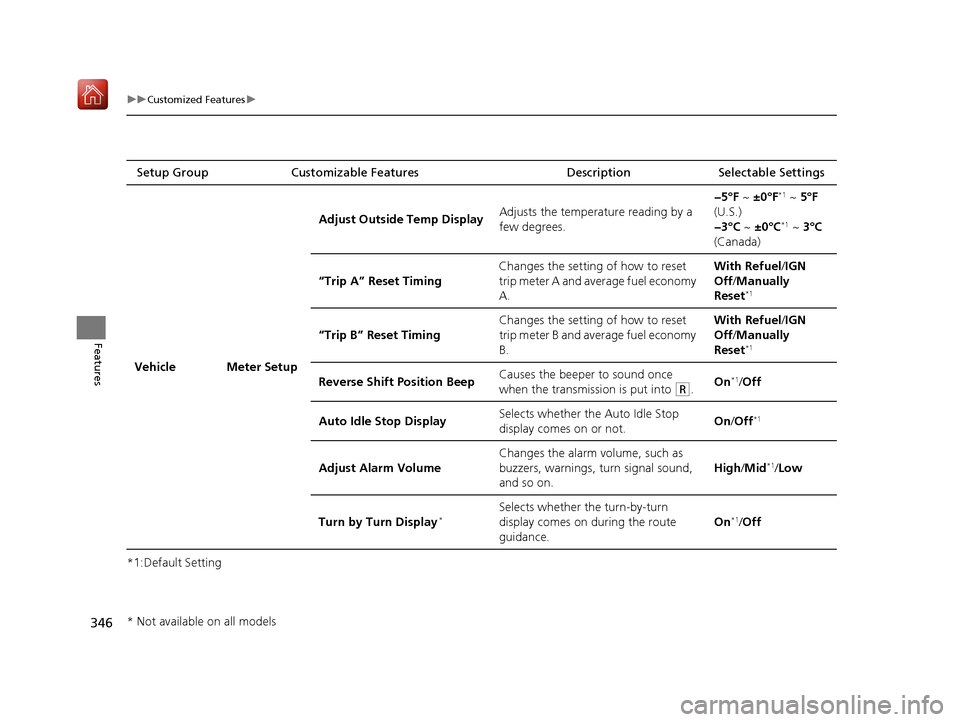
Vehicle Meter Setup Adjust Outside Temp Display
Adjusts the temperature reading by a
few degrees. −5°F ~
±0°F
*1 ~ 5°F
(U.S.)
−3°C ~ ±0°C
*1 ~ 3°C
(Canada)
“Trip A” Reset Timing Changes the setting of how to reset
trip meter A and average fuel economy
A. With Refuel
/IGN
Off /Manually
Reset
*1
“Trip B” Reset Timing Changes the setting of how to reset
trip meter B and average fuel economy
B. With Refuel
/IGN
Off /Manually
Reset*1
Reverse Shift Position Beep Causes the beeper to sound once
when the transmission is put into (R.On*1/
Off
Auto Idle Stop Display Selects whether the Auto Idle Stop
display comes on or not.
On
/Off
*1
Adjust Alarm Volume Changes the alarm volume, such as
buzzers, warnings, turn signal sound,
and so on.
High
/Mid*1/Low
Turn by Turn Display
*Selects whether the turn-by-turn
display comes on during the route
guidance. On*1/
Off
* Not available on all models
19 ACURA RDX-31TJB6000.book 346 ページ 2018年4月26日 木曜日 午後4時51分
Page 351 of 649

350
uuCustomized Features u
Features
*1:Default SettingSetup Group Customizable Features
Description Selectable Settings
Vehicle Power
Tailgate
SetupPower Tailgate Keyless Open
Mode
Changes the setting to enable the
power tailgate to be opened with the
keyless access remote at anytime or
only when the door
s are unlocked. Anytime
*1/
When
Unlocked
Power Tailgate Open by
Outer Handle Changes the setting to enable or
disable the power tailgate open
operation when the user presses the
outer handle of the power tailgate. Off (Manual only)
/
On (Power/
Manual)
*1
Hands Free Access Power
Tailgate*
Changes the setting to enable or
disable the power tailgate open
operation when a kicking motion
under the rear bumper is detected. On
*1/
Off
Maintenance
Information (Select Reset Items) Resets the Maintenance Minder
TM
display when you have performed the
maintenance service. —
Reset All Due
* Not available on all models
19 ACURA RDX-31TJB6000.book 350 ページ 2018年4月26日 木曜日 午後4時51分
Page 353 of 649
352
uuCustomized Features u
Features
*1:Default SettingSetup Group Customizable Features
Description Selectable Settings
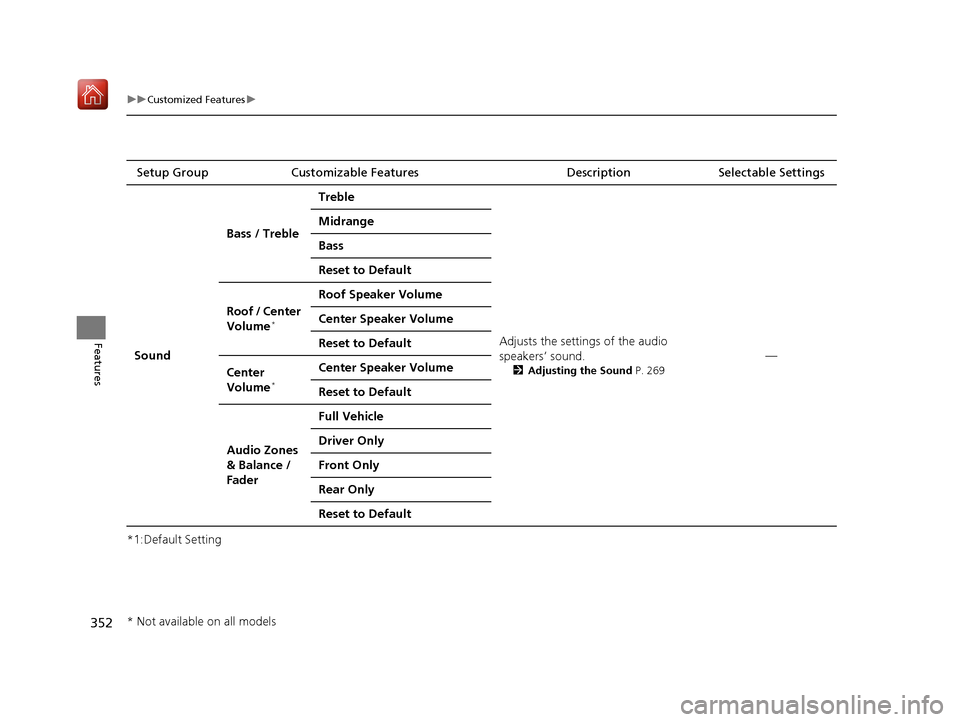
Sound Bass / Treble
Treble
Adjusts the settings of the audio
speakers’ sound.
2Adjusting the Sound P. 269
—
Midrange
Bass
Reset to Default
Roof / Center
Volume
*
Roof Speaker Volume
Center Speaker Volume
Reset to Default
Center
Volume
*
Center Speaker Volume
Reset to Default
Audio Zones
& Balance /
Fader Full Vehicle
Driver Only
Front Only
Rear Only
Reset to Default
* Not available on all models
19 ACURA RDX-31TJB6000.book 352 ページ 2018年4月26日 木曜日 午後4時51分
Page 355 of 649
354
uuCustomized Features uDefaulting All the Settings
Features
Defaulting All the Settings
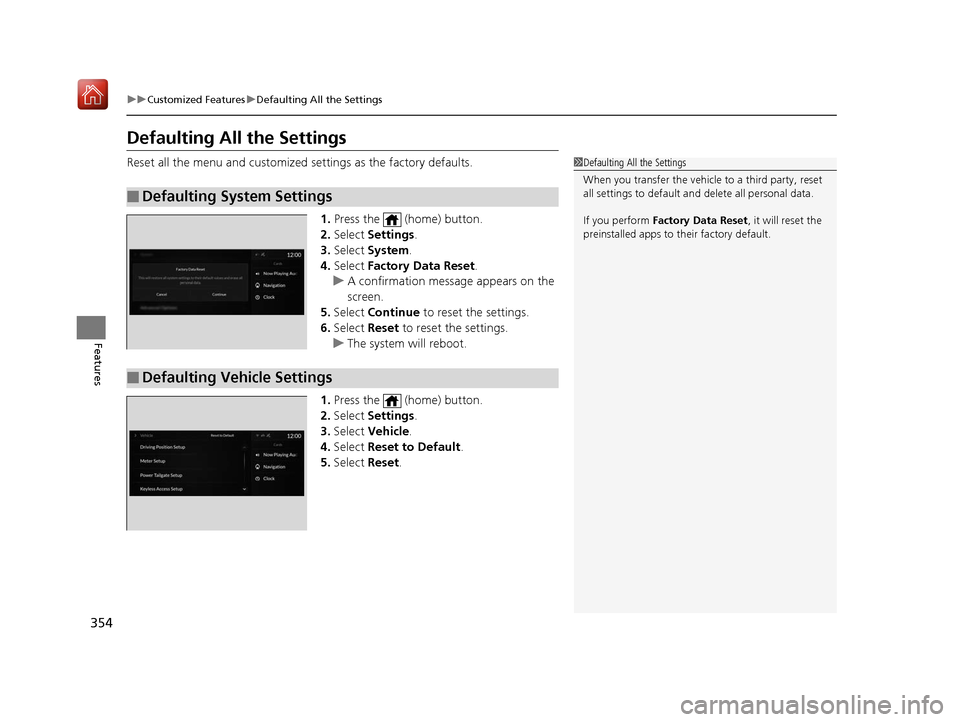
Reset all the menu and customized settings as the factory defaults.
1. Press the (home) button.
2. Select Settings .
3. Select System .
4. Select Factory Data Reset .
u A confirmation message appears on the
screen.
5. Select Continue to reset the settings.
6. Select Reset to reset the settings.
u The system will reboot.
1. Press the (home) button.
2. Select Settings .
3. Select Vehicle .
4. Select Reset to Default .
5. Select Reset.
■Defaulting System Settings
1Defaulting All the Settings
When you transfer the vehicle to a third party, reset
all settings to default a nd delete all personal data.
If you perform Factory Data Reset , it will reset the
preinstalled apps to their factory default.
■Defaulting Vehicle Settings
19 ACURA RDX-31TJB6000.book 354 ページ 2018年4月26日 木曜日 午後4時51分
Page 384 of 649
Continued383
uuBluetooth ® HandsFreeLink ®u Text Message
Features
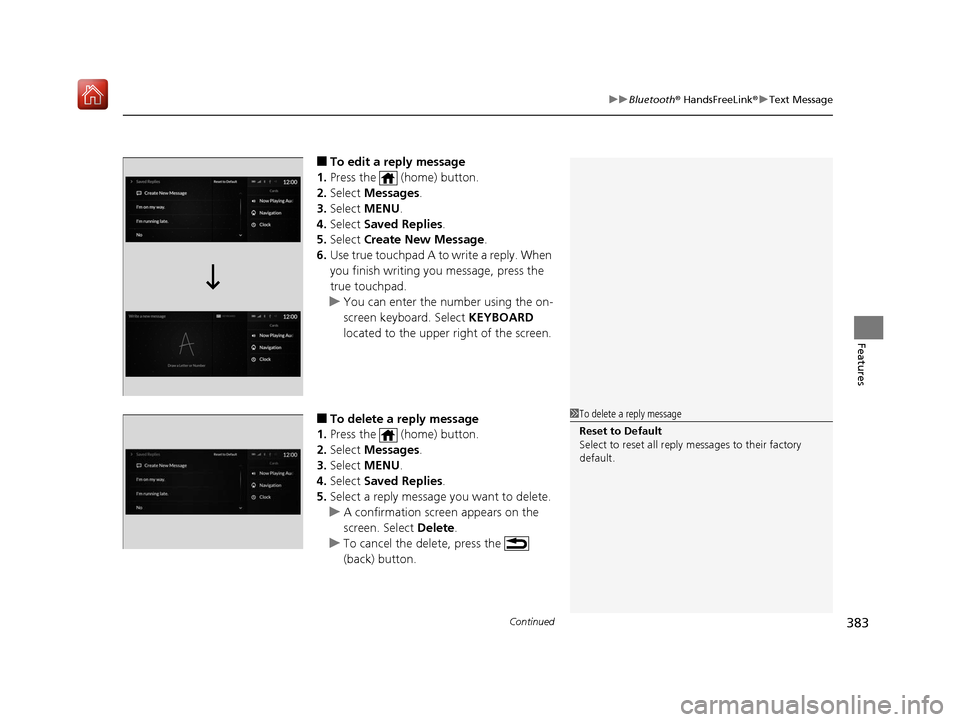
■To edit a reply message
1. Press the (home) button.
2. Select Messages.
3. Select MENU .
4. Select Saved Replies .
5. Select Create New Message .
6. Use true touchpad A to write a reply. When
you finish writing you message, press the
true touchpad.
u You can enter the number using the on-
screen keyboard. Select KEYBOARD
located to the upper right of the screen.
■To delete a reply message
1. Press the (home) button.
2. Select Messages.
3. Select MENU .
4. Select Saved Replies .
5. Select a reply message you want to delete.
u A confirmation screen appears on the
screen. Select Delete.
u To cancel the delete, press the
(back) button.1To delete a reply message
Reset to Default
Select to reset all reply messages to their factory
default.
19 ACURA RDX-31TJB6000.book 383 ページ 2018年4月26日 木曜日 午後4時51分
Page 530 of 649
529
uuMaintenance MinderTMuTo Use Maintenance MinderTM
Continued
Maintenance
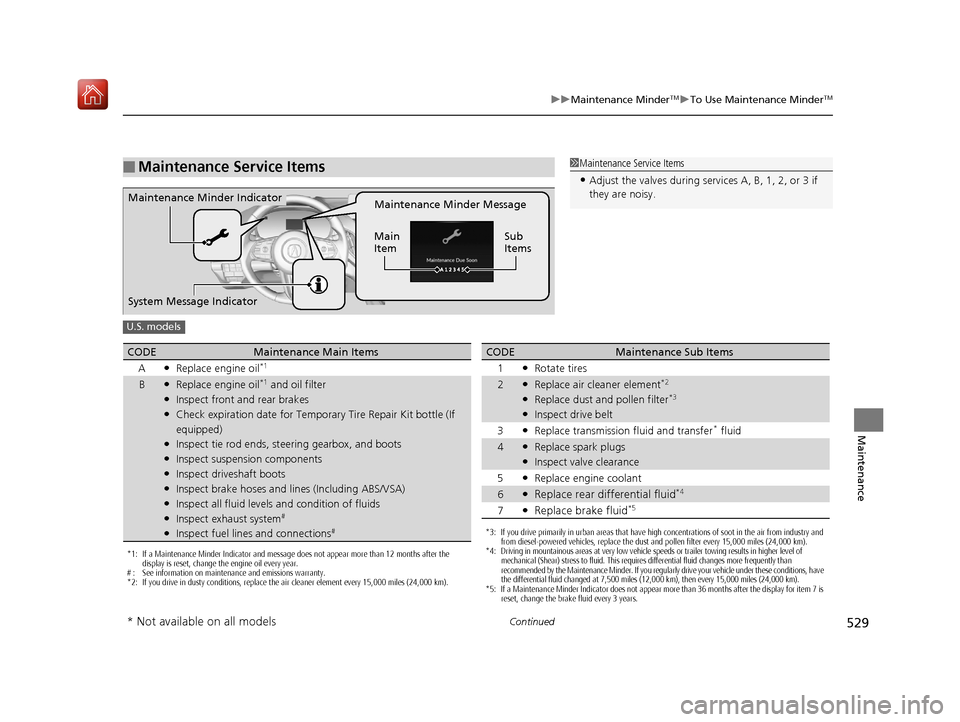
■Maintenance Service Items1Maintenance Service Items
•Adjust the valves during services A, B, 1, 2, or 3 if
they are noisy.
Maintenance Minder Message
Main
Item Sub
ItemsMaintenance Minder Indicator
System Message Indicator
U.S. models
*1: If a Maintenance Minder Indicator and message does not appear more than 12 months after the
display is reset, change the engine oil every year.
# : See information on maintenance and emissions warranty.
*2: If you drive in dusty conditions, replace the air cleaner element every 15,000 miles (24,000 km).
CODEMaintenance Main Items
A
●Replace engine oil*1
B●Replace engine oil*1 and oil filter●Inspect front and rear brakes●Check expiration date for Temporary Tire Repair Kit bottle (If
equipped)
●Inspect tie rod ends, steering gearbox, and boots●Inspect suspension components●Inspect driveshaft boots●Inspect brake hoses and lin es (Including ABS/VSA)●Inspect all fluid levels and condition of fluids●Inspect exhaust system#
●Inspect fuel lines and connections#*3: If you drive primarily in urban areas that have high concentrations of soot in the air from industry and
from diesel-powered vehicles, replace the dust and pollen filter every 15,000 miles (24,000 km).
*4: Driving in mountainous areas at very low vehicle speeds or trailer towing results in higher level of
mechanical (Shear) stress to fluid. This requires differential fluid changes more frequently than
recommended by the Maintenance Minder. If you regularly drive your vehicle under these conditions, have
the differential fluid changed at 7,500 miles (12,000 km), then every 15,000 miles (24,000 km).
*5: If a Maintenance Minder Indicator does not appear more than 36 months after the display for item 7 is reset, change the brake fluid every 3 years.
CODEMaintenance Sub Items
1
●Rotate tires
2●Replace air cleaner element*2
●Replace dust and pollen filter*3
●Inspect drive belt
3
●Replace transmission fluid and transfer* fluid
4●Replace spark plugs●Inspect valve clearance
5
●Replace engine coolant
6●Replace rear differential fluid*4
7●Replace brake fluid*5
* Not available on all models
19 ACURA RDX-31TJB6000.book 529 ページ 2018年4月26日 木曜日 午後4時51分