vehicle settings Acura RDX 2019 User Guide
[x] Cancel search | Manufacturer: ACURA, Model Year: 2019, Model line: RDX, Model: Acura RDX 2019Pages: 649, PDF Size: 33 MB
Page 347 of 649
346
uuCustomized Features u
Features
*1:Default SettingSetup Group Customizable Features
Description Selectable Settings
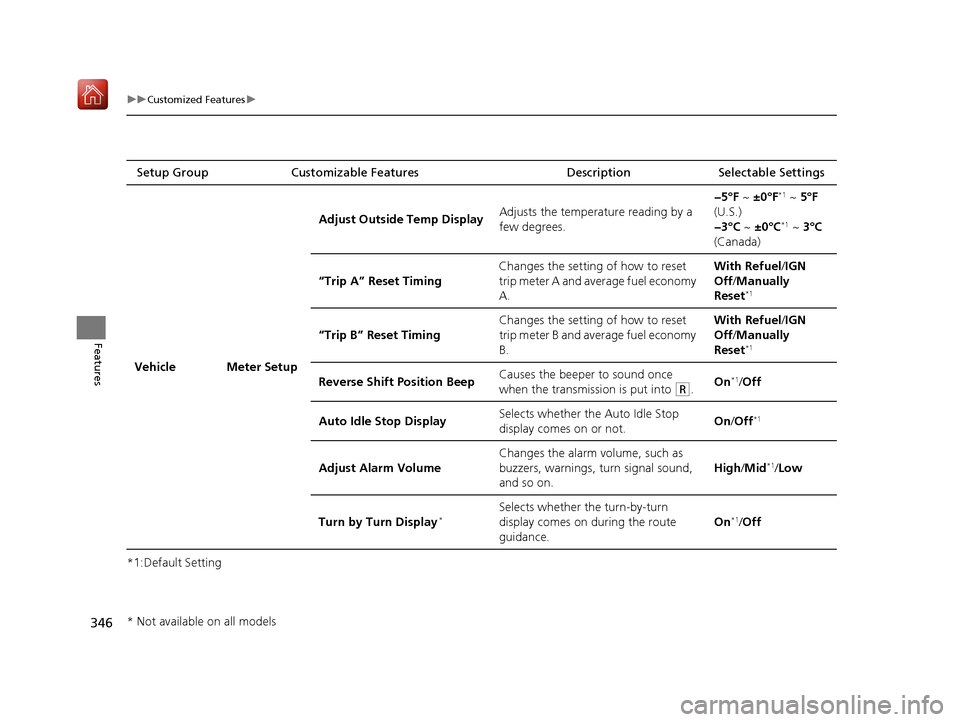
Vehicle Meter Setup Adjust Outside Temp Display
Adjusts the temperature reading by a
few degrees. −5°F ~
±0°F
*1 ~ 5°F
(U.S.)
−3°C ~ ±0°C
*1 ~ 3°C
(Canada)
“Trip A” Reset Timing Changes the setting of how to reset
trip meter A and average fuel economy
A. With Refuel
/IGN
Off /Manually
Reset
*1
“Trip B” Reset Timing Changes the setting of how to reset
trip meter B and average fuel economy
B. With Refuel
/IGN
Off /Manually
Reset*1
Reverse Shift Position Beep Causes the beeper to sound once
when the transmission is put into (R.On*1/
Off
Auto Idle Stop Display Selects whether the Auto Idle Stop
display comes on or not.
On
/Off
*1
Adjust Alarm Volume Changes the alarm volume, such as
buzzers, warnings, turn signal sound,
and so on.
High
/Mid*1/Low
Turn by Turn Display
*Selects whether the turn-by-turn
display comes on during the route
guidance. On*1/
Off
* Not available on all models
19 ACURA RDX-31TJB6000.book 346 ページ 2018年4月26日 木曜日 午後4時51分
Page 348 of 649

347
uuCustomized Features u
Continued
Features
*1:Default SettingSetup Group Customizable Features
Description Selectable Settings
Vehicle Driving
Position
Setup
Memory Position Link
Turns the driving position memory
system on and off. On
*1/
Off
Seat Position Movement at
Entry/Exit Causes the driver’s
seat to move back
to make it easier to enter or exit the
vehicle. On
*1/
Off
Keyless
Access Setup Door Unlock Mode
Changes which doors unlock when
you grab the driver’s door handle. Driver Door or
Tailgate Only
*1/
All
Doors
Keyless Access Beep Volume Changes the beep volume. High
*1/Low
Keyless Access Light Flash Causes some exterior lights to flash
when you unlock/lock the doors.
On
*1/
Off
Keyless Access Beep Causes the beeper to sound when you
unlock/lock the doors. On
*1/
Off
Remote Start System On/
Off
*Turns the remote engine start feature
on and off. On*1/
Off
Walk Away Auto Lock Changes the settings for the auto lock
function when you walk away from
the vehicle. Enable
/Disable
*1
* Not available on all models
19 ACURA RDX-31TJB6000.book 347 ページ 2018年4月26日 木曜日 午後4時51分
Page 349 of 649
348
uuCustomized Features u
Features
*1:Default SettingSetup Group Customizable Features
Description Selectable Settings
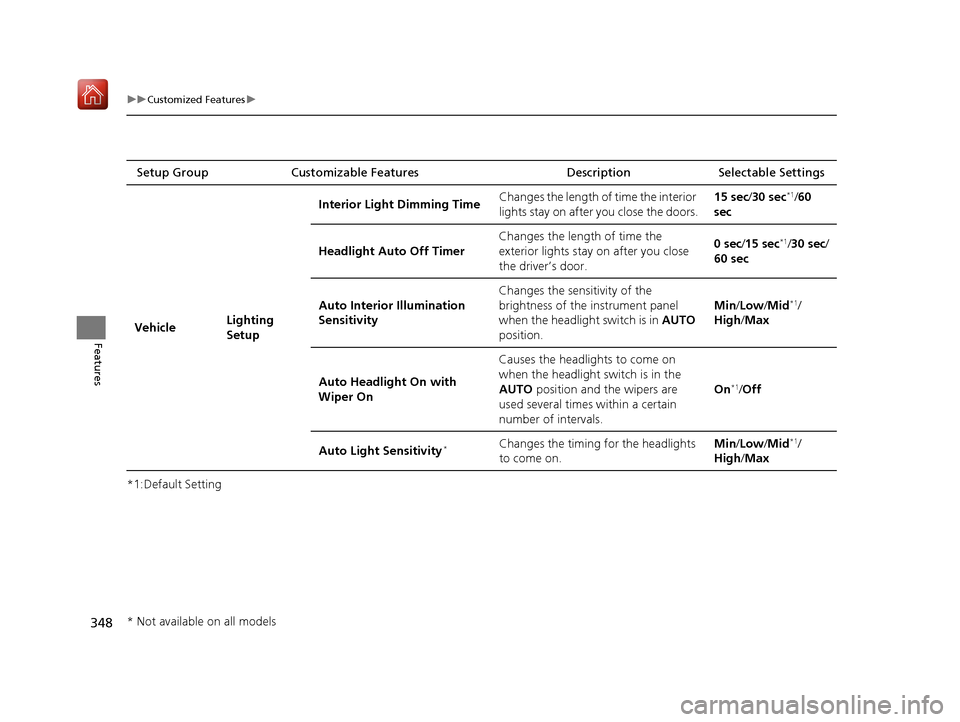
Vehicle Lighting
SetupInterior Ligh
t Dimming Time Changes the length of time the interior
lights stay on after you close the doors. 15 sec
/30 sec
*1/60
sec
Headlight Auto Off Timer Changes the length of time the
exterior lights stay on after you close
the driver’s door. 0 sec
/15 sec
*1/30 sec/
60 sec
Auto Interior Illumination
Sensitivity Changes the sensitivity of the
brightness of the instrument panel
when the headlight switch is in
AUTO
position. Min/
Low/ Mid
*1/
High /Max
Auto Headligh t On with
Wiper On Causes the headlights to come on
when the headlight switch is in the
AUTO
position and the wipers are
used several times within a certain
number of intervals. On
*1/
Off
Auto Light Sensitivity
*Changes the timing for the headlights
to come on. Min/
Low/ Mid*1/
High /Max
* Not available on all models
19 ACURA RDX-31TJB6000.book 348 ページ 2018年4月26日 木曜日 午後4時51分
Page 350 of 649

349
uuCustomized Features u
Continued
Features
*1:Default SettingSetup Group Customizable Features
Description Selectable Settings
Vehicle Door Setup Auto Door Lock
Changes the setting for the automatic
locking feature. Off
/With Vehicle
Speed
*1/ Shift from P
Auto Door Unlock Changes the setting for when the
doors unlock automatically. All Doors with
Driver’s Door
Opens
*1/
All Doors
with Shift to P /All
Doors with IGN Off /
Off
Key and Remote Unlock
Mode Sets up either the dr
iver’s door or all
doors to unlock on the first push of the
remote or built-in key. Driver Door
*1/
All
Doors
Keyless Lock Answer Back LOCK/UNLOCK- The exterior lights
flash.
LOCK (2nd push)- The beeper sounds. On
*1/
Off
Security Relock Timer Changes the time it takes for the doors
to relock and the security system to set
after you unlock the vehicle without
opening any door. 30 sec
*1/
60 sec/ 90
sec
Auto Folding Door Mirror
*
Changes the setting so that the mirrors
fold at the time the doors are locked
with the remote transmitter or keyless
access system. Auto Fold with
Keyless
*1/
Manual
Only
* Not available on all models
19 ACURA RDX-31TJB6000.book 349 ページ 2018年4月26日 木曜日 午後4時51分
Page 351 of 649

350
uuCustomized Features u
Features
*1:Default SettingSetup Group Customizable Features
Description Selectable Settings
Vehicle Power
Tailgate
SetupPower Tailgate Keyless Open
Mode
Changes the setting to enable the
power tailgate to be opened with the
keyless access remote at anytime or
only when the door
s are unlocked. Anytime
*1/
When
Unlocked
Power Tailgate Open by
Outer Handle Changes the setting to enable or
disable the power tailgate open
operation when the user presses the
outer handle of the power tailgate. Off (Manual only)
/
On (Power/
Manual)
*1
Hands Free Access Power
Tailgate*
Changes the setting to enable or
disable the power tailgate open
operation when a kicking motion
under the rear bumper is detected. On
*1/
Off
Maintenance
Information (Select Reset Items) Resets the Maintenance Minder
TM
display when you have performed the
maintenance service. —
Reset All Due
* Not available on all models
19 ACURA RDX-31TJB6000.book 350 ページ 2018年4月26日 木曜日 午後4時51分
Page 353 of 649
352
uuCustomized Features u
Features
*1:Default SettingSetup Group Customizable Features
Description Selectable Settings
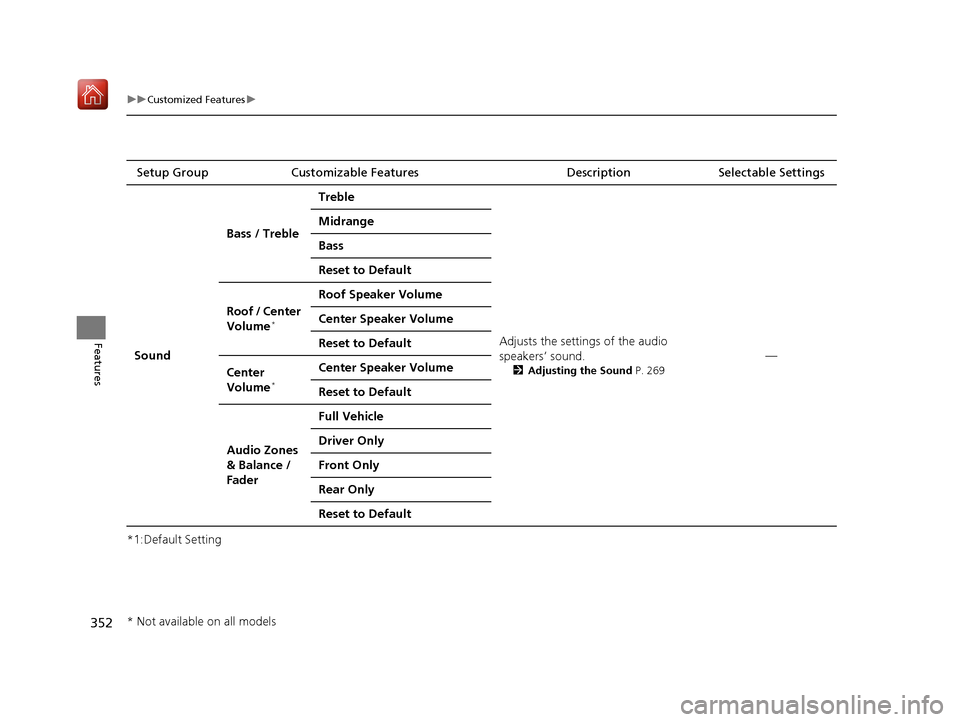
Sound Bass / Treble
Treble
Adjusts the settings of the audio
speakers’ sound.
2Adjusting the Sound P. 269
—
Midrange
Bass
Reset to Default
Roof / Center
Volume
*
Roof Speaker Volume
Center Speaker Volume
Reset to Default
Center
Volume
*
Center Speaker Volume
Reset to Default
Audio Zones
& Balance /
Fader Full Vehicle
Driver Only
Front Only
Rear Only
Reset to Default
* Not available on all models
19 ACURA RDX-31TJB6000.book 352 ページ 2018年4月26日 木曜日 午後4時51分
Page 355 of 649
354
uuCustomized Features uDefaulting All the Settings
Features
Defaulting All the Settings
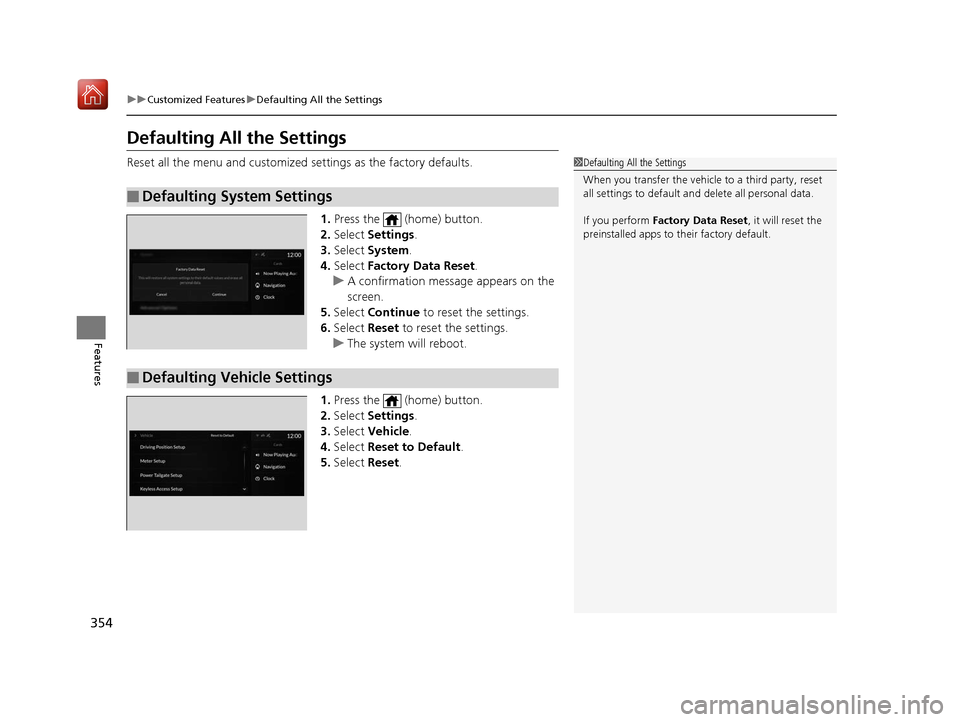
Reset all the menu and customized settings as the factory defaults.
1. Press the (home) button.
2. Select Settings .
3. Select System .
4. Select Factory Data Reset .
u A confirmation message appears on the
screen.
5. Select Continue to reset the settings.
6. Select Reset to reset the settings.
u The system will reboot.
1. Press the (home) button.
2. Select Settings .
3. Select Vehicle .
4. Select Reset to Default .
5. Select Reset.
■Defaulting System Settings
1Defaulting All the Settings
When you transfer the vehicle to a third party, reset
all settings to default a nd delete all personal data.
If you perform Factory Data Reset , it will reset the
preinstalled apps to their factory default.
■Defaulting Vehicle Settings
19 ACURA RDX-31TJB6000.book 354 ページ 2018年4月26日 木曜日 午後4時51分
Page 490 of 649

Continued489
uuBraking uBrake System
Driving
■Activating and deactivating the automatic parking brake feature
With the power mode is in ON, carry out th e following steps to either activate or
deactivate the automatic parking brake feature.
1. Put the transmission into
(P.
2. Without depressing the brake pedal, pres s and release the parking brake switch.
u Check that the Parking Brake and Brake System indicator (red) has come on.
3. Press and hold the parking brake switch. Wh en you hear a beeping sound, release
the switch and within 3 seconds pu ll up and hold the switch again.
4. When you hear a sound indicating that the procedure is completed, release the
switch.
u Two beeps indicates that the feature has been activated.
u One beep indicates that the feature has been deactivated.
u When you have completed activating the feature, the parking brake will
remain applied after you turn off the engine.
u To confirm that the parkin g brake is applied, check if the Parking Brake and
Brake System indicator (red) is on.
If you need to temporarily deactivate th e feature for when putting your vehicle
through a conveyor type car wash, you can follow the procedure explained below.
1. Depress the brake pedal and bring the vehicle to a stop.
2. Set the power mode to VEHICLE OFF and then within 2 seconds pull up the
parking brake switch.
u Activation and deactivation settings for the feature will not be affected.
u Before temporarily deactivating the feat ure, make sure to first turn off both
ACC with LSF and the automatic brake hold system.
u To confirm that the parkin g brake is applied, check if the Parking Brake and
Brake System indicator (red) is on.
1 Parking Brake
In cold climates, the parking brake may freeze in
place if applied.
When parking the vehicle, chock the wheels and
make sure the automatic parking brake feature is
deactivated.
Also, when putting your vehicle through a conveyor-
type car wash or when ha ving your vehicle towed,
deactivate the automatic parking brake feature and
leave the parking brake released.
19 ACURA RDX-31TJB6000.book 489 ページ 2018年4月26日 木曜日 午後4時51分
Page 648 of 649
647
Index
Side Curtain Airbags.................................. 54
Siri ® Eyes Free ........................................... 302
SiriusXM ® Radio ....................................... 278
Snow Tires ................................................ 562
Spare Tire ......................................... 579, 629
Spark Plugs ............................................... 628
Specifications ........................................... 628
Specified Fuel ................................... 515, 628
Speed Limit Information ......................... 128
Speed/Distance Units ............................... 134
Speedometer ............................................ 126
Sport Gauge Settings ............................... 135
SRS Airbags (Airbags) ................................ 45
Starting Assist Brake Function ................ 433
Starting the Engine .................................. 411
Does Not Start ........................................ 601
Jump Starting ......................................... 604
Remote Engine Start ............................... 413
Steering Wheel ........................................ 203
Adjusting ................................................ 203
Stopping ................................................... 495
Summer Tires ............................................ 562
Sunglasses Holder .................................... 227
Super Handling-All Wheel Drive
TM
(SH-AWD ®).............................................. 437
Supplemental Restraint System (SRS) ....... 45
Surround View Camera System ............... 507
Switches (Around the Steering
Wheel) ............................................ 4, 5, 182
Synchronized Mode ................................. 233
System Message Indicator ......................... 89System Updates
........................................ 263
T
Tachometer............................................... 134
Tailgate ..................................................... 163
Unable to Open ....................................... 624
Temperature Gauge ..................................................... 126
Outside Temperature Display ................... 127
Temperature Sensor ......................... 127, 235
Temporary Tire Repair Kit ........................ 588
Tie-down Anchors .................................... 226
Time (Setting) ........................................... 144
Tire Fill Assist ............................................ 613
Tire Pressure Monitoring System
(TPMS) ..................................................... 441
Indicator ............................................ 86, 613
Tire Fill Assist ........................................... 613
Tire Repair Kit ........................................... 587
Tires ........................................................... 554
Air Pressure ..................................... 555, 629
Checking and Maintaining ....................... 554
Inspection ................................................ 554
Labeling .................................................. 555
Puncture (Flat Tire) ........................... 579, 587
Regulations ............................................. 557
Rotation .................................................. 561
Spare Tire ........................................ 579, 629
Summer .................................................. 562
Temporary Tire Repair Kit ........................ 588 Tire Chains .............................................. 562
Tire Repair Kit.......................................... 587
Wear Indicators ....................................... 559
Winter..................................................... 562
Tools .......................................................... 578
Towing a Trailer ....................................... 403
Equipment and Accessories ..................... 405
Load Limits .............................................. 403
Towing Your Vehicle ................................ 408
Emergency .............................................. 622
TPMS (Tire Pressure Monitoring
System) .................................................... 441
Indicator............................................ 86, 613
Transmission ....................................... 19, 418
Automatic ......................................... 19, 418
Fluid ........................................................ 542
Gear Position Indicator ...................... 79, 420
Indicator.................................................. 614
Number................................................... 630
Sequential Shift Mode ............................. 424
Transmission System Indicator.................................................... 80
Trip Computer .......................................... 130
Trip Meter ................................................. 130
19 ACURA RDX-31TJB6000.book 647 ページ 2018年4月26日 木曜日 午後4時51分