warning lights Acura RDX 2019 User Guide
[x] Cancel search | Manufacturer: ACURA, Model Year: 2019, Model line: RDX, Model: Acura RDX 2019Pages: 649, PDF Size: 33 MB
Page 459 of 649
uuAcuraWatchTMuAdaptive Cruise Control (ACC) with Low Speed Follow (LSF)
458
Driving
■There is a vehicle ahead
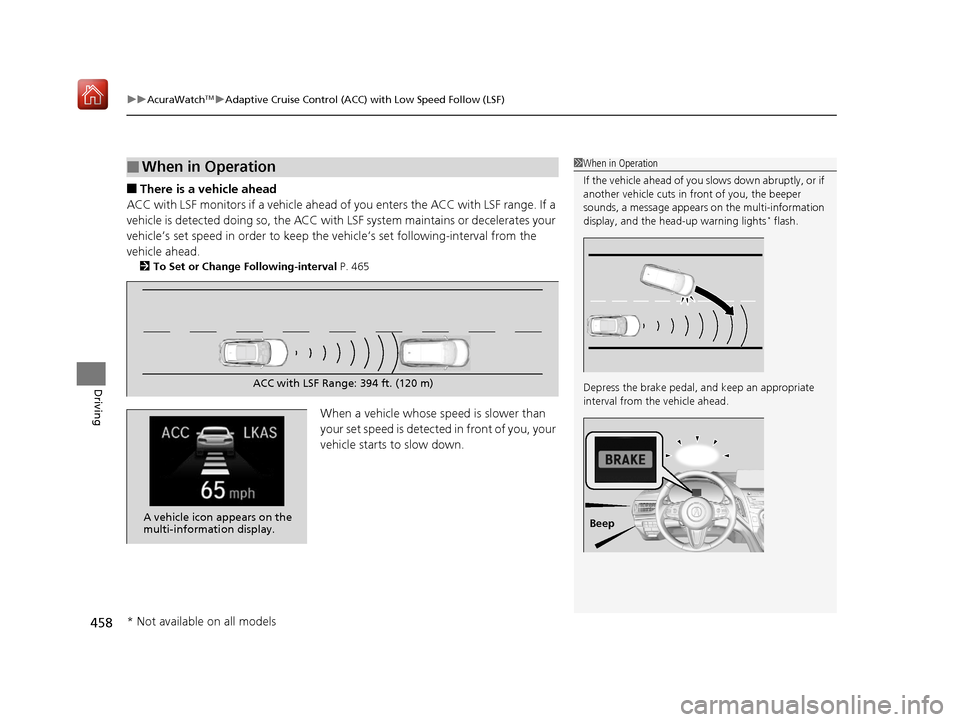
ACC with LSF monitors if a vehicle ahead of you enters the ACC with LSF range. If a
vehicle is detected doing so, the ACC with LSF system maintains or decelerates your
vehicle’s set speed in order to keep the vehicle’s set following-interval from the
vehicle ahead.
2 To Set or Change Following-interval P. 465
When a vehicle whose speed is slower than
your set speed is detected in front of you, your
vehicle starts to slow down.
■When in Operation1 When in Operation
If the vehicle ahead of you slows down abruptly, or if
another vehicle cuts in front of you, the beeper
sounds, a message appears on the multi-information
display, and the head-up warning lights
* flash.
Depress the brake pedal, and keep an appropriate
interval from the vehicle ahead.
Beep
ACC with LSF Range: 394 ft. (120 m)
A vehicle icon appears on the
multi-information display.
* Not available on all models
19 ACURA RDX-31TJB6000.book 458 ページ 2018年4月26日 木曜日 午後4時51分
Page 462 of 649
Continued461
uuAcuraWatchTMuAdaptive Cruise Control (ACC) with Low Speed Follow (LSF)
Driving
The system may automatically shut off and the ACC with LSF indicator will come on
under certain conditions. Some examples of these conditions are listed below. Other
conditions may reduce some of the ACC with LSF functions.
■Environmental conditions
Driving in bad weather (r ain, fog, snow, etc.).
■Roadway conditions
Driving on a snowy or wet roadway (obscure d lane marking, vehicle tracks, reflected
lights, road spra y, high contrast).
■Vehicle conditions
• The outside of the windshield is blocked by dirt, mud, leaves, wet snow, etc.
• An abnormal tire or wheel condition (Wro ng sized, varied size or construction,
improperly inflated, compact spare tire
*, etc.).
• The camera temperature gets too high.
• The parking brake is applied.
• When the radar sensor cover is dirty.
• The vehicle is tilted due to a heavy load or suspension modifications.
• When tire chains are installed.
■ACC with LSF Conditions and Limitations1ACC with LSF Conditions and Limitations
For directions on the prop er handling of the radar
sensor, refer to the following page.
2 Radar Sensor P. 485
You can read about handling information for the
camera equipped with this system. 2 Front Sensor Camera P. 483
Have your vehicle checked by a dealer if you find any
unusual behavior of the system (e.g., the warning
message appears too frequently).
* Not available on all models
19 ACURA RDX-31TJB6000.book 461 ページ 2018年4月26日 木曜日 午後4時51分
Page 492 of 649

Continued491
uuBraking uBrake System
Driving
Keeps the brake applied after releasing the brake pedal until the accelerator pedal is
pressed. You can use this system while th e vehicle is temporarily stopped, like at
traffic lights and in heavy traffic.
■Automatic Brake Hold1 Automatic Brake Hold
3WARNING
Activating the automatic brake hold system
on steep hills or slippery roads may still
allow the vehicle to move if you remove
your foot from the brake pedal.
If a vehicle unexpectedly moves, it may
cause a crash resulting in serious injury or
death.
Never activate the automatic brake hold
system or rely on it to keep a vehicle from
moving when stopped on a steep hill or
slippery roads.
3WARNING
Using the automatic brake hold system to
park the vehicle may result in the vehicle
unexpectedly moving.
If a vehicle moves unexpectedly, it may
cause a crash, resulting in serious injury or
death.
Never leave the vehicle when braking is
temporarily kept by automatic brake hold
and always park the vehicle by putting the
transmission in
( P and applying the parking
brake.
■Turning on the system
Fasten your seat belt
properly, then start the
engine. Press the
automatic brake hold
button.
●The automatic brake
hold system indicator
comes on. The system
is turned on.
■Activating the system
Depress the brake pedal
to come to a complete
stop. The transmission
must be in
( D, (S or (N.●The automatic brake
hold indicator comes
on. Braking is kept for
up to 10 minutes.
●Release the brake
pedal after the
automatic brake hold
indicator comes on.
■Canceling the system
Depress the accelerator
pedal while the
transmission is in
( D or (S. The system is
canceled and the vehicle
starts to move.
●The automatic brake
hold indicator goes
off. The system
continues to be on.
Accelerator PedalBrake PedalAutomatic Brake
Hold Button
Goes
Off
Comes
OnOn On
Comes
On
Comes
On
U.S.
Canada
19 ACURA RDX-31TJB6000.book 491 ページ 2018年4月26日 木曜日 午後4時51分
Page 580 of 649
579Continued
Handling the Unexpected
If a Tire Goes Flat
Changing a Flat Tire
If a tire goes flat while driving, grasp the steering wheel firmly, and brake gradually
to reduce speed. Then, stop in a safe plac e. Replace the flat tire with a compact
spare tire. Go to a dealer as soon as possib le to have the full-size tire repaired or
replaced.
1. Park the vehicle on firm, level, non-slip pery surface and apply the parking brake.
2. Change the gear position to
(P.
3. Turn on the hazard warning lights an d set the power mode to VEHICLE OFF
(LOCK).
Vehicles with a compact spare tire
1 Changing a Flat Tire
Follow compact spare precautions:
Periodically check the tire pressure of the compact
spare. It should be set to the specified pressure.
Specified Pressure: 60 psi (420 kPa, 4.2 kgf/cm
2)
When driving with the compact spare tire, keep the
vehicle speed under 50 mph (80 km/h). Replace with
a full-size tire as soon as possible.
The compact spare tire and wheel in your vehicle are
specifically for this model. Do not use them with
another vehicle. Do not us e another type of compact
spare tire or wheel with your vehicle.
Do not mount tire chains on a compact spare tire.
If a chain-mounted front tire goes flat, remove one of
the full-size rear tires and replace it with the compact
spare tire. Remove the flat front tire and replace it
with the full-size tire that was removed from the rear.
Mount the tire chains on the front tire.
Do not use a puncture-repairi ng agent on a flat tire,
as it can damage the tire pressure sensor.
19 ACURA RDX-31TJB6000.book 579 ページ 2018年4月26日 木曜日 午後4時51分
Page 588 of 649
587
uuIf a Tire Goes Flat uTemporarily Repairing a Flat Tire
Continued
Handling the Unexpected
Temporarily Repairing a Flat Tire
If the tire has a large cut or is otherwise severely damaged, you will need to have the
vehicle towed. If the tire only has a small puncture, from a nail for instance, you can
use the temporary tire repair kit so that you can drive to the nearest service station
for a more permanent repair.
If a tire goes flat while driving, grasp the steering wheel firmly, and brake gradually
to reduce speed. Then stop in a safe place.
1. Park the vehicle on a firm, level, and n on-slippery surface and apply the parking
brake.
2. Change the gear position to
(P.
3. Turn on the hazard warning lights an d set the power mode to VEHICLE OFF
(LOCK).
Vehicles with temporary tire repair kit
1 Temporarily Repairing a Flat Tire
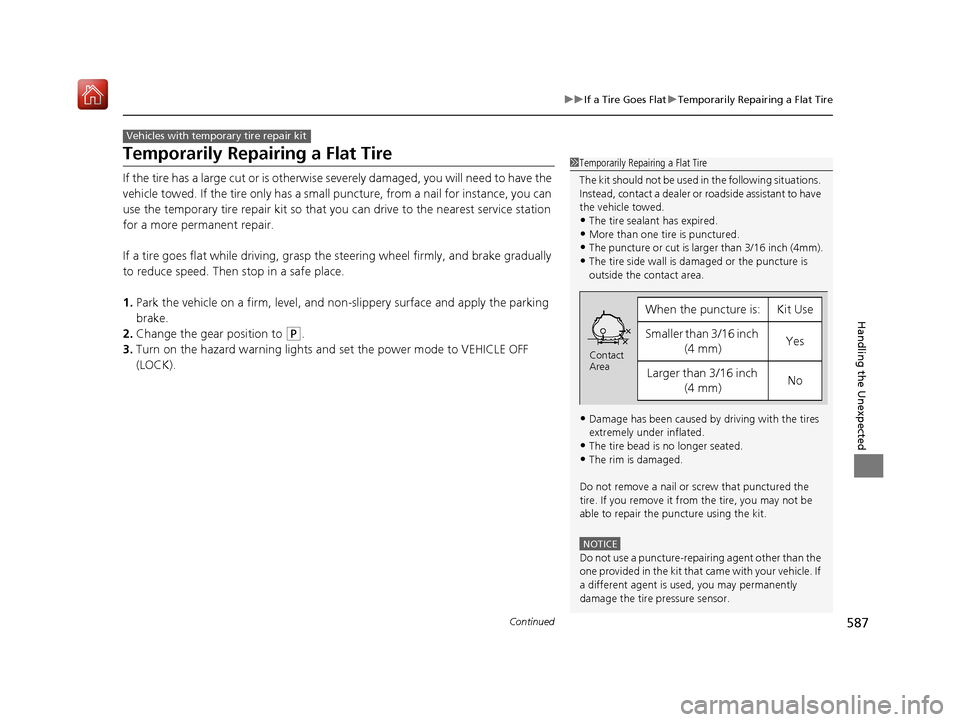
The kit should not be used in the following situations.
Instead, contact a dealer or roadside assistant to have
the vehicle towed.
•The tire sealant has expired.
•More than one tire is punctured.•The puncture or cut is larger than 3/16 inch (4mm).
•The tire side wall is da maged or the puncture is
outside the contact area.
•Damage has been caused by driving with the tires
extremely under inflated.
•The tire bead is no longer seated.
•The rim is damaged.
Do not remove a nail or screw that punctured the
tire. If you remove it from the tire, you may not be
able to repair the puncture using the kit.
NOTICE
Do not use a puncture-repairing agent other than the
one provided in the kit that came with your vehicle. If
a different agent is used, you may permanently
damage the tire pressure sensor.
When the puncture is:Kit Use
Smaller than 3/16 inch (4 mm)Yes
Larger than 3/16 inch (4 mm)No
Contact
Area
19 ACURA RDX-31TJB6000.book 587 ページ 2018年4月26日 木曜日 午後4時51分
Page 605 of 649
604
Handling the Unexpected
Jump Starting
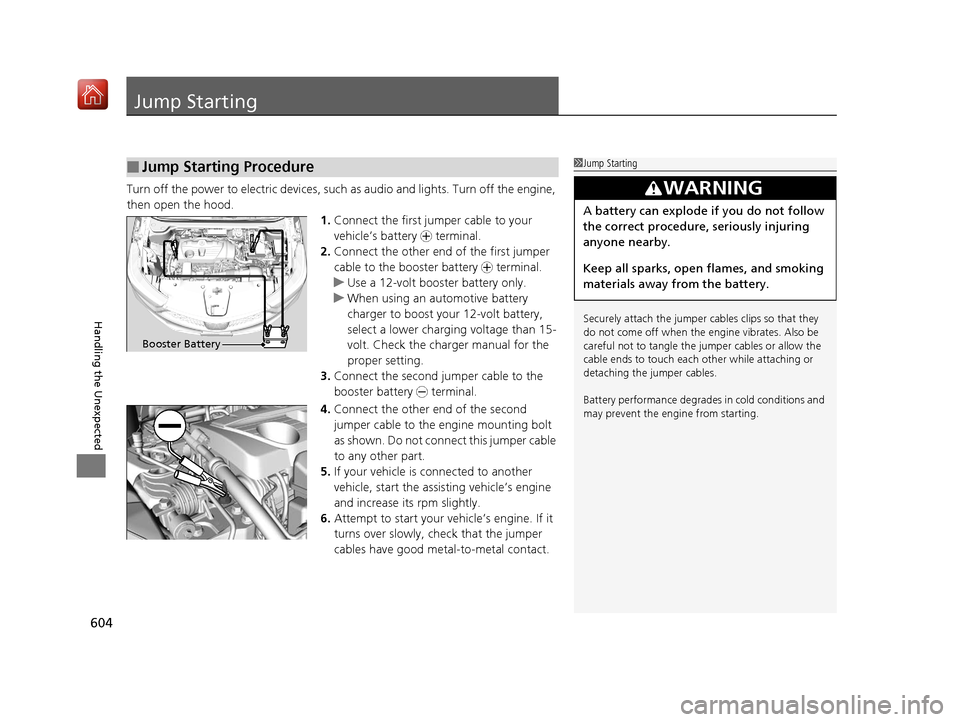
Turn off the power to electric devices, such as audio and lights. Turn off the engine,
then open the hood. 1.Connect the first jump er cable to your
vehicle’s battery + terminal.
2. Connect the other end of the first jumper
cable to the booster battery + terminal.
u Use a 12-volt booster battery only.
u When using an automotive battery
charger to boost your 12-volt battery,
select a lower charging voltage than 15-
volt. Check the charger manual for the
proper setting.
3. Connect the second jumper cable to the
booster battery - terminal.
4. Connect the other end of the second
jumper cable to the engine mounting bolt
as shown. Do not conn ect this jumper cable
to any other part.
5. If your vehicle is connected to another
vehicle, start the assi sting vehicle’s engine
and increase its rpm slightly.
6. Attempt to start your vehicle’s engine. If it
turns over slowly, check that the jumper
cables have good metal-to-metal contact.
■Jump Starting Procedure1Jump Starting
Securely attach the jumper cables clips so that they
do not come off when the e ngine vibrates. Also be
careful not to tangle the ju mper cables or allow the
cable ends to touch each other while attaching or
detaching the jumper cables.
Battery performance degrades in cold conditions and
may prevent the engi ne from starting.
3WARNING
A battery can explode if you do not follow
the correct procedure, seriously injuring
anyone nearby.
Keep all sparks, open flames, and smoking
materials away from the battery.
Booster Battery
19 ACURA RDX-31TJB6000.book 604 ページ 2018年4月26日 木曜日 午後4時51分
Page 607 of 649
606
Handling the Unexpected
Overheating
How to Handle Overheating
Overheating symptoms are as follows:
•The temperature gauge is at the mark or the engine suddenly loses power.
• Engine Temperature Too Hot. Do No t Drive. Allow Engine To Cool.
message appears on the mu lti-information display.
• Steam or spray comes out of the engine compartment.
■First thing to do
1. Immediately park the vehicle in a safe place.
2. Turn off all accessories and turn on the hazard warning lights.
u No steam or spray present: Keep the engine running and open the hood.
u Steam or spray is present: Turn off the engine and wait until it subsides.
Then, open the hood.
1 How to Handle Overheating
NOTICE
Continuing to drive with the temperature gauge at
the mark may damage the engine.
3WARNING
Steam and spray from an overheated
engine can seri ously scald you.
Do not open the hood if steam is coming
out.
H
H
19 ACURA RDX-31TJB6000.book 606 ページ 2018年4月26日 木曜日 午後4時51分
Page 609 of 649
608
Handling the Unexpected
Indicator, Coming On/Blinking
If the Low Oil Pressure Warning Appears
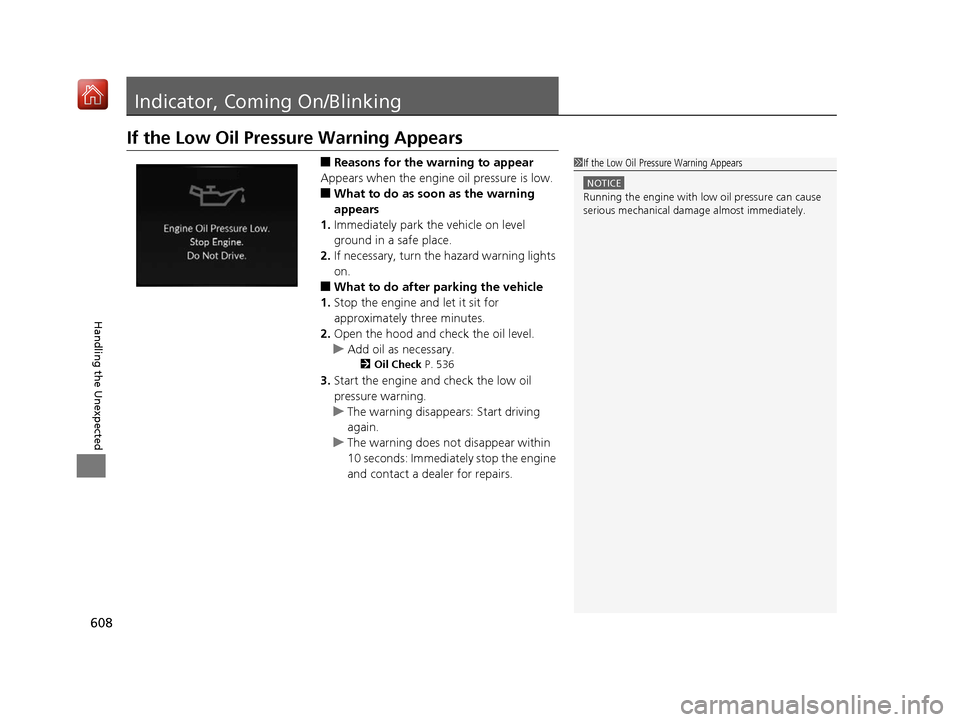
■Reasons for the warning to appear
Appears when the engine oil pressure is low.
■What to do as soon as the warning
appears
1. Immediately park the vehicle on level
ground in a safe place.
2. If necessary, turn the hazard warning lights
on.
■What to do after parking the vehicle
1. Stop the engine and let it sit for
approximately three minutes.
2. Open the hood and check the oil level.
u Add oil as necessary.
2 Oil Check P. 536
3.Start the engine and check the low oil
pressure warning.
u The warning disappears: Start driving
again.
u The warning does not disappear within
10 seconds: Immediately stop the engine
and contact a dealer for repairs.
1If the Low Oil Pressure Warning Appears
NOTICE
Running the engine with low oil pressure can cause
serious mechanical damage almost immediately.
19 ACURA RDX-31TJB6000.book 608 ページ 2018年4月26日 木曜日 午後4時51分
Page 644 of 649
643
Index
Fuel..................................................... 21, 515
Economy................................................. 518
Gauge .................................................... 126
Instant Fuel Economy .............................. 131
Low Fuel Indicator..................................... 83
Range ..................................................... 131
Recommendation.................................... 515
Refueling ................................................ 515
Fuel Economy ........................................... 518
Fuel Fill Door ...................................... 21, 516
Fuses ......................................................... 615
Inspecting and Changing ........................ 621
Locations ................................ 615, 618, 619
G
Gasoline (Fuel) Economy................................................. 518
Gauge .................................................... 126
Information............................................. 515
Instant Fuel Economy .............................. 131
Low Fuel Indicator..................................... 83
Refueling ................................................ 515
Gauges ...................................................... 126
Gear Position Indicator ...................... 79, 420
Gear Shift Positions Automatic Transmission .......................... 418
Glass (care) ............................................... 572
Glove Box ................................................. 221
H
Handling the Unexpected ........................ 577
HandsFreeLink ® (HFL) ............................... 358
Automatic Import of Cellular Phonebook
and Call History ..................................... 369
Automatic Transferring ............................ 368
Displaying Messages ................................ 381
Favorite Contacts ..................................... 370
HFL Buttons ............................................. 358
HFL Menus .............................................. 362
HFL Status Display ................................... 360
In Case of Emergency .............................. 391
Limitations for Manua l Operation ............ 361
Making a Call .......................................... 371
Options During a Call .............................. 375
Phone Setup ............................................ 364
Receiving a Call ....................................... 374
Receiving a Text Message ........................ 379
Ring Tone ................................................ 368
Selecting a Phone .................................... 380
To Set Up a Text Message Options ........... 378
Hazard Warning Button ............................... 4
HD Radio
TM................................................ 277
Head Restraints ......................................... 212
Headlight Washers ................................... 197
Headlights ................................................. 186
Adaptive Front Lighting System (AFS) ....... 189
Auto High-Beam System .......................... 191
Automatic Operation ............................... 187
Dimming ......................................... 186, 190
Operating ................................................ 186 Head-Up Display
....................................... 138
Heated Steering Wheel ............................ 227
Heaters (Seat) ........................................... 228
HFL (HandsFreeLink ®)............................... 358
High Beam Indicator .................................. 87
Hill Start Assist System ............................. 415
HomeLink ® Universal Transceiver ............ 355
Honda App License Agreement .............. 313
Honda Sensing
TM...................................... 445
I
Identification Numbers ............................ 630
Engine and Transmission ......................... 630
Vehicle Identification ............................... 630
IDS (Integrated Dynamics System) ........... 426
Illumination Control ................................. 198
Knob ....................................................... 198
Immobilizer System .................................. 173
Indicator.................................................... 88
19 ACURA RDX-31TJB6000.book 643 ページ 2018年4月26日 木曜日 午後4時51分
Page 645 of 649
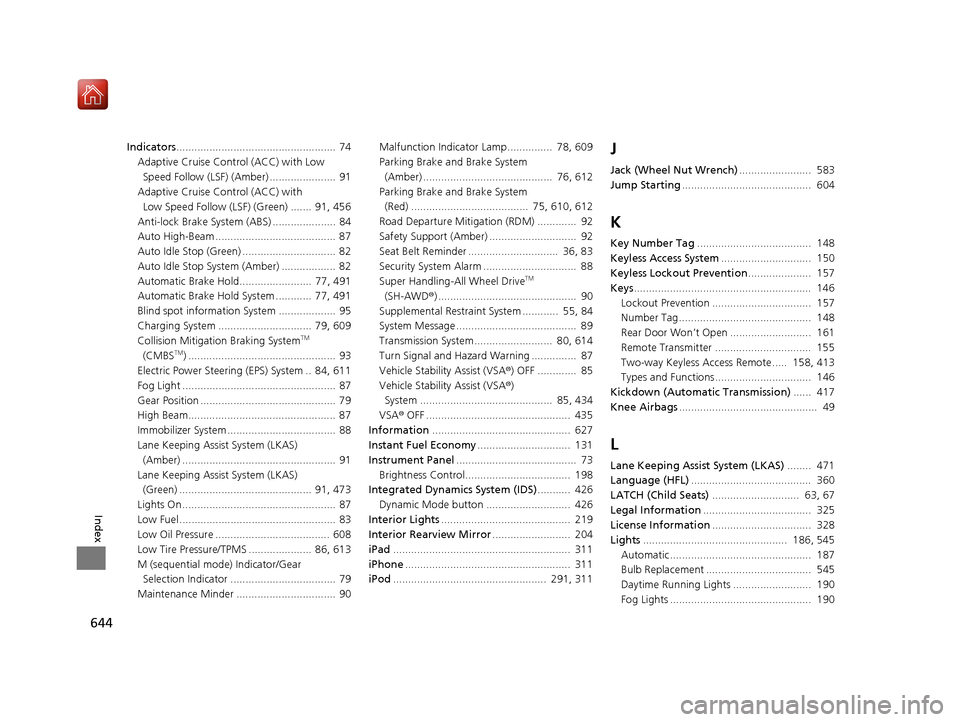
644
Index
Indicators..................................................... 74
Adaptive Cruise Control (ACC) with Low
Speed Follow (LSF) (Amber) ...................... 91
Adaptive Cruise Control (ACC) with Low Speed Follow (LSF) (Green) ....... 91, 456
Anti-lock Brake System (ABS) ..................... 84
Auto High-Beam ........................................ 87
Auto Idle Stop (Green) ............................... 82
Auto Idle Stop System (Amber) .................. 82
Automatic Brake Hold........................ 77, 491
Automatic Brake Hold System ............ 77, 491
Blind spot information System ................... 95
Charging System ............................... 79, 609
Collision Mitigati on Braking System
TM
(CMBSTM) ................................................. 93
Electric Power Steering (EPS) System .. 84, 611
Fog Light ................................................... 87
Gear Position ............................................. 79
High Beam................................................. 87
Immobilizer System .................................... 88
Lane Keeping Assist System (LKAS) (Amber) ................................................... 91
Lane Keeping Assist System (LKAS) (Green) ............................................ 91, 473
Lights On ................................................... 87
Low Fuel .................................................... 83
Low Oil Pressure ...................................... 608
Low Tire Pressure/TPMS ..................... 86, 613
M (sequential mode ) Indicator/Gear
Selection Indicator ................................... 79
Maintenance Minder ................................. 90 Malfunction Indicator Lamp............... 78, 609
Parking Brake a
nd Brake System
(Amber) ........................................... 76, 612
Parking Brake a nd Brake System
(Red) ....................................... 75, 610, 612
Road Departure Mitigation (RDM) ............. 92
Safety Support (Amber) ............................. 92
Seat Belt Reminder .............................. 36, 83
Security System Alarm ............................... 88
Super Handling-All Wheel Drive
TM
(SH-AWD ®) .............................................. 90
Supplemental Restraint System ............ 55, 84
System Message ........................................ 89
Transmission System.......................... 80, 614
Turn Signal and Hazard Warning ............... 87
Vehicle Stability Assist (VSA ®) OFF ............. 85
Vehicle Stability Assist (VSA ®)
System ............................................ 85, 434
VSA ® OFF ................................................ 435
Information .............................................. 627
Instant Fuel Economy ............................... 131
Instrument Panel ........................................ 73
Brightness Control................................... 198
Integrated Dynamics System (IDS) ........... 426
Dynamic Mode button ............................ 426
Interior Lights ........................................... 219
Interior Rearview Mirror .......................... 204
iPad ........................................................... 311
iPhone ....................................................... 311
iPod ................................................... 291, 311
J
Jack (Wheel Nut Wrench) ........................ 583
Jump Starting ........................................... 604
K
Key Number Tag ...................................... 148
Keyless Access System .............................. 150
Keyless Lockout Prevention ..................... 157
Keys ........................................................... 146
Lockout Prevention ................................. 157
Number Tag............................................ 148
Rear Door Won’t Open ........................... 161
Remote Transmitter ................................ 155
Two-way Keyless Access Remote..... 158, 413
Types and Functions................................ 146
Kickdown (Automatic Transmission) ...... 417
Knee Airbags .............................................. 49
L
Lane Keeping Assist System (LKAS) ........ 471
Language (HFL) ........................................ 360
LATCH (Child Seats) ............................. 63, 67
Legal Information .................................... 325
License Information ................................. 328
Lights ................................................ 186, 545
Automatic............................................... 187
Bulb Replacement ................................... 545
Daytime Running Lights .......................... 190
Fog Lights ............................................... 190
19 ACURA RDX-31TJB6000.book 644 ページ 2018年4月26日 木曜日 午後4時51分