lights Acura RDX 2019 Workshop Manual
[x] Cancel search | Manufacturer: ACURA, Model Year: 2019, Model line: RDX, Model: Acura RDX 2019Pages: 649, PDF Size: 33 MB
Page 399 of 649
398
Driving
Before Driving
Driving Preparation
Check the following items before you start driving.
• Make sure there are no obstructions on th e windows, door mirrors, exterior
lights, or other parts of the vehicle.
u Remove any frost, snow, or ice.
u Remove any snow on the roof, as this can slip down and obstruct your field of
vision while driving. If frozen solid , remove ice once it has softened.
u When removing ice from around the wheel s, be sure not to damage the wheel
or wheel components.
• Make sure the hood is securely closed.
u If the hood opens while driving, your front view will be blocked.
• Make sure the tires are in good condition.
u Check air pressures, and check for damage and excessive wear.
2Checking and Maintaining Tires P. 554
•Make sure there are no people or ob jects behind or around the vehicle.
u There are blind spots from the inside.
■Exterior Checks1Exterior Checks
NOTICE
When doors are frozen s hut, use warm water around
the door edges to melt any ice. Do not try to force
them open, as this can damage the rubber trim
around the doors. When done, wipe dry to avoid
further freezing.
Do not pour warm water into the key cylinder.
You will be unable to insert the key if the water
freezes in the hole.
Heat from the engine and exhaust can ignite
flammable material s left under the hood, causing a
fire. If you’ve parked y our vehicle for an extended
period, inspect and remove any debris that may have
collected, such as dried grass and leaves that have
fallen or have been carried in for use as a nest by a
small animal. Also check under the hood for leftover
flammable materials after you or someone else has
performed maintenance on your vehicle.
19 ACURA RDX-31TJB6000.book 398 ページ 2018年4月26日 木曜日 午後4時51分
Page 407 of 649
406
uuTowing a Trailer uTowing Preparation
Driving
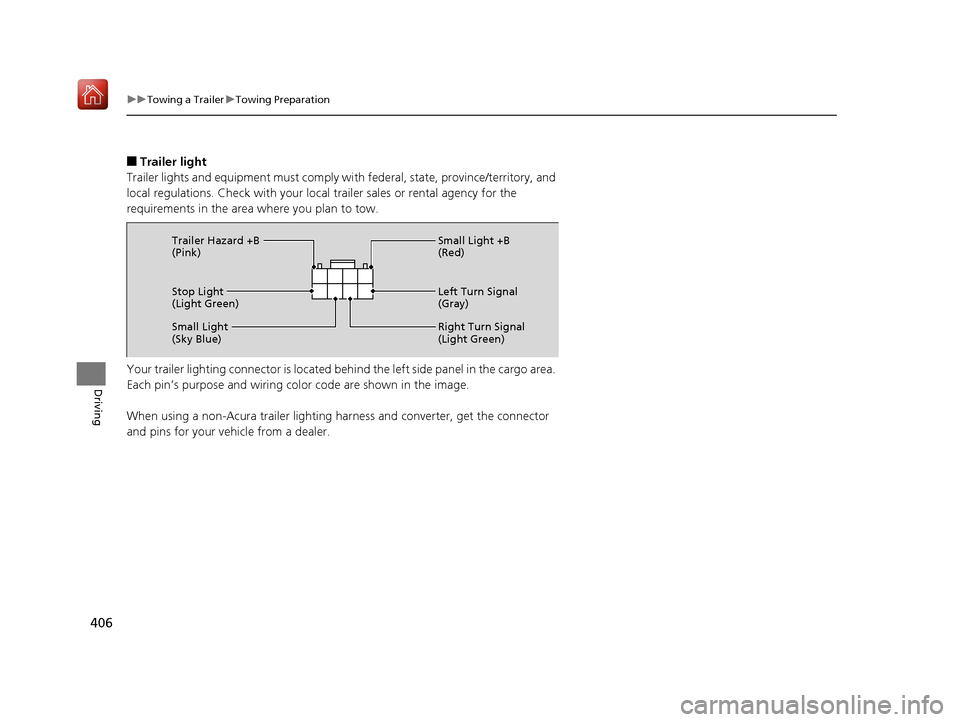
■Trailer light
Trailer lights and equipment must comply with federal, state, province/territory, and
local regulations. Check with your local trailer sales or rental agency for the
requirements in the area where you plan to tow.
Your trailer lighting connector is located be hind the left side panel in the cargo area.
Each pin’s purpose and wiring color code are shown in the image.
When using a non-Acura trailer lighting harness and converter, get the connector
and pins for your vehicle from a dealer.
Stop Light
(Light Green) Small Light +B
(Red)
Left Turn Signal
(Gray)
Right Turn Signal
(Light Green)
Small Light
(Sky Blue) Trailer Hazard +B
(Pink)
19 ACURA RDX-31TJB6000.book 406 ページ 2018年4月26日 木曜日 午後4時51分
Page 408 of 649
407
uuTowing a Trailer uDriving Safely with a Trailer
Driving
Driving Safely with a Trailer
• Have the trailer properly servic ed and keep it in good condition.
• Make sure that all the weights and load in the vehicle and trailer are within limits.
2Towing Load Limits P. 403
•Securely attach the hitch, safety chains, and other necessary parts to the trailer.
• Securely store all the items in and on the tra iler so that they do not shift while
driving.
• Check if the lights and brakes on the trailer are working properly.
• Check the pressures of the traile r tires, including the spare.
• Drive slower than normal.
• Obey posted speed limits fo r vehicles with trailers.
• Use the
(D position when towing a trailer on level roads.
• Turn more slowly and with a wider turning arc than normal.
• Allow more time and distance for braking.
• Do not brake or turn suddenly.
• Monitor your temperature gauge. If it nears the red (Hot) mark, turn off the
climate control system and redu ce speed. Pull to the side of the road safely to cool
down the engine if necessary.
• Put the transmission into
(S if the transmission shifts frequently.
■Things You Need To Know Before Towing a Trailer
■Towing Speeds and Gears
■Turning and Braking
■Driving in Hilly Terrain
1Driving Safely with a Trailer
Operating speed when towing a trailer must not
exceed 62 mph (100 km/h).
Parking
In addition to the normal precautions, place wheel
chocks at each of the trailer’s tires.
19 ACURA RDX-31TJB6000.book 407 ページ 2018年4月26日 木曜日 午後4時51分
Page 412 of 649

411Continued
Driving
When Driving
Starting the Engine
1.Make sure the parkin g brake is applied.
u The Parking Brake and Brake System
indicator (red) comes on for 30 seconds
when you press the electric parking
brake switch.
u The parking brake must be applied to
start the engine.
2. Depress the brake pedal.
u Although it is possible to start the vehicle
in
(N with the parking brake is applied, it
is safer to start it in
(P.
3. Press the ENGINE START/STOP button
without depressing the accelerator pedal.
1 Starting the Engine
Keep your foot firmly on the brake pedal when
starting the engine.
The engine is harder to start in cold weather and in thinner
air found at altitudes above 8,000 feet (2,400 meters).
When starting the engine in cold weather, turn off all
electrical accessories such as the lights, climate
control system, and rear de fogger in order to reduce
battery drain.
If you live in a region where winter is extremely cold,
an engine block heater will improve starting and
warming of the engine. Cons ult a dealer for details.
If the exhaust system sounds abnormal or you can
smell exhaust gas inside the vehicle, have your vehicle
checked by a dealer. There may be a problem with
the engine or exhaust system.
Bring the keyless access remote close to the ENGINE
START/STOP button if the batte ry in the keyless
access remote is weak. 2 If the Keyless Access Remote Battery is
Weak P. 602
The engine may not start if the keyless access remote
is subjected to strong radio waves.
Do not hold the ENGINE START/STOP button to
start the engine.
If the engine does not star t, set the power mode to
OFF and wait at least 30 se conds before trying again.
Electric Parking
Brake Switch
Brake Pedal
19 ACURA RDX-31TJB6000.book 411 ページ 2018年4月26日 木曜日 午後4時51分
Page 442 of 649
441
uuWhen Driving uTire Pressure Monitoring System (TPMS) with Tire Fill Assist
Continued
Driving
Tire Pressure Monitoring System (TPMS) with Tire
Fill Assist
Monitors the tire pr essure while you are
driving. If your vehicle’s tire pressure becomes
significantly low, the low tire pressure/TPMS
indicator comes on and a message appears on
the multi-information display.
1 Tire Pressure Monitoring System (TPMS) with Tire Fill Assist
Conditions such as low ambient temperature and
altitude change directly affect tire pressure and can
trigger the low tire pressure/TPMS indicator to come
on. 2 If the Low Tire Pressure/TPMS Indicator
Comes On or Blinks P. 613
Tire pressure checked and inflated in:
•Warm weather can beco me under-inflated in
colder weather.
•Cold weather can become over-inflated in warmer
weather.
The low tire pressure/TPMS indicator will not come
on as a result of over inflation.
The TPMS audibly and visually informs you of
changes in tire pressure of the individual ti re that you
are adjusting using audibl e and visual indications.
If a change in tire pressure has been significant, the
system beeps and the hazard lights flash continuously
for five seconds when the specified tire pressure is
reached. Stop filling the tire.
19 ACURA RDX-31TJB6000.book 441 ページ 2018年4月26日 木曜日 午後4時51分
Page 448 of 649
Continued447
uuAcuraWatchTMuCollision Mitigation Braking SystemTM (CMBSTM)
Driving
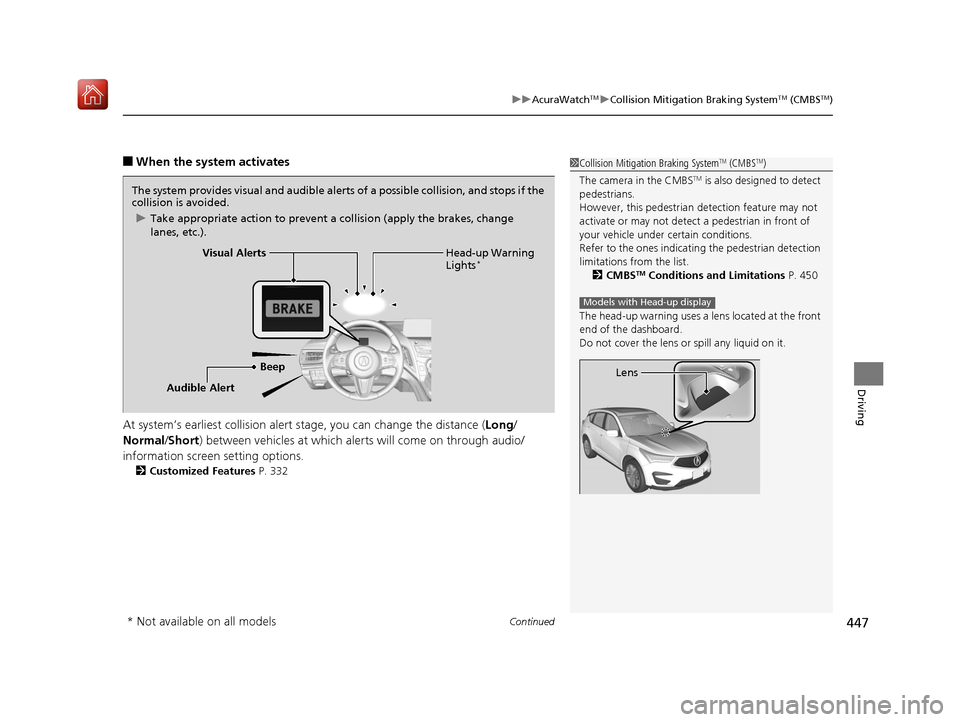
■When the system activates
At system’s earliest collision alert st age, you can change the distance (Long/
Normal /Short ) between vehicles at which alerts will come on through audio/
information screen setting options.
2 Customized Features P. 332
1Collision Mitigation Braking SystemTM (CMBSTM)
The camera in the CMBS
TM is also designed to detect
pedestrians.
However, this pedestrian detection feature may not
activate or may not detect a pedestrian in front of
your vehicle under certain conditions.
Refer to the ones indicating the pedestrian detection
limitations from the list. 2 CMBS
TM Conditions and Limitations P. 450
The head-up warning uses a lens located at the front
end of the dashboard.
Do not cover the lens or spill any liquid on it.
Models with Head-up display
Lens
The system provides visual and audible alerts of a possible collision, and stops if the
collision is avoided.
u Take appropriate action to prevent a collision (apply the brakes, change
lanes, etc.).
Beep Head-up Warning
Lights
*Visual Alerts
Audible Alert
* Not available on all models
19 ACURA RDX-31TJB6000.book 447 ページ 2018年4月26日 木曜日 午後4時51分
Page 451 of 649
uuAcuraWatchTMuCollision Mitigation Braking SystemTM (CMBSTM)
450
Driving
The system may automatically shut off and the CMBSTM indicator will come on under
certain conditions. Some examples of th ese conditions are listed below. Other
conditions may reduce some of the CMBS
TM functions.
2 Front Sensor Camera P. 483
■Environmental conditions
• Driving in bad weather (rain, fog, snow, etc.).
• Sudden changes between light and dark, such as an entrance or exit of a tunnel.
• There is little contrast between objects and the background.
• Driving into low sunlight (e.g., at dawn or dusk).
• Strong light is reflected onto the roadway.
• Driving in the shadows of trees, buildings, etc.
• Roadway objects or structures are misint erpreted as vehicles and pedestrians.
• Reflections on the interi or of the windshield.
• Driving at night or in a dark condition such as a tunnel.
■Roadway conditions
• Driving on a snowy or wet roadway (obscured lane marking, vehicle tracks,
reflected lights, road spray, high contrast).
• Driving on curvy, winding, or undulating roads.
• The road is hilly or the vehicle is approaching the crest of a hill.
■CMBSTM Conditions and Limitations1Collision Mitigation Braking SystemTM (CMBSTM)
Have your vehicle checked by a dealer if you find any
unusual behavior of the system (e.g., the warning
message appears too frequently).
19 ACURA RDX-31TJB6000.book 450 ページ 2018年4月26日 木曜日 午後4時51分
Page 452 of 649
451
uuAcuraWatchTMuCollision Mitigation Braking SystemTM (CMBSTM)
Continued
Driving
■Vehicle conditions
• Headlight lenses are dirty or the h eadlights are not properly adjusted.
• The outside of the windshield is blocked by dirt, mud, leaves, wet snow, etc.
• The inside of the windshield is fogged.
• An abnormal tire or wheel condition (wro ng sized, varied size or construction,
improperly inflated, compact spare tire
*, etc.).
• When tire chains are installed.
• The vehicle is tilted due to a heavy load or suspension modifications.
• The camera temperature gets too high.
• Driving with the parking brake applied.
• When the radar sensor behind the emblem gets dirty.
■Detection limitations
• A vehicle or pedestrian suddenly crosses in front of you.
• The distance between your vehicle and the vehicle or pedestrian ahead of you is
too short.
• A vehicle cuts in front of you at a slow speed, and it brakes suddenly.
• When you accelerate rapidly and approach the vehicle or pedestrian ahead of you
at high speed.
• The vehicle ahead of you is a motorcycle, bicycle, mobility scooter or other small
vehicle.
• When there are animals in front of your vehicle.
• When you drive on a curved, winding or und ulating road that makes it difficult for
the sensor to properly detect a vehicle in front of you.
• The speed difference between your vehicle an d a vehicle or pedestrian in front of
you is significantly large.
• An oncoming vehicle suddenly comes in front of you.
• Another vehicle suddenly comes in front of you at an intersection, etc.
• Your vehicle abruptly crosses over in front of an oncoming vehicle.
• When driving through a narrow iron bridge.
• When the lead vehicl e suddenly slows down.
* Not available on all models
19 ACURA RDX-31TJB6000.book 451 ページ 2018年4月26日 木曜日 午後4時51分
Page 456 of 649
455
uuAcuraWatchTMuAdaptive Cruise Control (ACC) with Low Speed Follow (LSF)
Continued
Driving
Adaptive Cruise Control (ACC) with Low Speed
Follow (LSF)
Helps maintain a constant vehicle speed and a set following interval behind a vehicle
detected ahead of yours and, if the detect ed vehicle comes to a stop, can decelerate
and stop your ve hicle, without yo u having to keep your foot on the brake or the
accelerator.
When ACC with LSF slows your vehicle by applying the brakes, your vehicle’s brake
lights will illuminate.
1 Adaptive Cruise Control (ACC) with Low Speed Follow (LSF)
Important Reminder
As with any system, there are limits to ACC with LSF.
Use the brake pedal whenever necessary, and always
keep a safe interval between your vehicle and other
vehicles.
ACC with LSF can not be activated if Intelligent
Dynamics System setting is Snow.
3WARNING
Improper use of ACC wi th LSF can lead to a
crash.
Use ACC with LSF only when driving on
expressways or freeways and in good
weather conditions.
3WARNING
ACC with LSF has limited braking capability
and may not stop your vehicle in time to
avoid a collision with a vehicle that quickly
stops in front of you.
Always be prepared to apply the brake
pedal if the conditions require.
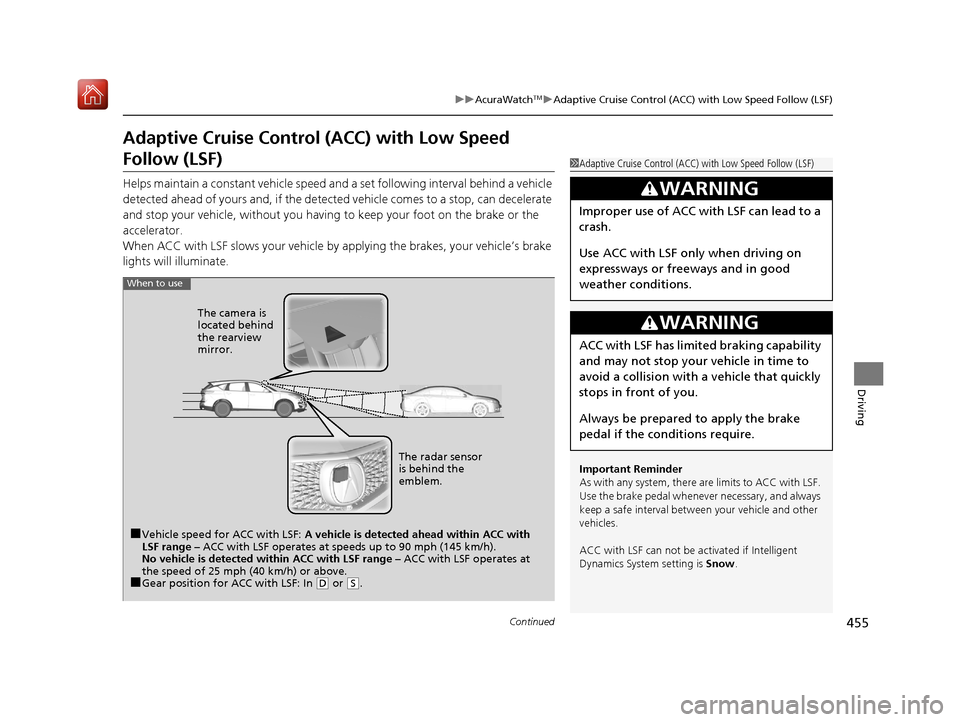
When to use
■Vehicle speed for ACC with LSF: A vehicle is detected ahead within ACC with
LSF range – ACC with LSF operates at speeds up to 90 mph (145 km/h).
No vehicle is detected within ACC with LSF range – ACC with LSF operates at
the speed of 25 mph (40 km/h) or above.
■Gear position for ACC with LSF: In ( D or ( S. The radar sensor
is behind the
emblem.
The camera is
located behind
the rearview
mirror.
19 ACURA RDX-31TJB6000.book 455 ページ 2018年4月26日 木曜日 午後4時51分
Page 459 of 649
uuAcuraWatchTMuAdaptive Cruise Control (ACC) with Low Speed Follow (LSF)
458
Driving
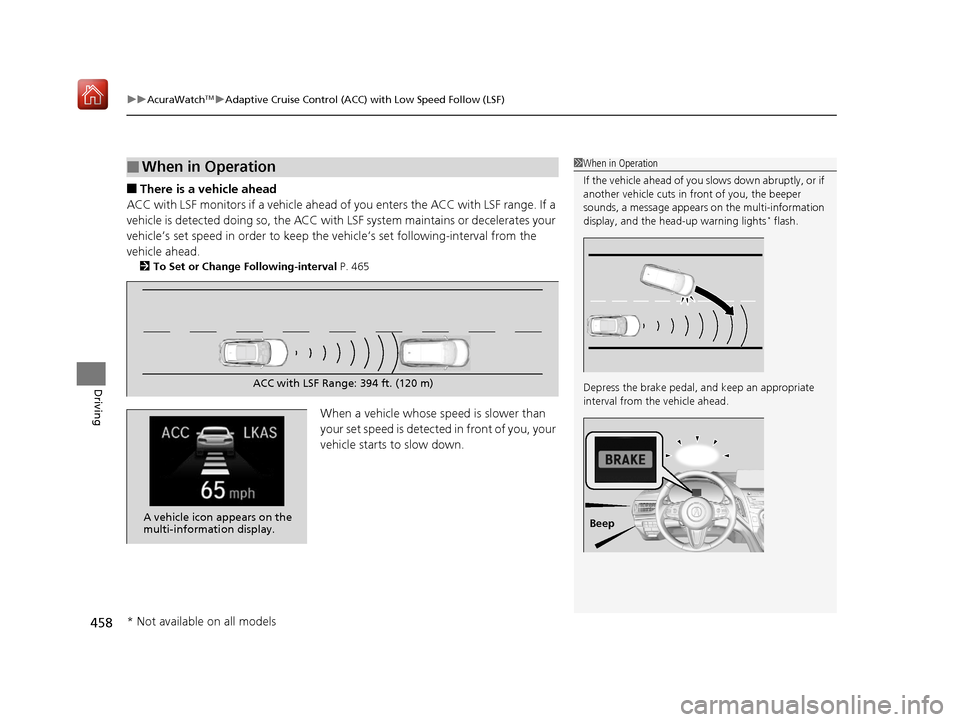
■There is a vehicle ahead
ACC with LSF monitors if a vehicle ahead of you enters the ACC with LSF range. If a
vehicle is detected doing so, the ACC with LSF system maintains or decelerates your
vehicle’s set speed in order to keep the vehicle’s set following-interval from the
vehicle ahead.
2 To Set or Change Following-interval P. 465
When a vehicle whose speed is slower than
your set speed is detected in front of you, your
vehicle starts to slow down.
■When in Operation1 When in Operation
If the vehicle ahead of you slows down abruptly, or if
another vehicle cuts in front of you, the beeper
sounds, a message appears on the multi-information
display, and the head-up warning lights
* flash.
Depress the brake pedal, and keep an appropriate
interval from the vehicle ahead.
Beep
ACC with LSF Range: 394 ft. (120 m)
A vehicle icon appears on the
multi-information display.
* Not available on all models
19 ACURA RDX-31TJB6000.book 458 ページ 2018年4月26日 木曜日 午後4時51分