remote Acura RDX 2019 Repair Manual
[x] Cancel search | Manufacturer: ACURA, Model Year: 2019, Model line: RDX, Model: Acura RDX 2019Pages: 649, PDF Size: 33 MB
Page 517 of 649
516
uuRefueling uHow to Refuel
Driving
How to Refuel
Your fuel tank is not equipped with a fuel filler cap. You can insert the filler nozzle
directly into the filler neck. The tank seal s itself again when you pull out the filler
nozzle.
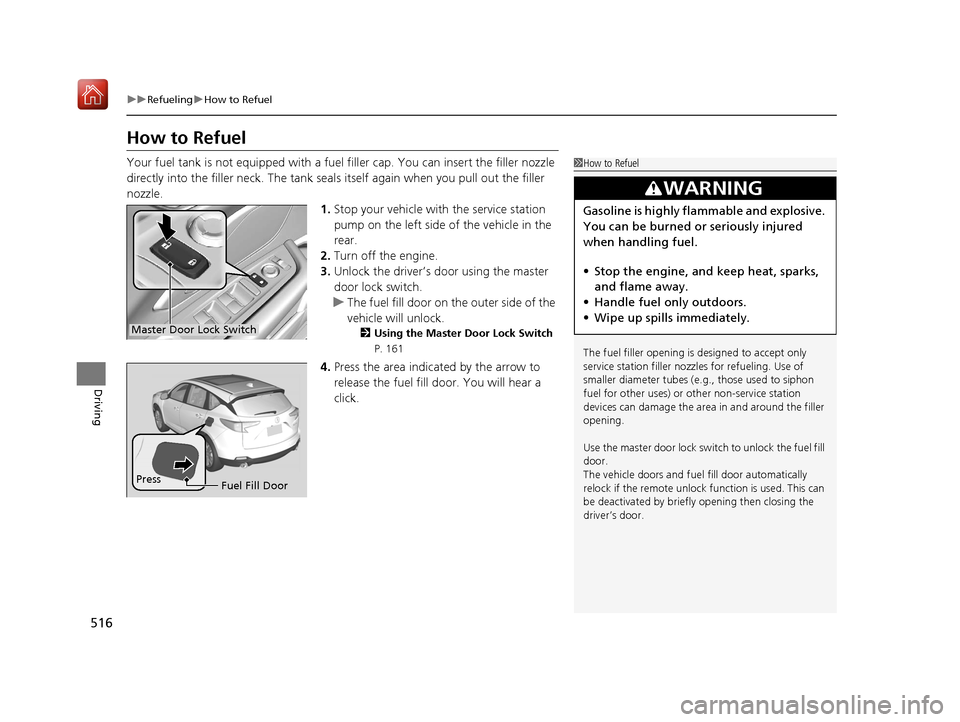
1.Stop your vehicle with the service station
pump on the left side of the vehicle in the
rear.
2. Turn off the engine.
3. Unlock the driver’s door using the master
door lock switch.
u The fuel fill door on the outer side of the
vehicle will unlock.
2 Using the Master Door Lock Switch
P. 161
4.Press the area indicated by the arrow to
release the fuel fill door. You will hear a
click.
1How to Refuel
The fuel filler opening is designed to accept only
service station filler nozzles for refueling. Use of
smaller diamet er tubes (e.g., those used to siphon
fuel for other uses) or other non-service station
devices can damage the area in and around the filler
opening.
Use the master door lock swit ch to unlock the fuel fill
door.
The vehicle doors and fuel fill door automatically
relock if the remote unlock function is used. This can
be deactivated by briefl y opening then closing the
driver’s door.
3WARNING
Gasoline is highly flammable and explosive.
You can be burned or seriously injured
when handling fuel.
• Stop the engine, and keep heat, sparks,
and flame away.
• Handle fuel only outdoors.
• Wipe up spills immediately.
Master Door Lock Switch
Press
Fuel Fill Door
19 ACURA RDX-31TJB6000.book 516 ページ 2018年4月26日 木曜日 午後4時51分
Page 522 of 649
521
Maintenance
This chapter discusses basic maintenance.
Before Performing MaintenanceInspection and Maintenance ............ 522
Safety When Performing Maintenance ..523
Parts and Fluids Used in Maintenance Service ........................................... 524
Maintenance Minder
TM..................... 525
Maintenance Under the Hood Maintenance Items Under the Hood .. 532
Opening the Hood ........................... 533
Engine Compartment Cover ............. 534
Recommended Engine Oil ................ 535
Oil Check ......................................... 536
Adding Engine Oil ............................ 537 Changing the Engine Oi
l and Oil Filter... 538
Engine Coolant ................................ 540
Transmission Fluid ............................ 542
Brake Fluid ....................................... 543
Refilling Window Washer Fluid......... 544
Replacing Light Bulbs ....................... 545Checking and Maintaining Wiper
Blades .......................................... 549
Checking and Maintaining Tires
Checking Tires ................................. 554
Tire and Loading Information Label .. 555
Tire Labeling .................................... 555
DOT Tire Quality Grading (U.S. Vehicles).. 557
Wear Indicators ............................... 559
Tire Service Life ................................ 559
Tire and Wheel Replacement ........... 560
Tire Rotation .................................... 561
Winter Tires ..................................... 562
Battery ............................................... 563
Remote Transmitter Care Replacing the Button Battery ........... 565
Climate Control System Maintenance.. 567Cleaning
Interior Care .................................... 569
Exterior Care.................................... 571
Accessories and Modifications ........ 574
19 ACURA RDX-31TJB6000.book 521 ページ 2018年4月26日 木曜日 午後4時51分
Page 566 of 649
565Continued
Maintenance
Remote Transmitter Care
Replacing the Button Battery
If the indicator does not come on when the button is pressed, replace the battery.
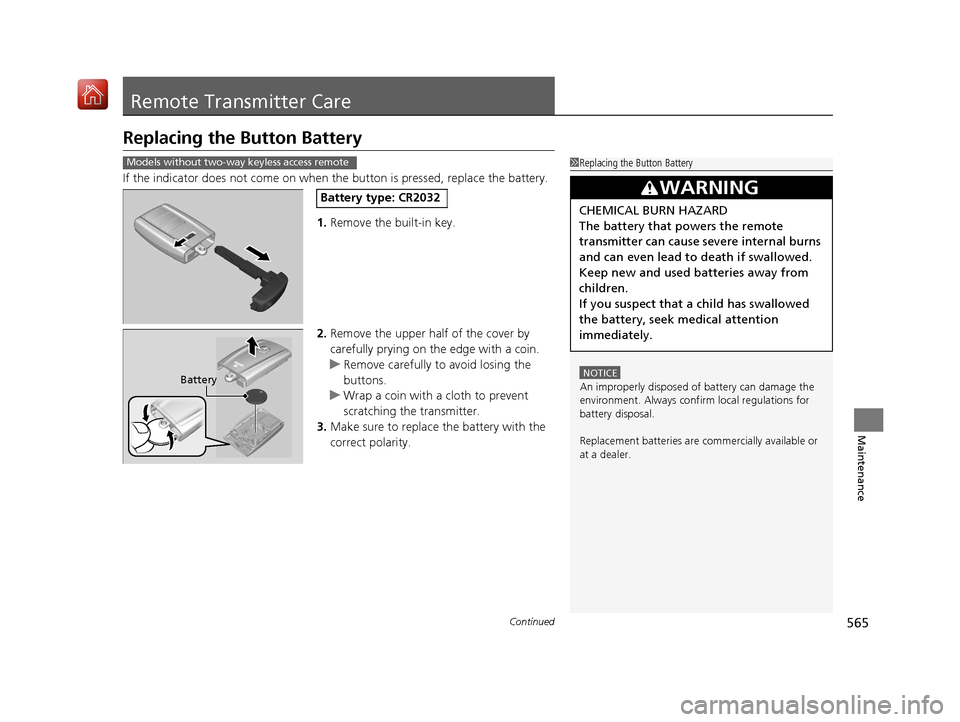
1. Remove the built-in key.
2. Remove the upper half of the cover by
carefully prying on the edge with a coin.
u Remove carefully to avoid losing the
buttons.
u Wrap a coin with a cloth to prevent
scratching the transmitter.
3. Make sure to replace the battery with the
correct polarity.
1Replacing the Button Battery
NOTICE
An improperly disposed of battery can damage the
environment. Always conf irm local regulations for
battery disposal.
Replacement batteries are commercially available or
at a dealer.
3WARNING
CHEMICAL BURN HAZARD
The battery that powers the remote
transmitter can cause severe internal burns
and can even lead to death if swallowed.
Keep new and used batteries away from
children.
If you suspect that a child has swallowed
the battery, seek medical attention
immediately.
Models without two-way keyless access remote
Battery type: CR2032
Battery
19 ACURA RDX-31TJB6000.book 565 ページ 2018年4月26日 木曜日 午後4時51分
Page 567 of 649
uuRemote Transmitter Care uReplacing the Button Battery
566
Maintenance
If the indicator does not come on when the button is pressed, replace the battery.
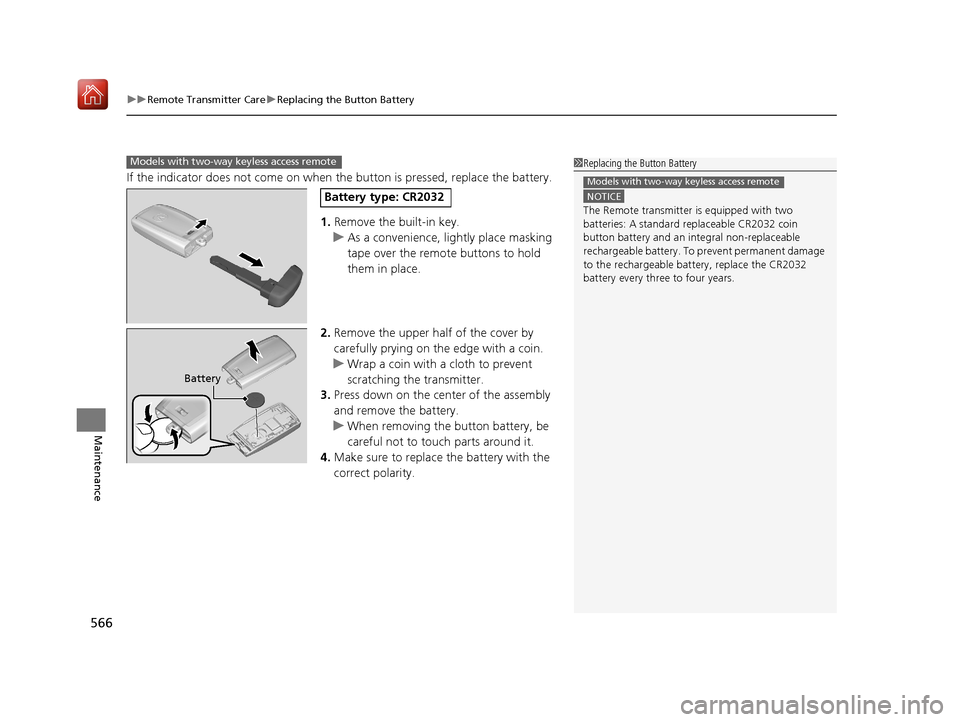
1. Remove the built-in key.
u As a convenience, lightly place masking
tape over the remote buttons to hold
them in place.
2. Remove the upper half of the cover by
carefully prying on the edge with a coin.
u Wrap a coin with a cloth to prevent
scratching the transmitter.
3. Press down on the center of the assembly
and remove the battery.
u When removing the button battery, be
careful not to touch parts around it.
4. Make sure to replace the battery with the
correct polarity.
Models with two-way keyless access remote1 Replacing the Button Battery
NOTICE
The Remote transmitter is equipped with two
batteries: A standard replaceable CR2032 coin
button battery and an in tegral non-replaceable
rechargeable battery. To prevent permanent damage
to the rechargeable battery, replace the CR2032
battery every three to four years.
Models with two-way keyless access remote
Battery type: CR2032
Battery
19 ACURA RDX-31TJB6000.book 566 ページ 2018年4月26日 木曜日 午後4時51分
Page 578 of 649
577
Handling the Unexpected
This chapter explains how to handle unexpected troubles.
ToolsTypes of Tools .................................. 578
If a Tire Goes Flat
Changing a Flat Tire ......................... 579
Temporarily Repairi ng a Flat Tire....... 587
Engine Does Not Start Checking the Engine ........................ 601
If the Keyless Access Remote Battery is Weak ............................................. 602
Emergency Engine Stop ................... 603
Jump Starting .................................... 604
Vehicles with a compact spare tire
Vehicles with temporary tire repair kit
Overheating
How to Handle Overheating............. 606
Indicator, Coming On/Blinking
If the Low Oil Pressure Warning Appears ... 608If the Charging System Indicator Comes On... 609If the Malfunction Indicator Lamp Comes On or Blinks ................................... 609
If the Brake System Indicator (Red) Comes
On or Blinks ....................................... 610
If the Electric Power Steering (EPS) System
Indicator Comes On ........................... 611
If the Brake System Indicator (Red) Comes On or Blinks at the Same Time When the Brake
System Indicator (Amber) Comes On .....612
If the Low Tire Pressure/TPMS Indicator Comes On or Blinks ....................... 613
If the Transmission System Indicator Blinks along with the Warning Message .... 614
Fuses
Fuse Locations ................................. 615
Inspecting and Changing Fuses ........ 621
Emergency Towing ........................... 622
When You Cannot Unlock the Fuel Fill Door ................................................. 623
When You Cannot Open the Tailgate.. 624Refueling ........................................... 625
19 ACURA RDX-31TJB6000.book 577 ページ 2018年4月26日 木曜日 午後4時51分
Page 602 of 649
601
Handling the Unexpected
Engine Does Not Start
Checking the Engine
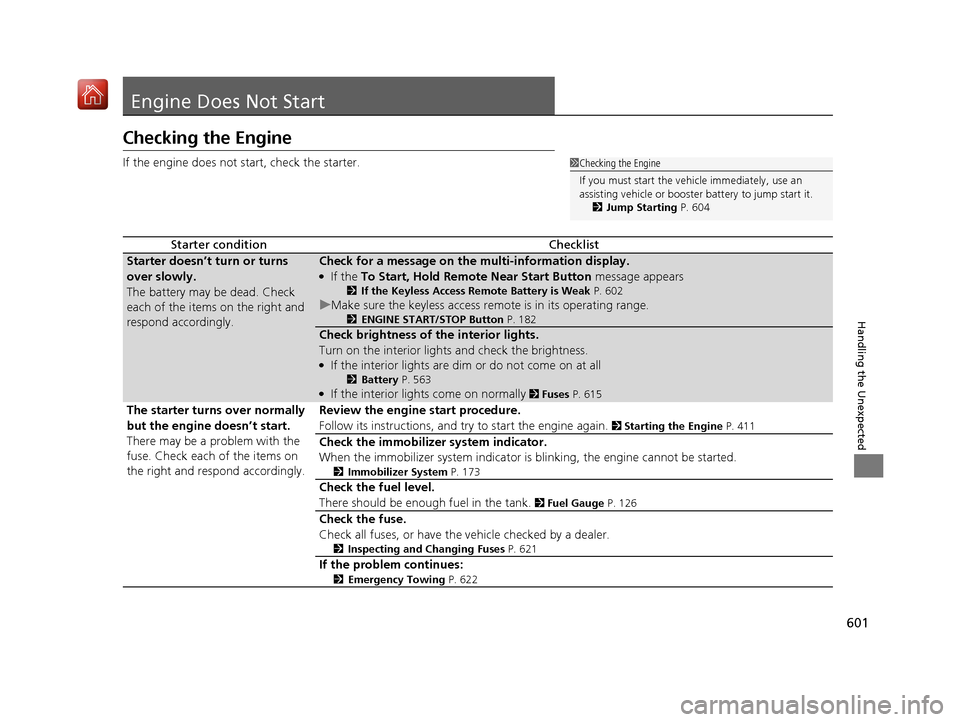
If the engine does not start, check the starter.
Starter conditionChecklist
Starter doesn’t turn or turns
over slowly.
The battery may be dead. Check
each of the items on the right and
respond accordingly.Check for a message on the multi-information display.
●If the To Start, Hold Remote Near Start Button message appears
2If the Keyless Access Remote Battery is Weak P. 602
uMake sure the keyless access remote is in its operating range.
2ENGINE START/STOP Button P. 182
Check brightness of the interior lights.
Turn on the interior lights and check the brightness.
●If the interior lights are dim or do not come on at all
2Battery P. 563●If the interior lights come on normally 2 Fuses P. 615
The starter turns over normally
but the engine doesn’t start.
There may be a problem with the
fuse. Check each of the items on
the right and respond accordingly. Review the engine start procedure.
Follow its instructions, and try
to start the engine again.
2 Starting the Engine P. 411
Check the immobilizer system indicator.
When the immobilizer system indicator is blinking, the engine cannot be started.
2Immobilizer System P. 173
Check the fuel level.
There should be enough fuel in the tank.
2 Fuel Gauge P. 126
Check the fuse.
Check all fuses, or have the vehicle checked by a dealer.
2Inspecting and Changing Fuses P. 621
If the problem continues:
2Emergency Towing P. 622
1Checking the Engine
If you must start the vehi cle immediately, use an
assisting vehicle or booster battery to jump start it.
2 Jump Starting P. 604
19 ACURA RDX-31TJB6000.book 601 ページ 2018年4月26日 木曜日 午後4時51分
Page 603 of 649
602
uuEngine Does Not Start uIf the Keyless Access Remote Battery is Weak
Handling the Unexpected
If the Keyless Access Re mote Battery is Weak
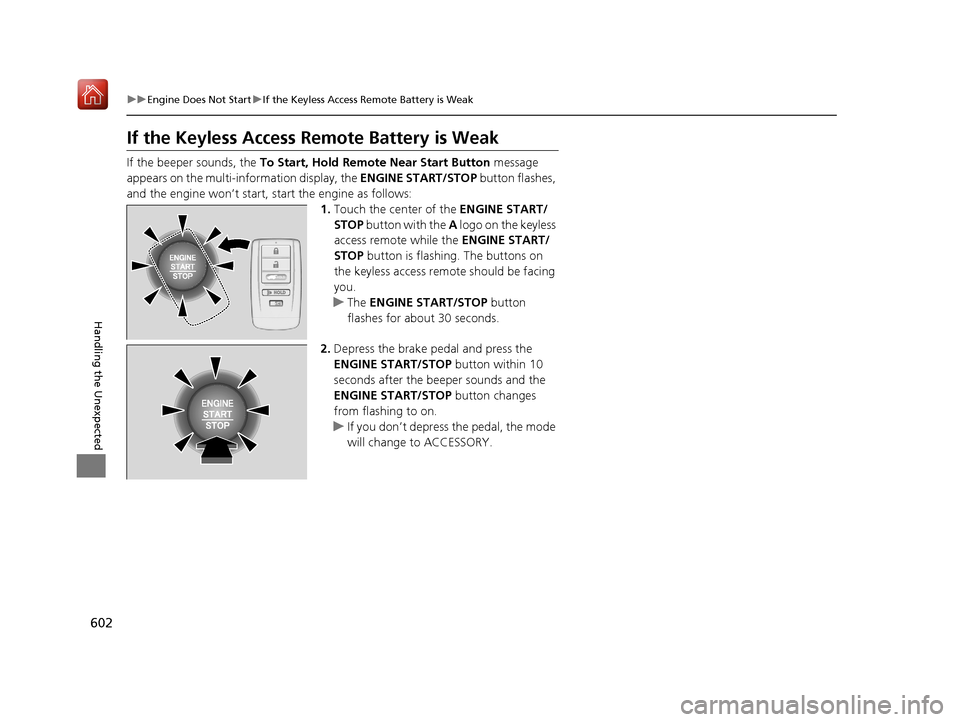
If the beeper sounds, the To Start, Hold Remote Near Start Button message
appears on the multi-information display, the ENGINE START/STOP button flashes,
and the engine won’t start, start the engine as follows:
1.Touch the center of the ENGINE START/
STOP button with the A logo on the keyless
access remote while the ENGINE START/
STOP button is flashing. The buttons on
the keyless access remo te should be facing
you.
u The ENGINE START/STOP button
flashes for about 30 seconds.
2. Depress the brake pedal and press the
ENGINE START/STOP button within 10
seconds after the beeper sounds and the
ENGINE START/STOP button changes
from flashing to on.
u If you don’t depress the pedal, the mode
will change to ACCESSORY.
HOLD
19 ACURA RDX-31TJB6000.book 602 ページ 2018年4月26日 木曜日 午後4時51分
Page 632 of 649
631Continued
Information
Devices that Emit Radio Waves
The following products and systems on your vehicle emit radio waves when in operation.
Each of the above complies with the appropriate requirements or the required
standards of FCC (Federal Communications Commission) and Industry Canada
Standard, described below:
AcuraLink
Adaptive Cruise Control (ACC) with Low Speed Follow (LSF)
Audio System
Blind spot information System*
Bluetooth® Audio
Bluetooth® HandsFreeLink ®
Collision Mitigati on Braking SystemTM
HomeLink® Universal Transceiver
Immobilizer System
Remote Transmitter
Keyless Access System
Tire Pressure Monitoring System (TPMS)
Remote Engine Start with Vehicle Feedback*
Wi-Fi
* Not available on all models
19 ACURA RDX-31TJB6000.book 631 ページ 2018年4月26日 木曜日 午後4時51分
Page 641 of 649
Index
640
Index
Index
A
ABS (Anti-lock Brake System)................... 493
Accessories and Modifications ................. 574
Accessory Power Socket ........................... 225
AcuraLink® ................................................ 387
AcuraWatch
TM............................................. 22
Adaptive Cruise Control (ACC) ................... 91
Adaptive Cruise Control (ACC) with
Low Speed Follow (LSF) .................... 91, 455
Adaptive Front Lighting System (AFS) ..... 189
Additives
Coolant ................................................... 540
Engine Oil ................................................ 535
Washer .................................................... 544
Additives, Engine Oil ................................ 535
Adjusting Armrest ................................................... 218
Front Seats .............................................. 207
Head Restraints........................................ 212
Mirrors .................................................... 204
Rear Seats................................................ 216
Steering Wheel ........................................ 203
Agile Handling Assist ................................ 436
Air Conditioning System (Climate Control System) .................................................... 230
Changing the Mode ................................ 230
Defrosting the Windshield and Windows ............................................... 232
Dust and Pollen Filter ............................... 568
Rear Temperature Control Dial................. 234
Recirculation/Fresh Air Mode ................... 230 Sensors ................................................... 235
Synchronized Mode................................. 233
Using Automatic Climate Control ............ 230
Air Pressure ....................................... 555, 629
Airbags ........................................................ 42
Advanced Airbags ..................................... 48
After a Collision ........................................ 45
Airbag Care............................................... 57
Front Airbags (SRS) .................................... 45
Indicator.............................................. 55, 84
Knee Airbags............................................. 49
Passenger Airbag Off Indicator .................. 56
Sensors ..................................................... 42
Side Airbags .............................................. 52
Side Curtain Airbags.................................. 54
AM/FM Radio ............................................ 274
Anti-lock Brake System (ABS) .................. 493
Indicator.................................................... 84
Apple CarPlay
TM........................................ 303
Armrest ..................................................... 218
Audio Remote Controls ........................... 243
Audio System ............................................ 238
Adjusting the Sound................................ 269
Audio/Information Screen........................ 249
Auxiliary Input Jack.................................. 241
Display Setup .......................................... 270
Error Messages ........................................ 307
General Information ................................ 310
Home Screen........................................... 254
How to Update Wirelessly ....................... 263
How to Update with a USB Device........... 267 How to use Siri
® Eyes Free....................... 302
iPod ........................................................ 291
Limitations for Manual Operation ............ 270
MP3/WMA/AAC ..................................... 294
Reactivating ............................................ 242
Remote Controls ..................................... 243
Security Code ......................................... 242
Status Area ............................................. 259
System Updates ...................................... 263
Theft Protection ...................................... 242
USB Flash Drives.............................. 294, 312
USB Ports ................................................ 239
Audio/Information Screen ....................... 249
Authorized Manuals ................................ 638
Auto Door Locking/Unlocking ................ 162
Auto High-Beam ...................................... 191
Indicator ................................................... 87
Auto Idle Stop .......................................... 428
OFF Button ............................................. 429
Automatic Brake Hold ............................. 491
Indicator ........................................... 77, 491
Automatic Folding Door Mirror .............. 206
Automatic Intermittent Wipers .............. 195
Automatic Lighting .................................. 187
Automatic Transmission .......................... 417
Creeping................................................. 417
Fluid ....................................................... 542
Kickdown ............................................... 417
Operating the Shift Button ...................... 420
Sequential Shift Mode............................. 424
Shifting ................................................... 418
19 ACURA RDX-31TJB6000.book 640 ページ 2018年4月26日 木曜日 午後4時51分
Page 643 of 649
642
Index
Cup Holders............................................... 223
Customized Features ................................ 332
D
Daytime Running Lights ........................... 190
Dead Battery ............................................. 604
Defaulting All the Settings ...................... 354
Defrosting the Windshield and Windows .................................................. 232
Devices that Emit Radio Waves ................ 631
Dimming Headlights ............................................... 186
Rearview Mirror ....................................... 204
Dipstick (Engine Oil) ................................. 536
Directional Signals (Turn Signal) .............. 185
Door Mirrors ............................................. 205
Doors ......................................................... 146
Auto Door Locking .................................. 162
Auto Door Unlocking ............................... 162
Keys ........................................................ 146
Locking/Unlocking the Doors from the Inside ..................................................... 159
Locking/Unlocking the Doors from the
Outside .................................................. 150
Lockout Prevention System ...................... 157
DOT Tire Quality Grading ........................ 557
Driving ....................................................... 397
Automatic Transmission ........................... 417
Braking .................................................... 486
Off-Highway Driving Guidelines ............... 409 Shifting Gear ........................................... 418
Starting the Engine.................................. 411
Driving Position Memory System ............ 201
Dust and Pollen Filter ............................... 568
Dynamic Mode Switch ............................. 426
E
Electric Parking Brake
Switch ..................................................... 486
Electric Power Steering (EPS) System Indicator............................................ 84, 611
Electronic Stability Control (ESC) ............. 434
Emergency ................................................ 622
Emissions Testing (Readiness Codes) ....... 634
Engine ....................................................... 630
Coolant ................................................... 540
Jump Starting .......................................... 604
Oil ........................................................... 535
Remote Engine Start................................ 413
Starting ................................................... 411
Engine Compartment Cover .................... 534
Engine Coolant ......................................... 540
Adding to the Radiator ............................ 541
Adding to the Reserve Tank..................... 540
Overheating ............................................ 606
Temperature Gauge ................................ 126
Engine Oil ................................................. 535
Adding .................................................... 537
Checking................................................. 536
Displaying Oil Life .................................... 526 Low Oil Pressure Indicator ....................... 608
Recommended Engine Oil ....................... 535
ENGINE START/STOP Button .................... 182
EPS (Electric Power Steering) System ...... 611
Exhaust Gas Hazard (Carbon Monoxide) .. 71
Exterior Care (Cleaning) .......................... 571
Exterior Mirrors ........................................ 205F
Features.................................................... 237
Filters Dust and Pollen....................................... 568
Oil .......................................................... 538
Flat Tire ............................................. 579, 587
Floor Mats ................................................ 570
Fluids Automatic Transmission .......................... 542
Brake ...................................................... 543
Engine Coolant ....................................... 540
Windshield Washer ................................. 544
FM/AM Radio ........................................... 274
Fog Lights Indicator ................................................... 87
Folding Down the Rear Seats .................. 216
Foot Brake ................................................ 490
Front Airbags (SRS) .................................... 45
Front Seats ................................................ 207
Adjusting ................................................ 207
Front Sensor Camera ............................... 483
19 ACURA RDX-31TJB6000.book 642 ページ 2018年4月26日 木曜日 午後4時51分