Econ Acura RDX 2019 Owner's Manual
[x] Cancel search | Manufacturer: ACURA, Model Year: 2019, Model line: RDX, Model: Acura RDX 2019Pages: 649, PDF Size: 33 MB
Page 1 of 649
Event Data Recorders
This vehicle is equipped with an event data recorder (EDR).
The main purpose of an EDR is to record, in certain crash or near
crash-like situations, such as an air bag deployment or hitting a
road obstacle, data that will assist in understanding how a vehicle’s
systems performed. The EDR is designed to record data related
to vehicle dynamics and safety systems for a short period of
time, typically 30 seconds or le ss. The EDR in this vehicle is
designed to record such data as:
• How various systems in your vehicle were operating;
• Whether or not the driver and passenger safety belts were
buckled/fastened;
3WARNING
California Proposition 65 Warning
Operating, servicing and maintaining a
passenger vehicle or off-highway motor
vehicle can expose you to chemicals including
engine exhaust, carbon monoxide,
phthalates, and lead, which are known to the
State of California to cause cancer and birth
defects or other reproductive harm. To
minimize exposure, avoid breathing exhaust,
do not idle the engine except as necessary,
service your vehicle in a well-ventilated area
and wear gloves or wash your hands
frequently when servicing your vehicle. For
more information go to
www.P65Warnings.ca.go v/passenger-vehicle.
•How far (if at all) the driver was depressing the accelerator
and/or brake pedal; and,
• How fast the vehicle was traveling.
These data can help provide a better understanding of the
circumstances in which crashes and injuries occur. NOTE: EDR data
are recorded by your vehicle only if a non-trivial crash situation
occurs; no data are recorded by the EDR under normal driving
conditions and no personal data (e.g., name, gender, age, and
crash location) are recorded. Howeve r, other parties, such as law
enforcement, could co mbine the EDR data with the type of
personally identifying data rout inely acquired during a crash
investigation.
To read data recorded by an ED R, special equipment is required,
and access to the vehicle or the EDR is needed. In addition to the
vehicle manufacturer, other parties, such as law enforcement, that
have the special equipment, can re ad the information if they have
access to the vehicle or the EDR.
The data belongs to the vehicle ow ner and may not be accessed by
anyone else except as legally requir ed or with the permission of the
vehicle owner.
Service Diagnostic Recorders
This vehicle is equipped with se rvice-related devices that record
information about powertrain perfo rmance. The data can be used
to verify emissions law requirem ents and/or help technicians
diagnose and solve service problems. It may also be combined with
data from other sources for res earch purposes, but it remains
confidential. Some diagnostic and maintenance information is
uploaded to Acura upon vehicle start up.
19 ACURA RDX-31TJB6000.book 0 ページ 2018年4月26日 木曜日 午後4時51分
Page 3 of 649
Contents
This owner’s manual should be considered a permanent part of the
vehicle and should remain with the vehicle when it is sold.
This owner’s manual covers all models of your vehicle. You may find
descriptions of equipment and features that are not on your
particular model.
Images throughout this owner’s manu al (including the front cover)
represent features and equipment that are available on some, but
not all, models. Your particular mo del may not have some of these
features.
This owner’s manual is for vehicles sold in the United States and
Canada.
The information and specifications in cluded in this publication were
in effect at the time of approval for printing. Honda Motor Co., Ltd.
reserves the right, however, to discontinue or change specifications
or design at any time without notice and without incurring any
obligation.2 Safe Driving P. 29
For Safe Driving P. 30 Seat Belts P. 35 Airbags P. 42
2Instrument Panel P. 73
Indicators P. 74 Gauges and Displays P. 126
2Controls P. 143
Clock P. 144 Locking and Unlocking the Doors P. 146
Panoramic Roof P. 179
Adjusting the Seats P. 207
2 Features P. 237
Audio System P. 238 Audio System Basic Operation P. 245
Customized Features P. 332 HomeLink® Universal Transceiver P. 355
2 Driving P. 397
Before Driving P. 398 Towing a Trailer P. 403
Braking P. 486Parking Your Vehicle P. 495
Fuel Economy and CO2 Emissions P. 518 Turbo Engine Vehicle P. 519
2 Maintenance P. 521
Before Performing Maintenance P. 522 Maintenance MinderTM P. 525
Checking and Maintaining Wiper Blades P. 549
Climate Control System Main tenance P. 567 Cleaning P. 569
2Handling the Unexpected P. 577
Tools P. 578 If a Tire Goes Flat P. 579
Indicator, Coming On/Blinking P. 608 Fuses P. 615
2 Information P. 627
Specifications P. 628 Identification Numbers P. 630
Warranty Coverages P. 636 Authorized Manuals P. 638
19 ACURA RDX-31TJB6000.book 2 ページ 2018年4月26日 木曜日 午後4時51分
Page 10 of 649
9
Quick Reference Guide
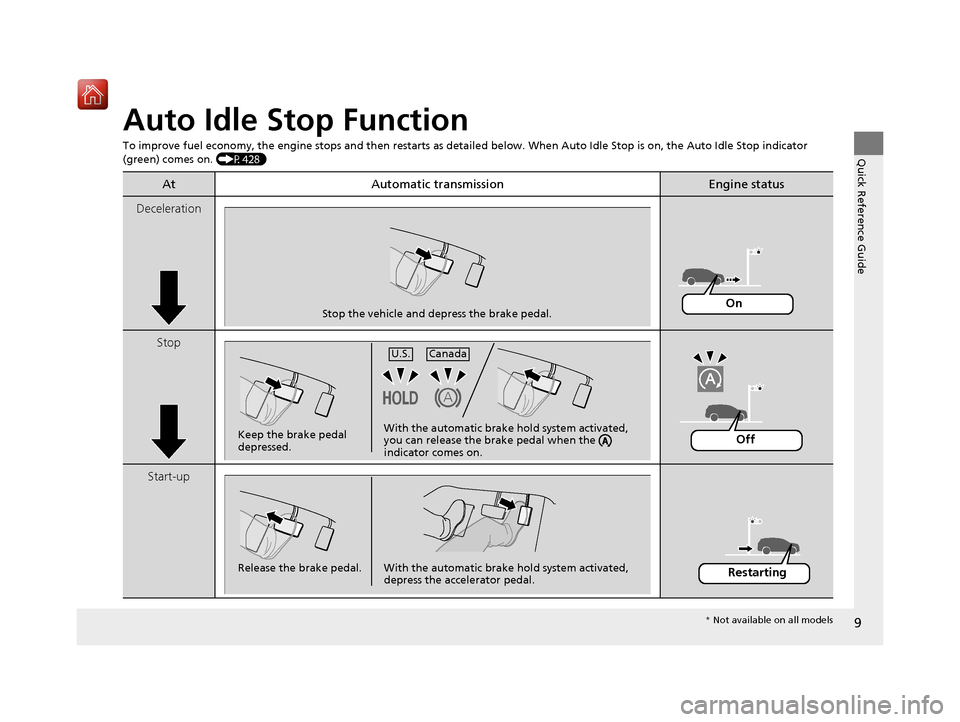
Auto Idle Stop Function
To improve fuel economy, the engine stops and then restarts as detailed below. When Auto Idle Stop is on, the Auto Idle Stop in dicator
(green) comes on. (P428)
At Automatic transmissionEngine status
Deceleration
Stop
Start-up
Stop the vehicle and depress the brake pedal.On
Keep the brake pedal
depressed.U.S.
Canada
With the automatic brake
hold system activated,
you can release the brake pedal when the
indicator comes on.Off
Release the brake pedal. With the automatic brake hold system activated, depress the accelerator pedal.Restarting
* Not available on all models
19 ACURA RDX-31TJB6000.book 9 ページ 2018年4月26日 木曜日 午後4時51分
Page 22 of 649
21
Quick Reference Guide
VSA® On and Off (P 435)
● The Vehicle Stability Assist ® (VSA® ) system
helps stabilize the vehicle during
cornering, and helps maintain traction
while accelerating on loose or slippery
road surfaces.
● VSA ® comes on automatically every time
you start the engine.
● To partially disable or fully restore VSA ®
function, press and ho ld the button until
you hear a beep.
CMBSTM On and Off
(P449)
● When a possible collision is likely
unavoidable, the CMBS
TM can help you to
reduce the vehicle speed and the severity
of the collision.
● The CMBS
TM is turned on every time you
start the engine.
● To turn the CMBS
TM on or off, press and
hold the button until you hear a beep.
Tire Pressure Monitoring
System (TPMS) with Tire
Fill Assist
(P 441)
● The TPMS monitors tire pressure.
● TPMS is turned on automatically every
time you start the engine.
● TPMS fill assist provides audible and visual
guidance during tire pressure adjustment.
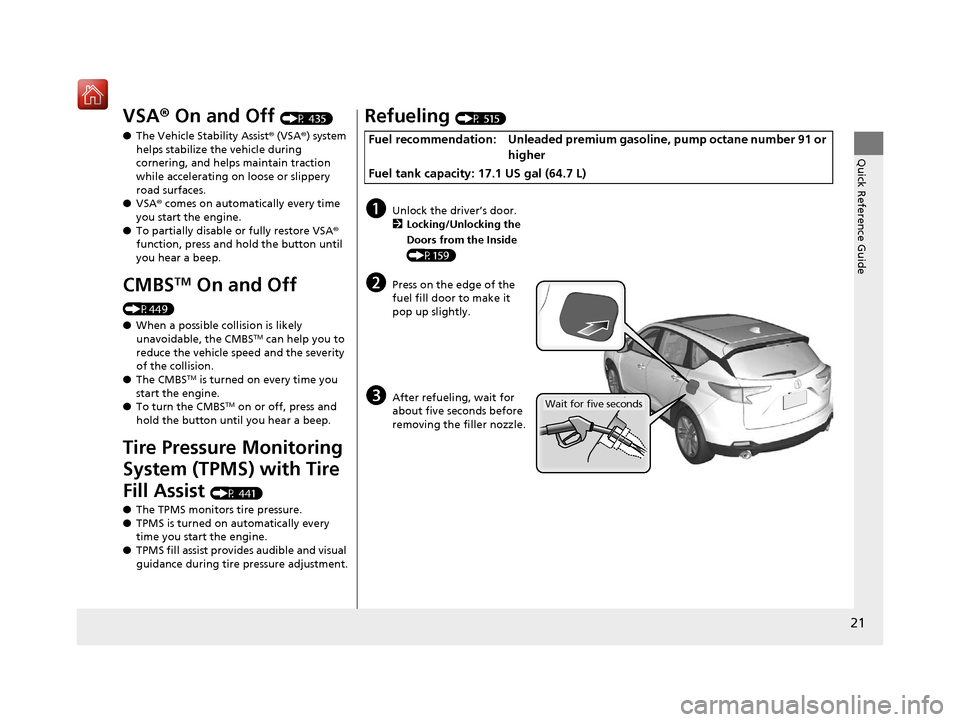
Refueling (P 515)
Fuel recommendation: Unleaded premium ga soline, pump octane number 91 or
higher
Fuel tank capacity: 17.1 US gal (64.7 L)
aUnlock the driver’s door. 2 Locking/Unlocking the
Doors from the Inside
(P159)
bPress on the edge of the
fuel fill door to make it
pop up slightly.
cAfter refueling, wait for
about five seconds before
removing the filler nozzle.Wait for five seconds
19 ACURA RDX-31TJB6000.book 21 ページ 2018年4月26日 木曜日 午後4時51分
Page 26 of 649
25
Quick Reference Guide
What to Do If
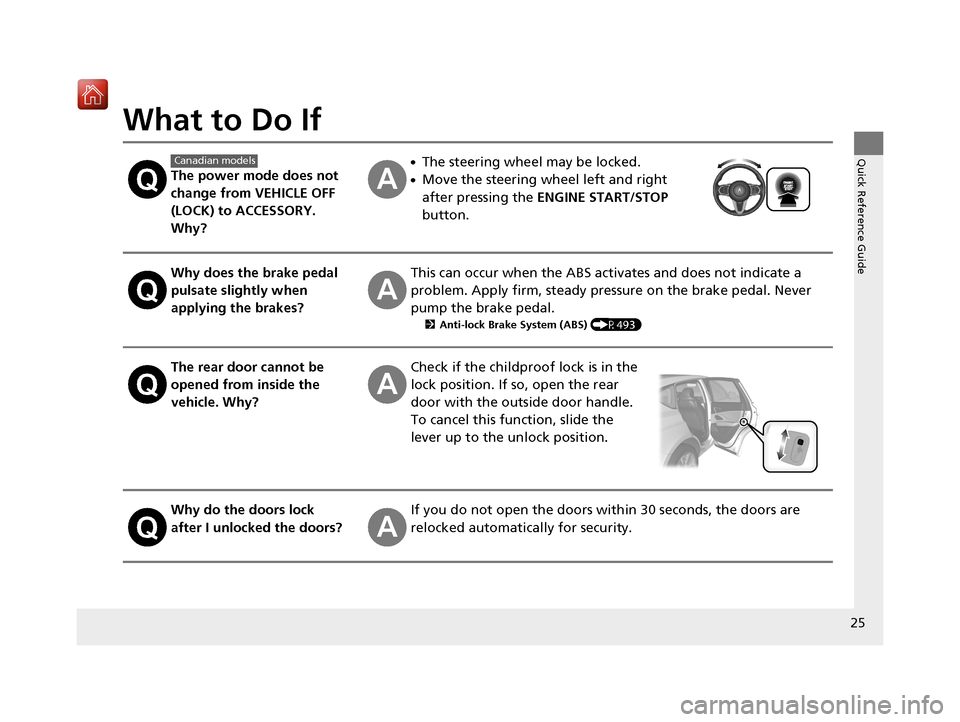
The power mode does not
change from VEHICLE OFF
(LOCK) to ACCESSORY.
Why?
●The steering wheel may be locked.
●Move the steering wheel left and right
after pressing the ENGINE START/STOP
button.
Why does the brake pedal
pulsate slightly when
applying the brakes?This can occur when the ABS activates and does not indicate a
problem. Apply firm, steady pressure on the brake pedal. Never
pump the brake pedal.
2 Anti-lock Brake System (ABS) (P493)
The rear door cannot be
opened from inside the
vehicle. Why?Check if the childproof lock is in the
lock position. If so, open the rear
door with the outside door handle.
To cancel this function, slide the
lever up to the unlock position.
Why do the doors lock
after I unlocked the doors?If you do not open the doors within 30 seconds, the doors are
relocked automatically for security.
Canadian models
19 ACURA RDX-31TJB6000.book 25 ページ 2018年4月26日 木曜日 午後4時51分
Page 37 of 649
uuSeat Belts uAbout Your Seat Belts
36
Safe Driving
■Proper use of seat belts
Follow these guidelines for proper use:
• All occupants should sit upright, well back in the seat, and remain in that position
for the duration of the trip. Slouching and leaning reduce the effectiveness of the
belt and can increase the chance of serious injury in a crash.
• Never place the shoulder part of a lap/shoulder seat belt under your arm or
behind your back. This could cause very serious injuries in a crash.
• Two people should never use the same seat belt. If they do, they could be very
seriously injured in a crash.
• Do not put any accessories on the seat be lts. Devices intended to improve comfort
or reposition the shoulder part of a seat be lt can reduce the protective capability
and increase the chance of serious injury in a crash.
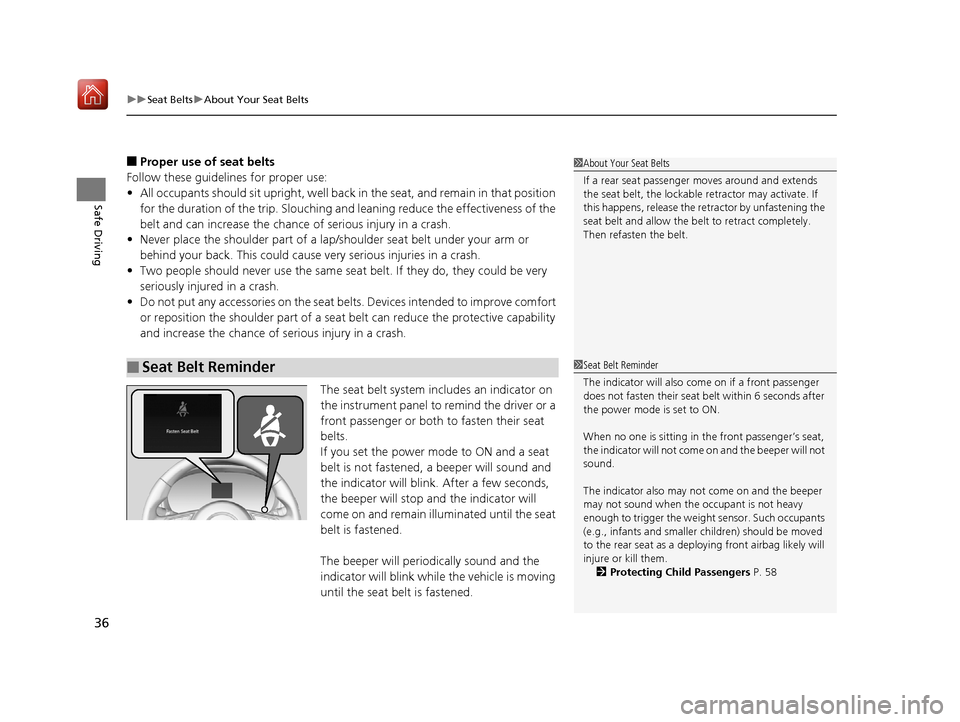
The seat belt system includes an indicator on
the instrument panel to remind the driver or a
front passenger or both to fasten their seat
belts.
If you set the power mode to ON and a seat
belt is not fastened, a beeper will sound and
the indicator will blink. After a few seconds,
the beeper will stop and the indicator will
come on and remain illuminated until the seat
belt is fastened.
The beeper will periodically sound and the
indicator will blink while the vehicle is moving
until the seat belt is fastened.
■Seat Belt Reminder
1 About Your Seat Belts
If a rear seat passenger moves around and extends
the seat belt, the lockable retractor may activate. If
this happens, release the retractor by unfastening the
seat belt and allow the belt to retract completely.
Then refasten the belt.
1Seat Belt Reminder
The indicator will also come on if a front passenger
does not fasten their seat be lt within 6 seconds after
the power mode is set to ON.
When no one is sitting in th e front passenger’s seat,
the indicator will not come on and the beeper will not
sound.
The indicator also may no t come on and the beeper
may not sound when the occupant is not heavy
enough to trigger the weight sensor. Such occupants
(e.g., infants and smaller children) should be moved
to the rear seat as a deploying front airbag likely will
injure or kill them. 2 Protecting Child Passengers P. 58
19 ACURA RDX-31TJB6000.book 36 ページ 2018年4月26日 木曜日 午後4時51分
Page 47 of 649

uuAirbags uFront Airbags (SRS)
46
Safe DrivingFront airbags are designed to inflate during moderate-to-severe frontal collisions.
When the vehicle decelerates suddenly, the sensors send information to the control
unit which signals one or both front airbags to inflate.
A frontal collision can be either head-on or angled between two vehicles, or when a
vehicle crashes into a stationary object, such as a concrete wall.
While your seat belt restrains your torso, the
front airbag provides supplemental protection
for your head and chest.
The front airbags deflate immediately so that
they won’t interfere with the driver’s visibility
or the ability to steer or operate other
controls.
The total time for inflation and deflation is so fast that most occupants are not
aware that the airbags depl oyed until they see them lying in front of them.
■Operation
■How the Front Airbags Work1How the Front Airbags Work
Although the driver’s and fr ont passenger’s airbags
normally inflate within a spli t second of each other, it
is possible for only one airbag to deploy. This can
happen if the severity of a collision is at the margin,
or threshold, that determines whether or not the
airbags will deploy. In such cases, the seat belt will
provide sufficient protec tion, and the supplemental
protection offered by the airbag would be minimal.
19 ACURA RDX-31TJB6000.book 46 ページ 2018年4月26日 木曜日 午後4時51分
Page 56 of 649

Continued55
uuAirbags uAirbag System Indicators
Safe Driving
■When side curtain airbags deploy in a frontal collision
One or both side curtain ai rbags may also inflate in a moderate-to-severe angled
frontal collision.
Airbag System Indicators
If a problem occurs in the airbag system , the SRS indicator will come on and a
message appears on the mu lti-information display.
■When the power mode is set to ON
The indicator comes on for a few seconds,
then goes off. This te lls you the system is
working properly.
If the indicator comes on at any other time, or does not come on at all, have the
system checked by a dealer as soon as po ssible. If you don’t, your airbags and seat
belt tensioners may not work properly when they are needed.
■Supplemental Restraint System (SRS) Indicator1Supplemental Restraint Sy stem (SRS) Indicator
3WARNING
Ignoring the SRS indicator can result in
serious injury or death if the airbag systems
or tensioners do not work properly.
Have your vehicle checked by a dealer as
soon as possible if th e SRS indicator alerts
you to a possible problem.
19 ACURA RDX-31TJB6000.book 55 ページ 2018年4月26日 木曜日 午後4時51分
Page 75 of 649
74
Instrument Panel
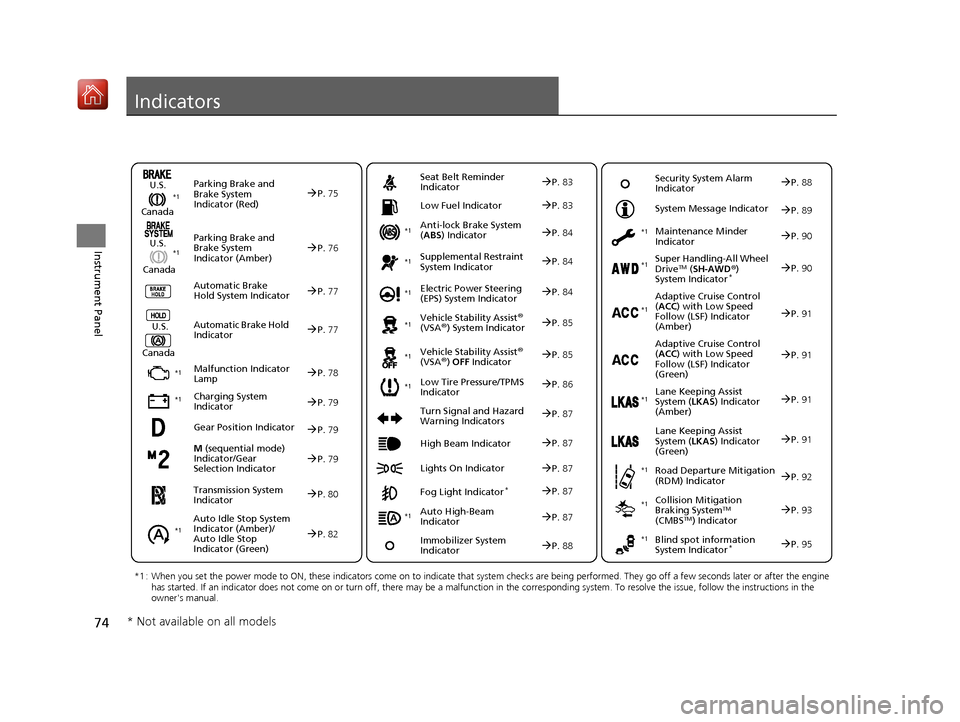
Indicators
M (sequential mode)
Indicator/Gear
Selection IndicatorP. 79
Parking Brake and
Brake System
Indicator (Red)
Parking Brake and
Brake System
Indicator (Amber)
U.S.
Canada
U.S.
Canada Automatic Brake
Hold System Indicator
Automatic Brake Hold
IndicatorU.S.
Canada
*1 : When you set the power mode to ON, these indicators come on to indicate that system checks are being performed. They go off a few seconds later or after the engine
has started. If an indicator does not come on or turn off, th ere may be a malfunction in the corresponding system. To resolve the issue, follow the instructions in the
owner's manual.
P. 75*1
Malfunction Indicator
Lamp
Charging System
Indicator
Anti-lock Brake System
(ABS ) Indicator
Seat Belt Reminder
Indicator
Low Fuel Indicator
Vehicle Stability Assist®
(VSA®) System Indicator
Vehicle Stability Assist
®
(VSA®) OFF Indicator
Supplemental Restraint
System Indicator
Auto High-Beam
Indicator
Low Tire Pressure/TPMS
Indicator Electric Power Steering
(EPS) System Indicator
Turn Signal and Hazard
Warning Indicators
Lights On Indicator High Beam Indicator
Fog Light Indicator*
Maintenance Minder
Indicator
System Message Indicator
Super Handling-All Wheel
DriveTM (
SH-AWD ®)
System Indicator*
Adaptive Cruise Control
( ACC ) with Low Speed
Follow (LSF) Indicator
(Amber)
Lane Keeping Assist
System ( LKAS) Indicator
(Amber)
Road Departure Mitigation
(RDM) Indicator
Blind spot information
System Indicator*
P. 76
P.77
P.77
P.78
P.79
*1
*1
P.86*1
*1
Gear Position IndicatorP.79
Transmission System
Indicator
P. 80
Auto Idle Stop System
Indicator (Amber)/
Auto Idle Stop
Indicator (Green)
P. 82
P. 83
P.83
P.84
P.84
P.87
P.85
*1
*1
*1
P.85
*1P.84
P.87
P.91
*1
P.87
P.87
P.90
P.87
Immobilizer System
Indicator
P. 88
Security System Alarm
Indicator P.88
P.89
P.90
P.91
P.92
P.95
*1
Adaptive Cruise Control
(ACC ) with Low Speed
Follow (LSF) Indicator
(Green)P. 91
*1
Lane Keeping Assist
System ( LKAS) Indicator
(Green)P. 91
*1
*1 *1 *1
*1
Collision Mitigation
Braking SystemTM
(CMBSTM) Indicator
*1P. 93*1
* Not available on all models
19 ACURA RDX-31TJB6000.book 74 ページ 2018年4月26日 木曜日 午後4時51分
Page 76 of 649
75
uuIndicators u
Continued
Instrument Panel
IndicatorNameOn/BlinkingExplanationMessage
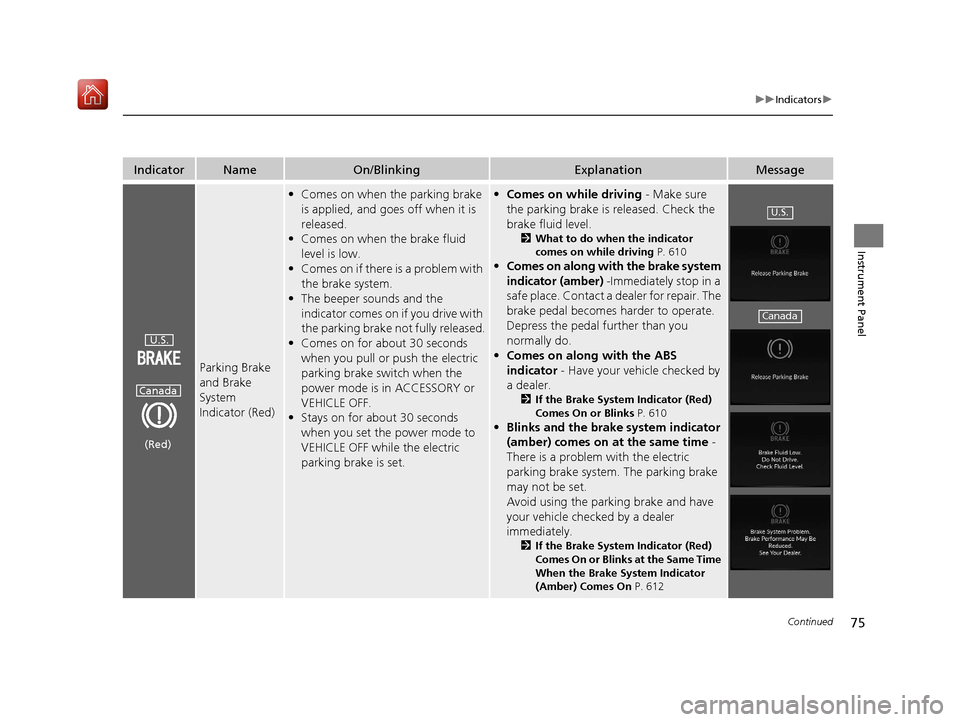
Parking Brake
and Brake
System
Indicator (Red)
•Comes on when the parking brake
is applied, and goes off when it is
released.
• Comes on when the brake fluid
level is low.
• Comes on if there is a problem with
the brake system.
• The beeper sounds and the
indicator comes on if you drive with
the parking brake not fully released.
• Comes on for about 30 seconds
when you pull or push the electric
parking brake switch when the
power mode is in ACCESSORY or
VEHICLE OFF.
• Stays on for about 30 seconds
when you set the power mode to
VEHICLE OFF while the electric
parking brake is set.•Comes on while driving - Make sure
the parking brake is released. Check the
brake fluid level.
2 What to do when the indicator
comes on while driving P. 610
•Comes on along with the brake system
indicator (amber) -Immediately stop in a
safe place. Contact a dealer for repair. The
brake pedal becomes harder to operate.
Depress the pedal further than you
normally do.
• Comes on along with the ABS
indicator - Have your vehicle checked by
a dealer.
2 If the Brake System Indicator (Red)
Comes On or Blinks P. 610
•Blinks and the brake system indicator
(amber) comes on at the same time -
There is a problem with the electric
parking brake system. The parking brake
may not be set.
Avoid using the parking brake and have
your vehicle checked by a dealer
immediately.
2 If the Brake System Indicator (Red)
Comes On or Blinks at the Same Time
When the Brake System Indicator
(Amber) Comes On P. 612
U.S.
Canada
(Red)
U.S.
Canada
19 ACURA RDX-31TJB6000.book 75 ページ 2018年4月26日 木曜日 午後4時51分