Jack Acura RDX 2019 Owner's Manual
[x] Cancel search | Manufacturer: ACURA, Model Year: 2019, Model line: RDX, Model: Acura RDX 2019Pages: 649, PDF Size: 33 MB
Page 8 of 649
7
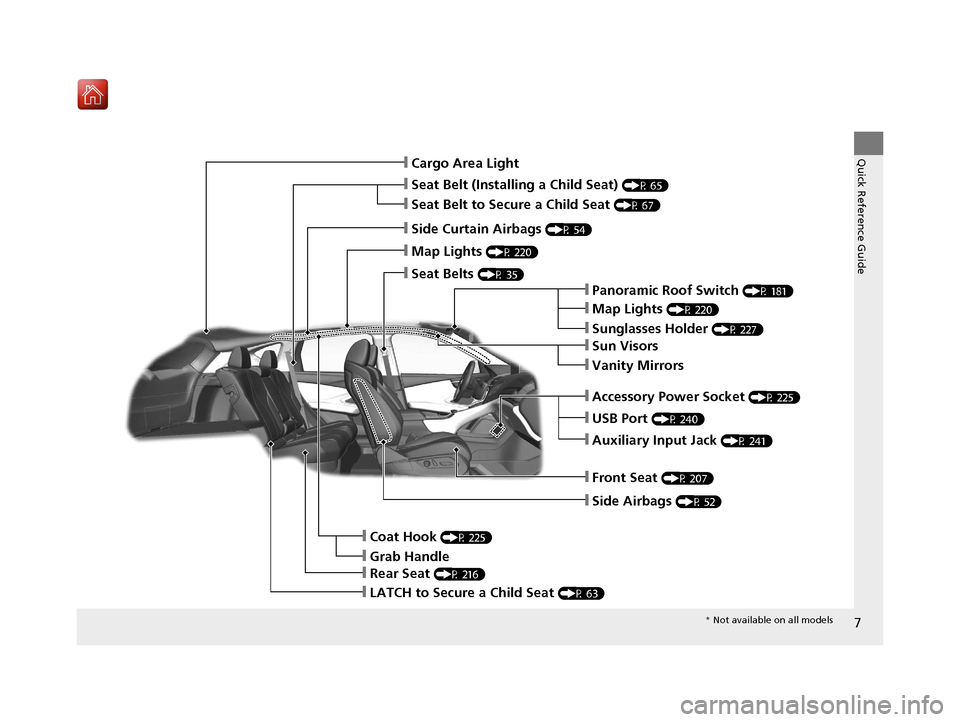
Quick Reference Guide❙Cargo Area Light
❙Seat Belt (Installing a Child Seat) (P 65)
❙Side Curtain Airbags (P 54)
❙Map Lights (P 220)
❙Seat Belts (P 35)
❙Panoramic Roof Switch (P 181)
❙Map Lights (P 220)
❙Sunglasses Holder (P 227)
❙USB Port (P 240)
❙Auxiliary Input Jack (P 241)
❙Front Seat (P 207)
❙Side Airbags (P 52)
❙Coat Hook (P 225)
❙LATCH to Secure a Child Seat (P 63)
❙Accessory Power Socket (P 225)
❙Rear Seat (P 216)
❙Sun Visors
❙Vanity Mirrors
❙Seat Belt to Secure a Child Seat (P 67)
❙Grab Handle
* Not available on all models
19 ACURA RDX-31TJB6000.book 7 ページ 2018年4月26日 木曜日 午後4時51分
Page 238 of 649
237
Features
This chapter describes how to operate technology features.
Audio SystemAbout Your Audio System ................ 238
USB Ports ......................................... 239
Auxiliary Input Jack .......................... 241
Audio System Theft Protection ......... 242
Audio Remote Controls .................... 243
Audio System Basic Operation ........ 245
True Touchpad Operation ................ 246
Audio/Information Screen ................ 249
System Updates ............................... 263
Adjusting the Sound ........................ 269
Display Setup ................................... 270 Voice Control Operation .................. 271
Playing AM/FM Radio ....................... 274
Playing SiriusXM
® Radio ................... 278
Playing an iPod ................................ 291
Playing a USB Flash Drive ................. 294
Playing Bluetooth ® Audio................. 297
Wi-Fi Connection ............................. 300
Siri ® Eyes Free .................................. 302
Apple CarPlay
TM............................... 303
Audio Error Messages ...................... 307
General Information on the Audio System ............................................. 310 Customized Features
........................ 332
HomeLink ® Universal Transceiver ... 355
Bluetooth ® HandsFreeLink® ............. 358
AcuraLink® ........................................ 387
19 ACURA RDX-31TJB6000.book 237 ページ 2018年4月26日 木曜日 午後4時51分
Page 242 of 649
241
uuAudio System uAuxiliary Input Jack
Features
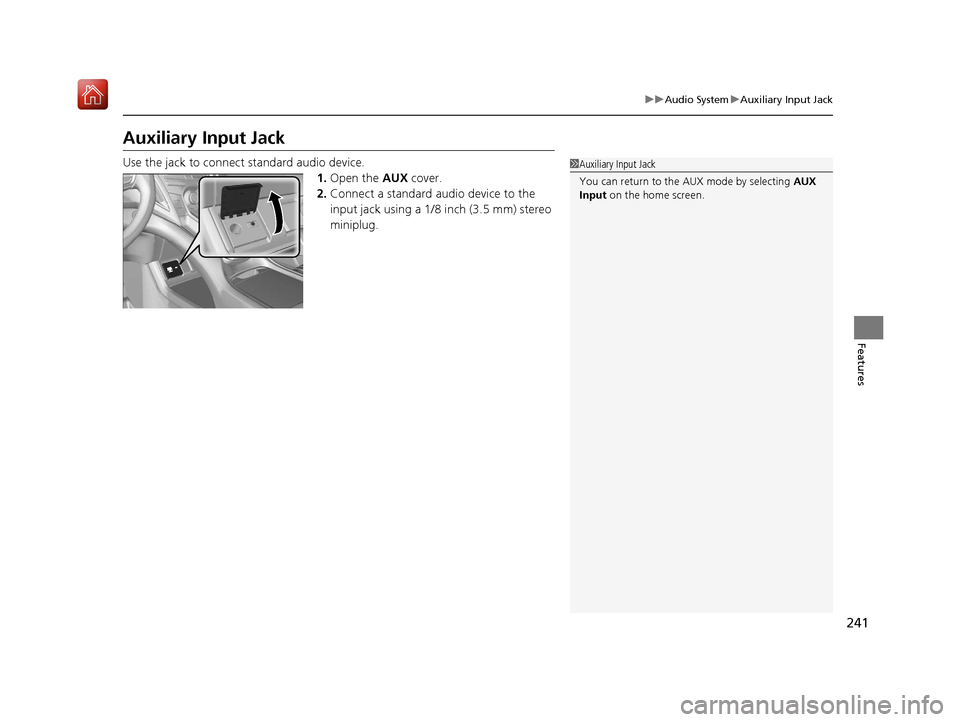
Auxiliary Input Jack
Use the jack to connect standard audio device.
1.Open the AUX cover.
2. Connect a standard audio device to the
input jack using a 1/8 inch (3.5 mm) stereo
miniplug.1Auxiliary Input Jack
You can return to the AUX mode by selecting AUX
Input on the home screen.
19 ACURA RDX-31TJB6000.book 241 ページ 2018年4月26日 木曜日 午後4時51分
Page 579 of 649
578
Handling the Unexpected
Tools
Types of Tools
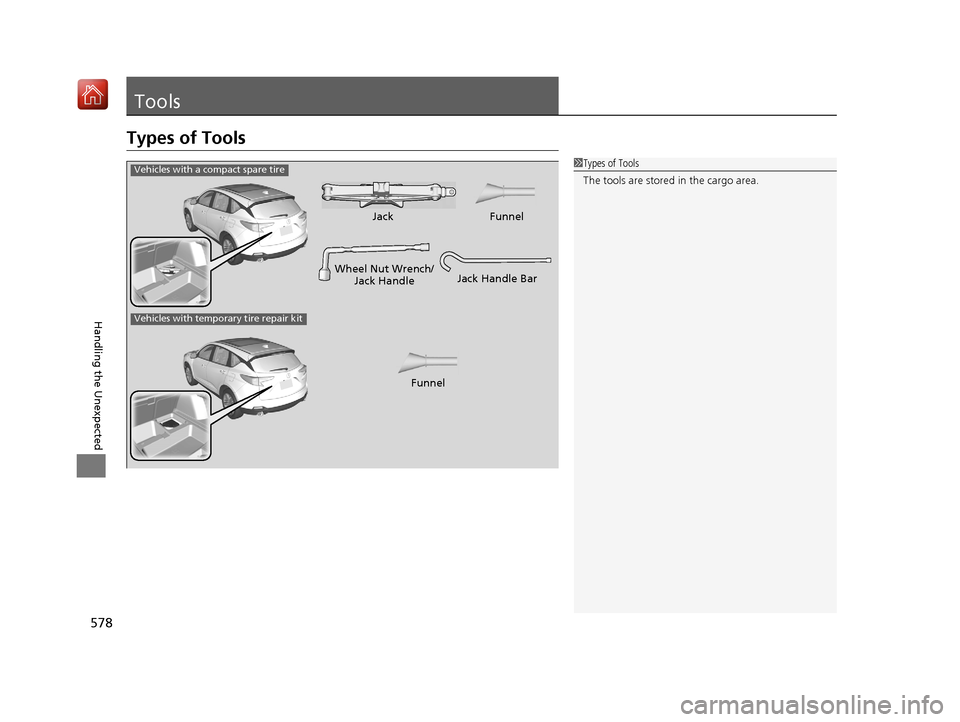
1Types of Tools
The tools are stored in the cargo area.
Wheel Nut Wrench/
Jack HandleJack
Jack Handle Bar
Vehicles with a compact spare tire
Vehicles with temporary tire repair kit
FunnelFunnel
19 ACURA RDX-31TJB6000.book 578 ページ 2018年4月26日 木曜日 午後4時51分
Page 581 of 649
uuIf a Tire Goes Flat uChanging a Flat Tire
580
Handling the Unexpected
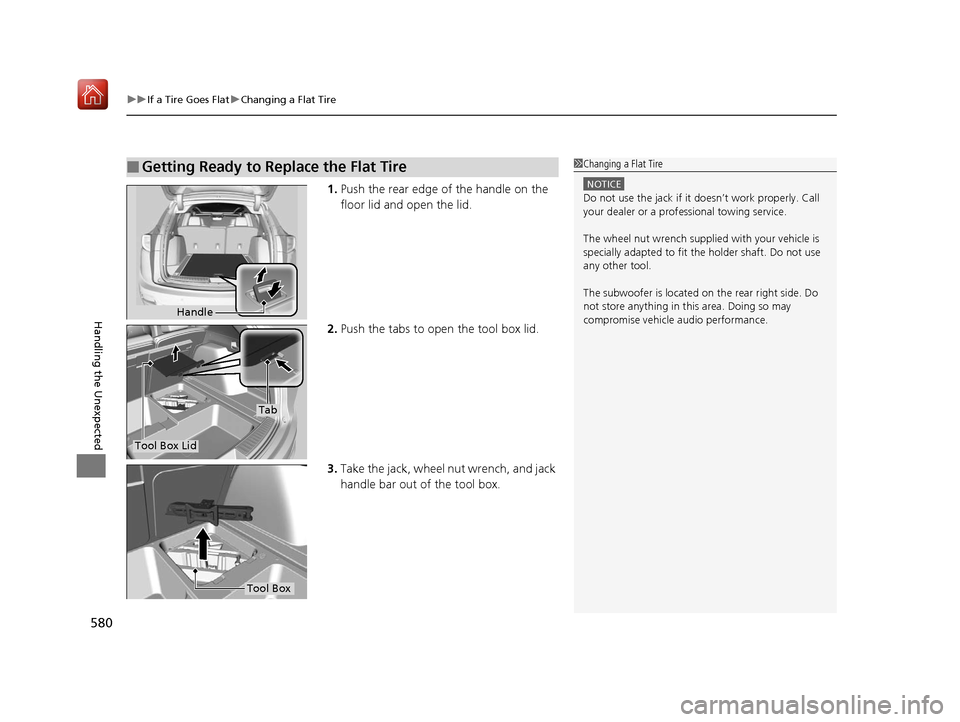
1. Push the rear edge of the handle on the
floor lid and open the lid.
2. Push the tabs to open the tool box lid.
3. Take the jack, wheel nut wrench, and jack
handle bar out of the tool box.
■Getting Ready to Replace the Flat Tire1Changing a Flat Tire
NOTICE
Do not use the jack if it doesn’t work properly. Call
your dealer or a prof essional towing service.
The wheel nut wrench supplied with your vehicle is
specially adapted to fit th e holder shaft. Do not use
any other tool.
The subwoofer is located on the rear right side. Do
not store anything in th is area. Doing so may
compromise vehicle audio performance.
Handle
Tool Box Lid
Tab
Tool Box
19 ACURA RDX-31TJB6000.book 580 ページ 2018年4月26日 木曜日 午後4時51分
Page 582 of 649
581
uuIf a Tire Goes Flat uChanging a Flat Tire
Continued
Handling the Unexpected
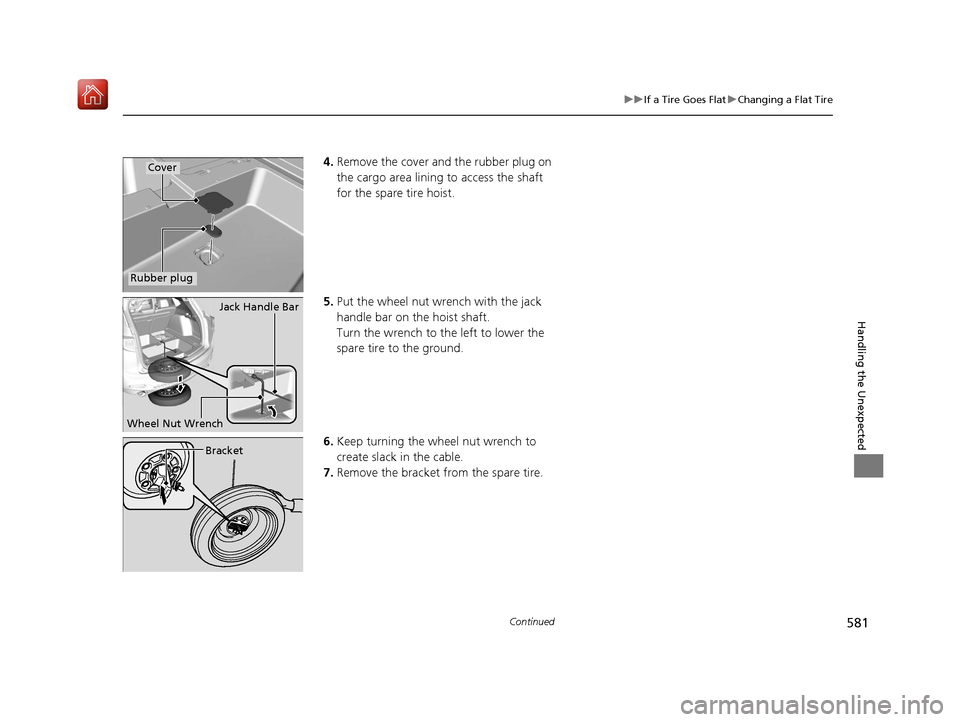
4. Remove the cover and the rubber plug on
the cargo area lining to access the shaft
for the spare tire hoist.
5. Put the wheel nut wrench with the jack
handle bar on the hoist shaft.
Turn the wrench to the left to lower the
spare tire to the ground.
6. Keep turning the wh eel nut wrench to
create slack in the cable.
7. Remove the bracket from the spare tire.Cover
Rubber plug
Jack Handle Bar
Wheel Nut Wrench
Bracket
19 ACURA RDX-31TJB6000.book 581 ページ 2018年4月26日 木曜日 午後4時51分
Page 584 of 649
Continued583
uuIf a Tire Goes Flat uChanging a Flat Tire
Handling the Unexpected
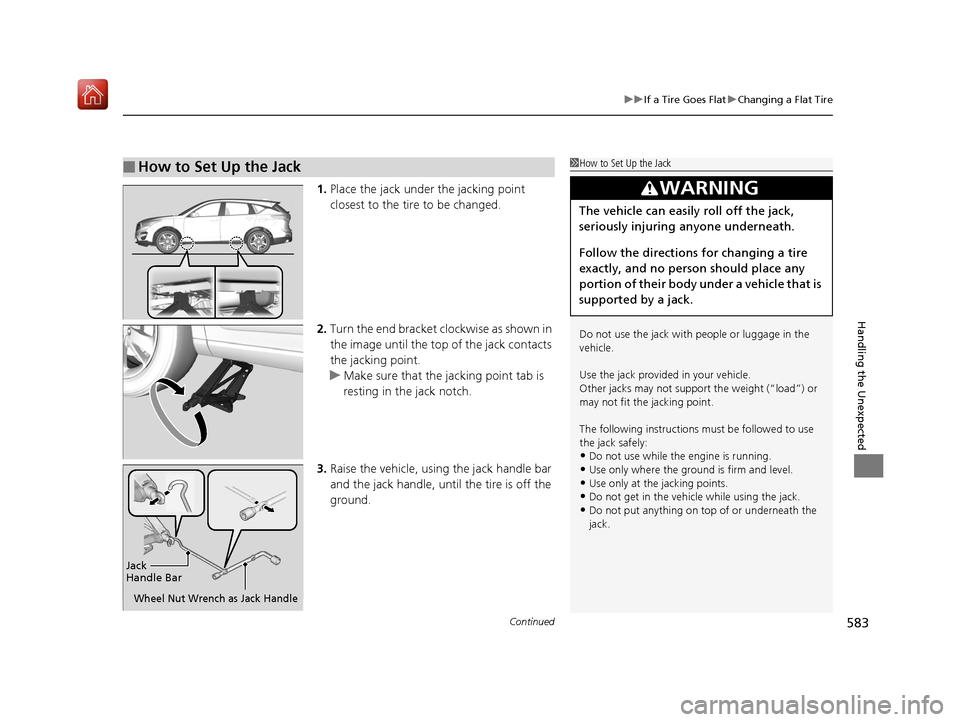
1. Place the jack under the jacking point
closest to the tire to be changed.
2. Turn the end bracket cl ockwise as shown in
the image until the top of the jack contacts
the jacking point.
u Make sure that the jacking point tab is
resting in the jack notch.
3. Raise the vehicle, using the jack handle bar
and the jack handle, until the tire is off the
ground.
■How to Set Up the Jack1How to Set Up the Jack
Do not use the jack with people or luggage in the
vehicle.
Use the jack provided in your vehicle.
Other jacks may not support the weight (“load”) or
may not fit the jacking point.
The following instructions must be followed to use
the jack safely:
•Do not use while the engine is running.
•Use only where the ground is firm and level.•Use only at the jacking points.
•Do not get in the vehicl e while using the jack.
•Do not put anything on top of or underneath the
jack.
3WARNING
The vehicle can easily roll off the jack,
seriously injuring anyone underneath.
Follow the directions for changing a tire
exactly, and no person should place any
portion of their body under a vehicle that is
supported by a jack.
Jack
Handle Bar
Wheel Nut Wrench as Jack Handle
19 ACURA RDX-31TJB6000.book 583 ページ 2018年4月26日 木曜日 午後4時51分
Page 585 of 649
uuIf a Tire Goes Flat uChanging a Flat Tire
584
Handling the Unexpected
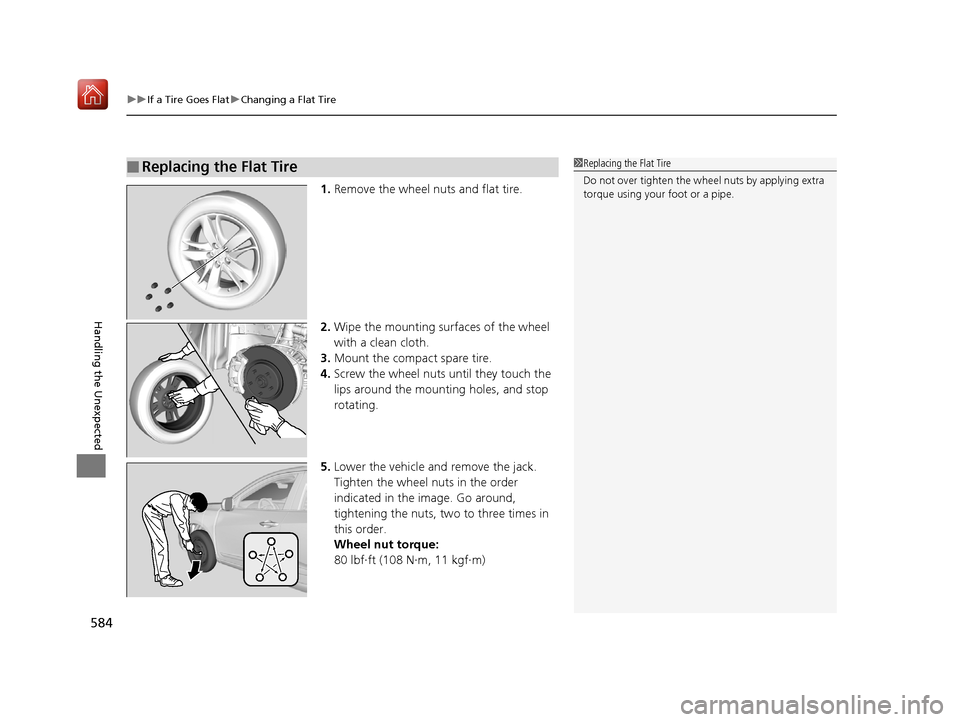
1. Remove the wheel nuts and flat tire.
2. Wipe the mounting surfaces of the wheel
with a clean cloth.
3. Mount the compact spare tire.
4. Screw the wheel nuts until they touch the
lips around the mounting holes, and stop
rotating.
5. Lower the vehicle and remove the jack.
Tighten the wheel nuts in the order
indicated in the image. Go around,
tightening the nuts, two to three times in
this order.
Wheel nut torque:
80 lbf∙ft (108 N∙m, 11 kgf∙m)
■Replacing the Flat Tire1Replacing the Flat Tire
Do not over tighten the wheel nuts by applying extra
torque using your foot or a pipe.
19 ACURA RDX-31TJB6000.book 584 ページ 2018年4月26日 木曜日 午後4時51分
Page 586 of 649
Continued585
uuIf a Tire Goes Flat uChanging a Flat Tire
Handling the Unexpected
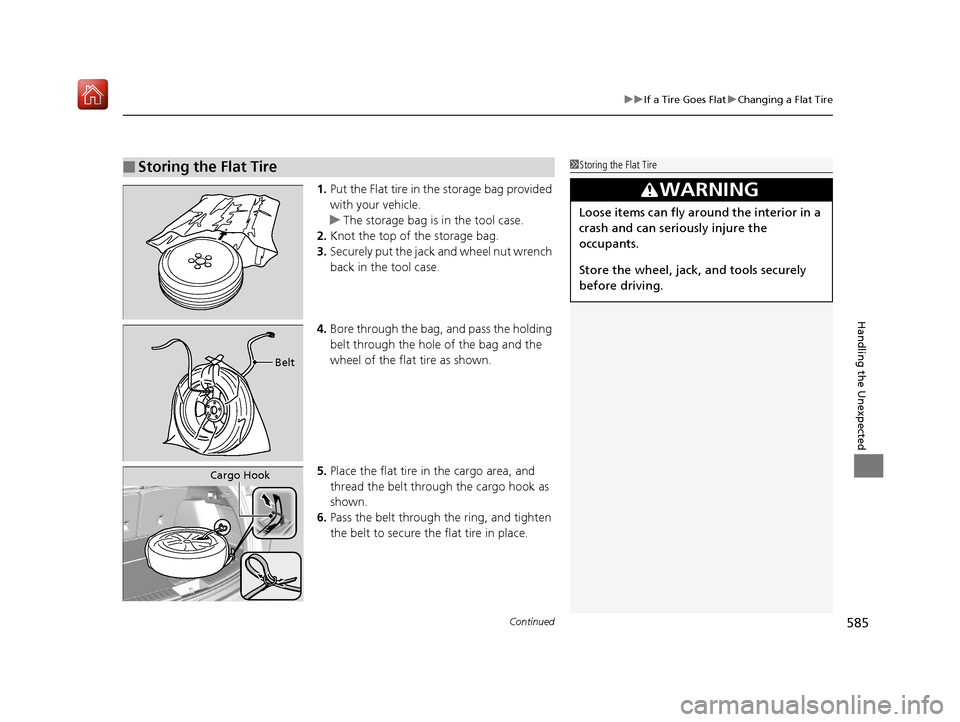
1. Put the Flat tire in the storage bag provided
with your vehicle.
u The storage bag is in the tool case.
2. Knot the top of the storage bag.
3. Securely put the jack and wheel nut wrench
back in the tool case.
4. Bore through the bag, and pass the holding
belt through the hole of the bag and the
wheel of the flat tire as shown.
5. Place the flat tire in the cargo area, and
thread the belt through the cargo hook as
shown.
6. Pass the belt through the ring, and tighten
the belt to secure the flat tire in place.
■Storing the Flat Tire1Storing the Flat Tire
3WARNING
Loose items can fly around the interior in a
crash and can seriously injure the
occupants.
Store the wheel, jack, and tools securely
before driving.
Belt
Cargo Hook
19 ACURA RDX-31TJB6000.book 585 ページ 2018年4月26日 木曜日 午後4時51分
Page 641 of 649
Index
640
Index
Index
A
ABS (Anti-lock Brake System)................... 493
Accessories and Modifications ................. 574
Accessory Power Socket ........................... 225
AcuraLink® ................................................ 387
AcuraWatch
TM............................................. 22
Adaptive Cruise Control (ACC) ................... 91
Adaptive Cruise Control (ACC) with
Low Speed Follow (LSF) .................... 91, 455
Adaptive Front Lighting System (AFS) ..... 189
Additives
Coolant ................................................... 540
Engine Oil ................................................ 535
Washer .................................................... 544
Additives, Engine Oil ................................ 535
Adjusting Armrest ................................................... 218
Front Seats .............................................. 207
Head Restraints........................................ 212
Mirrors .................................................... 204
Rear Seats................................................ 216
Steering Wheel ........................................ 203
Agile Handling Assist ................................ 436
Air Conditioning System (Climate Control System) .................................................... 230
Changing the Mode ................................ 230
Defrosting the Windshield and Windows ............................................... 232
Dust and Pollen Filter ............................... 568
Rear Temperature Control Dial................. 234
Recirculation/Fresh Air Mode ................... 230 Sensors ................................................... 235
Synchronized Mode................................. 233
Using Automatic Climate Control ............ 230
Air Pressure ....................................... 555, 629
Airbags ........................................................ 42
Advanced Airbags ..................................... 48
After a Collision ........................................ 45
Airbag Care............................................... 57
Front Airbags (SRS) .................................... 45
Indicator.............................................. 55, 84
Knee Airbags............................................. 49
Passenger Airbag Off Indicator .................. 56
Sensors ..................................................... 42
Side Airbags .............................................. 52
Side Curtain Airbags.................................. 54
AM/FM Radio ............................................ 274
Anti-lock Brake System (ABS) .................. 493
Indicator.................................................... 84
Apple CarPlay
TM........................................ 303
Armrest ..................................................... 218
Audio Remote Controls ........................... 243
Audio System ............................................ 238
Adjusting the Sound................................ 269
Audio/Information Screen........................ 249
Auxiliary Input Jack.................................. 241
Display Setup .......................................... 270
Error Messages ........................................ 307
General Information ................................ 310
Home Screen........................................... 254
How to Update Wirelessly ....................... 263
How to Update with a USB Device........... 267 How to use Siri
® Eyes Free....................... 302
iPod ........................................................ 291
Limitations for Manual Operation ............ 270
MP3/WMA/AAC ..................................... 294
Reactivating ............................................ 242
Remote Controls ..................................... 243
Security Code ......................................... 242
Status Area ............................................. 259
System Updates ...................................... 263
Theft Protection ...................................... 242
USB Flash Drives.............................. 294, 312
USB Ports ................................................ 239
Audio/Information Screen ....................... 249
Authorized Manuals ................................ 638
Auto Door Locking/Unlocking ................ 162
Auto High-Beam ...................................... 191
Indicator ................................................... 87
Auto Idle Stop .......................................... 428
OFF Button ............................................. 429
Automatic Brake Hold ............................. 491
Indicator ........................................... 77, 491
Automatic Folding Door Mirror .............. 206
Automatic Intermittent Wipers .............. 195
Automatic Lighting .................................. 187
Automatic Transmission .......................... 417
Creeping................................................. 417
Fluid ....................................................... 542
Kickdown ............................................... 417
Operating the Shift Button ...................... 420
Sequential Shift Mode............................. 424
Shifting ................................................... 418
19 ACURA RDX-31TJB6000.book 640 ページ 2018年4月26日 木曜日 午後4時51分