brake Acura RDX 2020 User Guide
[x] Cancel search | Manufacturer: ACURA, Model Year: 2020, Model line: RDX, Model: Acura RDX 2020Pages: 657, PDF Size: 33.2 MB
Page 75 of 657
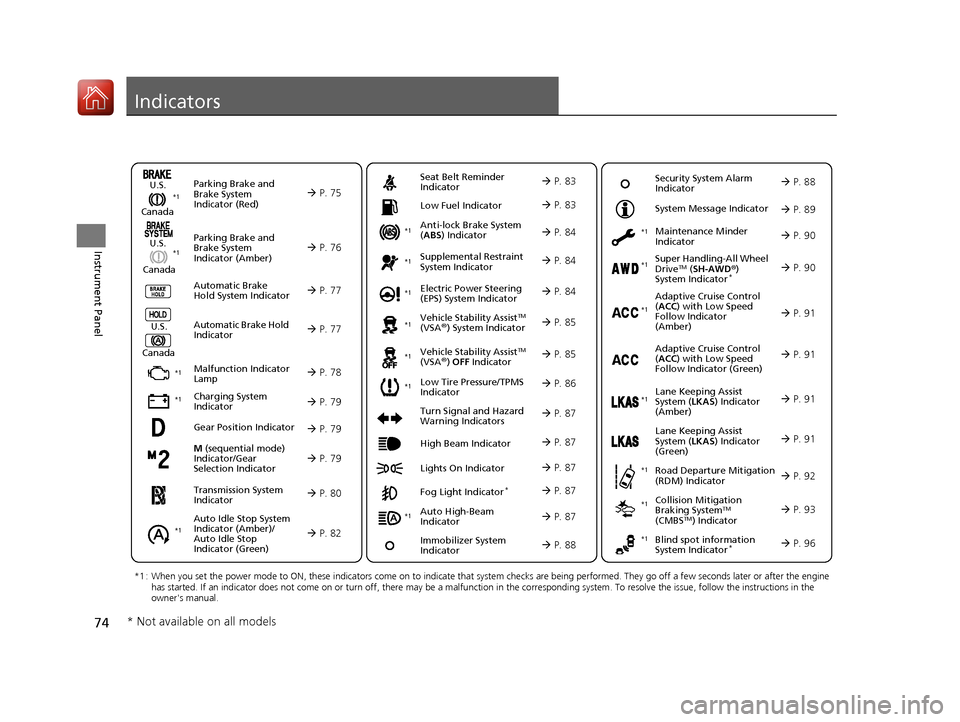
74
Instrument Panel
Indicators
M (sequential mode)
Indicator/Gear
Selection Indicator P. 79
Parking Brake and
Brake System
Indicator (Red)
Parking Brake and
Brake System
Indicator (Amber)
U.S.
Canada
U.S.
Canada Automatic Brake
Hold System Indicator
Automatic Brake Hold
IndicatorU.S.
Canada
*1 : When you set the power mode to ON, these indicators come on to indicate that system checks are being performed. They go off a few seconds later or after the engine
has started. If an indicator does not come on or turn off, ther e may be a malfunction in the corresponding system. To resolve the issue, follow the instructions in the
owner's manual.
P. 75*1
Malfunction Indicator
Lamp
Charging System
Indicator
Anti-lock Brake System
(ABS ) Indicator
Seat Belt Reminder
Indicator
Low Fuel Indicator
Vehicle Stability AssistTM
(VSA®) System Indicator
Vehicle Stability Assist
TM
(VSA®) OFF Indicator
Supplemental Restraint
System Indicator
Auto High-Beam
Indicator
Low Tire Pressure/TPMS
Indicator Electric Power Steering
(EPS) System Indicator
Turn Signal and Hazard
Warning Indicators
Lights On Indicator High Beam Indicator
Fog Light Indicator*
Maintenance Minder
Indicator
System Message Indicator
Super Handling-All Wheel
DriveTM (
SH-AWD ®)
System Indicator*
Adaptive Cruise Control
( ACC ) with Low Speed
Follow Indicator
(Amber)
Lane Keeping Assist
System ( LKAS) Indicator
(Amber)
Road Departure Mitigation
(RDM) Indicator
Blind spot information
System Indicator*
P. 76
P. 77
P. 77
P. 78
P. 79*1
*1
P. 86*1
*1
Gear Position Indicator P. 79
Transmission System
Indicator P. 80
Auto Idle Stop System
Indicator (Amber)/
Auto Idle Stop
Indicator (Green)
P. 82
P. 83
P. 83
P. 84
P. 84
P. 87
P. 85
*1
*1
*1
P. 85
*1 P. 84
P. 87
P. 91
*1
P. 87
P. 87
P. 90
P. 87
Immobilizer System
Indicator P. 88
Security System Alarm
Indicator P. 88
P. 89
P. 90
P. 91
P. 92
P. 96
*1
Adaptive Cruise Control
(ACC ) with Low Speed
Follow Indicator (Green) P. 91
*1
Lane Keeping Assist
System ( LKAS) Indicator
(Green) P. 91
*1
*1 *1 *1
*1
Collision Mitigation
Braking SystemTM
(CMBSTM) Indicator
*1 P. 93*1
* Not available on all models
20 ACURA RDX-31TJB6111.book 74 ページ 2020年2月11日 火曜日 午後2時6分
Page 76 of 657
75
uuIndicators u
Continued
Instrument Panel
IndicatorNameOn/BlinkingExplanationMessage
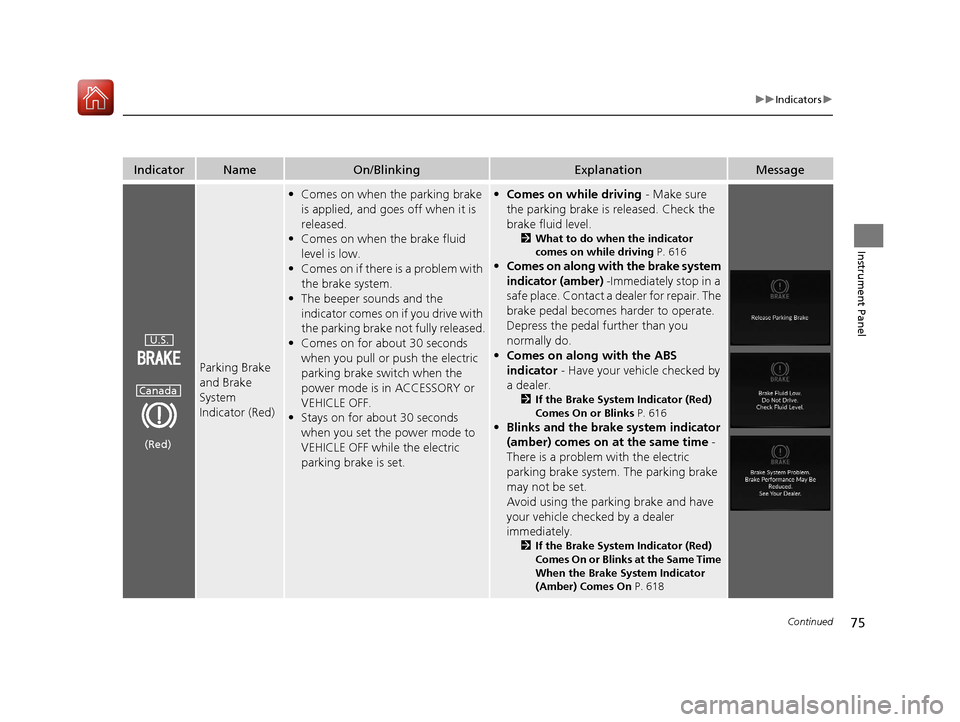
Parking Brake
and Brake
System
Indicator (Red)
•Comes on when the parking brake
is applied, and goes off when it is
released.
• Comes on when the brake fluid
level is low.
• Comes on if there is a problem with
the brake system.
• The beeper sounds and the
indicator comes on if you drive with
the parking brake not fully released.
• Comes on for about 30 seconds
when you pull or push the electric
parking brake switch when the
power mode is in ACCESSORY or
VEHICLE OFF.
• Stays on for about 30 seconds
when you set the power mode to
VEHICLE OFF while the electric
parking brake is set.•Comes on while driving - Make sure
the parking brake is released. Check the
brake fluid level.
2 What to do when the indicator
comes on while driving P. 616
•Comes on along with the brake system
indicator (amber) -Immediately stop in a
safe place. Contact a dealer for repair. The
brake pedal becomes harder to operate.
Depress the pedal further than you
normally do.
• Comes on along with the ABS
indicator - Have your vehicle checked by
a dealer.
2 If the Brake System Indicator (Red)
Comes On or Blinks P. 616
•Blinks and the brake system indicator
(amber) comes on at the same time -
There is a problem with the electric
parking brake system. The parking brake
may not be set.
Avoid using the parking brake and have
your vehicle checked by a dealer
immediately.
2 If the Brake System Indicator (Red)
Comes On or Blinks at the Same Time
When the Brake System Indicator
(Amber) Comes On P. 618
U.S.
Canada
(Red)
20 ACURA RDX-31TJB6111.book 75 ページ 2020年2月11日 火曜日 午後2時6分
Page 77 of 657
76
uuIndicators u
Instrument Panel
IndicatorNameOn/BlinkingExplanationMessage
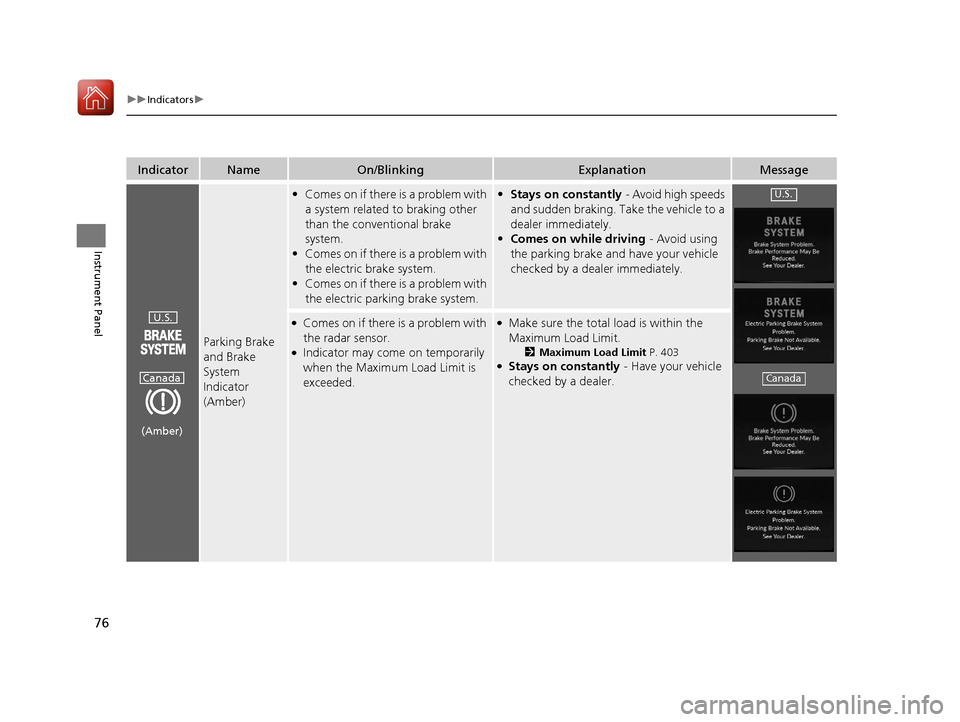
Parking Brake
and Brake
System
Indicator
(Amber)
•Comes on if there is a problem with
a system related to braking other
than the conventional brake
system.
• Comes on if there is a problem with
the electric brake system.
• Comes on if there is a problem with
the electric parking brake system.• Stays on constantly - Avoid high speeds
and sudden braking. Take the vehicle to a
dealer immediately.
• Comes on while driving - Avoid using
the parking brake and have your vehicle
checked by a dealer immediately.
●Comes on if there is a problem with
the radar sensor.
●Indicator may come on temporarily
when the Maximum Load Limit is
exceeded.
●Make sure the total load is within the
Maximum Load Limit.
2 Maximum Load Limit P. 403●Stays on constantly - Have your vehicle
checked by a dealer.
U.S.
Canada
(Amber)
U.S.
Canada
20 ACURA RDX-31TJB6111.book 76 ページ 2020年2月11日 火曜日 午後2時6分
Page 78 of 657
77
uuIndicators u
Continued
Instrument Panel
IndicatorNameOn/BlinkingExplanationMessage
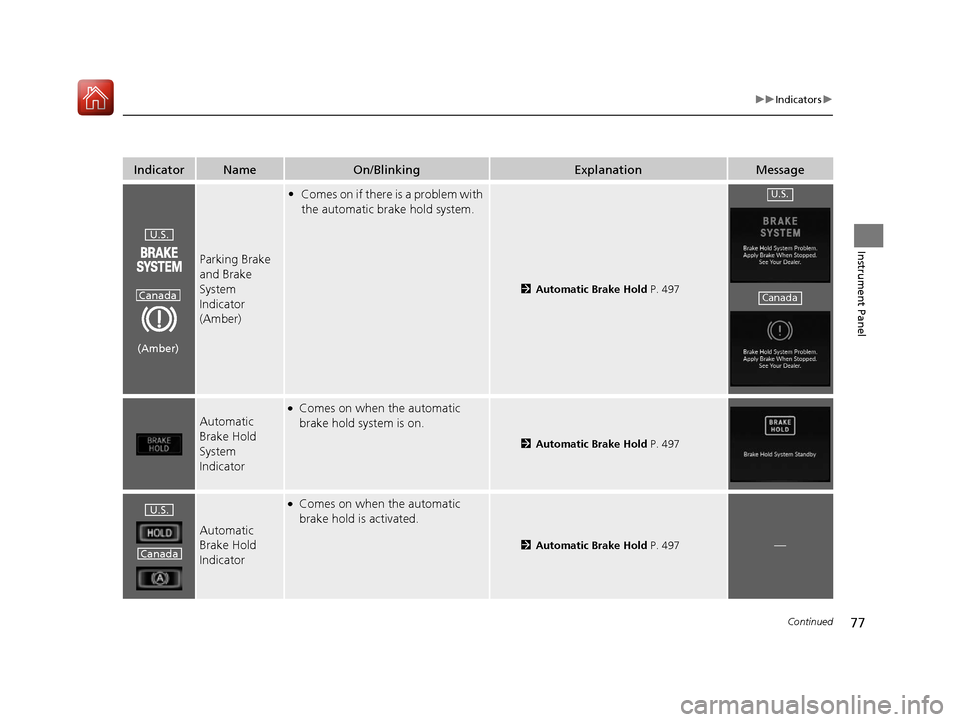
Parking Brake
and Brake
System
Indicator
(Amber)
•Comes on if there is a problem with
the automatic brake hold system.
2 Automatic Brake Hold P. 497
Automatic
Brake Hold
System
Indicator
●Comes on when the automatic
brake hold system is on.
2Automatic Brake Hold P. 497
Automatic
Brake Hold
Indicator
●Comes on when the automatic
brake hold is activated.
2Automatic Brake Hold P. 497—
U.S.
Canada
(Amber)
U.S.
Canada
U.S.
Canada
20 ACURA RDX-31TJB6111.book 77 ページ 2020年2月11日 火曜日 午後2時6分
Page 82 of 657
81
uuIndicators u
Continued
Instrument Panel
IndicatorNameOn/BlinkingExplanationMessage
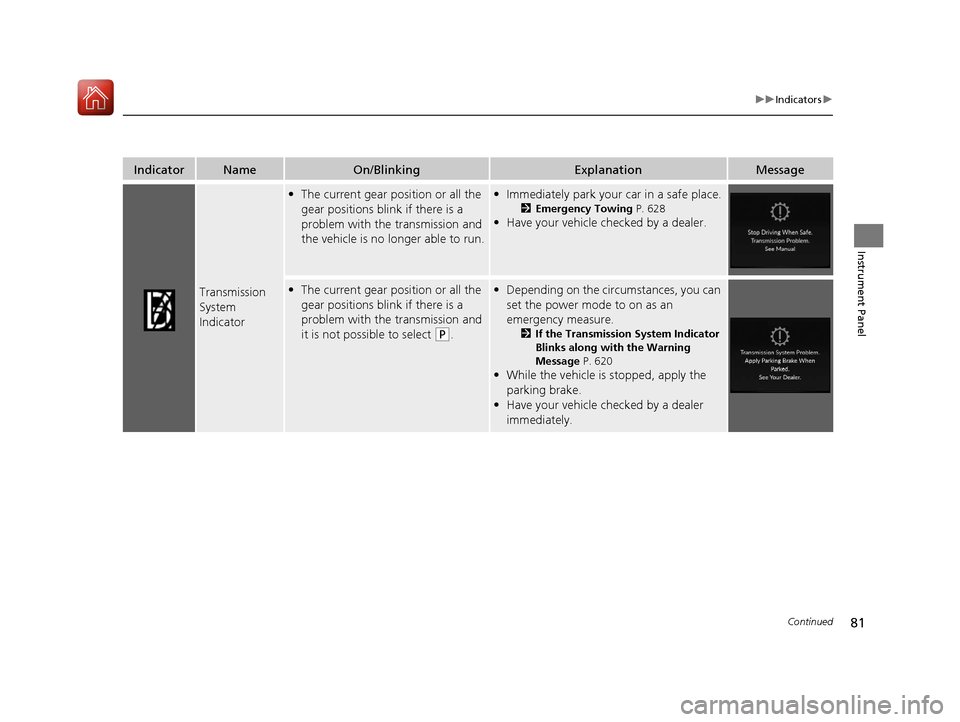
Transmission
System
Indicator
•The current gear position or all the
gear positions blink if there is a
problem with the transmission and
the vehicle is no longer able to run.•Immediately park your car in a safe place.
2 Emergency Towing P. 628
•Have your vehicle checked by a dealer.
•The current gear position or all the
gear positions blink if there is a
problem with the transmission and
it is not possible to select
(P.
•Depending on the circumstances, you can
set the power mode to on as an
emergency measure.
2 If the Transmission System Indicator
Blinks along with the Warning
Message P. 620
•While the vehicle is stopped, apply the
parking brake.
• Have your vehicle checked by a dealer
immediately.
20 ACURA RDX-31TJB6111.book 81 ページ 2020年2月11日 火曜日 午後2時6分
Page 85 of 657
84
uuIndicators u
Instrument Panel
IndicatorNameOn/BlinkingExplanationMessage
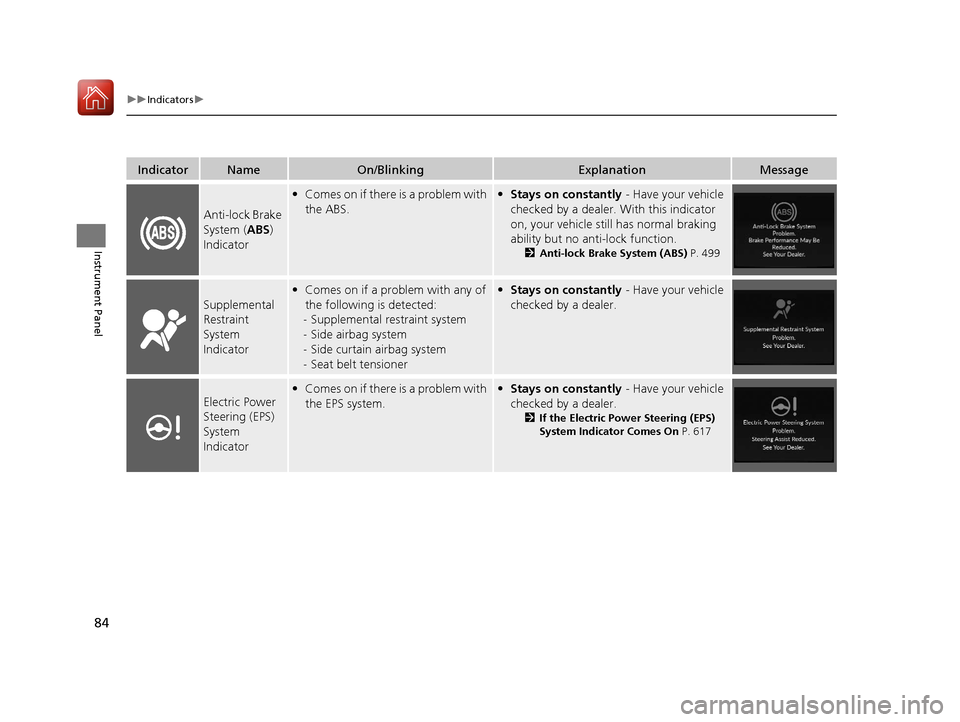
Anti-lock Brake
System (ABS)
Indicator
• Comes on if there is a problem with
the ABS.• Stays on constantly - Have your vehicle
checked by a dealer. With this indicator
on, your vehicle still has normal braking
ability but no anti-lock function.
2 Anti-lock Brake System (ABS) P. 499
Supplemental
Restraint
System
Indicator
•Comes on if a problem with any of
the following is detected:
- Supplemental restraint system
- Side airbag system
- Side curtain airbag system
- Seat belt tensioner• Stays on constantly - Have your vehicle
checked by a dealer.
Electric Power
Steering (EPS)
System
Indicator• Comes on if there is a problem with
the EPS system.• Stays on constantly - Have your vehicle
checked by a dealer.
2 If the Electric Power Steering (EPS)
System Indicator Comes On P. 617
20 ACURA RDX-31TJB6111.book 84 ページ 2020年2月11日 火曜日 午後2時6分
Page 86 of 657
85
uuIndicators u
Continued
Instrument Panel
IndicatorNameOn/BlinkingExplanationMessage
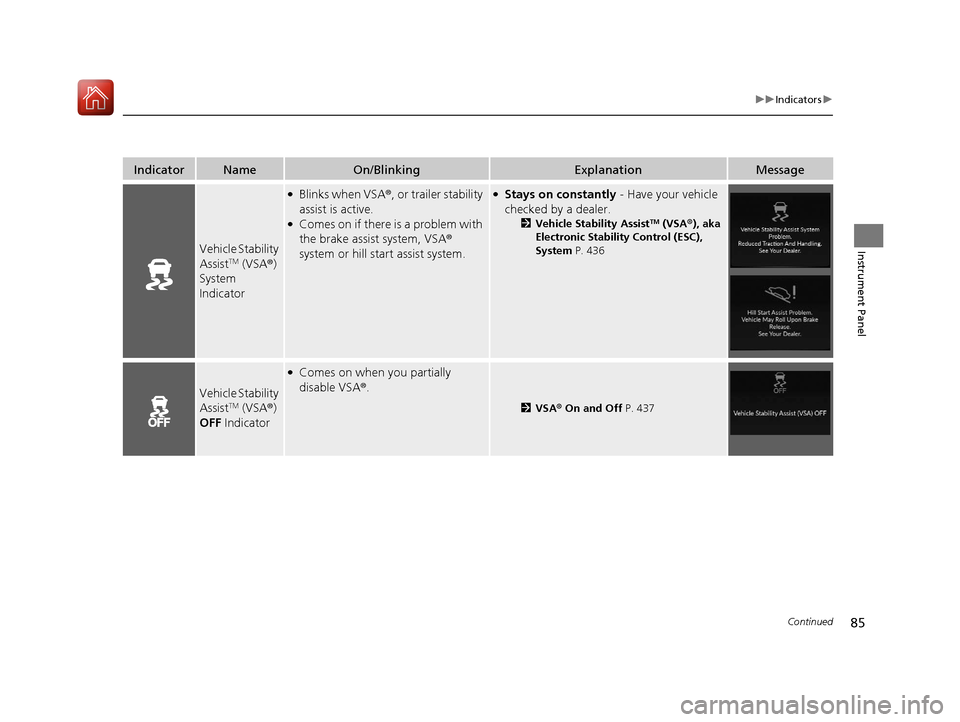
Vehicle Stability
AssistTM (VSA®)
System
Indicator
●Blinks when VSA ®, or trailer stability
assist is active.
●Comes on if there is a problem with
the brake assist system, VSA®
system or hill start assist system.
●Stays on constantly - Have your vehicle
checked by a dealer.
2 Vehicle Stability AssistTM (VSA ®), aka
Electronic Stability Control (ESC),
System P. 436
Vehicle Stability
AssistTM (VSA®)
OFF Indicator
●Comes on when you partially
disable VSA ®.
2 VSA ® On and Off P. 437
20 ACURA RDX-31TJB6111.book 85 ページ 2020年2月11日 火曜日 午後2時6分
Page 89 of 657
88
uuIndicators u
Instrument Panel
*1:Canadian models only: Apply and hold the brake pedal before selecting the ON mode.
IndicatorNameOn/BlinkingExplanationMessage*1
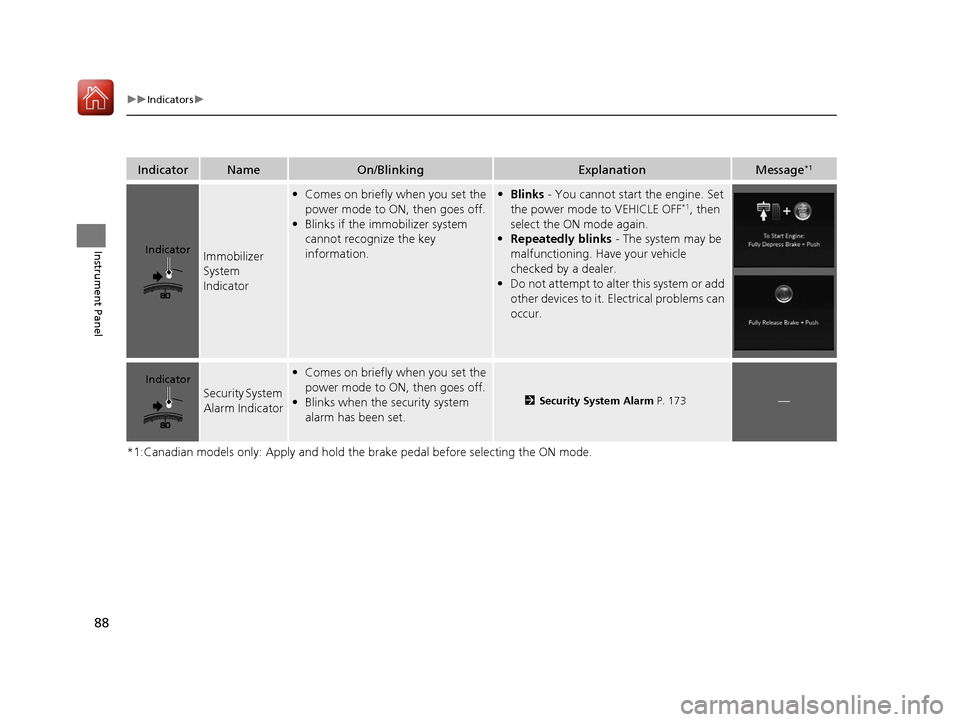
Immobilizer
System
Indicator
•Comes on briefly when you set the
power mode to ON, then goes off.
• Blinks if the immobilizer system
cannot recognize the key
information.• Blinks - You cannot start the engine. Set
the power mode to VEHICLE OFF*1, then
select the ON mode again.
• Repeatedly blinks - The system may be
malfunctioning. Have your vehicle
checked by a dealer.
• Do not attempt to alter this system or add
other devices to it. Electrical problems can
occur.
Security System
Alarm Indicator
•Comes on briefly when you set the
power mode to ON, then goes off.
• Blinks when the security system
alarm has been set.
2 Security System Alarm P. 173—
Indicator
Indicator
20 ACURA RDX-31TJB6111.book 88 ページ 2020年2月11日 火曜日 午後2時6分
Page 98 of 657
97
uuIndicators uMulti-Information Display Warning and Information Messages
Continued
Instrument Panel
Multi-Information Display Warn ing and Information Messages
The following messages appear only on the multi-information display. Roll the right selector wheel to see the message again with the
system message indicator on.
2 Switching the Display P. 129
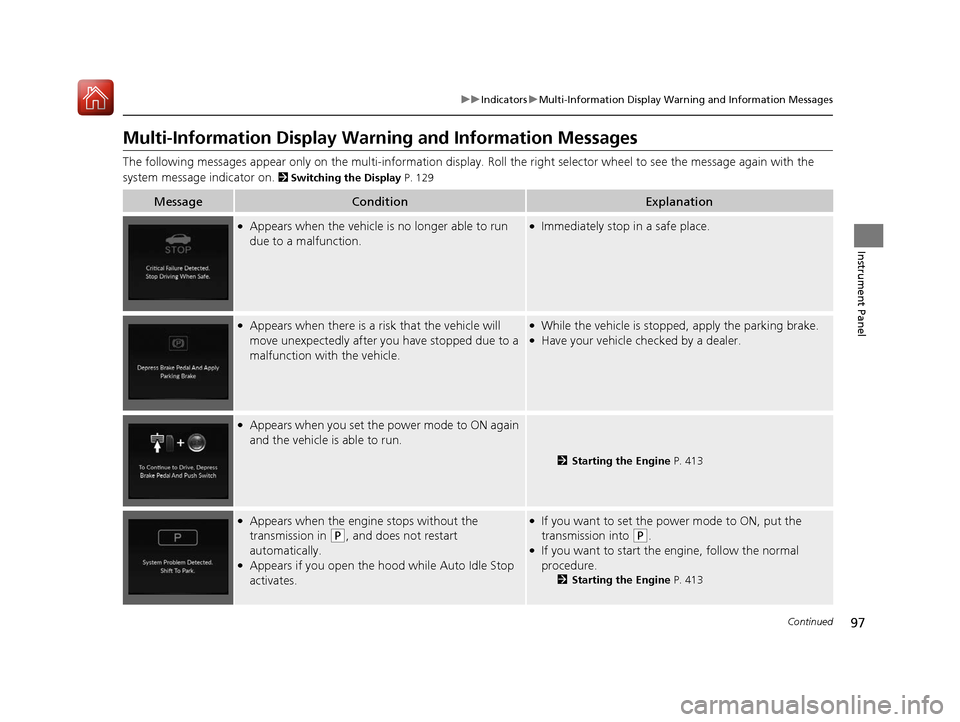
MessageConditionExplanation
●Appears when the vehicle is no longer able to run
due to a malfunction.●Immediately stop in a safe place.
●Appears when there is a ri sk that the vehicle will
move unexpectedly after you have stopped due to a
malfunction with the vehicle.●While the vehicle is stopped, apply the parking brake.●Have your vehicle checked by a dealer.
●Appears when you set the power mode to ON again
and the vehicle is able to run.
2 Starting the Engine P. 413
●Appears when the engine stops without the
transmission in
(P, and does not restart
automatically.
●Appears if you open the hood while Auto Idle Stop
activates.
●If you want to set the power mode to ON, put the
transmission into
(P.●If you want to start the engine, follow the normal
procedure.
2 Starting the Engine P. 413
20 ACURA RDX-31TJB6111.book 97 ページ 2020年2月11日 火曜日 午後2時6分
Page 100 of 657
99
uuIndicators uMulti-Information Display Warning and Information Messages
Continued
Instrument Panel
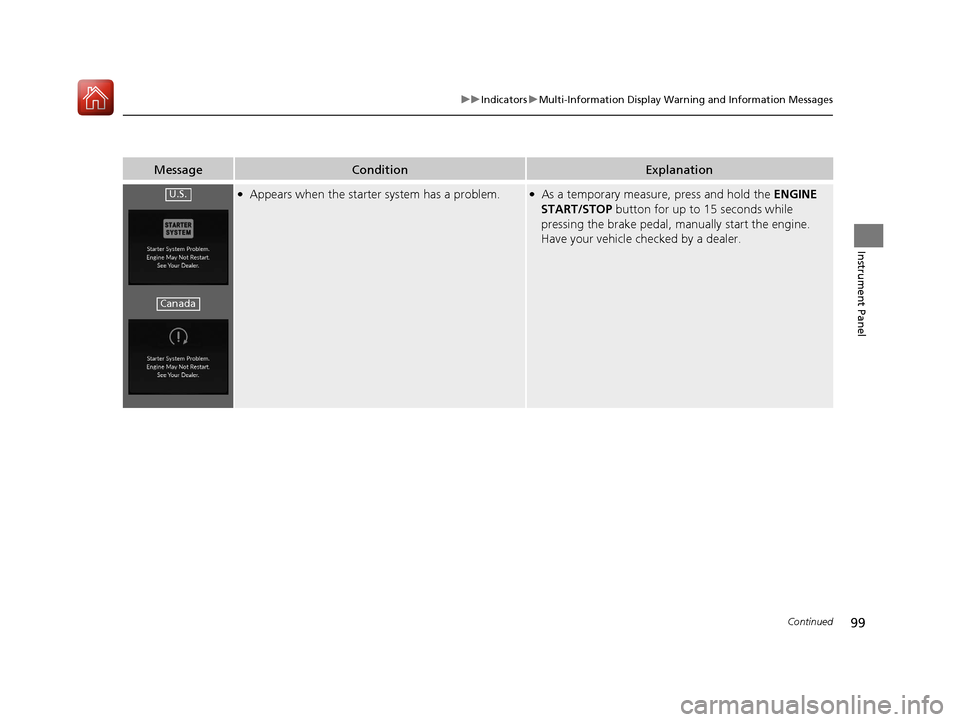
MessageConditionExplanation
●Appears when the starter system has a problem.●As a temporary measur e, press and hold the ENGINE
START/STOP button for up to 15 seconds while
pressing the brake pedal, manually start the engine.
Have your vehicle checked by a dealer.U.S.
Canada
20 ACURA RDX-31TJB6111.book 99 ページ 2020年2月11日 火曜日 午後2時6分