brake light Acura RDX 2020 User Guide
[x] Cancel search | Manufacturer: ACURA, Model Year: 2020, Model line: RDX, Model: Acura RDX 2020Pages: 657, PDF Size: 33.2 MB
Page 191 of 657
190
uuOperating the Switches Around the Steering Wheel uFog Lights*
Controls
Fog Lights*
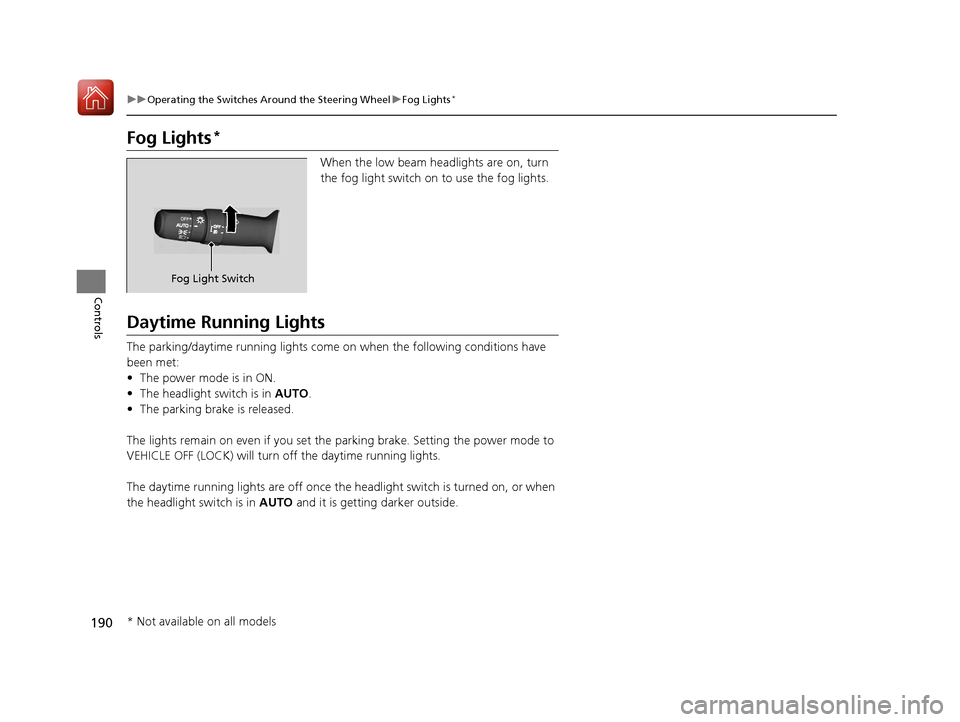
When the low beam headlights are on, turn
the fog light switch on to use the fog lights.
Daytime Running Lights
The parking/daytime running lights come on when the following conditions have
been met:
• The power mode is in ON.
• The headlight switch is in AUTO.
• The parking brake is released.
The lights remain on even if you set the parking brake. Setting the power mode to
VEHICLE OFF (LOCK) will turn off the daytime running lights.
The daytime running lights are off once the headlight switch is turned on, or when
the headlight switch is in AUTO and it is getting darker outside.
Fog Light Switch
* Not available on all models
20 ACURA RDX-31TJB6111.book 190 ページ 2020年2月11日 火曜日 午後2時6分
Page 203 of 657
uuOperating the Switches Around the Steering Wheel uDriving Position Memory System
202
Controls
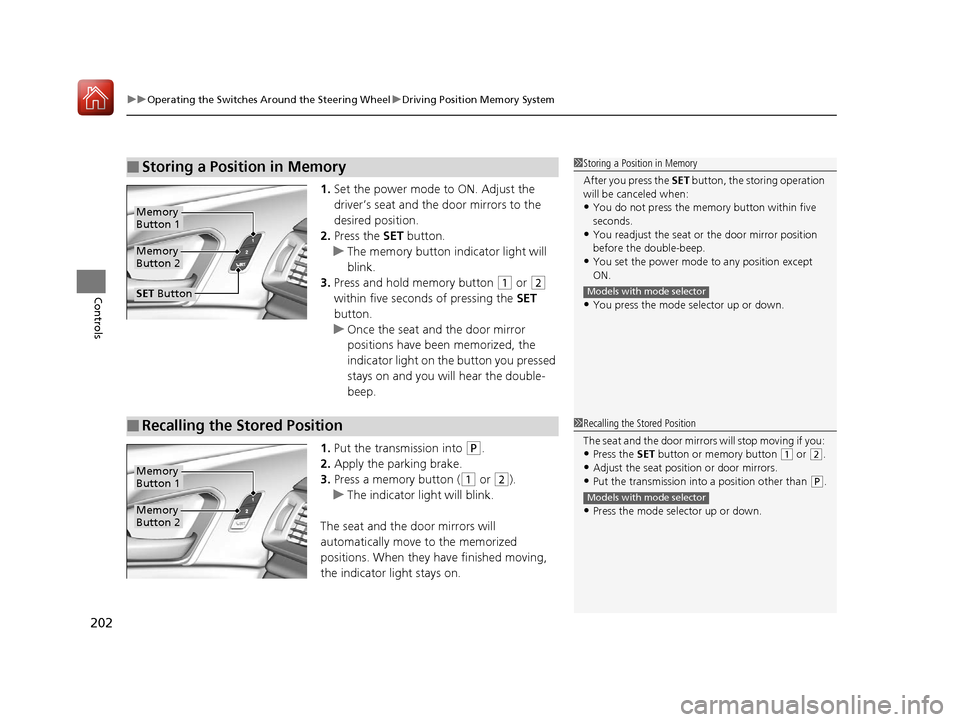
1. Set the power mode to ON. Adjust the
driver’s seat and th e door mirrors to the
desired position.
2. Press the SET button.
u The memory button i ndicator light will
blink.
3. Press and hold memory button
(1 or (2
within five seconds of pressing the SET
button.
u Once the seat and the door mirror
positions have been memorized, the
indicator light on the button you pressed
stays on and you will hear the double-
beep.
1. Put the transmission into
(P.
2. Apply the parking brake.
3. Press a memory button (
(1 or (2).
u The indicator light will blink.
The seat and the door mirrors will
automatically move to the memorized
positions. When they have finished moving,
the indicator light stays on.
■Storing a Position in Memory1 Storing a Position in Memory
After you press the SET button, the storing operation
will be canceled when:
•You do not press the memory button within five
seconds.
•You readjust the seat or the door mirror position
before the double-beep.
•You set the power mode to any position except
ON.
•You press the mode selector up or down.
Models with mode selector
Memory
Button 1
Memory
Button 2
SET Button
■Recalling the Stored Position1 Recalling the Stored Position
The seat and the door mirror s will stop moving if you:
•Press the SET button or memory button (1 or (2.
•Adjust the seat position or door mirrors.
•Put the transmission into a position other than (P.
•Press the mode selector up or down.
Models with mode selector
Memory
Button 1
Memory
Button 2
20 ACURA RDX-31TJB6111.book 202 ページ 2020年2月11日 火曜日 午後2時6分
Page 227 of 657
uuInterior Lights/Interior Convenience Items uInterior Convenience Items
226
Controls
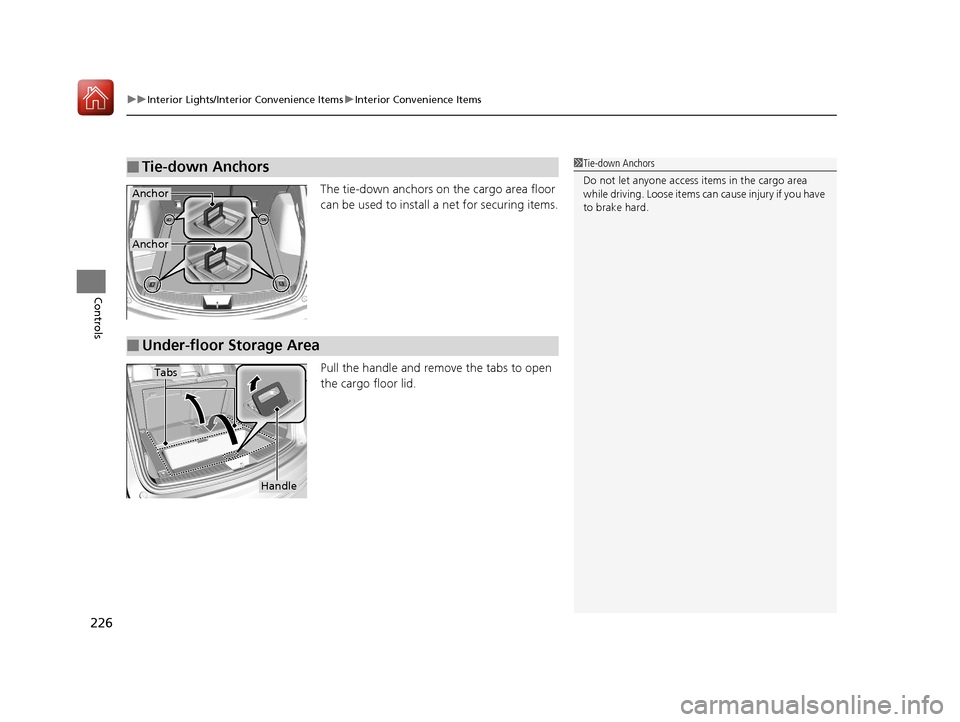
The tie-down anchors on the cargo area floor
can be used to install a net for securing items.
Pull the handle and remo ve the tabs to open
the cargo floor lid.
■Tie-down Anchors1 Tie-down Anchors
Do not let anyone access items in the cargo area
while driving. Loose items ca n cause injury if you have
to brake hard.
Anchor
Anchor
■Under-floor Storage Area
Tabs
Handle
20 ACURA RDX-31TJB6111.book 226 ページ 2020年2月11日 火曜日 午後2時6分
Page 402 of 657
Continued401
uuBefore Driving uDriving Preparation
Driving
• Store or secure all items on board properly.
u Carrying too much cargo, or improperly storing it, can affect your vehicle’s
handling, stability, sto pping distance, and tires, and make it unsafe.
2Maximum Load Limit P. 403
•Do not pile items higher than the seat height.
u They can block your view and may be thrown forward in the event of sudden
braking.
• Do not place anything in the front seat footwells. Make sure to secure the floor
mat.
u An object or unsecured floor mat can in terfere with your brake and accelerator
pedal operation while driving.
• If you have any animals on board, do not let them move around in the vehicle.
u They may interfere with driving and a crash could occur.
• Securely close and lock al l doors and the tailgate.
2Locking/Unlocking the Doors from the Inside P. 159
•Adjust your seating position properly.
u Adjust the head restraint, too.
2Adjusting the Seats P. 207
2 Adjusting the Front and Rear Outer Head Restraint Positions P. 212
•Adjust the mirrors and steering wheel properly.
u Adjust them while sitting in the proper driving position.
2 Adjusting the Steering Wheel P. 203
2 Adjusting the Mirrors P. 204
■Interior Checks1Interior Checks
The headlight aim is set by the factory, and does not
need to be adjusted. Howeve r, if you regularly carry
heavy items in the cargo area or tow a trailer, have
the aiming readjusted at a dealer or by a qualified
technician.
20 ACURA RDX-31TJB6111.book 401 ページ 2020年2月11日 火曜日 午後2時6分
Page 408 of 657
Continued407
uuTowing a Trailer uTowing Preparation
Driving
Towing equipment varies by th e size of your trailer, how much load you are towing,
and where you are towing.
■Hitches
The hitch must be of an approved type and properly bolted to the underbody.
■Safety chains
Always use safety chains when you tow a trailer. Leave enough slack to allow the
trailer to turn corners easily, but do not allow the chains to drag on the ground.
■Trailer brakes
Recommended for any trailer with a total weight of 1,000 lbs (450 kg) or more:
There are two common types of trailer bra kes: surge and electric. Surge brakes are
common for boat trailers, since the brakes will get wet. If you choose electric brakes,
be sure they are electronically actuated. Do not attempt to attach trailer brakes to
your vehicle’s hydraulic system, as it wi ll lower braking effectiveness and create a
potential hazard.
■Additional towing equipment
Many states and provinces/territories requ ire special outside mirrors when towing a
trailer. Even if mirrors are not required in your locale, you should install special
mirrors if visibility is restricted in any way.
■Towing Equipment and Accessories1Towing Equipment and Accessories
Make sure that all equipment is properly installed and
maintained, and that it meets federal, state, province/
territory, and lo cal regulations.
Consult your traile r sales or rental agency if any other
items are recommended or required for your towing
situation.
The lighting and wiring of tra ilers can vary by type
and brand. If a connector is required, it should only
be installed by a qua lified technician.
20 ACURA RDX-31TJB6111.book 407 ページ 2020年2月11日 火曜日 午後2時6分
Page 410 of 657
409
uuTowing a Trailer uDriving Safely with a Trailer
Continued
Driving
Driving Safely with a Trailer
• Have the trailer properly servic ed and keep it in good condition.
• Make sure that all the weights and load in the vehicle and trailer are within limits.
2Towing Load Limits P. 405
•Securely attach the hitch, safety chains, and other necessary parts to the trailer.
• Securely store all the items in and on the tra iler so that they do not shift while
driving.
• Check if the lights and brakes on the trailer are working properly.
• Check the pressures of the traile r tires, including the spare.
• Turn off the Auto Idle Stop syst em using the Auto Idle Stop OFF button. The
trailer weight can affect your vehicle’s brake effectiveness if Auto Idle Stop is
activated on a hill wh ile towing a trailer.
• Drive slower than normal.
• Obey posted speed limits fo r vehicles with trailers.
• Use the
(D position when towing a trailer on level roads.
• Turn more slowly and with a wider turning arc than normal.
• Allow more time and distance for braking.
• Do not brake or turn suddenly.
■Things You Need To Know Before Towing a Trailer
■Towing Speeds and Gears
■Turning and Braking
1Driving Safely with a Trailer
Operating speed when towing a trailer must not
exceed 62 mph (100 km/h).
Parking
In addition to the normal precautions, place wheel
chocks at each of the trailer’s tires.
20 ACURA RDX-31TJB6111.book 409 ページ 2020年2月11日 火曜日 午後2時6分
Page 414 of 657

413Continued
Driving
When Driving
Starting the Engine
1.Make sure the parkin g brake is applied.
u The Parking Brake and Brake System
indicator (red) comes on for 30 seconds
when you press the electric parking
brake switch.
u The parking brake must be applied to
start the engine.
2. Depress the brake pedal.
u Although it is possible to start the vehicle
in
(N with the parking brake is applied, it
is safer to start it in
(P.
3. Press the ENGINE START/STOP button
without depressing the accelerator pedal.
1 Starting the Engine
Keep your foot firmly on the brake pedal when
starting the engine.
The engine is harder to start in cold weather and in thinner
air found at altitudes above 8,000 feet (2,400 meters).
When starting the engine in cold weather, turn off all
electrical accessories such as the lights, climate
control system, and rear de fogger in order to reduce
battery drain.
If you live in a region where winter is extremely cold,
an engine block heater will improve starting and
warming of the engine. Consult a dealer for details.
If the exhaust system sounds abnormal or you can
smell exhaust gas inside the vehicle, have your vehicle
checked by a dealer. There may be a problem with
the engine or exhaust system.
Bring the keyless access remote close to the ENGINE
START/STOP button if the batte ry in the keyless
access remote is weak. 2 If the Keyless Access Remote Battery is
Weak P. 608
The engine may not start if the keyless access remote
is subjected to strong radio waves.
Do not hold the ENGINE START/STOP button to
start the engine.
If the engine does not start, wait at least 30 seconds
before trying again.
Electric Parking
Brake Switch
Brake Pedal
20 ACURA RDX-31TJB6111.book 413 ページ 2020年2月11日 火曜日 午後2時6分
Page 423 of 657

uuWhen Driving uShifting
422
Driving
■Shift Operation1Shift Operation
NOTICE
When you change (D to (R and vice versa, come to
a complete stop and keep the brake pedal depressed.
Operating the shift button before the vehicle has
come to a complete standstill can damage the
transmission.
Use the gear position indicator and the shift button
indicator to check the gear position before selecting
a shift button.
If the indicator of the curren tly selected gear position,
or all the gear position indicators are blinking
simultaneously, there is a problem with the
transmission.
Avoid sudden acceleration and have the transmission
checked by a dealer as soon as possible.
The fuel supply may be cut of f if you drive at engine
speeds in or over the tac hometer’s red zone (engine
speed limit). If this happe ns, you may experience a
slight jolt.
When the engine speed is increased while the
transmission is in
( N, (P or (R, the fuel supply may
be cut off even without the engine speed entering
the tachometer’s red zone.
The beeper sounds once when you change to
( R.
2 Customized Features P. 335
Gear Position Indicator
Tachometer’s red zone
Press the (P button.
Pull back the (R button.
Press the
( N button.
Shift Button
Indicator M
(sequential mode)
Indicator
Sequential Mode Gear
Selection Indicator
Press the button.
Each time you press the button,
the mode switches between
Drive and S Position mode.D/S
20 ACURA RDX-31TJB6111.book 422 ページ 2020年2月11日 火曜日 午後2時6分
Page 435 of 657
uuWhen Driving uAuto Idle Stop
434
Driving
• The brake pedal is released (without the automatic brake hold system activated).
• The accelerator pedal is depressed (with the automatic brake hold system
activated).
2 Automatic Brake Hold P. 497
■The engine restarts even if the brake pedal is depressed*1 when:
• The Auto Idle Stop OFF button is pressed.
• A steering wheel is operated.
• The transmission is put into
(R, (S, and (P, or taken out of (N and put into (D.
• The pressure on the brake pedal is redu ced and the vehicle starts moving while
stopped on an incline.
• The brake pedal is released slightly during a stop.
• The battery charge becomes low.
• The accelerator pedal is depressed.
• The driver’s seat belt is unlatched.
• is ON (indicator on).
• The climate control system is in us e, and the difference between the set
temperature and actual interior temperature becomes significant.
• The climate control system is bein g used to dehumidify the interior.
• The vehicle ahead of you starts again when your vehicle stops automatically with
ACC with Low Speed Follow.
• The dynamic mode is changed to Snow or Sport+ mode.
■The Engine Automatically Restarts When:1The Engine Automatically Restarts When:
If you are using an electroni c device during Auto Idle
Stop, the device may tempor arily be turned off when
the engine restarts.
1 The engine restarts even if the brake pedal is depressed*1 when:
*1: With the automatic brake hold system activated,
you can release the brake pe dal during Auto Idle Stop
is in operation.
If the automatic brake hold system has been turned
off, or if there is a problem with the system, the
engine will restart automatically when you release
the brake pedal. 2 Automatic Brake Hold P. 497
20 ACURA RDX-31TJB6111.book 434 ページ 2020年2月11日 火曜日 午後2時6分
Page 439 of 657
438
uuWhen Driving uAgile Handling Assist
Driving
Agile Handling Assist
Lightly brakes each of the front and rear wheels, as needed, when you turn the
steering wheel, and helps support the vehicle’s stability and performance during
cornering.
Lightly brakes the front wheel s, as needed, when you turn the steering wheel, and
helps support the vehicle’s stability and performance during cornering.
1 Agile Handling Assist
The agile handling assist ca nnot enhance stability in
all driving situations. You still need to drive and
corner at speeds appropriate for the conditions and
always leave a sufficient margin of safety.
When the VSA ® system indicator comes on and stays
on while driving, the agil e handling assist does not
activate.
You may hear a sound coming from the engine
compartment while the agile handling assist is
activated. This is normal.AWD models
2WD models
20 ACURA RDX-31TJB6111.book 438 ページ 2020年2月11日 火曜日 午後2時6分