charging Acura RDX 2020 User Guide
[x] Cancel search | Manufacturer: ACURA, Model Year: 2020, Model line: RDX, Model: Acura RDX 2020Pages: 657, PDF Size: 33.2 MB
Page 584 of 657
583
Handling the Unexpected
This chapter explains how to handle unexpected troubles.
ToolsTypes of Tools .................................. 584
If a Tire Goes Flat
Changing a Flat Tire ......................... 585
Temporarily Repairi ng a Flat Tire....... 593
Engine Does Not Start Checking the Engine ........................ 607
If the Keyless Access Remote Battery is Weak ............................................. 608
Emergency Engine Stop ................... 609
Jump Starting .................................... 610
Vehicles with a compact spare tire
Vehicles with temporary tire repair kit
Overheating
How to Handle Overheating............. 612
Indicator, Coming On/Blinking
If the Low Oil Pressure Warning Appears ... 614If the Charging System Indicator Comes On... 615If the Malfunction Indicator Lamp Comes On or Blinks ................................... 615
If the Brake System Indicator (Red) Comes
On or Blinks ....................................... 616
If the Electric Power Steering (EPS) System
Indicator Comes On ........................... 617
If the Brake System Indicator (Red) Comes On or Blinks at the Same Time When the Brake
System Indicator (Amber) Comes On .....618
If the Low Tire Pressure/TPMS Indicator Comes On or Blinks ....................... 619
If the Transmission System Indicator Blinks along with the Warning Message .... 620
Fuses
Fuse Locations ................................. 621
Inspecting and Changing Fuses ........ 627
Emergency Towing ........................... 628
When You Cannot Unlock the Fuel Fill Door ................................................. 629
When You Cannot Open the Tailgate.. 630Refueling ........................................... 631
20 ACURA RDX-31TJB6111.book 583 ページ 2020年2月11日 火曜日 午後2時6分
Page 611 of 657
610
Handling the Unexpected
Jump Starting
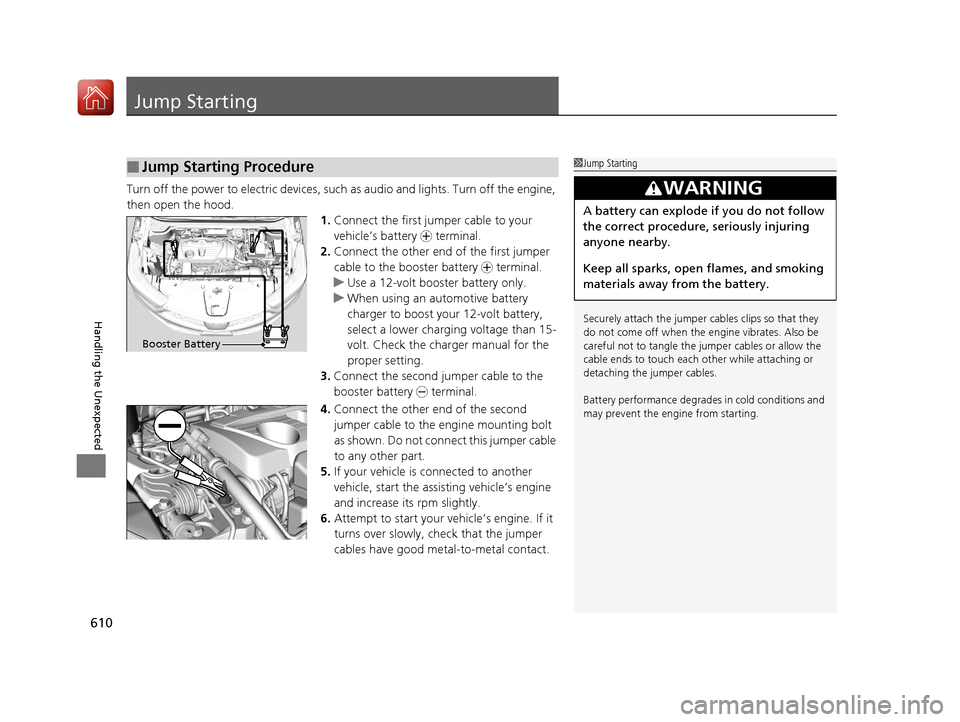
Turn off the power to electric devices, such as audio and lights. Turn off the engine,
then open the hood. 1.Connect the first jump er cable to your
vehicle’s battery + terminal.
2. Connect the other end of the first jumper
cable to the booster battery + terminal.
u Use a 12-volt booster battery only.
u When using an automotive battery
charger to boost your 12-volt battery,
select a lower charging voltage than 15-
volt. Check the charger manual for the
proper setting.
3. Connect the second jumper cable to the
booster battery - terminal.
4. Connect the other end of the second
jumper cable to the engine mounting bolt
as shown. Do not connect this jumper cable
to any other part.
5. If your vehicle is connected to another
vehicle, start the assisting vehicle’s engine
and increase its rpm slightly.
6. Attempt to start your vehicle’s engine. If it
turns over slowly, check that the jumper
cables have good metal-to-metal contact.
■Jump Starting Procedure1Jump Starting
Securely attach the jumper cables clips so that they
do not come off when the e ngine vibrates. Also be
careful not to tangle the ju mper cables or allow the
cable ends to touch each other while attaching or
detaching the jumper cables.
Battery performance degrades in cold conditions and
may prevent the engi ne from starting.
3WARNING
A battery can explode if you do not follow
the correct procedure, seriously injuring
anyone nearby.
Keep all sparks, open flames, and smoking
materials away from the battery.
Booster Battery
20 ACURA RDX-31TJB6111.book 610 ページ 2020年2月11日 火曜日 午後2時6分
Page 616 of 657
615
uuIndicator, Coming On/Blinking uIf the Charging System Indicator Comes On
Handling the Unexpected
If the Charging System Indicator Comes On
■Reasons for the indicator to come on
Comes on when the battery is not being charged.
■What to do when th e indicator comes on
Turn off the climate control system, rear defogger, and other electrical
systems, and immediately co ntact a dealer for repairs.
If the Malfunction Indicator Lamp Comes On or
Blinks
■Reasons for the indicator la mp to come on or blink
• Comes on when there is a problem with the engine emissions control
system.
• Blinks when engine misfiring is detected.
■What to do when the indicator lamp comes on
Avoid high speeds and immediately get your vehicle inspected at a
dealer.
■What to do when the indicator lamp blinks
Park the vehicle in a safe place with no flammable items and wait at least
10 minutes or more with the engine stopped until it cools.
1 If the Charging System Indicator Comes On
If you need to stop temporarily, do not turn off the
engine. Restarting the engi ne may rapidly discharge
the battery.
1 If the Malfunction Indicato r Lamp Comes On or Blinks
NOTICE
If you drive with the malf unction indicator lamp on,
the emissions control system and the engine could be
damaged.
If the malfunction indicator lamp blinks again when
restarting the engine, drive to the nearest dealer at
31 mph (50 km/h) or less. Have your vehicle
inspected.
20 ACURA RDX-31TJB6111.book 615 ページ 2020年2月11日 火曜日 午後2時6分
Page 647 of 657
646
Index
Automatic Transmission........................... 419
Creeping ................................................. 419
Fluid ........................................................ 548
Kickdown ................................................ 419
Operating the Shift Button....................... 422
Sequential Shift Mode ............................. 426
Shifting.................................................... 420
Auxiliary Input Jack .................................. 241
Average Fuel Economy ............................. 131
AWD .......................................................... 439
B
Battery ....................................................... 569
Charging System Indicator ................. 79, 615
Jump Starting .......................................... 610
Maintenance (Checking the Battery) ........ 569
Belts (Seat) .................................................. 35
Beverage Holders ...................................... 223
Blind spot information System ................ 444
Bluetooth ® Audio ..................................... 296
Bluetooth ® HandsFreeLink ®..................... 361
Booster Seats (For Children) ....................... 70
Brake System ............................................. 492
Anti-lock Brake System (ABS) ................... 499
Automatic Brake Hold.............................. 497
Brake Assist System ................................. 500
Fluid ........................................................ 549
Foot Brake ............................................... 496
Indicator ...................................... 75, 76, 616
Indicator (Red) ......................................... 618 Parking Brake .......................................... 492
Brightness Control (Instrument Panel) .... 198
Built-in Key ............................................... 147
Bulb Replacement .................................... 551
Fog Lights ............................................... 551
Front Turn Signal, Parking/Daytime Running and Front Side Marker Lights ... 551
Headlights ............................................... 551
High-Mount Brake Light .......................... 554
Puddle Lights........................................... 554
Rear License Plate Light ........................... 554
Rear Turn Signal Light Bulbs .................... 552
Side Turn Signal/Emergency Indicator Lights .................................................... 551
Taillights, Brake and Rear Side Marker Lights .................................................... 553
Taillights/Brake and Back-Up Lights ......... 554
Bulb Specifications ................................... 634
C
CAMERA Button....................................... 514
Carbon Monoxide Gas ............................... 71
Carrying Cargo ................................. 401, 403
Certification Label .................................... 636
Changing Bulbs ........................................ 551
Charging System Indicator ................. 79, 615
Child Safety ................................................. 58
Childproof Door Locks............................. 161
Child Seat .................................................... 58
Booster Seats ............................................ 70 Child Seat for Infants ................................ 60
Child Seat for Small Children .................... 61
Installing a Child Seat
with a Lap/Shoulder
Seat Belt ................................................. 65
Larger Children ......................................... 69
Rear-facing Child Seat............................... 60
Selecting a Child Seat ............................... 62
Childproof Door Locks ............................. 161
Cleaning the Exterior ............................... 577
Cleaning the Interior ............................... 575
Client Service Information ....................... 644
Climate Control System ........................... 230
Changing the Mode................................ 230
Defrosting the Windshield and
Windows .............................................. 232
Dust and Pollen Filter .............................. 574
Rear Temperature Control Dial ................ 234
Recirculation/Fresh Air Mode................... 230
Sensors ................................................... 235
Synchronized Mode ................................ 233
Using Automatic Climate Control............ 230
Clock ......................................................... 144
CMBSTM (Collision Mitigation Braking
SystemTM) ................................................ 450
Coat Hook ................................................ 225
Collision Mitigation Braking System
TM
(CMBSTM) ................................................. 450
Compact Spare Tire .......................... 585, 635
Console Compartment ............................. 222
Controls .................................................... 143
20 ACURA RDX-31TJB6111.book 646 ページ 2020年2月11日 火曜日 午後2時6分
Page 650 of 657
649
Index
Auto Idle Stop (Green) .............................. 82
Auto Idle Stop System (Amber) ................. 82
Automatic Brake Hold ....................... 77, 497
Automatic Brake Hold System ........... 77, 497
Blind spot information System................... 96
Charging System............................... 79, 615
Collision Mitigation Braking System
TM
(CMBSTM) ................................................ 93
Electric Power Steering (EPS) System ............................................ 84, 617
Fog Light .................................................. 87
Gear Position ............................................ 79
High Beam ................................................ 87
Immobilizer System ................................... 88
Lane Keeping Assist System (LKAS) (Amber) .................................................. 91
Lane Keeping Assist System (LKAS)
(Green) ........................................... 91, 479
Lights On .................................................. 87
Low Fuel ................................................... 83
Low Oil Pressure ..................................... 614
Low Tire Pressure/TPMS .................... 86, 619
M (sequential mode) Indicator/Gear Selection Indicator................................... 79
Maintenance Minder................................. 90
Malfunction Indicator Lamp .............. 78, 615
Parking Brake and Brake System (Amber) .......................................... 76, 618
Parking Brake and Brake System (Red) ....................................... 75, 616, 618
Road Departure Mitigation (RDM) ............. 92 Safety Support (Amber) ............................. 92
Seat Belt Reminder .............................. 36, 83
Security System Alarm ............................... 88
Super Handling-All Wheel Drive
TM
(SH-AWD® ) .............................................. 90
Supplemental Restraint System ............ 55, 84
System Message ........................................ 89
Transmission System .......................... 80, 620
Turn Signal and Haza rd Warning ............... 87
Vehicle Stability Assist
TM (VSA ®) OFF ........... 85
Vehicle Stability AssistTM (VSA ®)
System............................................. 85, 436
VSA ® OFF ................................................ 437
Information ............................................... 633
Instant Fuel Economy ............................... 131
Instrument Panel ........................................ 73
Brightness Control ................................... 198
Integrated Dynamics System .................... 428
Dynamic Mode button ............................. 428
Interior Lights ........................................... 219
Interior Rearview Mirror .......................... 204
iPad ............................................................ 314
iPhone ....................................................... 314
iPod ................................................... 290, 314
J
Jack (Wheel Nut Wrench) ........................ 589
Jump Starting ........................................... 610
K
Key Number Tag ....................................... 148
Keyless Access System .............................. 150
Keyless Lockout Prevention ..................... 157
Keys ........................................................... 146
Lockout Prevention.................................. 157
Number Tag ............................................ 148
Rear Door Won’t Open............................ 161
Remote Transmitter ................................. 155
Two-way Keyless Access Remote ..... 158, 415
Types and Functions ................................ 146
Kickdown (Automatic Transmission) ....... 419
Knee Airbags .............................................. 49
L
Lane Keeping Assist System (LKAS) ......... 477
LATCH (Child Seats) .............................. 63, 67
Legal Information .................................... 328
License Information ................................. 331
Lights ................................................. 186, 551
Automatic ............................................... 187
Bulb Replacement ................................... 551
Daytime Running Lights........................... 190
Fog Lights ............................................... 190
High Beam Indicator .................................. 87
Interior .................................................... 219
Light Switches ......................................... 186
Lights On Indicator .................................... 87
Turn Signals and Hazard Warning............ 185
Load Limits ................................................ 403
20 ACURA RDX-31TJB6111.book 649 ページ 2020年2月11日 火曜日 午後2時6分