wipers Acura RDX 2020 User Guide
[x] Cancel search | Manufacturer: ACURA, Model Year: 2020, Model line: RDX, Model: Acura RDX 2020Pages: 657, PDF Size: 33.2 MB
Page 198 of 657
197
uuOperating the Switches Around the Steering Wheel uWipers and Washers
Controls
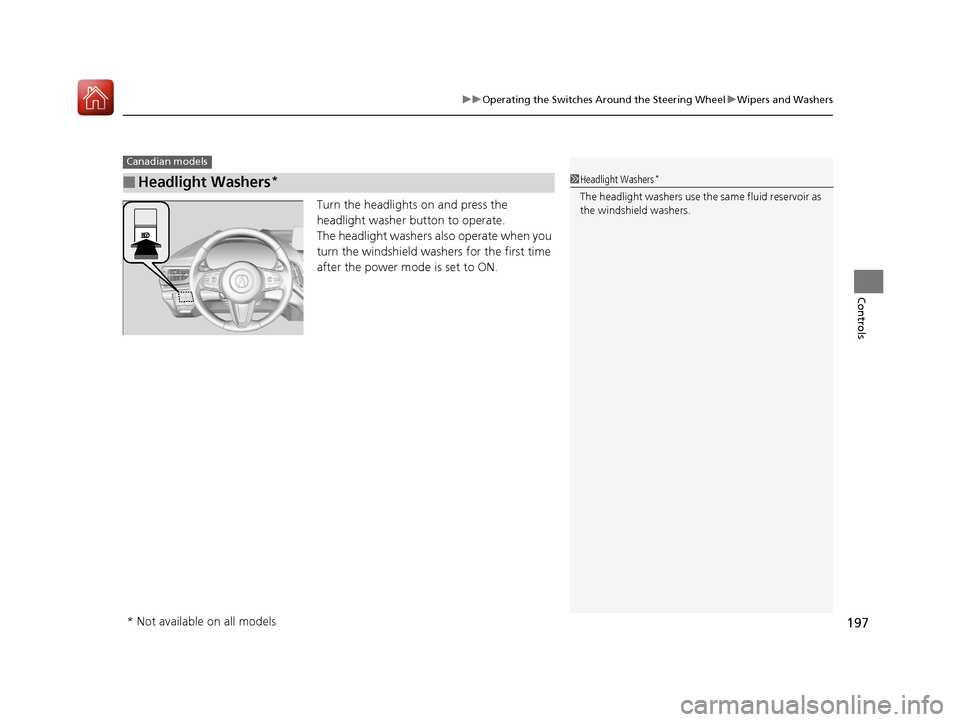
Turn the headlights on and press the
headlight washer button to operate.
The headlight washers also operate when you
turn the windshield washers for the first time
after the power mode is set to ON.
■Headlight Washers*
Canadian models
1Headlight Washers*
The headlight washers use th e same fluid reservoir as
the windshield washers.
* Not available on all models
20 ACURA RDX-31TJB6111.book 197 ページ 2020年2月11日 火曜日 午後2時6分
Page 352 of 657
351
uuCustomized Features u
Continued
Features
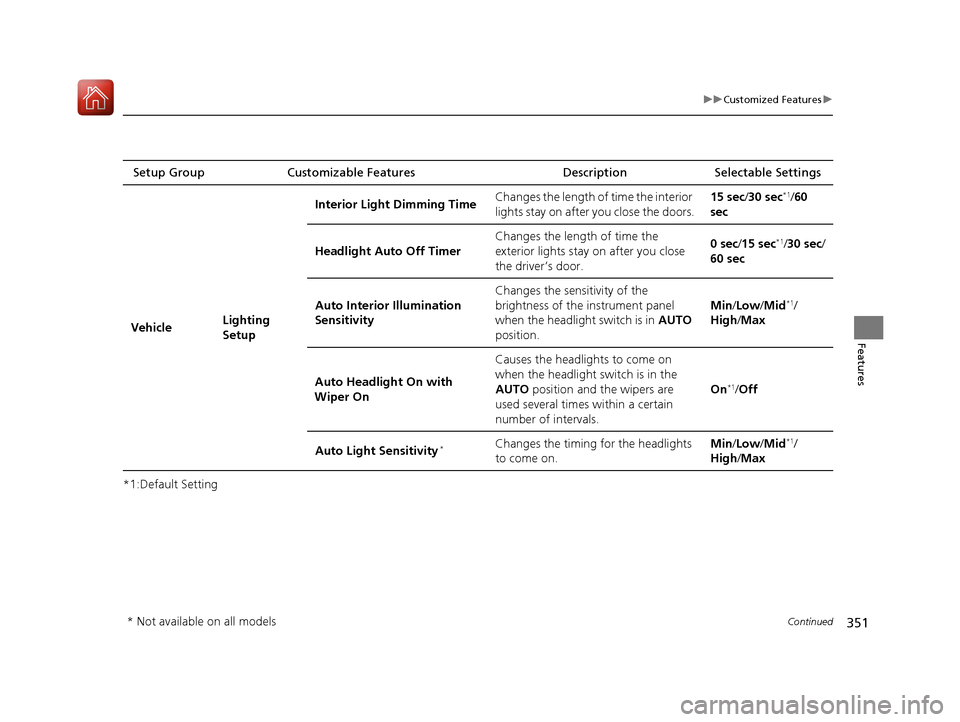
*1:Default SettingSetup Group Customizable Features
Description Selectable Settings
Vehicle Lighting
SetupInterior Ligh
t Dimming Time Changes the length of time the interior
lights stay on after you close the doors. 15 sec/
30 sec
*1/60
sec
Headlight Auto Off Timer Changes the length of time the
exterior lights stay on after you close
the driver’s door. 0 sec
/15 sec
*1/30 sec /
60 sec
Auto Interior Illumination
Sensitivity Changes the sensitivity of the
brightness of the instrument panel
when the headlight switch is in
AUTO
position. Min/
Low/ Mid
*1/
High /Max
Auto Headligh t On with
Wiper On Causes the headlights to come on
when the headlight switch is in the
AUTO
position and the wipers are
used several times within a certain
number of intervals. On
*1/
Off
Auto Light Sensitivity
*Changes the timing for the headlights
to come on. Min/
Low/ Mid*1/
High /Max
* Not available on all models
20 ACURA RDX-31TJB6111.book 351 ページ 2020年2月11日 火曜日 午後2時6分
Page 480 of 657
Continued479
uuAcuraWatchTMuLane Keeping Assist System (LKAS)
Driving
The system can be used when th e following conditions are met.
• The lane in which you are driving has detectable lane markers on both sides, and
your vehicle is in the center of the lane.
• The vehicle speed is between about 45 and 90 mph (72 and 145 km/h).
• You are driving on a straight or slightly curved road.
• The turn signals are off.
• The brake pedal is not depressed.
• The wipers are not in continuous operation.
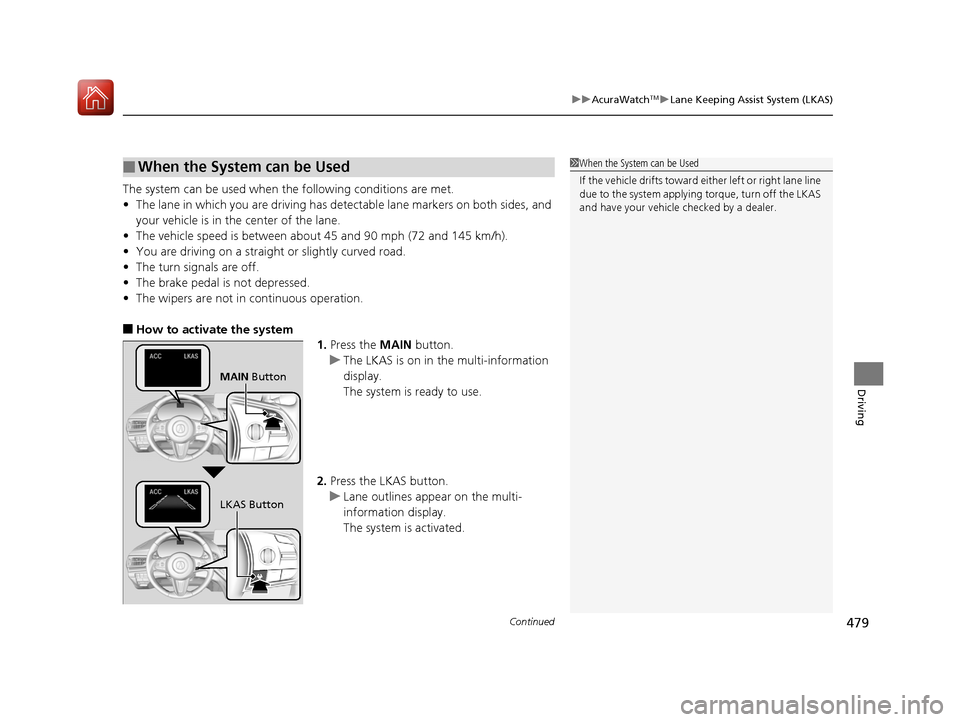
■How to activate the system
1.Press the MAIN button.
u The LKAS is on in the multi-information
display.
The system is ready to use.
2. Press the LKAS button.
u Lane outlines appear on the multi-
information display.
The system is activated.
■When the System can be Used1When the System can be Used
If the vehicle drifts toward ei ther left or right lane line
due to the system applying torque, turn off the LKAS
and have your vehicle checked by a dealer.
MAIN Button
LKAS Button
20 ACURA RDX-31TJB6111.book 479 ページ 2020年2月11日 火曜日 午後2時6分
Page 482 of 657
481
uuAcuraWatchTMuLane Keeping Assist System (LKAS)
Continued
Driving
■The system operation is suspended if
you:
• Set the wipers to HI .
u Turning the wipers o ff or setting it to LO
resumes the LKAS.
• Set the wiper switch to AUTO and the
wipers operate at high speed.
u The LKAS resumes when the wipers stop
or operate at low speed.
• Decrease the vehicle speed to about 40 mph
(64 km/h) or less.
u Increasing the vehicle speed to about
45 mph (72 km/h) or more resumes the
LKAS.
• Depress the brake pedal.
u The LKAS resumes and starts detecting
the lane lines again once you release the
brake pedal.
■The LKAS may automatica lly be suspended when:
• The system fails to detect lane lines.
• The steering wheel is quickly turned.
• You fail to steer the vehicle.
• Driving through a sharp curve.
• Driving at a speed in excess of approximately 90 mph (145 km/h).
Once these conditions no longer exist, the LKAS automatically resumes.
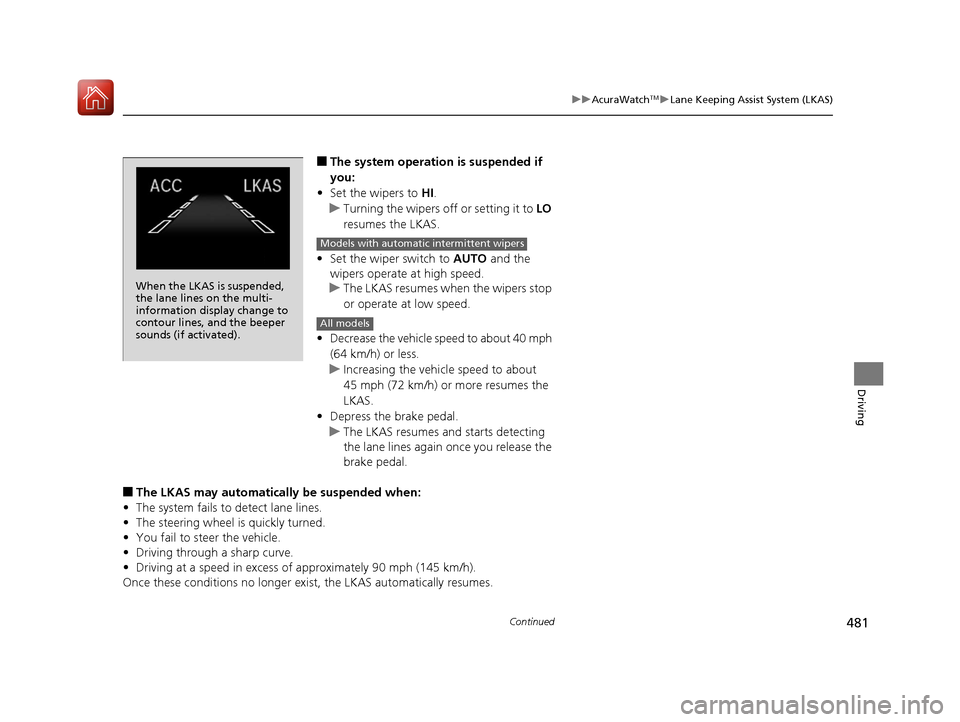
When the LKAS is suspended,
the lane lines on the multi-
information display change to
contour lines, and the beeper
sounds (if activated).
Models with automatic intermittent wipers
All models
20 ACURA RDX-31TJB6111.book 481 ページ 2020年2月11日 火曜日 午後2時6分
Page 487 of 657

uuAcuraWatchTMuRoad Departure Mitigation (RDM) System
486
Driving
The system becomes ready to start sear ching for lane markings when all the
following conditions are met:
• The vehicle is traveling between about 45 and 90 mph (72 and 145 km/h).
• The vehicle is on a straight or slightly curved road.
• The turn signals are off.
• The brake pedal is not depressed.
• The wipers are not in continuous operation.
• The vehicle is not accelerating or braking, and the steering wheel is not being
turned.
• The system makes a determination that th e driver is not actively accelerating,
braking or steering.
■How the System Activates1 How the System Activates
The RDM system may automa tically shut off and the
indicator comes and stays on.
2 Indicators P. 74
RDM system function can be impacted when the
vehicle is:
•Not driven within a traffic lane.•Driven on the inside edge of a curve, or outside of
a lane.
•Driven in a narrow lane.
20 ACURA RDX-31TJB6111.book 486 ページ 2020年2月11日 火曜日 午後2時6分
Page 540 of 657
539
uuMaintenance Under the Hood uOpening the Hood
Maintenance
Opening the Hood
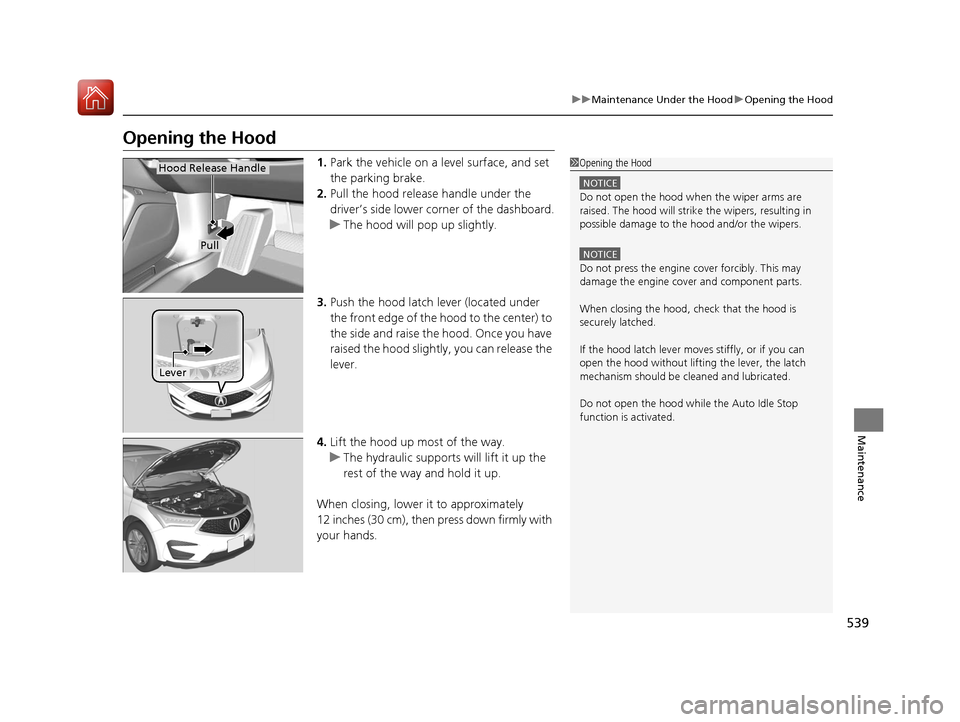
1. Park the vehicle on a level surface, and set
the parking brake.
2. Pull the hood release handle under the
driver’s side lower corner of the dashboard.
u The hood will pop up slightly.
3. Push the hood latch lever (located under
the front edge of the hood to the center) to
the side and raise the hood. Once you have
raised the hood slightly , you can release the
lever.
4. Lift the hood up most of the way.
u The hydraulic supports will lift it up the
rest of the way and hold it up.
When closing, lower it to approximately
12 inches (30 cm), then press down firmly with
your hands.1 Opening the Hood
NOTICE
Do not open the hood when the wiper arms are
raised. The hood will strike the wipers, resulting in
possible damage to the hood and/or the wipers.
NOTICE
Do not press the engine cover forcibly. This may
damage the engine cover and component parts.
When closing the hood, check that the hood is
securely latched.
If the hood latch lever moves stiffly, or if you can
open the hood without lifti ng the lever, the latch
mechanism should be cl eaned and lubricated.
Do not open the hood while the Auto Idle Stop
function is activated.
Hood Release Handle
Pull
Lever
20 ACURA RDX-31TJB6111.book 539 ページ 2020年2月11日 火曜日 午後2時6分
Page 577 of 657

uuCleaning uInterior Care
576
Maintenance
Wipe using a glass cleaner.
The front floor mats hook over floor anchors,
which keep them from sliding forward. To
remove a mat for cleaning, turn the anchor
knobs to the unlock position. When
reinstalling the mat after cleaning, turn the
knobs to the lock position.
Do not put additional floor mats on top of
the anchored mats.
To properly clean leather:
1. Use a vacuum or soft dry cloth first to remove any dirt or dust.
2. Clean the leather with a soft cloth dampen ed with a solution comprised of 90%
water and 10% neutral soap.
3. Wipe away any soap residu e with a clean damp cloth.
4. Wipe away residual water and allow leather to air dry in the shade.
■Cleaning the Window
■Floor Mats
1Cleaning the Window
Wires are mounted to the in side of the rear window.
Wipe along the same direct ion as the wires with a
soft cloth so as not to damage them.
Be careful not to spill fluids, such as water or glass
cleaner, on or around the co ver of both the front
sensor camera and the rainfall/light sensor
*.
2 Automatic Operation (automatic lighting
control) P. 187
2 Automatic Intermittent Wipers
* P. 195
2 Front Sensor Camera P. 489
1Floor Mats
If you use any floor mats that were not originally
provided with your vehicle, make sure they are
designed for your specific ve hicle, fit correctly, and
are securely anchored by the floor anchors.
Position the rear seat floor mat properly. If they are
not properly positioned, th e floor mat can interfere
with the front seat functions.
Lock
Unlock
■Maintaining Genuine Leather1
Maintaining Genuine Leather
It is important to clean or wipe away dirt or dust as
soon as possible. Spills can soak into leather resulting
in stains. Dirt or dust ca n cause abrasions in the
leather. In addition, pl ease note that some dark
colored clothing can rub onto the leather seats
resulting in discol oration or stains.
* Not available on all models
20 ACURA RDX-31TJB6111.book 576 ページ 2020年2月11日 火曜日 午後2時6分
Page 579 of 657
uuCleaning uExterior Care
578
Maintenance
• Make sure to follow the instructions indicated on the automated car wash.
• Fold in the door mirrors.
• For models equipped with automatic inte rmittent wipers, turn the wipers off.
• Keep sufficient distance between the cleaning nozzl e and the vehicle body.
• Take particular care around the windows. St anding too close may cause water to
enter the vehicle interior.
• Do not spray high pressure water directly into the engine compartment. Instead,
use low pressure water and a mild detergent.
A good coat of automotive body wax helps protect your vehicle’s paint from the
elements. Wax will wear off over time and expose your vehicle’s paint to the
elements, so reapply as necessary.
If you get gasoline, oil, engine coolant, or battery fluid on resin coated parts, they
may be stained or the coating may peel. Prom ptly wipe it away using a soft cloth and
clean water.
Wipe using a glass cleaner.
■Using an Automated Car Wash
■Using High Pressure Cleaners
■Applying Wax
■Maintaining the Bumpers and Other Resin Coated Parts
■Cleaning the Window
1 Using an Automated Car Wash
When using an automated car wash that pulls the
vehicle through with a convey or, make sure vehicle is
in car wash mode. 2 If you want to keep the transmission in
(N
position [car wash mode] P. 424
1Applying Wax
NOTICE
Chemical solvents and st rong cleaners can damage
the paint, metal, and plasti c on your vehicle. Wipe
away spills immediately.
1 Maintaining the Bumpers an d Other Resin Coated Parts
Ask a dealer about the corr ect coating material when
you want to repair the painted surface of the parts
made of resin.
20 ACURA RDX-31TJB6111.book 578 ページ 2020年2月11日 火曜日 午後2時6分
Page 646 of 657
Index
645
Index
Index
A
ABS (Anti-lock Brake System).................. 499
Accessories and Modifications ................ 580
Accessory Power Socket ........................... 225
AcuraLink® ................................................ 390
AcuraWatch
TM.................................... 22, 447
Adaptive Cruise Control (ACC) .................. 91
Adaptive Cruise Control (ACC) with
Low Speed Follow ............................ 91, 460
Adaptive Front Lighting System (AFS) .... 189
Additives
Coolant .................................................. 546
Engine Oil ............................................... 541
Washer ................................................... 550
Additives, Engine Oil ............................... 541
Adjusting Armrest .................................................. 218
Front Seats.............................................. 207
Head Restraints ....................................... 212
Mirrors.................................................... 204
Rear Seats ............................................... 216
Steering Wheel ....................................... 203
Agile Handling Assist ............................... 438
Air Conditioning System (Climate Control System) .................................................... 230
Changing the Mode................................ 230
Defrosting the Windshield and Windows .............................................. 232
Dust and Pollen Filter .............................. 574
Rear Temperature Control Dial ................ 234
Recirculation/Fresh Air Mode................... 230 Sensors .................................................... 235
Synchronized Mode ................................. 233
Using Automatic Climate Control ............ 230
Air Pressure ....................................... 561, 635
Airbags ........................................................ 42
Advanced Airbags ..................................... 48
After a Collision ......................................... 45
Airbag Care ............................................... 57
Front Airbags (SRS) .................................... 45
Indicator .............................................. 55, 84
Knee Airbags ............................................. 49
Passenger Airbag Off Indicator .................. 56
Sensors ...................................................... 42
Side Airbags .............................................. 52
Side Curtain Airbags .................................. 54
AM/FM Radio ............................................ 273
Android Auto ............................................ 306
Anti-lock Brake System (ABS) .................. 499
Indicator .................................................... 84
Apple CarPlay ........................................... 302
Armrest ..................................................... 218
Audio Remote Controls ............................ 243
Audio System ............................................ 238
Adjusting the Sound ................................ 268
Audio/Information Screen ........................ 249
Auxiliary Input Jack .................................. 241
Display Setup ........................................... 269
Error Messages ........................................ 310
General Information ................................ 313
Home Screen ........................................... 253
How to Update Wirelessly ........................ 262 How to Update with a USB Device........... 266
How to use Siri Eyes Free ......................... 301
iPod ........................................................ 290
Limitations for Manual Operation ............ 269
MP3/WMA/AAC ...................................... 293
Reactivating ............................................ 242
Remote Controls ..................................... 243
Security Code .......................................... 242
Status Area ............................................. 258
System Updates....................................... 262
Theft Protection ...................................... 242
USB Flash Drives .............................. 293, 315
USB Ports ................................................ 239
Audio/Information Screen ....................... 249
Authorized Manuals ................................ 643
Auto Door Locking/Unlocking ................. 162
Auto High-Beam ....................................... 191
Indicator.................................................... 87
Auto Idle Stop .......................................... 430
OFF Button .............................................. 431
Automatic Brake Hold ............................. 497
Indicator............................................ 77, 497
Automatic Folding Door Mirror .............. 206
Automatic Intermittent Wipers ............... 195
Automatic Lighting .................................. 187
20 ACURA RDX-31TJB6111.book 645 ページ 2020年2月11日 火曜日 午後2時6分
Page 654 of 657
653
Index
Turbo Engine Vehicle.............................. 525
Turn Signals .............................................. 185
Indicators (Instrume nt Panel) ..................... 87
Turn-by-Turn Directions .......................... 141
Two-way Keyless Access Remote .... 158, 415
U
Under-floor Storage Area....................... 226
Unlocking the Doors ................................ 150
Unlocking the Fron t Doors from the
Inside ................................................. 13, 159
USB Flash Drives ............................... 293, 315
USB Ports .................................................. 239
V
Vanity Mirrors .............................................. 7
Vehicle Identification Number ................ 636
Vehicle Speed ........................................... 141
Vehicle Stability Assist
TM (VSA® ).............. 436
Off Button .............................................. 437
Off Indicator ............................................. 85
System Indicator ............................... 85, 436
Viscosity (Oil) .................................... 541, 635
Voice Control Operation ......................... 270
Voice Portal Screen ................................. 271
Voice Recognition ................................... 270
VSA ® (Vehicle Stability Assist
TM).............. 436
W
Warning and Information Messages ......... 97
Warning Indicator On/Blinking ............... 614
Warning Labels ........................................... 72
Warnings ................................................... 133
Warranties (Warranty Manual provided separately) ............................................... 641
Watts ......................................................... 634
Wear Indicators (Tire) ............................... 565
Wheel Nut Wrench (Jack Handle) ........... 589
Wi-Fi Connection ...................................... 299
Window Washers ...................................... 194
Adding/Refilling Fluid ............................... 550
Switch ..................................................... 194
Windows (Opening and Closing) ............. 176
Windshield ................................................ 194
Cleaning .................................................. 578
Defrosting/Defogging .............................. 232
Washer Fluid ........................................... 550
Wiper Blades ........................................... 555
Wipers and Washers ................................ 194
Winter Tires .............................................. 568
Snow Tires ............................................... 568
Tire Chains .............................................. 568
Wipers and Washers ................................. 194
Automatic Intermittent Wipers................. 195
Checking and Replacing Wiper Blades ..... 555
Front ....................................................... 194
Rear ........................................................ 196
WMA ......................................................... 293
Worn Tires ................................................. 560
20 ACURA RDX-31TJB6111.book 653 ページ 2020年2月11日 火曜日 午後2時6分