driver side control Acura RDX 2020 Owner's Guide
[x] Cancel search | Manufacturer: ACURA, Model Year: 2020, Model line: RDX, Model: Acura RDX 2020Pages: 657, PDF Size: 33.2 MB
Page 187 of 657
186
uuOperating the Switches Around the Steering Wheel uLight Switches
Controls
Light Switches
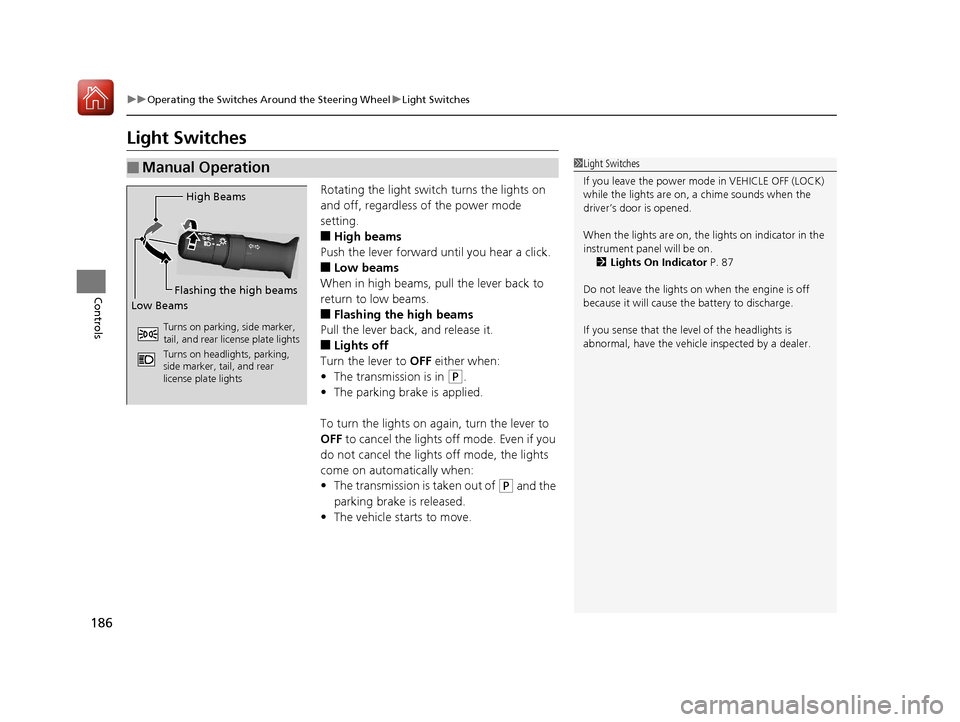
Rotating the light switch turns the lights on
and off, regardless of the power mode
setting.
■High beams
Push the lever forward until you hear a click.
■Low beams
When in high beams, pull the lever back to
return to low beams.
■Flashing the high beams
Pull the lever back, and release it.
■Lights off
Turn the lever to OFF either when:
• The transmission is in
(P.
• The parking brake is applied.
To turn the lights on again, turn the lever to
OFF to cancel the lights off mode. Even if you
do not cancel the lights off mode, the lights
come on automatically when:
• The transmission is taken out of
(P and the
parking brake is released.
• The vehicle starts to move.
■Manual Operation1Light Switches
If you leave the power mode in VEHICLE OFF (LOCK)
while the lights are on, a chime sounds when the
driver’s door is opened.
When the lights are on, the lights on indicator in the
instrument pane l will be on.
2 Lights On Indicator P. 87
Do not leave the lights on when the engine is off
because it will cause the battery to discharge.
If you sense that the le vel of the headlights is
abnormal, have the vehicl e inspected by a dealer.
High Beams
Flashing the high beams
Low Beams
Turns on parking, side marker,
tail, and rear license plate lights
Turns on headlights, parking,
side marker, tail, and rear
license plate lights
20 ACURA RDX-31TJB6111.book 186 ページ 2020年2月11日 火曜日 午後2時6分
Page 192 of 657
191
uuOperating the Switches Around the Steering Wheel uAuto High-Beam
Continued
Controls
Auto High-Beam
The front sensor camera detects the light sources ahead of the vehicle such as the
lights of a preceding or oncoming vehicle, or street lights. When you are driving at
night, the system automatica lly switches the headlights between low beam and high
beam depending on the situation.
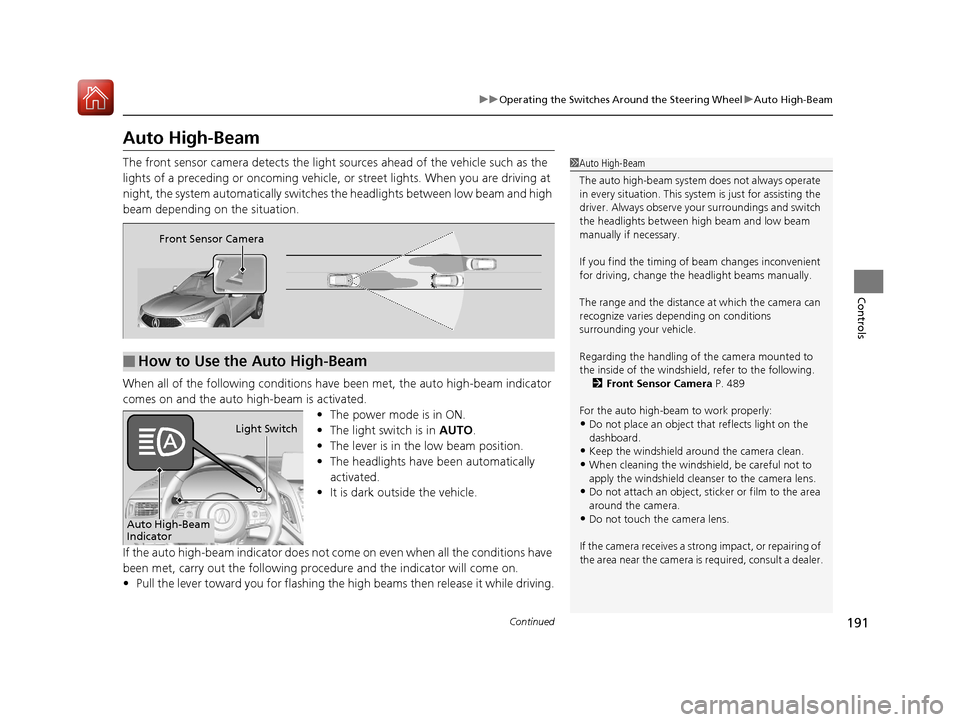
When all of the following conditions have been met, the auto high-beam indicator
comes on and the auto high-beam is activated.
•The power mode is in ON.
• The light switch is in AUTO.
• The lever is in the low beam position.
• The headlights have been automatically
activated.
• It is dark outside the vehicle.
If the auto high-beam indicato r does not come on even when all the conditions have
been met, carry out the following procedure and the indicator will come on.
• Pull the lever toward you for flashing the high beams then release it while driving.1Auto High-Beam
The auto high-beam system does not always operate
in every situation. This syst em is just for assisting the
driver. Always observe your surroundings and switch
the headlights between high beam and low beam
manually if necessary.
If you find the timing of beam changes inconvenient
for driving, change the headlight beams manually.
The range and the distance at which the camera can
recognize varies de pending on conditions
surrounding your vehicle.
Regarding the handling of the camera mounted to
the inside of the windshiel d, refer to the following.
2 Front Sensor Camera P. 489
For the auto high-beam to work properly:
•Do not place an object that reflects light on the
dashboard.
•Keep the windshield around the camera clean.
•When cleaning the windshield, be careful not to
apply the windshield cleans er to the camera lens.
•Do not attach an object, sticker or film to the area
around the camera.
•Do not touch the camera lens.
If the camera receives a st rong impact, or repairing of
the area near the camera is required, consult a dealer.
■How to Use the Auto High-Beam
Front Sensor Camera
Auto High-Beam
IndicatorLight Switch
20 ACURA RDX-31TJB6111.book 191 ページ 2020年2月11日 火曜日 午後2時6分
Page 201 of 657
200
uuOperating the Switches Around the Steering Wheel uRear Defogger/Heated Door Mirror Button
Controls
Rear Defogger/Heated Door Mirror Button
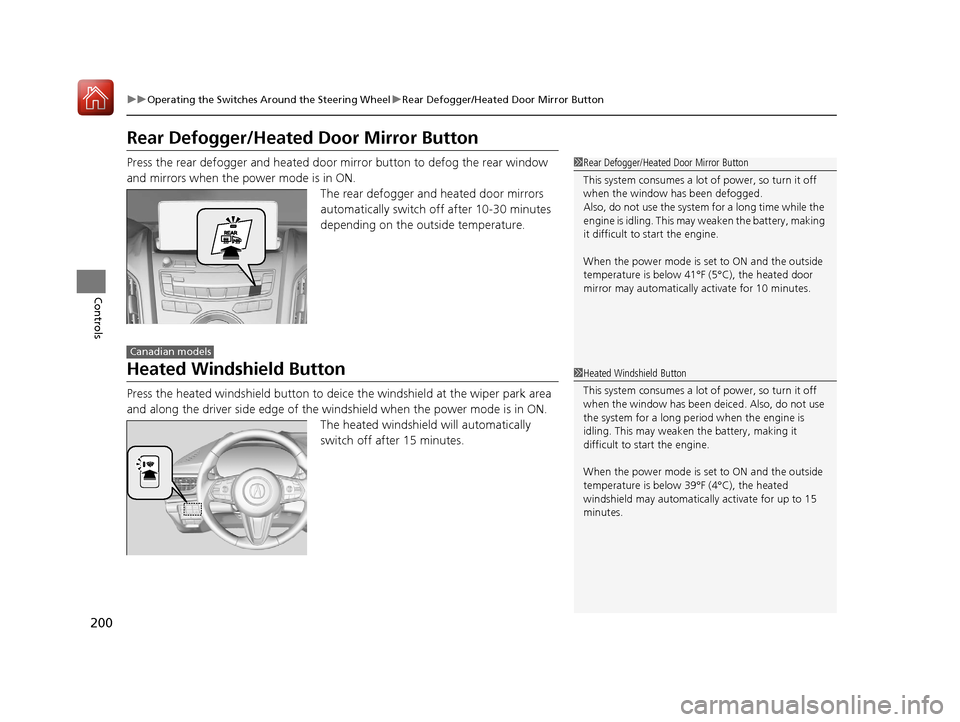
Press the rear defogger and heated door mirror button to defog the rear window
and mirrors when the power mode is in ON.
The rear defogger and heated door mirrors
automatically switch off after 10-30 minutes
depending on the outside temperature.
Heated Windshield Button
Press the heated windshield button to deic e the windshield at the wiper park area
and along the driver side edge of the wi ndshield when the power mode is in ON.
The heated windshield will automatically
switch off after 15 minutes.
1 Rear Defogger/Heated Door Mirror Button
This system consumes a lot of power, so turn it off
when the window has been defogged.
Also, do not use the system for a long time while the
engine is idling. This may weaken the battery, making
it difficult to start the engine.
When the power mode is se t to ON and the outside
temperature is below 41°F (5°C), the heated door
mirror may automatically activate for 10 minutes.
Canadian models
1 Heated Windshield Button
This system consumes a lot of power, so turn it off
when the window has been deiced. Also, do not use
the system for a long peri od when the engine is
idling. This may weaken the battery, making it
difficult to start the engine.
When the power mode is se t to ON and the outside
temperature is below 39°F (4°C), the heated
windshield may automatically activate for up to 15
minutes.
20 ACURA RDX-31TJB6111.book 200 ページ 2020年2月11日 火曜日 午後2時6分
Page 207 of 657
uuAdjusting the Mirrors uPower Door Mirrors
206
Controls
■Folding in the door mirrors
Lock the driver’s door with the key, press the lock button on the remote transmitter,
touch the door lock sensor on any door, or press the door lock button on the
tailgate. u The mirrors start folding in automatically.
■Folding out the door mirrors
Unlock the driver’s door us ing the key, remote transmitter or keyless access system.
u The mirrors start folding out automatically.
■Automatic Folding Door Mirror Function*1Automatic Folding Door Mirror Function*
You cannot turn the automatic folding out
automatically if they have been folded in using the
folding button.
You can turn the automa tic folding door mirror
function on and off. 2 Customized Features P. 335
Door mirrors will not fold automatically when locking
from inside the vehicle usi ng lock tab or master door
lock switch.
* Not available on all models
20 ACURA RDX-31TJB6111.book 206 ページ 2020年2月11日 火曜日 午後2時6分
Page 211 of 657
uuAdjusting the Seats uFront Seats
210
Controls
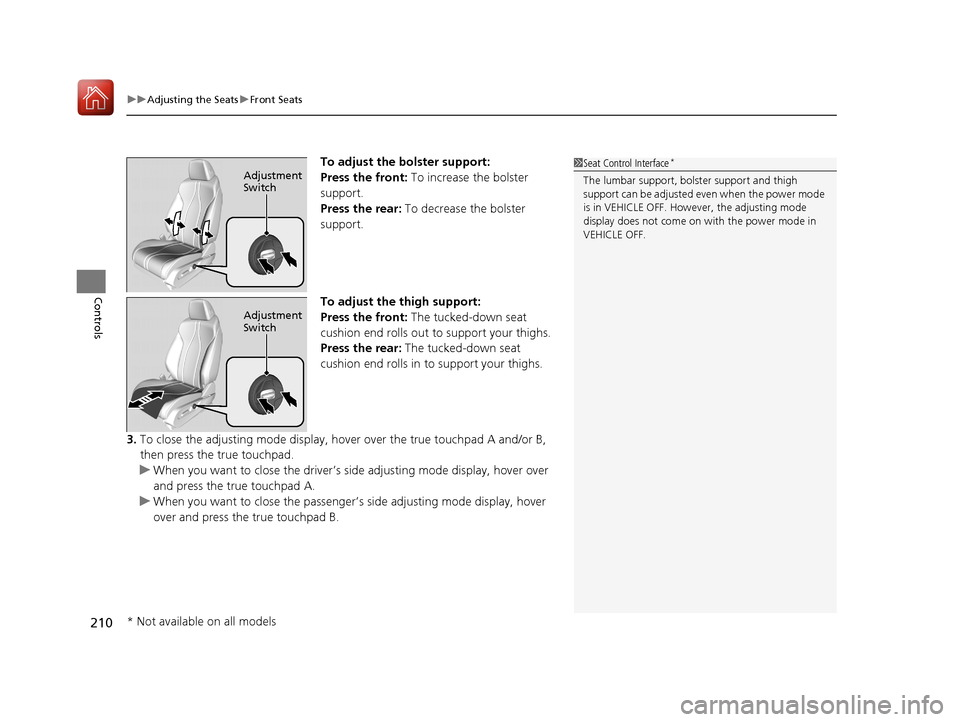
To adjust the bolster support:
Press the front: To increase the bolster
support.
Press the rear: To decrease the bolster
support.
To adjust the thigh support:
Press the front: The tucked-down seat
cushion end rolls out to support your thighs.
Press the rear: The tucked-down seat
cushion end rolls in to support your thighs.
3. To close the adjusting mode display, hover over the true touchpad A and/or B,
then press the true touchpad.
u When you want to close the driver’s side adjusting mode display, hover over
and press the true touchpad A.
u When you want to close the passenger’s side adjusting mode display, hover
over and press the true touchpad B.1 Seat Control Interface*
The lumbar support, bolster support and thigh
support can be adjusted even when the power mode
is in VEHICLE OFF. However, the adjusting mode
display does not come on with the power mode in
VEHICLE OFF.Adjustment
Switch
Adjustment
Switch
* Not available on all models
20 ACURA RDX-31TJB6111.book 210 ページ 2020年2月11日 火曜日 午後2時6分
Page 231 of 657
230
Controls
Climate Control System
Using Automatic Climate Control
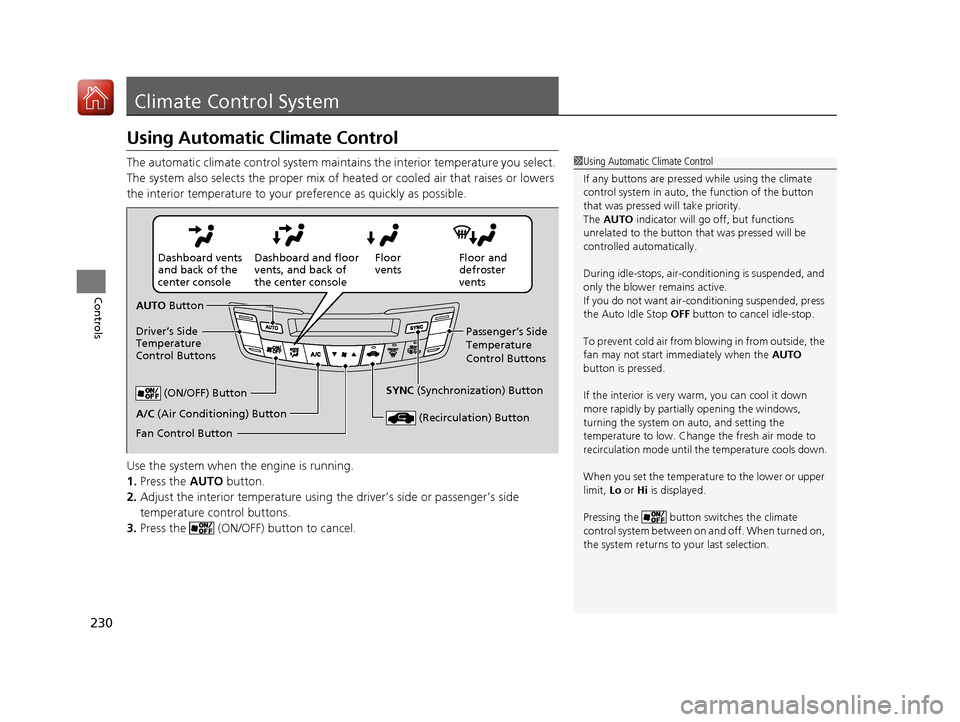
The automatic climate control system maintains the interior temperature you select.
The system also selects the proper mix of heated or cooled air that raises or lowers
the interior temperature to your preference as quickly as possible.
Use the system when the engine is running.
1. Press the AUTO button.
2. Adjust the interior temperature using the driver’s side or passenger’s side
temperature control buttons.
3. Press the (ON/OFF) button to cancel.1Using Automatic Climate Control
If any buttons are presse d while using the climate
control system in auto, the function of the button
that was pressed will take priority.
The AUTO indicator will go off, but functions
unrelated to the button th at was pressed will be
controlled automatically.
During idle-stops, air-conditioning is suspended, and
only the blower remains active.
If you do not want air-cond itioning suspended, press
the Auto Idle Stop OFF button to cancel idle-stop.
To prevent cold air from bl owing in from outside, the
fan may not start i mmediately when the AUTO
button is pressed.
If the interior is very warm, you can cool it down
more rapidly by partial ly opening the windows,
turning the system on auto, and setting the
temperature to low. Change the fresh air mode to
recirculation mode until the temperature cools down.
When you set the temperat ure to the lower or upper
limit, Lo or Hi is displayed.
Pressing the button switches the climate
control system between on and off. When turned on,
the system returns to your last selection.
Floor and
defroster
vents
Floor
vents
Dashboard and floor
vents, and back of
the center console
Dashboard vents
and back of the
center console
AUTO Button
Driver’s Side
Temperature
Control Buttons Passenger’s Side
Temperature
Control Buttons
A/C (Air Conditioning) Button (ON/OFF) Button
Fan Control Button SYNC
(Synchronization) Button
(Recirculation) Button
20 ACURA RDX-31TJB6111.book 230 ページ 2020年2月11日 火曜日 午後2時6分
Page 232 of 657
Continued231
uuClimate Control System uUsing Automatic Climate Control
Controls
■Switching between the recirc ulation and fresh air modes
Press the (recirculation) button and switch the mode depending on
environmental conditions.
Recirculation mode (indicator on): Recirculat es air from the vehicle’s interior through
the system.
Fresh air mode (indicator off): Maintains outside ventilation. Keep the system in
fresh air mode in normal situations.1 Using Automatic Climate Control
When you unlock the doors with your remote, the
driver’s ID (DRIVER 1 or DRIVER 2) is detected, and
the climate control settings are turned to the
respective mode automatically when you set the
power mode to ON.
20 ACURA RDX-31TJB6111.book 231 ページ 2020年2月11日 火曜日 午後2時6分
Page 234 of 657
Continued233
uuClimate Control System u
Controls
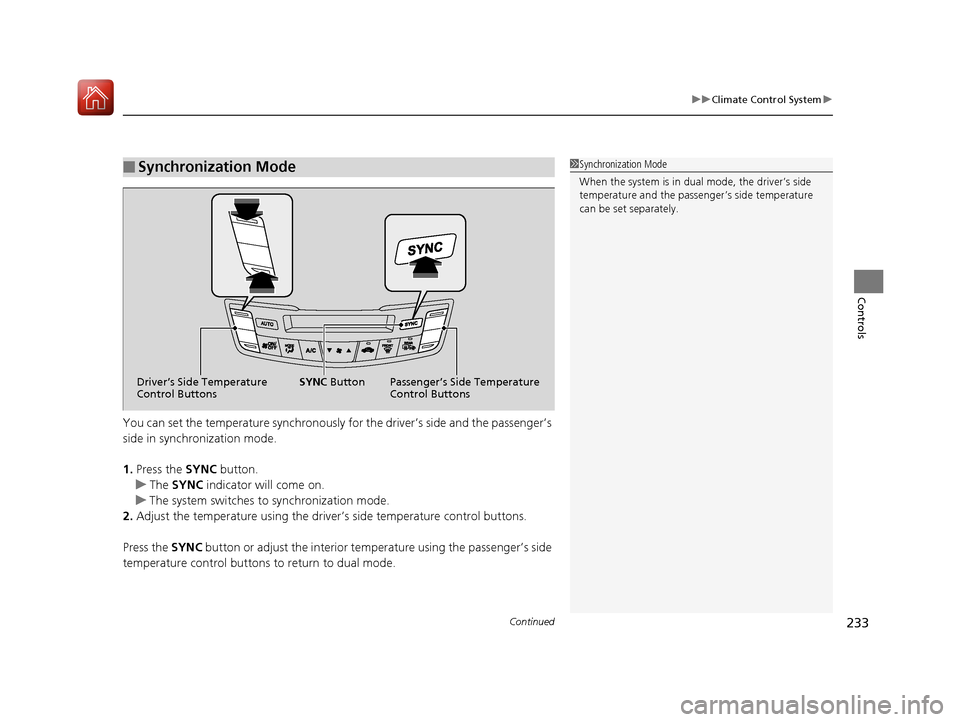
You can set the temperature synchronously for the driver’s side and the passenger’s
side in synchronization mode.
1.Press the SYNC button.
u The SYNC indicator will come on.
u The system switches to synchronization mode.
2. Adjust the temperature using the driver’s side temperature control buttons.
Press the SYNC button or adjust the interior temp erature using the passenger’s side
temperature control buttons to return to dual mode.
■Synchronization Mode1Synchronization Mode
When the system is in dua l mode, the driver’s side
temperature and the passe nger’s side temperature
can be set separately.
Driver’s Side Temperature
Control Buttons Passenger’s Side Temperature
Control Buttons
SYNC
Button
20 ACURA RDX-31TJB6111.book 233 ページ 2020年2月11日 火曜日 午後2時6分
Page 320 of 657

319
uuGeneral Information on the Audio System uHonda App License Agreement
Continued
Features
7. Export Restrictions: You acknowledge that the SOFTWARE and SERVICES are subject to U.S., European Union, and other export
jurisdictions. You agree to comply with all applicable internat ional and national laws that apply to the SOFTWARE and SERVICES, including
the U.S. Export Administration Regulations, as well as end-user, end-use, and destination restrictions issued by the U.S. and other
governments.
C. SOFTWARE Operation
1. HONDA reserves the right to suspend or terminate your access to and use of the SOFTWARE or SERVICES if you are found to be in
violation of this AGREEMENT or as reasonably deemed necessary by HONDA.
2. Eligibility/Registration/Activation.
The SOFTWARE is intended for and av ailable to individuals who (a) are of legal age of majority in their
jurisdiction of residence (and at least 18 years of age), or are younger than 18 years of age and possess a valid driver’s license issued by
their jurisdiction of residence, and (b) own or have permissive access to a compatible VEHICLE. We do not knowingly collect any
information, including personal information, from children under 13. If we learn or are notified that we have collected personal
information of a child under 13 , we will immediately take steps to delete such information.
3. Use of PROVIDER SERVICES through the SOFTWARE.
Certain PROVIDER SERVICES made availa ble through the SOFTWARE may require
that you register or otherwise have an account with the PROVIDER and agree to PROVIDER TERMS. Any use of any of such PROVIDER
SERVICES within the SOFTWARE is subject to this AGREEMENT and the applicable PROVIDER TERMS. HONDA does not exercise control
over such PROVIDER SERVICES and is not res ponsible or liable for the availability, security, or content of such PROVIDER SERVIC ES, and the
inclusion of any PROVIDER SERVIC ES does not imply a referral from, the approval of, or the endorsement by HONDA of such PROVIDE R
SERVICES. HONDA is not responsible or liable, directly or indirectly, for any damage relating to or result ing from your use of the PROVIDER
SERVICES.
4. Links to Third Party Sites:
The SOFTWARE may provide you with th e ability to access third-party sites and content through the use of the
SOFTWARE or SERVICES. The third-party sites and content are not under the control of HONDA. HONDA is not responsible or liable,
directly or indirectly, for such third-party websites and their content or for any damage relating to or resulting from your ac cess or use of
such websites and content.
20 ACURA RDX-31TJB6111.book 319 ページ 2020年2月11日 火曜日 午後2時6分
Page 322 of 657
321
uuGeneral Information on the Audio System uHonda App License Agreement
Continued
Features
2. Potential Map Inaccuracy and Route Safety. Maps used by this system may be inaccurate because of changes in roads, traffic controls,
routing, or driving conditions. Always use good judgment and co mmon sense when following suggested routes. Do not follow the ro ute
suggestions if doing so would result in an unsafe or illegal driving maneuver, if you would be placed in an unsafe situation, or if you would
be directed into an area that you consider unsafe. Do not rely on any navigation featur es included in the system to route you to emergency
services. Not all emergency services such as police, fire stations, hospitals, or clinics are likely to be contained in the map database for such
navigation features. Ask local authorities or an emergency services operator for such locations and routes. The driver is ultimately
responsible for the safe operation of the vehicle and therefore, must evaluate whether it is safe to follow the suggested directions. Any
navigation features are pr ovided only as an aid. Make your driving decisions based on your obse rvations of local conditions and existing
traffic regulations. Navigation features are not a substitute for your personal judgment. Any route suggestions made by the SOF TWARE or
SERVICES should never replace any local traffic regulations or your personal judgment or knowledge of safe driving practices.
3. Speech Recognition:
You acknowledge and understand that HONDA and PROV IDERS may record, retain, and use voices commands
when you use the speech recognition componen ts of the SOFTWARE or SERVICES. You and all VEHICLE operators and passengers (a)
consent to the recording and retention of voice commands in support of providing speech recognition components and (b) release HONDA
and PROVIDERS from all claims, liabilities, and losses that may result from any use of such recorded voice commands. Recognitio n errors
are inherent in speech recognition. It is your responsibility to monitor any speech recognition functions included in the syste m and address
any errors. Neither HONDA nor PROVIDERS will be liable for any damages arising out of errors in the speech recognition process.
4. Distraction Hazards.
Navigation features may require manual (non-verbal) input or setup. Attempting to perform such set-up or insert
data while driving can seriously distract your attention and could cause a crash or other serious consequences; the ability to undertake such
interactions may also be limited by state or local law, which laws you are responsible to know and follow. Even occasional shor t scans of
the screen may be hazardous if your attention has been diverted away from your driving at a critical time. Pull over and stop the vehicle in
a safe and legal manner before attempting to access a function of the system requiring prolonged attention. Do not raise the vo lume
excessively. Keep the volume at a level where you can still hear outside traffic and emergency signals while driving. Driving while unable
to hear these sounds could result in a crash.
20 ACURA RDX-31TJB6111.book 321 ページ 2020年2月11日 火曜日 午後2時6分