steering Acura RDX 2020 Manual Online
[x] Cancel search | Manufacturer: ACURA, Model Year: 2020, Model line: RDX, Model: Acura RDX 2020Pages: 657, PDF Size: 33.2 MB
Page 536 of 657
535
uuMaintenance MinderTMuTo Use Maintenance MinderTM
Continued
Maintenance
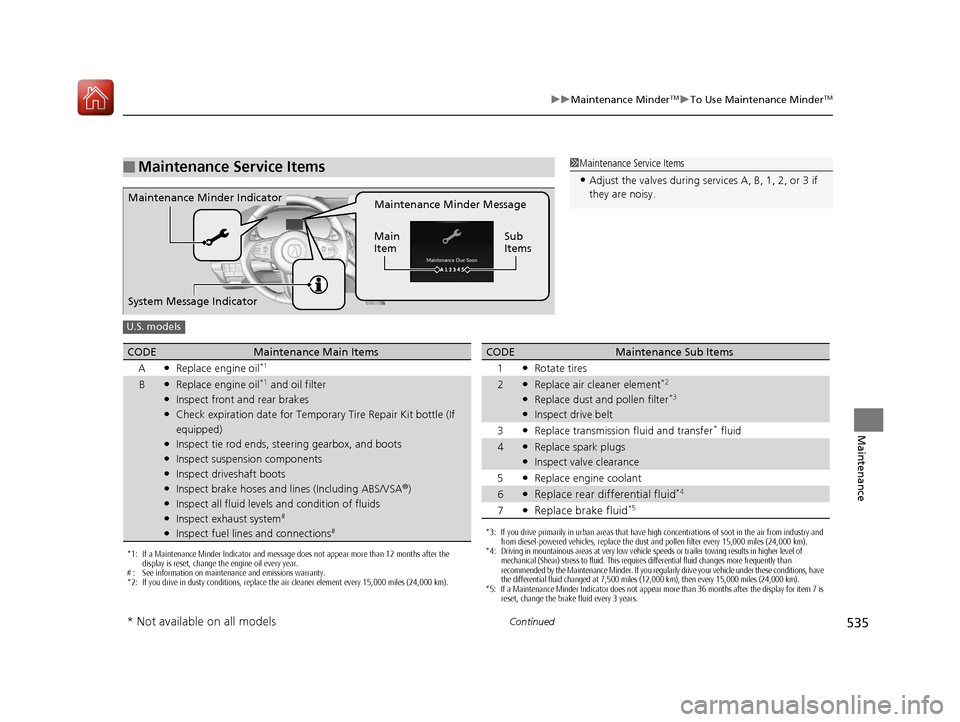
■Maintenance Service Items1Maintenance Service Items
•Adjust the valves during services A, B, 1, 2, or 3 if
they are noisy.
Maintenance Minder Message
Main
Item Sub
ItemsMaintenance Minder Indicator
System Message Indicator
U.S. models
*1: If a Maintenance Minder Indicator and message does not appear more than 12 months after the
display is reset, change the engine oil every year.
# : See information on maintenance and emissions warranty.
*2: If you drive in dusty conditions, replace the air cleaner element every 15,000 miles (24,000 km).
CODEMaintenance Main Items
A
●Replace engine oil*1
B●Replace engine oil*1 and oil filter●Inspect front and rear brakes●Check expiration date for Temporary Tire Repair Kit bottle (If
equipped)
●Inspect tie rod ends, steering gearbox, and boots●Inspect suspension components●Inspect driveshaft boots●Inspect brake hoses and lin es (Including ABS/VSA®)●Inspect all fluid levels and condition of fluids●Inspect exhaust system#
●Inspect fuel lines and connections#*3: If you drive primarily in urban areas that have high concentrations of soot in the air from industry and
from diesel-powered vehicles, replace the dust and pollen filter every 15,000 miles (24,000 km).
*4: Driving in mountainous areas at very low vehicle speeds or trailer towing results in higher level of
mechanical (Shear) stress to fluid. This requires differential fluid changes more frequently than
recommended by the Maintenance Minder. If you regularly drive your vehicle under these conditions, have
the differential fluid changed at 7,500 miles (12,000 km), then every 15,000 miles (24,000 km).
*5: If a Maintenance Minder Indicator does not appear more than 36 months after the display for item 7 is reset, change the brake fluid every 3 years.
CODEMaintenance Sub Items
1
●Rotate tires
2●Replace air cleaner element*2
●Replace dust and pollen filter*3
●Inspect drive belt
3
●Replace transmission fluid and transfer* fluid
4●Replace spark plugs●Inspect valve clearance
5
●Replace engine coolant
6●Replace rear differential fluid*4
7●Replace brake fluid*5
* Not available on all models
20 ACURA RDX-31TJB6111.book 535 ページ 2020年2月11日 火曜日 午後2時6分
Page 569 of 657
568
uuChecking and Maintaining Tires uWinter Tires
Maintenance
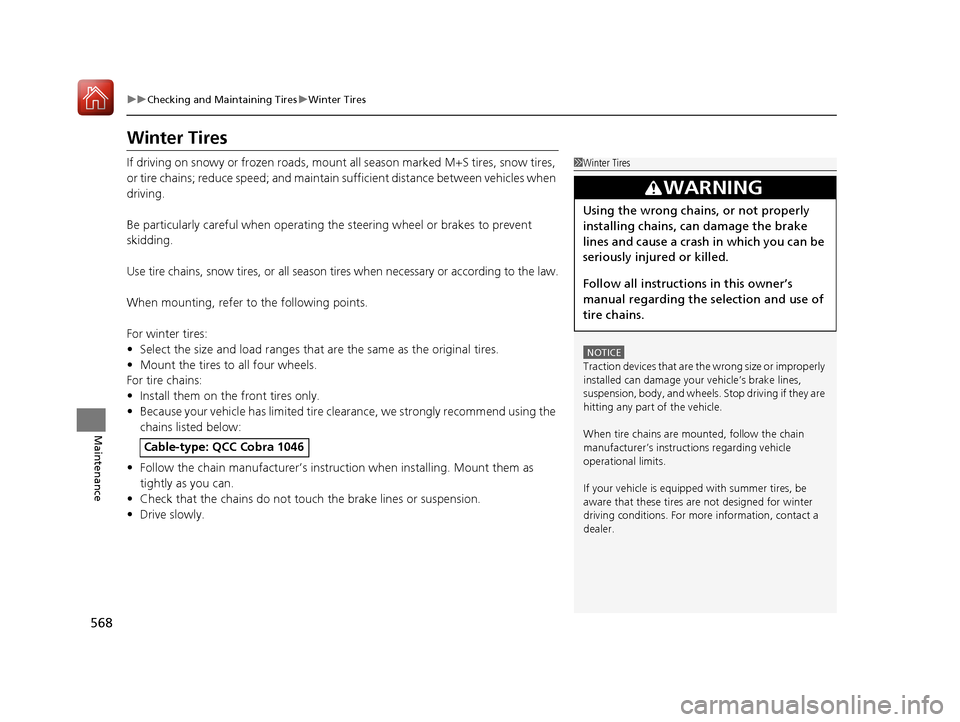
Winter Tires
If driving on snowy or frozen roads, mount all season marked M+S tires, snow tires,
or tire chains; reduce speed; and maintain su fficient distance between vehicles when
driving.
Be particularly careful when operating the steering wheel or brakes to prevent
skidding.
Use tire chains, snow tires, or all season ti res when necessary or according to the law.
When mounting, refer to the following points.
For winter tires:
• Select the size and load ranges that are the same as the original tires.
• Mount the tires to all four wheels.
For tire chains:
• Install them on the front tires only.
• Because your vehicle has limited tire cl earance, we strongly recommend using the
chains listed below:
• Follow the chain manufacturer’s instruction when installing. Mount them as
tightly as you can.
• Check that the chains do not to uch the brake lines or suspension.
• Drive slowly.
Cable-type: QCC Cobra 1046
1Winter Tires
NOTICE
Traction devices that are th e wrong size or improperly
installed can damage your vehicle’s brake lines,
suspension, body, and wheels. Stop driving if they are
hitting any part of the vehicle.
When tire chains are mounted, follow the chain
manufacturer’s instructi ons regarding vehicle
operational limits.
If your vehicle is equipp ed with summer tires, be
aware that these tires are not designed for winter
driving conditions. For more information, contact a
dealer.
3WARNING
Using the wrong chains, or not properly
installing chains, can damage the brake
lines and cause a crash in which you can be
seriously injured or killed.
Follow all instruction s in this owner’s
manual regarding the selection and use of
tire chains.
20 ACURA RDX-31TJB6111.book 568 ページ 2020年2月11日 火曜日 午後2時6分
Page 584 of 657
583
Handling the Unexpected
This chapter explains how to handle unexpected troubles.
ToolsTypes of Tools .................................. 584
If a Tire Goes Flat
Changing a Flat Tire ......................... 585
Temporarily Repairi ng a Flat Tire....... 593
Engine Does Not Start Checking the Engine ........................ 607
If the Keyless Access Remote Battery is Weak ............................................. 608
Emergency Engine Stop ................... 609
Jump Starting .................................... 610
Vehicles with a compact spare tire
Vehicles with temporary tire repair kit
Overheating
How to Handle Overheating............. 612
Indicator, Coming On/Blinking
If the Low Oil Pressure Warning Appears ... 614If the Charging System Indicator Comes On... 615If the Malfunction Indicator Lamp Comes On or Blinks ................................... 615
If the Brake System Indicator (Red) Comes
On or Blinks ....................................... 616
If the Electric Power Steering (EPS) System
Indicator Comes On ........................... 617
If the Brake System Indicator (Red) Comes On or Blinks at the Same Time When the Brake
System Indicator (Amber) Comes On .....618
If the Low Tire Pressure/TPMS Indicator Comes On or Blinks ....................... 619
If the Transmission System Indicator Blinks along with the Warning Message .... 620
Fuses
Fuse Locations ................................. 621
Inspecting and Changing Fuses ........ 627
Emergency Towing ........................... 628
When You Cannot Unlock the Fuel Fill Door ................................................. 629
When You Cannot Open the Tailgate.. 630Refueling ........................................... 631
20 ACURA RDX-31TJB6111.book 583 ページ 2020年2月11日 火曜日 午後2時6分
Page 586 of 657
585Continued
Handling the Unexpected
If a Tire Goes Flat
Changing a Flat Tire
If a tire goes flat while driving, grasp the steering wheel firmly, and brake gradually
to reduce speed. Then, stop in a safe plac e. Replace the flat tire with a compact
spare tire. Go to a dealer as soon as possib le to have the full-size tire repaired or
replaced.
1. Park the vehicle on firm, level, non-slip pery surface and apply the parking brake.
2. Change the gear position to
(P.
3. Turn on the hazard warning lights an d set the power mode to VEHICLE OFF
(LOCK).
Vehicles with a compact spare tire
1 Changing a Flat Tire
Follow compact spare precautions:
Periodically check the tire pressure of the compact
spare. It should be set to the specified pressure.
Specified Pressure: 60 psi (420 kPa, 4.2 kgf/cm
2)
When driving with the compact spare tire, keep the
vehicle speed under 50 mph (80 km/h). Replace with
a full-size tire as soon as possible.
The compact spare tire and wheel in your vehicle are
specifically for this model. Do not use them with
another vehicle. Do not us e another type of compact
spare tire or wheel with your vehicle.
Do not mount tire chains on a compact spare tire.
If a chain-mounted front tire goes flat, remove one of
the full-size rear tires and replace it with the compact
spare tire. Remove the flat front tire and replace it
with the full-size tire that was removed from the rear.
Mount the tire chains on the front tire.
Do not use a puncture-repairi ng agent on a flat tire,
as it can damage the tire pressure sensor.
20 ACURA RDX-31TJB6111.book 585 ページ 2020年2月11日 火曜日 午後2時6分
Page 594 of 657
593
uuIf a Tire Goes Flat uTemporarily Repairing a Flat Tire
Continued
Handling the Unexpected
Temporarily Repairing a Flat Tire
If the tire has a large cut or is otherwise severely damaged, you will need to have the
vehicle towed. If the tire only has a small puncture, from a nail for instance, you can
use the temporary tire repair kit so that you can drive to the nearest service station
for a more permanent repair.
If a tire goes flat while driving, grasp the steering wheel firmly, and brake gradually
to reduce speed. Then stop in a safe place.
1. Park the vehicle on a firm, level, and n on-slippery surface and apply the parking
brake.
2. Change the gear position to
(P.
3. Turn on the hazard warning lights an d set the power mode to VEHICLE OFF
(LOCK).
Vehicles with temporary tire repair kit
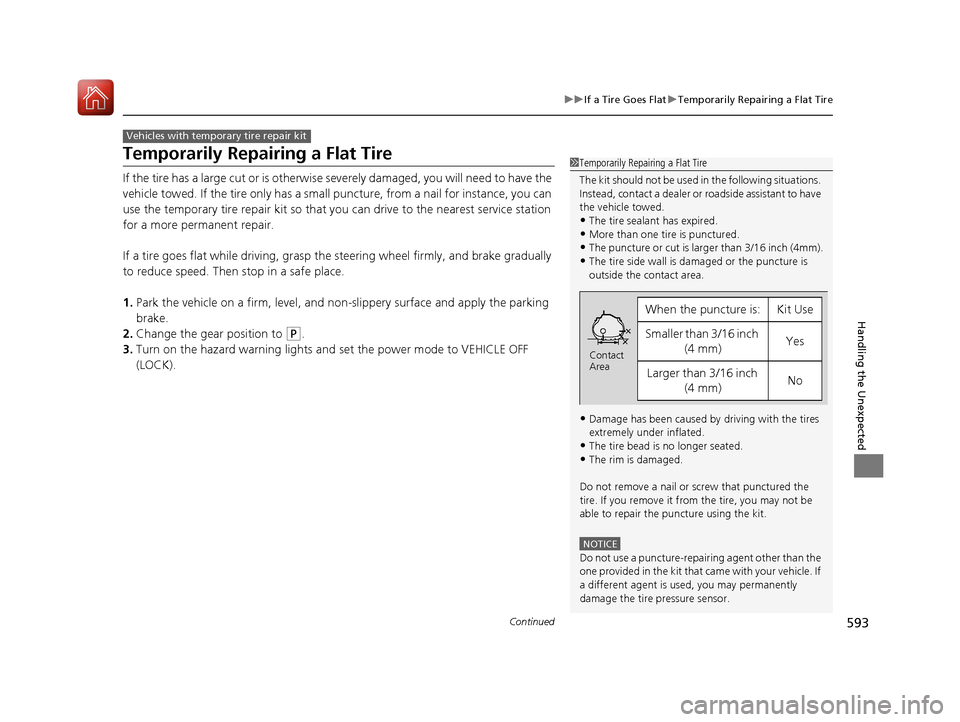
1 Temporarily Repairing a Flat Tire
The kit should not be used in the following situations.
Instead, contact a dealer or roadside assistant to have
the vehicle towed.
•The tire sealant has expired.
•More than one tire is punctured.•The puncture or cut is larger than 3/16 inch (4mm).
•The tire side wall is da maged or the puncture is
outside the contact area.
•Damage has been caused by driving with the tires
extremely under inflated.
•The tire bead is no longer seated.
•The rim is damaged.
Do not remove a nail or screw that punctured the
tire. If you remove it from the tire, you may not be
able to repair the puncture using the kit.
NOTICE
Do not use a puncture-repairing agent other than the
one provided in the kit that came with your vehicle. If
a different agent is used, you may permanently
damage the tire pressure sensor.
When the puncture is:Kit Use
Smaller than 3/16 inch (4 mm)Yes
Larger than 3/16 inch (4 mm)No
Contact
Area
20 ACURA RDX-31TJB6111.book 593 ページ 2020年2月11日 火曜日 午後2時6分
Page 610 of 657

609
uuEngine Does Not Start uEmergency Engine Stop
Handling the Unexpected
Emergency Engine Stop
The ENGINE START/STOP button may be used to stop the engine due to an
emergency situation even while driving. If you must stop the engine, do either of the
following operations:
• Press and hold the ENGINE START/STOP button for two seconds.
• Firmly press the ENGINE START/STOP button three times.
The steering wheel will not lock. However, because turning off the engine disables
the power assist the engine provides to the steering and braking systems, it will
require significantly more physical effort an d time to steer and slow the vehicle. Use
both feet on the brake pedal to slow down the vehicle and stop immediately in a
safe place.
The gear position auto matically changes to
(P after the vehicle comes to a complete
stop. Then, the power mode changes to VEHICLE OFF.
The gear position auto matically changes to
(P after the vehicle comes to a complete
stop. Then press the ENGINE START/STOP button twice without depressing the
brake pedal to change the mode to VEHICLE OFF.
1 Emergency Engine Stop
Do not press the ENGINE START/STOP button while
driving unless it is absolute ly necessary for the engine
to be turned off.
If you press the ENGINE START/STOP button while
driving, the beeper sounds.
Vehicles with U.S. models
Vehicles with Canada models
20 ACURA RDX-31TJB6111.book 609 ページ 2020年2月11日 火曜日 午後2時6分
Page 618 of 657
617
uuIndicator, Coming On/Blinking uIf the Electric Power Steering (EPS) System Indicator Comes On
Handling the Unexpected
If the Electric Power Steeri ng (EPS) System Indicator
Comes On
■Reasons for the indicator to come on
• Comes on when there is a problem with the EPS system.
• If you depress the accelerator pedal repeatedly to increase the engine
speed while the engine is idling, the indicator comes on, and
sometimes the steering wheel becomes harder to operate.
■What to do when th e indicator comes on
Stop the vehicle in a safe place and restart the engine.
If the indicator comes on and stays on, immediately have your vehicle
inspected by a dealer.
20 ACURA RDX-31TJB6111.book 617 ページ 2020年2月11日 火曜日 午後2時6分
Page 646 of 657
Index
645
Index
Index
A
ABS (Anti-lock Brake System).................. 499
Accessories and Modifications ................ 580
Accessory Power Socket ........................... 225
AcuraLink® ................................................ 390
AcuraWatch
TM.................................... 22, 447
Adaptive Cruise Control (ACC) .................. 91
Adaptive Cruise Control (ACC) with
Low Speed Follow ............................ 91, 460
Adaptive Front Lighting System (AFS) .... 189
Additives
Coolant .................................................. 546
Engine Oil ............................................... 541
Washer ................................................... 550
Additives, Engine Oil ............................... 541
Adjusting Armrest .................................................. 218
Front Seats.............................................. 207
Head Restraints ....................................... 212
Mirrors.................................................... 204
Rear Seats ............................................... 216
Steering Wheel ....................................... 203
Agile Handling Assist ............................... 438
Air Conditioning System (Climate Control System) .................................................... 230
Changing the Mode................................ 230
Defrosting the Windshield and Windows .............................................. 232
Dust and Pollen Filter .............................. 574
Rear Temperature Control Dial ................ 234
Recirculation/Fresh Air Mode................... 230 Sensors .................................................... 235
Synchronized Mode ................................. 233
Using Automatic Climate Control ............ 230
Air Pressure ....................................... 561, 635
Airbags ........................................................ 42
Advanced Airbags ..................................... 48
After a Collision ......................................... 45
Airbag Care ............................................... 57
Front Airbags (SRS) .................................... 45
Indicator .............................................. 55, 84
Knee Airbags ............................................. 49
Passenger Airbag Off Indicator .................. 56
Sensors ...................................................... 42
Side Airbags .............................................. 52
Side Curtain Airbags .................................. 54
AM/FM Radio ............................................ 273
Android Auto ............................................ 306
Anti-lock Brake System (ABS) .................. 499
Indicator .................................................... 84
Apple CarPlay ........................................... 302
Armrest ..................................................... 218
Audio Remote Controls ............................ 243
Audio System ............................................ 238
Adjusting the Sound ................................ 268
Audio/Information Screen ........................ 249
Auxiliary Input Jack .................................. 241
Display Setup ........................................... 269
Error Messages ........................................ 310
General Information ................................ 313
Home Screen ........................................... 253
How to Update Wirelessly ........................ 262 How to Update with a USB Device........... 266
How to use Siri Eyes Free ......................... 301
iPod ........................................................ 290
Limitations for Manual Operation ............ 269
MP3/WMA/AAC ...................................... 293
Reactivating ............................................ 242
Remote Controls ..................................... 243
Security Code .......................................... 242
Status Area ............................................. 258
System Updates....................................... 262
Theft Protection ...................................... 242
USB Flash Drives .............................. 293, 315
USB Ports ................................................ 239
Audio/Information Screen ....................... 249
Authorized Manuals ................................ 643
Auto Door Locking/Unlocking ................. 162
Auto High-Beam ....................................... 191
Indicator.................................................... 87
Auto Idle Stop .......................................... 430
OFF Button .............................................. 431
Automatic Brake Hold ............................. 497
Indicator............................................ 77, 497
Automatic Folding Door Mirror .............. 206
Automatic Intermittent Wipers ............... 195
Automatic Lighting .................................. 187
20 ACURA RDX-31TJB6111.book 645 ページ 2020年2月11日 火曜日 午後2時6分
Page 648 of 657
647
Index
Coolant (Engine)...................................... 546
Adding to the Radiator ........................... 547
Adding to the Reserve Tank .................... 546
Overheating ............................................ 612
Creeping (Automatic Transmission) ........ 419
Cross Traffic Monitor ............................... 507
Cup Holders .............................................. 223
Customized Features ............................... 335
D
Daytime Running Lights .......................... 190
Dead Battery ............................................ 610
Defaulting All the Settings ...................... 357
Defrosting the Windshield and Windows ................................................. 232
Devices that Emit Radio Waves ............... 637
Dimming
Headlights .............................................. 186
Rearview Mirror ...................................... 204
Dipstick (Engine Oil) ................................ 542
Directional Signals (Turn Signal) ............. 185
Door Mirrors ............................................. 205
Doors ........................................................ 146
Auto Door Locking.................................. 162
Auto Door Unlocking .............................. 162
Keys........................................................ 146
Locking/Unlocking the Doors from the Inside .................................................... 159
Locking/Unlocking the Doors from the
Outside ................................................. 150 Lockout Prevention System ...................... 157
DOT Tire Quality Grading ........................ 563
Driving ....................................................... 399
Automatic Transmission ........................... 419
Braking .................................................... 492
Off-Highway Driving Guidelines ............... 411
Shifting Gear ........................................... 420
Starting the Engine .................................. 413
Driving Position Memory System ............. 201
Dust and Pollen Filter ............................... 574
Dynamic Mode Switch .............................. 428
E
Electric Parking Brake
Switch ..................................................... 492
Electric Power Steering (EPS) System Indicator ............................................ 84, 617
Electronic Stability Control (ESC) ............. 436
Emergency ................................................ 628
Emissions Testing (Readiness Codes) ....... 639
Engine ....................................................... 636
Coolant ................................................... 546
Jump Starting .......................................... 610
Oil ........................................................... 541
Remote Engine Start ................................ 415
Starting ................................................... 413
Engine Compartment Cover .................... 540
Engine Coolant ......................................... 546
Adding to the Radiator ............................ 547
Adding to the Reserve Tank ..................... 546 Overheating ............................................ 612
Temperature Gauge ................................ 126
Engine Oil ................................................. 541
Adding .................................................... 543
Checking................................................. 542
Displaying Oil Life .................................... 532
Low Oil Pressure Indicator ....................... 614
Recommended Engine Oil ....................... 541
ENGINE START/STOP Button .................... 182
EPS (Electric Power Steering) System ...... 617
Exhaust Gas Hazard (Carbon Monoxide) .. 71
Exterior Care (Cleaning) ........................... 577
Exterior Mirrors ........................................ 205F
Features.................................................... 237
Filters
Dust and Pollen ....................................... 574
Oil ........................................................... 544
Flat Tire ............................................. 585, 593
Floor Mats ................................................. 576
Fluids Automatic Transmission .......................... 548
Brake ...................................................... 549
Engine Coolant ....................................... 546
Windshield Washer ................................. 550
FM/AM Radio ............................................ 273
Fog Lights Indicator.................................................... 87
Folding Down the Rear Seats .................. 216
20 ACURA RDX-31TJB6111.book 647 ページ 2020年2月11日 火曜日 午後2時6分
Page 649 of 657
648
Index
Foot Brake................................................. 496
Front Airbags (SRS) ..................................... 45
Front Seats ................................................ 207
Adjusting ................................................. 207
Front Sensor Camera ................................ 489
Fuel ...................................................... 21, 521
Economy ................................................. 524
Gauge ..................................................... 126
Instant Fuel Economy ............................... 131
Low Fuel Indicator ..................................... 83
Range ...................................................... 131
Recommendation .................................... 521
Refueling ................................................. 521
Fuel Economy ............................................ 524
Fuel Fill Door ....................................... 21, 522
Fuses .......................................................... 621
Inspecting and Changing ......................... 627
Locations ................................. 621, 624, 625
G
Gasoline (Fuel) Economy ................................................. 524
Gauge ..................................................... 126
Information ............................................. 521
Instant Fuel Economy ............................... 131
Low Fuel Indicator ..................................... 83
Refueling ................................................. 521
Gauges ....................................................... 126
Gear Position Indicator ....................... 79, 422 Gear Shift Positions
Automatic Transmission .......................... 420
Glass (care) ................................................ 578
Glove Box .................................................. 221
H
Handling the Unexpected ........................ 583
HandsFreeLink ® (HFL) ............................... 361
Automatic Import of Cellular Phonebook
and Call History ..................................... 372
Automatic Transferring............................ 371
Displaying Messages................................ 384
Favorite Contacts .................................... 373
HFL Buttons............................................. 361
HFL Menus .............................................. 365
HFL Status Display ................................... 363
In Case of Emergency .............................. 394
Limitations for Manual Operation ............ 364
Making a Call .......................................... 374
Options During a Call .............................. 378
Phone Setup............................................ 367
Receiving a Call ....................................... 377
Receiving a Text Message ........................ 382
Ring Tone................................................ 371
Selecting a Phone .................................... 383
To Set Up a Text Message Options .......... 381
Hazard Warning Button .............................. 4
HD Radio
TM................................................ 276
Head Restraints ........................................ 212
Headlight Washers ................................... 197 Headlights
................................................ 186
Adaptive Front Lighting System (AFS) ...... 189
Auto High-Beam System ......................... 191
Automatic Operation .............................. 187
Dimming......................................... 186, 190
Operating ............................................... 186
Head-Up Display ...................................... 138
Heated Steering Wheel ........................... 227
Heaters (Seat) ........................................... 228
HFL (HandsFreeLink ®) .............................. 361
High Beam Indicator .................................. 87
Hill Start Assist System ............................. 417
HomeLink ® Universal Transceiver ........... 358
Honda App License Agreement .............. 316
I
Identification Numbers............................ 636
Engine and Transmission ......................... 636
Vehicle Identification............................... 636
Illumination Control ................................ 198
Knob ...................................................... 198
Immobilizer System .................................. 173
Indicator ................................................... 88
Indicators .................................................... 74
Adaptive Cruise Control (ACC) with Low Speed Follow (Amber) ............................. 91
Adaptive Cruise Control (ACC) with Low Speed Follow (Green)............... 91, 461
Anti-lock Brake System (ABS) .................... 84
Auto High-Beam ....................................... 87
20 ACURA RDX-31TJB6111.book 648 ページ 2020年2月11日 火曜日 午後2時6分