auto idle stop Acura RDX 2020 Owner's Manual
[x] Cancel search | Manufacturer: ACURA, Model Year: 2020, Model line: RDX, Model: Acura RDX 2020Pages: 657, PDF Size: 33.2 MB
Page 5 of 657
4
Quick Reference Guide
Quick Reference Guide
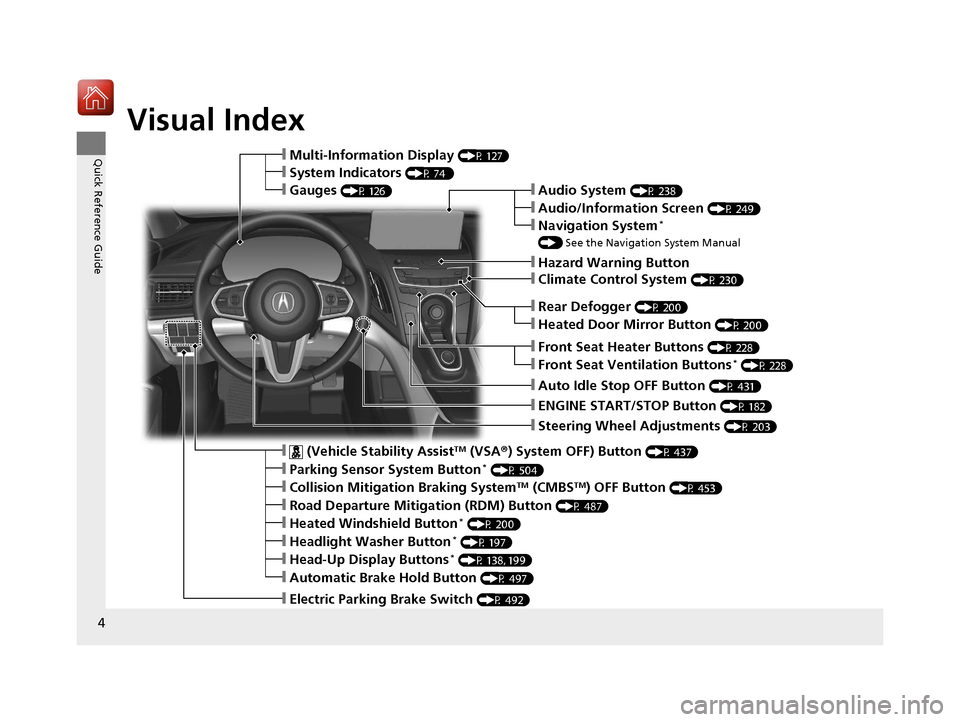
Visual Index
❙Steering Wheel Adjustments (P 203)
❙ENGINE START/STOP Button (P 182)
❙Rear Defogger (P 200)
❙Heated Door Mirror Button (P 200)
❙Climate Control System (P 230)
❙Audio System (P 238)
❙Hazard Warning Button
❙Audio/Information Screen (P 249)
❙Navigation System*
() See the Navigation System Manual
❙Front Seat Heater Buttons (P 228)
❙Front Seat Ventilation Buttons* (P 228)
❙Auto Idle Stop OFF Button (P 431)
❙ (Vehicle Stability AssistTM (VSA ®) System OFF) Button (P 437)
❙Parking Sensor System Button* (P 504)
❙Collision Mitigation Braking SystemTM (CMBSTM) OFF Button (P 453)
❙Road Departure Mitigation (RDM) Button (P 487)
❙Heated Windshield Button* (P 200)
❙Headlight Washer Button* (P 197)
❙Head-Up Display Buttons* (P 138, 199)
❙Automatic Brake Hold Button (P 497)
❙Electric Parking Brake Switch (P 492)
❙Multi-Information Display (P 127)
❙System Indicators (P 74 )
❙Gauges (P 126)
20 ACURA RDX-31TJB6111.book 4 ページ 2020年2月11日 火曜日 午後2時6分
Page 10 of 657
9
Quick Reference Guide
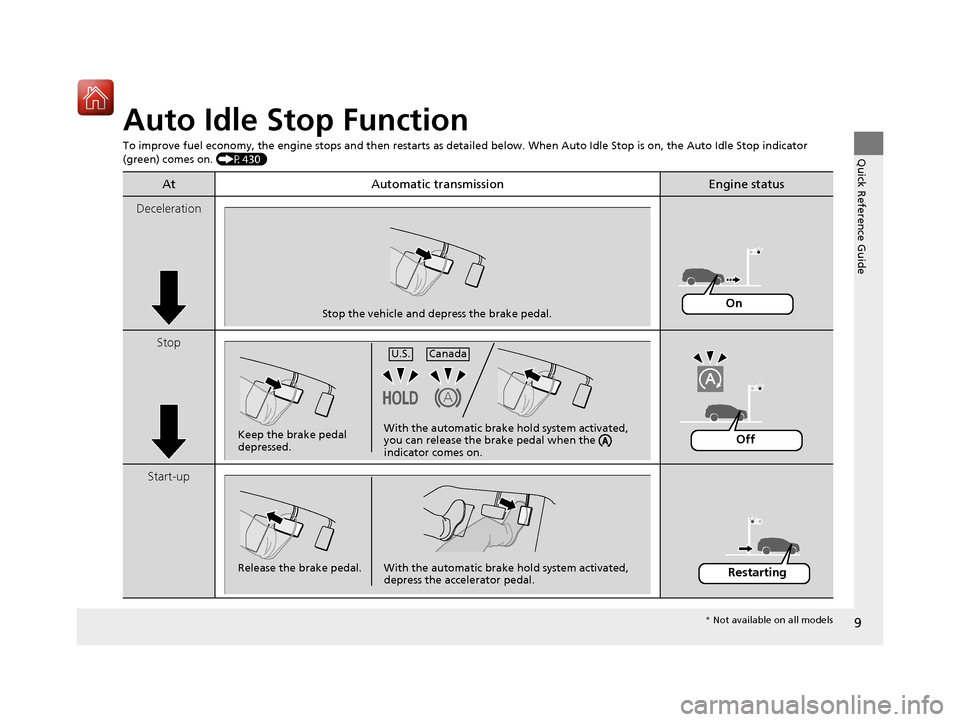
Auto Idle Stop Function
To improve fuel economy, the engine stops and then restarts as detailed below. When Auto Idle Stop is on, the Auto Idle Stop in dicator
(green) comes on. (P430)
At Automatic transmissionEngine status
Deceleration
Stop
Start-up
Stop the vehicle and depress the brake pedal.On
Keep the brake pedal
depressed.U.S.
Canada
With the automatic brake hold system activated,
you can release the brake pedal when the
indicator comes on.Off
Release the brake pedal. With the automatic brake hold system activated,
depress the accelerator pedal.Restarting
* Not available on all models
20 ACURA RDX-31TJB6111.book 9 ページ 2020年2月11日 火曜日 午後2時6分
Page 27 of 657
26
Quick Reference Guide
Why does the beeper
sound when I open the
driver’s door?The beeper sounds when:
●The power mode is in ACCESSORY.
●The exterior lights are left on.
●The Auto Idle Stop is in operation.
Why does a beeper sound
when I walk away from the
vehicle after I close the
door?The beeper sounds if you move outside the walk away auto lock
operating range before the door completely closes.
2Locking the doors and tailgate (Walk away auto lock ®) (P153)
Why does the beeper
sound when I start driving?The beeper sounds when the driver and/or front passenger are
not wearing their seat belts.
Pulling the electric parking
brake switch does not
release the parking brake.
Why?Pull the electric parking brake switch with the brake pedal
depressed.
I’m seeing an amber
indicator of a tire with an
exclamation point. What is
that?The Tire Pressure Monitoring Sy stem (TPMS) needs attention.
Check tire pressure.
2 If the Low Tire Pressure/TPMS Indicator Comes On or Blinks (P619)
20 ACURA RDX-31TJB6111.book 26 ページ 2020年2月11日 火曜日 午後2時6分
Page 75 of 657
74
Instrument Panel
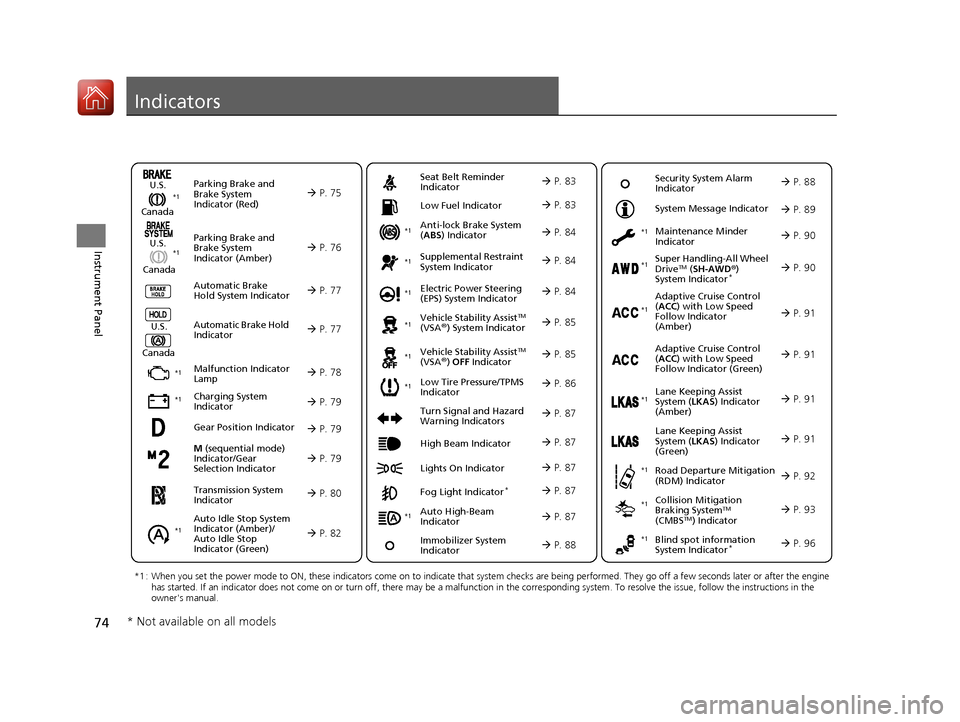
Indicators
M (sequential mode)
Indicator/Gear
Selection Indicator P. 79
Parking Brake and
Brake System
Indicator (Red)
Parking Brake and
Brake System
Indicator (Amber)
U.S.
Canada
U.S.
Canada Automatic Brake
Hold System Indicator
Automatic Brake Hold
IndicatorU.S.
Canada
*1 : When you set the power mode to ON, these indicators come on to indicate that system checks are being performed. They go off a few seconds later or after the engine
has started. If an indicator does not come on or turn off, ther e may be a malfunction in the corresponding system. To resolve the issue, follow the instructions in the
owner's manual.
P. 75*1
Malfunction Indicator
Lamp
Charging System
Indicator
Anti-lock Brake System
(ABS ) Indicator
Seat Belt Reminder
Indicator
Low Fuel Indicator
Vehicle Stability AssistTM
(VSA®) System Indicator
Vehicle Stability Assist
TM
(VSA®) OFF Indicator
Supplemental Restraint
System Indicator
Auto High-Beam
Indicator
Low Tire Pressure/TPMS
Indicator Electric Power Steering
(EPS) System Indicator
Turn Signal and Hazard
Warning Indicators
Lights On Indicator High Beam Indicator
Fog Light Indicator*
Maintenance Minder
Indicator
System Message Indicator
Super Handling-All Wheel
DriveTM (
SH-AWD ®)
System Indicator*
Adaptive Cruise Control
( ACC ) with Low Speed
Follow Indicator
(Amber)
Lane Keeping Assist
System ( LKAS) Indicator
(Amber)
Road Departure Mitigation
(RDM) Indicator
Blind spot information
System Indicator*
P. 76
P. 77
P. 77
P. 78
P. 79*1
*1
P. 86*1
*1
Gear Position Indicator P. 79
Transmission System
Indicator P. 80
Auto Idle Stop System
Indicator (Amber)/
Auto Idle Stop
Indicator (Green)
P. 82
P. 83
P. 83
P. 84
P. 84
P. 87
P. 85
*1
*1
*1
P. 85
*1 P. 84
P. 87
P. 91
*1
P. 87
P. 87
P. 90
P. 87
Immobilizer System
Indicator P. 88
Security System Alarm
Indicator P. 88
P. 89
P. 90
P. 91
P. 92
P. 96
*1
Adaptive Cruise Control
(ACC ) with Low Speed
Follow Indicator (Green) P. 91
*1
Lane Keeping Assist
System ( LKAS) Indicator
(Green) P. 91
*1
*1 *1 *1
*1
Collision Mitigation
Braking SystemTM
(CMBSTM) Indicator
*1 P. 93*1
* Not available on all models
20 ACURA RDX-31TJB6111.book 74 ページ 2020年2月11日 火曜日 午後2時6分
Page 83 of 657
82
uuIndicators u
Instrument Panel
IndicatorNameOn/BlinkingExplanationMessage
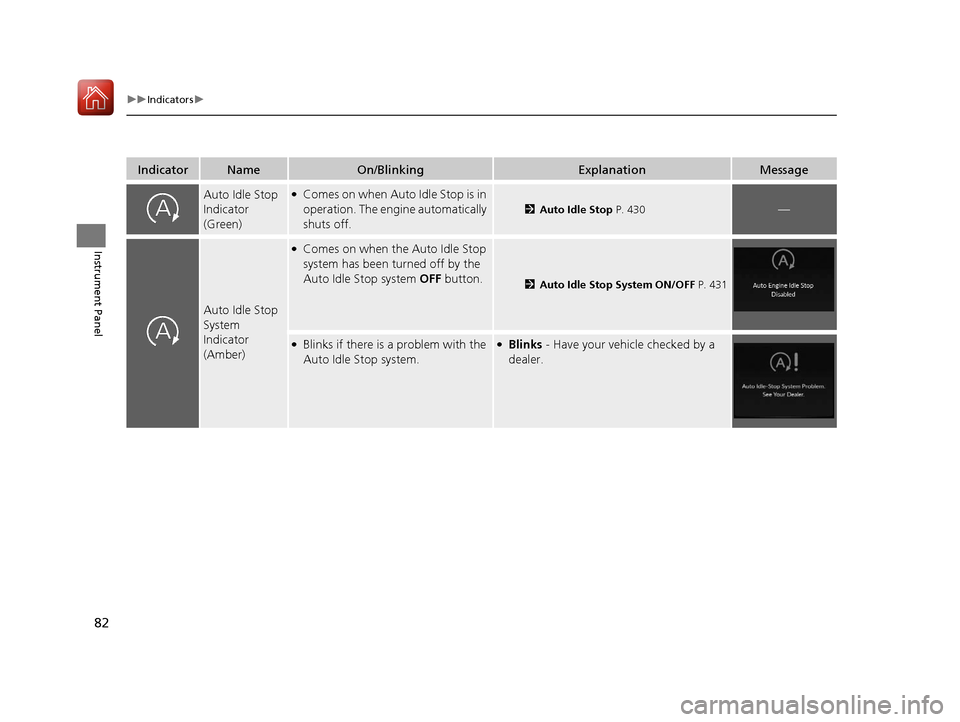
Auto Idle Stop
Indicator
(Green)●Comes on when Auto Idle Stop is in
operation. The engine automatically
shuts off.
2Auto Idle Stop P. 430—
Auto Idle Stop
System
Indicator
(Amber)
●Comes on when the Auto Idle Stop
system has been turned off by the
Auto Idle Stop system OFF button.
2Auto Idle Stop System ON/OFF P. 431
●Blinks if there is a problem with the
Auto Idle Stop system.●Blinks - Have your vehicle checked by a
dealer.
20 ACURA RDX-31TJB6111.book 82 ページ 2020年2月11日 火曜日 午後2時6分
Page 98 of 657
97
uuIndicators uMulti-Information Display Warning and Information Messages
Continued
Instrument Panel
Multi-Information Display Warn ing and Information Messages
The following messages appear only on the multi-information display. Roll the right selector wheel to see the message again with the
system message indicator on.
2 Switching the Display P. 129
MessageConditionExplanation
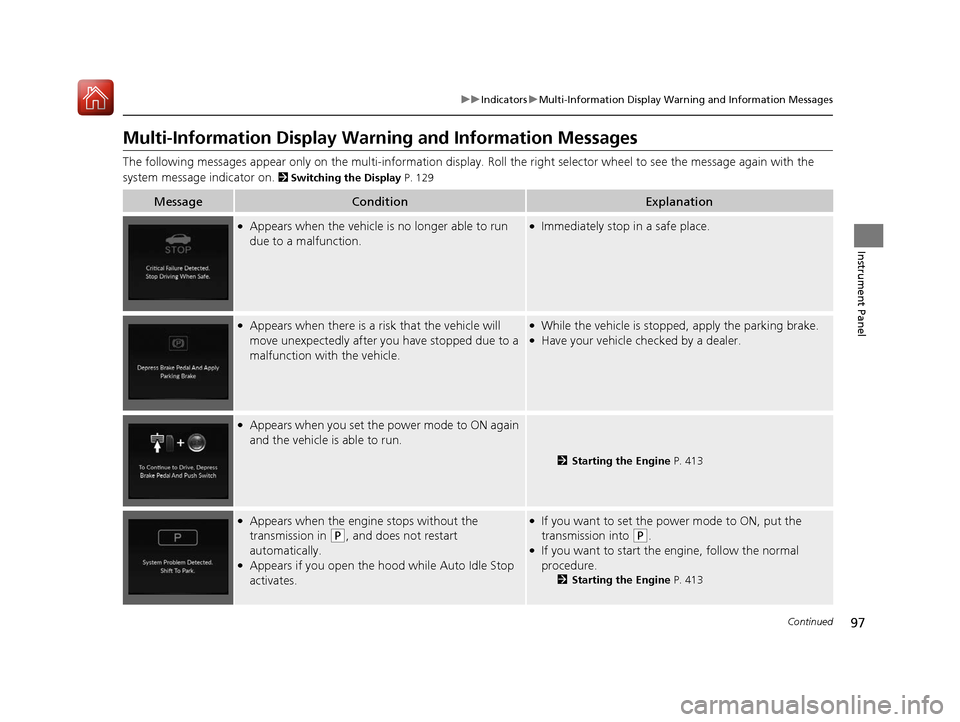
●Appears when the vehicle is no longer able to run
due to a malfunction.●Immediately stop in a safe place.
●Appears when there is a ri sk that the vehicle will
move unexpectedly after you have stopped due to a
malfunction with the vehicle.●While the vehicle is stopped, apply the parking brake.●Have your vehicle checked by a dealer.
●Appears when you set the power mode to ON again
and the vehicle is able to run.
2 Starting the Engine P. 413
●Appears when the engine stops without the
transmission in
(P, and does not restart
automatically.
●Appears if you open the hood while Auto Idle Stop
activates.
●If you want to set the power mode to ON, put the
transmission into
(P.●If you want to start the engine, follow the normal
procedure.
2 Starting the Engine P. 413
20 ACURA RDX-31TJB6111.book 97 ページ 2020年2月11日 火曜日 午後2時6分
Page 107 of 657
106
uuIndicators uMulti-Information Display Warn ing and Information Messages
Instrument Panel
MessageConditionExplanation
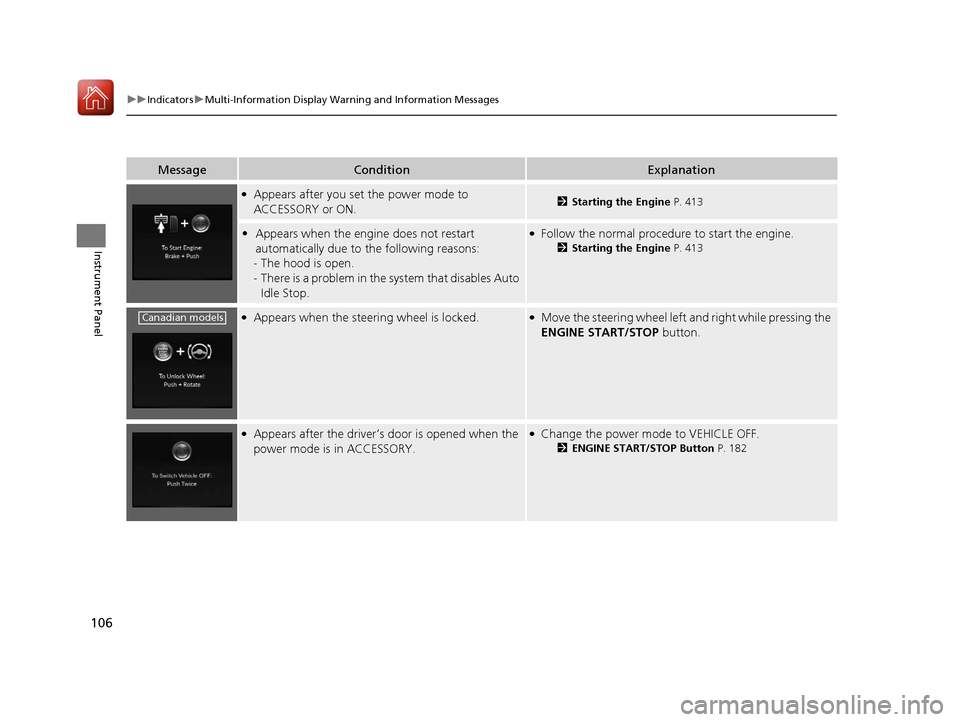
●Appears after you set the power mode to
ACCESSORY or ON.2Starting the Engine P. 413
•Appears when the engine does not restart
automatically due to the following reasons:
- The hood is open.
- There is a problem in the sy stem that disables Auto
Idle Stop.●Follow the normal procedure to start the engine.
2 Starting the Engine P. 413
●Appears when the steering wheel is locked.●Move the steering wheel left and right while pressing the
ENGINE START/STOP button.
●Appears after the driver’s door is opened when the
power mode is in ACCESSORY.●Change the power mode to VEHICLE OFF.
2ENGINE START/STOP Button P. 182
Canadian models
20 ACURA RDX-31TJB6111.book 106 ページ 2020年2月11日 火曜日 午後2時6分
Page 110 of 657
109
uuIndicators uMulti-Information Display Warning and Information Messages
Continued
Instrument Panel
MessageConditionExplanation
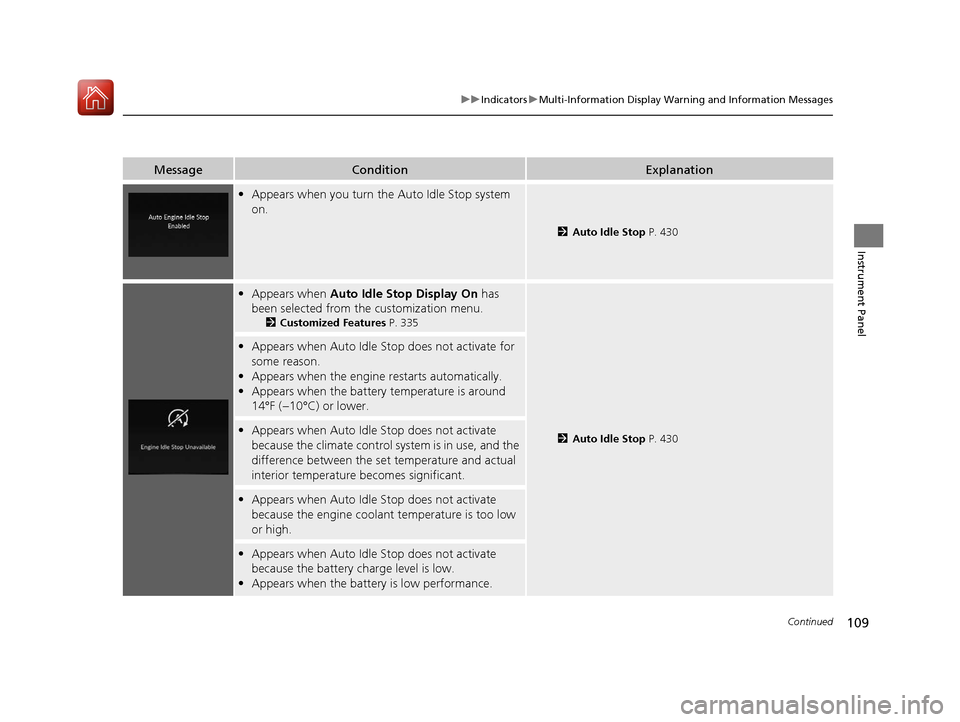
• Appears when you turn the Auto Idle Stop system
on.
2 Auto Idle Stop P. 430
•Appears when Auto Idle Stop Display On has
been selected from the customization menu.
2 Customized Features P. 335
2Auto Idle Stop P. 430
•Appears when Auto Idle Stop does not activate for
some reason.
• Appears when the engine restarts automatically.
• Appears when the battery temperature is around
14°F (−10°C) or lower.
•Appears when Auto Idle Stop does not activate
because the climate control sy stem is in use, and the
difference between the set temperature and actual
interior temperature becomes significant.
• Appears when Auto Idle Stop does not activate
because the engine coolant temperature is too low
or high.
•Appears when Auto Idle Stop does not activate
because the battery charge level is low.
• Appears when the batte ry is low performance.
20 ACURA RDX-31TJB6111.book 109 ページ 2020年2月11日 火曜日 午後2時6分
Page 111 of 657
110
uuIndicators uMulti-Information Display Warn ing and Information Messages
Instrument Panel
MessageConditionExplanation
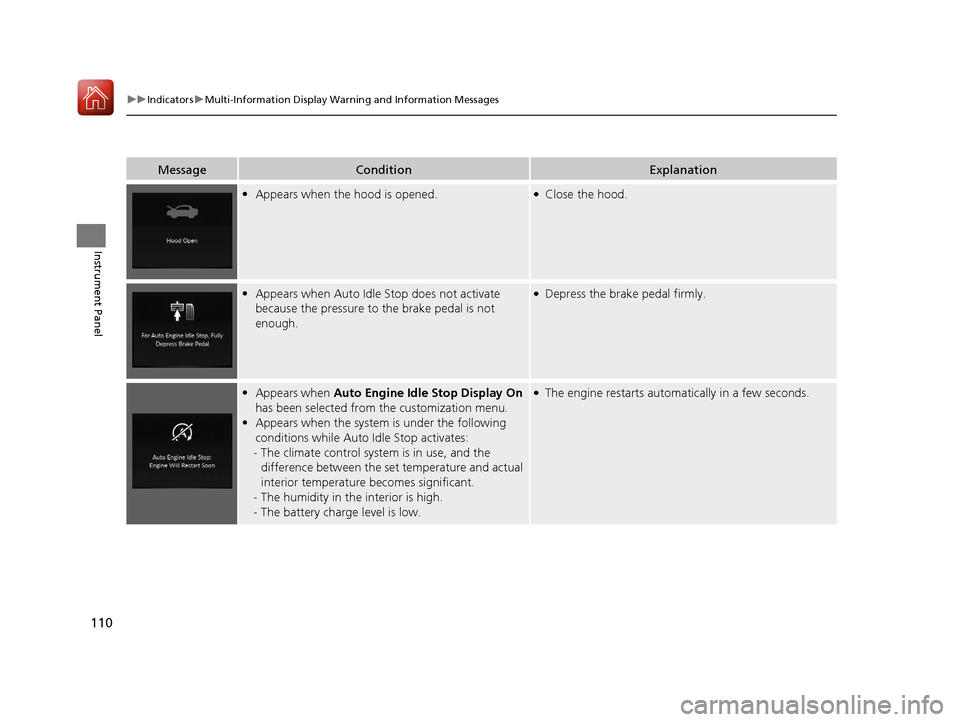
•Appears when the hood is opened.●Close the hood.
•Appears when Auto Idle Stop does not activate
because the pressure to the brake pedal is not
enough.●Depress the brake pedal firmly.
•Appears when Auto Engine Idle Stop Display On
has been selected from the customization menu.
• Appears when the system is under the following
conditions while Auto Idle Stop activates:
- The climate control system is in use, and the
difference between the set temperature and actual
interior temperature becomes significant.
- The humidity in the interior is high.
- The battery charge level is low.●The engine restarts automatically in a few seconds.
20 ACURA RDX-31TJB6111.book 110 ページ 2020年2月11日 火曜日 午後2時6分
Page 231 of 657
230
Controls
Climate Control System
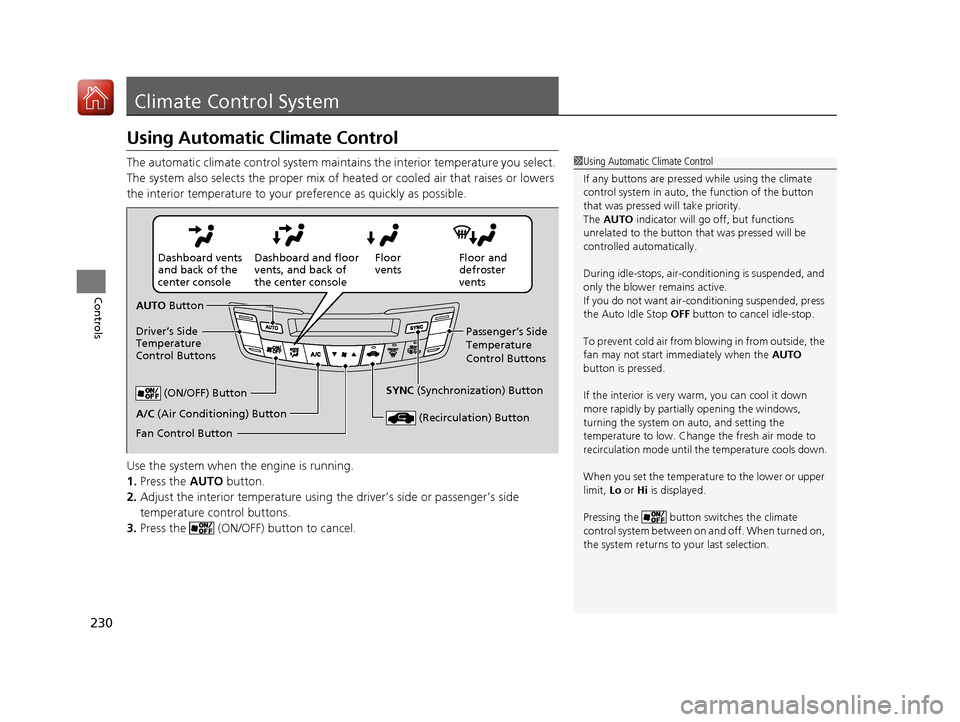
Using Automatic Climate Control
The automatic climate control system maintains the interior temperature you select.
The system also selects the proper mix of heated or cooled air that raises or lowers
the interior temperature to your preference as quickly as possible.
Use the system when the engine is running.
1. Press the AUTO button.
2. Adjust the interior temperature using the driver’s side or passenger’s side
temperature control buttons.
3. Press the (ON/OFF) button to cancel.1Using Automatic Climate Control
If any buttons are presse d while using the climate
control system in auto, the function of the button
that was pressed will take priority.
The AUTO indicator will go off, but functions
unrelated to the button th at was pressed will be
controlled automatically.
During idle-stops, air-conditioning is suspended, and
only the blower remains active.
If you do not want air-cond itioning suspended, press
the Auto Idle Stop OFF button to cancel idle-stop.
To prevent cold air from bl owing in from outside, the
fan may not start i mmediately when the AUTO
button is pressed.
If the interior is very warm, you can cool it down
more rapidly by partial ly opening the windows,
turning the system on auto, and setting the
temperature to low. Change the fresh air mode to
recirculation mode until the temperature cools down.
When you set the temperat ure to the lower or upper
limit, Lo or Hi is displayed.
Pressing the button switches the climate
control system between on and off. When turned on,
the system returns to your last selection.
Floor and
defroster
vents
Floor
vents
Dashboard and floor
vents, and back of
the center console
Dashboard vents
and back of the
center console
AUTO Button
Driver’s Side
Temperature
Control Buttons Passenger’s Side
Temperature
Control Buttons
A/C (Air Conditioning) Button (ON/OFF) Button
Fan Control Button SYNC
(Synchronization) Button
(Recirculation) Button
20 ACURA RDX-31TJB6111.book 230 ページ 2020年2月11日 火曜日 午後2時6分