battery change Acura RDX 2020 Owner's Manual
[x] Cancel search | Manufacturer: ACURA, Model Year: 2020, Model line: RDX, Model: Acura RDX 2020Pages: 657, PDF Size: 33.2 MB
Page 103 of 657
102
uuIndicators uMulti-Information Display Warn ing and Information Messages
Instrument Panel
MessageConditionExplanation
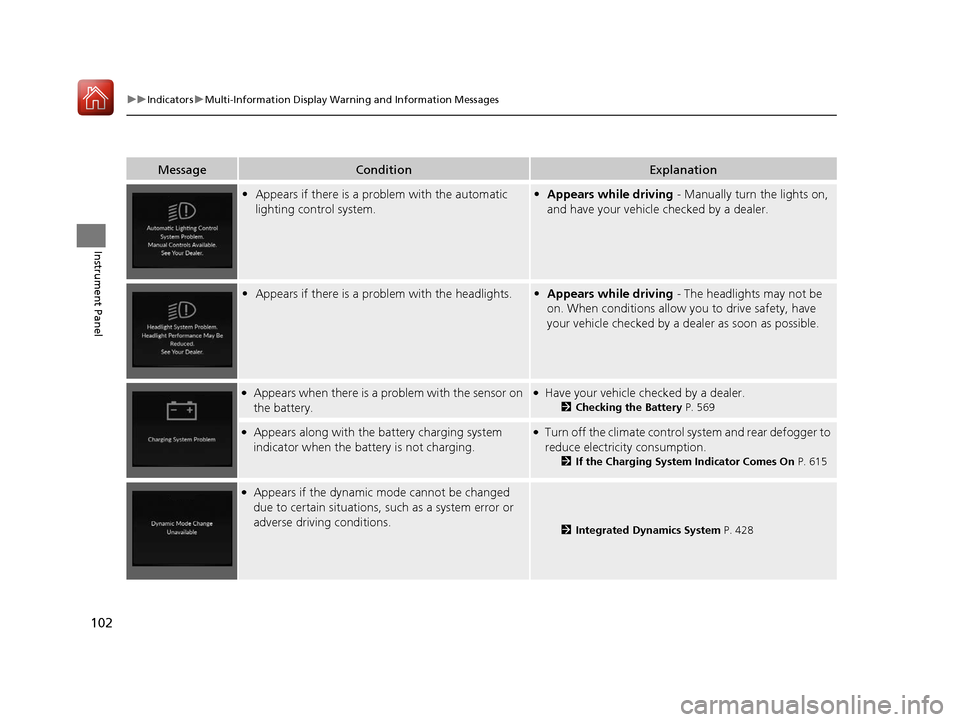
•Appears if there is a problem with the automatic
lighting control system.•Appears while driving - Manually turn the lights on,
and have your vehicle checked by a dealer.
• Appears if there is a problem with the headlights.•Appears while driving - The headlights may not be
on. When conditions allow you to drive safety, have
your vehicle checked by a de aler as soon as possible.
●Appears when there is a problem with the sensor on
the battery.●Have your vehicle checked by a dealer.
2 Checking the Battery P. 569
●Appears along with the battery charging system
indicator when the batte ry is not charging.●Turn off the climate control system and rear defogger to
reduce electricity consumption.
2If the Charging System Indicator Comes On P. 615
●Appears if the dynamic mode cannot be changed
due to certain situations, such as a system error or
adverse driving conditions.
2Integrated Dynamics System P. 428
20 ACURA RDX-31TJB6111.book 102 ページ 2020年2月11日 火曜日 午後2時6分
Page 156 of 657
Continued155
uuLocking and Unlocking the Doors uLocking/Unlocking the Doors from the Outside
Controls
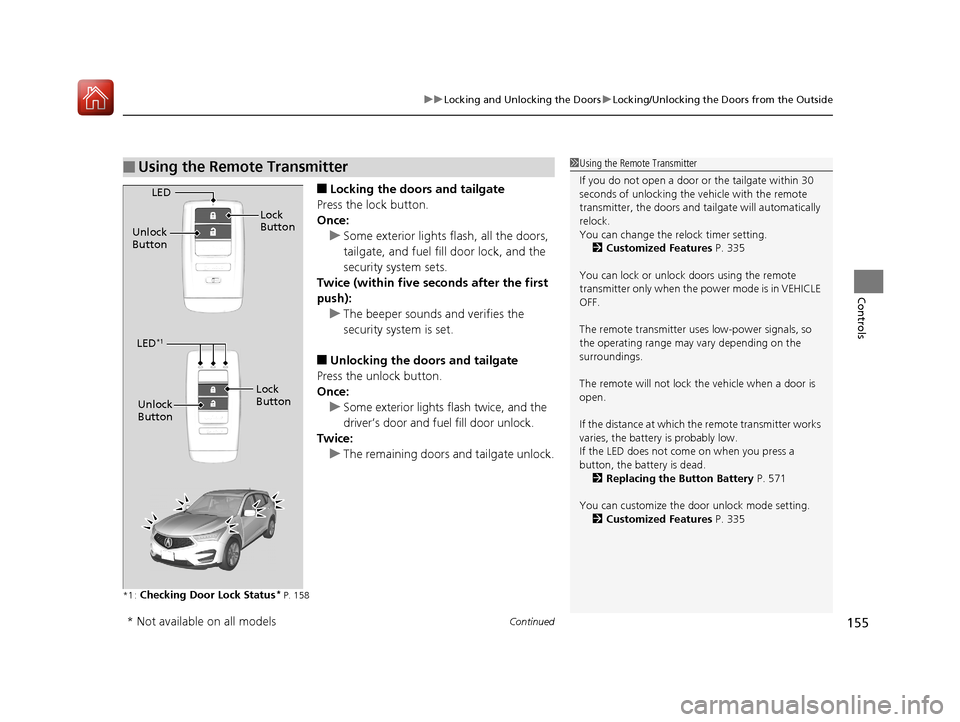
■Locking the doors and tailgate
Press the lock button.
Once: u Some exterior lights flash, all the doors,
tailgate, and fuel fill door lock, and the
security system sets.
Twice (within five se conds after the first
push):
u The beeper sounds and verifies the
security system is set.
■Unlocking the doors and tailgate
Press the unlock button.
Once: u Some exterior lights flash twice, and the
driver’s door and fuel fill door unlock.
Twice:
u The remaining doors and tailgate unlock.
*1 :Checking Door Lock Status* P. 158
■Using the Remote Transmitter1Using the Remote Transmitter
If you do not open a door or the tailgate within 30
seconds of unlocking the vehicle with the remote
transmitter, the doors and ta ilgate will automatically
relock.
You can change the relock timer setting. 2 Customized Features P. 335
You can lock or unlock doors using the remote
transmitter only when the power mode is in VEHICLE
OFF.
The remote transmitter us es low-power signals, so
the operating range may vary depending on the
surroundings.
The remote will not lock th e vehicle when a door is
open.
If the distance at which the remote transmitter works
varies, the batter y is probably low.
If the LED does not come on when you press a
button, the battery is dead.
2 Replacing the Button Battery P. 571
You can customize the door unlock mode setting. 2 Customized Features P. 335
LED
Unlock
Button Lock
Button
LED*1
Unlock
Button
Lock
Button
* Not available on all models
20 ACURA RDX-31TJB6111.book 155 ページ 2020年2月11日 火曜日 午後2時6分
Page 175 of 657
uuSecurity System uSecurity System Alarm
174
Controls
■Setting the security system alarm
The security system alarm automatically sets when the following conditions have
been met:
• The power mode is set to VEHICLE OFF (LOCK).
• The hood is closed.
• All doors and the tailgate are locked from outside with the key, remote
transmitter, or keyless access system.
■When the security system alarm sets
The security system alarm indicator in the instrument panel blinks. When the
blinking interval changes after about 15 seconds, the security system alarm is set.
■To cancel the security system alarm
The security system alarm is canceled when the vehicle is unlocked using the remote
transmitter, keyless ac cess system, or the power mode is set to ON. The security
system alarm indicator goe s off at the same time.
1Security System Alarm
Do not set the security system alarm when someone
is in the vehicle or a window is open. The system can
accidentally activate when:
•Unlocking the door with the lock tab.•Opening the hood with the hood release.
If the battery goes dead after you have set the
security system alarm, the security alarm may go off
once the battery is re charged or replaced.
If this occurs, deactivate the security system alarm by
unlocking a door using the key, remote transmitter or
keyless access system.
20 ACURA RDX-31TJB6111.book 174 ページ 2020年2月11日 火曜日 午後2時6分
Page 369 of 657

uuBluetooth ® HandsFreeLink ®u HFL Menus
368
Features
■To pair a cell phone (when there is no
phone paired to the system)
1. Press the (home) button.
2. Select Phone .
3. Select Connect Phone .
4. Make sure your phone is in search or
discoverable mode, then select + Connect
New Device .
u HFL automatically searches for a
Bluetooth® device.
5. Select your phone when it appears on the
list.
u If your phone still does not appear,
search for Bluetooth® devices using your
phone.
From your phone, search for
HandsFreeLink .
6. The system gives you a pairing code on the
audio/information screen.
u Confirm if the pairing code on the screen
and your phone match.
This may vary by phone.
7. Select desired functions and then select
Connect .
u The pop-up menu appears on the screen,
if the internet wireless hotspot function
is selected.1Phone Setup
Your Bluetooth -compatible phone must be paired to
the system before you ca n make and receive hands-
free calls.
Phone Pairing Tips:
•You cannot pair your phone while the vehicle is
moving.
•Up to six phones can be paired.
•Your phone’s battery may dr ain faster when it is
paired to the system.
Once you have paired a phone, you can see it
displayed on the screen with one or more icons on
the right side.
These icons indicate the following: : The phone is compatible with Bluetooth® Audio.
: The phone can be used with HFL.
: The phone can be used with internet wireless
hotspot.
If there is an active c onnection to Apple CarPlay
pairing of additional Bluetooth® compatible devices is
unavailable.
Enable Smart Sharing pop-up
Smart Sharing to share phone data with Acura, you
can change the setting later by deleting the device in
Phone Menu .
For detail information of all data shared visit https://
acuralink.acura.com/#/acuralinkLegalTerms
20 ACURA RDX-31TJB6111.book 368 ページ 2020年2月11日 火曜日 午後2時6分
Page 395 of 657
uuAcuraLink ®u
394
Features
■Automatic collisi on notification
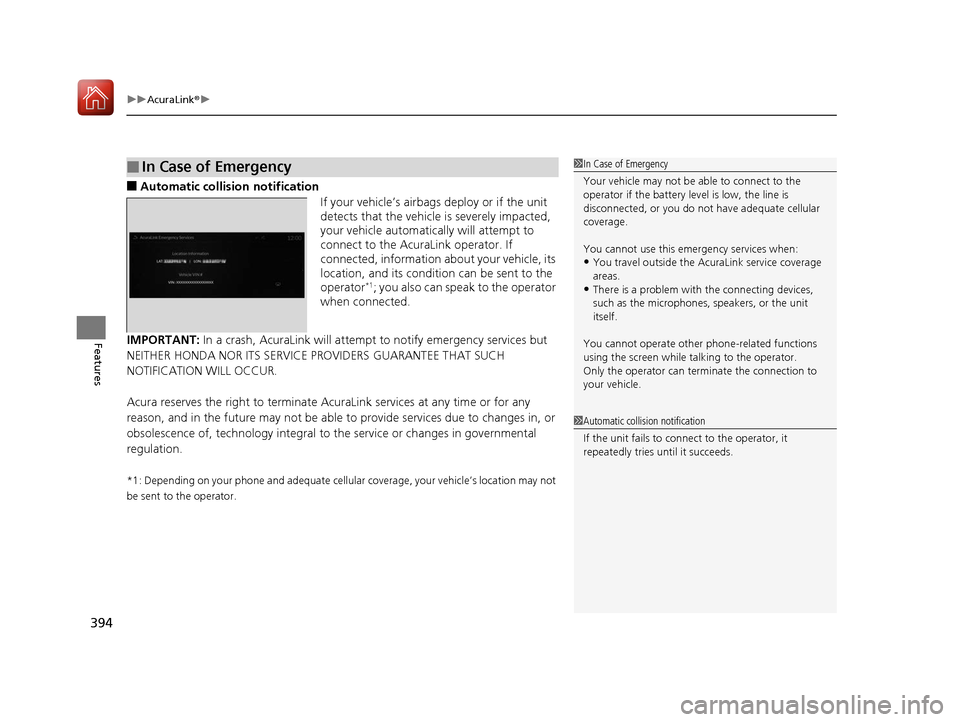
If your vehicle’s airbags deploy or if the unit
detects that the vehicle is severely impacted,
your vehicle automatically will attempt to
connect to the AcuraLink operator. If
connected, information about your vehicle, its
location, and its condition can be sent to the
operator
*1; you also can speak to the operator
when connected.
IMPORTANT: In a crash, AcuraLink will attempt to notify emergency services but
NEITHER HONDA NOR ITS SERVICE PROVIDERS GUARANTEE THAT SUCH
NOTIFICATION WILL OCCUR.
Acura reserves the right to terminate Acur aLink services at any time or for any
reason, and in the future may not be able to provide services due to changes in, or
obsolescence of, technology integral to the service or changes in governmental
regulation.
*1: Depending on your phone and ad equate cellular coverage, your vehicle’s location may not
be sent to the operator.
■In Case of Emergency1 In Case of Emergency
Your vehicle may not be able to connect to the
operator if the battery level is low, the line is
disconnected, or you do not have adequate cellular
coverage.
You cannot use this emergency services when:
•You travel outside the AcuraLink service coverage
areas.
•There is a problem with the connecting devices,
such as the microphones, speakers, or the unit
itself.
You cannot operate othe r phone-related functions
using the screen while talking to the operator.
Only the operator can terminate the connection to
your vehicle.
1 Automatic collision notification
If the unit fails to connect to the operator, it
repeatedly tries until it succeeds.
20 ACURA RDX-31TJB6111.book 394 ページ 2020年2月11日 火曜日 午後2時6分
Page 433 of 657
uuWhen Driving uAuto Idle Stop
432
Driving
The vehicle stops with the gear position in (D and the brake pedal depressed.
■Auto Idle Stop does not activate when:
• The Auto Idle Stop OFF button is pressed.
• The driver’s seat belt is not fastened.
• The engine coolant temperature is low or high.
• The transmission fluid temperature is low or high.
• The vehicle comes to a stop again befo re the vehicle speed reaches 3 mph (5
km/h) after the engine starts.
• Stopped on a steep incline.
• The transmission is in a position other than
(D.
• The engine is started with the hood open.
u Turn off the engine. Close the hood before you restart the engine to activate
Auto Idle Stop.
• The battery charge is low.
• The internal temperature of the ba ttery is 14°F (−10°C). or less.
• The climate control system is in use, an d the outside temperature is below −4°F
(−20°C) or over 104°F (40°C).
• The climate control system is in use, and the temperature is set to the Hi or Lo.
• is ON (indicator on).
• The dynamic mode is changed to Snow or Sport+ mode.
■Auto Idle Stop Activates When:1Auto Idle Stop Activates When:
Do not open the hood while the Auto Idle Stop
function is activated. If the hood is opened, the
engine will not re start automatically.
In this case, restart the engine with the ENGINE
START/STOP button.
2 Starting the Engine P. 413
When ACC with Low Speed Follow is in operation,
the vehicle stops without de pressing the brake pedal
and Auto Idle Stop may activate.
Pressing the ENGINE START/STOP button changes
the power mode to OFF even while Auto Idle Stop is
in operation. Once in O FF, the engine no longer
restarts automatically. Follow the standard procedure
to start the engine. 2 Starting the Engine P. 413
20 ACURA RDX-31TJB6111.book 432 ページ 2020年2月11日 火曜日 午後2時6分
Page 435 of 657
uuWhen Driving uAuto Idle Stop
434
Driving
• The brake pedal is released (without the automatic brake hold system activated).
• The accelerator pedal is depressed (with the automatic brake hold system
activated).
2 Automatic Brake Hold P. 497
■The engine restarts even if the brake pedal is depressed*1 when:
• The Auto Idle Stop OFF button is pressed.
• A steering wheel is operated.
• The transmission is put into
(R, (S, and (P, or taken out of (N and put into (D.
• The pressure on the brake pedal is redu ced and the vehicle starts moving while
stopped on an incline.
• The brake pedal is released slightly during a stop.
• The battery charge becomes low.
• The accelerator pedal is depressed.
• The driver’s seat belt is unlatched.
• is ON (indicator on).
• The climate control system is in us e, and the difference between the set
temperature and actual interior temperature becomes significant.
• The climate control system is bein g used to dehumidify the interior.
• The vehicle ahead of you starts again when your vehicle stops automatically with
ACC with Low Speed Follow.
• The dynamic mode is changed to Snow or Sport+ mode.
■The Engine Automatically Restarts When:1The Engine Automatically Restarts When:
If you are using an electroni c device during Auto Idle
Stop, the device may tempor arily be turned off when
the engine restarts.
1 The engine restarts even if the brake pedal is depressed*1 when:
*1: With the automatic brake hold system activated,
you can release the brake pe dal during Auto Idle Stop
is in operation.
If the automatic brake hold system has been turned
off, or if there is a problem with the system, the
engine will restart automatically when you release
the brake pedal. 2 Automatic Brake Hold P. 497
20 ACURA RDX-31TJB6111.book 434 ページ 2020年2月11日 火曜日 午後2時6分
Page 609 of 657
608
uuEngine Does Not Start uIf the Keyless Access Remote Battery is Weak
Handling the Unexpected
If the Keyless Access Re mote Battery is Weak
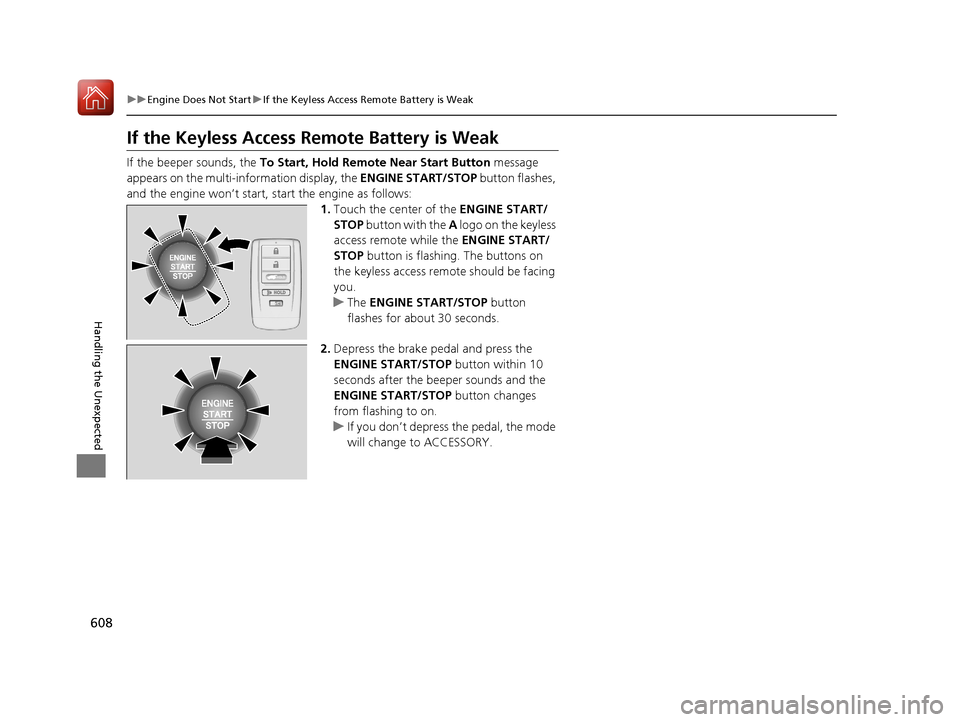
If the beeper sounds, the To Start, Hold Remote Near Start Button message
appears on the multi-information display, the ENGINE START/STOP button flashes,
and the engine won’t start, start the engine as follows:
1.Touch the center of the ENGINE START/
STOP button with the A logo on the keyless
access remote while the ENGINE START/
STOP button is flashing. The buttons on
the keyless access remo te should be facing
you.
u The ENGINE START/STOP button
flashes for about 30 seconds.
2. Depress the brake pedal and press the
ENGINE START/STOP button within 10
seconds after the beeper sounds and the
ENGINE START/STOP button changes
from flashing to on.
u If you don’t depress the pedal, the mode
will change to ACCESSORY.
HOLD
20 ACURA RDX-31TJB6111.book 608 ページ 2020年2月11日 火曜日 午後2時6分