battery replace Acura RDX 2020 Owner's Manual
[x] Cancel search | Manufacturer: ACURA, Model Year: 2020, Model line: RDX, Model: Acura RDX 2020Pages: 657, PDF Size: 33.2 MB
Page 24 of 657
23
Quick Reference Guide
Maintenance (P 527)
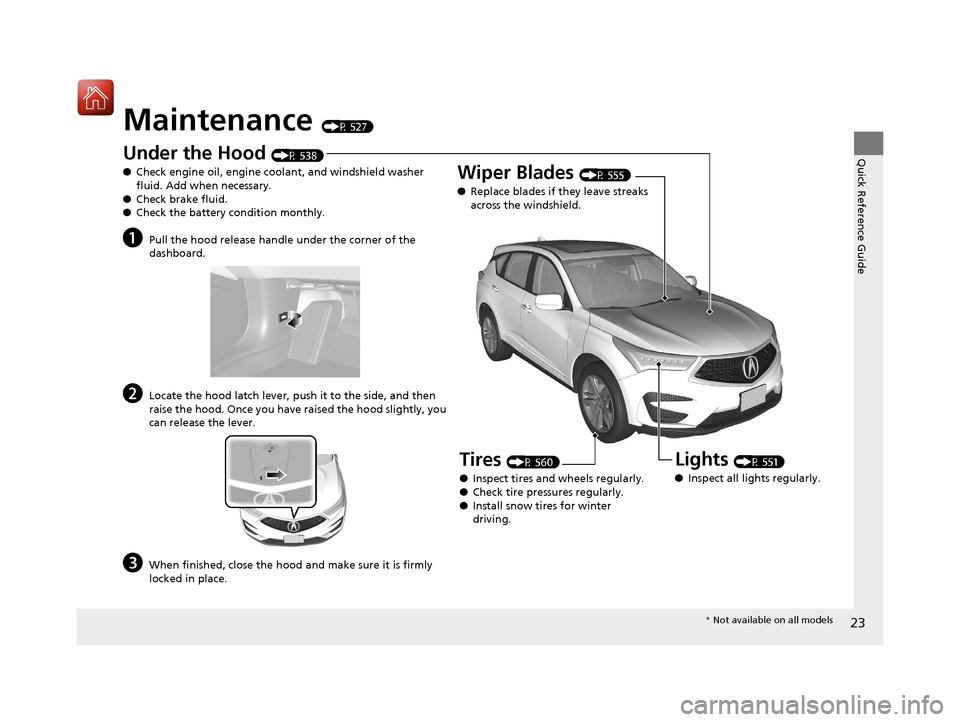
Under the Hood (P 538)
● Check engine oil, engine coolant, and windshield washer
fluid. Add when necessary.
● Check brake fluid.
● Check the battery condition monthly.
aPull the hood release handle under the corner of the
dashboard.
bLocate the hood latch lever, push it to the side, and then
raise the hood. Once you have raised the hood slightly, you
can release the lever.
cWhen finished, close the hood and make sure it is firmly
locked in place.
Lights (P 551)
● Inspect all lights regularly.
Wiper Blades (P 555)
● Replace blades if they leave streaks
across the windshield.
Tires (P 560)
● Inspect tires and wheels regularly.
● Check tire pressures regularly.
● Install snow tires for winter
driving.
* Not available on all models
20 ACURA RDX-31TJB6111.book 23 ページ 2020年2月11日 火曜日 午後2時6分
Page 25 of 657
24
Quick Reference Guide
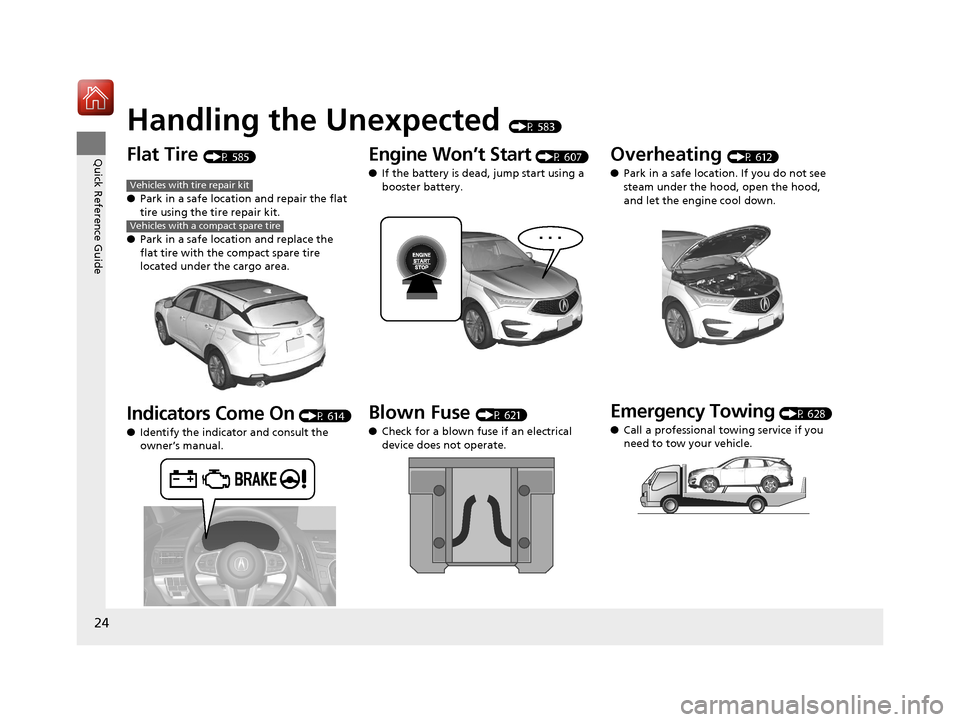
Handling the Unexpected (P 583)
Flat Tire (P 585)
● Park in a safe location and repair the flat
tire using the tire repair kit.
● Park in a safe location and replace the
flat tire with the compact spare tire
located under the cargo area.
Indicators Come On (P 614)
● Identify the indicator and consult the
owner’s manual.
Vehicles with tire repair kit
Vehicles with a compact spare tire
Engine Won’t Start (P 607)
● If the battery is dead, jump start using a
booster battery.
Blown Fuse (P 621)
● Check for a blown fuse if an electrical
device does not operate.
Overheating (P 612)
● Park in a safe location. If you do not see
steam under the hood, open the hood,
and let the engine cool down.
Emergency Towing (P 628)
● Call a professional towing service if you
need to tow your vehicle.
20 ACURA RDX-31TJB6111.book 24 ページ 2020年2月11日 火曜日 午後2時6分
Page 167 of 657
uuOpening and Closing the Tailgate uOpening/Closing the Power Tailgate
166
Controls
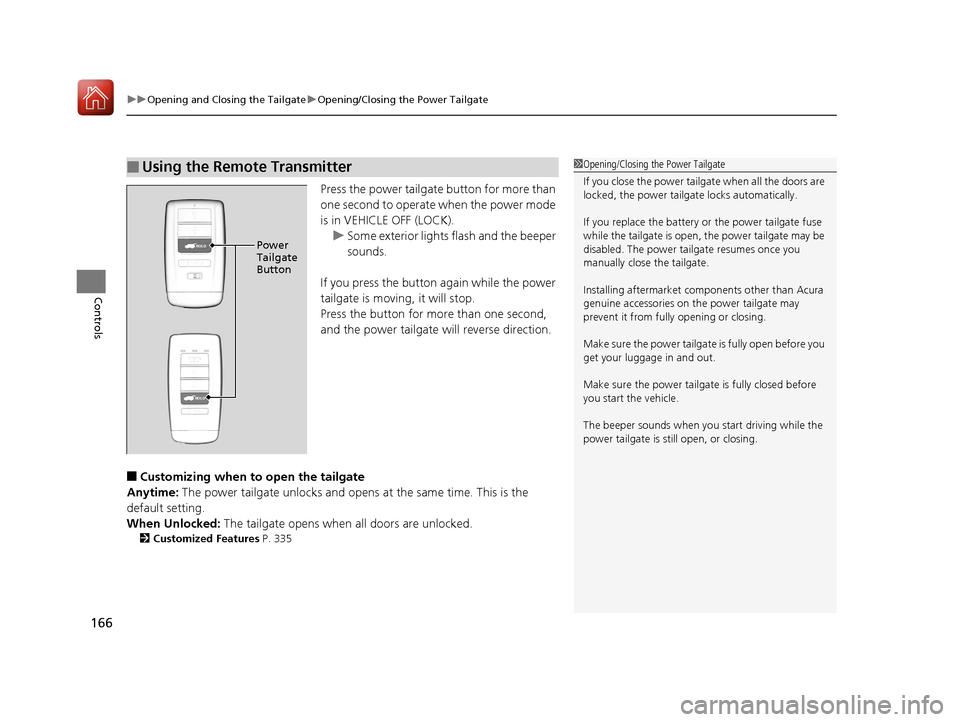
Press the power tailgate button for more than
one second to operate when the power mode
is in VEHICLE OFF (LOCK).
u Some exterior lights flash and the beeper
sounds.
If you press the button again while the power
tailgate is moving, it will stop.
Press the button for more than one second,
and the power tailgate will reverse direction.
■Customizing when to open the tailgate
Anytime: The power tailgate unlocks and opens at the same time. This is the
default setting.
When Unlocked: The tailgate opens when all doors are unlocked.
2Customized Features P. 335
■Using the Remote Transmitter1Opening/Closing the Power Tailgate
If you close the power tail gate when all the doors are
locked, the power tailgate locks automatically.
If you replace the battery or the power tailgate fuse
while the tailgate is open, the power tailgate may be
disabled. The power tail gate resumes once you
manually close the tailgate.
Installing aftermarket com ponents other than Acura
genuine accessories on the power tailgate may
prevent it from fully opening or closing.
Make sure the power tailgate is fully open before you
get your luggage in and out.
Make sure the power tailgate is fully closed before
you start the vehicle.
The beeper sounds when you start driving while the
power tailgate is still open, or closing.
HOLDPower
Tailgate
Button
HOLD
20 ACURA RDX-31TJB6111.book 166 ページ 2020年2月11日 火曜日 午後2時6分
Page 175 of 657
uuSecurity System uSecurity System Alarm
174
Controls
■Setting the security system alarm
The security system alarm automatically sets when the following conditions have
been met:
• The power mode is set to VEHICLE OFF (LOCK).
• The hood is closed.
• All doors and the tailgate are locked from outside with the key, remote
transmitter, or keyless access system.
■When the security system alarm sets
The security system alarm indicator in the instrument panel blinks. When the
blinking interval changes after about 15 seconds, the security system alarm is set.
■To cancel the security system alarm
The security system alarm is canceled when the vehicle is unlocked using the remote
transmitter, keyless ac cess system, or the power mode is set to ON. The security
system alarm indicator goe s off at the same time.
1Security System Alarm
Do not set the security system alarm when someone
is in the vehicle or a window is open. The system can
accidentally activate when:
•Unlocking the door with the lock tab.•Opening the hood with the hood release.
If the battery goes dead after you have set the
security system alarm, the security alarm may go off
once the battery is re charged or replaced.
If this occurs, deactivate the security system alarm by
unlocking a door using the key, remote transmitter or
keyless access system.
20 ACURA RDX-31TJB6111.book 174 ページ 2020年2月11日 火曜日 午後2時6分
Page 431 of 657
430
uuWhen Driving uAuto Idle Stop
Driving
Auto Idle Stop
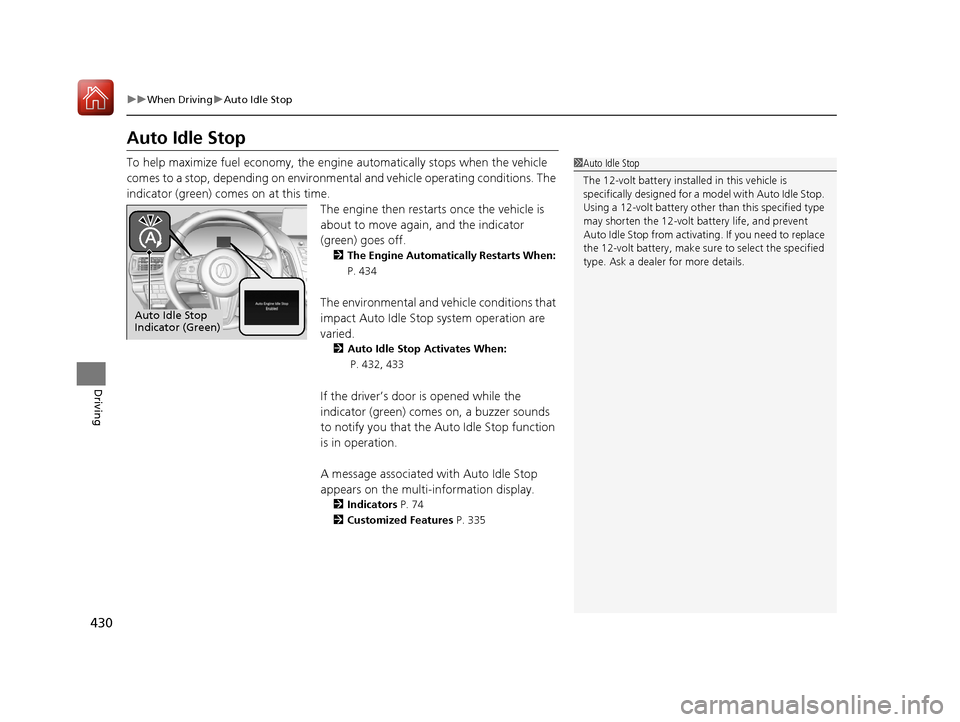
To help maximize fuel econ omy, the engine automatica lly stops when the vehicle
comes to a stop, depending on environmental and vehicle operating conditions. The
indicator (green) comes on at this time. The engine then restarts once the vehicle is
about to move again, and the indicator
(green) goes off.
2 The Engine Automatically Restarts When:
P. 434
The environmental and vehicle conditions that
impact Auto Idle Stop system operation are
varied.
2 Auto Idle Stop Activates When:
P. 432, 433
If the driver’s door is opened while the
indicator (green) comes on, a buzzer sounds
to notify you that the Auto Idle Stop function
is in operation.
A message associated with Auto Idle Stop
appears on the multi-information display.
2Indicators P. 74
2 Customized Features P. 335
1Auto Idle Stop
The 12-volt battery insta lled in this vehicle is
specifically designed for a m odel with Auto Idle Stop.
Using a 12-volt battery other than this specified type
may shorten the 12-volt ba ttery life, and prevent
Auto Idle Stop from activati ng. If you need to replace
the 12-volt battery, make sure to select the specified
type. Ask a dealer for more details.
Auto Idle Stop
Indicator (Green)
20 ACURA RDX-31TJB6111.book 430 ページ 2020年2月11日 火曜日 午後2時6分
Page 528 of 657
527
Maintenance
This chapter discusses basic maintenance.
Before Performing MaintenanceInspection and Maintenance ............ 528
Safety When Performing Maintenance ..529
Parts and Fluids Used in Maintenance Service ........................................... 530
Maintenance Minder
TM..................... 531
Maintenance Under the Hood Maintenance Items Under the Hood .. 538
Opening the Hood ........................... 539
Engine Compartment Cover ............. 540
Recommended Engine Oil ................ 541
Oil Check ......................................... 542
Adding Engine Oil ............................ 543 Changing the Engine Oi
l and Oil Filter... 544
Engine Coolant ................................ 546
Transmission Fluid ............................ 548
Brake Fluid ....................................... 549
Refilling Window Wa sher Fluid......... 550
Replacing Light Bulbs ....................... 551Checking and Maintaining Wiper
Blades .......................................... 555
Checking and Maintaining Tires
Checking Tires ................................. 560
Tire and Loading Information Label .. 561
Tire Labeling .................................... 561
DOT Tire Quality Grading (U.S. Vehicles).. 563
Wear Indicators ............................... 565
Tire Service Life ................................ 565
Tire and Wheel Replacement ........... 566
Tire Rotation .................................... 567
Winter Tires ..................................... 568
Battery ............................................... 569
Remote Transmitter Care Replacing the Button Battery ........... 571
Climate Control System Maintenance.. 573Cleaning
Interior Care .................................... 575
Exterior Care.................................... 577
Accessories and Modifications ........ 580
20 ACURA RDX-31TJB6111.book 527 ページ 2020年2月11日 火曜日 午後2時6分
Page 570 of 657
569
Maintenance
Battery
Checking the Battery
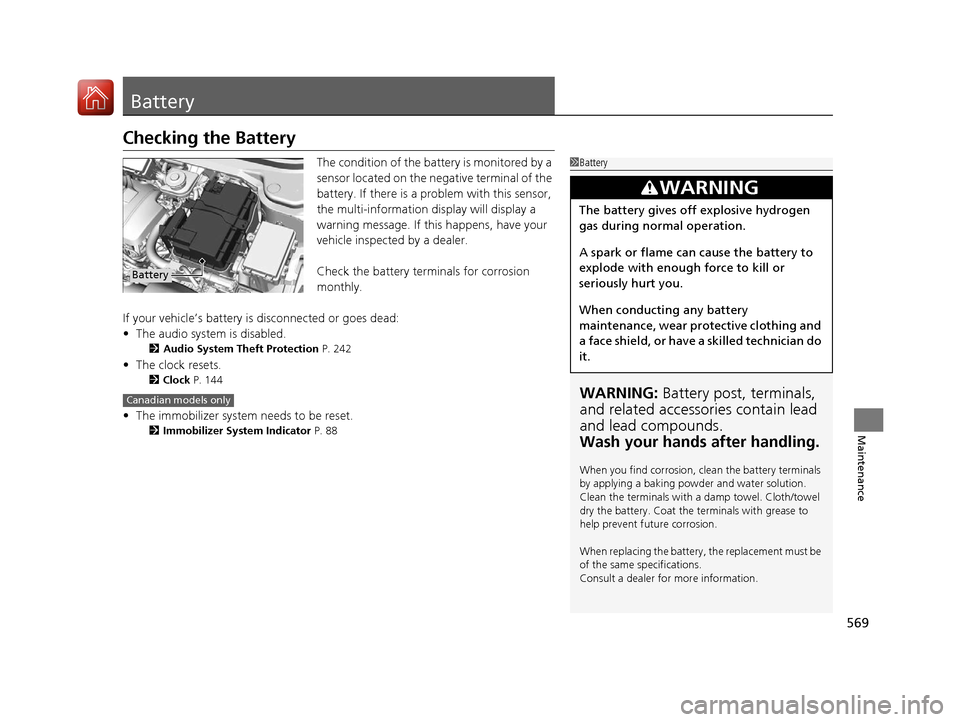
The condition of the battery is monitored by a
sensor located on the negative terminal of the
battery. If there is a problem with this sensor,
the multi-information display will display a
warning message. If this happens, have your
vehicle inspected by a dealer.
Check the battery termi nals for corrosion
monthly.
If your vehicle’s battery is disconnected or goes dead:
• The audio system is disabled.
2 Audio System Theft Protection P. 242
•The clock resets.
2 Clock P. 144
•The immobilizer system needs to be reset.
2 Immobilizer System Indicator P. 88
1Battery
WARNING: Battery post, terminals,
and related accessories contain lead
and lead compounds.
Wash your hands after handling.
When you find corrosion, cl ean the battery terminals
by applying a baking powder and water solution.
Clean the terminals with a damp towel. Cloth/towel
dry the battery. Coat the terminals with grease to
help prevent future corrosion.
When replacing the battery, the replacement must be
of the same specifications.
Consult a dealer for more information.
3WARNING
The battery gives off explosive hydrogen
gas during normal operation.
A spark or flame can cause the battery to
explode with enough force to kill or
seriously hurt you.
When conducting any battery
maintenance, wear prot ective clothing and
a face shield, or have a skilled technician do
it.
Battery
Canadian models only
20 ACURA RDX-31TJB6111.book 569 ページ 2020年2月11日 火曜日 午後2時6分
Page 571 of 657
570
uuBattery uCharging the AGM Battery
Maintenance
Charging the AGM Battery
AGM labeled batteries like those installe d in your vehicle require a compatible
charger to be properly charged. Damage to the battery can result if the battery is
charged improperly or with the wrong equipment. For more information on how to
charge your vehicle’s AGM battery, consult a dealer.1Battery
The battery installed in this vehicle is specifically
designed for a model wi th Auto Idle Stop.
Using a battery other than this specified type may
shorten the battery life, a nd prevent Auto Idle Stop
from activating. If you need to replace the battery,
make sure to select the specified type. Ask a dealer
for more details.
20 ACURA RDX-31TJB6111.book 570 ページ 2020年2月11日 火曜日 午後2時6分
Page 572 of 657
571Continued
Maintenance
Remote Transmitter Care
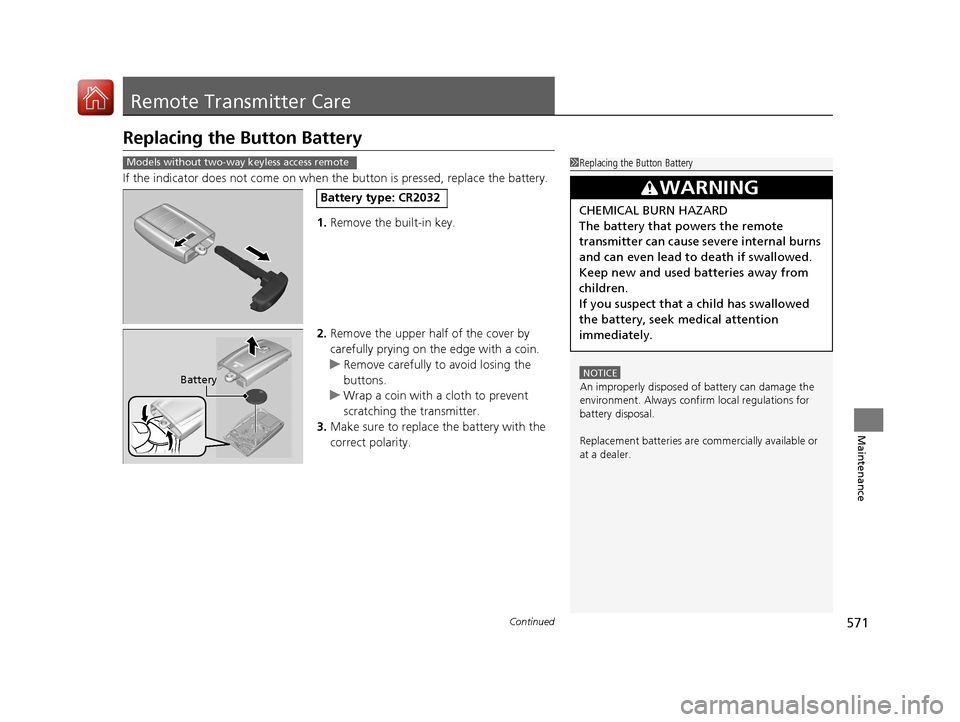
Replacing the Button Battery
If the indicator does not come on when the button is pressed, replace the battery.
1. Remove the built-in key.
2. Remove the upper half of the cover by
carefully prying on the edge with a coin.
u Remove carefully to avoid losing the
buttons.
u Wrap a coin with a cloth to prevent
scratching the transmitter.
3. Make sure to replace the battery with the
correct polarity.
1Replacing the Button Battery
NOTICE
An improperly disposed of battery can damage the
environment. Always conf irm local regulations for
battery disposal.
Replacement batteries are commercially available or
at a dealer.
3WARNING
CHEMICAL BURN HAZARD
The battery that powers the remote
transmitter can cause severe internal burns
and can even lead to death if swallowed.
Keep new and used batteries away from
children.
If you suspect that a child has swallowed
the battery, seek medical attention
immediately.
Models without two-way keyless access remote
Battery type: CR2032
Battery
20 ACURA RDX-31TJB6111.book 571 ページ 2020年2月11日 火曜日 午後2時6分
Page 573 of 657

uuRemote Transmitter Care uReplacing the Button Battery
572
Maintenance
If the indicator does not come on when the button is pressed, replace the battery.
1.Remove the built-in key.
u As a convenience, lightly place masking
tape over the remote buttons to hold
them in place.
2. Remove the upper half of the cover by
carefully prying on the edge with a coin.
u Wrap a coin with a cloth to prevent
scratching the transmitter.
3. Press down on the center of the assembly
and remove the battery.
u When removing the button battery, be
careful not to touch parts around it.
4. Make sure to replace the battery with the
correct polarity.
Models with two-way keyless access remote1 Replacing the Button Battery
NOTICE
The Remote transmitter is equipped with two
batteries: A standard replaceable CR2032 coin
button battery and an in tegral non-replaceable
rechargeable battery. To prevent permanent damage
to the rechargeable battery, replace the CR2032
battery every three to four years.
Models with two-way keyless access remote
Battery type: CR2032
Battery
20 ACURA RDX-31TJB6111.book 572 ページ 2020年2月11日 火曜日 午後2時6分