blind spot Acura RDX 2020 Owner's Manual
[x] Cancel search | Manufacturer: ACURA, Model Year: 2020, Model line: RDX, Model: Acura RDX 2020Pages: 657, PDF Size: 33.2 MB
Page 75 of 657
74
Instrument Panel
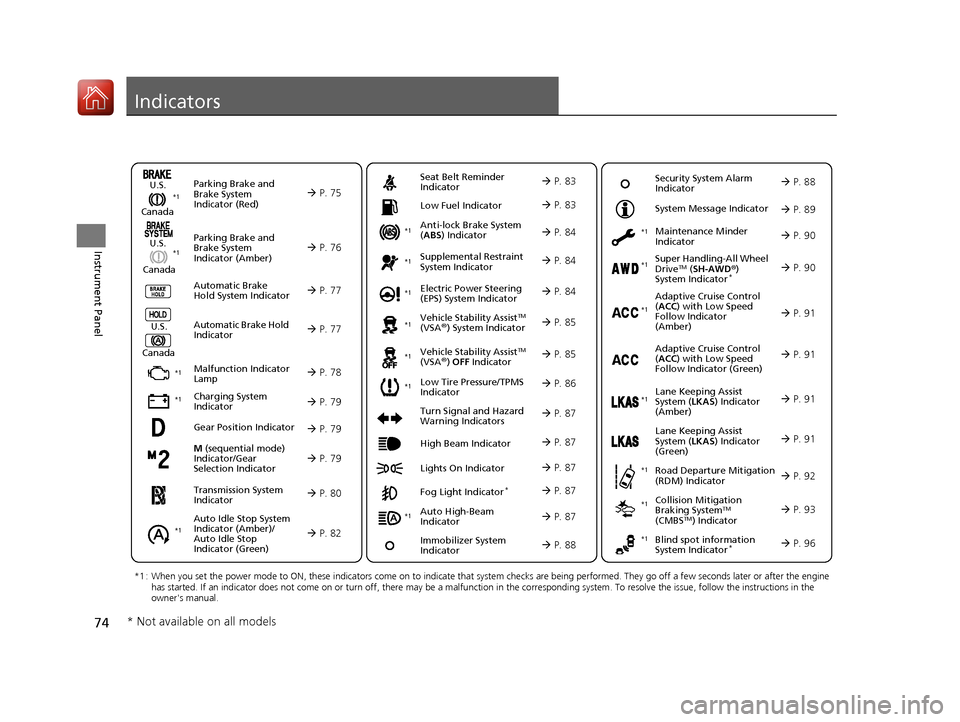
Indicators
M (sequential mode)
Indicator/Gear
Selection Indicator P. 79
Parking Brake and
Brake System
Indicator (Red)
Parking Brake and
Brake System
Indicator (Amber)
U.S.
Canada
U.S.
Canada Automatic Brake
Hold System Indicator
Automatic Brake Hold
IndicatorU.S.
Canada
*1 : When you set the power mode to ON, these indicators come on to indicate that system checks are being performed. They go off a few seconds later or after the engine
has started. If an indicator does not come on or turn off, ther e may be a malfunction in the corresponding system. To resolve the issue, follow the instructions in the
owner's manual.
P. 75*1
Malfunction Indicator
Lamp
Charging System
Indicator
Anti-lock Brake System
(ABS ) Indicator
Seat Belt Reminder
Indicator
Low Fuel Indicator
Vehicle Stability AssistTM
(VSA®) System Indicator
Vehicle Stability Assist
TM
(VSA®) OFF Indicator
Supplemental Restraint
System Indicator
Auto High-Beam
Indicator
Low Tire Pressure/TPMS
Indicator Electric Power Steering
(EPS) System Indicator
Turn Signal and Hazard
Warning Indicators
Lights On Indicator High Beam Indicator
Fog Light Indicator*
Maintenance Minder
Indicator
System Message Indicator
Super Handling-All Wheel
DriveTM (
SH-AWD ®)
System Indicator*
Adaptive Cruise Control
( ACC ) with Low Speed
Follow Indicator
(Amber)
Lane Keeping Assist
System ( LKAS) Indicator
(Amber)
Road Departure Mitigation
(RDM) Indicator
Blind spot information
System Indicator*
P. 76
P. 77
P. 77
P. 78
P. 79*1
*1
P. 86*1
*1
Gear Position Indicator P. 79
Transmission System
Indicator P. 80
Auto Idle Stop System
Indicator (Amber)/
Auto Idle Stop
Indicator (Green)
P. 82
P. 83
P. 83
P. 84
P. 84
P. 87
P. 85
*1
*1
*1
P. 85
*1 P. 84
P. 87
P. 91
*1
P. 87
P. 87
P. 90
P. 87
Immobilizer System
Indicator P. 88
Security System Alarm
Indicator P. 88
P. 89
P. 90
P. 91
P. 92
P. 96
*1
Adaptive Cruise Control
(ACC ) with Low Speed
Follow Indicator (Green) P. 91
*1
Lane Keeping Assist
System ( LKAS) Indicator
(Green) P. 91
*1
*1 *1 *1
*1
Collision Mitigation
Braking SystemTM
(CMBSTM) Indicator
*1 P. 93*1
* Not available on all models
20 ACURA RDX-31TJB6111.book 74 ページ 2020年2月11日 火曜日 午後2時6分
Page 97 of 657

96
uuIndicators u
Instrument Panel
IndicatorNameOn/BlinkingExplanationMessage
Blind spot
information
System
Indicator
*
●Stays on while blind spot
information system is turned off.
2Customized Features P. 335
●Comes on when mud, snow, or ice
accumulates in the vicinity of
sensor.●Comes on while driving - Remove the
obstacle in the vicinity of sensor.
2 Blind spot information System*
P. 444
●Comes on if there is a problem with
the system.●Comes on while driving - Have your
vehicle checked by a dealer.
* Not available on all models
20 ACURA RDX-31TJB6111.book 96 ページ 2020年2月11日 火曜日 午後2時6分
Page 339 of 657
338
uuCustomized Features u
Features
Memory Position Link
“Trip B” Reset Timing
Seat Position Movement at Entry/Exit
Adjust Outside Temp Display
“Trip A” Reset Timing
Meter Setup
Vehicle
Driving Position Setup
Reverse Shift Position Beep
Auto Idle Stop Display
Adjust Alarm Volume
Turn by Turn Display*
Road Departure Mitigation Setting
Forward Collision Warning Distance
ACC Forward Vehicle Detect Beep
Lane Keeping Assist Suspend Beep
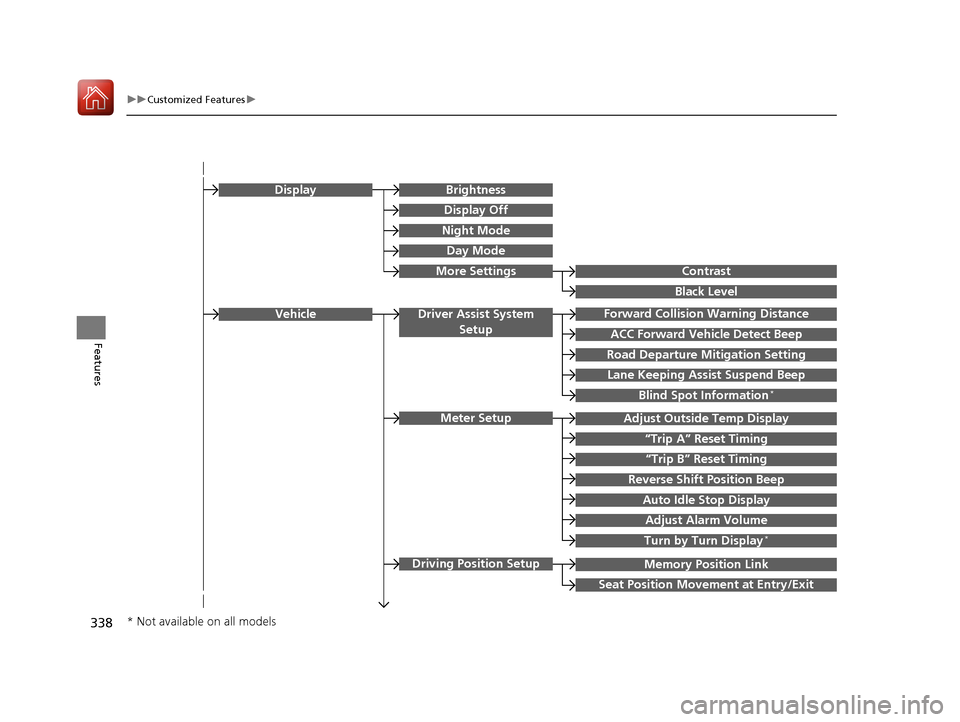
Blind Spot Information*
Driver Assist System
Setup
Night Mode
Day Mode
BrightnessDisplay
Contrast
Black Level
More Settings
Display Off
* Not available on all models
20 ACURA RDX-31TJB6111.book 338 ページ 2020年2月11日 火曜日 午後2時6分
Page 349 of 657
348
uuCustomized Features u
Features
*1:Default SettingSetup Group Customizable Features Description Selectable Settings
Vehicle Driver Assist
System
SetupForward Collision Warning
Distance
Changes Collision Mitigation Braking
System (CMBS
TM) alert distance.Long
/Normal
*1/
Short
ACC Forward Vehicle Detect
Beep Causes the system to beep when the
system detects a vehicle, or when the
vehicle goes out of the ACC with Low
Speed Follow range.
On
/Off
*1
Road Departure Mitigation
Setting Changes the setting for the road
departure mitigation system. Normal*1/
Wide /
Warning Only
Lane Keeping As sist Suspend
Beep Causes the system to beep when Lane
Keeping Assist Sy
stem (LKAS) is
suspended. On
/Off
*1
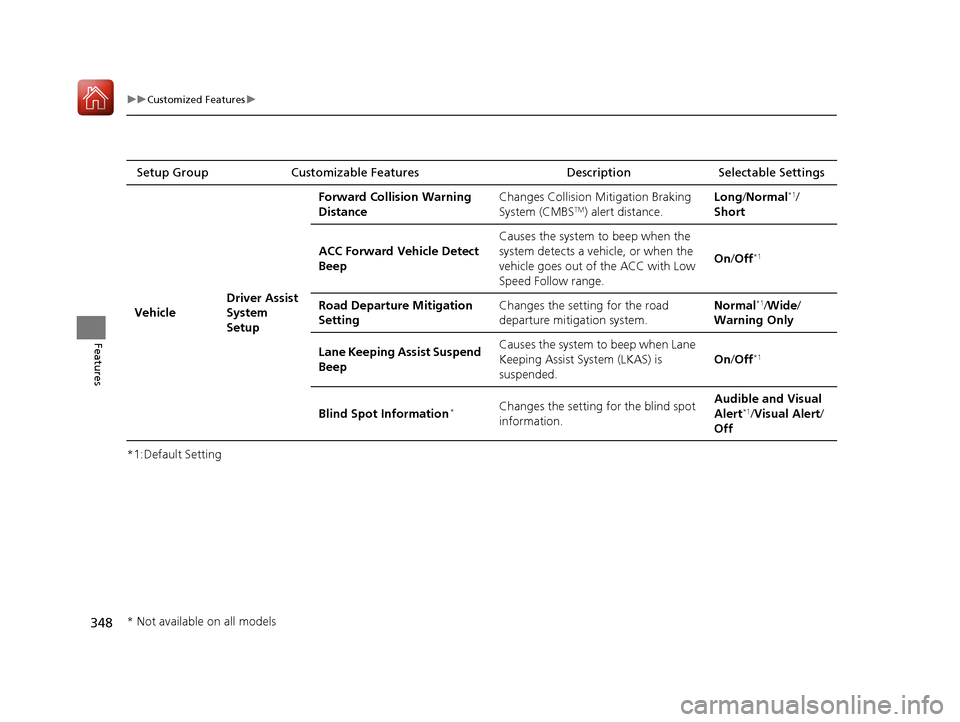
Blind Spot Information*Changes the setting for the blind spot
information. Audible and Visual
Alert*1/
Visual Alert /
Off
* Not available on all models
20 ACURA RDX-31TJB6111.book 348 ページ 2020年2月11日 火曜日 午後2時6分
Page 400 of 657
399
Driving
This chapter discusses driving and refueling.
Before Driving................................... 400
Towing a Trailer ................................ 405
Off-Highway Driving Guidelines ..... 411
When Driving Starting the Engine .......................... 413
Precautions While Driving................. 418
Automatic Transmission ................... 419
Shifting ............................................ 420
Integrated Dynamics System............. 428
Auto Idle Stop .................................. 430
Vehicle Stability AssistTM (VSA®), aka Electronic
Stability Control (ESC), System ................. 436
Agile Handling Assist ....................... 438
Super Handling-All Wheel DriveTM (SH-AWD®)*.. 439
Tire Pressure Monitoring System (TPMS) with Tire Fill Assist .......................... 440
Tire Pressure Monitoring System (TPMS) - Required Federal Explanation ......... 442
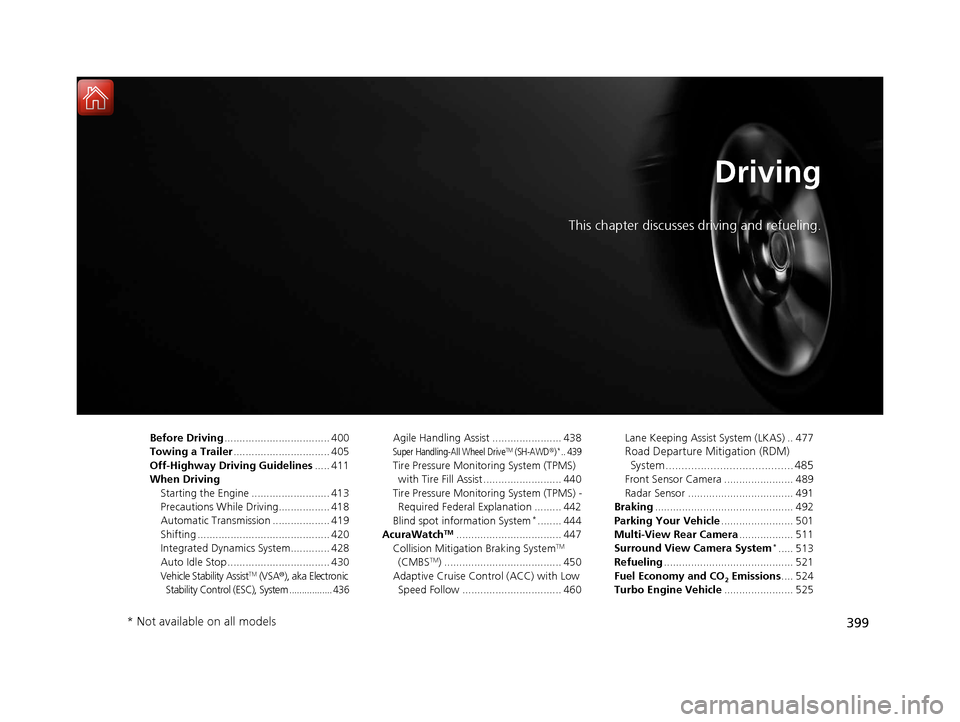
Blind spot information System
*........ 444
AcuraWatchTM................................... 447
Collision Mitigati on Braking SystemTM
(CMBSTM) ....................................... 450
Adaptive Cruise Control (ACC) with Low Speed Follow ................................. 460 Lane Keeping Assist System (LKAS) .. 477
Road Departure Mi
tigation (RDM)
System ........................................ 485
Front Sensor Camera ....................... 489
Radar Sensor ................................... 491
Braking .............................................. 492
Parking Your Vehicle ........................ 501
Multi-View Rear Camera .................. 511
Surround View Camera System
*..... 513
Refueling ........................................... 521
Fuel Economy and CO
2 Emissions .... 524
Turbo Engine Vehicle ....................... 525
* Not available on all models
20 ACURA RDX-31TJB6111.book 399 ページ 2020年2月11日 火曜日 午後2時6分
Page 401 of 657
400
Driving
Before Driving
Driving Preparation
Check the following items before you start driving.
• Make sure there are no obstructions on the windows, door mirrors, exterior
lights, or other parts of the vehicle.
u Remove any frost, snow, or ice.
u Remove any snow on the roof, as this can slip down and obstruct your field of
vision while driving. If frozen solid , remove ice once it has softened.
u When removing ice from around the wheels, be sure not to damage the wheel
or wheel components.
• Make sure the hood is securely closed.
u If the hood opens while driving, your front view will be blocked.
• Make sure the tires are in good condition.
u Check air pressures, and check for damage and excessive wear.
2Checking and Maintaining Tires P. 560
•Make sure there are no people or ob jects behind or around the vehicle.
u There are blind spots from the inside.
■Exterior Checks1Exterior Checks
NOTICE
When doors are frozen s hut, use warm water around
the door edges to melt any ice. Do not try to force
them open, as this can damage the rubber trim
around the doors. When done, wipe dry to avoid
further freezing.
Do not pour warm water into the key cylinder.
You will be unable to insert the key if the water
freezes in the hole.
Heat from the engine and exhaust can ignite
flammable material s left under the hood, causing a
fire. If you’ve parked y our vehicle for an extended
period, inspect and remove any debris that may have
collected, such as dried grass and leaves that have
fallen or have been carried in for use as a nest by a
small animal. Also check under the hood for leftover
flammable materials after you or someone else has
performed maintenance on your vehicle.
20 ACURA RDX-31TJB6111.book 400 ページ 2020年2月11日 火曜日 午後2時6分
Page 445 of 657

444
uuWhen Driving uBlind spot information System*
Driving
Blind spot information System*
Is designed to detect vehicles in specified alert zones adjacent to your vehicle,
particularly in harder to see areas commonly known as “blind spots.”
When the system detects vehi cles approaching from behind in adjacent lanes, the
appropriate indicator comes on for a few se conds, providing assistance when you
change lanes.
■How the system works
1 Blind spot information System*
Important Safety Reminder
Like all assistance systems, blind spot information
system has limitations. Over reliance on blind spot
information system may result in a collision.
The blind spot information system alert indicator may
not come on under the following conditions:
•A vehicle does not stay in the alert zone for more
than two seconds.
•A vehicle is parked in a side lane.
•The speed difference betw een your vehicle and the
vehicle you are passing is greater than 6 mph (10
km/h).
•An object not detected by the radar sensors
approaches or passes your vehicle.
•A vehicle running in the adjacent lane is a
motorcycle or other small vehicle.
3WARNING
Failure to visually confirm that it is safe to
change lanes before doing so may result in
a crash and serious injury or death.
Do not rely only on the blind spot
information system wh en changing lanes.
Always look in your mi rrors, to either side
of your vehicle, and behind you for other
vehicles before changing lanes.
●The transmission is in
( D or (S.●Your vehicle speed is
between 20 mph (32
km/h) and 100 mph
(160 km/h)
Alert zone range
A: Approx. 1.6 ft. (0.5 m)
B: Approx. 10 ft. (3 m)
C: Approx. 10 ft. (3 m) Radar Sensors:
underneath the
rear bumper
corners
Alert Zone
A
B
C
* Not available on all models
20 ACURA RDX-31TJB6111.book 444 ページ 2020年2月11日 火曜日 午後2時6分
Page 446 of 657

Continued445
uuWhen Driving uBlind spot information System*
Driving
■When the system detects a vehicle
Blind spot information System Alert Indicator:
Located near the pillar on both sides.
Comes on when:
•A vehicle enters the alert zone from behind
to overtake you with a speed difference of
no more than 31 mph (50 km/h) from your
vehicle.
• You pass a vehicle with a speed difference
of no more than 12 mph (20 km/h).
Blinks and a beeper sounds when:
You move the turn signal lever in the direction
of the detected vehicle. The beeper sounds
three times.1 Blind spot information System*
The system is for your convenience only. Even if an
object is within the alert zone, the following
situations may occur.
•The blind spot informatio n system alert indicator
may not come on due to obstruction (splashes,
etc.) even without the Blind Spot Information
System Not Available multi-information display
appearing.
•The blind spot informatio n system alert indicator
may come on even with the message appearing.
The system does not operate when in
( R.
You can turn off the audible al ert, or all the blind spot
information system alert using the audio/information
screen. 2 Customized Features P. 335
Turn the system off when towing a trailer.
The system may not work properly for the following
reasons:
•The added mass tilts the vehicle and changes the
radar coverage.
•The trailer itself can be detected by the radar
sensors, causing the blind spot information system
alert indicators to come on.
Comes On
Blinks
Blind spot information
System Alert Indicator
* Not available on all models
20 ACURA RDX-31TJB6111.book 445 ページ 2020年2月11日 火曜日 午後2時6分
Page 447 of 657

uuWhen Driving uBlind spot information System*
446
Driving
1Blind spot information System*
Blind spot information sy stem may be adversely
affected when:
•Objects (guard rails, poles, trees, etc,.) are
detected.
•An object that does not re flect radio waves well,
such as a motorcycle, is in the alert zone.
•Driving on a curved road.•A vehicle is moving from a far lane to the adjacent
lane.
•The system picks up external electrical interference.•The rear bumper or the sens ors have been improperly
repaired or the rear bu mper has been deformed.
•The orientation of the sensors has been changed.•In bad weather (Heavy rain, snow, and fog).
For a proper blind spot in formation system operation:
•Always keep the rear bumper corner area clean.
•Do not cover the rear bumper corner area with
labels or stickers of any kind.
•Take your vehicle to a dealer if you need the rear
bumper corner area or the radar sensors to be
repaired, or the re ar bumper corner area is strongly
impacted.
* Not available on all models
20 ACURA RDX-31TJB6111.book 446 ページ 2020年2月11日 火曜日 午後2時6分
Page 514 of 657
513
Driving
Surround View Camera System*
Is a four camera system that views areas commonly known as “blind spots” from
different angles, then displa ys the images on the audio/information screen. This
system can be used to:
• Check the right and left sides of the vehi cle while crossing at intersections with
poor visibility (fog, heavy rain, obstructed view, etc.).
2Checking from the front wide view at intersections P. 519
•Check for obstacles in front of the vehicle when parking or maneuvering in
confined areas.
2 Checking the sides of your vehicle P. 519
•Check for obstacles wh en you are moving in (R.
2When Parking Your Vehicle P. 517
1Surround View Camera System*
3WARNING
Failure to visually assess the area around
the vehicle (directly or by use of the
mirrors) may result in a crash causing
serious injury or death.
The areas shown in the surround view
camera system display are limited. The
display may not show all pedestrians or
other objects around your vehicle.
Do not solely rely only on the surround
view camera system display to assess
whether it is safe to move your vehicle.
3WARNING
Failure to pay proper attention to your
surroundings while driving may result in a
crash causing serious injury or death.
To help mitigate the ch ances of a collision,
only look at the surround view camera
system display when it is safe to do so.
* Not available on all models
20 ACURA RDX-31TJB6111.book 513 ページ 2020年2月11日 火曜日 午後2時6分